SELF-MANAGED COUCHBASE ON KUBERNETES
Couchbase Kubernetes Operator
The Kubernetes Operator deploys, scales, heals, and upgrades Couchbase for you. Your platform team runs the database like every other workload, minus the 2 a.m. pages.

Kubernetes knows pods. We know Couchbase.
Kubernetes is great at replacing pods. A database also needs rebalancing, replica placement, and safe upgrades. Our operator handles that for you.

Ship faster on the platform you already run
When the database sits outside your platform, every change waits on a ticket. Here it’s YAML in Git, reviewed and shipped as code.

Stay patched without weekend maintenance windows
Put off upgrades and security risk piles up. Rolling upgrades go one pod at a time while apps run, and you can roll back midway.

Fewer outages, fewer 2 a.m. pages
When a pod or node fails, the operator replaces it, reuses its storage and rebalances data. It flags only what needs a human.

Keep control of your data and your spend
Use the Kubernetes capacity you already run, on premises or in any cloud. Meet data residency and compliance rules, on your terms.
What is the Couchbase Kubernetes Operator?
It runs Couchbase Server on Kubernetes for you. You say what you want in YAML, and the operator makes the cluster match, then keeps it that way.
The operator adds Couchbase types to Kubernetes, like CouchbaseCluster, CouchbaseBucket and CouchbaseBackup. You write what you want, and the operator compares it with what’s running and fixes the difference, all day. An admission controller rejects bad config before it’s saved, so mistakes show up in your terminal, not your incident channel.
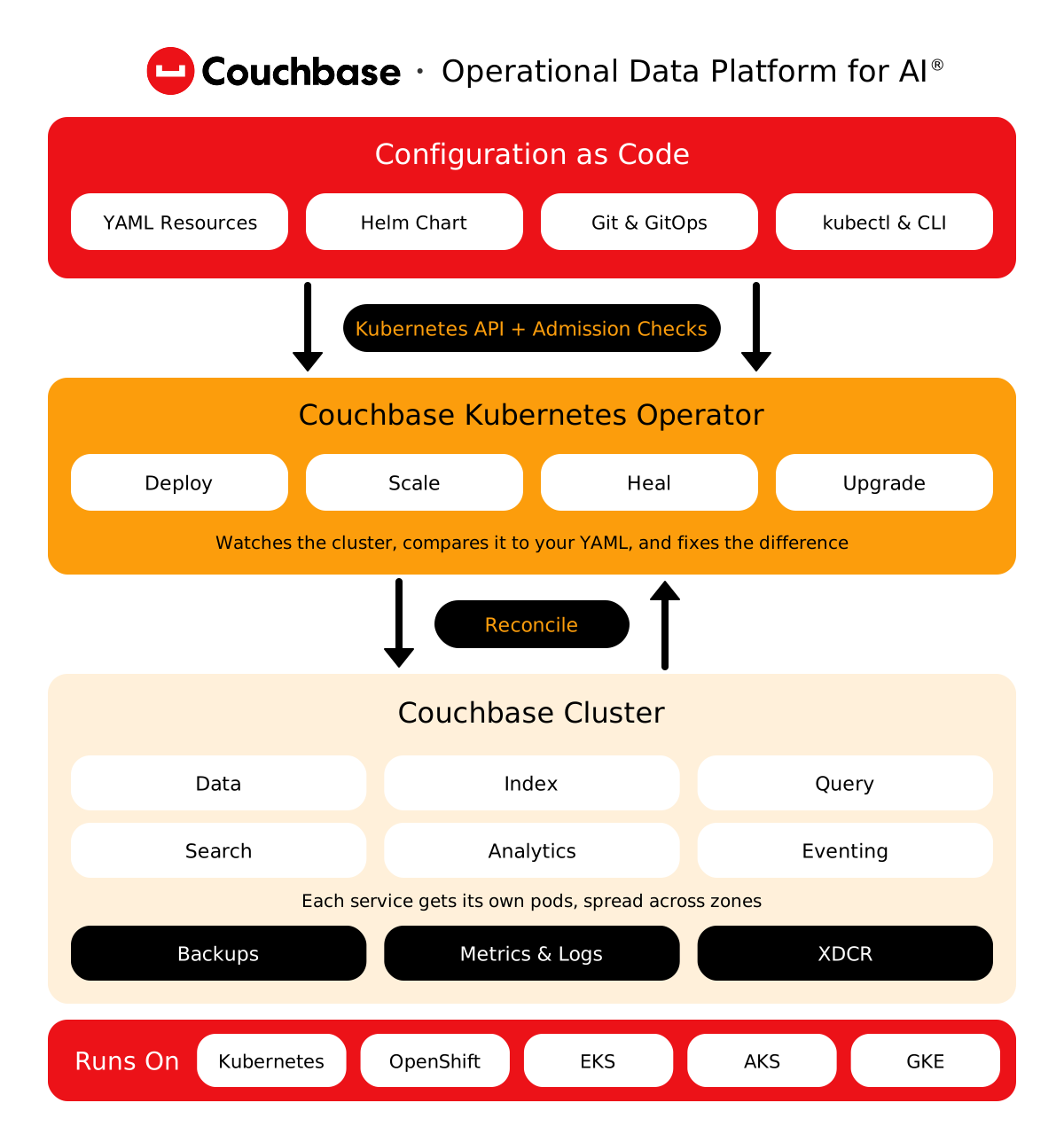
A generic StatefulSet restarts pods. The operator understands Couchbase. It rebalances data before it moves on, places replicas in different zones, and reuses persistent volumes so a replaced pod only catches up on recent changes. During Kubernetes upgrades, it lets only one Couchbase pod go at a time, so node drains don’t lose data.
Version 2.9 supports Kubernetes 1.31 to 1.36, Red Hat OpenShift 4.18 to 4.20, Amazon EKS, Google GKE, Microsoft AKS, K3s and Bottlerocket OS, on x86 or ARM. Running something else? A self-certification tool tests your platform, storage, and network, and Couchbase reviews the results. On premises works too, with images from your own registry.
The operator runs Couchbase Server Enterprise Edition, versions 7.2 to 8.0. That’s the same engine behind Capella, so your SDKs, SQL++ queries, and data model work everywhere. Cross data center replication (XDCR) links clusters on Kubernetes, VMs and Capella, so going hybrid or moving between them is a configuration change, not a migration project.
Runs on Auto Pilot, one careful pod at a time
5 of 5
Kubernetes Operator capability level: Auto Pilot, the top tier
1 pod
most the operator lets Kubernetes evict at once during upgrades
COUCHBASE SERVER CUSTOMER RESULTS
Built for apps that can’t go down



UNDER THE HOOD
Everything day 2 ops needs, handled in YAML
How the operator runs, scales, upgrades, protects, and secures Couchbase, so your team doesn’t have to do it by hand.
- Operate
- Scale
- Upgrade
- Protect
- Secure
Install with Helm, manage through Git, and watch everything in the tools your platform team already uses.
Key capabilities, including what’s new in Operator 2.9
Helm, GitOps, and the CLI
One official Helm chart installs the operator, the admission controller, a cluster, and even Sync Gateway. Keep every change in Git.
Bad config never lands
The admission controller checks every Couchbase resource before Kubernetes saves it, including secrets, certificates, and storage classes.
Alerts when a human is needed
A watchdog flags what the operator can’t fix alone, like expired certificates or lost quorum, through Kubernetes events and metrics.
Scale each Couchbase service on its own, automatically if you like, and switch idle clusters off.
Key capabilities, including what’s new in Operator 2.9
Multi-dimensional scaling
Give data, index, query, search and analytics their own pods and hardware. Add search pods without paying for more data pods.
Autoscaling with the Kubernetes HPA
Scale each service on CPU, memory or Couchbase metrics through the Horizontal Pod Autoscaler. No downtime when pods come and go.
Hibernate idle clusters
Put dev and test clusters to sleep with one field. Compute goes back to the pool, volumes stay put, and the cluster wakes up as it was.
Upgrade Couchbase and Kubernetes without downtime, and move existing clusters onto Kubernetes while they stay online.
Key capabilities, including what’s new in Operator 2.9
Rolling upgrades you control
Change the image tag and the operator upgrades pod by pod. Set the order by zone, class or service, and pause between steps.
Kubernetes upgrades without data loss
Disruption budgets and readiness gates let node drains take one Couchbase pod at a time, and only once data is safely rebalanced.
Move VM clusters onto Kubernetes
Point the operator at a cluster on VMs or EC2. It swaps nodes into Kubernetes one at a time while apps keep running.
Scheduled backups to object storage, replication between clusters, and replicas spread across zones.
Key capabilities, including what’s new in Operator 2.9
Scheduled backup and restore
Set schedules as Kubernetes resources. Backups run off your Couchbase nodes and can land in S3, Azure Blob, or Google Cloud Storage.
XDCR between clusters
Replicate to another Kubernetes cluster, region, or cloud, one way or both. New in 2.9: conflict logging for active-active setups.
Zone-aware placement
Server groups map to availability zones, so replicas live in a different zone from the data they protect. Lose a zone, keep your data.
TLS that rotates itself, encryption at rest with your own keys, and users and roles kept in code.
Key capabilities, including what’s new in Operator 2.9
TLS that rotates itself
Use standard Kubernetes TLS secrets or cert-manager. Rotate server, client or CA certificates, and require mutual TLS if you want.
Encryption at rest, your keys
For Server 8.0: encrypt buckets, config, and audit logs with keys from AWS KMS, a KMIP key manager, or Couchbase itself.
Users, roles, and LDAP as code
Define Couchbase users, groups, and role bindings as Kubernetes resources, link LDAP groups, and rotate the admin password safely.
- Production
- Hybrid
- Migrate
ARCHITECTURE
A production cluster across 3 zones

One zone outage shouldn’t take your app down. Each zone becomes a Couchbase server group on nodes reserved for Couchbase, so replicas live somewhere else. Every service gets its own pods and storage in its own zone. cert-manager rotates TLS, and backups run off the database nodes.
ARCHITECTURE
One topology across every site
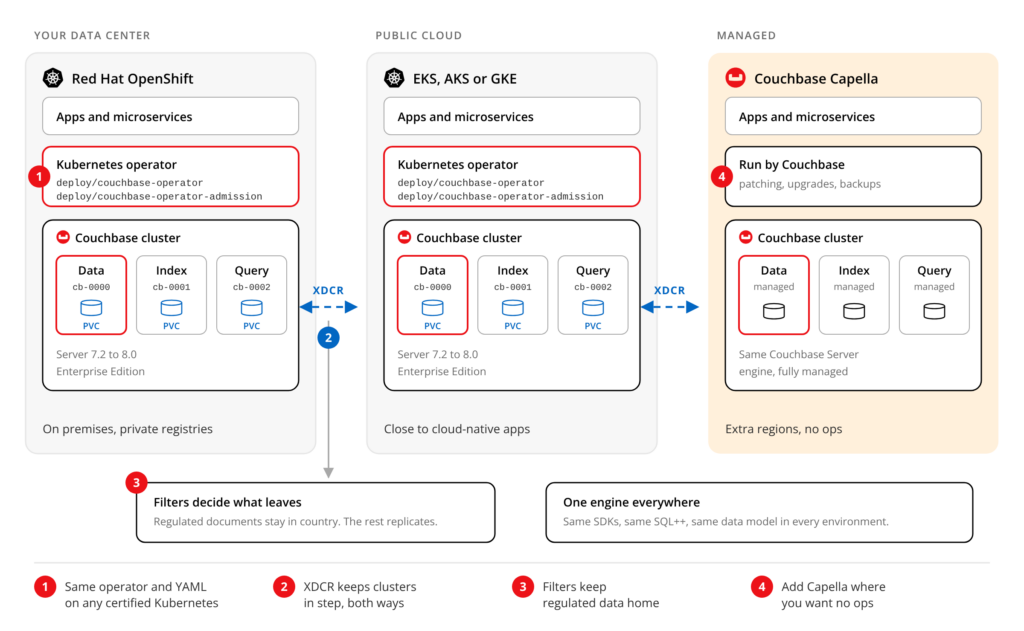
Some data has to stay home. Some apps live in the cloud. Run the same operator YAML on OpenShift in your data center and on EKS, AKS, or GKE, then link them with XDCR in both directions. Filters keep regulated documents in-country. Add Capella for regions where you’d rather not run anything.
ARCHITECTURE
Move off VMs without going offline
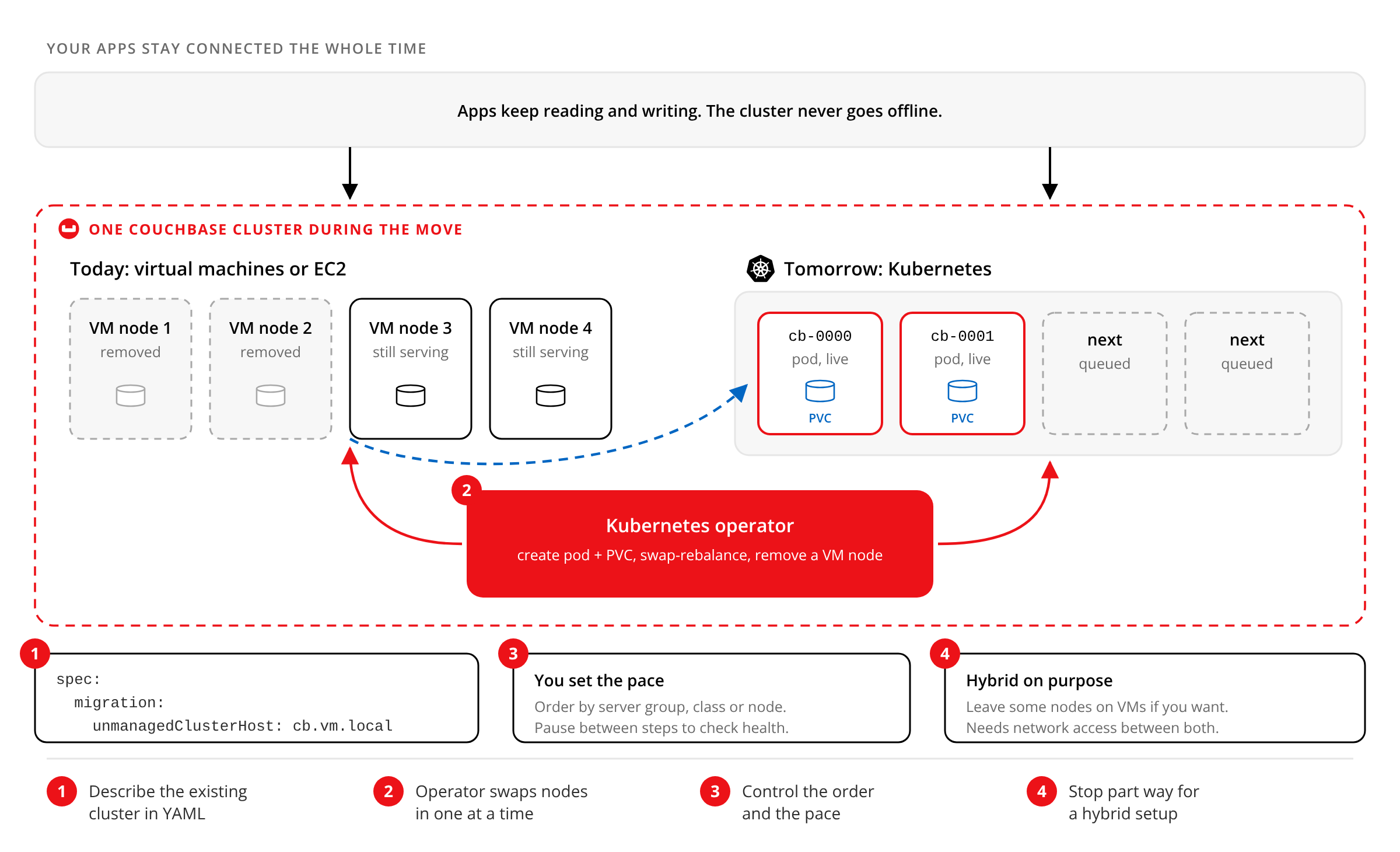
Describe your existing cluster in YAML and point the operator at it. It adds a pod, rebalances data onto it, then removes a VM node, one step at a time, while apps stay connected to one cluster. You choose the order and the pace, and you can stop part way for a hybrid setup.
GET STARTED
From Helm install to first cluster
Add the Couchbase Helm repo and install one chart. You get the operator, the admission controller and a working Couchbase cluster, ready to connect from the web console or an SDK. Prefer to go step by step? The CLI installs each piece on its own, on Kubernetes or OpenShift. Read the best practices guide before production. It covers storage, scheduling, and the mistakes worth skipping.
Same engine, three ways to run it
SELF-MANAGED
Couchbase Server
The engine the operator runs: JSON, key-value, SQL++, search, vector search, and caching in one database. Run it on Kubernetes with the operator, or on VMs and bare metal when that suits you better.
MANAGED CLOUD
Couchbase Capella
Want Couchbase without running Kubernetes either? Capella is the same engine, fully managed on AWS, Google Cloud, and Azure. Couchbase handles setup, backups, scaling, and upgrades.
MOBILE AND EDGE
Couchbase Mobile
Couchbase Lite keeps apps working on phones and edge devices without a connection. The same Helm chart can deploy Sync Gateway next to your cluster to keep those devices in sync.
Couchbase Kubernetes Operator FAQ
Answers to common questions about running Couchbase on Kubernetes and OpenShift.
Our Kubernetes operator, also called the Couchbase Autonomous Operator (CAO), deploys, scales, heals, backs up, and upgrades self-managed Couchbase Server on Kubernetes and OpenShift.
Version 2.9 supports Kubernetes 1.31 to 1.36, OpenShift 4.18 to 4.20, Amazon EKS, Google GKE, Microsoft AKS, K3s, and Bottlerocket OS, on x86 and ARM nodes.
It manages Couchbase Server Enterprise Edition 7.2 to 8.0. Operator 2.9 also configures 8.0 features such as encryption at rest. Community Edition isn’t supported.
The Operator Framework defines five capability levels, from Basic Install to Auto Pilot. The Couchbase operator is listed at Level 5, Auto Pilot. Vendors rate themselves, so try it and judge.
Yes. Point the operator at a cluster on VMs or EC2 and it swap-rebalances nodes into Kubernetes one at a time. Apps stay connected, and both sides need network access.
Both run the same Couchbase engine. With the operator, your team runs Couchbase on your own Kubernetes. With Capella, Couchbase runs it for you on AWS, Google Cloud, or Azure.
Keep exploring
-

Production reference architecture
Copy-ready YAML for a secure, zone-aware Couchbase cluster on Kubernetes.
-
How we test the operator across clouds
Inside the CI pipeline that checks operator, Server, and Kubernetes versions.
-

Intrigued? Start today.
Let’s talk about how you can build smarter for an AI future, today.