
Cuando buscas algo en Internet, esperas que el motor de búsqueda entienda lo que quieres decir, no solo lo que escribes. Quieres que capte el contexto, los matices y la intención detrás de tu consulta. Esta es la diferencia fundamental entre dos tecnologías de búsqueda básicas: la búsqueda semántica y la búsqueda por palabras clave. Mientras que una busca coincidencias exactas de palabras, la otra entiende el significado.
¿Qué es la búsqueda semántica?
Búsqueda semántica es una tecnología de búsqueda avanzada que tiene como objetivo comprender la intención y el significado contextual de las consultas de búsqueda. En lugar de limitarse a buscar coincidencias entre palabras clave, analiza las relaciones entre palabras y conceptos para ofrecer resultados más precisos y relevantes. Es como hablar con un experto que te ayuda y entiende lo que realmente estás preguntando, aunque no utilices la misma expresión exacta.
Esta tecnología impulsa las experiencias intuitivas que se obtienen en los principales motores de búsqueda, como Google. Tiene en cuenta la ubicación del usuario, el historial de búsqueda y el contexto general de la consulta para proporcionar respuestas que van más allá de la simple coincidencia de texto.
¿Qué es la búsqueda por palabras clave?
La búsqueda por palabras clave, también conocida como búsqueda léxica, es un método de búsqueda más tradicional. Funciona comparando las palabras clave o frases exactas introducidas por un usuario con una base de datos o un índice de documentos. Si un documento contiene las palabras clave especificadas, aparece en los resultados de la búsqueda.
Este método es sencillo y rápido. Se basa en encontrar coincidencias literales para las palabras de tu consulta. Piensa en ello como si estuvieras utilizando el índice al final de un libro. Buscas un término específico y te indica las páginas exactas en las que aparece.
Cómo funciona la búsqueda semántica
La búsqueda semántica utiliza una combinación de inteligencia artificial y procesamiento del lenguaje natural (NLP) para entender el lenguaje tal y como lo hace un humano. Desglosa una consulta para analizar su significado subyacente.
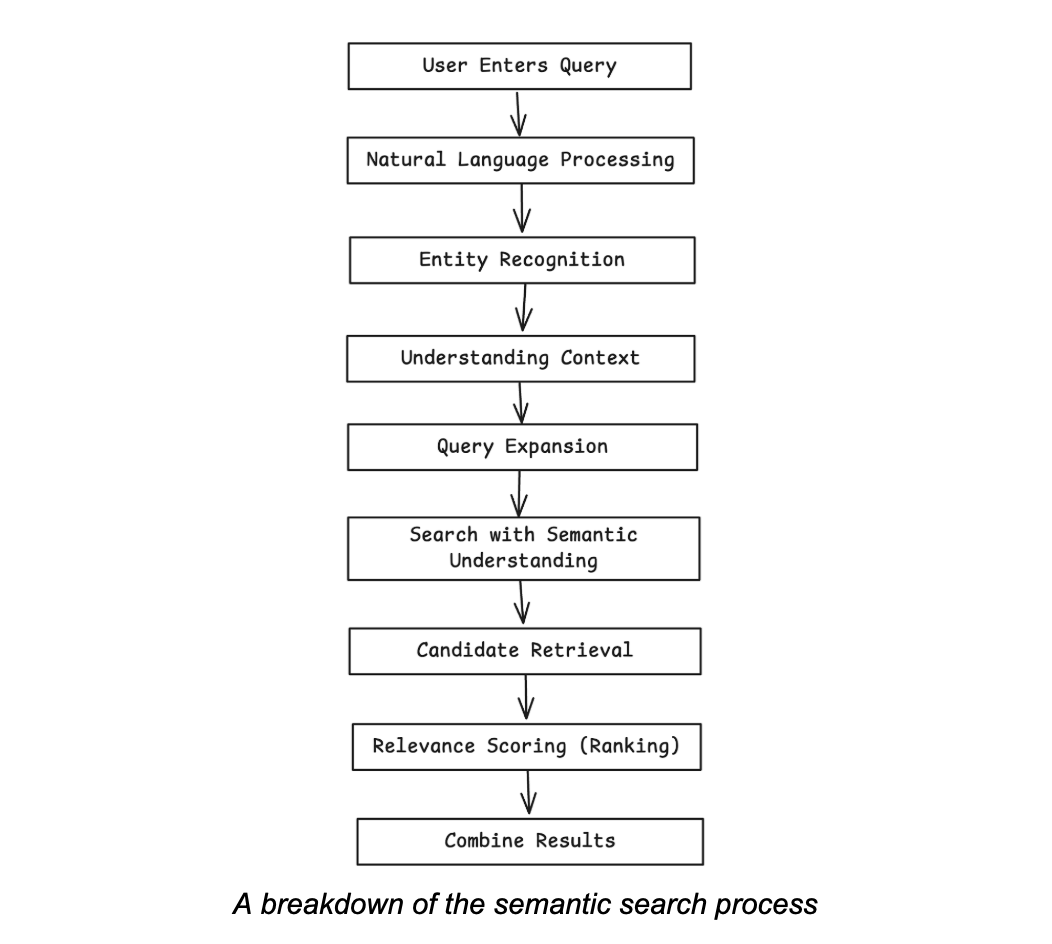
El proceso implica los siguientes pasos:
- Comprender la intención: El sistema primero intenta averiguar qué quiere lograr el usuario. ¿El usuario busca información, un sitio web específico o un producto para comprar?
- Análisis contextual: Examina el contexto que rodea a la consulta. Esto puede incluir la ubicación del usuario, búsquedas anteriores e incluso la hora del día. Por ejemplo, una búsqueda de “los mejores restaurantes” arrojará resultados diferentes dependiendo de si estás en Nueva York o en Londres.
- Coincidencia de conceptos: En lugar de limitarse a buscar palabras clave, la búsqueda semántica identifica los conceptos principales de la consulta. Utiliza gráficos de conocimiento extensos (grandes redes de datos interconectados sobre personas, lugares y cosas) para entender las relaciones entre estos conceptos.
- Obtención de resultados: Por último, clasifica los documentos en función de su grado de coincidencia con el significado y la intención de la consulta, y no solo con las palabras. Esto suele dar lugar a respuestas más relevantes y satisfactorias.
Cómo funciona la búsqueda por palabras clave
La mecánica de la búsqueda por palabras clave es mucho más sencilla. Funciona según el principio de coincidencia directa.
A continuación, se detalla el proceso completo:
- Indexación: Antes de que se pueda realizar cualquier búsqueda, el sistema debe escanear e indexar todos los documentos disponibles. Crea una biblioteca enorme en la que se pueden realizar búsquedas, a menudo utilizando un índice invertido que asigna cada palabra a los documentos que la contienen.
- Procesamiento de consultas: Cuando un usuario ingresa una consulta, el sistema busca esas palabras clave exactas en su índice.
- Recuperación: El sistema recupera todos los documentos que contienen las palabras clave especificadas.
- Clasificación: A continuación, los resultados se clasifican en función de factores como la frecuencia de la palabra clave (cuántas veces aparece), su posición en el documento (por ejemplo, en el título o en el cuerpo) y otras métricas, como la autoridad de la página.
Este método es rápido y eficiente en comparación con la búsqueda semántica; sin embargo, tiene dificultades con la ambigüedad, los sinónimos y la intención del usuario.
Casos de uso de la búsqueda semántica
A continuación se presentan algunos casos de uso que demuestran cómo la búsqueda semántica mejora la satisfacción del usuario:
- Comercio electrónico: Los compradores en línea suelen utilizar un lenguaje coloquial. Una búsqueda de “chamarras cálidas para hombre por menos de $100” requiere comprender conceptos como “cálidas”, “chamarras”, “hombre” y un rango de precios. La búsqueda semántica puede interpretar esto para mostrar productos relevantes, mejorando la experiencia de compra e impulsando las ventas.
- Atención al cliente: Es posible que los clientes que buscan ayuda en una base de conocimientos no estén familiarizados con la terminología oficial. Es posible que busquen “mi factura es incorrecta” en lugar de “consulta sobre discrepancia en la facturación”. Dado que la búsqueda semántica comprende la intención, puede conectar al cliente con el artículo de soporte adecuado.
- Descubrimiento de contenido: Las plataformas multimedia como Netflix y Spotify utilizan la búsqueda semántica para recomendar contenidos. Cuando terminas de ver una película, el sistema te sugiere otras basándose en el género, los actores, el director y los temas, y no solo en las palabras clave del título.
- Sanidad: Los profesionales médicos pueden utilizar la búsqueda semántica para encontrar artículos de investigación o historiales clínicos relevantes describiendo los síntomas o afecciones, incluso sin conocer los términos médicos exactos.
Casos de uso para la búsqueda por palabras clave
A pesar del auge de la búsqueda semántica, la búsqueda por palabras clave sigue siendo muy eficaz para aplicaciones específicas. Estas son algunas de las formas en que puede utilizarla:
- Análisis de registros: Los administradores de sistemas y los desarrolladores a menudo necesitan buscar códigos de error o direcciones IP específicos en archivos de registro masivos. En este caso, lo que se necesita es una coincidencia exacta.
- Consultas a la base de datos: Cuando conoce el identificador exacto de un registro, como el SKU de un producto, el número de pedido o el ID de usuario, la búsqueda por palabra clave es la forma más rápida y precisa de recuperarlo.
- Aspectos legales y de cumplimiento normativo: En el descubrimiento electrónico, los equipos jurídicos a menudo necesitan encontrar todos los documentos que contengan nombres, frases o términos jurídicos específicos. La búsqueda por palabras clave garantiza que no se pase por alto ningún documento que contenga el término exacto.
- Búsqueda simple en el sitio: Para sitios web con poco contenido y una estructura clara, una simple búsqueda por palabras clave puede ser suficiente y más rentable de implementar.
Mientras que la búsqueda por palabras clave destaca por su precisión y sencillez en consultas bien definidas, la búsqueda semántica ofrece un enfoque más intuitivo y sensible al contexto, lo que la hace ideal para necesidades de búsqueda complejas o ambiguas.
Ejemplos de búsqueda semántica
A continuación encontrarás una lista de ejemplos que muestran cómo funciona la búsqueda semántica:
- Consulta: “¿Cuál era la población de Estados Unidos cuando salió al mercado el primer iPhone?”
- Cómo funciona: Un motor de búsqueda semántico entiende que necesita encontrar dos datos distintos: la fecha de lanzamiento del primer iPhone (2007) y la población de EE. UU. en ese año. Conecta estos conceptos para proporcionar una respuesta directa.
- Consulta: “Restaurantes cerca de mí que están abiertos ahora”.”
- Cómo funciona: El motor utiliza tu ubicación actual (“cerca de mí”), comprueba la hora actual y cruza esa información con el horario comercial de los restaurantes locales para ofrecerte una lista relevante y en tiempo real.
- Consulta: “¿Quién fue el actor de El guardaespaldas que también dirigió Bailando con lobos?”
- Cómo funciona: El sistema identifica “El guardaespaldas” y “Bailando con lobos” como películas. Accede a su gráfico de conocimiento para encontrar el reparto de la primera y el director de la segunda, y luego encuentra el vínculo común: Kevin Costner.
Ejemplos de búsqueda por palabra clave
La búsqueda por palabra clave tiene un enfoque más directo. A continuación se muestran algunos ejemplos de cómo funciona:
- Consulta: “Informe del tercer trimestre de 2024”
- Cómo funciona: En el sistema de documentos internos de una empresa, esta consulta recuperaría todos los archivos que contienen la frase exacta “informe del tercer trimestre de 2024”. No encontraría un documento titulado “Resumen del tercer trimestre de 2024”.”
- Consulta: “product_id: 8675309”
- Cómo funciona: En el backend de un sitio de comercio electrónico, esta consulta extraería instantáneamente el registro del producto con el identificador exacto “8675309”. Se trata de una búsqueda precisa e inequívoca.
- Consulta: “instalar controlador de impresora”
- Cómo funciona: En un sitio web de soporte técnico, esto mostraría todos los artículos que contienen las palabras exactas “instalar”, “impresora” y “controlador”. Podría omitir un artículo titulado “Configuración de su nueva impresora” que no utiliza la palabra “instalar”.”
Los ejemplos de búsqueda semántica dan prioridad a la comprensión de la intención y el significado contextual detrás de una consulta, mientras que los ejemplos de búsqueda por palabras clave se basan en la coincidencia de palabras o frases exactas, lo que puede llevar a pasar por alto contenido relevante que está redactado de manera diferente.
¿Cuál es la diferencia entre la búsqueda semántica y la búsqueda por palabras clave?
A continuación se muestra una comparación detallada de las diferencias entre la búsqueda semántica y la búsqueda por palabras clave en cuanto a sus métodos básicos, rendimiento y aplicaciones. Puede utilizar esta tabla para identificar rápidamente qué enfoque se ajusta mejor a sus objetivos de búsqueda.
| Característica | Búsqueda semántica | Búsqueda por palabra clave |
|---|---|---|
| Método de búsqueda | Comprende la intención, el significado y las relaciones. | Coincide con palabras o frases exactas |
| Flexibilidad de consulta | Maneja sinónimos, paráfrasis y lenguaje natural. | Funciona mejor con términos precisos. |
| Relevancia de los resultados | Da prioridad a los resultados contextualmente relevantes. | A menudo recupera contenido con coincidencias exactas, incluso si no es relevante. |
| Compatibilidad con tipos de datos | Funciona con texto, imágenes, audio y otros datos no estructurados. | Principalmente basado en texto |
| Enfoque de clasificación | Similitud contextual a través de incrustaciones y modelos de IA | Frecuencia y coincidencia de cadenas (por ejemplo, TF-IDF) |
| Casos de uso ideales | Búsqueda conversacional, recuperación de conocimientos empresariales, integración de IA generativa | Consultas de búsqueda simples, datos estructurados, filtrado basado en reglas. |
Si bien la búsqueda por palabras clave sigue siendo confiable para consultas sencillas, la búsqueda semántica ofrece una experiencia de descubrimiento más intuitiva y precisa al interpretar lo que los usuarios quieren decir, no solo lo que escriben.
Cómo elegir entre la búsqueda semántica y la búsqueda por palabras clave
La elección entre la búsqueda semántica y la búsqueda por palabras clave depende de tus usuarios, tu contenido y tus objetivos.
Elija la búsqueda semántica cuando:
- Sus usuarios son clientes externos que utilizarán un lenguaje natural y coloquial.
- Tu contenido es diverso y abarca una amplia gama de temas en los que el contexto es importante (por ejemplo, comercio electrónico, bases de conocimiento, medios de comunicación).
- El objetivo es mejorar la experiencia del usuario, el descubrimiento y la participación proporcionando resultados muy relevantes.
- Es necesario manejar eficazmente la ambigüedad, los sinónimos y las consultas complejas.
Elija la búsqueda por palabra clave cuando:
- Sus usuarios son expertos internos que conocen los términos exactos que buscan (por ejemplo, desarrolladores, analistas).
- Sus datos están muy estructurados y las consultas se basan en identificadores específicos, como SKU, códigos de error o entradas de registro.
- La rapidez y la precisión para obtener coincidencias exactas son más importantes que comprender los matices.
- Tu presupuesto y recursos técnicos para la implementación son limitados.
- En muchos sistemas modernos, un enfoque híbrido es la solución más potente, ya que utiliza ambos métodos para satisfacer diferentes necesidades.
Puntos clave y recursos relacionados
La elección entre la búsqueda semántica y la búsqueda por palabras clave depende de cómo interactúen los usuarios con la información y del nivel de comprensión contextual requerido. Mientras que la búsqueda por palabras clave es rápida y precisa con términos exactos, la búsqueda semántica interpreta el significado para ofrecer una experiencia de búsqueda más humana. A continuación se presentan las conclusiones más importantes de esta entrada del blog, junto con áreas que merecen ser exploradas más a fondo.
Principales conclusiones
- La búsqueda semántica entiende la intención, el contexto y las relaciones entre conceptos. para obtener resultados más relevantes.
- La búsqueda por palabra clave se basa en la coincidencia directa de texto., lo que lo hace ideal para términos conocidos, identificadores y búsquedas exactas.
- La búsqueda semántica utiliza IA y PLN., incluyendo incrustaciones y grafos de conocimiento, para interpretar el lenguaje tal y como lo haría un humano.
- La búsqueda por palabras clave es más rápida y fácil de implementar., especialmente para datos estructurados y usuarios técnicos.
- La búsqueda semántica destaca en las aplicaciones orientadas al usuario. como el comercio electrónico, los portales de soporte y el descubrimiento de medios.
- La búsqueda por palabras clave predomina en las tareas que requieren precisión., como el análisis de registros, la investigación legal y las búsquedas de productos.
- La búsqueda híbrida ofrece lo mejor de ambos mundos., combinando la precisión de la coincidencia exacta con la inteligencia contextual.
Para obtener más información sobre temas relacionados con la búsqueda, puede visitar los recursos adicionales que se enumeran a continuación:
Recursos relacionados
- Guía para la búsqueda de vectores - Blog
- Almacenamiento semántico en caché: conceptos
- Similitud semántica con selectividad enfocada – Blog
- ¿Qué es el análisis conversacional? Ejemplos y herramientas – Blog
Preguntas frecuentes
¿En qué se diferencian las búsquedas semánticas y por palabras clave en cuanto al tratamiento de los sinónimos o conceptos relacionados? La búsqueda por palabras clave requiere coincidencias exactas, lo que significa que pueden perderse sinónimos o consultas reformuladas. La búsqueda semántica interpreta el significado y las relaciones, lo que le permite mostrar resultados relevantes incluso cuando la redacción difiere.
¿La búsqueda semántica es más precisa que la búsqueda por palabras clave? La búsqueda semántica suele ofrecer resultados más relevantes para consultas complejas o ambiguas, pero la búsqueda por palabras clave puede ser más precisa cuando los usuarios conocen los términos exactos que necesitan.
¿Qué industrias se benefician más de la búsqueda semántica en comparación con la búsqueda por palabras clave? Sectores como el comercio electrónico, la salud, los medios de comunicación y la atención al cliente se benefician enormemente de la búsqueda semántica, ya que los usuarios se basan en el lenguaje natural y la información contextual.
¿Sigue siendo útil la búsqueda por palabras clave en las aplicaciones modernas? Sí. La búsqueda por palabras clave sigue siendo esencial para búsquedas exactas, consultas de datos estructurados y entornos en los que la velocidad y la precisión son importantes.
¿En qué se diferencian el costo y la complejidad de implementación entre la búsqueda semántica y la búsqueda por palabras clave? La búsqueda semántica suele requerir una infraestructura más avanzada, modelos de inteligencia artificial y ajustes continuos, lo que hace que su desarrollo y funcionamiento sean más costosos que los sistemas más sencillos basados en palabras clave.
¿Se pueden utilizar conjuntamente la búsqueda semántica y la búsqueda por palabras clave en el mismo sistema? Por supuesto. Muchas plataformas de búsqueda modernas combinan ambos métodos para equilibrar la precisión, el rendimiento y la experiencia del usuario en diferentes tipos de consultas.


