
In this CodeLab, you will learn how to build a Hotel Search Agent usando LangChain, Couchbase AI Services, y Catálogo de agentes. We will also incorporate Arize Phoenix for observability and evaluation to ensure our agent performs reliably.
This tutorial takes you from zero to a fully functional agent that can search for hotels, filter by amenities, and answer natural language queries using real-world data.
Note: You can find the full Google CodeLab notebook for this CodeLab Aquí.
What Are Couchbase AI Services?
Building AI applications often involves juggling multiple services: a vector database for memory, an inference provider for LLMs (like OpenAI or Anthropic), and separate infrastructure for embedding models.
Couchbase AI Services streamlines this by providing a unified platform where your operational data, vector search, and AI models live together. It offers:
- LLM inference and embeddings API: Access popular LLMs (like Llama 3) and embedding models directly within Couchbase Capella, with no external API keys, no extra infrastructure, and no data egress. Your application data stays inside Capella. Queries, vectors, and model inference all happen where the data lives. This enables secure, low-latency AI experiences while meeting privacy, compliance requirements. Thus, the key value: data and AI together, without sending sensitive information outside your system.
- Unified platform: Database + Vectorization + Search + Model
- Integrated vector search: Perform semantic search directly on your JSON data with millisecond latency.
Why Is This Needed?
As we move from simple chatbots to agentic workflows, where AI models autonomously use tools, latency, and complexity of setup become bottlenecks. By co-locating your data and AI services, you reduce the operational overhead and latency. Furthermore, tools like the Catálogo de agentes help with managing hundreds of agent prompts and tools and provide built in logging for your agents.
Prerrequisitos
Before we begin, ensure you have:
- A Couchbase Capella account.
- Python 3.10+ installed.
- Basic familiarity with Python and Jupyter notebooks.
Create a Cluster in Couchbase Capella
- Log into Couchbase Capella.
- Create a new cluster or use an existing one. Note that the cluster needs to run the latest version of Couchbase Server 8.0 with the Data, Query, Index, and the Eventing services.
- Create a bucket.
- Create a scope and collection for your data.
Step 1: Install Dependencies
We’ll start by installing the necessary packages. This includes the couchbase-infrastructure helper for setup, the agentc CLI for the catalog, and the LangChain integration packages.
|
1 2 3 4 5 6 7 8 9 10 11 12 13 14 |
%pip Instalar –q “pydantic>=2.0.0,<3.0.0” “python-dotenv>=1.0.0,<2.0.0” “pandas>=2.0.0,<3.0.0” “nest-asyncio>=1.6.0,<2.0.0” “langchain-couchbase>=0.2.4,<0.5.0” “langchain-openai>=0.3.11,<0.4.0” “arize-phoenix>=11.37.0,<12.0.0” “openinference-instrumentation-langchain>=0.1.29,<0.2.0” “couchbase-infrastructure” # Install Agent Catalog %pip Instalar agentc==1.0.0 |
Step 2: Infrastructure as Code
Instead of manually clicking through the UI, we use the couchbase-infrastructure package to programmatically provision our Capella environment. This ensures a reproducible setup.
We will:
- Create a Project and Cluster.
- Deploy an Embedding Model (
nvidia/llama-3.2-nv-embedqa-1b-v2) and an LLM (meta/llama3-8b-instruct). - Load the
travel-sampledataset.
Couchbase AI Services provides OpenAI-compatible endpoints that are used by the agents.
|
1 2 3 4 5 6 7 8 9 10 11 12 13 14 15 16 17 18 19 20 21 22 23 24 25 26 27 28 29 30 31 32 33 34 35 36 37 38 39 40 41 42 43 44 45 46 47 |
importar os desde getpass importar getpass desde couchbase_infrastructure importar CapellaConfig, CapellaClient desde couchbase_infrastructure.resources importar ( create_project, create_developer_pro_cluster, add_allowed_cidr, load_sample_data, create_database_user, deploy_ai_model, create_ai_api_key, ) # 1. Collect Credentials management_api_key = getpass(“Enter your MANAGEMENT_API_KEY: “) organization_id = input(“Enter your ORGANIZATION_ID: “) configuración = CapellaConfig( management_api_key=management_api_key, organization_id=organization_id, project_name=“agent-app”, cluster_name=“agent-app-cluster”, db_username=“agent_app_user”, sample_bucket=“travel-sample”, # Using Couchbase AI Services for models embedding_model_name=“nvidia/llama-3.2-nv-embedqa-1b-v2”, llm_model_name=“meta/llama3-8b-instruct”, ) # 2. Provision Cluster cliente = CapellaClient(configuración) org_id = cliente.get_organization_id() project_id = create_project(cliente, org_id, configuración.project_name) cluster_id = create_developer_pro_cluster(cliente, org_id, project_id, configuración.cluster_name, configuración) # 3. Network & Data Setup add_allowed_cidr(cliente, org_id, project_id, cluster_id, “0.0.0.0/0”) # Allow all IPs for tutorial load_sample_data(cliente, org_id, project_id, cluster_id, configuración.sample_bucket) db_password = create_database_user(cliente, org_id, project_id, cluster_id, configuración.db_username, configuración.sample_bucket) # 4. Deploy AI Models imprimir(“Deploying AI Models…”) deploy_ai_model(cliente, org_id, configuración.embedding_model_name, “agent-hub-embedding-model”, “incrustación”, configuración) deploy_ai_model(cliente, org_id, configuración.llm_model_name, “agent-hub-llm-model”, “llm”, configuración) # 5. Generate API Keys clave_api = create_ai_api_key(cliente, org_id, configuración.ai_model_region) |
Ensure to follow the steps to setup the security root certificate. Secure connections to Couchbase Capella require a root certificate for TLS verification. You can find this in the ## 📜 Root Certificate Setup section of the Google Colab Notebook.
Step 3: Integrating Agent Catalog
El Catálogo de agentes is a powerful tool for managing the lifecycle of your agent’s capabilities. Instead of hardcoding prompts and tool definitions in your Python files, you manage them as versioned assets. You can centralize and reuse your tools across your development teams. You can also examine and monitor agent responses with the Agent Tracer.
Initialize and Download Assets
First, we initialize the catalog and download our pre-defined prompts and tools.
|
1 2 3 4 5 6 7 8 |
!git init !agentc init # Download example tools and prompts !mkdir –p prompts Herramientas !wget –O prompts/hotel_search_assistant.yaml https://raw.githubusercontent.com/couchbase-examples/agent-catalog-quickstart/refs/heads/main/notebooks/hotel_search_agent_langchain/prompts/hotel_search_assistant.yaml !wget –O Herramientas/search_vector_database.py https://raw.githubusercontent.com/couchbase-examples/agent-catalog-quickstart/refs/heads/main/notebooks/hotel_search_agent_langchain/tools/search_vector_database.py !wget –O agentcatalog_index.json https://raw.githubusercontent.com/couchbase-examples/agent-catalog-quickstart/refs/heads/main/notebooks/hotel_search_agent_langchain/agentcatalog_index.json |
Index and Publish
We use agentc to index our local files and publish them to Couchbase. This stores the metadata in your database, making it searchable and discoverable by the agent at runtime.
|
1 2 3 4 5 |
# Create local index of tools and prompts !agentc index . # Upload to Couchbase !agentc publish |
Step 4: Preparing the Vector Store
To enable our agent to search for hotels semantically (e.g., “cozy place near the beach”), we need to generate vector embeddings for our hotel data.
We define a helper to format our hotel data into a rich text representation, prioritizing location and amenities.
|
1 2 3 4 5 6 7 8 9 10 11 12 13 14 15 16 17 18 19 20 21 22 23 |
desde langchain_couchbase.vectorstores importar CouchbaseVectorStore def load_hotel_data_to_couchbase(clúster, nombre_del_bucket, scope_name, collection_name, incrustaciones, index_name): # Check if data exists # … (omitted for brevity) … # Generate rich text for each hotel # e.g., “Le Clos Fleuri in Giverny, France. Amenities: Free breakfast: Yes…” hotel_texts = get_hotel_texts() # Initialize Vector Store connected to Capella vector_store = CouchbaseVectorStore( clúster=clúster, nombre_del_bucket=nombre_del_bucket, scope_name=scope_name, collection_name=collection_name, incrustación=incrustaciones, index_name=index_name, ) # Batch upload texts vector_store.add_texts(texts=hotel_texts) imprimir(f“Successfully loaded {len(hotel_texts)} hotel embeddings”) |
Step 5: Building the LangChain Agent
We use the Catálogo de agentes to fetch our tool definitions and prompts dynamically. The code remains generic, while your capabilities (tools) and personality (prompts) are managed separately. We will also create our ReAct agents.
|
1 2 3 4 5 6 7 8 9 10 11 12 13 14 15 16 17 18 19 20 21 22 23 24 25 26 27 28 29 30 31 32 33 34 35 36 37 38 39 40 41 42 43 44 45 46 47 |
importar agentc desde langchain.agents importar AgentExecutor, crear_agente_react desde langchain_core.prompts importar PromptTemplate desde langchain_core.Herramientas importar Herramienta def create_langchain_agent(auto, catalog, span): # 1. Setup AI Services using Capella endpoints incrustaciones, LLM = setup_ai_services(framework=“langchain”) # 2. Discover Tools from Catalog # The catalog.find() method searches your published catalog tool_search = catalog.find(“tool”, nombre=“search_vector_database”) Herramientas = [ Herramienta( nombre=tool_search.meta.nombre, descripción=tool_search.meta.descripción, func=tool_search.func, # The actual python function ), ] # 3. Discover Prompt from Catalog hotel_prompt = catalog.find(“prompt”, nombre=“hotel_search_assistant”) # 4. Construct the Prompt Template custom_prompt = PromptTemplate( template=hotel_prompt.contenido.strip(), input_variables=[“input”, “agent_scratchpad”], partial_variables={ “tools”: “n”.join([f“{tool.name}: {tool.description}” para tool en Herramientas]), “tool_names”: “,“.join([tool.nombre para tool en Herramientas]), }, ) # 5. Create the ReAct Agent agente = crear_agente_react(LLM, Herramientas, custom_prompt) agent_executor = AgentExecutor( agente=agente, Herramientas=Herramientas, verbose=Verdadero, handle_parsing_errors=Verdadero, # Auto-correct formatting errors max_iterations=5, return_intermediate_steps=Verdadero, ) regresar agent_executor |
Step 6: Running the Agent
With the agent initialized, we can perform complex queries. The agent will:
- Receive the user input.
- Decide it needs to use the
search_vector_databasetool. - Execute the search against Capella.
- Synthesize the results into a natural language response.
|
1 2 3 4 5 6 7 8 9 10 11 12 13 |
# Initialize Agent Catalog catalog = agentc.catalog.Catálogo() span = catalog.Span(nombre=“Hotel Support Agent”, blacklist=establecer()) # Create the agent agent_executor = couchbase_client.create_langchain_agent(catalog, span) # Run a query consulta = “Find hotels in Giverny with free breakfast” respuesta = agent_executor.invocar({“input”: consulta}) imprimir(f“User: {query}”) imprimir(f“Agent: {response[‘output’]}”) |
Example Output:
Agent: I found a hotel in Giverny that offers free breakfast called Le Clos Fleuri. It is located at 5 rue de la Dîme, 27620 Giverny. It offers free internet and parking as well.
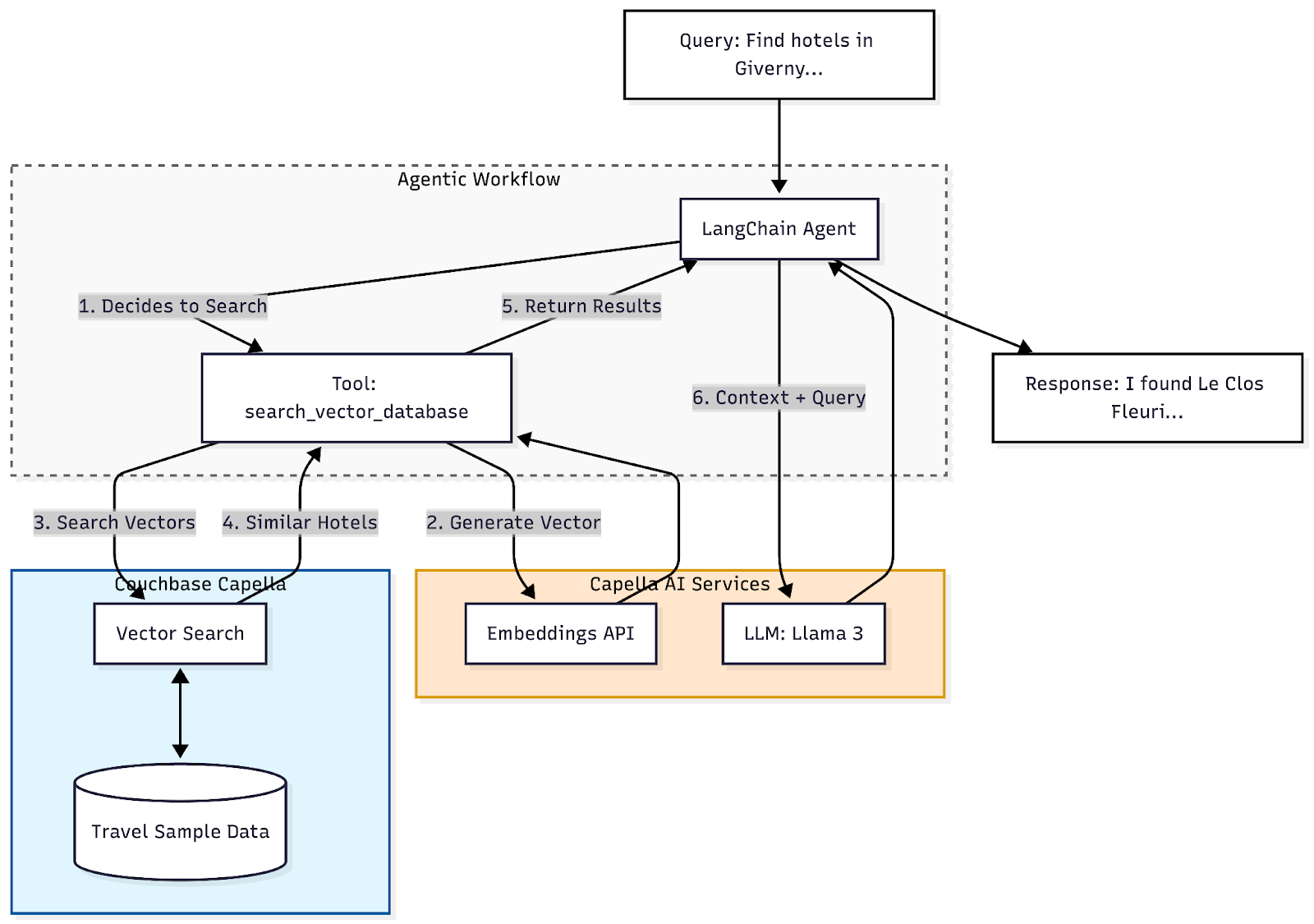
Nota: In Capella Model Services, the model outputs can be cached (both semantic and standard cache). The caching mechanism enhances the RAG’s efficiency and speed, particularly when dealing with repeated or similar queries. When a query is first processed, the LLM generates a response and then stores this response in Couchbase. When similar queries come in later, the cached responses are returned. The caching duration can be configured in the Capella Model services.
Adding Semantic Caching
Caching is particularly valuable in scenarios where users may submit similar queries multiple times or where certain pieces of information are frequently requested. By storing these in a cache, we can significantly reduce the time it takes to respond to these queries, improving the user experience.
|
1 2 3 4 5 6 7 8 9 10 11 12 13 14 15 16 17 18 19 20 21 22 23 24 25 26 27 28 29 30 31 32 33 34 35 36 37 38 39 40 41 |
## Semantic Caching Demonstration # This section demonstrates how to enable and use Semantic Caching with Capella Model Services. # Semantic caching stores responses for queries and reuses them for semantically similar future queries, significantly reducing latency and cost. # 1. Setup LLM with Semantic Caching enabled # We pass the “X-cb-cache”: “semantic” header to enable the feature imprimir(” Setting up LLM with Semantic Caching enabled…”) llm_with_cache = ChatOpenAI( modelo=os.environ[“CAPELLA_API_LLM_MODEL”], base_url=os.environ[“CAPELLA_API_LLM_ENDPOINT”] + “/v1” si no os.environ[“CAPELLA_API_LLM_ENDPOINT”].endswith(“/v1”) otro os.environ[“CAPELLA_API_LLM_ENDPOINT”], clave_api=os.environ[“CAPELLA_API_LLM_KEY”], temperatura=0, # Deterministic for caching default_headers={“X-cb-cache”: “semantic”} ) # 2. Define a query and a semantically similar variation query_1 = “What are the best hotels in Paris with a view of the Eiffel Tower?” query_2 = “Recommend some hotels in Paris where I can see the Eiffel Tower.” imprimir(f“n Query 1: {query_1}”) imprimir(f” Query 2 (Semantically similar): {query_2}”) # 3. First execution (Cache Miss) imprimir(“n Executing Query 1 (First run – Cache MISS)…”) start_time = time.time() response_1 = llm_with_cache.invocar(query_1) end_time = time.time() time_1 = end_time – start_time imprimir(f” Time taken: {time_1:.4f} seconds”) imprimir(f” Response: {response_1.content[:100]}…”) # 4. Second execution (Cache Hit) # The system should recognize query_2 is semantically similar to query_1 and return the cached response imprimir(“n Executing Query 2 (Semantically similar – Cache HIT)…”) start_time = time.time() response_2 = llm_with_cache.invocar(query_2) end_time = time.time() time_2 = end_time – start_time imprimir(f” Time taken: {time_2:.4f} seconds”) imprimir(f” Response: {response_2.content[:100]}…”) |
Step 7: Observability With Arize Phoenix
In production, you need to know why an agent gave a specific answer. We use Arize Phoenix to trace the agent’s “thought process” (the ReAct chain).
We can also run evaluations to check for hallucinations o relevance.
|
1 2 3 4 5 6 7 8 9 10 11 12 13 14 15 16 17 18 19 20 21 |
importar phoenix as px desde phoenix.evals importar llm_classify, LENIENT_QA_PROMPT_TEMPLATE # 1. Start Phoenix Server sesión = px.launch_app() # 2. Instrument LangChain desde openinference.instrumentation.langchain importar LangChainInstrumentor LangChainInstrumentor().instrument() # … Run your agent queries … # 3. Evaluate Results # We use an LLM-as-a-judge to grade our agent’s responses hotel_qa_results = llm_classify( datos=hotel_eval_df[[“input”, “output”, “reference”]], modelo=evaluator_llm, template=LENIENT_QA_PROMPT_TEMPLATE, rails=[“correct”, “incorrect”], provide_explanation=Verdadero, ) |
By inspecting the Phoenix UI, you can visualize the exact sequence of tool calls and see the latency of each step in the chain.
Conclusión
We have successfully built a robust Hotel Search Agent. This architecture leverages:
- Couchbase AI Services: For a unified, low-latency data and AI layer.
- Agent Catalog: For organized, versioned management of agent tools and prompts. Agent catalog also provides tracing. It provides users to use SQL++ with traces, leverage the performance of Couchbase, and get insight into details of prompts and tools in the same platform.
- LangChain: For flexible orchestration.
- Arize Phoenix: For observability.
This approach scales well for teams building complex, multi-agent systems where data management and tool discovery are critical challenges.

Deja un comentario
Lo siento, debes estar conectado para publicar un comentario.