
SCRAM authentication is one of the new features in version 4.5. Check this blog entry for an introduction on SCRAM in Couchbase.
In this article we will cover how to monitor SCRAM handshake from Java.
First, you do not have to do anything special from your Java code to use SCRAM. SCRAM is enabled by default, and will be used if your Java SDK version is 2.2.5 or higher and your Couchbase Server version is 4.5 or higher.
SCRAM will be used when you open a bucket with a password.
To monitor the SCRAM authentication from your Java code, simply set your debug level to FINEST:
|
1 2 3 4 5 6 7 8 9 |
Logger logger = Logger.getLogger("com.couchbase.client"); logger.setLevel(Level.FINEST); for(Handler h : logger.getParent().getHandlers()) { if(h instanceof ConsoleHandler){ h.setLevel(Level.FINEST); } } } |
Now, at some point in your code you access the bucket:
|
1 2 |
CouchbaseCluster.create("_cluster_address_").openBucket(bucket, password); |
You can see the now the authentication conversation:
|
1 2 3 4 5 6 7 8 9 10 11 12 13 14 15 16 17 18 19 20 |
May 19, 2016 12:23:45 PM com.couchbase.client.deps.io.netty.handler.logging.LoggingHandler logMessage FINEST: [id: 0x7af6f756, L:/127.0.0.1:51766 - R:localhost/127.0.0.1:11210] RECEIVED: 75B +-------------------------------------------------+ | 0 1 2 3 4 5 6 7 8 9 a b c d e f | +--------+-------------------------------------------------+----------------+ |00000000| 81 20 00 00 00 00 00 00 00 00 00 33 00 00 00 00 |. .........3....| |00000010| 00 00 00 00 00 00 00 00 53 43 52 41 4d 2d 53 48 |........SCRAM-SH| |00000020| 41 35 31 32 20 53 43 52 41 4d 2d 53 48 41 32 35 |A512 SCRAM-SHA25| |00000030| 36 20 53 43 52 41 4d 2d 53 48 41 31 20 43 52 41 |6 SCRAM-SHA1 CRA| |00000040| 4d 2d 4d 44 35 20 50 4c 41 49 4e |M-MD5 PLAIN | +--------+-------------------------------------------------+----------------+ May 19, 2016 12:23:45 PM com.couchbase.client.deps.io.netty.handler.logging.LoggingHandler logMessage FINEST: [id: 0x7af6f756, L:/127.0.0.1:51766 - R:localhost/127.0.0.1:11210] WRITE: 36B +-------------------------------------------------+ | 0 1 2 3 4 5 6 7 8 9 a b c d e f | +--------+-------------------------------------------------+----------------+ |00000000| 80 21 00 0c 00 00 00 00 00 00 00 33 00 00 00 00 |.!.........3....| |00000010| 00 00 00 00 00 00 00 00 53 43 52 41 4d 2d 53 48 |........SCRAM-SH| |00000020| 41 35 31 32 |A512 | +--------+-------------------------------------------------+----------------+ |
We show here only the steps where server inform about supported authentication method and client choose the strongest. In this handshake server supports:
- SCRAM-SHA512
- SCRAM-SHA256
- SCRAM-SHA1
- CRAM-MD5 PLAIN
And the client chooses the strongest: SCRAM-SHA512
The same code running against Couchbase 4.1 produces this output:
|
1 2 3 4 5 6 7 8 9 10 11 12 13 14 15 16 17 |
May 20, 2016 12:05:54 AM com.couchbase.client.deps.io.netty.handler.logging.LoggingHandler logMessage FINEST: [id: 0x7a2764f3, L:/192.168.56.1:52201 - R:oracle2couchbase/192.168.56.101:11210] RECEIVED: 38B +-------------------------------------------------+ | 0 1 2 3 4 5 6 7 8 9 a b c d e f | +--------+-------------------------------------------------+----------------+ |00000000| 81 20 00 00 00 00 00 00 00 00 00 0e 00 00 00 00 |. ..............| |00000010| 00 00 00 00 00 00 00 00 43 52 41 4d 2d 4d 44 35 |........CRAM-MD5| |00000020| 20 50 4c 41 49 4e | PLAIN | +--------+-------------------------------------------------+----------------+ May 20, 2016 12:05:54 AM com.couchbase.client.deps.io.netty.handler.logging.LoggingHandler logMessage FINEST: [id: 0x7a2764f3, L:/192.168.56.1:52201 - R:oracle2couchbase/192.168.56.101:11210] WRITE: 32B +-------------------------------------------------+ | 0 1 2 3 4 5 6 7 8 9 a b c d e f | +--------+-------------------------------------------------+----------------+ |00000000| 80 21 00 08 00 00 00 00 00 00 00 08 00 00 00 00 |.!..............| |00000010| 00 00 00 00 00 00 00 00 43 52 41 4d 2d 4d 44 35 |........CRAM-MD5| +--------+-------------------------------------------------+----------------+ |
Here you can see how CRAM-MD5 is selected.
You can also monitor the authentication by sniffing the network traffic. One great tool for this task is wireshark. You can grab traffic and then filter by protocol “Couchbase”:
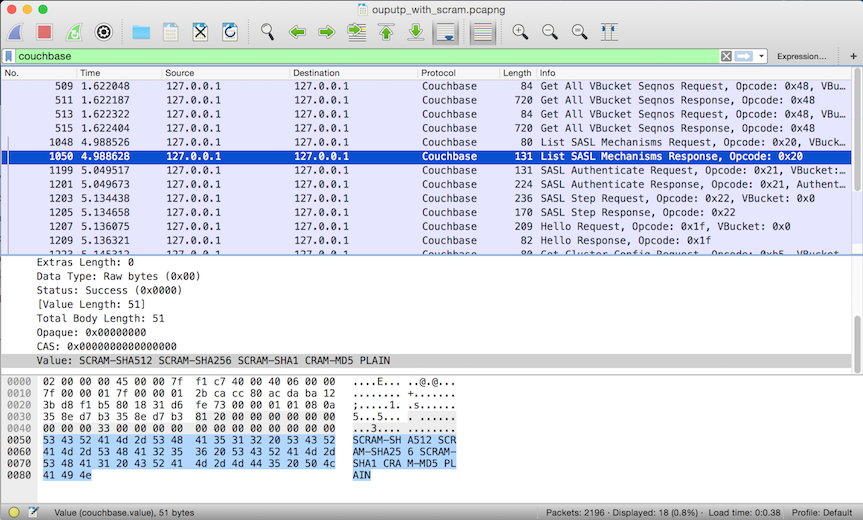
To finish, you have probably noticed how easy is to monitor the authentication handshake, this is why we recommend to use TLS in your client-server authentication.
In this way, a man-in-the middle attack is avoided by the fact that SCRAM uses mutual authentication and server must respond to a challenge to proof he knows the “secret” based on the client hashed password.
Happy authentication!


