
The Sub-Document API – go
You’ve probably heard about the sub-document (subdoc) API available in couchbase 4.5. Mark Nunberg, one of the architects of the new API, has a great blog on the motivation and impetus behind extending the Memcached (key-value) api to support Sub-Document operations. Matthew Revell also put together a great sample walkthrough using Java and Python. If you’re anything like me, you want to see any new feature expressed in your preferred language(s). For me, that means go or nodejs. Let’s look at an example and how the API works in go.
Edit: This blog post has been edited with updates from the 4.5 Beta
For other features of Couchbase 4.5, see Don Pinto’s blog posts about the Developer Preview and the Beta.
Let’s start with a simple json structure, with three fields
Create a document using the structure we defined and “upsert” it into couchbase
Now, let’s add an array to the document we created to a new field, and then perform some additional operations on the array. Through the magic of the subdoc API, we can do all of this without ever having to retrieve or update the entire document. This saves time and bandwidth, and dramatically improves performance.
What just happened? I need a builder!
The go api for sub-document operations adds two new methods to the Bucket type: LookupIn() and MutateIn(). These bucket level operations are consistent across the couchbase SDKs. If you’re using go, nodejs, Java, .NET, C or Python they all work the same way. This is a nice convenience for code portability, as we seldom see a production environment with only one language through the stack. Let’s take a look at what these two new methods on the Bucket type do under the covers:
MutateIn
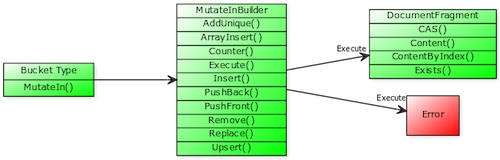
Let’s look at the MutateInBuilder, used to combine one or more mutation operations scoped to a single document: func (b *Bucket) MutateIn(key string, cas Cas, expiry uint32) *MutateInBuilder. This function includes a method receiver for the Bucket type, and it returns a reference to the MutateInBuilder

The MutateInBuilder has ten methods:
- AddUnique():
func (set *MutateInBuilder) AddUnique(path string, value interface{}, createParents bool) *MutateInBuilderThis method adds a unique value to an existing array field. It checks if the value exists first, and the updates. It returns a reference to aMutateInBuilder - ArrayInsert():
func (set *MutateInBuilder) ArrayInsert(path string, value interface{}) *MutateInBuilderThis method inserts an array value to an array field of a document. Note, in our example above we pass in a string that represents the array and index: “fourthItem[2]”. It returns a reference to aMutateInBuilder - Counter():
func (set *MutateInBuilder) Counter(path string, delta int64, createParents bool) *MutateInBuilderThis method performs an atomic counter operation on a field within a document. It returns a reference to aMutateInBuilder - Insert():
func (set *MutateInBuilder) Insert(path string, value interface{}, createParents bool) *MutateInBuilderThis method inserts a new value to a specific location in a document. It returns a reference to aMutateInBuilder - PushBack():
func (set *MutateInBuilder) PushBack(path string, value interface{}, createParents bool) *MutateInBuilderThis method adds a new value to the end of an array field within a document. It returns a reference to aMutateInBuilder - PushFront():
func (set *MutateInBuilder) PushFront(path string, value interface{}, createParents bool) *MutateInBuilderThis method adds a new value to the beginning of an array field within a document. It returns a reference to aMutateInBuilder - Remove():
func (set *MutateInBuilder) Remove(path string) *MutateInBuilderThis method removes a value from a specific field of a document. It returns a reference to aMutateInBuilder - Replace():
func (set *MutateInBuilder) Replace(path string, value interface{}) *MutateInBuilderThis method replaces a value within a field of a document. It returns a reference to aMutateInBuilder - Upsert():
func (set *MutateInBuilder) Upsert(path string, value interface{}, createParents bool) *MutateInBuilderThis method adds or replaces a field within a document. It returns a reference to aMutateInBuilder - Execute():
func (set *MutateInBuilder) Execute() (*DocumentFragment, error)This method submits the chained operations to the server and returns aDocumentFragmentcontaining their results.
The logic flow for MutateIn() looks like this
LookupIn
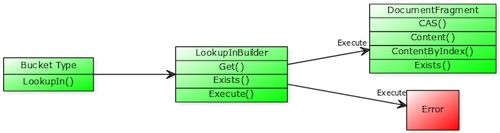
Let’s look at the LookupInBuilder, which allows us to declare one or more retrieval operations scoped to a single document: func (b *Bucket) LookupIn(key string) *LookupInBuilder. This function includes a method receiver for the Bucket type, and it returns a reference to the LookupInBuilder.

The LookupInBuilder has three methods:
- Get():
func (set *LookupInBuilder) Get(path string) *LookupInBuilderThis method requests that the path contents be retrieved. Returns a reference to aLookupInBuilder - Exists():
func (set *LookupInBuilder) Exists(path string) *LookupInBuilderChecks if the provided path exists. Returns a reference to aLookupInBuilder - Execute():
func (set *LookupInBuilder) Execute() (*DocumentFragment, error)This method sends the chained commands to the server and returns a reference to aDocumentFragmenttype (containing the results) and anerrorif one is encountered.
The logic flow for LookupIn()looks like this
Next Steps
Why not try it yourself? The example above along with several other go examples can be found in our developer-guide repository on github A great way to get started and try out couchbase 4.5 (in beta at the time of publishing) is with docker. The couchbase 4.5 docker image can be loaded if you have docker installed with the following command:
docker run -d --name=CB45DP1 -p 8091-8093:8091-8094 -p 11207-11210:11207-11210 -p 18091-18092:18091-18092 couchbase/server:enterprise-4.5.0-Beta
We thrive on feedback–give it a try and let us know what you think.


