
SQL++ 쿼리는 다양한 방식으로 Couchbase 클러스터에 저장된 데이터에 액세스할 수 있습니다. 데이터 쿼리의 일부로 비즈니스 로직을 포함하는 것이 유리할 수 있는 상황도 있습니다. SQL++는 사용자 정의 함수(UDF)를 통해 이를 지원합니다. Couchbase 7.0.
이 블로그 게시물에서는 SQL++를 사용하여 사용자 위치의 포인트를 동적으로 쿼리하는 UDF를 JavaScript로 만듭니다. 또한 파이썬에서 UDF를 사용하여 동일한 거리 계산을 수행합니다. 분석 서비스.
지리공간 쿼리 사용 사례
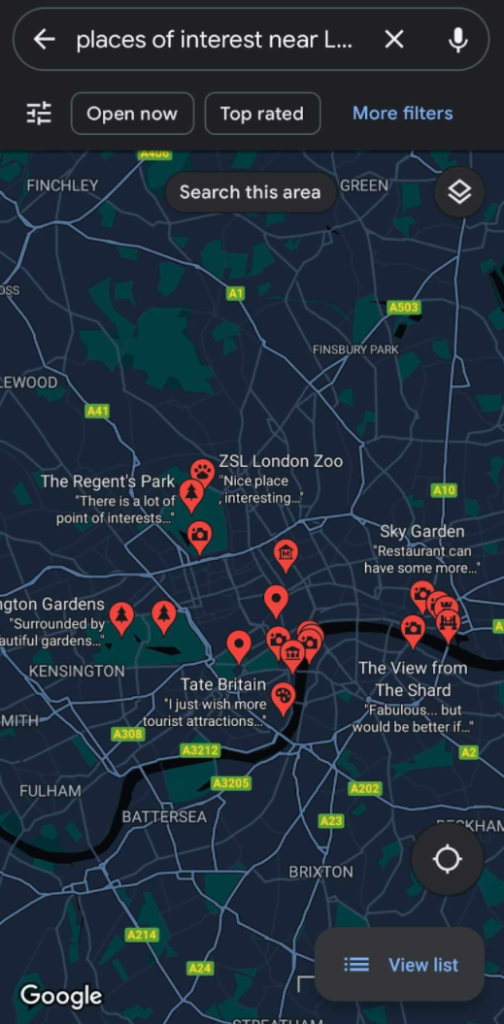
저희 애플리케이션은 아래 스크린샷에 표시된 것처럼 Google 지도와 같은 서비스와 유사하게 데이터베이스에서 사용자의 GPS 위치 근처에 있는 지리적 관심 지점을 생성합니다. 이 예제에서는 여행 샘플 데이터 세트 Couchbase에서 제공하는 샘플 버킷에서 사용할 수 있습니다.
특히, 저희는 랜드마크 그리고 공항 를 반환합니다. 거리 계산은 사용자의 실시간 지리적 위치를 기반으로 하므로 SQL++ 쿼리를 직접 사용할 수 없습니다. SQL++는 쿼리에서 사용자 지정 로직을 수행하기 위해 자바스크립트로 UDF를 정의하는 것을 지원합니다.
GPS 좌표로부터 거리 계산하기
두 GPS 좌표 세트 사이의 거리를 계산하는 방법에는 여러 가지가 있습니다. 이 예제에서는 두 좌표 세트 사이의 거리를 계산하기 위해 하버신 공식. 경로를 직선 거리가 아닌 구체로 간주하여 두 GPS 좌표 사이의 대략적인 거리를 제공합니다.
이 샘플에는 지리적 거리를 계산하는 자바스크립트 코드가 나와 있습니다:
|
1 2 3 4 5 6 7 8 9 10 11 12 13 14 15 16 17 18 |
function degreesToRadians(degrees) { return degrees * Math.PI / 180; } function distanceInKmBetweenEarthCoordinates(lat1, lon1, lat2, lon2) { var earthRadiusKm = 6371; var dLat = degreesToRadians(lat2-lat1); var dLon = degreesToRadians(lon2-lon1); lat1 = degreesToRadians(lat1); lat2 = degreesToRadians(lat2); var a = Math.sin(dLat/2) * Math.sin(dLat/2) + Math.sin(dLon/2) * Math.sin(dLon/2) * Math.cos(lat1) * Math.cos(lat2); var c = 2 * Math.atan2(Math.sqrt(a), Math.sqrt(1-a)); return earthRadiusKm * c; } |
하나는 도(度)와 라디안 사이의 변환을 수행하는 JavaScript 함수이고 다른 하나는 다른 함수의 GPS 좌표 사이의 거리를 킬로미터 단위로 계산하는 함수입니다.
Couchbase로 UDF 가져오기
이제 이러한 자바스크립트 함수는 이제 REST API를 사용하여 아래 그림과 같이 curl 명령을 사용합니다:
|
1 2 3 4 5 6 7 8 9 10 11 12 13 14 |
curl -v -X POST https://localhost:8093/evaluator/v1/libraries/math -u <user>:<password> -d 'function degreesToRadians(degrees) { return degrees * Math.PI / 180; } function distanceInKmBetweenEarthCoordinates(lat1, lon1, lat2, lon2) { var earthRadiusKm = 6371; var dLat = degreesToRadians(lat2-lat1); var dLon = degreesToRadians(lon2-lon1); lat1 = degreesToRadians(lat1); lat2 = degreesToRadians(lat2); var a = Math.sin(dLat/2) * Math.sin(dLat/2) + Math.sin(dLon/2) * Math.sin(dLon/2) * Math.cos(lat1) * Math.cos(lat2); var c = 2 * Math.atan2(Math.sqrt(a), Math.sqrt(1-a)); return earthRadiusKm * c; }' |
이 단계가 끝나면 웹 콘솔의 쿼리 편집기:
|
1 2 3 |
CREATE FUNCTION degreesToRadians(a) LANGUAGE JAVASCRIPT AS "degreesToRadians" AT "math" CREATE FUNCTION distanceInKmBetweenEarthCoordinates(lat1, lon1, lat2, lon2) LANGUAGE JAVASCRIPT AS "distanceInKmBetweenEarthCoordinates" AT "math" |
여기에서 수학 참조는 자바스크립트 라이브러리 를 평가하기 위해 만들었습니다.
이제 SQL++에서 샘플 GPS 좌표를 사용하여 UDF를 테스트할 수 있습니다. 실행 기능 아래와 같이
|
1 |
EXECUTE FUNCTION distanceInKmBetweenEarthCoordinates(51.5, 0, 38.8, -77.1) |
함수에 GPS 좌표를 수동으로 제공하면 함수가 의도한 대로 작동하는 것을 관찰할 수 있습니다.
UDF를 카우치베이스 데이터에 연결하기
에서 여행 샘플 데이터 세트의 GPS 좌표가 있습니다. 랜드마크 그리고 공항 와 같은 다른 관심 장소와 함께 호텔.
아래와 같이 쿼리에 통합할 수 있습니다:
|
1 2 3 4 5 6 |
SELECT distanceInKmBetweenEarthCoordinates(a.geo.lat, a.geo.lon, 51.509865, -0.118092) AS distance, a.airportname, a.city FROM `travel-sample`.inventory.airport a ORDER BY distance ASC LIMIT 10; |
이 쿼리는 사용자 위치에서 가장 가까운 공항 10곳의 목록을 반환합니다(51.509865, -0.118092). 위도(a.geo.lat) 및 경도(a.geo.lon) 필드를 사용하여 문서에 내장된 SQL++의 기능을 사용할 수 있습니다.
|
1 2 3 4 5 6 7 8 9 10 11 12 13 14 15 16 17 18 19 20 21 22 23 24 25 26 27 28 29 30 31 32 33 34 35 36 37 38 39 40 41 42 43 44 45 46 47 48 49 50 51 52 |
[ { "airportname": "All Airports", "city": "London", "distance": 0.6998675034052988 }, { "airportname": "Waterloo International", "city": "London", "distance": 0.7880158040048914 }, { "airportname": "London St Pancras", "city": "London", "distance": 2.289359875405007 }, { "airportname": "Euston Station", "city": "London", "distance": 2.30782110865356 }, { "airportname": "St Pancras Railway Station", "city": "London", "distance": 2.582290289682563 }, { "airportname": "Paddington Station", "city": "London", "distance": 4.069442660124984 }, { "airportname": "London Heliport", "city": "London", "distance": 6.062824964656381 }, { "airportname": "Elstree", "city": "Elstree", "distance": 8.735152174563803 }, { "airportname": "City", "city": "London", "distance": 12.009592036043564 }, { "airportname": "London - Kings Cross", "city": "London", "distance": 16.891716659500467 } ] |
마찬가지로, 사용자 주변의 관심 지점을 계산할 수 있습니다. 랜드마크 사용자와의 거리가 멀어질수록 수집이 증가합니다:
|
1 2 3 4 5 6 7 |
SELECT distanceInKmBetweenEarthCoordinates(l.geo.lat, l.geo.lon, 51.509865, -0.118092) AS distance, l.activity, l.city, l.content FROM `travel-sample`.inventory.landmark l ORDER BY distance ASC LIMIT 10; |
주변 랜드마크를 표시하는 쿼리 결과입니다:
|
1 2 3 4 5 6 7 8 9 10 11 12 13 14 15 16 17 18 19 20 21 22 23 24 25 26 27 28 29 30 31 32 33 34 35 36 37 38 39 40 41 42 43 44 45 46 47 48 49 50 51 52 53 54 55 56 57 58 59 60 61 62 |
[ { "activity": "see", "city": "London", "content": "Somerset House is home to three art galleries: The exceptional '''Courtauld Institute''' displays a collection of 19th and 20th century art, including well-known works by Degas, Matisse and Kandinsky; The Gilbert Collection presents a collection of decorative art; and The Hermitage Rooms, the most recent addition to Somerset House, hosts temporary exhibitions of works on loan from the Hermitage Museum in Saint Petersburg. The central courtyard is filled with fountains in the Summer, but in the Winter, an ice rink is installed, it is very popular, so visitors should book in advance, or expect to wait a long time to skate.", "distance": 0.10940067520415872 }, { "activity": "see", "city": "London", "content": "Cleopatra's Needle originated in the ancient [[Egypt]]ian city of [[Cairo/Heliopolis|Heliopolis]], in the Temple of Atum, but the Romans moved it to [[Alexandria]] in 12 BC. In 1819, viceroy Mehemet Ali presented Cleopatra's Needle to the British, commemorating military victories in Egypt, but it remained in Alexandria until 1877 when transportation was arranged to bring it to London. On the voyage, the ship capsized in a storm, killing six crewmembers. Cleopatra's Needle was thought to be lost, but Spanish trawlers found it afloat a few days later, and after some repairs, it arrived in London on 21 Jan 1878. The obelisk is flanked by two faux-sphinxes, which show the effects of bombings of London during World War II. Today, Cleopatra's Needle shows some wear from exposure to London's damp weather.", "distance": 0.2153782246329736 }, { "activity": "buy", "city": "London", "content": "Daily second-hand book sale near the bank of the Thames. A nice place to just browse for books (classic and modern), maps and prints.", "distance": 0.329776385402355 }, { "activity": "see", "city": "London", "content": "[[London]] (in [[London/Covent Garden|Covent Garden]])", "distance": 0.34889537479151833 }, { "activity": "see", "city": "London", "content": "London's most famous and popular skateboarding area, situated partly underneath Queen Elizabeth Hall along Queen's Walk and the Thames. Also popular with graffiti artists, BMXers and so forth.", "distance": 0.36487940944981834 }, { "activity": "see", "city": "London", "content": "Tucked under Waterloo Bridge, BFI Southbank, formerly known as the National Film Theatre, pitches itself as the home of film and has three screens showing classic (including silent), foreign language and less mainstream films. Recently redeveloped, it now has a new entrance on Theatre Alley, a shop dedicated to film, an interactive exhibition space and an excellent bar/restaurant at the back. Visitors can also access the Mediatheque - wind your way through the BFI's extensive film and TV archive for free. Cool bar and restaurant. Tickets are generally available on the spur of the moment.", "distance": 0.378692262237853 }, { "activity": "see", "city": "London", "content": "Music venue hosting daily performances. | image=Queen Elizabeth Hall.jpg", "distance": 0.3859430181613397 }, { "activity": "drink", "city": "London", "content": "The antidote to gay bars: a pub-like atmosphere and great music. | image=The Retro Bar.jpg", "distance": 0.39732030942983415 }, { "activity": "see", "city": "London", "content": "Three large auditoriums, the Olivier, the Lyttelton and the Cottesloe. The Olivier theatre is the largest with an open stage and a fan shaped auditorium around it. This ensures that all seats provide a good view. Most of the more 'popular' productions are put on here as the space provided is much larger than most theatres. The Lyttelton theatre is more traditional with a procenium arc with good views from most seats. The Cottesloe is a small studio theatre, seating around 400. Some tickets will be available on the day, either day seats (arrive before 09:30 and queue) or standby (arrive before 6PM and queue), or you can buy online. Popular shows, especially those around Christmas in the Olivier sell out months in advance. Tickets to The National Theatre are generally better value than most other theatres. There is also the '£10 Travelex' season in the summer that provides a large number (over 100,000 seats a year) at £10. Booking in advance is required for these. There is also an exhibition space in the Lyttelton theatre foyer that frequently holds popular photographic exhibitions. Free jazz is often played in the evening in the ground floor foyer. During summer there is a free daily outdoor festival of performance, music, comedy and cabaret known as Watch This Space. Deckchairs (and artificial grass) are provided to watch on. Free exhibitions. Backstage tours £5. (https://www.nationaltheatrelondon.com/tickets/)", "distance": 0.42625112040817054 }, { "activity": "drink", "city": "London", "content": "Free nightly music events. The best place to sample underground electro, indie, dub-step and more.", "distance": 0.4323026974543284 } ] |
여러 사용자에 대해 동시에 이러한 쿼리를 실행하는 경우, Couchbase 클러스터의 일부인 컴퓨팅 리소스를 사용하기 때문에 성능 문제가 발생할 수 있습니다.
이러한 시나리오에서 Couchbase Analytics는 클러스터에 미치는 영향을 줄일 수 있습니다. 카우치베이스 애널리틱스는 많은 레코드에 대한 복잡한 쿼리를 효율적으로 실행하도록 설계되었습니다. 복잡한 쿼리에는 대규모 임시 조인, 집합, 집계 및 그룹화 작업이 포함될 수 있으며, 이러한 작업은 데이터 가져오기 및 노드 간 조정으로 인해 쿼리가 오래 실행되거나, CPU 사용량이 많거나, 메모리가 많이 소모되거나, 네트워크 지연 시간이 과도하게 발생할 수 있습니다.
카우치베이스 애널리틱스를 사용한 사용자 정의 함수
카우치베이스 애널리틱스를 통해 다음을 정의하고 사용할 수 있습니다. 파이썬의 사용자 정의 함수 하지만 이 글을 쓰는 시점에서는 다음을 수행해야 합니다. 개발자 미리 보기 활성화 모드로 전환합니다. 다음 명령으로 이 작업을 수행할 수 있습니다:
|
1 2 |
$ /opt/couchbase/bin/couchbase-cli enable-developer-preview \ --enable -c localhost:8091 -u <username> -p <password> |
다음 단계는 개발 환경에서 파이썬 UDF를 사용하여 로컬로 파이썬 패키지를 생성하는 것입니다. 이 경우 UDF는 두 GPS 좌표 사이의 거리를 계산하는 방법입니다.
|
1 2 3 4 5 6 7 |
# distance.py from geopy import distance class distance_calculation: def calculate_distance(self, lat1, lon1, lat2, lon2) -> float: """Calculate Distance using geodesic distance""" return distance.distance((lat1, lon1), (lat2, lon2)).km |
여기서는 측지 거리 (곡선 경로를 따라 점 사이의 최단 거리)를 라이브러리의 도움으로 두 GPS 좌표 사이의 거리로 계산합니다, 지리.
UDF 패키징
라이브러리를 패키징하려면 패키지를 사용합니다. shiv 를 사용하여 모든 플랫폼에 대한 요구 사항과 함께 코드를 패키징할 수 있습니다. 여기서는 카우치베이스 서버가 Docker 내의 Linux 환경에서 실행되고 있으므로 Linux를 사용하고 있습니다.
|
1 |
shiv -o distance.pyz --site-packages . --platform manylinux2010_x86_64 --python-version 39 --only-binary=:all: geopy |
이 바이너리 패키지를 UDF와 함께 Couchbase에 업로드하기 위해서는 REST API 애널리틱스 서비스용입니다.
|
1 |
curl -X POST -u <username>:<password> -F "type=python" -F "data=@./distance.pyz" localhost:8095/analytics/library/Default/pylib |
이렇게 하면 패키징된 UDF를 pylib 라이브러리의 기본값 범위 (이전 데이터버스)를 클릭합니다. 이제 분석 환경의 분석 워크벤치.
이 정의 문은 다음과 같은 이름의 UDF를 정의하고 있음을 나타냅니다. distance_in_km 파이썬 함수에서 호출할 수 있는 계산_거리 클래스에 정의된 거리 계산 파이썬 모듈 내에서 거리.
|
1 2 |
CREATE ANALYTICS FUNCTION distance_in_km(lat1, lon1, lat2, lon2) AS "distance", "distance_calculation.calculate_distance" AT pylib; |
이제 SQL++ 쿼리에서 UDF를 사용한 것과 동일한 방식으로 Analytics 쿼리에서 UDF를 사용할 수 있습니다.
|
1 2 3 4 5 6 7 8 |
SELECT distance_in_km(51.5, 0, 38.8, -77.1) AS "distance" RESULTS: [ { "distance": 5933.5299530300545 } ] |
분석 서비스에서 데이터 서비스의 데이터 매핑하기
분석 서비스에서 데이터 서비스의 데이터를 쿼리하려면 다음을 수행해야 합니다. 지도 의 여행 샘플 데이터 컬렉션을 사용하여 Analytics의 데이터 서비스에서 데이터의 실시간 섀도 복사본을 만듭니다. 이 예제에서는 컬렉션을 지리적 데이터, 즉 랜드마크, 공항 그리고 호텔 인벤토리 범위의 컬렉션에서 여행 샘플 버킷.
카우치베이스 데이터에 대한 분석 UDF 실행
이제 이전에 SQL++에서 실행했던 것과 동일한 쿼리를 분석 서비스에서 실행할 수 있습니다. UDF 이름만 변경되었습니다. 나머지 인터페이스는 SQL++ 쿼리에서 사용했던 것과 유사합니다. 결과도 이전 결과와 유사합니다.
|
1 2 3 4 5 6 7 8 9 10 11 12 13 14 |
SELECT distance_in_km(a.geo.lat, a.geo.lon, 51.509865, -0.118092) AS distance, a.airportname, a.city FROM `travel-sample`.inventory.airport a ORDER BY distance ASC LIMIT 10; SELECT distance_in_km(l.geo.lat, l.geo.lon, 51.509865, -0.118092) AS distance, l.activity, l.city, l.content FROM `travel-sample`.inventory.landmark l ORDER BY distance ASC LIMIT 10; |
이 접근 방식은 이러한 쿼리를 실행하면서 데이터 서비스 트랜잭션 데이터에 일반적으로 사용됩니다. 데이터는 데이터 및 분석 서비스 내부적으로 Couchbase에서 실시간으로 확인합니다.
요약
이 블로그 게시물에서는 두 GPS 좌표 사이의 거리를 계산하는 사용자 정의 함수(UDF)를 JavaScript로 만드는 방법을 배웠습니다. UDF를 Couchbase로 가져온 다음 이를 SQL++ 쿼리에 통합하여 사용자 주변의 관심 지점을 제공할 수 있는 애플리케이션을 구동하는 방법을 살펴보았습니다. 또한 트랜잭션 Couchbase 클러스터에 미치는 영향을 줄이기 위해 Analytics 서비스를 사용하여 Python 기반 UDF에서 동일한 거리 계산을 수행하는 방법도 보여드렸습니다.
자세한 내용을 읽고 참고하려면 다음 리소스를 참조하세요:


