
소개
오늘날의 서버 인프라 머신은 온프레미스 데이터센터, 프라이빗 데이터센터 또는 퍼블릭 클라우드 데이터센터에 있습니다. 이러한 머신은 물리적 베어메탈 머신, 하이퍼바이저가 있는 가상 머신(VM) 또는 물리적 또는 가상 머신 위에 있는 도커 컨테이너와 같은 소형 컨테이너입니다. 이러한 머신은 물리적으로 로컬 실험실에 있을 수 있습니다. 프라이빗 데이터센터 시나리오에서는 자체 조달한 호스트가 타사 데이터센터에서 공유되는 물리적 공간에 배치되고 원격으로 연결됩니다. 반면 AWS, GCP, Azure, OCI와 같은 퍼블릭 데이터센터에서는 원격으로 연결되는 확장성이 높은 요구 사항을 위해 머신을 예약하거나 온디맨드 방식으로 생성합니다. 이러한 인프라는 각각 확장성, 보안, 안정성, 관리 및 비용 측면에서 고유한 장점을 가지고 있습니다.
제품 개발 환경 팀에서는 SDLC 프로세스 중에 많은 서버가 필요할 수 있습니다. Xen Server와 함께 자체 물리적 머신이 있는 프라이빗 데이터 센터를 선택했다고 가정해 보겠습니다. 이제 문제는 클라우드 환경과 유사하게 간결하고 민첩한 프로세스를 통해 프로비저닝 또는 종료를 위해 VM 수명주기를 어떻게 관리할 것인가 하는 것입니다.
이 문서는 동적 인프라 환경을 쉽게 구축할 수 있도록 기본 인프라 모델, 아키텍처, 최소 API 및 샘플 코드 스니펫을 제공하는 것을 목표로 합니다.
혜택
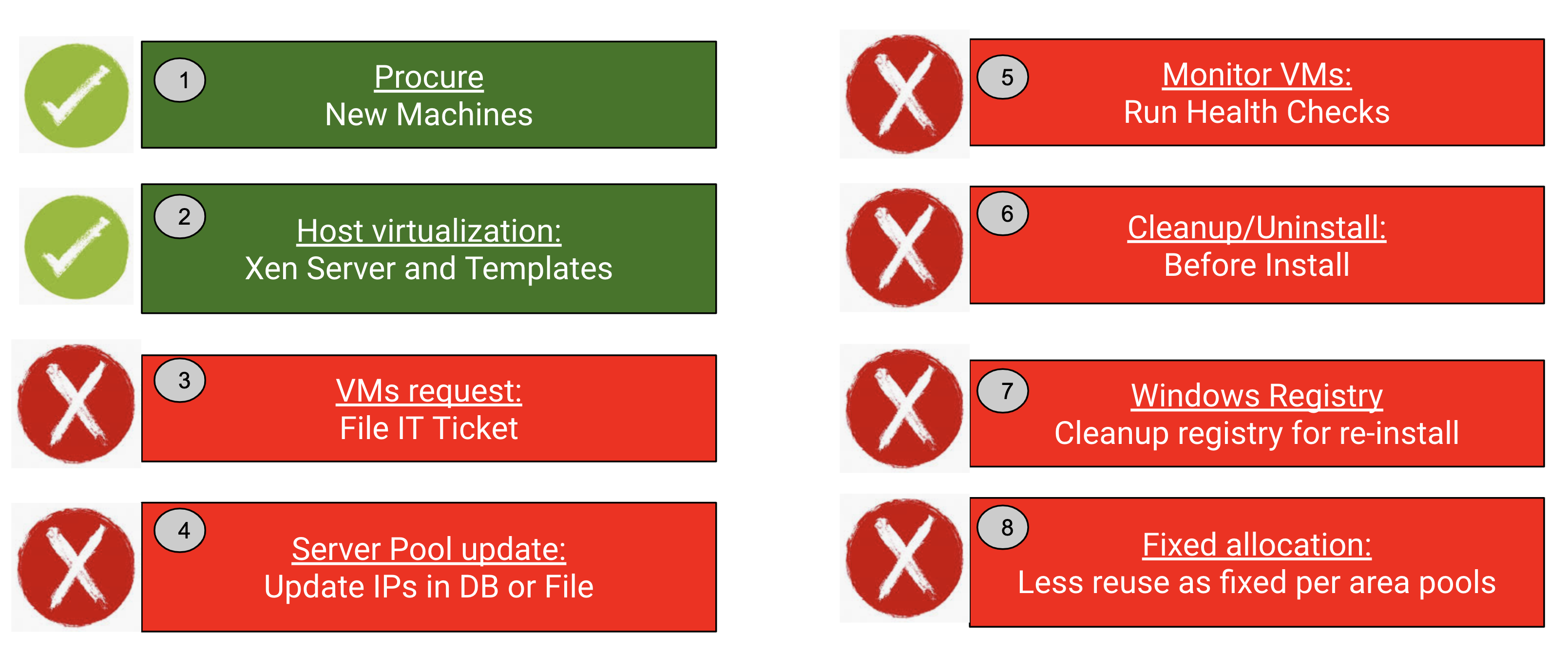
먼저 이 서버의 인프라 프로세스에서 따르는 일반적인 단계의 순서를 이해해 보겠습니다. 다음과 같이 기억하시면 됩니다.
-
- IT 부서의 새로운 기계 조달
- 호스트 가상화 - IT 부서에서 Xen Server 설치 및 VM 템플릿 만들기
- 개발 및 테스트 팀이 (예: JIRA) 티켓을 통해 IT 부서에 요청하는 정적 가상 머신
- 수신된 VM IP를 데이터베이스 또는 정적 파일에 유지하거나 Jenkins config.xml과 같은 구성 파일 또는 CI 도구에 하드코딩합니다.
- 제품을 설치하는 데 사용하기 전에 VM의 상태를 모니터링하여 상태가 양호한지 확인합니다.
- 서버 설치 전후에 정리 또는 제거하기
- 제품을 설치하기 전에 Windows에서 레지스트리 정리가 필요할 수 있습니다.
- 특정 영역이나 팀에 VM을 고정 할당하거나 엔지니어 전용으로 할당했을 수 있습니다.
그렇다면 어떻게 하면 이 프로세스를 더 간결하고 민첩하게 만들 수 있을까요? 간단한 자동화를 통해 위의 대부분의 단계를 제거할 수 있을까요?
예. 저희 환경에서는 1000개 이상의 가상 머신이 있었고 주로 다음과 같은 목표를 달성하려고 했습니다.
"테스트 실행 중 필요에 따라 일회용 VM을 온디맨드 방식으로 사용할 수 있습니다. 정기적인 테스트 주기로 Windows 정리 문제를 해결하세요."
아래에서 볼 수 있듯이 동적 가상 머신 서버 관리자 API 서비스를 사용하면 8단계 중 6단계를 제거할 수 있으며 전체 제품 팀에 대한 무제한 인프라 보기를 제공합니다. 처음 두 단계인 가상화 조달과 호스트 가상화만 필요합니다. 사실상 시간과 비용을 절약할 수 있습니다!
동적 인프라 모델
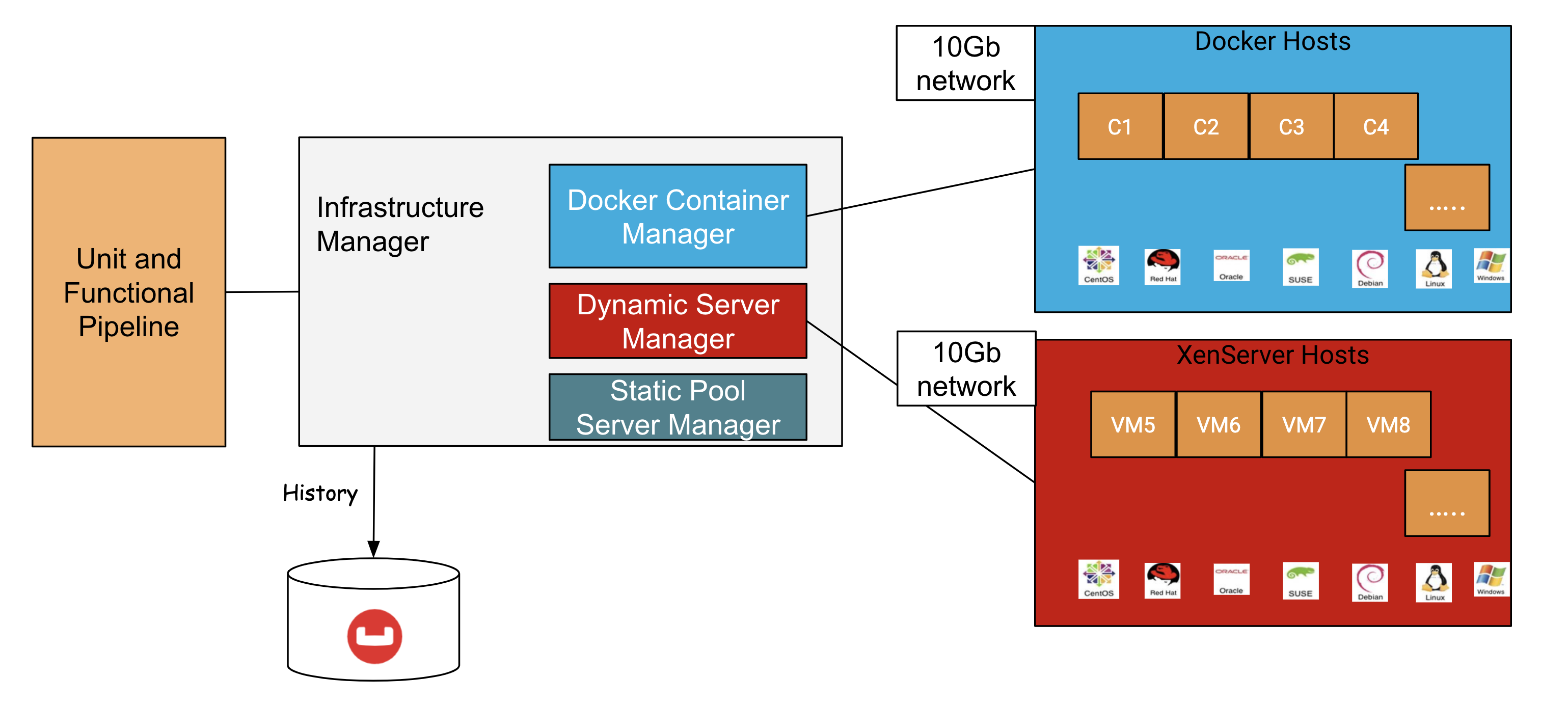
아래 그림은 일반적인 서버 제품 환경에 대해 80%의 도커 컨테이너, 15%를 동적 VM으로, 5%를 특수한 경우를 위한 정적 풀링된 VM으로 구성하는 인프라를 제안합니다. 이 배분은 사용자 환경에 가장 적합한 것을 기준으로 조정할 수 있습니다.
이제부터 동적 가상 머신 서버 관리자 부분에 대해 자세히 설명하겠습니다.
동적 서버 관리자 아키텍처
동적 VM 서버 관리자에서는 아래 REST API를 노출할 수 있는 간단한 API 서비스를 제공하며 자동화된 프로세스의 어느 곳에서나 사용할 수 있습니다. 기술 스택에서 볼 수 있듯이 실제 XenServer 호스트에서 VM을 생성하는 데는 Python 3 및 Python 기반 Xen API가 사용됩니다. REST 서비스 계층 생성에는 Flask가 사용되고 있습니다. OS는 윈도우2016, 센토스7, 센토스8, 데비안10, 우분투18, 오엘8, 수세15 등 제품이 지원하는 모든 플랫폼이 될 수 있습니다.
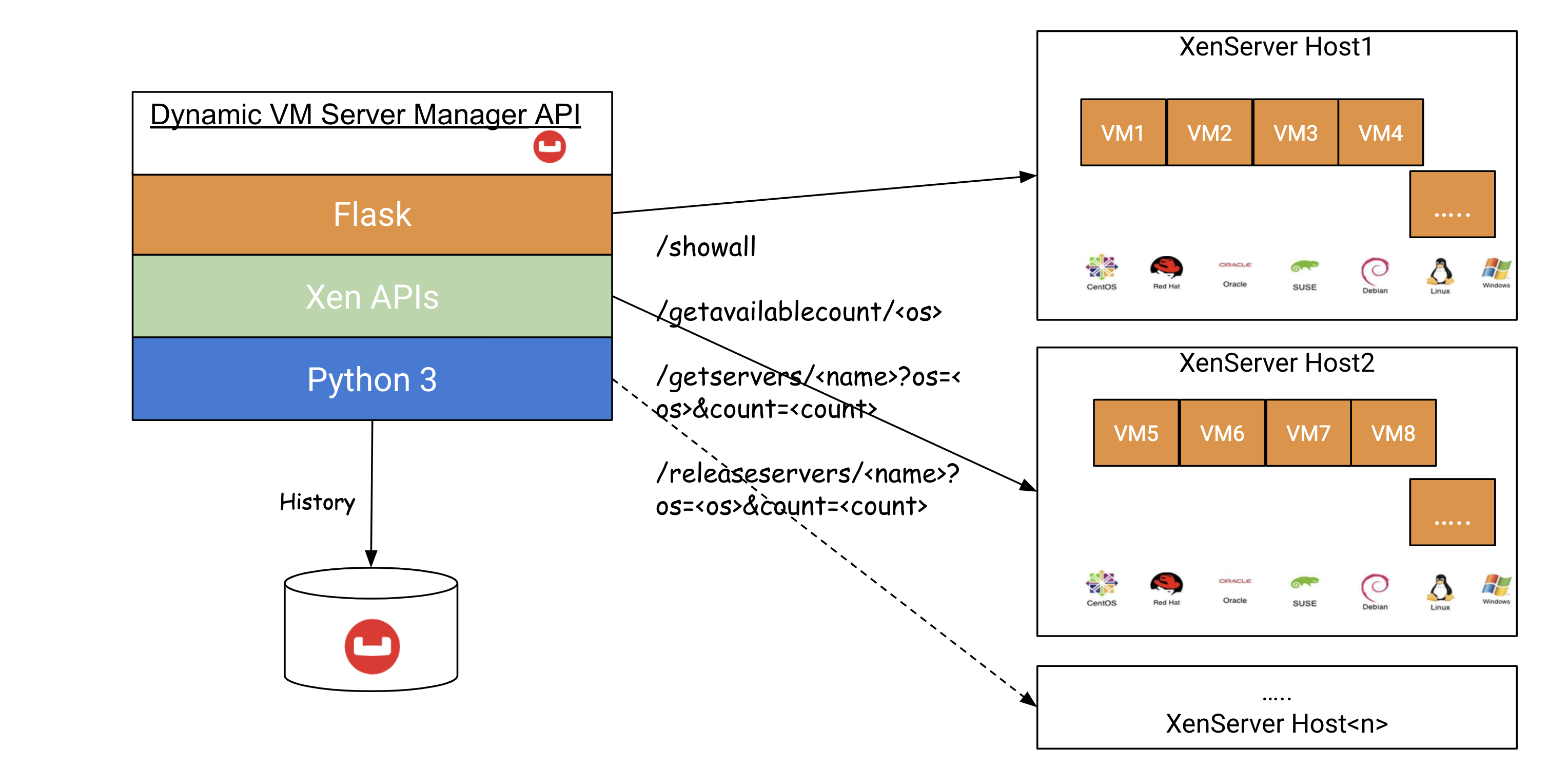
가상 머신의 이력을 저장하여 사용량과 프로비저닝 또는 종료까지의 시간을 추적하여 추가 분석이 가능합니다. json 문서 저장을 위해 nosql 문서 데이터베이스인 Couchbase 엔터프라이즈 서버를 사용할 수 있습니다.
간단한 REST API
| 방법 | URI(들) | 목적 |
| GET | /showall | 모든 VM을 json 형식으로 나열합니다. |
| GET | /겟어블카운트/ | 주어진 에 대해 사용 가능한 VM 개수 목록을 가져옵니다. |
| GET | /getservers/?os=
/getservers/?os=&count= /getservers/?os=&count=&cpus=&mem= /getservers/?os=&expiresin= |
의 VM이 주어진 프로비저닝입니다.
CPU 수와 메모리 크기도 지원할 수 있습니다. 만료인 매개 변수를 몇 분 단위로 설정하여 VM의 만료(자동 종료)를 가져옵니다. |
| GET | /releaseservers/?os=
/releaseservers/?os=&count= |
의 주어진 VM을 종료합니다. |
동적 VM 대상 Xen 호스트의 사전 요구 사항
- 대상 동적 VM Xen 호스트 식별
- VM 템플릿 복사/생성
- IP 재활용을 위해 이러한 Xen 호스트를 별도의 VLAN/서브넷으로 이동(IT 부서와 협력)합니다.
구현
높은 수준에서
- 각 REST API에 함수 만들기
- 공통 서비스를 호출하여 다양한 REST 작업을 수행합니다.
- Xen 세션 생성, 레코드 가져오기, 템플릿에서 VM 복제, 올바른 디스크 연결, VM 생성 및 IP 수신 대기, VM 삭제, 디스크 삭제에 대해 이해합니다.
- VM 만료에 대한 스레드 자동 시작
- .ini 형식과 같은 일반적인 구성 읽기
- Couchbase 데이터베이스 작업 이해 및 문서 저장
- 필요한 OS 및 매개 변수로 모든 API를 테스트하세요.
- 문제가 있는 경우 문제 해결
- 적은 수의 Xen 호스트로 POC 수행
아래 코드 스니펫을 참고하면 더 쉽게 이해할 수 있습니다.
API 생성
|
1 2 3 4 5 6 7 8 9 10 11 12 13 14 15 16 17 18 19 20 21 22 23 24 25 26 27 28 29 30 31 32 33 34 35 36 37 38 39 40 41 42 43 44 45 46 47 48 49 50 51 52 53 54 55 56 57 58 59 60 61 62 63 64 65 66 67 68 69 70 71 72 73 74 75 76 77 78 79 80 81 82 83 84 85 86 87 88 89 90 91 92 93 94 95 96 97 98 99 100 101 102 103 104 105 106 107 108 109 110 111 112 113 114 115 |
@app.route('/showall/<string:os>') @app.route("/showall") def showall_service(os=None): count, _ = get_all_xen_hosts_count(os) log.info("--> count: {}".format(count)) all_vms = {} for xen_host_ref in range(1, count + 1): log.info("Getting xen_host_ref=" + str(xen_host_ref)) all_vms[xen_host_ref] = perform_service(xen_host_ref, service_name='listvms', os=os) return json.dumps(all_vms, indent=2, sort_keys=True) @app.route('/getavailablecount/<string:os>') @app.route('/getavailablecount') def getavailable_count_service(os='centos'): """ Calculate the available count: Get Total CPUs, Total Memory Get Free CPUs, Free Memory Get all the VMs - CPUs and Memory allocated Get each OS template - CPUs and Memory Available count1 = (Free CPUs - VMs CPUs)/OS_Template_CPUs Available count2 = (Free Memory - VMs Memory)/OS_Template_Memory Return min(count1,count2) """ count, available_counts, xen_hosts = get_all_available_count(os) log.info("{},{},{},{}".format(count, available_counts, xen_hosts, reserved_count)) if count > reserved_count: count -= reserved_count log.info("Less reserved count: {},{},{},{}".format(count, available_counts, xen_hosts, reserved_count)) return str(count) # /getservers/username?count=number&os=centos&ver=6&expiresin=30 @app.route('/getservers/<string:username>') def getservers_service(username): global reserved_count if request.args.get('count'): vm_count = int(request.args.get('count')) else: vm_count = 1 os_name = request.args.get('os') if request.args.get('cpus'): cpus_count = request.args.get('cpus') else: cpus_count = "default" if request.args.get('mem'): mem = request.args.get('mem') else: mem = "default" if request.args.get('expiresin'): exp = int(request.args.get('expiresin')) else: exp = MAX_EXPIRY_MINUTES if request.args.get('format'): output_format = request.args.get('format') else: output_format = "servermanager" xhostref = None if request.args.get('xhostref'): xhostref = request.args.get('xhostref') reserved_count += vm_count if xhostref: log.info("--> VMs on given xenhost" + xhostref) vms_ips_list = perform_service(xhostref, 'createvm', os_name, username, vm_count, cpus=cpus_count, maxmemory=mem, expiry_minutes=exp, output_format=output_format) return json.dumps(vms_ips_list) ... # /releaseservers/{username} @app.route('/releaseservers/<string:username>/<string:available>') @app.route('/releaseservers/<string:username>') def releaseservers_service(username): if request.args.get('count'): vm_count = int(request.args.get('count')) else: vm_count = 1 os_name = request.args.get('os') delete_vms_res = [] for vm_index in range(vm_count): if vm_count > 1: vm_name = username + str(vm_index + 1) else: vm_name = username xen_host_ref = get_vm_existed_xenhost_ref(vm_name, 1, None) log.info("VM to be deleted from xhost_ref=" + str(xen_host_ref)) if xen_host_ref != 0: delete_per_xen_res = perform_service(xen_host_ref, 'deletevm', os_name, vm_name, 1) for deleted_vm_res in delete_per_xen_res: delete_vms_res.append(deleted_vm_res) if len(delete_vms_res) < 1: return "Error: VM " + username + " doesn't exist" else: return json.dumps(delete_vms_res, indent=2, sort_keys=True) def perform_service(xen_host_ref=1, service_name='list_vms', os="centos", vm_prefix_names="", number_of_vms=1, cpus="default", maxmemory="default", expiry_minutes=MAX_EXPIRY_MINUTES, output_format="servermanager", start_suffix=0): xen_host = get_xen_host(xen_host_ref, os) ... def main(): # options = parse_arguments() set_log_level() app.run(host='0.0.0.0', debug=True) |
Xen 생성 세션
|
1 2 3 4 5 6 7 8 9 10 11 12 13 14 |
def get_xen_session(xen_host_ref=1, os="centos"): xen_host = get_xen_host(xen_host_ref, os) if not xen_host: return None url = "https://" + xen_host['host.name'] log.info("\nXen Server host: " + xen_host['host.name'] + "\n") try: session = XenAPI.Session(url) session.xenapi.login_with_password(xen_host['host.user'], xen_host['host.password']) except XenAPI.Failure as f: error = "Failed to acquire a session: {}".format(f.details) log.error(error) return error return session |
가상 머신 목록
|
1 2 3 4 5 6 7 8 9 10 11 12 13 14 15 16 17 18 19 20 21 22 23 24 25 26 27 28 29 30 31 32 33 34 35 36 |
def list_vms(session): vm_count = 0 vms = session.xenapi.VM.get_all() log.info("Server has {} VM objects (this includes templates):".format(len(vms))) log.info("-----------------------------------------------------------") log.info("S.No.,VMname,PowerState,Vcpus,MaxMemory,Networkinfo,Description") log.info("-----------------------------------------------------------") vm_details = [] for vm in vms: network_info = 'N/A' record = session.xenapi.VM.get_record(vm) if not (record["is_a_template"]) and not (record["is_control_domain"]): log.debug(record) vm_count = vm_count + 1 name = record["name_label"] name_description = record["name_description"] power_state = record["power_state"] vcpus = record["VCPUs_max"] memory_static_max = record["memory_static_max"] if record["power_state"] != 'Halted': ip_ref = session.xenapi.VM_guest_metrics.get_record(record['guest_metrics']) network_info = ','.join([str(elem) for elem in ip_ref['networks'].values()]) else: continue # Listing only Running VMs vm_info = {'name': name, 'power_state': power_state, 'vcpus': vcpus, 'memory_static_max': memory_static_max, 'networkinfo': network_info, 'name_description': name_description} vm_details.append(vm_info) log.info(vm_info) log.info("Server has {} VM objects and {} templates.".format(vm_count, len(vms) - vm_count)) log.debug(vm_details) return vm_details |
가상 머신 생성
|
1 2 3 4 5 6 7 8 9 10 11 12 13 14 15 16 17 18 19 20 21 22 23 24 25 26 27 28 29 30 31 32 33 34 35 36 37 38 39 40 41 42 43 44 45 46 47 48 49 50 51 52 53 54 55 56 57 58 59 60 61 62 63 64 65 66 67 68 69 70 71 72 73 74 75 76 77 78 79 80 81 82 83 84 85 86 87 88 89 90 91 92 93 94 95 96 97 98 99 100 101 102 103 104 105 106 107 108 109 110 111 112 113 114 115 116 117 118 119 120 121 122 123 124 125 126 127 128 129 130 131 132 133 134 135 136 137 138 139 140 141 142 143 |
def create_vm(session, os_name, template, new_vm_name, cpus="default", maxmemory="default", expiry_minutes=MAX_EXPIRY_MINUTES): error = '' vm_os_name = '' vm_ip_addr = '' prov_start_time = time.time() try: log.info("\n--- Creating VM: " + new_vm_name + " using " + template) pifs = session.xenapi.PIF.get_all_records() lowest = None for pifRef in pifs.keys(): if (lowest is None) or (pifs[pifRef]['device'] < pifs[lowest]['device']): lowest = pifRef log.debug("Choosing PIF with device: {}".format(pifs[lowest]['device'])) ref = lowest mac = pifs[ref]['MAC'] device = pifs[ref]['device'] mode = pifs[ref]['ip_configuration_mode'] ip_addr = pifs[ref]['IP'] net_mask = pifs[ref]['IP'] gateway = pifs[ref]['gateway'] dns_server = pifs[ref]['DNS'] log.debug("{},{},{},{},{},{},{}".format(mac, device, mode, ip_addr, net_mask, gateway, dns_server)) # List all the VM objects vms = session.xenapi.VM.get_all_records() log.debug("Server has {} VM objects (this includes templates)".format(len(vms))) templates = [] all_templates = [] for vm in vms: record = vms[vm] res_type = "VM" if record["is_a_template"]: res_type = "Template" all_templates.append(vm) # Look for a given template if record["name_label"].startswith(template): templates.append(vm) log.debug(" Found %8s with name_label = %s" % (res_type, record["name_label"])) log.debug("Server has {} Templates and {} VM objects.".format(len(all_templates), len(vms) - len( all_templates))) log.debug("Choosing a {} template to clone".format(template)) if not templates: log.error("Could not find any {} templates. Exiting.".format(template)) sys.exit(1) template_ref = templates[0] log.debug(" Selected template: {}".format(session.xenapi.VM.get_name_label(template_ref))) # Retries when 169.x address received ipaddr_max_retries = 3 retry_count = 1 is_local_ip = True vm_ip_addr = "" while is_local_ip and retry_count != ipaddr_max_retries: log.info("Installing new VM from the template - attempt #{}".format(retry_count)) vm = session.xenapi.VM.clone(template_ref, new_vm_name) network = session.xenapi.PIF.get_network(lowest) log.debug("Chosen PIF is connected to network: {}".format( session.xenapi.network.get_name_label(network))) vifs = session.xenapi.VIF.get_all() log.debug(("Number of VIFs=" + str(len(vifs)))) for i in range(len(vifs)): vmref = session.xenapi.VIF.get_VM(vifs[i]) a_vm_name = session.xenapi.VM.get_name_label(vmref) log.debug(str(i) + "." + session.xenapi.network.get_name_label( session.xenapi.VIF.get_network(vifs[i])) + " " + a_vm_name) if a_vm_name == new_vm_name: session.xenapi.VIF.move(vifs[i], network) log.debug("Adding non-interactive to the kernel commandline") session.xenapi.VM.set_PV_args(vm, "non-interactive") log.debug("Choosing an SR to instantiate the VM's disks") pool = session.xenapi.pool.get_all()[0] default_sr = session.xenapi.pool.get_default_SR(pool) default_sr = session.xenapi.SR.get_record(default_sr) log.debug("Choosing SR: {} (uuid {})".format(default_sr['name_label'], default_sr['uuid'])) log.debug("Asking server to provision storage from the template specification") description = new_vm_name + " from " + template + " on " + str(datetime.datetime.utcnow()) session.xenapi.VM.set_name_description(vm, description) if cpus != "default": log.info("Setting cpus to " + cpus) session.xenapi.VM.set_VCPUs_max(vm, int(cpus)) session.xenapi.VM.set_VCPUs_at_startup(vm, int(cpus)) if maxmemory != "default": log.info("Setting memory to " + maxmemory) session.xenapi.VM.set_memory(vm, maxmemory) # 8GB="8589934592" or 4GB="4294967296" session.xenapi.VM.provision(vm) log.info("Starting VM") session.xenapi.VM.start(vm, False, True) log.debug(" VM is booting") log.debug("Waiting for the installation to complete") # Get the OS Name and IPs log.info("Getting the OS Name and IP...") config = read_config() vm_network_timeout_secs = int(config.get("common", "vm.network.timeout.secs")) if vm_network_timeout_secs > 0: TIMEOUT_SECS = vm_network_timeout_secs log.info("Max wait time in secs for VM OS address is {0}".format(str(TIMEOUT_SECS))) if "win" not in template: maxtime = time.time() + TIMEOUT_SECS while read_os_name(session, vm) is None and time.time() < maxtime: time.sleep(1) vm_os_name = read_os_name(session, vm) log.info("VM OS name: {}".format(vm_os_name)) else: # TBD: Wait for network to refresh on Windows VM time.sleep(60) log.info("Max wait time in secs for IP address is " + str(TIMEOUT_SECS)) maxtime = time.time() + TIMEOUT_SECS # Wait until IP is not None or 169.xx (when no IPs available, this is default) and timeout # is not reached. while (read_ip_address(session, vm) is None or read_ip_address(session, vm).startswith( '169')) and \ time.time() < maxtime: time.sleep(1) vm_ip_addr = read_ip_address(session, vm) log.info("VM IP: {}".format(vm_ip_addr)) if vm_ip_addr.startswith('169'): log.info("No Network IP available. Deleting this VM ... ") record = session.xenapi.VM.get_record(vm) power_state = record["power_state"] if power_state != 'Halted': session.xenapi.VM.hard_shutdown(vm) delete_all_disks(session, vm) session.xenapi.VM.destroy(vm) time.sleep(5) is_local_ip = True retry_count += 1 else: is_local_ip = False log.info("Final VM IP: {}".format(vm_ip_addr)) |
VM 삭제
|
1 2 3 4 5 6 7 8 9 10 11 12 13 14 15 16 17 18 19 20 21 22 23 24 25 26 27 28 29 30 31 32 33 34 |
def delete_vm(session, vm_name): log.info("Deleting VM: " + vm_name) delete_start_time = time.time() vm = session.xenapi.VM.get_by_name_label(vm_name) log.info("Number of VMs found with name - " + vm_name + " : " + str(len(vm))) for j in range(len(vm)): record = session.xenapi.VM.get_record(vm[j]) power_state = record["power_state"] if power_state != 'Halted': # session.xenapi.VM.shutdown(vm[j]) session.xenapi.VM.hard_shutdown(vm[j]) # print_all_disks(session, vm[j]) delete_all_disks(session, vm[j]) session.xenapi.VM.destroy(vm[j]) delete_end_time = time.time() delete_duration = round(delete_end_time - delete_start_time) # delete from CB uuid = record["uuid"] doc_key = uuid cbdoc = CBDoc() doc_result = cbdoc.get_doc(doc_key) if doc_result: doc_value = doc_result.value doc_value["state"] = 'deleted' current_time = time.time() doc_value["deleted_time"] = current_time if doc_value["created_time"]: doc_value["live_duration_secs"] = round(current_time - doc_value["created_time"]) doc_value["delete_duration_secs"] = delete_duration cbdoc.save_dynvm_doc(doc_key, doc_value) |
가상 머신 사용 내역
다른 유용한 데이터와 함께 생성 및 종료된 모든 VM의 기록을 유지하는 것이 좋습니다. 다음은 Couchbase에 저장된 json 문서의 예입니다. 무료 Nosql 데이터베이스 서버에 추가합니다. 새 VM이 프로비저닝될 때마다 키를 xen opac 참조 UUID로 사용하여 새 문서를 삽입하고 VM이 종료될 때마다 동일하게 업데이트합니다. VM의 실시간 사용 시간과 각 사용자가 프로비저닝/종료한 방법을 추적합니다.
|
1 2 3 4 5 6 7 8 9 10 11 12 13 14 15 16 17 |
record = session.xenapi.VM.get_record(vm) uuid = record["uuid"] # Save as doc in CB state = "available" username = new_vm_name pool = "dynamicpool" doc_value = {"ipaddr": vm_ip_addr, "origin": xen_host_description, "os": os_name, "state": state, "poolId": pool, "prevUser": "", "username": username, "ver": "12", "memory": memory_static_max, "os_version": vm_os_name, "name": new_vm_name, "created_time": prov_end_time, "create_duration_secs": create_duration, "cpu": vcpus, "disk": disks_info} # doc_value["mac_address"] = mac_address doc_key = uuid cb_doc = CBDoc() cb_doc.save_dynvm_doc(doc_key, doc_value) |
|
1 2 3 4 5 6 7 8 9 10 11 12 13 14 15 16 17 18 19 20 21 22 23 24 25 26 27 28 29 30 31 |
class CBDoc: def __init__(self): config = read_config() self.cb_server = config.get("couchbase", "couchbase.server") self.cb_bucket = config.get("couchbase", "couchbase.bucket") self.cb_username = config.get("couchbase", "couchbase.username") self.cb_userpassword = config.get("couchbase", "couchbase.userpassword") try: self.cb_cluster = Cluster('couchbase://' + self.cb_server) self.cb_auth = PasswordAuthenticator(self.cb_username, self.cb_userpassword) self.cb_cluster.authenticate(self.cb_auth) self.cb = self.cb_cluster.open_bucket(self.cb_bucket) except Exception as e: log.error('Connection Failed: %s ' % self.cb_server) log.error(e) def get_doc(self, doc_key): try: return self.cb.get(doc_key) except Exception as e: log.error('Error while getting doc %s !' % doc_key) log.error(e) def save_dynvm_doc(self, doc_key, doc_value): try: log.info(doc_value) self.cb.upsert(doc_key, doc_value) log.info("%s added/updated successfully" % doc_key) except Exception as e: log.error('Document with key: %s saving error' % doc_key) log.error(e) |
|
1 2 3 4 5 6 7 8 9 10 11 12 13 14 15 16 17 18 19 20 |
"dynserver-pool": { "cpu": "6", "create_duration_secs": 65, "created_time": 1583518463.8943903, "delete_duration_secs": 5, "deleted_time": 1583520211.8498628, "disk": "75161927680", "ipaddr": "x.x.x.x", "live_duration_secs": 1748, "memory": "6442450944", "name": "Win2019-Server-1node-DynVM", "origin": "s827", "os": "win16", "os_version": "", "poolId": "dynamicpool", "prevUser": "", "state": "deleted", "username": "Win2019-Server-1node-DynVM", "ver": "12" } |
구성
카우치베이스 서버, xenhost 서버, 템플릿 세부 정보, 기본 만료 및 네트워크 시간 초과 값과 같은 동적 VM 서버 관리자 서비스 구성은 간단한 .ini 형식으로 유지 관리할 수 있습니다. 새 Xen 호스트가 수신되면 별도의 섹션으로 추가하기만 하면 동적 VM SM 서비스를 다시 시작하지 않고도 구성이 동적으로 로드됩니다.
샘플 구성 파일: .dynvmservice.ini
|
1 2 3 4 5 6 7 8 9 10 11 12 13 14 15 16 17 18 19 20 21 22 23 24 25 26 27 28 29 30 31 32 33 34 35 36 37 38 39 40 41 42 43 44 45 |
[couchbase] couchbase.server=<couchbase-hostIp> couchbase.bucket=<bucket-name> couchbase.username=<username> couchbase.userpassword=<password> [common] vm.expiry.minutes=720 vm.network.timeout.secs=400 [xenhost1] host.name=<xenhostip1> host.user=root host.password=xxxx host.storage.name=Local Storage 01 centos.template=tmpl-cnt7.7 centos7.template=tmpl-cnt7.7 windows.template=tmpl-win16dc - PATCHED (1) centos8.template=tmpl-cnt8.0 oel8.template=tmpl-oel8 deb10.template=tmpl-deb10-too debian10.template=tmpl-deb10-too ubuntu18.template=tmpl-ubu18-4cgb suse15.template=tmpl-suse15 [xenhost2] host.name=<xenhostip2> host.user=root host.password=xxxx host.storage.name=ssd centos.template=tmpl-cnt7.7 windows.template=tmpl-win16dc - PATCHED (1) centos8.template=tmpl-cnt8.0 oel8.template=tmpl-oel8 deb10.template=tmpl-deb10-too debian10.template=tmpl-deb10-too ubuntu18.template=tmpl-ubu18-4cgb suse15.template=tmpl-suse15 [xenhost3] ... [xenhost4] ... |
예제
curl을 사용한 REST API 호출 샘플
|
1 2 3 4 5 6 7 8 9 10 11 12 13 14 15 16 17 18 19 20 21 22 23 24 25 26 27 28 29 30 31 32 33 34 35 36 37 38 39 40 41 42 43 44 45 46 47 48 49 50 51 52 53 54 |
$ curl 'https://127.0.0.1:5000/showall' { "1": [ { "memory_static_max": "6442450944", "name": "tunable-rebalance-out-Apr-29-13:43:59-7.0.0-19021", "name_description": "tunable-rebalance-out-Apr-29-13:43:59-7.0.0-19021 from tmpl-win16dc - PATCHED (1) on 2020-04-29 20:43:33.785778", "networkinfo": "172.23.137.20,172.23.137.20,fe80:0000:0000:0000:0585:c6e8:52f9:91d1", "power_state": "Running", "vcpus": "6" }, { "memory_static_max": "6442450944", "name": "nserv-nserv-rebalanceinout_P0_Set1_compression-Apr-29-06:36:12-7.0.0-19022", "name_description": "nserv-nserv-rebalanceinout_P0_Set1_compression-Apr-29-06:36:12-7.0.0-19022 from tmpl-win16dc - PATCHED (1) on 2020-04-29 13:36:53.717776", "networkinfo": "172.23.136.142,172.23.136.142,fe80:0000:0000:0000:744d:fd63:1a88:2fa8", "power_state": "Running", "vcpus": "6" } ], "2": [ .. ] "3": [ .. ] "4": [ .. ] "5": [ .. ] "6": [ .. ] } $ curl 'https://127.0.0.1:5000/getavailablecount/windows' 2 $ curl 'https://127.0.0.1:5000/getavailablecount/centos' 10 $ curl 'https://127.0.0.1:5000/getservers/demoserver?os=centos&count=3' ["172.23.137.73", "172.23.137.74", "172.23.137.75"] $ curl 'https://127.0.0.1:5000/getavailablecount/centos' 7 $ curl 'https://127.0.0.1:5000/releaseservers/demoserver?os=centos&count=3' [ "demoserver1", "demoserver2", "demoserver3" ] $ curl 'https://127.0.0.1:5000/getavailablecount/centos' 10 $ |
단일 VM을 사용한 Jenkins 작업
|
1 2 3 4 5 6 7 8 |
curl -s -o ${BUILD_TAG}_vm.json "https://<host:port>/getservers/${BUILD_TAG}?os=windows&format=detailed" VM_IP_ADDRESS="`cat ${BUILD_TAG}_vm.json |egrep ${BUILD_TAG}|cut -f2 -d':'|xargs`" if [[ $VM_IP_ADDRESS =~ ^([0-9]{1,3}\.){3}[0-9]{1,3}$ ]]; then echo Valid IP received else echo NOT a valid IP received exit 1 fi |
여러 VM이 필요한 Jenkins 작업
|
1 2 3 4 5 6 7 8 9 10 11 12 13 14 15 16 17 18 19 20 21 22 |
curl -s -o ${BUILD_TAG}.json "${SERVER_API_URL}/getservers/${BUILD_TAG}?os=${OS}&count=${COUNT}&format=detailed" cat ${BUILD_TAG}.json VM_IP_ADDRESS="`cat ${BUILD_TAG}.json |egrep ${BUILD_TAG}|cut -f2 -d':'|xargs|sed 's/,//g'`" echo $VM_IP_ADDRESS ADDR=() INDEX=1 for IP in `echo $VM_IP_ADDRESS` do if [[ $IP =~ ^([0-9]{1,3}\.){3}[0-9]{1,3}$ ]]; then echo Valid IP=$IP received ADDR[$INDEX]=${IP} INDEX=`expr ${INDEX} + 1` else echo NOT a valid IP=$IP received exit 1 fi done echo ${ADDR[1]} echo ${ADDR[2]} echo ${ADDR[3]} echo ${ADDR[4]} |
주요 고려 사항
다음은 이 과정에서 제가 관찰한 몇 가지 사항이며, 보다 안정적으로 처리하는 것이 좋습니다.
- 서로 다른 Xen 호스트 간에 서로 다른 스토리지 이름/ID 처리
- 서비스 입력 구성 파일에서 VM 스토리지 장치 이름을 추적합니다.
- 프로비저닝하는 동안 일부 Xen 호스트에서만 사용할 수 있는 부분 템플릿 처리
- 네트워크 IP를 사용할 수 없고 Xen API가 Windows에서 기본 169.254.xx.yy를 가져오는 경우. 169가 아닌 주소를 가져오거나 시간이 초과될 때까지 기다립니다.
- 일부 템플릿이 없을 수 있으므로 릴리스 서버는 OS 템플릿을 무시해야 합니다. Xen 호스트
- 특정 Xen 호스트 참조에 대한 프로비저닝
- 사용 가능한 IP 없음 처리 또는 n생성된 일부 가상 머신에 대한 네트워크 IP를 얻지 못했습니다.
- P랜을 사용하여 동적 VM 대상 Xen 호스트에 대해 다른 서브넷을 사용하도록 설정할 수 있습니다. 기본 네트워크 DHCP IP 임대 만료는 일 단위(예: 7일)로 지정되며 새 IP는 제공되지 않습니다.
- 용량 확인을 처리하여 진행 중인 IP를 예약된 IP로 계산하고 현재 가득 찬 것보다 적은 수를 표시해야 합니다. 그렇지 않으면 진행 중인 요청과 수신 요청 모두에 문제가 있을 수 있습니다. 병렬 요청을 생성하고 확인하는 동안 하나 또는 두 개의 VM(cpus/메모리/디스크 크기)이 버퍼에 있을 수 있습니다.
참조
동적 VM 서버 관리자 서비스를 생성하는 데 도움이 되는 몇 가지 주요 참고 자료입니다.
- https://www.couchbase.com/downloads
- https://wiki.xenproject.org/wiki/XAPI_Command_Line_Interface
- https://xapi-project.github.io/xen-api/
- https://docs.citrix.com/en-us/citrix-hypervisor/command-line-interface.html
- https://github.com/xapi-project/xen-api-sdk/tree/master/python/samples
- https://www.citrix.com/community/citrix-developer/citrix-hypervisor-developer/citrix-hypervisor-developing-products/citrix-hypervisor-staticip.html
- https://docs.ansible.com/ansible/latest/modules/xenserver_guest_module.html
- https://github.com/terra-farm/terraform-provider-xenserver
- https://github.com/xapi-project/xen-api/blob/master/scripts/examples/python/renameif.py
- https://xen-orchestra.com/forum/topic/191/single-device-not-reporting-ip-on-dashboard/14
- https://xen-orchestra.com/blog/xen-orchestra-from-the-cli/
- https://support.citrix.com/article/CTX235403
즐거운 독서 시간이 되셨기를 바랍니다!
면책 조항: Xen 호스트를 다루는 경우 이 내용을 참고하시기 바랍니다. 도움이 될 만한 새로운 정보가 있으면 언제든지 공유해 주세요. 긍정적인 피드백을 보내주시면 감사하겠습니다!
이 과정에서 도움을 준 라주 수라바르잘라, 리탐 샤르마, 웨인 시우, 톰 트러시, 제임스 리에게 감사의 인사를 전합니다.


