El problema: “Sin estado” no significa “sin configuración”.”
Couchbase Eventing está diseñado intencionadamente como un lambda sin estado y de corta duración: reacciona a una mutación, realiza alguna tarea y sale. Ese modelo es limpio, hasta que tu función de eventos necesita único limpieza antes de poder procesar de forma segura la primera mutación.
Históricamente, los desarrolladores solucionaban este problema realizando un “calentamiento de primera mutación” dentro de OnUpdate, a menudo con escrituras o contadores CAS seguros, de modo que solo un hilo cargara un estado compartido. Ese enfoque puede funcionar, pero te obliga a depender de una mutación solo para establecer los requisitos previos y traslada las preocupaciones de configuración a la parte más crítica de la ruta del código: el procesamiento de mutaciones.
Por eso precisamente era necesario un concepto de inicialización sin mutaciones en Eventing: una fase de configuración explícita que pudiera ejecutarse sin una mutación inicial y preparara la función antes de que comenzara el trabajo real.
La idea: una lista de verificación previa al vuelo.
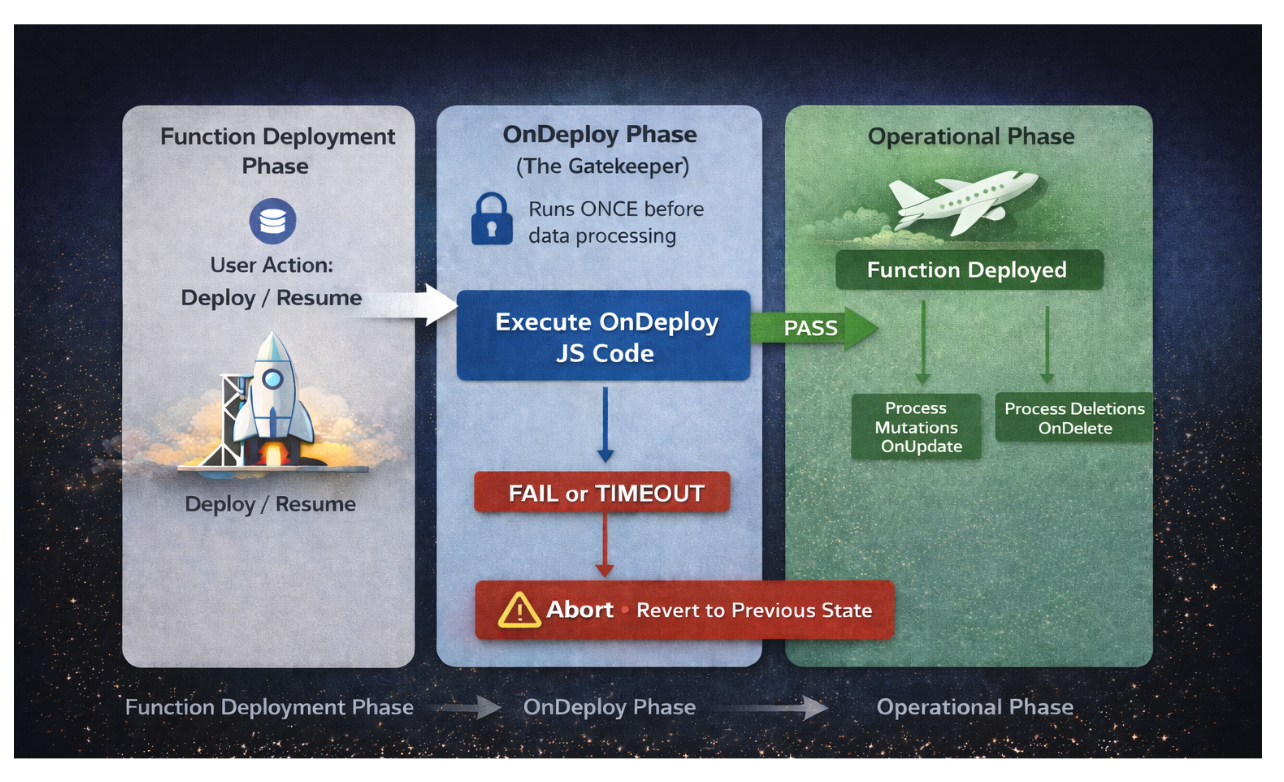
OnDeploy es un nuevo controlador de eventos que se ejecuta una vez cuando una función Eventing es:
- desplegadoo
- reanudado (después de haber estado en pausa)
Y, lo que es más importante, Se ejecuta antes de que se procesen las mutaciones..
Si piensas en tu función de Eventing como si fuera un avión:
- OnUpdate / OnDelete son las operaciones de vuelo.
- OnDeploy es la verificación previa al vuelo.
- Si la verificación previa al vuelo falla, el avión no sale de la pista.
Ese comportamiento de “guardián” es la clave: si OnDeploy Si falla, la función vuelve al estado anterior. – Protegiéndote de situaciones en las que “la lógica mal configurada se pone en marcha”.
Cómo funciona: OnDeploy(acción)
Si define un OnDeploy handler en el código de su función de eventos, se invocará una vez con un acción argumento.
|
1 2 3 |
function OnDeploy(action) { // your setup code } |
Dónde:
- razón de la acción es uno de:
- “implementar”: implementación de una nueva función de eventos
- “currículum”: reanudación después de una pausa
- retraso de la acción es:
- 0 en “implementar”
- la duración efectiva de la pausa (en milisegundos) en “currículum”
Dos barandales de seguridad importantes
- Tiempo de espera: OnDeploy debe terminar dentro del tiempo configurado Tiempo de espera de OnDeploy (por defecto: 60 segundos). Si se excede el tiempo de espera, no se permite continuar con la implementación de la función.
- Semántica de fallo rápido: Si OnDeploy genera un error o falla, no se procesan mutaciones y la función permanece en su estado anterior.
Por qué es importante
OnDeploy no es solo “algo que está bien tener”. Es un cambio en la forma en que se pueden diseñar las funciones de Eventing:
- Lo correcto primero: Asegúrate de que se cumplan los requisitos previos antes de ejecutar cualquier lógica de escritura.
- Menos texto repetitivo: Eliminar los trucos de coordinación de hilos de OnUpdate.
- Menor tiempo hasta la primera mutación correcta: Calienta las cachés una vez, no por cada subproceso.
| Aspecto | Sin OnDeploy | Con OnDeploy |
| Inicialización | En OnUpdate (propenso a las carreras) | Una vez, antes de las mutaciones |
| Coordinación de hilos | Requerido | No es necesario. |
| Garantía de configuración | Mejor esfuerzo | Garantía de fracaso rápido |
| Seguridad en la implementación | Posibles fallos silenciosos | Bloqueado si falla la configuración |
Casos prácticos
- Se necesita una tabla de consulta (precios, tipos de cambio, configuraciones) antes de que se permita cualquier mutación sobre datos incompletos.
- Quieres una tarea recurrente (una vez al día, una vez a la hora), pero no quieres “fingir” una mutación solo para iniciar una temporizador.
- Desea que la función se niegue a ejecutarse si faltan los requisitos previos, ya que es mejor bloquear la implementación que producir escrituras incorrectas de forma silenciosa.
Ejemplo 1: Calentar una tabla de búsqueda una vez y programar una actualización diaria.
Escenario
Enriquece los documentos con los precios de las acciones al cierre de la jornada. Los precios se obtienen diariamente de una API REST externa, se almacenan en un documento KV y se utilizan en todas las mutaciones posteriores.
Con OnDeploy, puedes realizar el calentamiento. una vez, garantizado, antes de que se procese cualquier mutación.
Código
|
1 2 3 4 5 6 7 8 9 10 11 12 13 14 15 16 17 18 19 20 21 22 23 24 25 26 27 28 29 30 31 32 33 34 35 36 37 |
// Timer Callback: refresh prices daily function RefreshPricesCallback(context) { log("Refreshing stock prices from API"); var response = curl("GET", stock_api_binding, {path: '/api/eod-prices'}); cache_bucket["lookup::eod_prices"] = response.body; // Re-schedule for tomorrow var tomorrow = new Date(); tomorrow.setSeconds(tomorrow.getSeconds() + 86400); // 24 hours createTimer(RefreshPricesCallback, tomorrow, "refresh_prices", {}); } // OnDeploy: initialize price cache once function OnDeploy(action) { log("OnDeploy: reason=" + action.reason); // Fetch initial prices from external API var response = curl("GET", stock_api_binding, {path: '/api/eod-prices'}); cache_bucket["lookup::eod_prices"] = response.body; // Schedule daily refresh timer var tomorrow = new Date(); tomorrow.setSeconds(tomorrow.getSeconds() + 86400); createTimer(RefreshPricesCallback, tomorrow, "refresh_prices", {}); log("Price cache initialized and refresh timer scheduled"); } // OnUpdate: enrich documents with cached prices function OnUpdate(doc, meta) { var prices = cache_bucket["lookup::eod_prices"]; doc.stockPrice = prices[doc.symbol]; doc.enrichedAt = new Date().toISOString(); dst_bucket[meta.id] = doc; } |
Las ventajas de esta lógica:
- Sin sorpresas con la “primera mutación que realiza la configuración”.
- Sin complejidad de hilos cruzados en el interior. OnUpdate.
- Toda mutación comienza cuando se dan las condiciones necesarias.
Ejemplo 2: Tratar de manera diferente la implementación y la reanudación con OnDeploy
Escenario
A veces, el trabajo no consiste en “programar el trabajo”, sino en Haz que tu función sea segura para iniciar (o reiniciar)..
Por ejemplo, su función Eventing podría depender de:
- datos externos (se pueden obtener mediante enlaces cURL en la primera implementación) y
- configuración almacenada en Couchbase (que debe recargarse después de una pausa)
Esto encaja perfectamente con OnDeploy, ya que le permite Comportamiento de las ramas basado en el ciclo de vida y asegúrate de que tu función esté lista. antes de procesar cualquier mutación.
Código
|
1 2 3 4 5 6 7 8 9 10 11 12 13 14 15 |
function OnDeploy(action) { log('OnDeploy triggered. Reason:', action.reason); switch (action.reason) { case 'deploy': // First-time deployment: fetch initial data needed by the function. log('Bootstrapping: Performing first-time setup...'); bootstrap_external_data(); break; case 'resume': // Function was paused and resumed: refresh any cached settings. log('Configuration changed. Reloading settings...'); reload_config_from_bucket(); break; } } |
Este patrón mantiene la lógica del ciclo de vida explícita y clara:
- Despliegue se convierte en el momento en que realizas el trabajo inicial de arranque.
- Currículum se convierte en el momento en que reconcilia/actualiza la configuración después de hacer una pausa (retraso de la acción te indica cuánto tiempo has estado en pausa).
- Sus controladores de mutación se mantienen enfocados en la lógica de negocio porque pueden asumir que los requisitos previos ya se cumplen.
Orientación sobre el diseño: qué no que hacer en OnDeploy
OnDeploy es potente, pero tiene limitaciones deliberadas:
- Guárdalo. corto y determinista.
- Evita los bucles de larga duración que podrían retrasar la implementación.
- Trátalo como código de infraestructura: valida los requisitos previos, inicializa el estado compartido, programa el trabajo y luego sal.
Conclusión
OnDeploy aporta un cambio fundamental a Couchbase Eventing: la capacidad de garantizar que se cumplan los requisitos previos antes de que se procese una sola mutación. En lugar de dispersar la lógica de inicialización entre los controladores de mutación o depender de trucos de calentamiento propensos a fallos, ahora dispone de una única comprobación previa explícita que se ejecuta una sola vez y falla rápidamente si algo sale mal.
¿El resultado? Código más limpio, implementaciones más seguras y la confianza de que tus funciones de Eventing se inician siempre en un estado óptimo.
¿Listo para probarlo? OnDeploy está disponible a partir de Couchbase Server 8.0 y versiones posteriores. Consulte la documentación que aparece a continuación para empezar y piense cuáles de sus funciones de Eventing actuales podrían beneficiarse de este patrón.
Referencias