
The problem: “Stateless” doesn’t mean “setup-free”
Couchbase Eventing is intentionally built like a short-running, stateless lambda: react to a mutation, do some work, exit. That model is clean – until your eventing function needs one-time housekeeping before it can safely process the first mutation.
Historically, developers worked around this by doing a “first mutation warmup” inside OnUpdate, often with CAS-safe writes or counters so only one thread would load a shared state. That approach can work, but it forces you to depend on a mutation just to establish prerequisites, and it pushes setup concerns into the hottest part of your code path: mutation processing.
This is exactly why there was a need for a mutationless initialization concept in Eventing – an explicit setup phase that can run without an initial mutation and make the function ready before any real work begins.
The idea: a pre-flight checklist
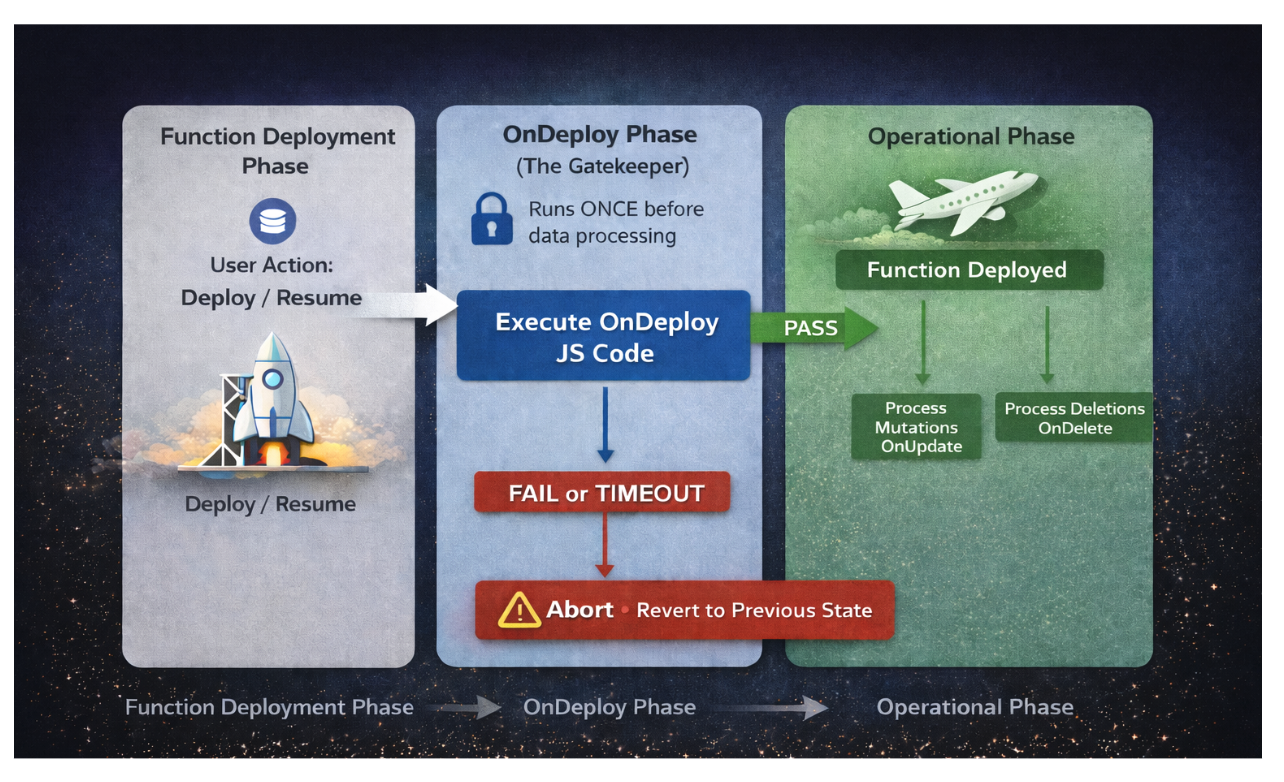
OnDeploy is a new Eventing handler that runs once when an Eventing function is:
- deployed, ou
- resumed (after being paused)
And, importantly, it runs before any mutations are processed.
If you think of your Eventing function like an aircraft:
- AoAtualizar / OnDelete are the flight operations.
- OnDeploy is the pre-flight check.
- If the pre-flight check fails, the plane doesn’t leave the runway.
That “gatekeeper” behavior is the key: se OnDeploy fails, the function reverts to the previous state – protecting you from “misconfigured logic goes live” scenarios.
How it works: OnDeploy(action)
If you define an OnDeploy handler in your eventing function code, it will be invoked once with an action argument.
|
1 2 3 |
função OnDeploy(action) { // your setup code } |
Where:
- action.reason is one of:
- “deploy”: a fresh eventing function deploy
- “resume”: resuming after a pause
- action.delay is:
- 0 ligado “deploy”
- the effective paused duration (milliseconds) on “resume”
Two important safety rails
- Timeout: OnDeploy must finish within the configured OnDeploy Timeout (default: 60 seconds). If it exceeds the timeout, the function deployment is not allowed to proceed.
- Fail-fast semantics: Se OnDeploy throws an error or fails, no mutations are processed and the function remains in its previous state.
Why this matters
OnDeploy isn’t just “nice to have.” It’s a shift in how you can design Eventing functions:
- Correctness first: Ensure prerequisites exist before any write logic runs.
- Less boilerplate: Remove thread coordination hacks from AoAtualizar.
- Faster time-to-first-correct-mutation: Warm caches once, not per thread.
| Aspecto | Without OnDeploy | With OnDeploy |
| Initialization | In OnUpdate (race-prone) | Once, before mutations |
| Thread coordination | Required | Not needed |
| Setup guarantee | Best effort | Fail-fast guarantee |
| Deployment safety | Silent failures possible | Blocked if setup fails |
Casos de uso
- You need a lookup table (prices, exchange rates, configs) before any mutation is allowed to act on incomplete data.
- You want a recurring job (once a day, once an hour) but you don’t want to “fake” a mutation just to start a timer.
- You want the function to refuse to run if prerequisites are missing – because it’s better to block deployment than to silently produce wrong writes.
Example 1: Warm a lookup table once, then schedule a daily refresh
Scenario
You enrich documents with end-of-day stock prices. Prices are fetched daily from an external REST API, stored in a KV document, and used by every mutation afterward.
With OnDeploy, you can do the warmup once, guaranteed, before any mutation is processed.
Code
|
1 2 3 4 5 6 7 8 9 10 11 12 13 14 15 16 17 18 19 20 21 22 23 24 25 26 27 28 29 30 31 32 33 34 35 36 37 |
// Timer Callback: refresh prices daily função RefreshPricesCallback(context) { log(“Refreshing stock prices from API”); variável response = curl(“GET”, stock_api_binding, {caminho: ‘/api/eod-prices’}); cache_bucket[“lookup::eod_prices”] = response.body; // Re-schedule for tomorrow variável tomorrow = novo Data(); tomorrow.setSeconds(tomorrow.getSeconds() + 86400); // 24 hours createTimer(RefreshPricesCallback, tomorrow, “refresh_prices”, {}); } // OnDeploy: initialize price cache once função OnDeploy(action) { log(“OnDeploy: reason=” + action.reason); // Fetch initial prices from external API variável response = curl(“GET”, stock_api_binding, {caminho: ‘/api/eod-prices’}); cache_bucket[“lookup::eod_prices”] = response.body; // Schedule daily refresh timer variável tomorrow = novo Data(); tomorrow.setSeconds(tomorrow.getSeconds() + 86400); createTimer(RefreshPricesCallback, tomorrow, “refresh_prices”, {}); log(“Price cache initialized and refresh timer scheduled”); } // OnUpdate: enrich documents with cached prices função AoAtualizar(doc, meta) { variável prices = cache_bucket[“lookup::eod_prices”]; doc.stockPrice = prices[doc.symbol]; doc.enrichedAt = novo Data().toISOString(); dst_bucket[meta.identidade] = doc; } |
The advantages with this logic:
- No “first mutation does setup” surprise.
- No cross-thread complexity inside AoAtualizar.
- Every mutation starts with the prerequisites in place.
Example 2: Treat deploy and resume differently with OnDeploy
Scenario
Sometimes the job isn’t to “schedule work” – it’s to make your function safe to start (or safe to restart).
For example, your Eventing function might depend on:
- external data (can be fetched via cURL bindings at first deployment), and
- configuration stored in Couchbase (that should be reloaded after a pause)
This is a great fit for OnDeploy because it lets you branch behavior based on lifecycle and ensure your function is ready before processing any mutations.
Code
|
1 2 3 4 5 6 7 8 9 10 11 12 13 14 15 |
função OnDeploy(action) { log(‘OnDeploy triggered. Reason:’, action.reason); switch (action.reason) { case ‘deploy’: // First-time deployment: fetch initial data needed by the function. log(‘Bootstrapping: Performing first-time setup…’); bootstrap_external_data(); break; case ‘resume’: // Function was paused and resumed: refresh any cached settings. log(‘Configuration changed. Reloading settings…’); reload_config_from_bucket(); break; } } |
This pattern keeps lifecycle logic explicit and clean:
- Implantar becomes the moment you do one-time bootstrap work.
- Resume becomes the moment you reconcile/refresh config after pausing (action.delay tells you how long you were paused).
- Your mutation handlers stay focused on business logic because they can assume that the prerequisites are already satisfied.
Design guidance: what não to do in OnDeploy
OnDeploy is powerful, but it is deliberately constrained:
- Keep it short e deterministic.
- Avoid long-running loops that could delay deployment.
- Treat it like infrastructure code: validate prerequisites, initialize shared state, schedule work, then exit.
Conclusão
OnDeploy brings a fundamental shift to Couchbase Eventing: the ability to guarantee prerequisites are met before a single mutation is processed. Instead of scattering initialization logic across mutation handlers or relying on race-prone warmup hacks, you now have a single, explicit pre-flight check that runs once and fails fast if anything goes wrong.
The result? Cleaner code, safer deployments, and confidence that your Eventing functions start in a known-good state every time.
Ready to try it? OnDeploy is available from Couchbase Server 8.0 and above. Check out the documentation below to get started, and consider which of your existing Eventing functions could benefit from this pattern.
References

Deixe um comentário
Você precisa fazer o login para publicar um comentário.