
Couchbase Capella tiene una nueva API de datos. Si te preguntas por qué es importante, ya que ya tenemos SDK, la respuesta es tratado en nuestra documentación - pero aquí hay una comparación rápida:
- API de datos: Independiente de HTTP, lenguaje y tiempo de ejecución; fácil integración sin dependencias; además de compensaciones en latencia, rendimiento y características de resiliencia.
- SDK: Biblioteca nativa, funciones más completas, mejor rendimiento, más adecuada para cargas de trabajo en las que la escala y la resiliencia son importantes.
Algunos casos de uso:
- Funciones para FaaS/sin servidor: AWS Lambda, Funciones de Google Cloud, Funciones de Azure, Funciones de Netlify
- Integraciones SaaS: Zapier, IFTTT, Relay, Make, N8N, Flowwise, Node-RED
- Scripting: Jenkins Pipeline o GitHub Actions
- Herramientas internas: Panel de control, Grafana
Todos estos casos de uso se pueden implementar, pero requerirían el despliegue y la gestión de su propia API respaldada por Couchbase SDK, o bien garantizar que los SDK estuvieran disponibles donde se ejecutaba el código. - lo cual en algunos casos es imposible.
Con esto, veamos cómo funciona todo esto en la práctica con un ejemplo de caso de uso.
Node-RED Ejemplo
Node-RED permite la programación con poco código para aplicaciones basadas en eventos. Es visual, sencillo, ligero y funciona en una amplia gama de plataformas de hardware. Sin embargo, aunque admite el uso de módulos externos, algunos - especialmente aquellas que dependen de bibliotecas nativas, como nuestro SDK de Node, pueden resultar difíciles de usar. Esto supone una excusa perfecta para probar la nueva API de datos.
A continuación se muestra un caso de uso sencillo que intenta extraer datos de Luma para saber qué está pasando en París. Puede ver los resultados a continuación. Tenga en cuenta que el flujo de nivel superior es la ingesta, y el segundo es la consulta de depuración.
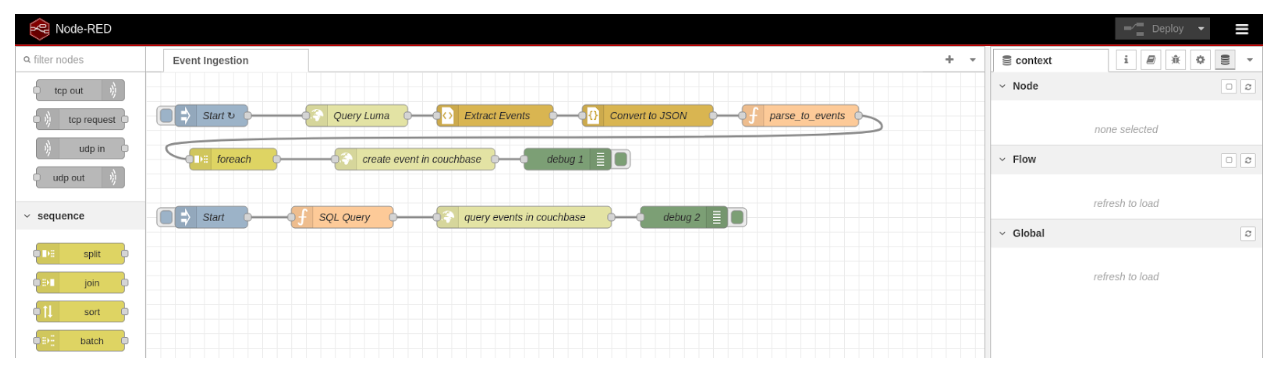
Flujo de ingestión
- Inicio: Un nodo de ingesta que activa esto cada 72 horas.
- Consulta luma: Una solicitud HTTP a https://luma.com/paris.
- Extraer eventos: Un analizador HTML para recuperar la lista de eventos como cadena.
- Convertir a JSON: Un analizador JSON para convertir esta cadena en un objeto JSON.
- Analizar_a_eventos: Una función que toma este objeto y crea uno nuevo con solo los datos necesarios.
El código tiene el siguiente aspecto:
|
1 2 |
var newMsg = { payload: msg.payload[0].content.props.pageProps.initialData.data.events }; return newMsg; |
- forEach: Una tarea Split que divide el objeto JSON de eventos del paso anterior.
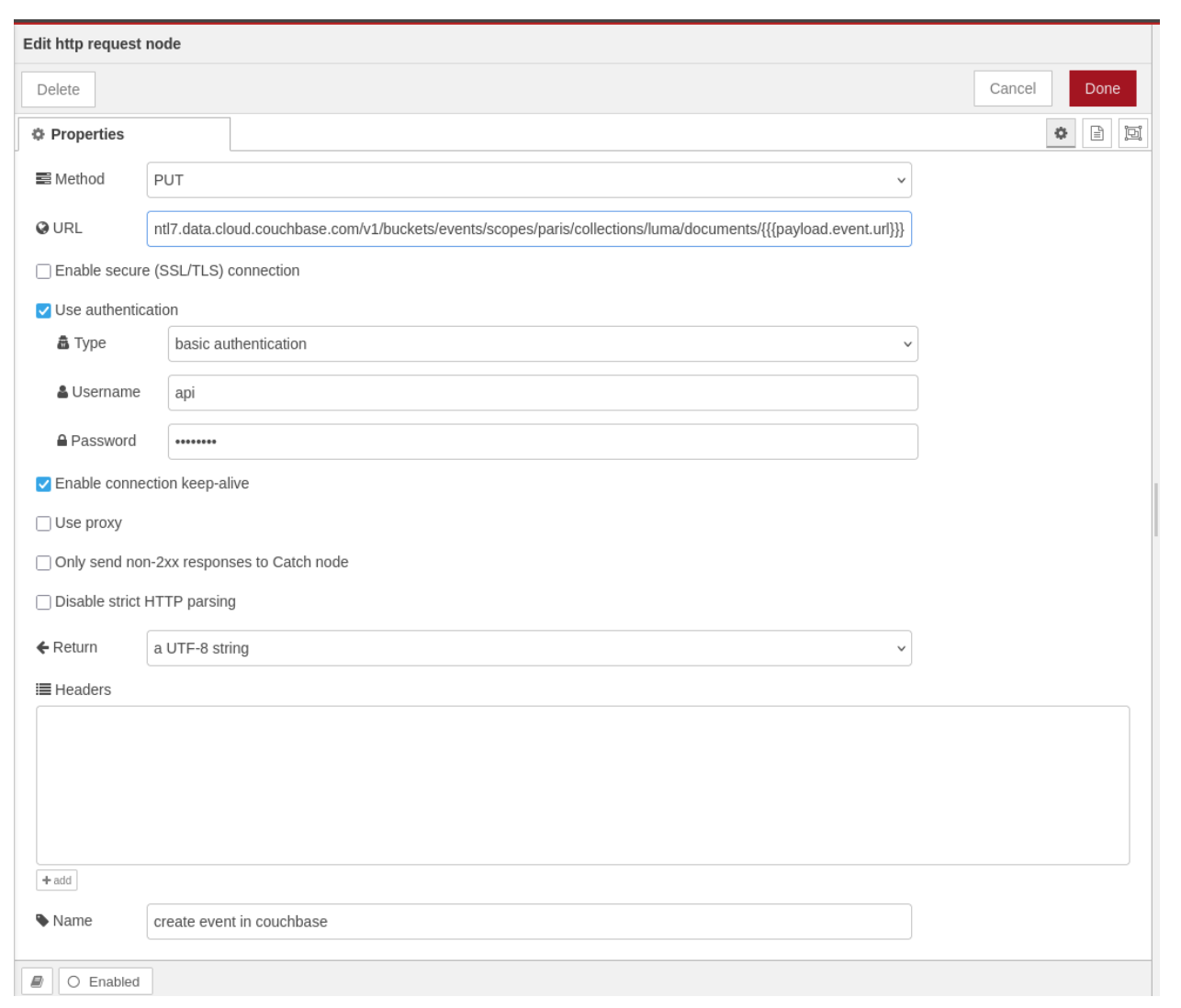
- Crear evento en Couchbase: Se envía una solicitud HTTP al API de datos de Capella. El contenido de la carga útil del paso anterior será el cuerpo de la solicitud. Puede utilizar plantillas Mustache para el campo URL. Aquí tiene una captura de pantalla del paso real; es como ejecutar este comando curl:
|
1 2 3 |
curl -X PUT --user api:**** -H 'Content-Type: application/json' -d '{"event":"data",...}' https://snzd9hz3unnntl7.data.cloud.couchbase.com/v1/buckets/events/scopes/paris/collections/luma/documents/fd5hds83 |
- Depuración 1: Un paso de depuración para ver los resultados de todas las solicitudes.
Flujo de depuración
- Inicio: Un nodo de ingesta que debe activarse manualmente.
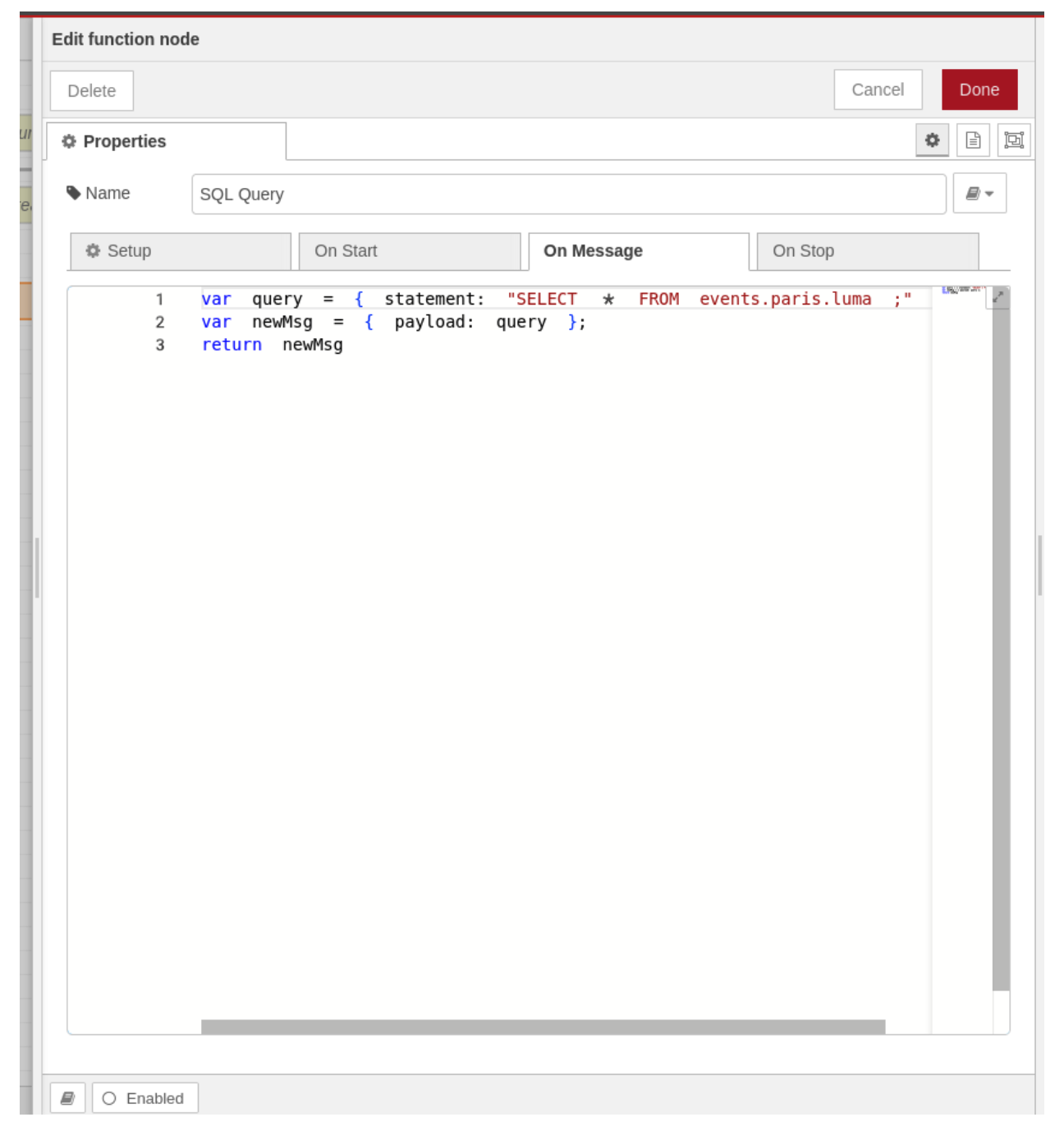
- Consulta SQL: Una función que devuelve un objeto JSON que representa la consulta que se va a ejecutar.
|
1 2 3 |
var query = { statement: "SELECT * FROM events.paris.luma ;" } var newMsg = { payload: query }; return newMsg |
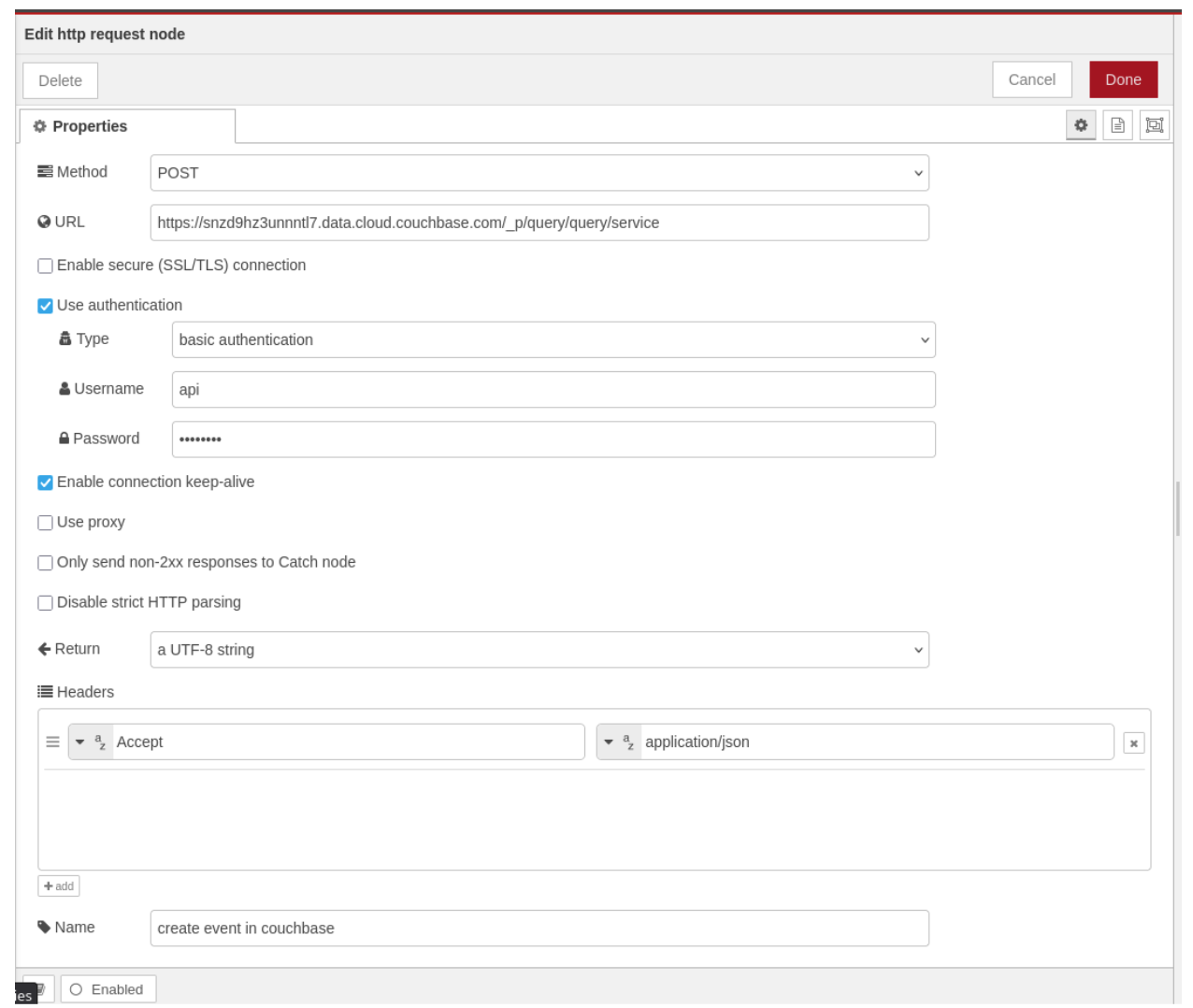
- Consultar eventos en Couchbase: Una solicitud HTTP que ejecuta la consulta dada. Se vería como el siguiente comando curl:
|
1 2 3 |
curl -X POST --user api:**** -H 'Content-Type: application/json' -d '{ statement: "SELECT * FROM events.paris.luma ;" }' https://snzd9hz3unnntl7.data.cloud.couchbase.com/_p/query/query/service |
Pruébelo usted mismo
Node-RED se puede ejecutar fácilmente en su máquina con docker run -it -p 1880:1880 --name mynodered nodered/node-red
Luego ve a http://127.0.0.1:1880/ y siga las instrucciones. Puede crear los nodos manualmente o importar este flujo con esta exportación JSON:
|
1 2 3 4 5 6 7 8 9 10 11 12 13 14 15 16 17 18 19 20 21 22 23 24 25 26 27 28 29 30 31 32 33 34 35 36 37 38 39 40 41 42 43 44 45 46 47 48 49 50 51 52 53 54 55 56 57 58 59 60 61 62 63 64 65 66 67 68 69 70 71 72 73 74 75 76 77 78 79 80 81 82 83 84 85 86 87 88 89 90 91 92 93 94 95 96 97 98 99 100 101 102 103 104 105 106 107 108 109 110 111 112 113 114 115 116 117 118 119 120 121 122 123 124 125 126 127 128 129 130 131 132 133 134 135 136 137 138 139 140 141 142 143 144 145 146 147 148 149 150 151 152 153 154 155 156 157 158 159 160 161 162 163 164 165 166 167 168 169 170 171 172 173 174 175 176 177 178 179 180 181 182 183 184 185 186 187 188 189 190 191 192 193 194 195 196 197 198 199 200 201 202 203 204 205 206 207 208 209 210 211 212 213 214 215 216 217 218 219 220 221 222 223 224 225 226 227 228 229 230 231 232 233 234 235 236 237 238 239 240 241 242 243 244 245 246 247 248 249 250 251 252 253 254 255 256 257 258 259 260 261 262 263 264 265 266 267 268 269 270 271 272 273 274 275 276 277 278 279 280 281 282 283 284 285 286 287 |
[ { "id":"f6f2187d.f17ca8", "type":"tab", "label":"Event Ingestion", "disabled":false, "info":"" }, { "id":"5039574f789798bf", "type":"inject", "z":"f6f2187d.f17ca8", "name":"Start", "props":[ { "p":"payload" }, { "p":"topic", "vt":"str" } ], "repeat":"259200", "crontab":"", "once":false, "onceDelay":0.1, "topic":"", "payload":"", "payloadType":"date", "x":90, "y":60, "wires":[ [ "a7e82076addaf2bf" ] ] }, { "id":"65dcb4aeead12a54", "type":"debug", "z":"f6f2187d.f17ca8", "name":"debug 1", "active":true, "tosidebar":true, "console":false, "tostatus":false, "complete":"payload", "targetType":"msg", "statusVal":"", "statusType":"auto", "x":580, "y":120, "wires":[ ] }, { "id":"a7e82076addaf2bf", "type":"http request", "z":"f6f2187d.f17ca8", "name":"Query Luma", "method":"GET", "ret":"txt", "paytoqs":"ignore", "url":"https://luma.com/paris", "tls":"", "persist":false, "proxy":"", "insecureHTTPParser":false, "authType":"", "senderr":false, "headers":[ ], "x":290, "y":60, "wires":[ [ "c463b094ea88ec73" ] ] }, { "id":"c463b094ea88ec73", "type":"html", "z":"f6f2187d.f17ca8", "name":"Extract Events", "property":"payload", "outproperty":"payload", "tag":"#__NEXT_DATA__", "ret":"compl", "as":"single", "chr":"content", "x":480, "y":60, "wires":[ [ "3be4c6d9e4554672" ] ] }, { "id":"3be4c6d9e4554672", "type":"json", "z":"f6f2187d.f17ca8", "name":"Convert to JSON", "property":"payload[0].content", "action":"obj", "pretty":true, "x":690, "y":60, "wires":[ [ "9b66605f179021d0" ] ] }, { "id":"9b66605f179021d0", "type":"function", "z":"f6f2187d.f17ca8", "name":"parse_to_events", "func":"var newMsg = { payload: msg.payload[0].content.props.pageProps.initialData.data.events };\nreturn newMsg;", "outputs":1, "timeout":0, "noerr":0, "initialize":"", "finalize":"", "libs":[ ], "x":900, "y":60, "wires":[ [ "1924a3c26b9520bd" ] ] }, { "id":"1924a3c26b9520bd", "type":"split", "z":"f6f2187d.f17ca8", "name":"foreach", "splt":"1", "spltType":"len", "arraySplt":1, "arraySpltType":"len", "stream":true, "addname":"", "property":"payload", "x":120, "y":120, "wires":[ [ "7e3a02b180875fed" ] ] }, { "id":"7e3a02b180875fed", "type":"http request", "z":"f6f2187d.f17ca8", "name":"create event in couchbase", "method":"PUT", "ret":"txt", "paytoqs":"query", "url":"https://snzd9hz3unnntl7.data.cloud.couchbase.com/v1/buckets/events/scopes/paris/collections/luma/documents/{{{payload.event.url}}}", "tls":"", "persist":true, "proxy":"", "insecureHTTPParser":false, "authType":"basic", "senderr":false, "headers":[ ], "x":370, "y":120, "wires":[ [ "65dcb4aeead12a54" ] ] }, { "id":"f309559bde533ab6", "type":"inject", "z":"f6f2187d.f17ca8", "name":"Start", "props":[ { "p":"payload" }, { "p":"topic", "vt":"str" } ], "repeat":"", "crontab":"", "once":false, "onceDelay":0.1, "topic":"", "payload":"", "payloadType":"date", "x":90, "y":200, "wires":[ [ "49244e9d100517aa" ] ] }, { "id":"7945b9a86fa49919", "type":"http request", "z":"f6f2187d.f17ca8", "name":"query events in couchbase", "method":"POST", "ret":"txt", "paytoqs":"query", "url":"https://snzd9hz3unnntl7.data.cloud.couchbase.com/_p/query/query/service", "tls":"", "persist":true, "proxy":"", "insecureHTTPParser":false, "authType":"basic", "senderr":false, "headers":[ { "keyType":"other", "keyValue":"Accept", "valueType":"other", "valueValue":"application/json" } ], "x":520, "y":200, "wires":[ [ "24b1dd899b6d2ef1" ] ] }, { "id":"24b1dd899b6d2ef1", "type":"debug", "z":"f6f2187d.f17ca8", "name":"debug 2", "active":true, "tosidebar":true, "console":false, "tostatus":false, "complete":"payload", "targetType":"msg", "statusVal":"", "statusType":"auto", "x":740, "y":200, "wires":[ ] }, { "id":"49244e9d100517aa", "type":"function", "z":"f6f2187d.f17ca8", "name":"SQL Query", "func":"var query = { statement: \"SELECT * FROM events.paris.luma ;\" }\nvar newMsg = { payload: query };\nreturn newMsg", "outputs":1, "timeout":0, "noerr":0, "initialize":"", "finalize":"", "libs":[ ], "x":270, "y":200, "wires":[ [ "7945b9a86fa49919" ] ] } ] |
Necesitarás una instancia de Capella con la API de datos habilitada. Está disponible en nuestro nivel gratuito y es fácil de probar. Solo tienes que ir a nube.couchbase.com, abra su clúster y vaya a la pestaña Conectar. A continuación, haga clic en Habilitar API de datos. Esto puede tardar hasta 20 minutos en estar listo, así que mientras tanto puedes seguir las instrucciones sobre direcciones IP y credenciales.
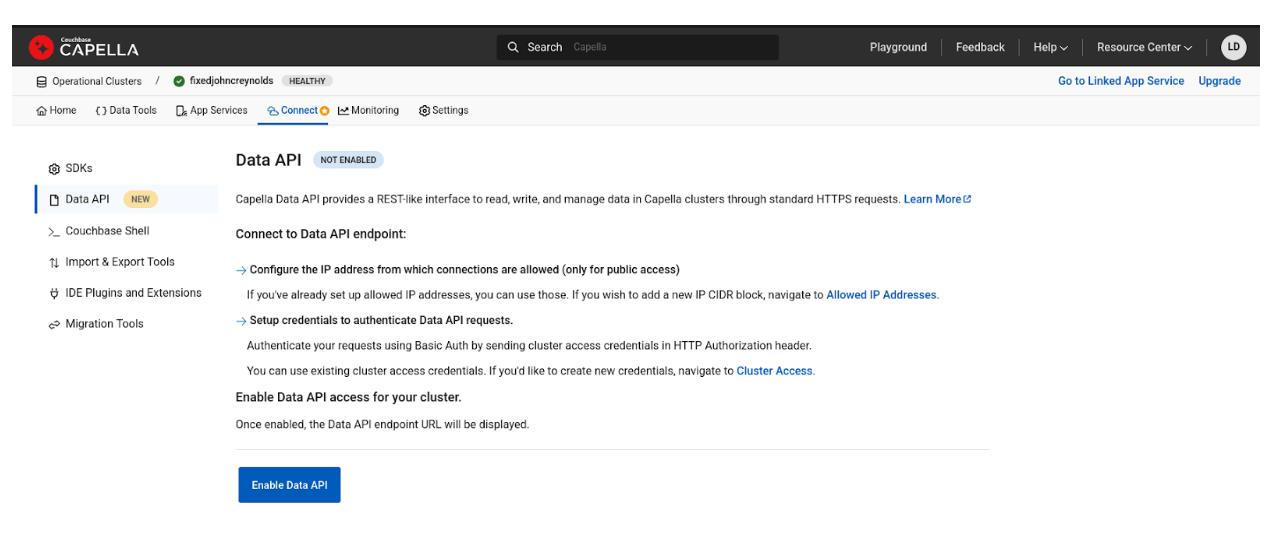 Ahora ya tiene todo lo necesario para utilizar la API de datos, concretamente el punto final URL de la API. También puede acceder a la Documentación de referencia para más información.
Esperamos que disfrutes de esta nueva función de Capella y de todos los casos de uso que ahora están a tu disposición.


