
카우치베이스는 성능을 매우 중요하게 생각하며, 신제품인 카우치베이스 오토노머스 오퍼레이터 1.0을 출시하면서 고객이 엔터프라이즈급으로 프로덕션에 바로 사용할 수 있도록 하고자 했습니다.
이 블로그 포스팅에서는 자율 운영자를 사용하여 쿠버네티스 플랫폼에 배포하기 위해 카우치베이스 서버 5.5에서 YCSB 성능 벤치마크 테스트를 실행한 자세한 성능 결과에 대해 설명합니다. 쿠버네티스에서 데이터베이스를 운영하려는 기업의 큰 관심사 중 하나는 '성능'입니다.
이 문서에서는 다음과 같은 두 가지 워크로드를 간략하게 비교합니다. YCSB A & E 카우치베이스 서버 5.5를 통한 쿠버네티스 지원 대 베어메탈.
YCSB 워크로드 A: 이 워크로드는 읽기와 쓰기가 50/50으로 혼합되어 있습니다. 애플리케이션의 예로 최근 작업을 기록하는 세션 저장소를 들 수 있습니다.
워크로드 E: 단거리: 이 워크로드에서는 개별 레코드 대신 짧은 범위의 레코드가 쿼리됩니다. 적용 예: 스레드 대화, 각 스캔은 지정된 스레드의 게시글을 대상으로 합니다(스레드 ID별로 클러스터링된 것으로 가정).
일반적으로 Kubernetes에서 Couchbase Cluster를 실행할 때 성능 저하가 크게 나타나지 않았습니다, 워크로드 A는 베어메탈과 비교했을 때 동등한 성능을 보였고 워크로드 E는 약 10% 미만의 성능 저하를 보였습니다.
설정:
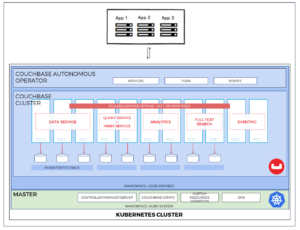
설정을 위해 아래에 설명된 대로 Operator 배포를 사용하여 Couchbase를 설치했습니다. 설정에 대한 자세한 내용은 다음을 참조하세요. 여기
파일:
운영자 배포: deployment.yaml(부록 참조)
카우치베이스 배포: 카우치베이스-클러스터-심플-셀렉터.yaml(부록 참조)
클라이언트/워크로드 생성기 배포: pillowfight-ycsb.yaml(부록 참조) (dockerhub의 공식 pillowfight 도커 이미지와 그 위에 자바 및 YCSB를 수동으로 설치)
하드웨어:
7개의 서버
서버당 CPU 24개 x 64GB RAM
카우치베이스 설정
서버 4개: 데이터 노드 2개, 인덱스+쿼리 노드 2개
데이터 서비스를 위한 40GB RAM 할당량
인덱스 서비스를 위한 40GB RAM 할당량
데이터/버킷 복제본 1개
기본 인덱스 복제본 1개
테스트:
YCSB 워크로드A 및 워크로드E
10M 문서
7개의 서버에서 새로운 빈 k8s 클러스터가 초기화된 후의 워크플로:
|
1 2 3 4 5 6 7 8 9 |
# assign labels to the nodes so all services/pods will be assigned to right servers: kubectl label nodes arke06-sa09 type=power kubectl label nodes arke07-sa10 type=client kubectl label nodes ark08-sa11 type=client kubectl label nodes arke01-sa04 type=kv kubectl label nodes arke00-sa03 type=kv kubectl label nodes arke02-sa05 type=kv kubectl label nodes arke03-sa06 type=kv |
|
1 2 3 4 5 6 7 8 9 10 11 12 13 14 15 16 17 18 19 20 21 22 23 24 25 26 27 28 29 30 31 32 33 34 35 36 37 38 39 40 41 42 43 44 45 46 47 48 49 |
#deploy Operator: kubectl create -f deployment.yaml #deploy Couchbase kubectl create -f couchbase-cluster-simple-selector.yaml #deploy Client(s): kubectl create -f pillowfight-ycsb.yaml I ran my tests directly from the client node by logging into the docker image of the client pod: docker exec -it --user root <pillowfight-yscb container id> bash And installing YCSB environment there manually: apt-get upgrade apt-get update apt-get install -y software-properties-common apt-get install python sudo apt-add-repository ppa:webupd8team/java sudo apt-get update sudo apt-get install oracle-java8-installer export JAVA_HOME=/usr/lib/jvm/java-8-oracle cd /opt wget https://download.nextag.com/apache/maven/maven-3/3.5.4/binaries/apache-maven-3.5.4-bin.tar.gz sudo tar -xvzf apache-maven-3.5.4-bin.tar.gz export M2_HOME="/opt/apache-maven-3.5.4" export PATH=$PATH:/opt/apache-maven-3.5.4/bin sudo update-alternatives --install "/usr/bin/mvn" "mvn" "/opt/apache-maven-3.5.4/bin/mvn" 0 sudo update-alternatives --set mvn /opt/apache-maven-3.5.4/bin/mvn git clone https://github.com/couchbaselabs/YCSB |
워크로드 실행하기:
|
1 2 3 4 5 6 7 8 9 10 11 |
Examples of YCSB commands used in this exercise: Workload A Load: ./bin/ycsb load couchbase2 -P workloads/workloade -p couchbase.password=password -p couchbase.host=10.44.0.2 -p couchbase.bucket=default -p couchbase.upsert=true -p couchbase.epoll=true -p couchbase.boost=48 -p couchbase.persistTo=0 -p couchbase.replicateTo=0 -p couchbase.sslMode=none -p writeallfields=true -p recordcount=10000000 -threads 50 -p maxexecutiontime=3600 -p operationcount=1000000000 Run: ./bin/ycsb run couchbase2 -P workloads/workloada -p couchbase.password=password -p couchbase.host=10.44.0.2 -p couchbase.bucket=default -p couchbase.upsert=true -p couchbase.epoll=true -p couchbase.boost=48 -p couchbase.persistTo=0 -p couchbase.replicateTo=0 -p couchbase.sslMode=none -p writeallfields=true -p recordcount=10000000 -threads 50 -p operationcount=1000000000 -p maxexecutiontime=600 -p exportfile=ycsb_workloadA_22vCPU.log |
테스트 결과:
| Env | 직접 설정 | 쿠버네티스 포드 리소스 | 테스트 | 베어 메탈 | Kubernetes | 델타 |
| 환경 1 | 22 vCPU, 48GB RAM
(사용 가능한 CPU 코어 및 RAM은 OS 코어 수준에서 설정됨) |
로 제한합니다:
CPU: 22000m = ~22vCPU mem: 48GB 모든 파드는 전용 노드에 있습니다. |
워크로드A
50/50 가져오기/삽입 |
처리량: 194,158 요청/초
CPU 사용량 평균: 전체 22개 코어 중 86% |
처리량: 192,190 요청/초
CPU 사용량 평균: 94%의 CPU 할당량 |
- 1% |
| 환경 2 | 16 vCPU, 48GB RAM
(사용 가능한 CPU 코어 및 RAM은 OS 코어 수준에서 설정됨) |
로 제한합니다:
CPU: 16000m = ~16vCPU mem: 48GB 모든 파드는 전용 노드에 있습니다. |
워크로드A
50/50 가져오기/삽입 |
처리량: 141,909 요청/초
CPU 사용량 평균: 전체 16개 코어의 89% |
처리량: 145,430 요청/초
CPU 사용량 평균: CPU 할당량의 100% |
+ 2.5% |
|
1 2 3 4 5 6 7 8 9 |
Workload E: Load: ./bin/ycsb load couchbase2 -P workloads/workloade -p couchbase.password=password -p couchbase.host=10.44.0.2 -p couchbase.bucket=default -p couchbase.upsert=true -p couchbase.epoll=true -p couchbase.boost=48 -p couchbase.persistTo=0 -p couchbase.replicateTo=0 -p couchbase.sslMode=none -p writeallfields=true -p recordcount=10000000 -threads 50 -p maxexecutiontime=3600 -p operationcount=1000000000 Run: ./bin/ycsb run couchbase2 -P workloads/workloade -p couchbase.password=password -p couchbase.host=10.44.0.2 -p couchbase.bucket=default -p couchbase.upsert=true -p couchbase.epoll=true -p couchbase.boost=48 -p couchbase.persistTo=0 -p couchbase.replicateTo=0 -p couchbase.sslMode=none -p writeallfields=true -p recordcount=10000000 -threads 50 -p operationcount=1000000000 -p maxexecutiontime=600 -p exportfile=ycsb_workloadE_22vCPU.log |
| Env | 직접 설정 | 쿠버네티스 포드 리소스 | 테스트 | 베어 메탈 | Kubernetes | 델타 |
| 환경 1 | 22 vCPU, 48GB RAM
(사용 가능한 CPU 코어 및 RAM은 OS 코어 수준에서 설정됨) |
로 제한합니다:
CPU: 22000m = ~22vCPU mem: 48GB 모든 파드는 전용 노드에 있습니다. |
워크로드E
95/5 스캔/삽입 |
처리량: 15,823 요청/초
CPU 사용량 평균: 전체 22개 코어 중 85% |
처리량: 14,281 요청/초
CPU 사용량 평균: 87%의 CPU 할당량 |
- 9.7% |
| 환경 2 | 16 vCPU, 48GB RAM
(사용 가능한 CPU 코어 및 RAM은 OS 코어 수준에서 설정됨) |
로 제한합니다:
CPU: 16000m = ~16vCPU mem: 48GB 모든 파드는 전용 노드에 있습니다. |
워크로드E
95/5 스캔/삽입 |
처리량: 13,014 요청/초
CPU 사용량 평균: 전체 16개 코어 중 91% |
처리량: 12,579 요청/초
CPU 사용량 평균: CPU 할당량의 100% |
- 3.3% |
결론:
Couchbase Server 5.5는 자율 운영자를 통해 Kubernetes에 배포할 수 있는 프로덕션 준비가 완료되었습니다. 베어메탈에서 실행하는 것과 비슷한 Kubernetes에서의 Couchbase Server 5.5의 성능. 쿠버네티스 플랫폼에서 카우치베이스 서버를 실행할 때 성능 저하가 거의 없습니다. 결과를 살펴보면 워크로드 A는 베어메탈과 비교했을 때 동등한 성능을 보였고 워크로드 E는 약 10% 미만의 성능 저하를 보였습니다.
참조:
- YCSB 워크로드 https://github.com/brianfrankcooper/YCSB/wiki/Core-Workloads
- 카우치베이스 쿠버네티스 페이지 https://www.couchbase.com/products/cloud/kubernetes
- 카우치베이스 자율 운영자 다운로드 https://www.couchbase.com/downloads
- 카우치베이스 운영자 소개 https://www.couchbase.com/blog/couchbase-autonomous-operator-1-0-for-kubernetes-and-openshift/
부록
내 deployment.yaml 파일
|
1 2 3 4 5 6 7 8 9 10 11 12 13 14 15 16 17 18 19 20 21 22 23 24 25 26 27 28 29 30 31 32 33 34 35 36 37 38 39 40 41 42 43 44 45 46 47 48 49 50 51 52 53 54 55 56 57 58 59 60 61 62 63 64 65 66 67 68 69 70 71 72 73 74 75 76 77 78 79 80 81 |
apiVersion: extensions/v1beta1 kind: Deployment metadata: name: couchbase-operator spec: replicas: 1 template: metadata: labels: name: couchbase-operator spec: nodeSelector: type: power containers: - name: couchbase-operator image: couchbase/couchbase-operator-internal:1.0.0-292 command: - couchbase-operator # Remove the arguments section if you are installing the CRD manually args: - -create-crd - -enable-upgrades=false env: - name: MY_POD_NAMESPACE valueFrom: fieldRef: fieldPath: metadata.namespace - name: MY_POD_NAME valueFrom: fieldRef: fieldPath: metadata.name ports: - name: readiness-port containerPort: 8080 readinessProbe: httpGet: path: /readyz port: readiness-port initialDelaySeconds: 3 periodSeconds: 3 failureThreshold: 19 |
내 couchbase-cluster-simple-selector.yaml 파일
|
1 2 3 4 5 6 7 8 9 10 11 12 13 14 15 16 17 18 19 20 21 22 23 24 25 26 27 28 29 30 31 32 33 34 35 36 37 38 39 40 41 42 43 44 45 46 47 48 49 50 51 52 53 54 55 56 57 58 59 60 61 62 63 64 65 66 67 68 69 70 71 72 73 74 75 76 77 78 79 80 81 82 83 84 85 86 87 88 89 90 91 92 93 94 95 96 97 98 99 100 101 102 103 104 105 106 107 108 109 110 111 112 113 114 115 116 117 118 119 120 121 122 123 124 125 126 |
apiVersion: couchbase.database.couchbase.com/v1 kind: CouchbaseCluster metadata: name: cb-example spec: baseImage: couchbase/server version: enterprise-5.5.0 authSecret: cb-example-auth exposeAdminConsole: true antiAffinity: true exposedFeatures: - xdcr cluster: dataServiceMemoryQuota: 40000 indexServiceMemoryQuota: 40000 searchServiceMemoryQuota: 1000 eventingServiceMemoryQuota: 1024 analyticsServiceMemoryQuota: 1024 indexStorageSetting: memory_optimized autoFailoverTimeout: 120 autoFailoverMaxCount: 3 autoFailoverOnDataDiskIssues: true autoFailoverOnDataDiskIssuesTimePeriod: 120 autoFailoverServerGroup: false buckets: - name: default type: couchbase memoryQuota: 20000 replicas: 1 ioPriority: high evictionPolicy: fullEviction conflictResolution: seqno enableFlush: true enableIndexReplica: false servers: - size: 2 name: data services: - data pod: nodeSelector: type: kv resources: limits: cpu: 22000m memory: 48Gi requests: cpu: 22000m memory: 48Gi - size: 2 name: qi services: - index - query pod: nodeSelector: type: kv resources: limits: cpu: 22000m memory: 48Gi requests: cpu: 22000m memory: 48Gi |
내 pillowfight-ycsb.yaml 파일
|
1 2 3 4 5 6 7 8 9 10 11 12 13 14 15 16 17 18 19 20 21 22 23 24 25 26 27 28 29 30 31 |
apiVersion: batch/v1 kind: Job metadata: name: pillowfight spec: template: metadata: name: pillowfight spec: containers: - name: pillowfight image: sequoiatools/pillowfight:v5.0.1 command: ["sh", "-c", "tail -f /dev/null"] restartPolicy: Never nodeSelector: type: client |


라주에게
멋진 블로그입니다.
따라하기 쉽도록 조금만 업데이트해 주세요.
두 개의 댓글이 있습니다:
Comment#1:
시콰이아툴즈/필로우파이트:v5.0.1은 코어오스를 기반으로 만들어졌기 때문에 패키지 관리자가 특별히 apt-get이 없는 것 같습니다.
댓글#2
오라클 자바 라이선스 계약이 일부 변경되었으므로 아래 단계는 현재 작동하지 않습니다.
sudo apt-add-re포지토리 ppa:webupd8team/java
-고마워요
JDK 11을 설치했습니다.
"-p couchbase.epoll=true"를 사용할 때 아래 오류가 발생했습니다.
워크로드 로드 중...
테스트 시작.
최대 실행 시간은 다음과 같이 지정됩니다: 120초
경고: 불법 반사 액세스 작업이 발생했습니다.
경고: java.nio.Buffer.address 필드에 대한 com.couchbase.client.deps.io.netty.util.internal.PlatformDependent0(파일:/opt/ycsb-couchbase2-binding-0.15.0/lib/core-io-1.3.1.jar)의 불법 반사적 액세스입니다.
경고: 이 문제를 com.couchbase.client.deps.io.netty.util.internal.PlatformDependent0의 유지 관리자에게 보고해 주세요.
경고: 추가 불법 반사 액세스 작업에 대한 경고를 활성화하려면 -illegal-access=warn을 사용합니다.
경고: 향후 릴리스에서는 모든 불법 액세스 작업이 거부됩니다.
Aug 23, 2019 9:15:34 AM com.couchbase.client.deps.io.netty.util.internal.PlatformDependent
INFO: 플랫폼에서 직접 버퍼에 안정적으로 액세스하기 위한 완전한 로우레벨 API를 제공하지 않습니다. 명시적으로 요청하지 않는 한 잠재적인 시스템 불안정성을 피하기 위해 항상 힙 버퍼가 선호됩니다.
com.yahoo.ycsb.DBException: 카우치베이스 버킷에 연결할 수 없습니다.
에서 com.yahoo.ycsb.db.couchbase2.Couchbase2Client.init(Couchbase2Client.java:208)
에서 com.yahoo.ycsb.DBWrapper.init(DBWrapper.java:86)
에서 com.yahoo.ycsb.ClientThread.run(Client.java:424)
에서 java.base/java.lang.Thread.run(Thread.java:834)
원인: java.lang.IllegalStateException: 하위 이벤트 루프를 만들지 못했습니다.
에서 com.couchbase.client.deps.io.netty.util.concurrent.MultithreadEventExecutorGroup.(MultithreadEventExecutorGroup.java:68)
에서 com.couchbase.client.deps.io.netty.channel.MultithreadEventLoopGroup.(MultithreadEventLoopGroup.java:49)
에서 com.couchbase.client.deps.io.netty.channel.epoll.EpollEventLoopGroup.(EpollEventLoopGroup.java:91)
에서 com.couchbase.client.deps.io.netty.channel.epoll.EpollEventLoopGroup.(EpollEventLoopGroup.java:67)
에서 com.yahoo.ycsb.db.couchbase2.Couchbase2Client.init(Couchbase2Client.java:195)
... 3개 더 보기
원인: java.lang.NullPointerException
에서 com.couchbase.client.deps.io.netty.util.internal.PlatformDependent0.allocateMemory(PlatformDependent0.java:330)
에서 com.couchbase.client.deps.io.netty.util.internal.PlatformDependent.allocateMemory(PlatformDependent.java:210)
에서 com.couchbase.client.deps.io.netty.channel.epoll.IovArray.(IovArray.java:64)
에서 com.couchbase.client.deps.io.netty.channel.epoll.EpollEventLoop.(EpollEventLoop.java:60)
에서 com.couchbase.client.deps.io.netty.channel.epoll.EpollEventLoopGroup.newChild(EpollEventLoopGroup.java:106)
에서 com.couchbase.client.deps.io.netty.util.concurrent.MultithreadEventExecutorGroup.(MultithreadEventExecutorGroup.java:64)
... 7개 더 보기