
The way we search and interact with information has shifted dramatically over the past decade. Traditional keyword-based search engines once served us well in finding documents or answers, but today’s business challenges demand much more than exact keyword matches. Modern users — whether consumers or enterprises — expect systems that understand intent, interpret context, and deliver the most relevant insights instantly.
This is where vector search comes in. By transforming data into high-dimensional mathematical representations (embeddings), vector search allows systems to capture semantic meaning rather than just lexical overlap. The implications extend far beyond search engines. Agentic applications — systems that can perceive, reason, and act autonomously — rely heavily on vector search as their knowledge backbone. Without it, AI agents risk being shallow responders rather than context-aware problem solvers.
In this blog, we’ll explore why vector search has become essential, the business domains it is reshaping, and how Couchbase is enabling this transformation with Full Text Search (FTS) and Eventing. We’ll dive into a real-world case study in the telecom industry, and set the stage for hands-on guidance.
Why vector search matters
At the heart of vector search are embeddings — numerical representations of words, documents, or even multimedia files. Unlike keywords, embeddings encode semantic relationships. For example, “network outage” and “dropped calls” may not share many keywords, but semantically they point to similar issues. With vector embeddings, both queries and data are projected into the same multidimensional space, where similarity is determined by distance metrics (cosine similarity, dot product, etc.).
This shift has profound implications:
-
- From literal to contextual: Search systems no longer match just words; they grasp meaning.
- From static to dynamic: Vector spaces adapt as data grows and contexts evolve.
- From search to reasoning: Agentic applications rely on embeddings not just to retrieve data, but to interpret intent and make decisions.
Put simply, vector search is not a feature upgrade to keyword search — it is a paradigm shift enabling the next generation of intelligent, autonomous systems.
Business use cases driving vector search adoption
Telecom (PCAP analysis)
Telecom networks generate enormous volumes of packet capture (PCAP) data. Traditional analysis involves keyword filters, regex searches, and manual correlation across gigabytes of logs — often too slow for real-time troubleshooting. Vector search changes this game. By embedding PCAP traces, anomalies and patterns can be semantically clustered and retrieved, allowing engineers to identify issues (like call quality degradation or packet loss) instantly.
Customer support copilots
Contact centers are moving from scripted FAQ bots to intelligent copilots that assist human agents. Vector search ensures that user queries map to the right knowledge base answers, even if phrased differently. For example, “My phone keeps dropping calls” can map to documentation on “network congestion issues” — something keyword search would likely miss.
Fraud detection in Finance
Financial fraud is subtle — patterns don’t always follow keywords. With embeddings, transactional behavior can be represented in vectors, enabling systems to detect outliers that deviate from “normal” patterns. This allows institutions to flag unusual but keyword-invisible anomalies.
Healthcare
Medical research and patient records contain diverse terminologies. Vector search can connect “chest pain” with “angina” or “cardiac discomfort,” making clinical decision support systems more effective. It accelerates research, diagnosis, and drug discovery.
Retail & recommendation engines
Recommendation systems thrive on semantic similarity. Vector search allows “people who bought this also liked that” recommendations to work on a deeper level — not just matching product tags, but aligning intent, style, or user behavior patterns.
Enterprise knowledge management
Organizations suffer from data silos. Employees waste hours searching for relevant insights across multiple systems. Vector search powers unified knowledge systems that surface the most contextually relevant information, regardless of format or phrasing.
Case study: PCAP analysis in Telecom with vector search
The challenge
Telecom operators capture billions of packets daily. Traditional packet analysis involves manual filtering, string searches, or static rules to detect anomalies. These approaches:
-
- Fail to capture semantic similarity (e.g., different manifestations of the same root issue)
- Struggle at scale due to sheer data volume
- Lead to slow troubleshooting and frustrated customers
The vector search advantage
By embedding PCAP data into vectors:
-
- Anomalies cluster naturally in vector space (e.g., all dropped-call traces sit close together).
- Semantic queries become possible (search for “latency spikes” and uncover logs with packet jitter or retransmissions).
- Root-cause analysis accelerates, since related issues can be surfaced automatically rather than manually pieced together.
The outcome
Telecom engineers move from reactive log parsing to proactive anomaly detection. Customer issues are identified in real-time, improving satisfaction and reducing churn. What once took hours of manual analysis can be accomplished in minutes.
How Couchbase enables vector search for semantic & agentic apps
Full text search (FTS) recap
Couchbase FTS has long enabled enterprises to move beyond structured queries, supporting natural language and full-text capabilities. However, FTS on its own is still rooted in lexical search.
Adding vector search
Couchbase extends FTS with vector indexing and similarity search. This means enterprises can embed data (logs, documents, queries, etc.) into vectors and store them in Couchbase for semantic retrieval. Instead of returning keyword matches, FTS can now surface contextually relevant results.
Hybrid search
The real power comes in hybrid search — blending keyword and vector similarity. For example, a telecom engineer can search for “call drops in New York” and get results that combine exact location matches (keyword) with semantically similar PCAP anomalies (vector).
Eventing in action
Couchbase Eventing adds real-time triggers to this ecosystem. Imagine an eventing function that:
-
- Watches for anomalies in packet embeddings.
- Automatically raises alerts when similarity thresholds are crossed.
- Initiates workflows (e.g., opening a Jira ticket or notifying the ops team).
This combination — FTS + Vector Search + Eventing — transforms search from passive information retrieval into active intelligence delivery.
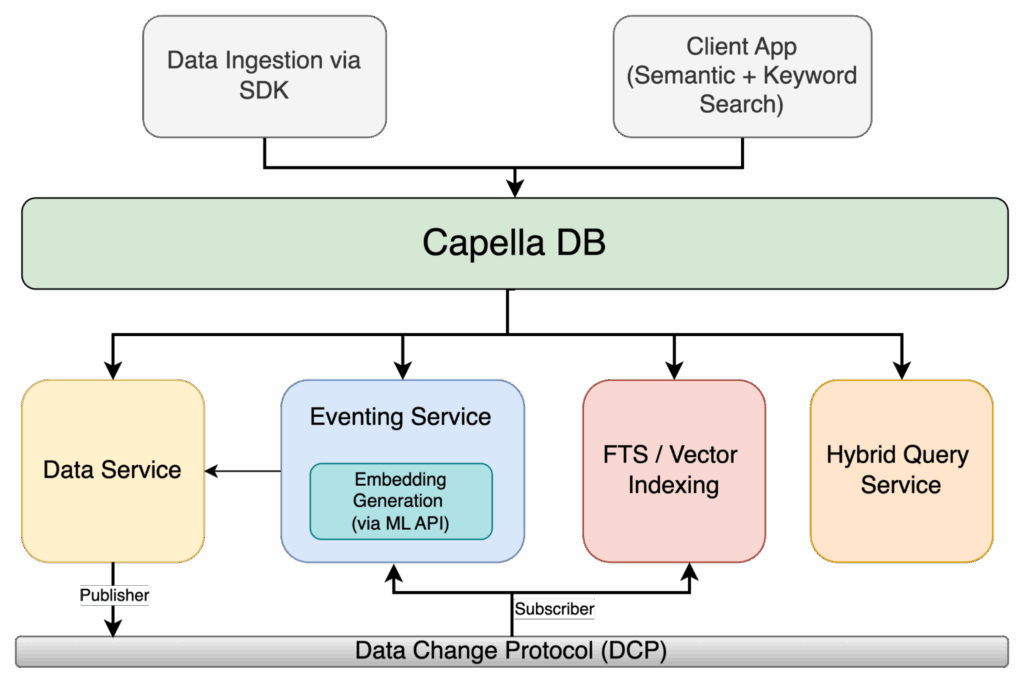
Figure 1: Capella Hybrid Search Architecture with Eventing, ML Embeddings, and FTS/Vector Indexing
Hands-on walkthrough: vector search with Couchbase
So far, we’ve spoken about why vector search matters and how Couchbase powers it. Now let’s put it all together in a hands-on example.
Our scenario is telecom PCAP (packet capture) analysis. Imagine a massive stream of packet session summaries flowing into Couchbase. Instead of storing this data passively, we want Couchbase to:
-
- Automatically embed each session summary into a vector using OpenAI embeddings.
- Store these embeddings alongside the raw metadata.
- Index them in Couchbase FTS for fast vector similarity queries.
- Allow us to detect anomalies or “sessions that look unusual” in real-time.
The best part? We won’t be doing this manually. Eventing will automate the whole pipeline — the moment a new PCAP session document arrives, Couchbase will enrich it with an embedding and push it straight into the vector index.
Prerequisites
Before diving into the build, let’s make sure our environment is ready. This isn’t just about checking boxes—it’s about setting the stage for a smooth developer experience.
Couchbase Server or Capella
You’ll need a running Couchbase environment with the Eventing and FTS (Full-Text Search) services enabled. These are the engines that will power automation and search.
A bucket to hold PCAP session data
For this walkthrough, we’ll call the bucket pcap. Within it, we’ll organize data into scopes and collections to keep things clean.
Eventing service enabled
Eventing functions are our “reactive glue.” As soon as a new PCAP session summary is ingested, Eventing will spring into action, enrich the doc with embeddings, and optionally trigger anomaly alerts.
FTS service enabled
This will let us build a vector index later on, so we can perform similarity search on session embeddings. Without it, the embeddings are just numbers sitting in JSON.
Embeddings API endpoint
You’ll need access to an embeddings model and API Key. In this blog, we’ll assume OpenAI’s text-embedding-3-small or text-embedding-3-large, but you can point to any API that returns a fixed-dimension vector. Eventing will use curl() to call this endpoint.
Ingesting PCAP sessions – data model
Every PCAP capture generates a flood of packets. For our demo, instead of storing raw packets (too big, too noisy), we’ll work with session summaries. These summaries distill the important facts: source/destination IPs, protocol, jitter, packet loss, retransmits, and a short natural-language description of what the session looked like.
A single session document might look like this:
|
1 2 3 4 5 6 7 8 9 10 11 12 13 14 15 16 17 18 19 20 |
{ "type": "pcap_session", "sessionId": "sess-2025-08-21-001", "ts": "2025-08-21T09:10:11Z", "srcIP": "10.1.2.3", "dstIP": "34.201.10.45", "srcPort": 5060, "dstPort": 5060, "proto": "SIP", "region": "us-east-1", "carrier": "cb-telecom", "durationMs": 17890, "packets": 3412, "lossPct": 0.7, "jitterMs": 35.2, "retransmits": 21, "summaryText": "SIP call with intermittent RTP loss and elevated jitter, user reported call drops", "embedding_vector": null, // <-- Eventing will fill this "qualityLabel": "unknown" // <-- Eventing/alerts will update this } |
Key fields:
-
- summaryText → a natural language synopsis that embeddings will capture.
- qualityLabel → heuristic health label (healthy, degraded) that Eventing can assign.
At this stage, the embedding_vector is empty. That’s where Eventing will come in.
Create bucket/scope/collection
We’ll organize the pipeline into logical containers:
-
- Bucket: pcap
- Scope: telco
- Collections:
- sessions (raw ingested PCAP session summaries)
- alerts (for anomaly alerts emitted by Eventing)
- metadata (for writing eventing metadata information)
Example N1QL:
|
1 2 3 |
CREATE SCOPE `pcap`.`telco`; CREATE COLLECTION `pcap`.`telco`.`sessions`; CREATE COLLECTION `pcap`.`telco`.`alerts`; |
Seed a few sample PCAP session docs
Let’s insert a couple of healthy and degraded sessions to test the pipeline:
|
1 2 3 4 5 6 7 8 9 10 11 12 13 14 15 16 17 18 |
INSERT INTO `pcap`.`telco`.`sessions` (KEY, VALUE) VALUES ("sess::1", { "type":"pcap_session","sessionId":"sess::1","ts":"2025-08-21T09:00:00Z", "srcIP":"10.0.0.1","dstIP":"52.0.0.5","srcPort":16384,"dstPort":16384, "proto":"RTP","region":"us-east-1","carrier":"cb-telecom","durationMs":600000, "packets":100000,"lossPct":0.05,"jitterMs":2.5,"retransmits":0, "summaryText":"Stable RTP media stream, negligible packet loss and low jitter", "embedding_vector":null,"qualityLabel":"unknown" }), ("sess::2", { "type":"pcap_session","sessionId":"sess::2","ts":"2025-08-21T09:05:00Z", "srcIP":"10.0.0.2","dstIP":"52.0.0.5","srcPort":5060,"dstPort":5060, "proto":"SIP","region":"us-east-1","carrier":"cb-telecom","durationMs":120000, "packets":12000,"lossPct":0.7,"jitterMs":35.2,"retransmits":21, "summaryText":"SIP negotiation with intermittent media loss and elevated jitter, multiple retransmits", "embedding_vector":null,"qualityLabel":"unknown" }); |
Here is how it would look if you view documents under the collection session:
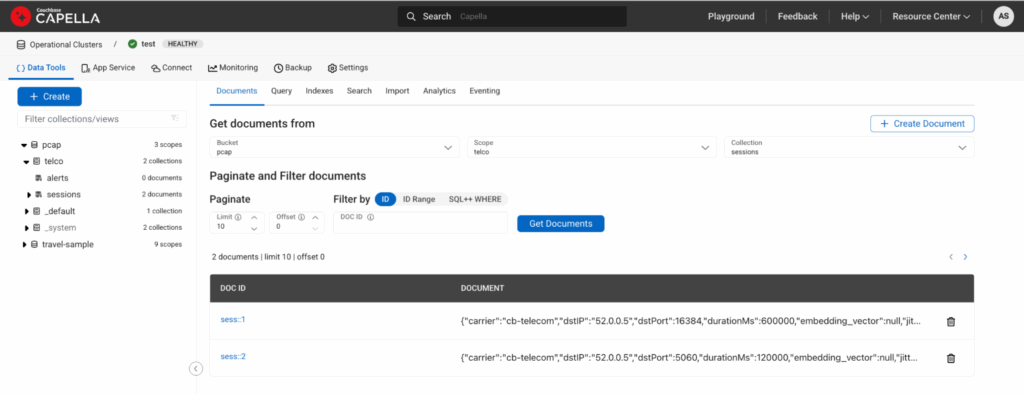
Figure 2: Capella UI showing two documents ingested via above DML.
Eventing: auto-embed on ingest
Here’s where the magic happens. Every time a document is written into pcap.telco.sessions, our Eventing function will:
-
- Call the OpenAI embeddings API with summaryText + structured features like proto, loss, jitter, region, carrier.
- Store the returned vector in embedding_vector.
- Tag the session as healthy or degraded.
- Copy enriched doc back into sessions.
- Emit anomaly alerts into alerts.
We’ll define bindings like this:
-
- Name: pcapEmbedding
- Source: pcap.telco.sessions
- Metadata: pcap.telco.metadata
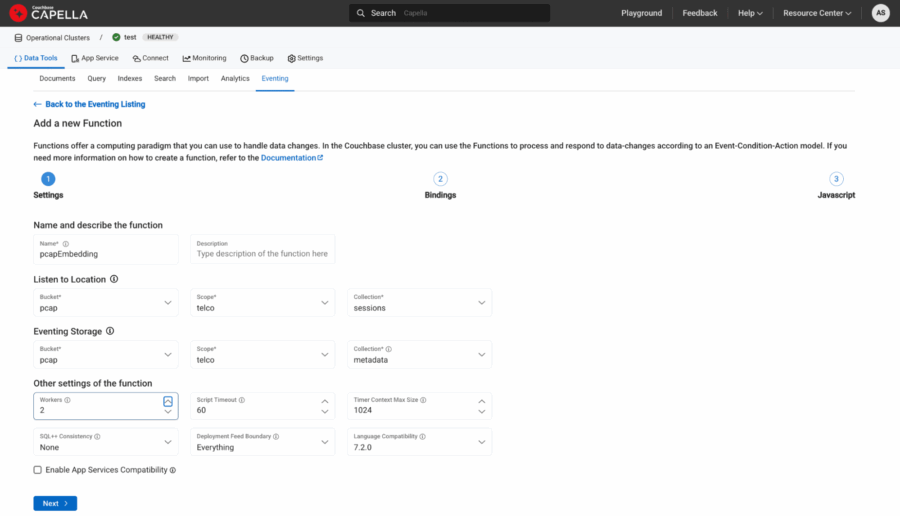
Figure 3: Source and Metadata binding.
-
- Bucket aliases:
- dst → pcap.telco.sessions with Read and Write Permission
- alerts → pcap.telco.alerts with Read and Write Permission
- URL aliases:
- EMBEDDING_API → “https://api.openai.com/v1/embeddings“
- Constant aliases:
- EMBEDDING_MODEL → “text-embedding-3-small”
- Bucket aliases:
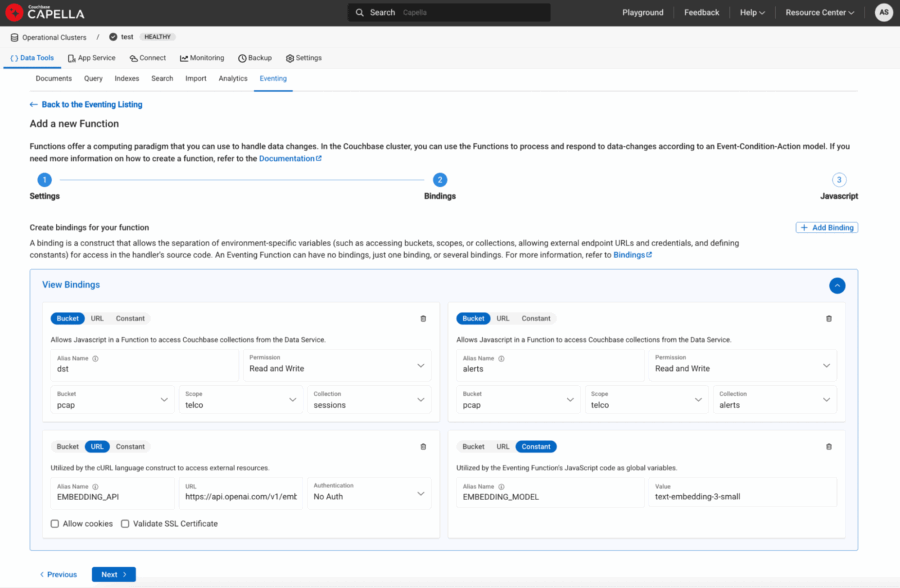
Figure 4: URL and Constants defined as bindings to eventing function.
Automating enrichment with Eventing
Here’s the magic moment. In most databases, enriching data with embeddings requires external ETL pipelines or custom workers. With Couchbase Eventing, the database itself becomes intelligent.
The idea is simple:
-
- As soon as a new session document lands in the sessions collection, Eventing will fire.
- It will call the OpenAI Embeddings API (text-embedding-3-small or text-embedding-3-large are great models for this).
- The returned vector will be appended back into the same document.
The result? Your bucket now holds PCAP sessions + their semantic fingerprint, ready to be indexed.
Here’s the updated Eventing handler:
|
1 2 3 4 5 6 7 8 9 10 11 12 13 14 15 16 17 18 19 20 21 22 23 24 25 26 27 28 29 30 31 32 33 34 35 36 37 38 39 40 41 42 43 44 45 46 47 48 49 50 51 52 53 54 55 56 57 58 59 60 61 62 63 64 65 66 67 68 69 70 71 72 73 74 75 76 77 78 79 80 81 82 83 84 85 86 87 88 89 90 91 92 93 94 95 96 97 98 |
function OnUpdate(doc, meta) { log("Eventing function started for doc id:", meta.id); try { if (doc.type !== "pcap_session") { log("Skipping doc: type is", doc.type); return; } var OPENAI_KEY = "YZX"; // <-- your OpenAI key // 1) Build enriched input text for embedding // Combine free-text + structured context so embeddings capture richer semantics var text = doc.summaryText || ""; text += " Proto:" + (doc.proto || ""); text += " LossPct:" + (doc.lossPct || 0); text += " JitterMs:" + (doc.jitterMs || 0); text += " Retransmits:" + (doc.retransmits || 0); text += " Region:" + (doc.region || ""); text += " Carrier:" + (doc.carrier || ""); log("Emritched text before embedding is: " + text); // 2) Call OpenAI Embeddings API var request = { headers: { "Authorization": "Bearer " + OPENAI_KEY, "Content-Type": "application/json" }, body: JSON.stringify({ "input": text, "model": EMBEDDING_MODEL }) }; try { var response = curl("POST", EMBEDDING_API, request); var body = response.body; log("Response body parsed"); if (typeof body === "string") { var result = JSON.parse(body); } else if (typeof body === "object") { // If already parsed, just assign var result = body; } else { log("Unexpected response.body type:", typeof body); } // Extract the embedding vector from first data element if (result && result.data && result.data.length > 0 && result.data[0].embedding) { var embeddingVector = result.data[0].embedding; log("Embedding vector length:", embeddingVector.length); // 3) Write back embedding + quality heuristic doc.embedding_vector = embeddingVector; doc.embedding_model = EMBEDDING_MODEL; doc.qualityLabel = (doc.lossPct > 0.5 || doc.jitterMs > 30 || doc.retransmits > 10) ? "degraded" : "healthy"; // Update destination collection dst[meta.id] = doc; } else { log("Embedding not found in response:", JSON.stringify(result)); } } catch (e) { log("Curl threw exception:", e); } // 4) Raise anomaly alert if degraded if (doc.qualityLabel === "degraded") { var alertDoc = { type: "pcap_alert", sessionId: doc.sessionId, ts: new Date().toISOString(), reason: "Heuristic threshold exceeded", lossPct: doc.lossPct, jitterMs: doc.jitterMs, retransmits: doc.retransmits, region: doc.region, carrier: doc.carrier }; var alertKey = "alert::" + doc.sessionId; alerts[alertKey] = alertDoc; } log("Document enriched with embedding + quality label:", meta.id); } catch (e) { log(" Eventing exception", e); } } function OnDelete(meta, options) { // No-op for deletes } |
Every new PCAP session summary now self-enriches in real time.
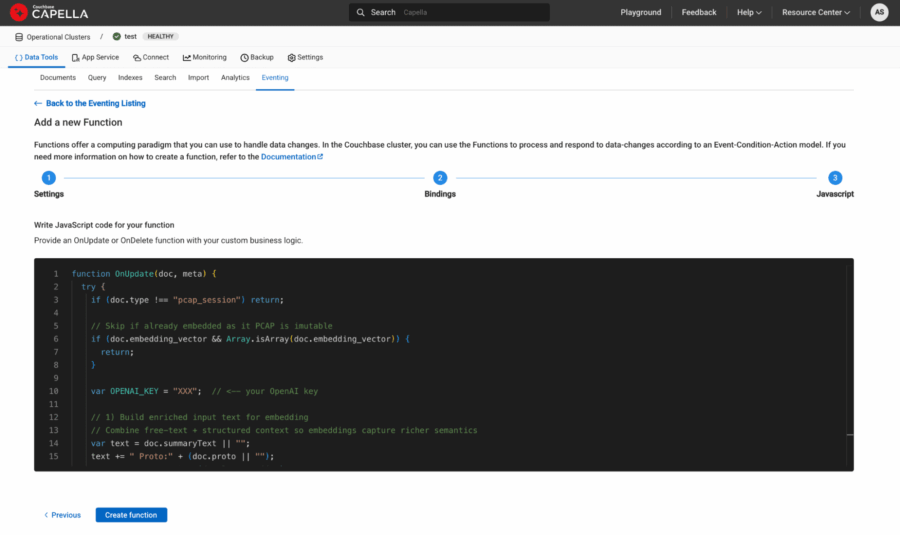
Figure 5: Eventing Function javascript copy/pasted in the last step of function definition.
Finally deploy the function and it should turn green once ready.
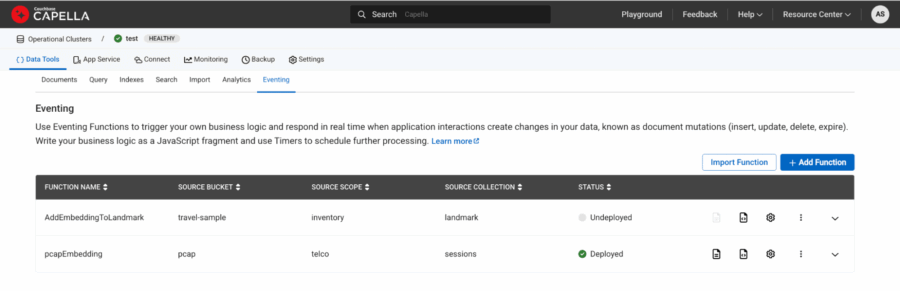
Figure 6: pcapEmbedding function is deployed and showed up as green under status.
Check the document and it should now have additional embedding_vector and embedding_model fields with the other fields like this:
|
1 2 3 4 5 6 7 8 9 10 11 12 13 14 15 16 17 18 19 20 21 |
{ "carrier": "cb-telecom", "dstIP": "52.0.0.5", "dstPort": 16384, "durationMs": 600000, "jitterMs": 2.5, "lossPct": 0.05, "packets": 100000, "proto": "RTP", "qualityLabel": "healthy", "region": "us-east-1", "retransmits": 0, "sessionId": "sess::1", "srcIP": "10.0.0.1", "srcPort": 16384, "summaryText": "Stable RTP media stream, negligible packet loss and low jitter", "ts": "2025-08-21T09:00:00Z", "type": "pcap_session", "embedding_model": "text-embedding-3-small", "embedding_vector": [-0.004560039, -0.0018385303, 0.033093546, 0.0023359614, ...] } |
Creating a vector-aware FTS index in Couchbase
Now that each PCAP session document carries both an embedding vector and enriched metadata (region, proto, carrier, jitter, loss, retransmits), the next step is to make these fields searchable. Couchbase’s Full Text Search (FTS) engine now supports vector indexing, meaning we can store those high-dimensional embeddings right alongside traditional keyword and numeric fields.
Why is this important?
Because it allows us to run semantic queries like “find sessions similar to this degraded call in Asia carried over LTE” — combining semantic similarity (via vector search) with structured filtering (region, proto, carrier).
Here’s a simple JSON definition of such an index (from the FTS console, you’d create a new index and paste this in):
|
1 2 3 4 5 6 7 8 9 10 11 12 13 14 15 16 17 18 19 20 21 22 23 24 25 26 27 28 29 30 31 32 33 34 35 36 37 38 39 40 41 42 43 44 45 46 47 48 49 50 51 52 53 54 55 56 57 58 59 60 61 62 63 64 65 66 67 68 69 70 71 72 73 74 75 76 77 78 79 80 81 82 83 84 85 86 87 88 89 90 91 92 93 94 95 96 97 98 99 100 101 102 103 104 105 106 107 108 109 110 111 112 113 114 115 116 117 118 119 120 121 122 123 124 125 126 127 128 129 130 131 132 133 134 135 136 137 138 139 140 141 142 143 144 145 146 147 148 149 150 |
{ "type": "fulltext-index", "name": "pcap.telco.pcapEmbeddingIndex", "uuid": "2fd519311de37177", "sourceType": "gocbcore", "sourceName": "pcap", "sourceUUID": "a576b1ee361c33974e47371d03098b72", "planParams": { "maxPartitionsPerPIndex": 1024, "indexPartitions": 1 }, "params": { "doc_config": { "docid_prefix_delim": "", "docid_regexp": "", "mode": "scope.collection.type_field", "type_field": "type" }, "mapping": { "analysis": {}, "default_analyzer": "standard", "default_datetime_parser": "dateTimeOptional", "default_field": "_all", "default_mapping": { "dynamic": false, "enabled": false }, "default_type": "_default", "docvalues_dynamic": false, "index_dynamic": true, "store_dynamic": true, "type_field": "_type", "types": { "telco.sessions": { "dynamic": false, "enabled": true, "properties": { "carrier": { "dynamic": false, "enabled": true, "fields": [ { "analyzer": "en", "index": true, "name": "carrier", "store": true, "type": "text" } ] }, "embedding_vector": { "dynamic": false, "enabled": true, "fields": [ { "dims": 1536, "index": true, "name": "embedding_vector", "similarity": "dot_product", "type": "vector", "vector_index_optimized_for": "recall" } ] }, "jitterMs": { "dynamic": false, "enabled": true, "fields": [ { "index": true, "name": "jitterMs", "store": true, "type": "number" } ] }, "lossPct": { "dynamic": false, "enabled": true, "fields": [ { "index": true, "name": "lossPct", "store": true, "type": "number" } ] }, "proto": { "dynamic": false, "enabled": true, "fields": [ { "analyzer": "en", "index": true, "name": "proto", "store": true, "type": "text" } ] }, "qualityLabel": { "dynamic": false, "enabled": true, "fields": [ { "analyzer": "en", "index": true, "name": "qualityLabel", "store": true, "type": "text" } ] }, "region": { "dynamic": false, "enabled": true, "fields": [ { "analyzer": "en", "index": true, "name": "region", "store": true, "type": "text" } ] }, "retransmits": { "dynamic": false, "enabled": true, "fields": [ { "index": true, "name": "retransmits", "store": true, "type": "number" } ] } } } } }, "store": { "indexType": "scorch", "segmentVersion": 16 } }, "sourceParams": {} } |
Let’s break it down in plain English:
-
- embedding_vector → This is the semantic backbone, a vector field where similarity queries happen. We’ve chosen dot product as the similarity metric since it works well with OpenAI embeddings.
- region, proto, carrier → Indexed as text fields so we can filter by telecom region, packet protocol, or carrier.
- lossPct, jitterMs, retransmits → Numeric fields that allow range queries (e.g., “sessions with jitter > 50ms”).
- qualityLabel → Our Eventing function already tagged calls as “healthy” or “degraded”, which now becomes a searchable field.
This dual structure — vector + metadata — is what makes the solution powerful. You’re not forced to choose between semantic similarity and structured filtering; you can blend both in a single query.
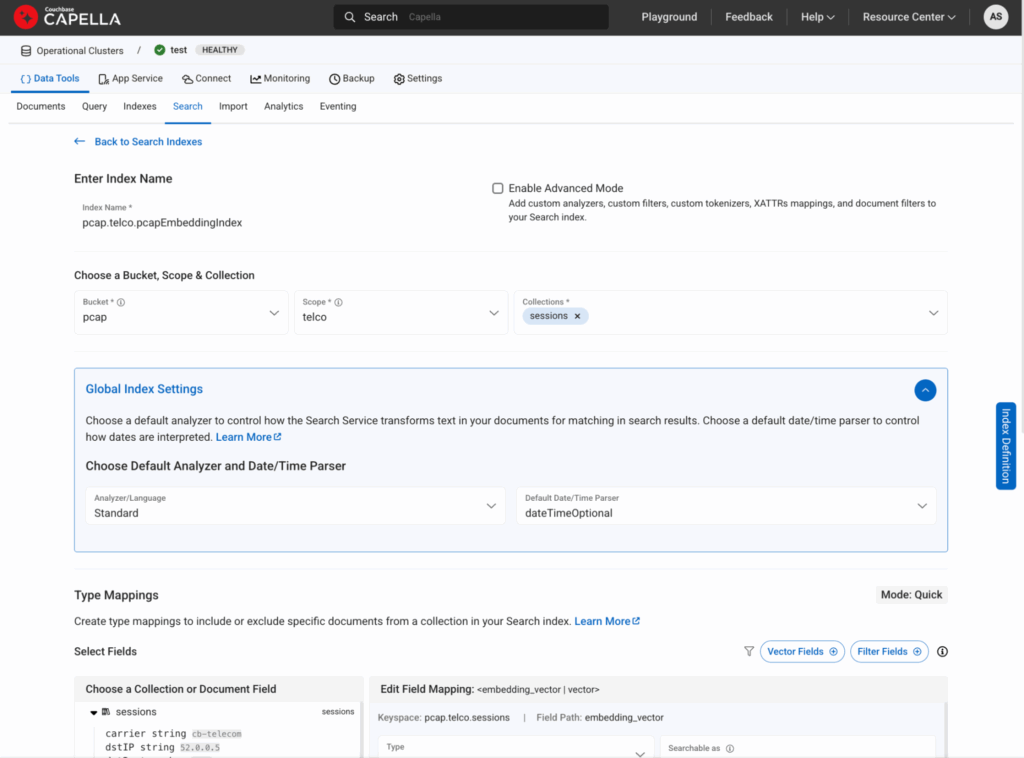
Figure 7: This is how you would create a vector index from Search tab
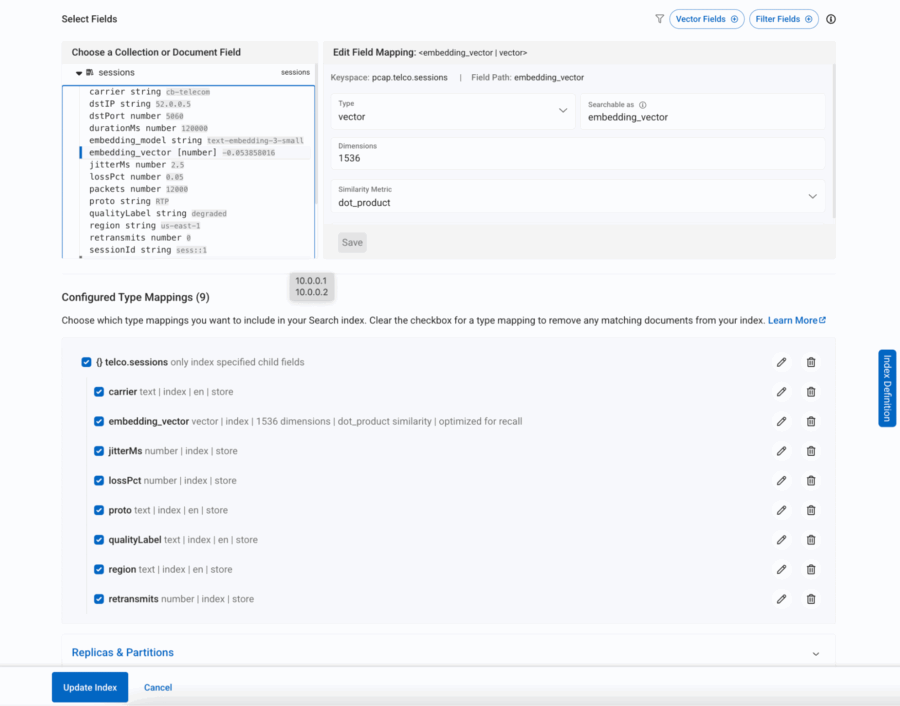
Figure 8: All the required fields within the session document are included in the search
Highlighting anomaly detection with hybrid search
Finally, let’s see the real payoff: anomaly detection powered by hybrid vector search.
Imagine you’ve had a rash of complaints about call drops in New York. You could run a query like:
|
1 2 3 4 5 6 7 8 9 10 11 12 13 14 15 16 17 18 19 20 |
SELECT META(s).id, s.sessionId, s.summaryText, s.qualityLabel, s.region, s.proto, s.carrier FROM `pcap`.`telco`.`sessions` AS s WHERE SEARCH(s, { "fields": ["*"], "knn": [ { "k": 10, "field": "embedding_vector", "vector": [/* ... fill with your actual embedding ... */], "filter": { "conjuncts": [ { "match": "degraded", "field": "qualityLabel" }, { "match": "us-east-1", "field": "region" }, { "match": "SIP", "field": "proto" }, { "match": "cb-telecom", "field": "carrier" } ] } } ] }); |
This query says:
-
- Find me 10 sessions most similar to a degraded SIP call (semantic similarity)
- But only if they occurred in us-east-1, were SIP calls
What you get back is not just a list of “bad calls” — it’s a cluster of semantically related anomalies that helps you pinpoint the root cause. If they’re all happening on one carrier, you’ve just isolated a provider issue. If they spike at certain hours, maybe it’s a routing bottleneck.
This is where vector search stops being “cool math” and starts delivering real operational insight.
Vector search as the backbone of agentic applications
Agentic applications are designed not only to retrieve information, but to interpret and act on it. Whether it’s a customer support copilot, a fraud detection engine, or a telecom anomaly detector, these systems need:
-
- Contextual recall: Retrieve the right information, not just literal matches.
- Reasoning capabilities: Understand relationships and intent.
- Autonomy: Trigger workflows and decisions without human intervention.
All three pillars rest on vector search. Without embeddings, agents lack memory. Without similarity search, they lack reasoning. Without semantic context, they cannot act effectively.
This is why vector search is more than just a new search method — it is the knowledge backbone of the agentic era.
Conclusion & what’s next
Vector search is transforming industries by shifting search from keywords to context. It powers everything from telecom anomaly detection to customer support copilots and fraud detection. At its core, it lays the foundation for agentic applications — intelligent systems that can recall, reason, and act.
Couchbase brings this to life with its combination of Full Text Search, vector indexing, and eventing, enabling enterprises to operationalize semantic search in real time.
In the next installment, we’ll take this a step further: exploring how LLMs + vector search converge to build truly autonomous agentic applications that not only understand context but also generate insights and take proactive actions.


