
Couchbase Capella has a new Data API. If you’re wondering why it is important since we already have SDKs, the answer is addressed in our documentation – but here’s a quick comparison:
- Data API: HTTP, language, and runtime agnostic; easy integration with zero dependency; plus trade-offs in latency, throughput, and resiliency features.
- SDKs: Native library, richer features, better performance, better suited to workloads where scale and resilience matter.
Some use cases:
- Functions for FaaS/Serverless: AWS Lambda, Google Cloud Functions, Azure Functions, Netlify Functions
- SaaS integrations: Zapier, IFTTT, Relay, Make, N8N, Flowwise, Node-RED
- Scripting: Jenkins Pipeline or GitHub Actions
- Internal tools: Dashboard, Grafana
All of these use cases can be implemented but would require either the deployment and management of your own Couchbase SDK-backed API, or ensuring SDKs were available where the code was running – which in some cases is impossible.
With that, let’s see how this all works in practice with a use case example.
Node-RED Example
Node-RED enables low-code programming for event-driven applications. It’s visual, simple, lightweight, and it runs on a wide range of hardware platforms. However, while it supports the use of external modules, some – especially those that depend on native libraries, such as our Node SDK, can be difficult to use. This presents a perfect excuse to try the new Data API.
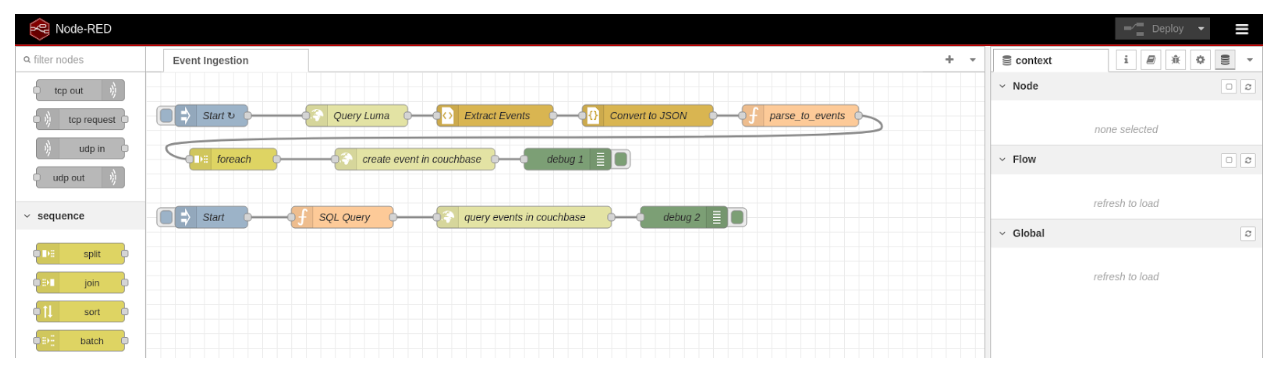
Below is a simple use case that tries to scrape data from luma to know what’s going on in Paris. You can see the results below. Note, the top-level flow is the ingestion, the second is the debugging query.
Ingestion Flow
- Start: An ingest node that triggers this every 72 hours.
- Query luma: An HTTP request to https://luma.com/paris.
- Extract events: An HTML parser to retrieve the list of events as String.
- Convert to JSON: A JSON parser to turn this String in a JSON Object.
- Parse_to_events: A function that takes this object and creates a new one with only the required data.
The code looks like this:
|
1 2 |
var newMsg = { payload: msg.payload[0].content.props.pageProps.initialData.data.events }; return newMsg; |
- forEach: A Split tasks that splits the events JSON object from the previous step.
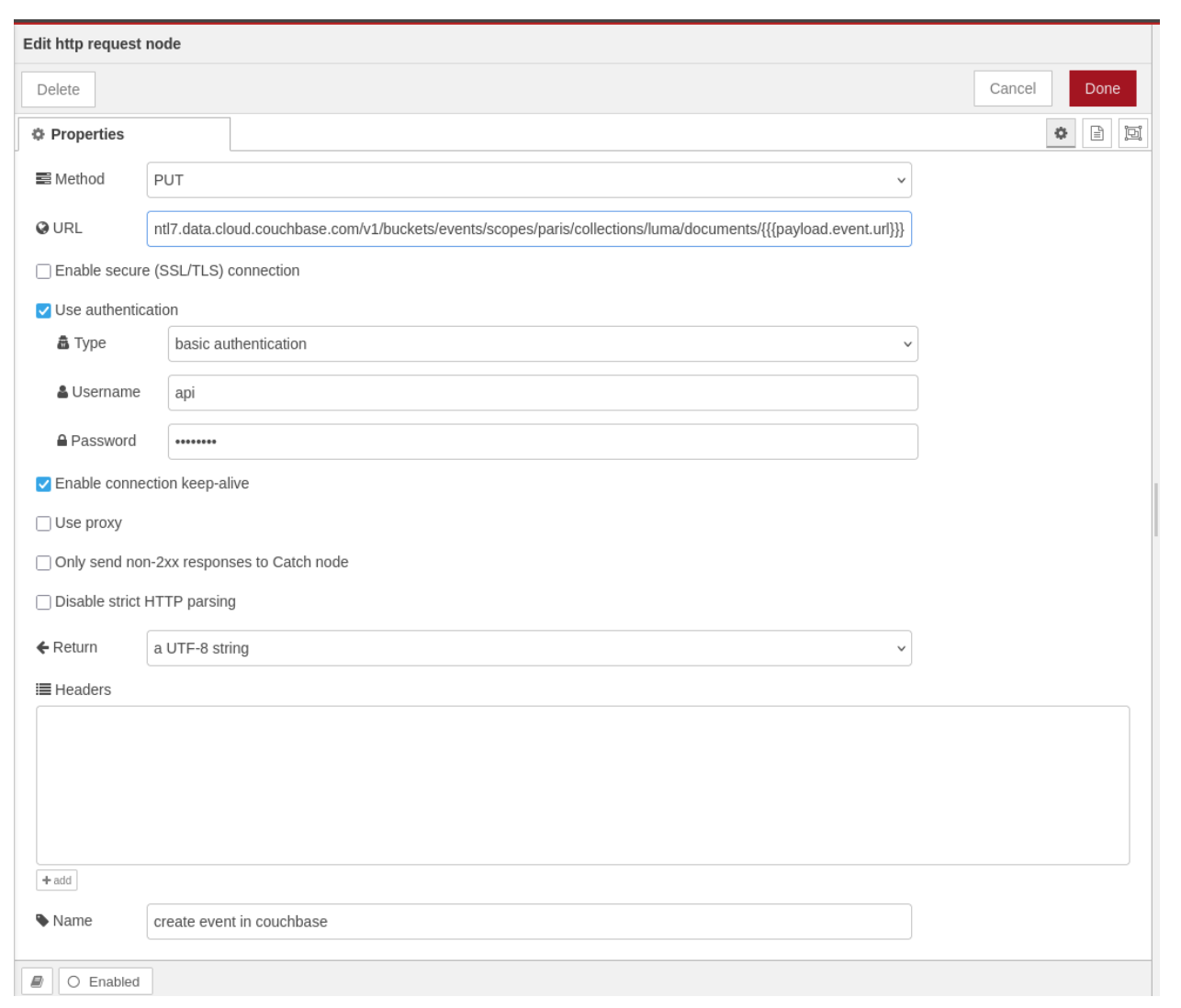
- Create event in Couchbase: An HTTP request is sent to the Capella Data API. Whatever is in the payload of the previous step will be the body of the request. You can use Mustache templating for the URL field. Here’s a screenshot of the actual step; it’s like running this curl command:
|
1 2 3 |
curl -X PUT --user api:**** -H 'Content-Type: application/json' -d '{"event":"data",...}' https://snzd9hz3unnntl7.data.cloud.couchbase.com/v1/buckets/events/scopes/paris/collections/luma/documents/fd5hds83 |
- Debug1: A debug step to see the results of all the requests.
Debug FLow
- Start: An ingest node that must be triggered manually.
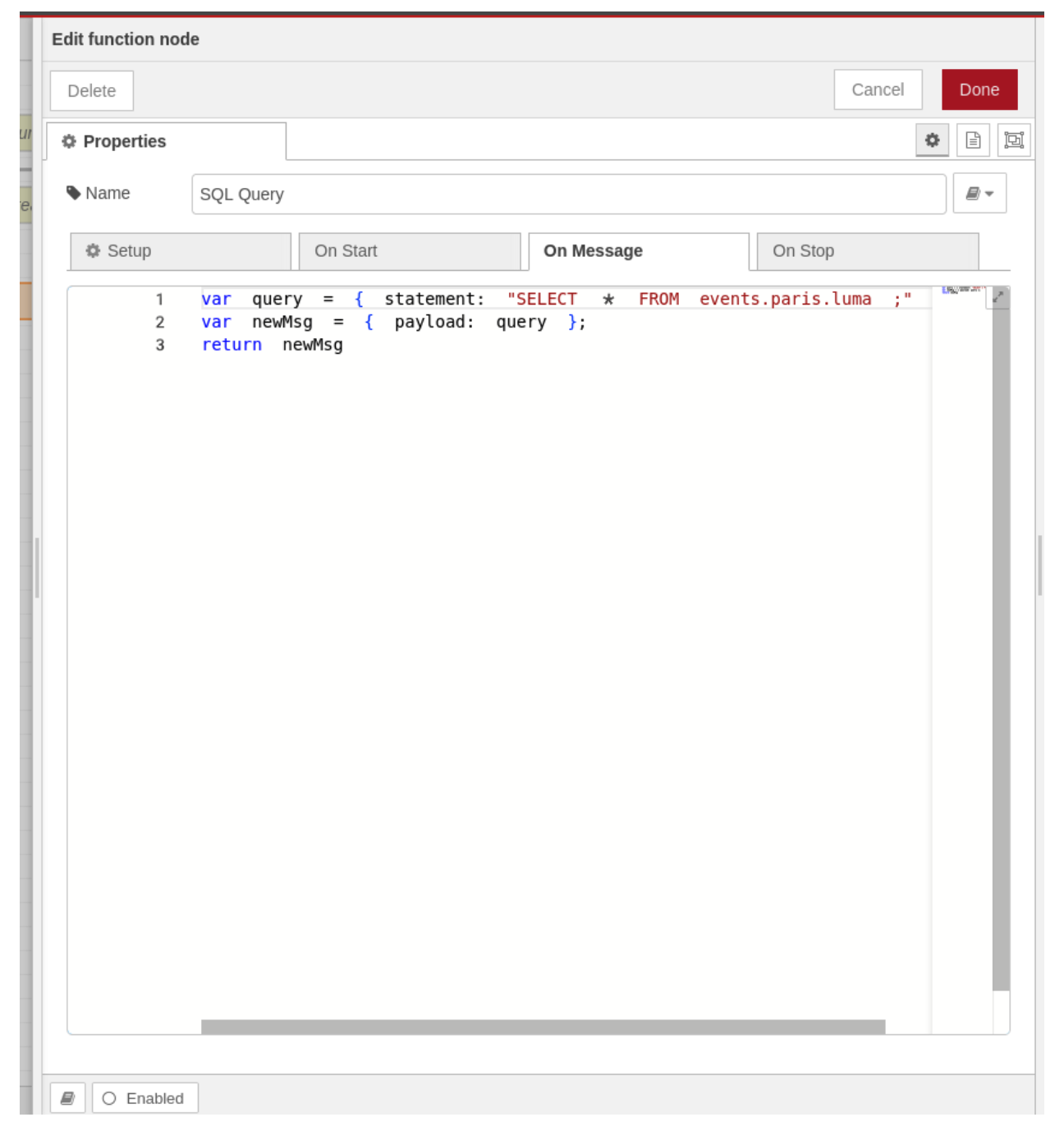
- SQL_Query: A function that returns a JSON object representing the query to run.
|
1 2 3 |
var query = { statement: "SELECT * FROM events.paris.luma ;" } var newMsg = { payload: query }; return newMsg |
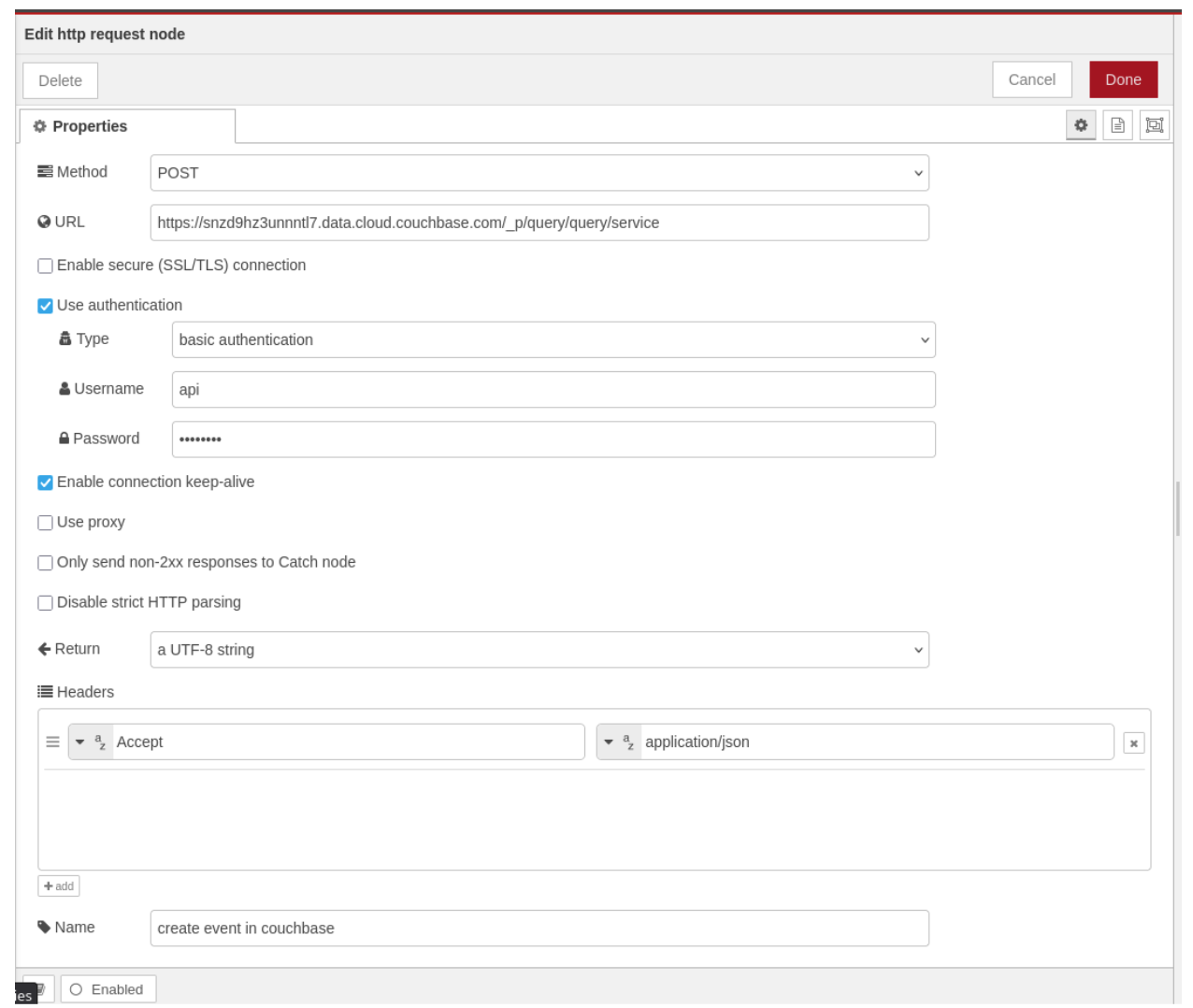
- Query events in Couchbase: An HTTP Request that runs the given query. It would look like the following curl command:
|
1 2 3 |
curl -X POST --user api:**** -H 'Content-Type: application/json' -d '{ statement: "SELECT * FROM events.paris.luma ;" }' https://snzd9hz3unnntl7.data.cloud.couchbase.com/_p/query/query/service |
Try It Yourself
Node-RED can easily be run on your machine with docker run -it -p 1880:1880 --name mynodered nodered/node-red
Then go to http://127.0.0.1:1880/ and follow the instructions. You can either create the nodes by hand or import this flow with this JSON export:
|
1 2 3 4 5 6 7 8 9 10 11 12 13 14 15 16 17 18 19 20 21 22 23 24 25 26 27 28 29 30 31 32 33 34 35 36 37 38 39 40 41 42 43 44 45 46 47 48 49 50 51 52 53 54 55 56 57 58 59 60 61 62 63 64 65 66 67 68 69 70 71 72 73 74 75 76 77 78 79 80 81 82 83 84 85 86 87 88 89 90 91 92 93 94 95 96 97 98 99 100 101 102 103 104 105 106 107 108 109 110 111 112 113 114 115 116 117 118 119 120 121 122 123 124 125 126 127 128 129 130 131 132 133 134 135 136 137 138 139 140 141 142 143 144 145 146 147 148 149 150 151 152 153 154 155 156 157 158 159 160 161 162 163 164 165 166 167 168 169 170 171 172 173 174 175 176 177 178 179 180 181 182 183 184 185 186 187 188 189 190 191 192 193 194 195 196 197 198 199 200 201 202 203 204 205 206 207 208 209 210 211 212 213 214 215 216 217 218 219 220 221 222 223 224 225 226 227 228 229 230 231 232 233 234 235 236 237 238 239 240 241 242 243 244 245 246 247 248 249 250 251 252 253 254 255 256 257 258 259 260 261 262 263 264 265 266 267 268 269 270 271 272 273 274 275 276 277 278 279 280 281 282 283 284 285 286 287 |
[ { "id":"f6f2187d.f17ca8", "type":"tab", "label":"Event Ingestion", "disabled":false, "info":"" }, { "id":"5039574f789798bf", "type":"inject", "z":"f6f2187d.f17ca8", "name":"Start", "props":[ { "p":"payload" }, { "p":"topic", "vt":"str" } ], "repeat":"259200", "crontab":"", "once":false, "onceDelay":0.1, "topic":"", "payload":"", "payloadType":"date", "x":90, "y":60, "wires":[ [ "a7e82076addaf2bf" ] ] }, { "id":"65dcb4aeead12a54", "type":"debug", "z":"f6f2187d.f17ca8", "name":"debug 1", "active":true, "tosidebar":true, "console":false, "tostatus":false, "complete":"payload", "targetType":"msg", "statusVal":"", "statusType":"auto", "x":580, "y":120, "wires":[ ] }, { "id":"a7e82076addaf2bf", "type":"http request", "z":"f6f2187d.f17ca8", "name":"Query Luma", "method":"GET", "ret":"txt", "paytoqs":"ignore", "url":"https://luma.com/paris", "tls":"", "persist":false, "proxy":"", "insecureHTTPParser":false, "authType":"", "senderr":false, "headers":[ ], "x":290, "y":60, "wires":[ [ "c463b094ea88ec73" ] ] }, { "id":"c463b094ea88ec73", "type":"html", "z":"f6f2187d.f17ca8", "name":"Extract Events", "property":"payload", "outproperty":"payload", "tag":"#__NEXT_DATA__", "ret":"compl", "as":"single", "chr":"content", "x":480, "y":60, "wires":[ [ "3be4c6d9e4554672" ] ] }, { "id":"3be4c6d9e4554672", "type":"json", "z":"f6f2187d.f17ca8", "name":"Convert to JSON", "property":"payload[0].content", "action":"obj", "pretty":true, "x":690, "y":60, "wires":[ [ "9b66605f179021d0" ] ] }, { "id":"9b66605f179021d0", "type":"function", "z":"f6f2187d.f17ca8", "name":"parse_to_events", "func":"var newMsg = { payload: msg.payload[0].content.props.pageProps.initialData.data.events };\nreturn newMsg;", "outputs":1, "timeout":0, "noerr":0, "initialize":"", "finalize":"", "libs":[ ], "x":900, "y":60, "wires":[ [ "1924a3c26b9520bd" ] ] }, { "id":"1924a3c26b9520bd", "type":"split", "z":"f6f2187d.f17ca8", "name":"foreach", "splt":"1", "spltType":"len", "arraySplt":1, "arraySpltType":"len", "stream":true, "addname":"", "property":"payload", "x":120, "y":120, "wires":[ [ "7e3a02b180875fed" ] ] }, { "id":"7e3a02b180875fed", "type":"http request", "z":"f6f2187d.f17ca8", "name":"create event in couchbase", "method":"PUT", "ret":"txt", "paytoqs":"query", "url":"https://snzd9hz3unnntl7.data.cloud.couchbase.com/v1/buckets/events/scopes/paris/collections/luma/documents/{{{payload.event.url}}}", "tls":"", "persist":true, "proxy":"", "insecureHTTPParser":false, "authType":"basic", "senderr":false, "headers":[ ], "x":370, "y":120, "wires":[ [ "65dcb4aeead12a54" ] ] }, { "id":"f309559bde533ab6", "type":"inject", "z":"f6f2187d.f17ca8", "name":"Start", "props":[ { "p":"payload" }, { "p":"topic", "vt":"str" } ], "repeat":"", "crontab":"", "once":false, "onceDelay":0.1, "topic":"", "payload":"", "payloadType":"date", "x":90, "y":200, "wires":[ [ "49244e9d100517aa" ] ] }, { "id":"7945b9a86fa49919", "type":"http request", "z":"f6f2187d.f17ca8", "name":"query events in couchbase", "method":"POST", "ret":"txt", "paytoqs":"query", "url":"https://snzd9hz3unnntl7.data.cloud.couchbase.com/_p/query/query/service", "tls":"", "persist":true, "proxy":"", "insecureHTTPParser":false, "authType":"basic", "senderr":false, "headers":[ { "keyType":"other", "keyValue":"Accept", "valueType":"other", "valueValue":"application/json" } ], "x":520, "y":200, "wires":[ [ "24b1dd899b6d2ef1" ] ] }, { "id":"24b1dd899b6d2ef1", "type":"debug", "z":"f6f2187d.f17ca8", "name":"debug 2", "active":true, "tosidebar":true, "console":false, "tostatus":false, "complete":"payload", "targetType":"msg", "statusVal":"", "statusType":"auto", "x":740, "y":200, "wires":[ ] }, { "id":"49244e9d100517aa", "type":"function", "z":"f6f2187d.f17ca8", "name":"SQL Query", "func":"var query = { statement: \"SELECT * FROM events.paris.luma ;\" }\nvar newMsg = { payload: query };\nreturn newMsg", "outputs":1, "timeout":0, "noerr":0, "initialize":"", "finalize":"", "libs":[ ], "x":270, "y":200, "wires":[ [ "7945b9a86fa49919" ] ] } ] |
You will need a Capella instance with the Data API enabled. It’s available in our Free Tier and is easy to test. Just go to cloud.couchbase.com, open your cluster, and go to the connect tab. You will then click on Enable Data API. This can take up to 20 minutes to be ready, so in the interim you can follow the instructions about IP addresses and credentials.
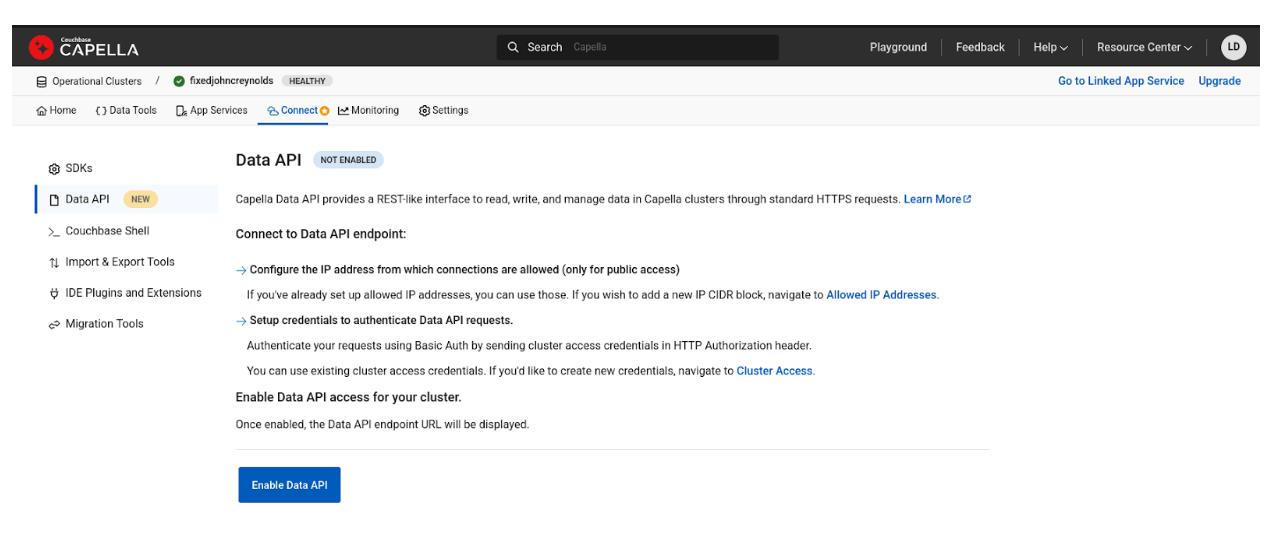 You now have everything you need to use the Data API, specifically the URL endpoint of the API. You can also access the Reference Documentation for more information.
We hope you enjoy this new Capella feature, and all the use cases that are now available to you.


