

In the modern data ecosystem, natural language to code capabilities are becoming paramount, with JSON rapidly emerging as the lingua franca for communication with large language models (LLMs). At Couchbase, we work with this knowledge to provide our customers with SQL++, a bridge between the familiar structure of SQL and the flexibility of JSON SQL++, allowing you to search through JSON docs using SQL-like queries. As we embrace the advent of AI, we aim to improve our Natural Language to SQL++ (NL2SQL++) conversion to make querying even more intuitive and powerful for our customers. Reliably enhancing this service requires us to gauge the performance of various state-of-the-art models available at our disposal. This is where we hit a significant roadblock: as of today, there are no publicly available NL2SQL++ benchmarks.
This gap in the community motivated us to create our own solution. We looked at the BIRD (BIg Bench for LaRge-scale Database Grounded Text-to-SQL Evaluation) NL2SQL benchmark, recognizing it as a comprehensive foundation for text-to-SQL evaluation. However, BIRD is built for traditional SQL, not the JSON-focused SQL++ dialect. It is critical to note that the Natural Language to SQL++ task presents a distinct challenge compared to traditional NL2SQL. The primary difficulty stems from the schema flexibility inherent to SQL++, which is designed for JSON documents. Unlike the fixed, rigid schema of a traditional SQL database, SQL++ operates under the assumption that fields may be missing or new fields may appear within documents, leading to greater variation in query outputs for even similar natural language requests. This flexible nature, combined with the differing ways SQL++ handles projections and the necessity for explicit NULL value handling, significantly increases the complexity for an LLM to generate semantically correct and performant queries.
The primary motivation behind developing this benchmark was to establish an objective metric for measuring performance improvement in Capella iQ, Couchbase’s current NL2SQL++ service, which currently utilizes the OpenAI GPT-4o model. But more importantly, the outcome of this work is not just an internal tool, but a reusable framework. This blog will walk you through the entire adaptation process, with the ultimate goal of empowering you to leverage this new benchmark for testing and validating your own NL2SQL++ conversion models.
Understanding the Process: The Benchmarking Methodology
In our benchmark, we utilized mini_BIRD (a curated subset of the BIRD dataset), which is publicly available and can be downloaded from the link given in the Readme file of the Repository attached. This dataset consists of 500 Natural Language questions paired with evidence statements that provide the Generating Model with the context it needs to understand the logic behind the query. A key architectural difference between our approach and the original BIRD framework lies in context delivery. The standard BIRD benchmark is often implemented in environments where the model has direct access to a local file system, allowing it to reference external database descriptor files (metadata files describing table schemas, column types, and foreign key relationships) as separate inputs.
However, our objective was to rigorously test Capella iQ in its native habitat. As a deployed cloud service, Capella iQ communicates with its underlying LLM via an encapsulated, stateless API. In this architecture, there are no “sidecar: files. Every piece of information – the schema metadata, the natural language question, and the BIRD evidence statements – must be serialized into one single, comprehensive prompt per question.
We started by combining the natural language question and the evidence statement into our prompt. On doing an initial test run, we achieved an accuracy of 32%. This number necessitated an exhaustive iteration (the first of many) over all pairs of gold SQL and generated SQL++ queries with the explicit objective to find out all the technical points the LLM failed to grasp. Through this search we discovered that there are various things about SQL++ that were beyond the understanding of the model. One of them being the usage of the RAW keyword when dealing with subqueries. In standard SQL++, subqueries do not return an array of scalar values like traditional SQL, instead, they return an array of JSON objects. To access values from these objects, the LLM would need to know and reference the schema of those internal JSON objects, which makes the job significantly harder. By using the RAW keyword, the subquery is instructed to return an array of scalar values. This simplifies the query generation process immensely, as those scalar values can then be directly accessed using indexing and IN operators. This crucial insight was one of many SQL++ specifics that had to be mentioned in the system prompt for the LLM to generate syntactically correct and logical SQL++ queries.
Setup: Data Preparation Steps
Now let’s look at all the things you have to do to try out this benchmark for yourself. For ease of understanding, we work with Couchbase as our JSON database throughout this blog.
Mini BIRD is based on 11 databases in SQLite format. Our first step is to convert these SQLite files into JSON documents. We then upload these JSON documents to a Couchbase server. Crucially, we also run all the gold SQL queries provided with the dataset, and save the results in a csv file. We will be using the results of these gold queries as the ground truth to compare against the output of the SQL++ queries that we generate.
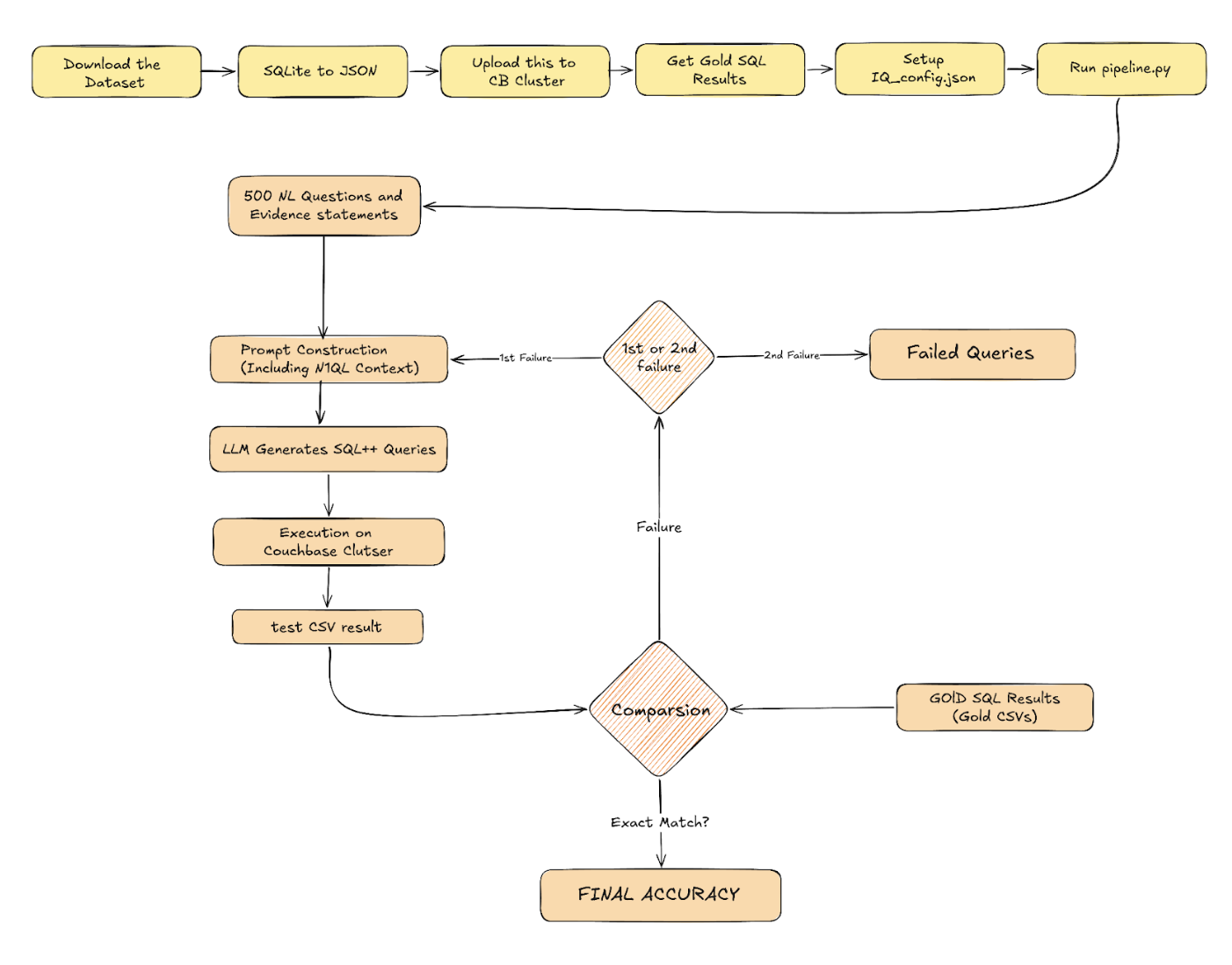
The GitHub repo consists of scripts to carry out all of these processes. To utilize our benchmark, you can carry out the following steps:
Step 1 – Download the dataset here (This is hosted by the BIRD benchmark).
Step 2 – Convert the SQLite files into JSON files using the script in our repo. Get the script here.
Step 3 – Upload this JSON data to your Couchbase cluster. You can use the scripts here.
Step 4 – Run all the gold SQL queries to get gold results in csv files, using this script.
Step 5 – Set up iQ_config.json.
Step 6 – Run pipeline.py as many times as you want to run tests and get your accuracy numbers.
But first, let’s understand its inner workings.
The Two-Pass Pipeline: Logic & Flow
The logic within pipeline.py implements a two-pass approach to thoroughly test the LLM. This two-pass strategy is designed specifically to handle the non-deterministic nature of large language models. Each pass consists of two core phases: Generation and Evaluation.
In the Generation Phase, the natural language questions and evidence statements are read from the benchmark and combined into one prompt. This prompt is then sent to the LLM to generate a SQL++ query. The generated query is saved for analysis and then executed against the buckets saved in the Couchbase cluster, with the received results saved as “test CSV” files. This is generation and execution is performed for all 500 questions. This logic can be seen and understood in isolation in the script testIq.py.
Following this, in the Evaluation Phase, the results stored in the test CSV files are compared against the gold SQL query results. Given the non-deterministic nature of the LLM, the order of fields in the final SELECT clause or their respective aliases are not guaranteed. This required us to develop a comparison logic that is flexible enough to deal with structural variations while maintaining an absolutely strict criterion for classifying success and failure. Here is a brief description of the multi-stage comparison solution:
- Value normalization: All values in both gold and test DataFrames are normalized to ensure consistent comparison. Strings are trimmed and lowercased, null representations are standardized, floating point numbers are rounded to 6 decimal places, and numeric values are handled uniformly.
- Type-aware column mapping: The system classifies each column’s data type by sampling values – columns are labeled as ‘numeric’ (80%+ numbers), ‘string’ (80%+ text), or ‘mixed’. Column mapping then happens in two stages: Stage 1 uses fuzzy string matching to semantically align columns with similar names (70%+ similarity threshold), and Stage 2 uses positional alignment for remaining unmapped columns based on left-to-right order. Critically, both stages enforce type compatibility – numeric columns only map to numeric, string to string, preventing meaningless comparisons between incompatible data types.
- Column alignment and selection: Successfully mapped test columns are renamed to match gold column names, unmapped columns are dropped, and columns are reordered to match the gold schema’s exact order. This ensures proper structural alignment between the two DataFrames for comparison.
- Classification: Results are classified as “exact match” if both rows and columns align perfectly, “column-flexible match” if rows match but extra columns are present, or “failure” if row content differs or column mapping fails.
The complete logic for comparison can be seen in isolation in compare_results.py. This entire process defines the first pass. For the second pass, a distinct prompt is utilized, and only the questions that were classified as failure in the first pass are considered, providing a retry mechanism to account for the non-deterministic nature of LLMs.
Let’s Try It Out! A Step-by-Step Walkthrough
Let’s now try and see what the NL2SQL++ generation process looks like in practice. This section walks through a single question from the dataset to demonstrate the entire flow: from our prompt construction to final results comparison. We begin with a single entry from the “mini_dev_data.json” file, from our repository. It looks something like this:

When you run “python Scripts/pipeline.py”, it takes this question and its evidence and formats them into a single comprehensive prompt.
The image below shows how the final prompt being sent to the LLM is built step by step.
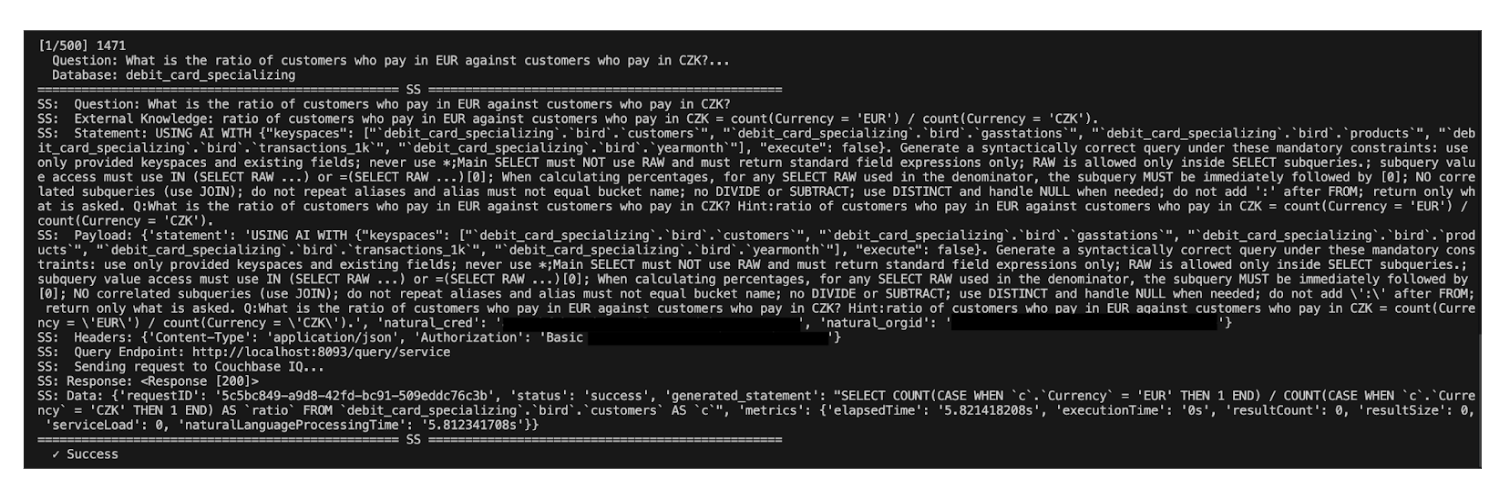
The final prompt sent to the LLM is built step by step, serializing all necessary context into one Payload:
- Question & Evidence: The Natural Language Question and External Knowledge (Evidence) statement are combined.
- SQL++ Wrapper: These are then added to a USING AI query, which is how the Couchbase Query Service allows users to query their JSON databases via natural language.
- Statement: This results in the core statement – what you would directly type into the Query workbench.
- Payload: By combining your Capella credentials and execution parameters on top of this statement, you build the final JSON Payload.
The script then takes this Payload and sends it to your running Couchbase server. In our case, we set the execution parameter to false within the WITH{} section. This is a critical step, as it instructs the Couchbase server to return the generated SQL++ statement itself, allowing us to save and analyze the LLM’s output before comparing the actual results. Here is the generated query for our question:

|
1 |
SELECT COUNT(CASE WHEN `c`.`Currency`=‘EUR’ THEN 1 END)/COUNT(CASE WHEN `c`.`Currency`=‘CZK’ THEN 1 END) AS `ratio` FROM `debit_card_specializing`.`bird`.`customers` AS `c`; |
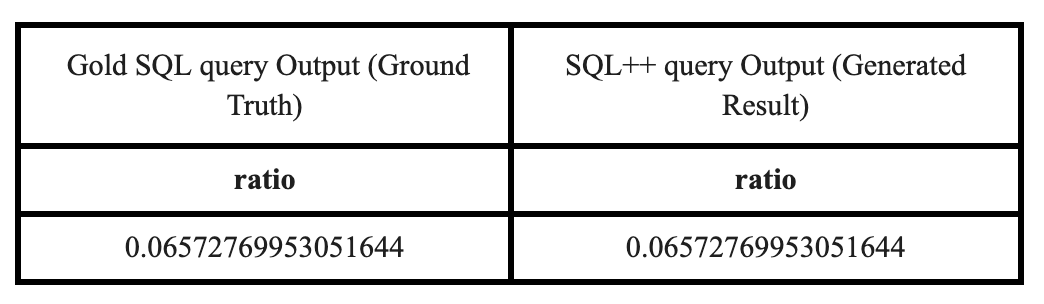
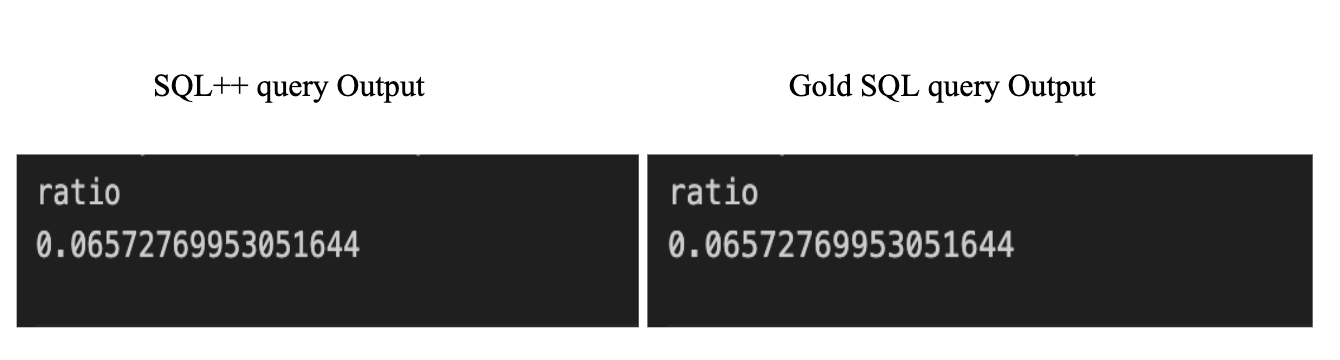
The script then executes this generated query against the data you uploaded to your Couchbase server. The resulting data is saved as a “test CSV” file. The core of the benchmark is then comparing this test CSV against the “gold CSV” file, which was generated by running the gold SQL query for the same question.
The following table visually represents the comparison of the output data, which must match perfectly based on the Row-Level Comparison logic outlined earlier:
Once all 500 questions are processed, pipeline.py runs the complete multi-stage comparison logic for all 500 pairs of test CSVs and gold CSVs to calculate the final accuracy score.
Iterative Improvement Loop and Arriving at Our Final Prompt
Achieving the final solution required an exhaustive iterative process. We used the benchmark to measure performance, as well as to identify failure modes of the LLM.
Initially, when we ran the benchmark with a first-pass approach using just the question and the evidence statement, we witnessed an accuracy score of 48.8% (percentage of questions the comparison script classified as successful, out of a total of 500). This result was the first critical data point, directing us to go through each pair of test and gold CSV files to precisely identify areas where the LLM (iQ) was failing to understand the nuances of SQL++. Through our iterations we discovered the following recurring ideas and saw corresponding improvements:
- Missing DISTINCT: The generated queries frequently omitted the DISTINCT keyword, leading to incorrect aggregation or duplicate results.
- Subquery Output Format (RAW): The generated queries did not use the RAW keyword when dealing with subqueries. As detailed previously, this was a critical fix needed to instruct the subquery to return an array of scalar values instead of JSON objects. Take this query for example:
|
1 |
SELECT COUNT(*) AS bond_count FROM `toxicology`.`bird`.`connected` AS `c` WHERE `c`.`bond_id` IN (SELECT `b`.`bond_id` FROM `toxicology`.`bird`.`bond` AS `b` WHERE `b`.`molecule_id` = ‘TR009’) AND (`c`.`atom_id` = ‘TR009_12’ OR `c`.`atom_id2` = ‘TR009_12’) |
The correct way to handle this would be the following:
|
1 |
SELECT COUNT(*) AS bond_count FROM `toxicology`.`bird`.`connected` AS `c` WHERE `c`.`bond_id` IN (SELECT RAW `b.`bond_id` FROM `toxicology`.`bird`.`bond` AS `b` WHERE `b`.`molecule_id`=‘TR009’) AND (`c`.`atom_id` = ‘TR009_12’ OR `c`.`atom_id2` = ‘TR009_12’) |
- Invalid Syntax & NULL Handling: We found that no form of NULL handling was being implemented, and the queries included mentions of non-SQL++ functions like DIVIDE, SUBTRACT, etc., which is not the correct syntax for SQL++.
|
1 |
SELECT DIVIDE(SUM(CASE WHEN `p`.`SEX` = ‘M’ AND `l`.`UA` <= 8.0 THEN 1 ELSE 0 END), SUM(CASE WHEN `p`.`SEX` = ‘F’ AND `l`.`UA` <= 6.5 THEN 1 ELSE 0 END)) AS `ratio` FROM `thrombosis_prediction`.`bird`.`Patient` AS `p` JOIN `thrombosis_prediction`.`bird`.`Laboratory` AS `l` ON `p`.`ID` = `l`.`ID`; |
- Overuse of Correlated Queries: The LLM often generated overly complex correlated queries, which added an unnecessary level of complexity and potential for error.
- Faulty Percentage Calculations: When dealing with percentage calculations focusing on particular checks, most generated queries used separate subqueries for numerators and denominators. This often resulted in subtle, incorrect differences inside the subqueries (e.g., different or missing JOINs for the same keyspaces), making the final percentage calculation technically wrong. Take the following example where the intent is to “Calculate percentage of chlorine atoms in carcinogenic molecules”:
|
1 |
SELECT (SUM(CASE WHEN `a`.`element` = ‘cl’ THEN 1 ELSE 0 END) / (SELECT RAW COUNT(`molecule_id`) FROM `toxicology`.`bird`.`molecule` AS `m2` WHERE `m2`.`label` = ‘+’ AND `m2`.`molecule_id` IS NOT NULL)[0]) AS `percentage` FROM `toxicology`.`bird`.`atom` AS `a` JOIN `toxicology`.`bird`.`molecule` AS `m` ON `a`.`molecule_id` = `m`.`molecule_id` WHERE `a`.`element` IS NOT NULL AND `m`.`label` = ‘+’ AND `a`.`molecule_id` IS NOT NULL |
A correct approach would be the following:
|
1 |
SELECT (SUM(CASE WHEN `a`.`element` = ‘cl’ THEN 1 ELSE 0 END) / COUNT(*)) AS `percentage` FROM `toxicology`.`bird`.`atom` AS `a` JOIN `toxicology`.`bird`.`molecule` AS `m` ON `a`.`molecule_id` = `m`.`molecule_id` WHERE `a`.`element` IS NOT NULL AND `m`.`label` = ‘+’ AND `a`.`molecule_id` IS NOT NULL |
Conclusion
This blog demonstrated the journey of transforming a traditional text-to-SQL benchmark into a framework for Natural Language to SQL++ evaluation.
We detailed why the lack of public NL2SQL++ benchmarks motivated us to innovate, the iterative process we undertook to identify and overcome the differences between SQL and SQL++, and the development of our two-pass pipeline and evaluation logic. The final benchmark establishes a clear performance metric: Couchbase’s Capella iQ was able to generate correct SQL++ queries for 389 out of 500 questions, achieving an overall accuracy of 77.8%. This result provides a strong foundation for future performance improvement and sets a well-defined benchmark for the industry.
More importantly, the entire methodology – from data preparation to the final comparison logic – is now packaged as a fully reusable, open-source framework. Our ultimate goal is to empower the community to build, test, and validate their own NL2SQL++ conversion models.
We encourage you to leverage this work for your own projects. All the scripts, data preparation tools, and the final optimized prompts are available in our GitHub repository.
Link to Repository: GitHub
Please refer to the README.md file in the repository for complete clarity on the setup process for using this benchmark with Couchbase.
References
- Li, J., Hui, B., Qu, G., Yang, J., Li, B., Li, B., … & Li, Y. (2023). Can llm already serve as a database interface? a big bench for large-scale database grounded text-to-sqls. Advances in Neural Information Processing Systems, 36, 42330-42357.
- Le, B. (2020, March 6). A Comparison of 3 NoSQL Query Languages Across 7 Metrics. Couchbase. Retrieved March 18, 2026, from https://www.couchbase.com/blog/sql-to-nosql-7-metrics-to-compare-query-language/
- Ong, K. W., Papakonstantinou, Y., & Vernoux, R. (2014). The SQL++ query language: Configurable, unifying and semi-structured. arXiv preprint arXiv:1405.3631.

Deixe um comentário
Você precisa fazer o login para publicar um comentário.