

Introdução
Memory is unreliable. You’ve read hundreds of articles and saved dozens of PDFs but when you actually need to find something, you’re stuck scrolling through folders or guessing the right filename. What if you could ask, in plain English, “What did that book say about building good habits?” ou “What does my insurance cover for dental?” and get a coherent, cited answer in seconds?
That is the problem Memory Lane solves.
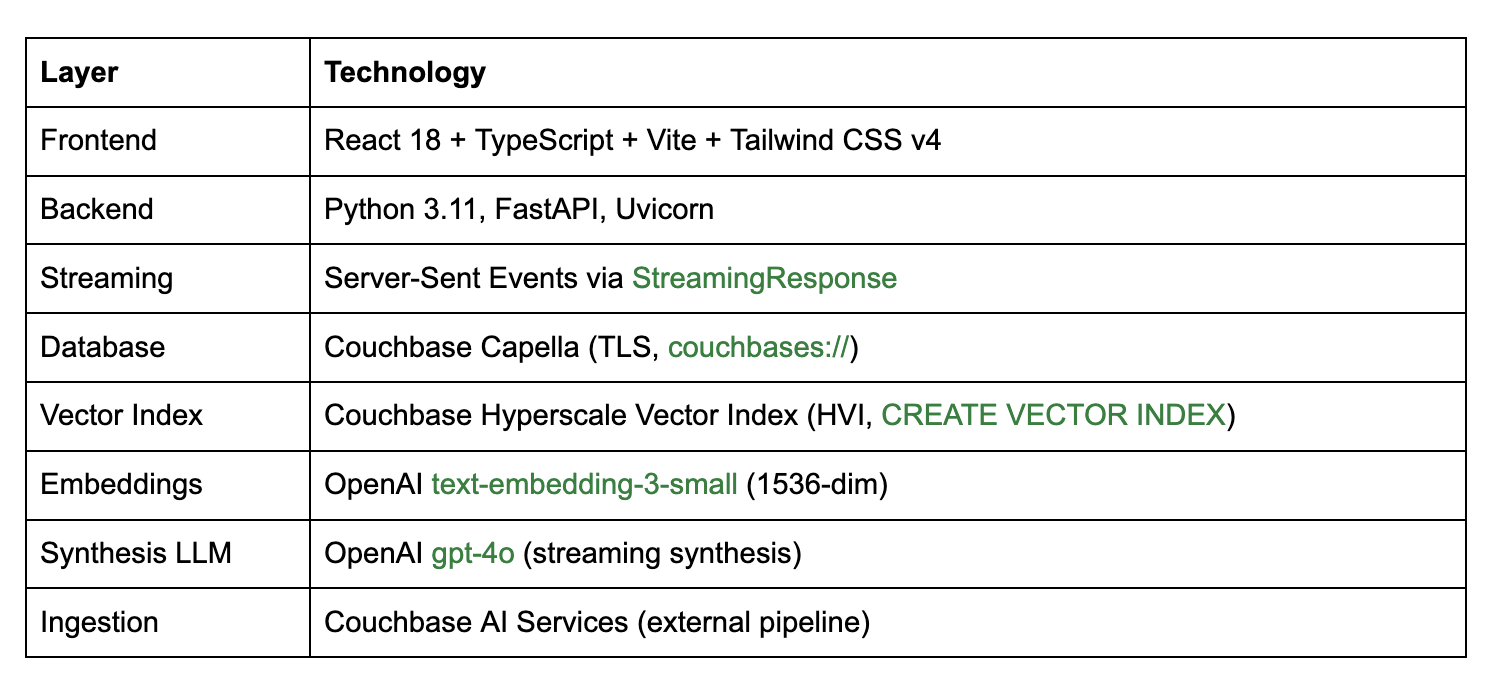
Memory Lane is an open source demo application that uses Couchbase Hyperscale Vector Index (HVI), a feature introduced in Couchbase v8.0 that’s combined with OpenAI text-embedding-3-small for vector embeddings and a GPT-4o synthesis layer to build a semantic personal document search assistant. Unlike keyword search, it understands the meaning behind your query. Unlike a simple vector search demo, it synthesises retrieved passages into a coherent natural language answer and streams that answer back token by token in real time.
This post walks through how we built it, why we made the technology choices we did, and what patterns from this demo you can carry directly into production systems.
Why This Demo Is Important to Developers
Vector search has moved beyond academic curiosity to become a production staple in under three years. But most developer-facing demos show only the simplest possible version: embed a string, store a vector, retrieve by cosine similarity. Real applications are messier and that gap is where teams get stuck.
Memory Lane was specifically designed to expose the hard parts:
- Ambiguous queries – “What does my contract say about notice period?” needs to retrieve the right passage from potentially hundreds of documents.
- Answer synthesis – Returning a ranked list of chunks is not a user experience. The system has to combine retrieved evidence into a coherent, readable response.
- Production-grade infrastructure – Embeddings need to be fast, search needs to be scalable, and the whole stack needs to run without complex tooling.
Memory Lane addresses all three. It is a complete, end-to-end reference implementation that includes a FastAPI backend and React frontend with streaming SSE that’s wired together in a way that is easy to read and straightforward to adapt. Whether you are building a knowledge assistant, a document retrieval tool, or an enterprise memory layer, the patterns transfer directly.
What the App Does
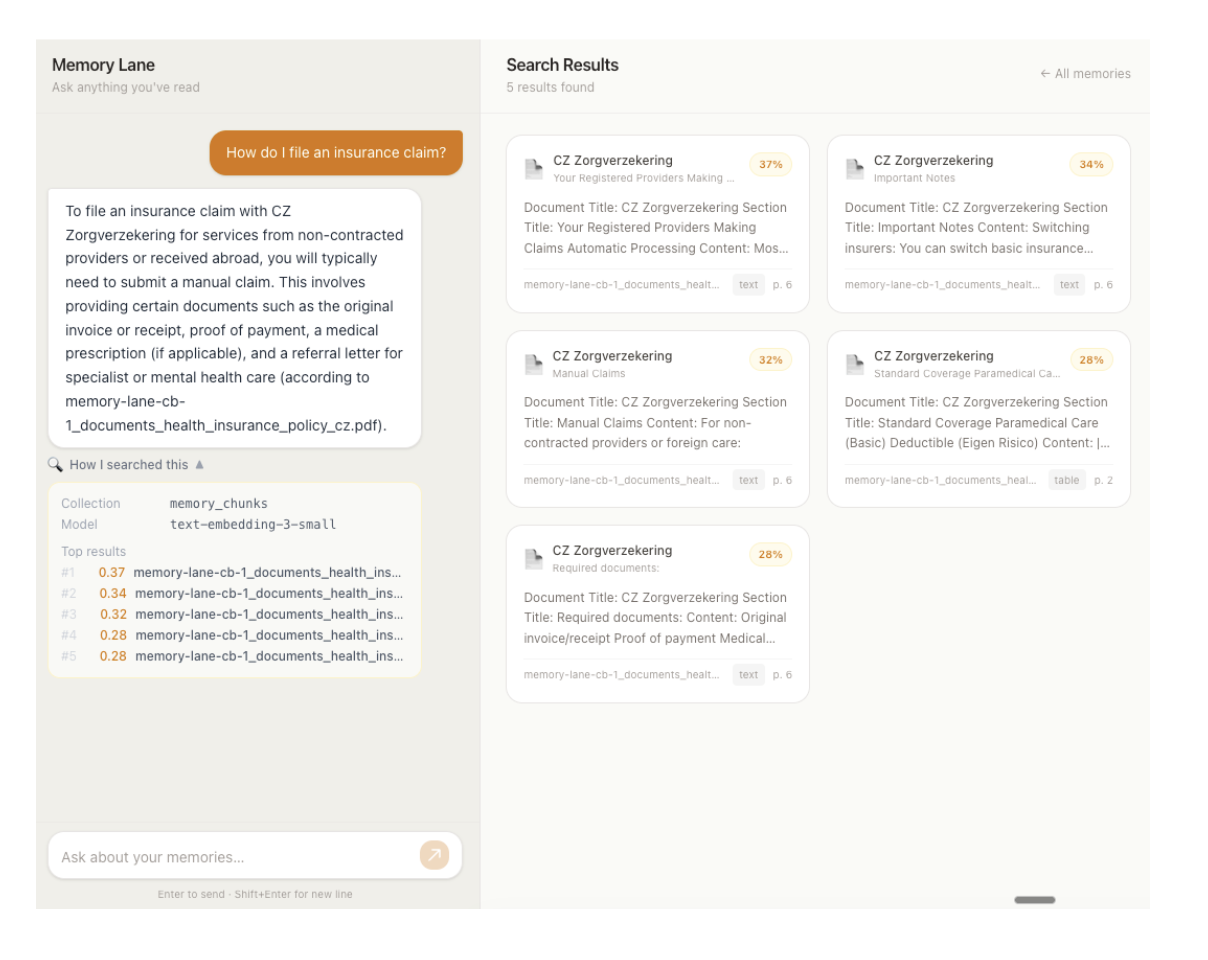
Memory Lane is a split-panel web application.
Left panel Chat interface: The user types a natural-language query. The app embeds the query, searches the Couchbase document collection, and streams a coherent cited answer back in real time. The search traces which collection was searched, which model was used, and the relevance scores of the top results is shown in a collapsible panel below each response.
Right panel Document cards: All stored document chunks are displayed as browseable cards in a responsive grid. When a search returns results, the panel switches from browse mode to search mode; only the matching documents are shown, each with a percentage similarity score badge. Clearing the search returns to the full browseable collection.
The app indexes document chunks – text extracted from PDFs, books, insurance policies, and travel itineraries split into overlapping passages by Couchbase AI Services and embedded using OpenAI text-embedding-3-small (1536-dim). Chunks live in the memory_chunks collection in Couchbase Capella and are indexed using a Hyperscale Vector Index created automatically by the AI Services workflow.
Current Capabilities
- Natural-language document search – Semantic retrieval from the document collection via a single chat interface
- Single embedding model – OpenAI text-embedding-3-small embeds both stored chunks (at ingestion time, via the AI Services workflow) and user queries (at search time, in the backend); delivering consistent vector space throughout
- Streaming responses – Answers stream token by token via Server-Sent Events (SSE), giving users immediate feedback rather than a loading spinner
- Search trace transparency – The searched collection, embedding model, and top-k relevance scores are visible to the user in a collapsible panel
- Browse and search modes – The right panel handles both paginated browsing of all documents and ranked display of search results, switching seamlessly
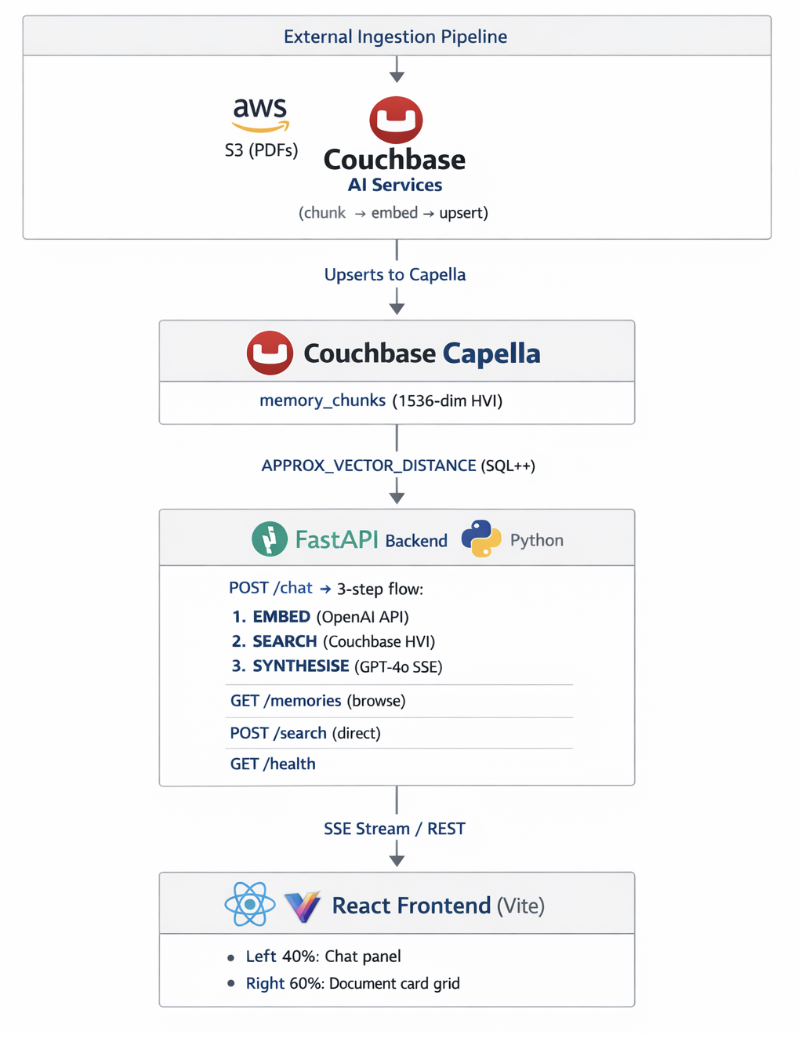
- Read-only by design – The app is a search interface only; document ingestion is handled externally by Couchbase AI Services, which reads from Amazon S3
- Ships with sample data – A dataset of 50 PDFs is included in the repo; you can swap in your own files, upload to S3, and re-run the AI Services workflow to search your own data
How It Works
When a user types “What does Atomic Habits say about identity?”, here is what happens step by step.
1. Convert the query into a vector
The query is passed to OpenAI text-embedding-3-small, which outputs a 1536-dimensional float vector. This is the same model used to embed document chunks at ingestion time, so stored vectors and the query vector live in the same space; higher dot product means more similar meaning.
The output is a unit-normalized vector, so DOT product and cosine similarity are mathematically equivalent.
2. Store embeddings with metadata
Every memory in the system is a single JSON document in Couchbase. The embedding vector lives inside the same document as the content and source information:
|
1 2 3 4 5 6 7 8 9 10 11 12 13 14 15 16 |
{ “element-id”: “atomic_habits_summary/paragraph/1”, “text-to-embed”: “Document Title: Atomic HabitsnSection Title: Identity-Based HabitsnContent: Identity change is the North Star of habit change…”, “meta-data”: { “page-number”: 2, “associated-titles”: [“Atomic Habits”, “Identity-Based Habits”], “type”: “paragraph” }, “xmeta-data”: { “filename”: “atomic_habits_summary.pdf”, “filetype”: “pdf”, “languages”: [“eng”], “workflow_id”: “memory-lane-docs” }, “text-embedding”: [0.023, –0.104, 0.061, ...] } |
This schema is generated by Couchbase AI Services and stored directly in Couchbase; the search app queries it without any transformation.
3. Run vector similarity search with Couchbase HVI
The query vector is submitted to Couchbase via a SQL++ query using APPROX_VECTOR_DISTANCE, the function that drives Hyperscale Vector Index lookups:
|
1 2 3 4 5 6 7 8 |
SELECIONAR META(d).identidade AS doc_key, APPROX_VECTOR_DISTANCE(d.`text–incorporação`,$query_vec,“DOT”,4) AS distance, d.`text–para–embed` AS text_content, d.`meta–dados` AS metadata, d.`xmeta–dados` AS xmetadata DE `memory_chunks` AS d PEDIDO POR APPROX_VECTOR_DISTANCE(d.`text–incorporação`,$query_vec,“DOT”,4) LIMITE $top_k |
The HVI returns the top-K nearest neighbours by dot product, working through the index rather than scanning every document. Because APPROX_VECTOR_DISTANCE with DOT similarity returns the negated dot product lower values are more similar the backend flips the sign to produce a pontuação field where higher means more relevant.
The top results are then passed to GPT-4o, which synthesises a natural-language answer and streams it back to the frontend token by token via SSE.
Architecture Overview
Stack
Configuring Couchbase AI Services
The ingestion side of Memory Lane, which turns raw PDFs into searchable vectors in Couchbase, is handled entirely by Couchbase AI Services. It does everything: chunks documents, generates embeddings, upserts JSON documents into Couchbase, and creates the Hyperscale Vector Index automatically. The search app simply queries what the pipeline has already populated.
Pré-requisitos
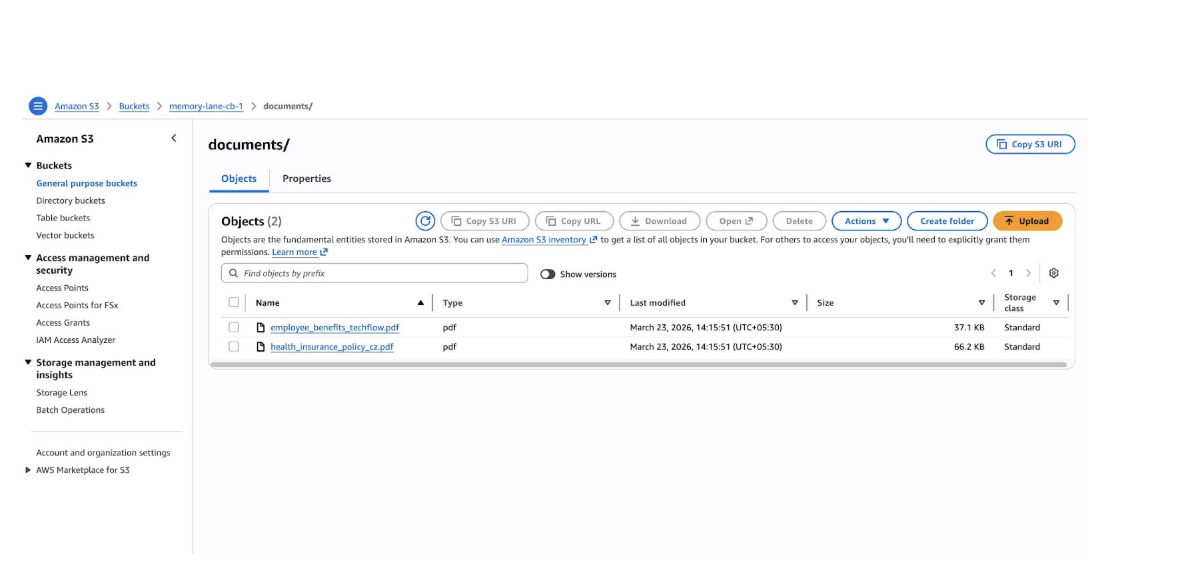
- Amazon S3 bucket with your PDFs (max 10,000 files, max 100 MB per file; supported formats: PDF, DOCX)
- Read-only AWS credentials (Access Key ID + Secret Access Key) for the bucket
- Capella cluster running Couchbase 8.0+ with the Search Service and Eventing Service running on at least one service group
- A destination bucket in Capella to receive the generated embeddings and HVI
- An embedding model either a deployed Capella model (with its API Key ID and Token) or an OpenAI API key
Creating a workflow
- Ir para AI Services → Workflows and click Create New Workflow.
- Click Unstructured Data from External sources.
- In the Workflow Name field, enter memory-lane-docs.
- Click Start Workflow.
- Configure Your Amazon S3 Bucket. Click Add New S3 Bucket Integration, give it an integration name, then enter your bucket name, region, Access Key ID, and Secret Access Key. Select the saved integration to proceed.
- Choose HVI timing. Select Create HyperScale Vector Index (now) –the workflow builds and attaches the index automatically when processing completes. No manual index creation is needed.
- Under the Destination Aglomerado, select your Capella operational cluster.
- Set Destination Bucket, Destination Scope, e Destination Collection to match CB_BUCKET, CB_SCOPE, e CB_COLLECTION_DOCS in your .env.
- Configure your data preprocessing settings:
- Optionally enable Include Page Range to process only a subset of PDF pages.
- Optionally choose Layout Exclusions to skip headers, footers, or other page elements.
- Enable OCR if your PDFs are scanned.
- Choose a chunking strategy, maximum chunk size, and chunk overlap.
- Choose your embedding model. Select a Capella-hosted model or an OpenAI model.
Embedding consistency is critical. This app embeds queries with OpenAI text-embedding-3-small (1536-dim). The AI Services workflow must be configured to use the same model. If you choose a different model in the workflow, update EMBED_MODEL e EMBED_DIMS em backend/embeddings.py to match a mismatch that silently degrades search quality.
- Verify your configuration and click Run Workflow.
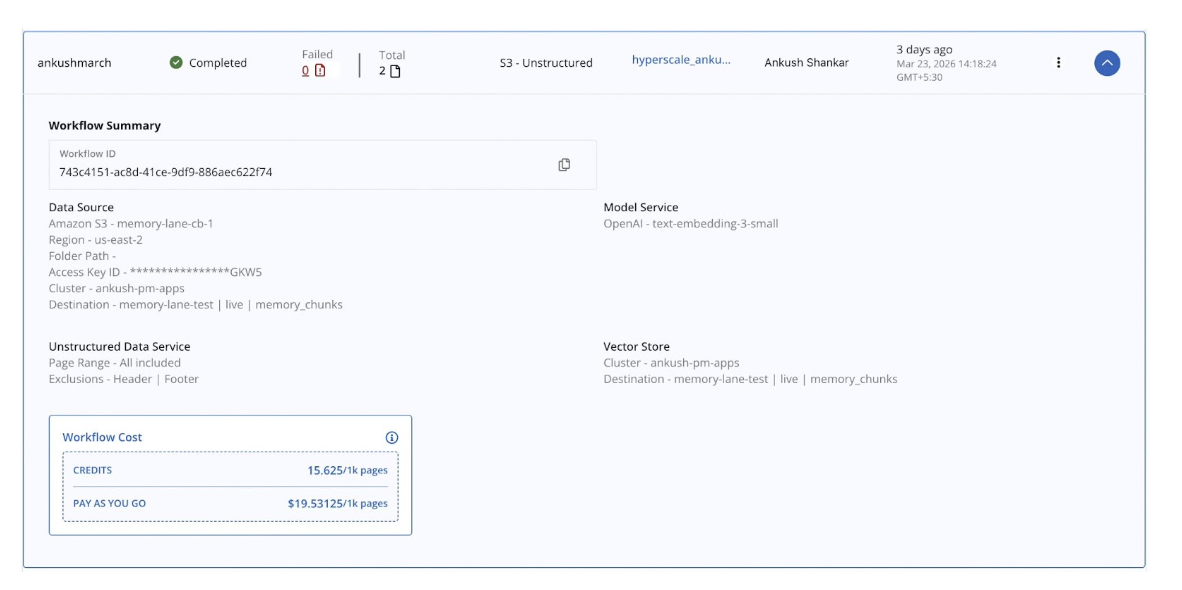
Important: Do not delete or modify the metadata scope, collections, or Eventing functions that the workflow creates in Couchbase. Modifying them requires deleting the workflow and creating a new one from scratch.
Re-ingestion: AI Services does not watch S3 continuously. To process new or changed files, re-trigger the workflow manually from the Capella UI.
How the Workflow Handles Different Document Types
This is where most DIY ingestion pipelines fall apart. A personal document collection or an enterprise content library is never uniform. Memory Lane’s sample corpus alone spans books, insurance policies, email threads, journal entries, and employee benefit guides. Each has a completely different layout, density, and information structure:
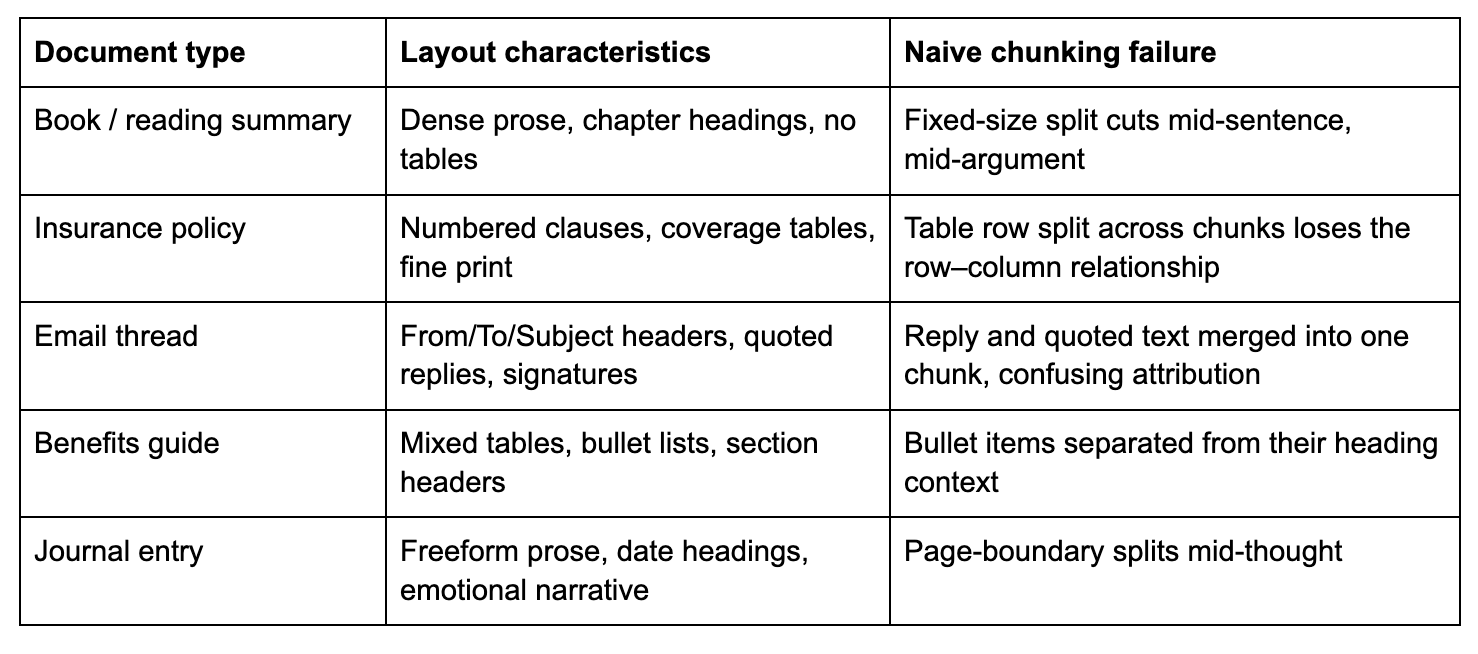
Couchbase AI Services solves this with layout-aware document parsing, not a generic text splitter. Rather than cut the document at a fixed token count, it first analyses the visual and logical structure of each page, identifying the type of every content element before any chunking decision is made.
Layout detection: what the workflow actually sees
The workflow runs an unstructured document parser over every PDF page. It identifies discrete elements by their layout role:
- paragraph – body text, a self-contained prose unit
- table – structured rows and columns; serialised into text preserving the row–column relationship
- título – document or section heading
- list_item – individual item within a bulleted or numbered list
- narrative_text – longer, flowing prose (e.g., a journal page)
- header / footer – page-level metadata, which you can exclude via Layout Exclusions
Each detected element becomes its own chunk with its type recorded in meta-data.type. A table never gets split mid-row. A paragraph never gets merged with an unrelated one from the next section. Semantic boundaries are respected automatically, regardless of how complex the page layout is.
How tables become searchable text
Tables are the hardest content type for embedding-based search. You cannot embed a two-dimensional grid directly except for a string. The workflow serialises each table into a readable text representation that preserves the row-to-column relationships. A dental coverage table like:
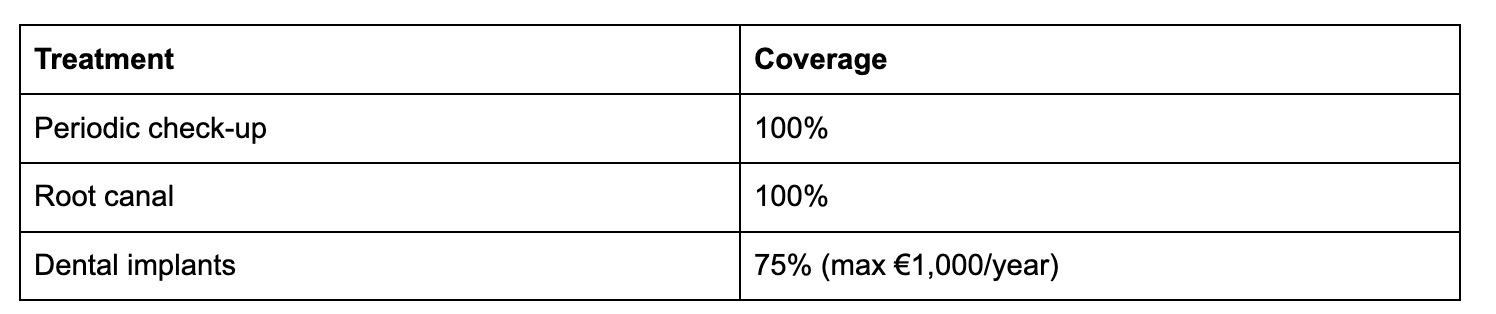
…becomes a text chunk that an embedding model can meaningfully represent and that a query like “What is the dental coverage for implants?” will reliably retrieve, because the serialised text contains both the treatment name and its coverage value in the same chunk.
Section context travels with every chunk
Real documents have hierarchy. A paragraph about “quarterly equity refresh grants” means something different when it appears in TechFlow Employee Benefits Guide → Compensation versus a separate unrelated PDF. The workflow captures this by injecting the document title and section title into every chunk’s meta-data.associated-titles field:
|
1 2 3 4 5 |
“meta-data”: { “associated-titles”: [“TechFlow Employee Benefits Guide”, “Compensation & Time Off”], “page-number”: 1, “type”: “paragraph” } |
When that chunk is embedded, the embedding reflects both the content e its context in the document hierarchy. A user asking about equity vesting gets back chunks that are specifically about compensation, not generic text that happens to mention vesting from a different source.
The chunking strategy choice
The workflow offers three chunking strategies. The right choice depends on your content:
By element (recommended for mixed corpora): Each layout element is its own chunk: one paragraph, one table, one list item. Chunk boundaries follow the document’s natural semantic structure. This is what Memory Lane uses, and it works well for a mixed corpus because each document type gets appropriate boundaries without any manual configuration.
By page: All elements on a page are concatenated into a single chunk. This is useful for when your documents have very dense, tightly coupled content where cross-element context on the same page matters. It produces fewer, larger chunks. One trade-off is that a query may retrieve a chunk where only one paragraph is relevant, but the whole page was stored together.
By token size with overlap: Fixed-size windows, with a configurable overlap between adjacent chunks. The overlap ensures that a sentence or clause that falls near a chunk boundary is still represented in both adjacent chunks. This is useful for very long, uniform prose where page or element boundaries are not meaningful. The overlap value (typically 10–20% of chunk size) controls how much context is shared between adjacent chunks; more overlap improves recall at the cost of storing more data.
For the Memory Lane corpus, where documents range from tightly structured insurance tables to freeform journal prose, chunking by element gives the best retrieval quality because each chunk represents one coherent unit of meaning.
OCR for scanned and image-heavy PDFs
Not every PDF has selectable text. Annual reports, older scanned contracts, and photocopied forms are stored as images. The workflow’s OCR option runs optical character recognition over each page image before layout analysis, extracting the text that the visual scan contains. The rest of the pipeline, including layout detection, chunking, and embedding, then runs identically on the extracted text. You can enable OCR whenever your corpus may include PDFs that were created by scanning physical documents.
What the app inherits for free
Because the ingestion pipeline handles all of this, the Memory Lane search app itself contains zero document-type-specific logic. It does not know or care whether a retrieved chunk came from a table, a paragraph, a journal entry, or a scanned form. Every chunk arrives as a text-to-embed string with structured metadata. The app embeds the query, runs the vector search, and synthesises an answer using the same three steps regardless of what the original document looked like.
This is the right way to build a retrieval application. Document intelligence belongs in the ingestion pipeline, not scattered across the search layer.
Por que Couchbase
1. Vector and metadata live together
Many vector search architectures require two systems running in parallel: a vector store (such as Pinecone or Weaviate) and a traditional database (such as PostgreSQL) to hold the metadata. You have to keep them in sync, which is a classic dual-write problem that introduces consistency risk and operational overhead.
With Couchbase, the embedding vector, the document content, the source name, and the page metadata all live in the same JSON document in the same collection. When the HVI returns a result, the full document is already there with no secondary lookup, no join, no synchronisation logic. The codebase is simpler, the query is faster, and there is one fewer moving part to break in production.
2. Hyperscale Vector Index is queried with standard SQL++
The Couchbase Hyperscale Vector Index is architecturally distinct from older FTS-based vector search approaches. It is a GSI index part of the Global Secondary Index service queried via the standard Query service using SQL++. This has meaningful practical consequences:
- No separate Search service to provision, tune, or operate
- Standard SQL++ – A APPROX_VECTOR_DISTANCE function is just another expression; you can add ONDE clauses, PARTICIPAR other collections, or combine vector ranking with any other GSI-indexed filter in the same query
- Disk-based storage – The HVI stores index data on disk rather than in RAM, making billion-document scale viable without proportionally large memory requirements
- One DDL statement – To create; no schema registration, no API call to a separate service, no YAML configuration file
CREATE VECTOR INDEX IF NOT EXISTS memory_lane_docs_hvi
LIGADO memory-lane-test.live.memory_chunks(text-embedding VECTOR)
WITH {“dimension”: 1536, “similarity”: “DOT”, “description”: “IVF,SQ8”, “scan_nprobes”: 4};
In production this index is created automatically by the Couchbase AI Services workflow with no manual DDL needed.
3. Managed infrastructure reduces operational friction
Couchbase Capella is a fully managed cloud database. For an application like Memory Lane this means:
- TLS by default: The connection string uses couchbases:// (with an s) and certificate validation is enforced out of the box – no certificate management required
- No cluster operations: No replication topology to configure, no disk management, no backup scheduling
- Scale without application changes: If you take this demo to production and data volume grows, Capella scales horizontally; the SQL++ queries and the application code do not change
A free Capella trial cluster is available in under five minutes, which is how quickly you can go from cloning this repository to a running application against a live database.
Index Configuration
Memory Lane uses a single HVI index on the memory_chunks collection:

Why DOT similarity? text-embedding-3-small produces unit-normalised vectors whose L2 norm is always 1. For unit vectors, dot product and cosine similarity are mathematically identical. DOT is marginally cheaper to compute, so we use it.
Why IVF,SQ8? A descrição field selects the underlying ANN algorithm:
- FIV (Inverted File Index) partitions the vector space into clusters at index build time. At query time, only the nearest clusters are examined rather than every vector, reducing search to a small fraction of the full scan cost.
- SQ8 applies 8-bit scalar quantisation, compressing each 32-bit float to 8 bits. This reduces the in-memory and on-disk footprint of vector data by approximately 4x with minimal accuracy loss.
scan_nprobes: 4 controls how many IVF clusters are examined per query. A value of 4 gives high recall for small datasets. For a corpus of millions of documents, tune this upward at the cost of proportionally higher query latency based on your recall/latency SLA.
In the dev stub path, ingest_stubs.py creates the index automatically. The SQL++ DDL is also provided in backend/cb_vector_index.n1ql for reference.
More Than Just a Fun App: Real Business Patterns
Every architectural choice in Memory Lane maps to a repeatable production pattern.
Enterprise knowledge base search
Replace personal PDFs with internal documentation: Confluence exports, SharePoint archives, engineering runbooks. The same single-collection architecture works at enterprise scale. Add per-user scoping or metadata filtering by department, and you have a production internal search system. Companies routinely lose institutional knowledge when documents are scattered across tools; semantic search over a centralised Couchbase collection addresses this directly.
Customer support automation
Index product manuals, past support tickets, and knowledge base articles are available. When a customer submits a ticket, the system retrieves the most relevant documentation passages and synthesises a suggested response, reducing the load on human agents and improving first-contact resolution rates. The same confidence-scored retrieval that surfaces Atomic Habits passages in the demo surfaces the right troubleshooting steps in production.
Legal and compliance document retrieval
Legal teams and compliance departments deal with thousands of contracts, regulations, and precedents. Semantic search over embedded document chunks lets an analyst ask “What does our standard MSA say about liability in case of a data breach?” and get a cited, passage-level answer in seconds instead of manually searching across hundreds of PDFs. The read-only architecture of Memory Lane is a natural fit for audit-sensitive environments where the search interface should not be able to modify source documents.
Takeaway for Developers
If you are building an AI-powered search or retrieval system, Memory Lane demonstrates that the hard parts of streaming responses, accurate semantic retrieval, and production-grade infrastructure do not require exotic infrastructure. They require clear architecture.
The patterns worth carrying from this demo into your next project:
Let the ingestion pipeline normalise your data. Couchbase AI Services converts every content type –paragraphs, tables, and even text extracted via OCR – into a uniform text-to-embed field. When everything arrives at the embedding step as text, you can use a single model for all content types. Simpler code, consistent vector space, no per-type embedding logic at query time.
Match your ingestion and query-time models exactly. The embedding model used by AI Services at ingestion must be the same model your app calls at query time. A mismatch silently puts stored vectors and query vectors in different spaces. Pin the model name explicitly in both the AI Services workflow configuration and your app’s embeddings module.
Keep vectors and metadata together. Couchbase HVI lets you store the embedding vector alongside all document content in one JSON document. Avoid architectures that force a join between a vector store and a separate metadata database; consistency is harder than it looks at scale.
Stream everything. Users tolerate a three-second wait better when they see the first words of the answer appear within 200 ms. Server-Sent Events are cheap to implement and dramatically improve perceived responsiveness. The ReadableStream pattern used in Memory Lane works in every modern browser without a library.
Final Thoughts
Memory Lane started from a straightforward question: What does a genuinely complete, end-to-end AI document search demo look like when built on modern Couchbase infrastructure?
The answer turned out to be surprisingly clean. A FastAPI backend with four routes. A single OpenAI embedding model text-embedding-3-small. A three-step flow: embed, search, synthesise. A React frontend with two panels. And at the centre a Couchbase Hyperscale Vector Index, storing embedding vectors alongside document content in a single JSON document, queryable with a standard SQL++ expression and a single new function name.
The code is intentionally approachable. Every design choice was made to be readable, not clever. The goal is not to demonstrate the maximum possible complexity, but to give you a starting point with real architecture decisions already made, so you can adapt it to your use case rather than rebuild from first principles.
Vector search and managed cloud databases are no longer research topics. They are the building blocks of the next generation of enterprise software. Memory Lane shows one way to put them together – clearly, practically, and with enough detail that the next step is cloning the repository rather than reading another white paper.
The full source code is available on GitHub. Try it, fork it, and build something better.
https://github.com/cb-ankush92/memory-lane
Built with Couchbase Capella, Couchbase Hyperscale Vector Index (HVI), FastAPI, React, and OpenAI GPT-4o.

Deixe um comentário
Você precisa fazer o login para publicar um comentário.