

Introducción
La memoria es poco confiable. Has leído cientos de artículos y guardado decenas de PDF, pero cuando realmente necesitas encontrar algo, te quedas atascado desplazándote por carpetas o adivinando el nombre de archivo correcto. ¿Y si pudieras preguntar, en un español sencillo, “¿Qué decía ese libro sobre la formación de buenos hábitos?” o “¿Qué cubre mi seguro dental?” ¿y obtener una respuesta coherente y citada en segundos?
Ese es el problema El pasado resuelve.
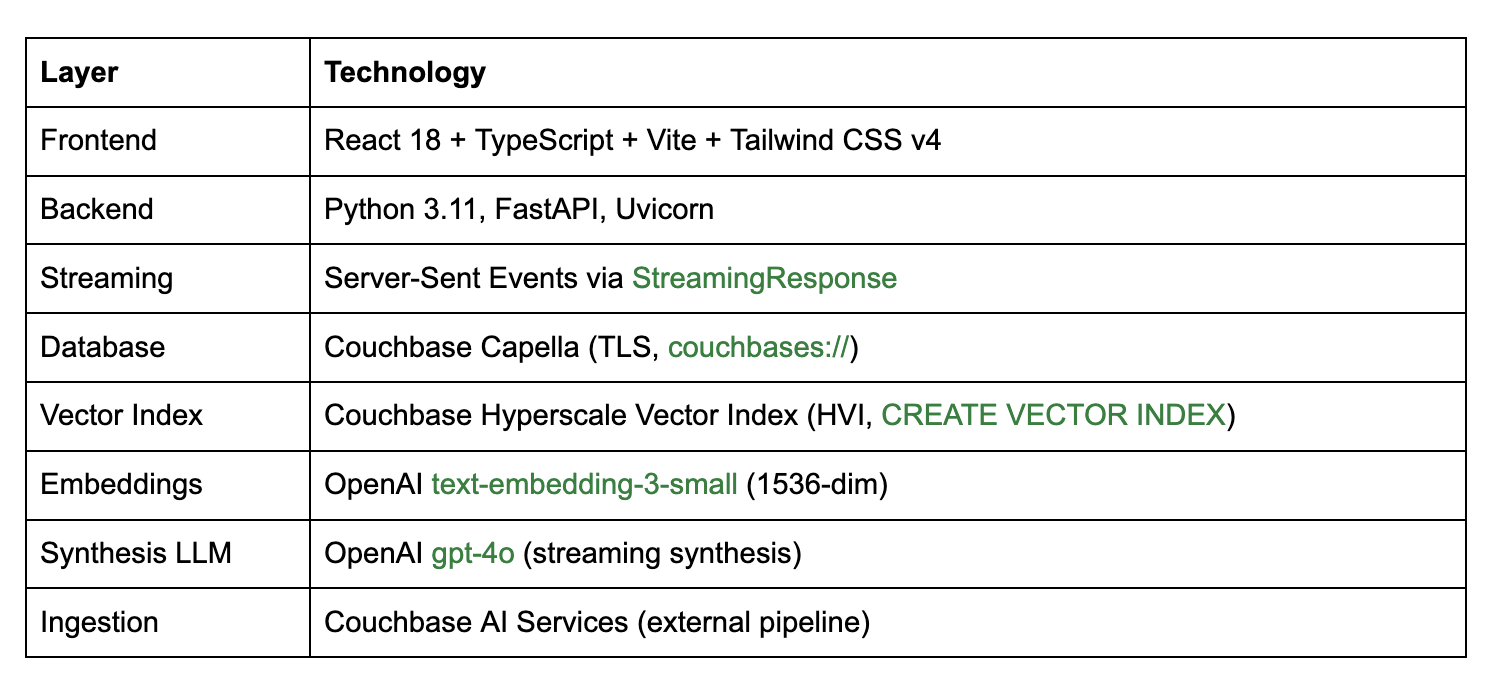
Memory Lane es una aplicación de demostración de código abierto que utiliza Índice de vectores a hiperescala (HVI) de Couchbase, una característica introducida en Couchbase v8.0 que se combina con OpenAI text-embedding-3-small para incrustaciones vectoriales y una capa de síntesis de GPT-4o para construir un asistente de búsqueda de documentos personales semántica. A diferencia de la búsqueda por palabras clave, comprende el significado detrás de tu consulta. A diferencia de una simple demostración de búsqueda vectorial, sintetiza los pasajes recuperados en una respuesta coherente en lenguaje natural y transmite esa respuesta token por token en tiempo real.
Esta publicación detalla cómo lo construimos, por qué tomamos las decisiones tecnológicas que tomamos y qué patrones de esta demostración puedes llevar directamente a sistemas de producción.
Por qué esta demostración es importante para los desarrolladores
La búsqueda vectorial ha dejado atrás la curiosidad académica para convertirse en un elemento básico de producción en menos de tres años. Pero la mayoría de las demostraciones dirigidas a desarrolladores muestran solo la versión más simple posible: incrustar una cadena, almacenar un vector, recuperar por similitud de coseno. Las aplicaciones reales son más desordenadas y esa brecha es donde los equipos se atascan.
Memory Lane fue diseñado específicamente para exponer las partes difíciles:
- Consultas ambiguas – “¿Qué dice mi contrato sobre el plazo de preaviso?” necesita recuperar el pasaje correcto de potencialmente cientos de documentos.
- Síntesis de respuestas – Devolver una lista ordenada de fragmentos no es una experiencia de usuario. El sistema tiene que combinar la evidencia recuperada en una respuesta coherente y legible.
- Infraestructura de nivel de producción – Los embeddings deben ser rápidos, la búsqueda debe ser escalable y todo el conjunto tecnológico debe funcionar sin herramientas complejas.
Memory Lane aborda los tres. Es una implementación de referencia completa y de extremo a extremo que incluye un backend en FastAPI y un frontend en React con streaming SSE, integrada de una manera fácil de leer y directa de adaptar. Ya sea que estés construyendo un asistente de conocimiento, una herramienta de recuperación de documentos o una capa de memoria empresarial, los patrones se transfieren directamente.
Lo que hace la aplicación
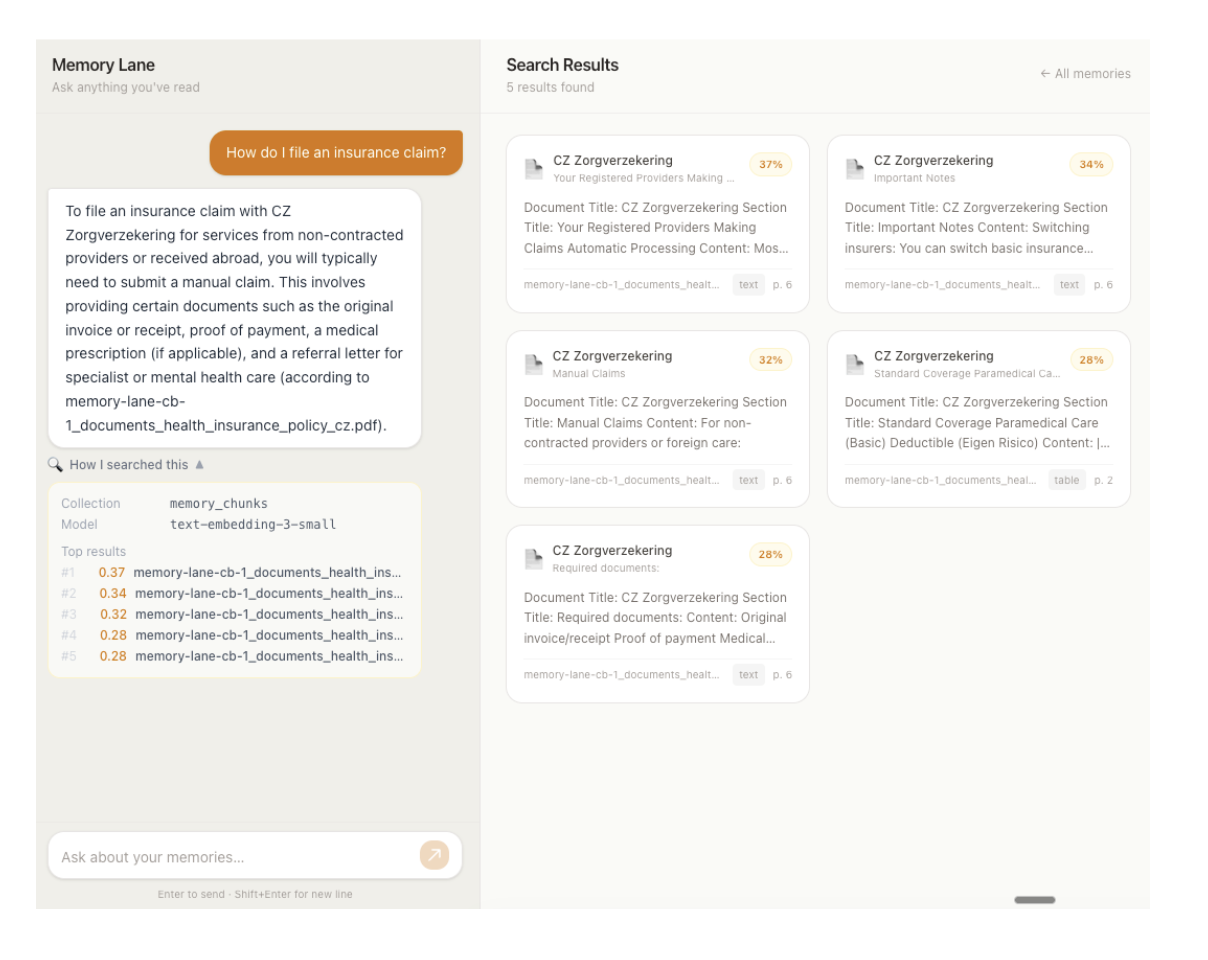
Memory Lane es una aplicación web de panel dividido.
Panel izquierdo Interfaz de chat: El usuario escribe una consulta en lenguaje natural. La aplicación incrusta la consulta, busca en la colección de documentos de Couchbase y transmite una respuesta coherente con citas en tiempo real. El rastro de la búsqueda, que indica qué colección se buscó, qué modelo se utilizó y las puntuaciones de relevancia de los mejores resultados, se muestra en un panel desplegable debajo de cada respuesta.
Tarjetas de documentos del panel derecho: Todos los fragmentos de documentos almacenados se muestran como tarjetas explorables en una cuadrícula adaptable. Cuando una búsqueda arroja resultados, el panel cambia del modo de exploración al modo de búsqueda; solo se muestran los documentos coincidentes, cada uno con una insignia de puntaje de similitud porcentual. Al borrar la búsqueda, se regresa a la colección completa explorable.
La aplicación indexa fragmentos de documento – texto extraído de archivos PDF, libros, pólizas de seguros e itinerarios de viaje dividido en fragmentos superpuestos por los Servicios de IA de Couchbase e incrustado mediante OpenAI text-embedding-3-small (1536-dim). Los fragmentos viven en el fragmentos_de_memoria colección en Couchbase Capella y están indexados mediante un índice vectorial de hiperescalamiento creado automáticamente por el flujo de trabajo de los Servicios de IA.
Capacidades actuales
- Búsqueda de documentos en lenguaje natural – Recuperación semántica de la colección de documentos a través de una única interfaz de chat
- Modelo de incrustación única – OpenAI text-embedding-3-small incorpora tanto los fragmentos almacenados (en el momento de la ingesta, a través del flujo de trabajo de Servicios de IA) como las consultas de los usuarios (en el momento de la búsqueda, en el backend); lo que ofrece un espacio vectorial coherente en todo el proceso
- Respuestas en streaming – Las respuestas se transmiten token por token a través de Server-Sent Events (SSE), lo que brinda a los usuarios retroalimentación inmediata en lugar de un indicador de carga
- Transparencia en el rastro de búsqueda – La colección buscada, el modelo de incrustación y las puntuaciones de relevancia top-k son visibles para el usuario en un panel desplegable
- Modos de navegación y búsqueda – El panel derecho maneja tanto la navegación paginada de todos los documentos como la visualización ordenada por relevancia de los resultados de búsqueda, alternando sin problemas
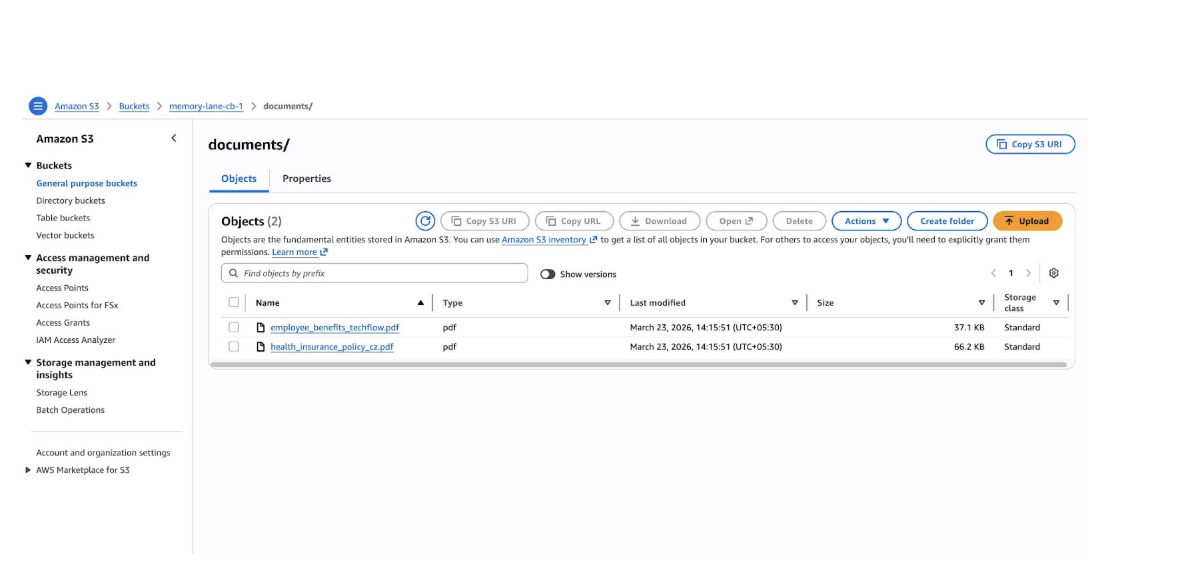
- De solo lectura por diseño – La aplicación es únicamente una interfaz de búsqueda; la ingesta de documentos es manejada externamente por Couchbase AI Services, que lee desde Amazon S3
- Barcos con datos de muestra – Se incluye un conjunto de datos de 50 archivos PDF en el repositorio; puede reemplazar con sus propios archivos, cargar en S3 y volver a ejecutar el flujo de trabajo de los Servicios de IA para buscar en sus propios datos
Cómo funciona
Cuando un usuario escribe “¿Qué dice Hábitos atómicos sobre la identidad?”, esto es lo que sucede paso a paso.
1. Convertir la consulta en un vector
La consulta se pasa a OpenAI text-embedding-3-small, que produce un vector de números flotantes de 1536 dimensiones. Este es el mismo modelo utilizado para incrustar fragmentos de documentos en el momento de la ingesta, por lo que los vectores almacenados y el vector de consulta viven en el mismo espacio; un producto escalar más alto significa un significado más similar.
El resultado es un vector normalizado por unidad, por lo que el producto PUNTO y la similitud del coseno son matemáticamente equivalentes.
2. Almacenar incrustaciones con metadatos
Cada memoria en el sistema es un documento JSON único en Couchbase. El vector de incrustación vive dentro del mismo documento que la información de contenido y origen:
|
1 2 3 4 5 6 7 8 9 10 11 12 13 14 15 16 |
{ “element-id”: “atomic_habits_summary/paragraph/1”, “texto a vector de incrustación”: “Título del documento: Hábitos atómicos\nSección: Hábitos basados en la identidad\nContenido: El cambio de identidad es la estrella polar del cambio de hábitos…”, “metadatos”: { “número de página”: 2, “títulos-asociados”: [“Hábitos atómicos”, “Hábitos basados en la identidad”], “tipo”: “párrafo” }, “xmeta-data”: { “nombre de archivo”: “atomic_habits_summary.pdf”, “tipo de archivo”: “PDF”, “idiomas”: [“inglés”], “workflow_id”: “memory-lane-docs” }, “incrustación de texto”: [0.023, –0.104, 0.061, ...] } |
Este esquema es generado por los servicios de IA de Couchbase y se almacena directamente en Couchbase; la aplicación de búsqueda lo consulta sin ninguna transformación.
3. Ejecutar la búsqueda de similitud de vectores con Couchbase HVI
El vector de consulta se envía a Couchbase mediante una consulta SQL++ utilizando APPROX_VECTOR_DISTANCE, la función que impulsa las búsquedas del Índice Vectorial Hiperescala:
|
1 2 3 4 5 6 7 8 |
SELECT Meta(d).identificación CO clave_doc, APPROX_VECTOR_DISTANCE(d.`texto–incrustación`,$vector de consulta,“DOT”,4) CO distancia, d.`texto–a–incrustar` CO contenido_del_texto, d.`meta–datos` CO metadatos, d.`xmeta–datos` CO metadatos x DE `fragmentos_de_memoria` CO d PEDIDO POR APPROX_VECTOR_DISTANCE(d.`texto–incrustación`,$vector de consulta,“DOT”,4) LÍMITE $top_k |
El HVI devuelve los K vecinos más cercanos por producto punto, trabajando a través del índice en lugar de escanear cada documento. Porque APPROX_VECTOR_DISTANCE with DOT similarity returns the negated dot product lower values are more similar the backend flips the sign to produce a puntuación field where higher means more relevant.
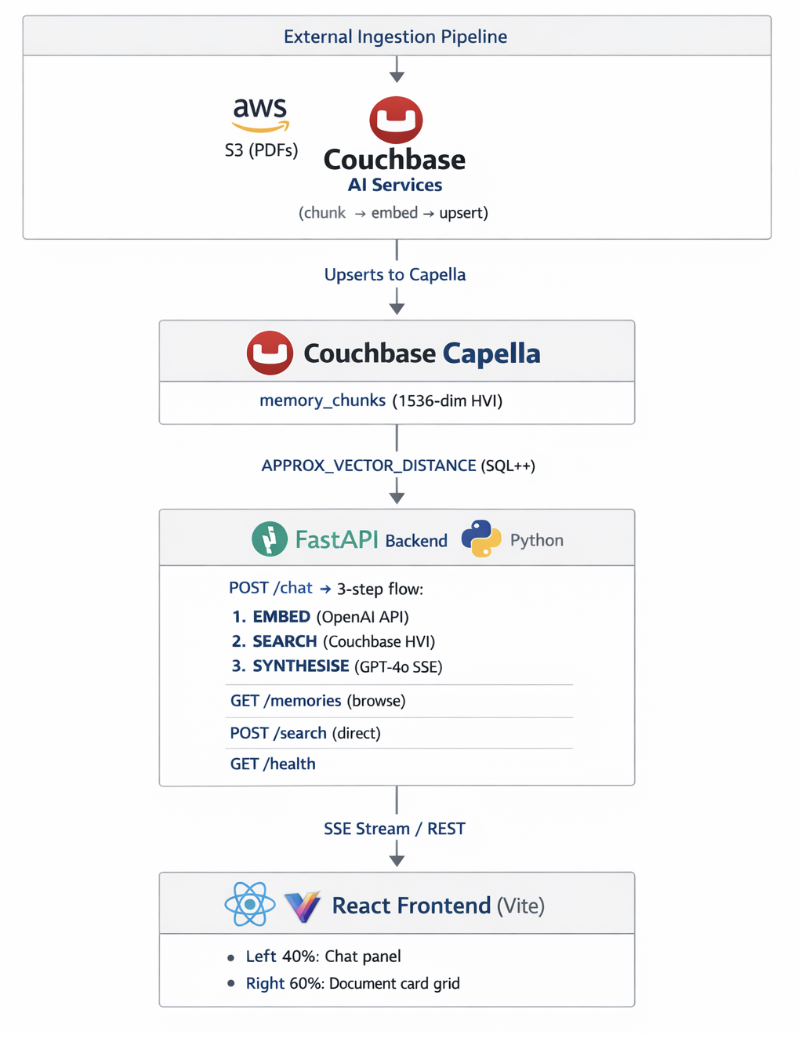
The top results are then passed to GPT-4o, which synthesises a natural-language answer and streams it back to the frontend token by token via SSE.
Architecture Overview
Stack
Configuring Couchbase AI Services
The ingestion side of Memory Lane, which turns raw PDFs into searchable vectors in Couchbase, is handled entirely by Couchbase AI Services. It does everything: chunks documents, generates embeddings, upserts JSON documents into Couchbase, and creates the Hyperscale Vector Index automatically. The search app simply queries what the pipeline has already populated.
Prerrequisitos
- Amazon S3 bucket with your PDFs (max 10,000 files, max 100 MB per file; supported formats: PDF, DOCX)
- Read-only AWS credentials (Access Key ID + Secret Access Key) for the bucket
- Capella cluster running Couchbase 8.0+ with the Search Service and Eventing Service running on at least one service group
- A destination bucket in Capella to receive the generated embeddings and HVI
- An embedding model either a deployed Capella model (with its API Key ID and Token) or an OpenAI API key
Creating a workflow
- Ir a AI Services → Workflows and click Create New Workflow.
- Hacer clic Unstructured Data from External sources.
- En el Workflow Name field, enter memory-lane-docs.
- Hacer clic Start Workflow.
- Configure Your Amazon S3 Bucket. Hacer clic Add New S3 Bucket Integration, give it an integration name, then enter your bucket name, region, Access Key ID, and Secret Access Key. Select the saved integration to proceed.
- Choose HVI timing. Seleccionar Create HyperScale Vector Index (now) –the workflow builds and attaches the index automatically when processing completes. No manual index creation is needed.
- Under the Destination Clúster, select your Capella operational cluster.
- Set Destination Bucket, Destination Scope, y Destination Collection to match CB_BUCKET, CB_SCOPE, y CB_COLLECTION_DOCS in your .env.
- Configure your data preprocessing settings:
- Optionally enable Include Page Range to process only a subset of PDF pages.
- Optionally choose Layout Exclusions to skip headers, footers, or other page elements.
- Enable OCR if your PDFs are scanned.
- Choose a chunking strategy, maximum chunk size, and chunk overlap.
- Choose your embedding model. Select a Capella-hosted model or an OpenAI model.
Embedding consistency is critical. This app embeds queries with OpenAI text-embedding-3-small (1536-dim). The AI Services workflow must be configured to use the same model. If you choose a different model in the workflow, update EMBED_MODEL y EMBED_DIMS en backend/embeddings.py to match a mismatch that silently degrades search quality.
- Verify your configuration and click Run Workflow.
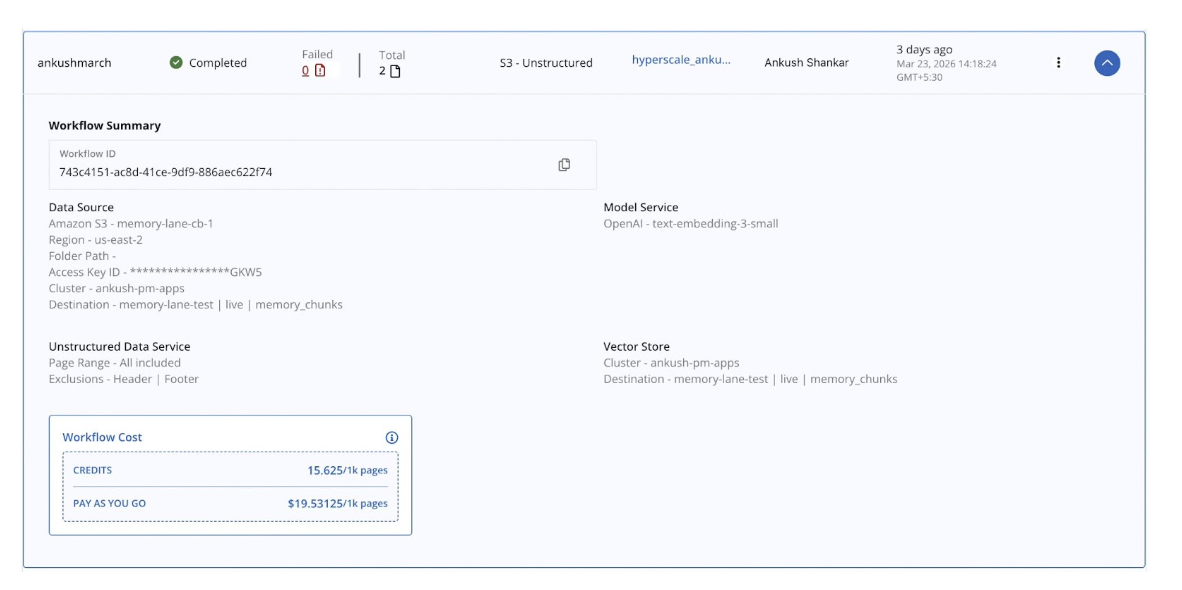
Important: Do not delete or modify the metadata scope, collections, or Eventing functions that the workflow creates in Couchbase. Modifying them requires deleting the workflow and creating a new one from scratch.
Re-ingestion: AI Services does not watch S3 continuously. To process new or changed files, re-trigger the workflow manually from the Capella UI.
How the Workflow Handles Different Document Types
This is where most DIY ingestion pipelines fall apart. A personal document collection or an enterprise content library is never uniform. Memory Lane’s sample corpus alone spans books, insurance policies, email threads, journal entries, and employee benefit guides. Each has a completely different layout, density, and information structure:
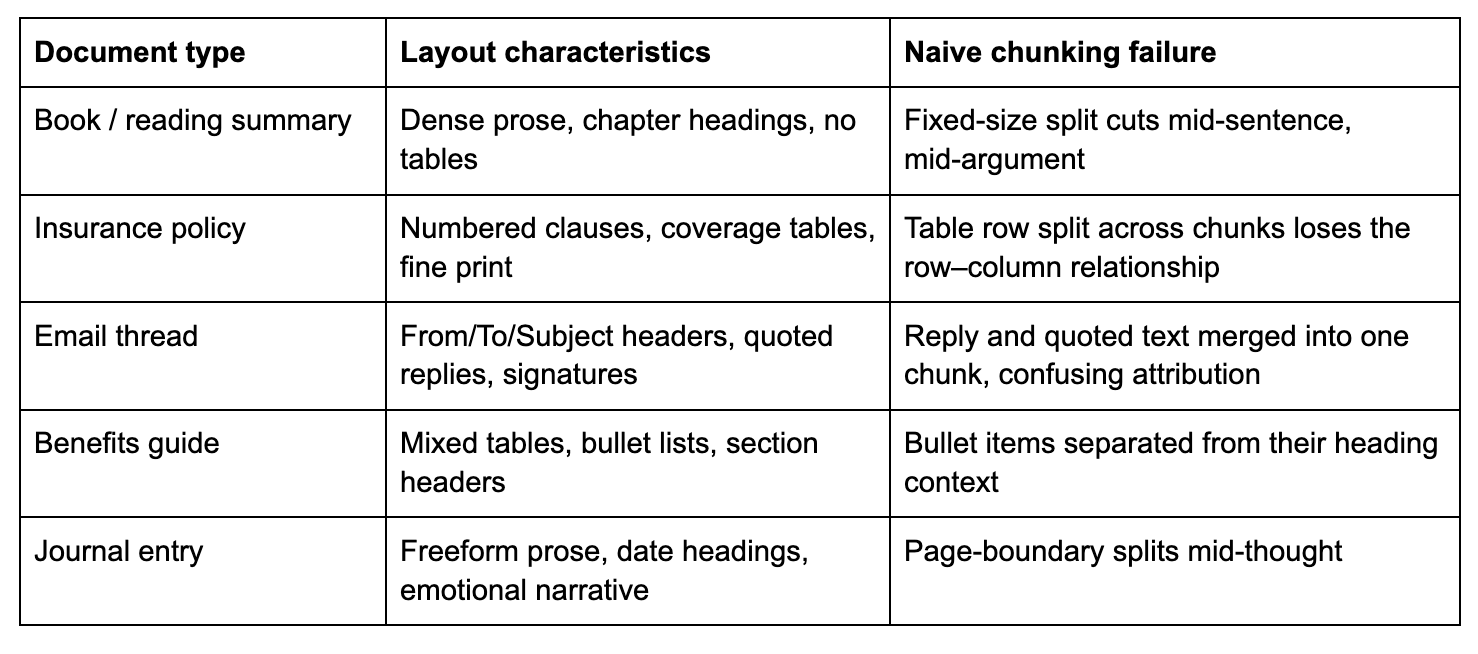
Couchbase AI Services solves this with layout-aware document parsing, not a generic text splitter. Rather than cut the document at a fixed token count, it first analyses the visual and logical structure of each page, identifying the type of every content element before any chunking decision is made.
Layout detection: what the workflow actually sees
The workflow runs an unstructured document parser over every PDF page. It identifies discrete elements by their layout role:
- paragraph – body text, a self-contained prose unit
- table – structured rows and columns; serialised into text preserving the row–column relationship
- title – document or section heading
- list_item – individual item within a bulleted or numbered list
- narrative_text – longer, flowing prose (e.g., a journal page)
- header / footer – page-level metadata, which you can exclude via Layout Exclusions
Each detected element becomes its own chunk with its type recorded in meta-data.type. A table never gets split mid-row. A paragraph never gets merged with an unrelated one from the next section. Semantic boundaries are respected automatically, regardless of how complex the page layout is.
How tables become searchable text
Tables are the hardest content type for embedding-based search. You cannot embed a two-dimensional grid directly except for a string. The workflow serialises each table into a readable text representation that preserves the row-to-column relationships. A dental coverage table like:
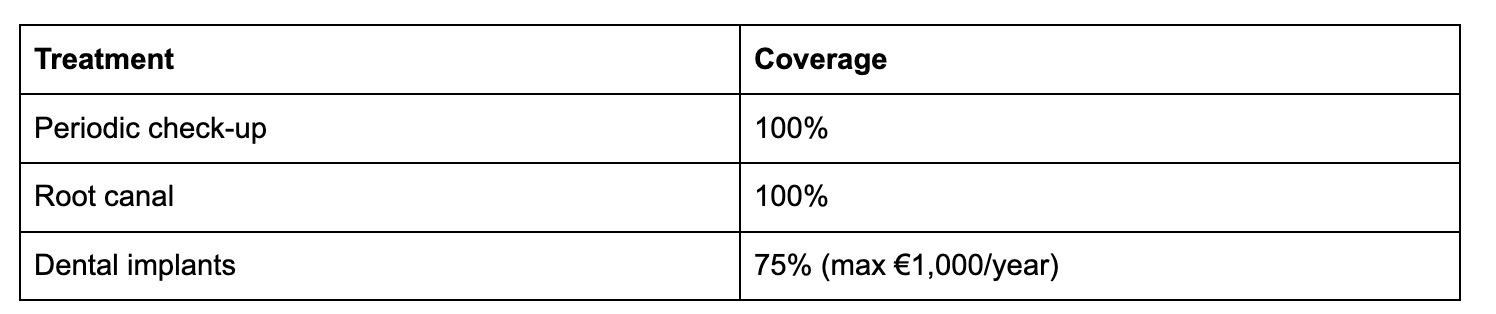
…becomes a text chunk that an embedding model can meaningfully represent and that a query like “What is the dental coverage for implants?” will reliably retrieve, because the serialised text contains both the treatment name and its coverage value in the same chunk.
Section context travels with every chunk
Real documents have hierarchy. A paragraph about “quarterly equity refresh grants” means something different when it appears in TechFlow Employee Benefits Guide → Compensation versus a separate unrelated PDF. The workflow captures this by injecting the document title and section title into every chunk’s meta-data.associated-titles field:
|
1 2 3 4 5 |
“metadatos”: { “títulos-asociados”: [“TechFlow Employee Benefits Guide”, “Compensation & Time Off”], “número de página”: 1, “tipo”: “párrafo” } |
When that chunk is embedded, the embedding reflects both the content y its context in the document hierarchy. A user asking about equity vesting gets back chunks that are specifically about compensation, not generic text that happens to mention vesting from a different source.
The chunking strategy choice
The workflow offers three chunking strategies. The right choice depends on your content:
By element (recommended for mixed corpora): Each layout element is its own chunk: one paragraph, one table, one list item. Chunk boundaries follow the document’s natural semantic structure. This is what Memory Lane uses, and it works well for a mixed corpus because each document type gets appropriate boundaries without any manual configuration.
By page: All elements on a page are concatenated into a single chunk. This is useful for when your documents have very dense, tightly coupled content where cross-element context on the same page matters. It produces fewer, larger chunks. One trade-off is that a query may retrieve a chunk where only one paragraph is relevant, but the whole page was stored together.
By token size with overlap: Fixed-size windows, with a configurable overlap between adjacent chunks. The overlap ensures that a sentence or clause that falls near a chunk boundary is still represented in both adjacent chunks. This is useful for very long, uniform prose where page or element boundaries are not meaningful. The overlap value (typically 10–20% of chunk size) controls how much context is shared between adjacent chunks; more overlap improves recall at the cost of storing more data.
For the Memory Lane corpus, where documents range from tightly structured insurance tables to freeform journal prose, chunking by element gives the best retrieval quality because each chunk represents one coherent unit of meaning.
OCR for scanned and image-heavy PDFs
Not every PDF has selectable text. Annual reports, older scanned contracts, and photocopied forms are stored as images. The workflow’s OCR option runs optical character recognition over each page image before layout analysis, extracting the text that the visual scan contains. The rest of the pipeline, including layout detection, chunking, and embedding, then runs identically on the extracted text. You can enable OCR whenever your corpus may include PDFs that were created by scanning physical documents.
What the app inherits for free
Because the ingestion pipeline handles all of this, the Memory Lane search app itself contains zero document-type-specific logic. It does not know or care whether a retrieved chunk came from a table, a paragraph, a journal entry, or a scanned form. Every chunk arrives as a text-to-embed string with structured metadata. The app embeds the query, runs the vector search, and synthesises an answer using the same three steps regardless of what the original document looked like.
This is the right way to build a retrieval application. Document intelligence belongs in the ingestion pipeline, not scattered across the search layer.
¿Por qué Couchbase?
1. Vector and metadata live together
Many vector search architectures require two systems running in parallel: a vector store (such as Pinecone or Weaviate) and a traditional database (such as PostgreSQL) to hold the metadata. You have to keep them in sync, which is a classic dual-write problem that introduces consistency risk and operational overhead.
With Couchbase, the embedding vector, the document content, the source name, and the page metadata all live in the same JSON document in the same collection. When the HVI returns a result, the full document is already there with no secondary lookup, no join, no synchronisation logic. The codebase is simpler, the query is faster, and there is one fewer moving part to break in production.
2. Hyperscale Vector Index is queried with standard SQL++
The Couchbase Hyperscale Vector Index is architecturally distinct from older FTS-based vector search approaches. It is a GSI index part of the Global Secondary Index service queried via the standard Query service using SQL++. This has meaningful practical consequences:
- No separate Search service to provision, tune, or operate
- Standard SQL++ – El APPROX_VECTOR_DISTANCE function is just another expression; you can add DÓNDE clauses, ÚNETE other collections, or combine vector ranking with any other GSI-indexed filter in the same query
- Disk-based storage – The HVI stores index data on disk rather than in RAM, making billion-document scale viable without proportionally large memory requirements
- One DDL statement – To create; no schema registration, no API call to a separate service, no YAML configuration file
CREATE VECTOR INDEX IF NOT EXISTS memory_lane_docs_hvi
Activado memory-lane-test.live.fragmentos_de_memoria(text-embedding VECTOR)
WITH {“dimension”: 1536, “similarity”: “DOT”, “description”: “IVF,SQ8”, “scan_nprobes”: 4};
In production this index is created automatically by the Couchbase AI Services workflow with no manual DDL needed.
3. Managed infrastructure reduces operational friction
Couchbase Capella is a fully managed cloud database. For an application like Memory Lane this means:
- TLS by default: The connection string uses couchbases:// (with an s) and certificate validation is enforced out of the box – no certificate management required
- No cluster operations: No replication topology to configure, no disk management, no backup scheduling
- Scale without application changes: If you take this demo to production and data volume grows, Capella scales horizontally; the SQL++ queries and the application code do not change
A free Capella trial cluster is available in under five minutes, which is how quickly you can go from cloning this repository to a running application against a live database.
Index Configuration
Memory Lane uses a single HVI index on the fragmentos_de_memoria collection:

Why DOT similarity? text-embedding-3-small produces unit-normalised vectors whose L2 norm is always 1. For unit vectors, dot product and cosine similarity are mathematically identical. DOT is marginally cheaper to compute, so we use it.
Why IVF,SQ8? El descripción field selects the underlying ANN algorithm:
- IVF (Inverted File Index) partitions the vector space into clusters at index build time. At query time, only the nearest clusters are examined rather than every vector, reducing search to a small fraction of the full scan cost.
- SQ8 applies 8-bit scalar quantisation, compressing each 32-bit float to 8 bits. This reduces the in-memory and on-disk footprint of vector data by approximately 4x with minimal accuracy loss.
scan_nprobes: 4 controls how many IVF clusters are examined per query. A value of 4 gives high recall for small datasets. For a corpus of millions of documents, tune this upward at the cost of proportionally higher query latency based on your recall/latency SLA.
In the dev stub path, ingest_stubs.py creates the index automatically. The SQL++ DDL is also provided in backend/cb_vector_index.n1ql for reference.
More Than Just a Fun App: Real Business Patterns
Every architectural choice in Memory Lane maps to a repeatable production pattern.
Enterprise knowledge base search
Replace personal PDFs with internal documentation: Confluence exports, SharePoint archives, engineering runbooks. The same single-collection architecture works at enterprise scale. Add per-user scoping or metadata filtering by department, and you have a production internal search system. Companies routinely lose institutional knowledge when documents are scattered across tools; semantic search over a centralised Couchbase collection addresses this directly.
Customer support automation
Index product manuals, past support tickets, and knowledge base articles are available. When a customer submits a ticket, the system retrieves the most relevant documentation passages and synthesises a suggested response, reducing the load on human agents and improving first-contact resolution rates. The same confidence-scored retrieval that surfaces Atomic Habits passages in the demo surfaces the right troubleshooting steps in production.
Legal and compliance document retrieval
Legal teams and compliance departments deal with thousands of contracts, regulations, and precedents. Semantic search over embedded document chunks lets an analyst ask “What does our standard MSA say about liability in case of a data breach?” and get a cited, passage-level answer in seconds instead of manually searching across hundreds of PDFs. The read-only architecture of Memory Lane is a natural fit for audit-sensitive environments where the search interface should not be able to modify source documents.
Takeaway for Developers
If you are building an AI-powered search or retrieval system, Memory Lane demonstrates that the hard parts of streaming responses, accurate semantic retrieval, and production-grade infrastructure do not require exotic infrastructure. They require clear architecture.
The patterns worth carrying from this demo into your next project:
Let the ingestion pipeline normalise your data. Couchbase AI Services converts every content type –paragraphs, tables, and even text extracted via OCR – into a uniform text-to-embed field. When everything arrives at the embedding step as text, you can use a single model for all content types. Simpler code, consistent vector space, no per-type embedding logic at query time.
Match your ingestion and query-time models exactly. The embedding model used by AI Services at ingestion must be the same model your app calls at query time. A mismatch silently puts stored vectors and query vectors in different spaces. Pin the model name explicitly in both the AI Services workflow configuration and your app’s embeddings module.
Keep vectors and metadata together. Couchbase HVI lets you store the embedding vector alongside all document content in one JSON document. Avoid architectures that force a join between a vector store and a separate metadata database; consistency is harder than it looks at scale.
Stream everything. Users tolerate a three-second wait better when they see the first words of the answer appear within 200 ms. Server-Sent Events are cheap to implement and dramatically improve perceived responsiveness. The ReadableStream pattern used in Memory Lane works in every modern browser without a library.
Reflexiones finales
Memory Lane started from a straightforward question: What does a genuinely complete, end-to-end AI document search demo look like when built on modern Couchbase infrastructure?
The answer turned out to be surprisingly clean. A FastAPI backend with four routes. A single OpenAI embedding model text-embedding-3-small. A three-step flow: embed, search, synthesise. A React frontend with two panels. And at the centre a Couchbase Hyperscale Vector Index, storing embedding vectors alongside document content in a single JSON document, queryable with a standard SQL++ expression and a single new function name.
The code is intentionally approachable. Every design choice was made to be readable, not clever. The goal is not to demonstrate the maximum possible complexity, but to give you a starting point with real architecture decisions already made, so you can adapt it to your use case rather than rebuild from first principles.
Vector search and managed cloud databases are no longer research topics. They are the building blocks of the next generation of enterprise software. Memory Lane shows one way to put them together – clearly, practically, and with enough detail that the next step is cloning the repository rather than reading another white paper.
The full source code is available on GitHub. Try it, fork it, and build something better.
https://github.com/cb-ankush92/memory-lane
Built with Couchbase Capella, Couchbase Hyperscale Vector Index (HVI), FastAPI, React, and OpenAI GPT-4o.

Deja un comentario
Lo siento, debes estar conectado para publicar un comentario.