
Este blog faz parte de uma série de blogs com várias partes que mostra como executar seus aplicativos no Kubernetes. Ele usará o Couchbaseum banco de dados de documentos distribuídos NoSQL de código aberto, como o Docker
contêiner.
A primeira parte (Couchbase no Kubernetes) explicou como iniciar o cluster do Kubernetes usando o Vagrant. Essa é uma maneira simples e fácil de desenvolver, testar e implantar
cluster do Kubernetes em seu computador local. Mas isso pode ser de uso limitado em breve, pois os recursos são limitados pelo computador local. Então, o que você faz?
O cluster do Kubernetes também pode ser instalado na Amazon. Esta segunda parte mostrará:
- Como configurar e iniciar o cluster do Kubernetes no Amazon Web Services
- Execute o contêiner do Docker no cluster do Kubernetes
- Expor o pod no Kubernetes como serviço
- Desligar o cluster
Aqui está uma visão geral rápida:
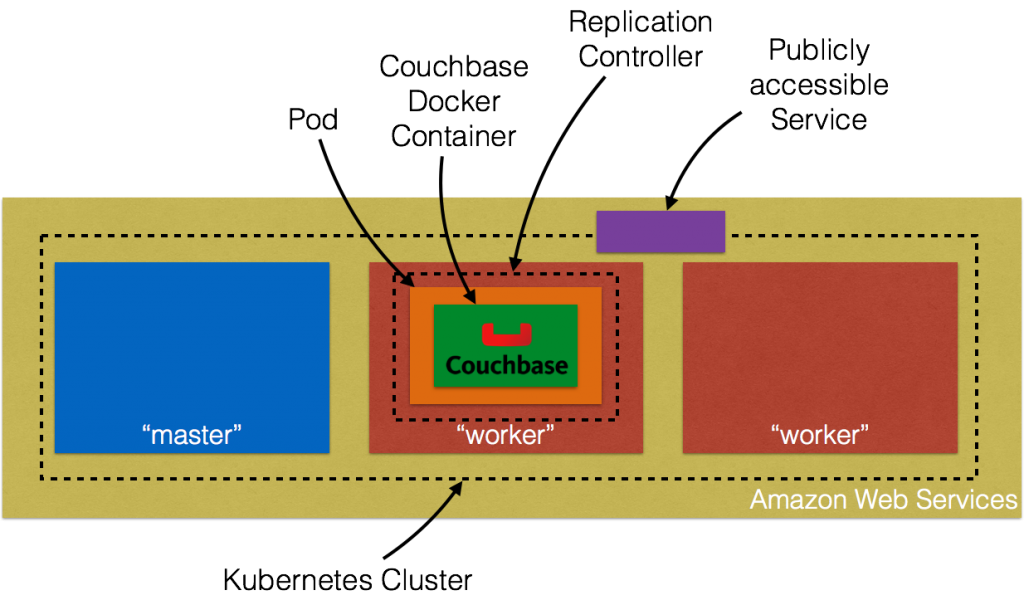
Vamos ver os detalhes!
Configurar o cluster do Kubernetes no Amazon Web Services
Primeiros passos no AWS EC2 fornecem instruções completas para iniciar o cluster do Kubernetes na Amazon. Certifique-se de ter os pré-requisitos (conta do AWS, AWS CLI, acesso total ao EC2)
antes de seguir estas instruções. O cluster do Kubernetes pode ser criado na Amazon como:
|
1 2 |
set KUBERNETES_PROVIDER=aws ./cluster/kube-up.sh |
Por padrão, isso provisiona um novo VPC e um cluster Kubernetes de 4 nós em us-west-2a (Oregon) com t2.micro instâncias em execução no Ubuntu. Isso significa que são criadas 5 AMIs (uma para o mestre e 4 para os nós de trabalho). Algumas
propriedades que merecem ser atualizadas:
- Conjunto
NUM_MINIONSpara qualquer número de nós necessários no cluster. Defina-a como 2 se quiser que apenas dois nós de trabalho sejam criados. - Cada tamanho de instância é 1.1.x é
t2.micro. DefinirTAMANHO_MESTREeMINION_SIZEvariáveis de ambiente param3.mediumcaso contrário, os nós vão se arrastar.
Se você baixou o Kubernetes de github.com/kubernetes/kubernetes/releasestodos os valores podem ser alterados em cluster/aws/config-default.sh. Iniciando o Kubernetes em
A Amazon mostra o seguinte registro:
|
1 2 3 4 5 6 7 8 9 10 11 12 13 14 15 16 17 18 19 20 21 22 23 24 25 26 27 28 29 30 31 32 33 34 35 36 37 38 39 40 41 42 43 44 45 46 47 48 49 50 51 52 53 54 55 56 57 58 59 60 61 62 63 64 65 66 67 68 69 70 71 72 73 74 75 76 77 78 79 80 81 82 83 84 85 86 87 88 89 90 91 92 93 94 95 96 97 98 99 100 101 102 103 104 105 106 107 108 109 110 111 112 113 114 115 116 117 118 119 120 121 122 123 124 125 126 127 128 129 130 131 132 133 134 135 136 137 138 139 140 141 142 143 144 145 146 147 148 149 150 151 152 153 154 155 156 157 158 159 160 161 162 163 164 165 166 167 168 169 170 171 172 173 174 175 176 177 178 179 180 181 182 183 184 185 186 187 188 |
./kubernetes/cluster/kube-up.sh ... Starting cluster using provider: aws ... calling verify-prereqs ... calling kube-up Starting cluster using os distro: vivid Uploading to Amazon S3 +++ Staging server tars to S3 Storage: kubernetes-staging-0eaf81fbc51209dd47c13b6d8b424149/devel { "InstanceProfile": { "InstanceProfileId": "AIPAJMNMKZSXNWXQBHXHI", "Roles": [ { "RoleName": "kubernetes-master", "AssumeRolePolicyDocument": { "Version": "2012-10-17", "Statement": [ { "Action": "sts:AssumeRole", "Effect": "Allow", "Principal": { "Service": "ec2.amazonaws.com" } } ] }, "CreateDate": "2016-02-29T23:19:17Z", "Path": "/", "RoleId": "AROAJW7ER37BPXX5KFTFS", "Arn": "arn:aws:iam::598307997273:role/kubernetes-master" } ], "Arn": "arn:aws:iam::598307997273:instance-profile/kubernetes-master", "CreateDate": "2016-02-29T23:19:19Z", "Path": "/", "InstanceProfileName": "kubernetes-master" } } { "InstanceProfile": { "InstanceProfileId": "AIPAILRAU7RF4R2SDCULG", "Path": "/", "Arn": "arn:aws:iam::598307997273:instance-profile/kubernetes-minion", "Roles": [ { "Path": "/", "AssumeRolePolicyDocument": { "Statement": [ { "Effect": "Allow", "Action": "sts:AssumeRole", "Principal": { "Service": "ec2.amazonaws.com" } } ], "Version": "2012-10-17" }, "RoleName": "kubernetes-minion", "Arn": "arn:aws:iam::598307997273:role/kubernetes-minion", "RoleId": "AROAIBEPV6VW4IEE6MRHS", "CreateDate": "2016-02-29T23:19:21Z" } ], "InstanceProfileName": "kubernetes-minion", "CreateDate": "2016-02-29T23:19:22Z" } } Using SSH key with (AWS) fingerprint: 39:b3:cb:c1:af:6a:86:de:98:95:01:3d:9a:56:bb:8b Creating vpc. Adding tag to vpc-7b46ac1f: Name=kubernetes-vpc Adding tag to vpc-7b46ac1f: KubernetesCluster=kubernetes Using VPC vpc-7b46ac1f Creating subnet. Adding tag to subnet-cc906fa8: KubernetesCluster=kubernetes Using subnet subnet-cc906fa8 Creating Internet Gateway. Using Internet Gateway igw-40055525 Associating route table. Creating route table Adding tag to rtb-f2dc1596: KubernetesCluster=kubernetes Associating route table rtb-f2dc1596 to subnet subnet-cc906fa8 Adding route to route table rtb-f2dc1596 Using Route Table rtb-f2dc1596 Creating master security group. Creating security group kubernetes-master-kubernetes. Adding tag to sg-308b3357: KubernetesCluster=kubernetes Creating minion security group. Creating security group kubernetes-minion-kubernetes. Adding tag to sg-3b8b335c: KubernetesCluster=kubernetes Using master security group: kubernetes-master-kubernetes sg-308b3357 Using minion security group: kubernetes-minion-kubernetes sg-3b8b335c Starting Master Adding tag to i-b71a6f70: Name=kubernetes-master Adding tag to i-b71a6f70: Role=kubernetes-master Adding tag to i-b71a6f70: KubernetesCluster=kubernetes Waiting for master to be ready Attempt 1 to check for master nodeWaiting for instance i-b71a6f70 to spawn Sleeping for 3 seconds... Waiting for instance i-b71a6f70 to spawn Sleeping for 3 seconds... Waiting for instance i-b71a6f70 to spawn Sleeping for 3 seconds... Waiting for instance i-b71a6f70 to spawn Sleeping for 3 seconds... Waiting for instance i-b71a6f70 to spawn Sleeping for 3 seconds... Waiting for instance i-b71a6f70 to spawn Sleeping for 3 seconds... [master running @52.34.244.195] Attaching persistent data volume (vol-e072d316) to master { "Device": "/dev/sdb", "State": "attaching", "InstanceId": "i-b71a6f70", "VolumeId": "vol-e072d316", "AttachTime": "2016-03-02T18:10:15.985Z" } Attempt 1 to check for SSH to master [ssh to master working] Attempt 1 to check for salt-master [salt-master not working yet] Attempt 2 to check for salt-master [salt-master not working yet] Attempt 3 to check for salt-master [salt-master not working yet] Attempt 4 to check for salt-master [salt-master not working yet] Attempt 5 to check for salt-master [salt-master not working yet] Attempt 6 to check for salt-master [salt-master not working yet] Attempt 7 to check for salt-master [salt-master not working yet] Attempt 8 to check for salt-master [salt-master not working yet] Attempt 9 to check for salt-master [salt-master not working yet] Attempt 10 to check for salt-master [salt-master not working yet] Attempt 11 to check for salt-master [salt-master not working yet] Attempt 12 to check for salt-master [salt-master not working yet] Attempt 13 to check for salt-master [salt-master not working yet] Attempt 14 to check for salt-master [salt-master running] Creating minion configuration Creating autoscaling group 0 minions started; waiting 0 minions started; waiting 0 minions started; waiting 0 minions started; waiting 2 minions started; ready Waiting 3 minutes for cluster to settle ..................Re-running salt highstate Waiting for cluster initialization. This will continually check to see if the API for kubernetes is reachable. This might loop forever if there was some uncaught error during start up. Kubernetes cluster created. cluster "aws_kubernetes" set. user "aws_kubernetes" set. context "aws_kubernetes" set. switched to context "aws_kubernetes". Wrote config for aws_kubernetes to /Users/arungupta/.kube/config Sanity checking cluster... Attempt 1 to check Docker on node @ 52.37.172.215 ...not working yet Attempt 2 to check Docker on node @ 52.37.172.215 ...not working yet Attempt 3 to check Docker on node @ 52.37.172.215 ...working Attempt 1 to check Docker on node @ 52.27.90.19 ...working Kubernetes cluster is running. The master is running at: https://52.34.244.195 The user name and password to use is located in /Users/arungupta/.kube/config. ... calling validate-cluster Waiting for 2 ready nodes. 1 ready nodes, 2 registered. Retrying. Found 2 node(s). NAME LABELS STATUS AGE ip-172-20-0-92.us-west-2.compute.internal kubernetes.io/hostname=ip-172-20-0-92.us-west-2.compute.internal Ready 56s ip-172-20-0-93.us-west-2.compute.internal kubernetes.io/hostname=ip-172-20-0-93.us-west-2.compute.internal Ready 35s Validate output: NAME STATUS MESSAGE ERROR controller-manager Healthy ok nil scheduler Healthy ok nil etcd-0 Healthy {"health": "true"} nil etcd-1 Healthy {"health": "true"} nil Cluster validation succeeded Done, listing cluster services: Kubernetes master is running at https://52.34.244.195 Elasticsearch is running at https://52.34.244.195/api/v1/proxy/namespaces/kube-system/services/elasticsearch-logging Heapster is running at https://52.34.244.195/api/v1/proxy/namespaces/kube-system/services/heapster Kibana is running at https://52.34.244.195/api/v1/proxy/namespaces/kube-system/services/kibana-logging KubeDNS is running at https://52.34.244.195/api/v1/proxy/namespaces/kube-system/services/kube-dns KubeUI is running at https://52.34.244.195/api/v1/proxy/namespaces/kube-system/services/kube-ui Grafana is running at https://52.34.244.195/api/v1/proxy/namespaces/kube-system/services/monitoring-grafana InfluxDB is running at https://52.34.244.195/api/v1/proxy/namespaces/kube-system/services/monitoring-influxdb |
O console da Amazon mostra:
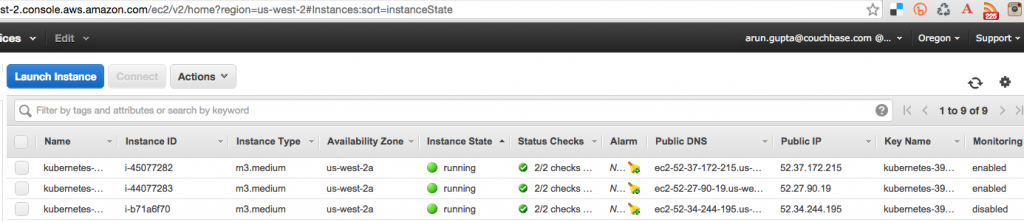
Três instâncias são criadas conforme mostrado - uma para o nó mestre e duas para os nós de trabalho. O nome de usuário e a senha do mestre do Kubernetes são armazenados em /Usuários/arungupta/.kube/config. Procure uma seção como:
|
1 2 3 4 5 6 |
- name: aws_kubernetes user: client-certificate-data: DATA client-key-data: DATA password: 3FkxcAURLCWBXc9H username: admin |
Execute o contêiner do Docker no Kubernetes Cluster na Amazon
Agora que o cluster está em funcionamento, obtenha uma lista de todos os nós:
|
1 2 3 4 |
./kubernetes/cluster/kubectl.sh get no NAME LABELS STATUS AGE ip-172-20-0-92.us-west-2.compute.internal kubernetes.io/hostname=ip-172-20-0-92.us-west-2.compute.internal Ready 18m ip-172-20-0-93.us-west-2.compute.internal kubernetes.io/hostname=ip-172-20-0-93.us-west-2.compute.internal Ready 18m |
Ele mostra dois nós de trabalho. Crie um novo pod do Couchbase:
|
1 2 |
./kubernetes/cluster/kubectl.sh run couchbase --image=arungupta/couchbase replicationcontroller "couchbase" created |
Observe como o nome da imagem pode ser especificado na CLI. Esse comando cria um controlador de replicação com um único pod. O pod usa arungupta/couchbase Imagem do Docker
que fornece um servidor Couchbase pré-configurado. Qualquer imagem do Docker pode ser especificada aqui. Obtenha todos os recursos RC:
|
1 2 3 |
./kubernetes/cluster/kubectl.sh get rc CONTROLLER CONTAINER(S) IMAGE(S) SELECTOR REPLICAS AGE couchbase couchbase arungupta/couchbase run=couchbase 1 12m |
Isso mostra o controlador de replicação que foi criado para você. Obtenha todos os pods:
|
1 2 3 |
./kubernetes/cluster/kubectl.sh get po NAME READY STATUS RESTARTS AGE couchbase-kil4y 1/1 Running 0 12m |
A saída mostra o pod que é criado como parte do controlador de replicação. Obtenha mais detalhes sobre o Pod:
|
1 2 3 4 5 6 7 8 9 10 11 12 13 14 15 16 17 18 19 20 21 22 23 24 25 26 27 28 29 30 31 32 33 34 35 36 37 38 39 40 41 42 43 44 |
./kubernetes/cluster/kubectl.sh describe po couchbase-kil4y Name: couchbase-kil4y Namespace: default Image(s): arungupta/couchbase Node: ip-172-20-0-93.us-west-2.compute.internal/172.20.0.93 Start Time: Wed, 02 Mar 2016 10:25:47 -0800 Labels: run=couchbase Status: Running Reason: Message: IP: 10.244.1.4 Replication Controllers: couchbase (1/1 replicas created) Containers: couchbase: Container ID: docker://1c33e4f28978a5169a5d166add7c763de59839ed1f12865f4643456efdc0c60e Image: arungupta/couchbase Image ID: docker://080e2e96b3fc22964f3dec079713cdf314e15942d6eb135395134d629e965062 QoS Tier: cpu: Burstable Requests: cpu: 100m State: Running Started: Wed, 02 Mar 2016 10:26:18 -0800 Ready: True Restart Count: 0 Environment Variables: Conditions: Type Status Ready True Volumes: default-token-xuxn5: Type: Secret (a secret that should populate this volume) SecretName: default-token-xuxn5 Events: FirstSeen LastSeen Count From SubobjectPath Reason Message ───────── ──────── ───── ──── ───────────── ────── ─────── 13m 13m 1 {scheduler } Scheduled Successfully assigned couchbase-kil4y to ip-172-20-0-93.us-west-2.compute.internal 13m 13m 1 {kubelet ip-172-20-0-93.us-west-2.compute.internal} implicitly required container POD Pulled Container image "gcr.io/google_containers/pause:0.8.0" already present on machine 13m 13m 1 {kubelet ip-172-20-0-93.us-west-2.compute.internal} implicitly required container POD Created Created with docker id 3830f504a7b6 13m 13m 1 {kubelet ip-172-20-0-93.us-west-2.compute.internal} implicitly required container POD Started Started with docker id 3830f504a7b6 13m 13m 1 {kubelet ip-172-20-0-93.us-west-2.compute.internal} spec.containers{couchbase} Pulling Pulling image "arungupta/couchbase" 12m 12m 1 {kubelet ip-172-20-0-93.us-west-2.compute.internal} spec.containers{couchbase} Pulled Successfully pulled image "arungupta/couchbase" 12m 12m 1 {kubelet ip-172-20-0-93.us-west-2.compute.internal} spec.containers{couchbase} Created Created with docker id 1c33e4f28978 12m 12m 1 {kubelet ip-172-20-0-93.us-west-2.compute.internal} spec.containers{couchbase} Started Started with docker id 1c33e4f28978 |
Expor o pod no Kubernetes como serviço
Agora que nosso pod está em execução, como posso acessar o servidor Couchbase? Você precisa expô-lo fora do cluster do Kubernetes. O kubectl expose pega um pod, serviço ou controlador de replicação e o expõe como um serviço do Kubernetes. Vamos lá
expor o controlador de replicação criado anteriormente e expô-lo:
|
1 2 |
./kubernetes/cluster/kubectl.sh expose rc couchbase --target-port=8091 --port=8091 --type=LoadBalancer service "couchbase" exposed |
Obtenha mais detalhes sobre o serviço:
|
1 2 3 4 5 6 7 8 9 10 11 12 13 14 15 16 17 |
./kubernetes/cluster/kubectl.sh describe svc couchbase Name: couchbase Namespace: default Labels: run=couchbase Selector: run=couchbase Type: LoadBalancer IP: 10.0.158.93 LoadBalancer Ingress: a44d3f016e0a411e5888f0206c9933da-1869988881.us-west-2.elb.amazonaws.com Port: 8091/TCP NodePort: 32415/TCP Endpoints: 10.244.1.4:8091 Session Affinity: None Events: FirstSeen LastSeen Count From SubobjectPath Reason Message ───────── ──────── ───── ──── ───────────── ────── ─────── 7s 7s 1 {service-controller } CreatingLoadBalancer Creating load balancer 5s 5s 1 {service-controller } CreatedLoadBalancer Created load balancer |
O Balanceador de carga O atributo Ingress fornece o endereço do balanceador de carga que agora está acessível publicamente. Aguarde 3 minutos para que o balanceador de carga se estabilize. Acesse-o usando a porta 8091 e a página de login para
O Console da Web do Couchbase é exibido:
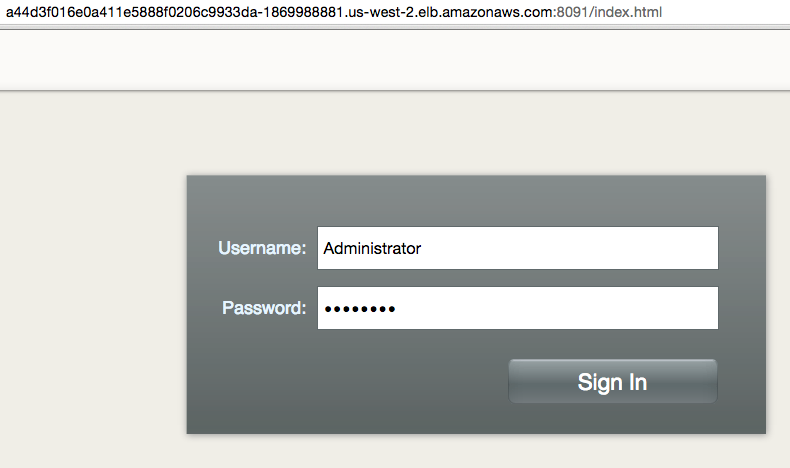
Digite as credenciais como "Administrator" e "password" para ver o console da Web:
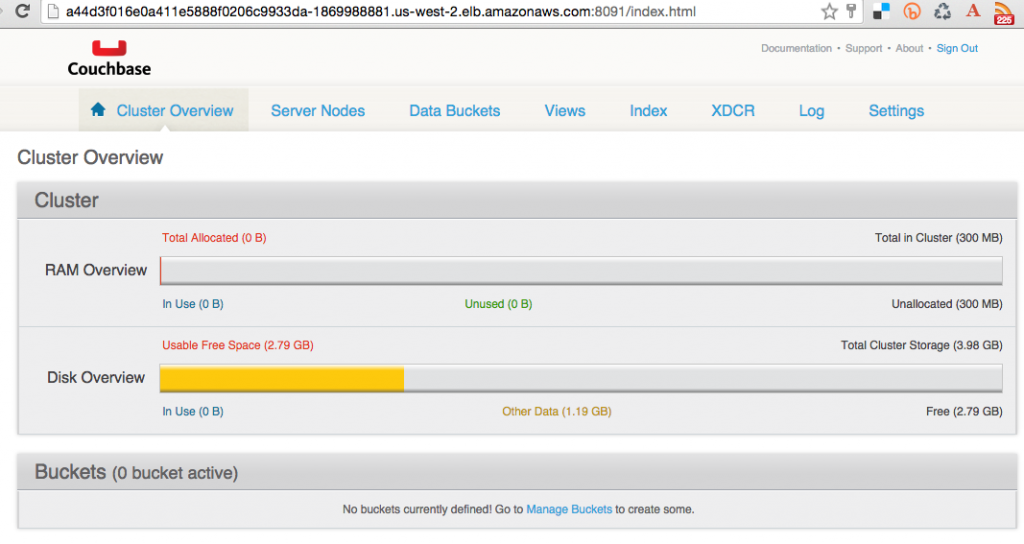
Assim, você acabou de acessar seu pod fora do cluster do Kubernetes.
Encerrar o cluster do Kubernetes
Por fim, desligue o cluster usando cluster/kube-down.sh roteiro.
|
1 2 3 4 5 6 7 8 9 10 11 12 13 14 15 16 17 18 19 20 21 22 23 24 25 26 27 28 29 30 31 32 33 34 35 36 37 38 39 40 41 42 43 44 |
./kubernetes/cluster/kube-down.sh Bringing down cluster using provider: aws Deleting ELBs in: vpc-7b46ac1f Waiting for ELBs to be deleted All ELBs deleted Deleting auto-scaling group: kubernetes-minion-group Deleting auto-scaling launch configuration: kubernetes-minion-group Deleting instances in VPC: vpc-7b46ac1f Waiting for instances to be deleted Instances not yet deleted: i-45077282 i-44077283 i-b71a6f70 Sleeping for 3 seconds... Instances not yet deleted: i-45077282 i-44077283 i-b71a6f70 Sleeping for 3 seconds... Instances not yet deleted: i-45077282 i-44077283 i-b71a6f70 Sleeping for 3 seconds... Instances not yet deleted: i-45077282 i-44077283 i-b71a6f70 Sleeping for 3 seconds... Instances not yet deleted: i-45077282 i-44077283 i-b71a6f70 Sleeping for 3 seconds... Instances not yet deleted: i-45077282 i-44077283 i-b71a6f70 Sleeping for 3 seconds... Instances not yet deleted: i-45077282 i-44077283 i-b71a6f70 Sleeping for 3 seconds... Instances not yet deleted: i-45077282 i-44077283 i-b71a6f70 Sleeping for 3 seconds... Instances not yet deleted: i-45077282 i-44077283 i-b71a6f70 Sleeping for 3 seconds... Instances not yet deleted: i-45077282 i-44077283 i-b71a6f70 Sleeping for 3 seconds... Instances not yet deleted: i-45077282 i-44077283 i-b71a6f70 Sleeping for 3 seconds... Instances not yet deleted: i-45077282 i-44077283 i-b71a6f70 Sleeping for 3 seconds... Instances not yet deleted: i-44077283 i-b71a6f70 Sleeping for 3 seconds... All instances deleted Deleting VPC: vpc-7b46ac1f Cleaning up security group: sg-308b3357 Cleaning up security group: sg-3b8b335c Cleaning up security group: sg-e3813984 Deleting security group: sg-308b3357 Deleting security group: sg-3b8b335c Deleting security group: sg-e3813984 Done |
Para uma limpeza completa, você ainda precisa excluir explicitamente o bucket do S3 onde os binários do Kubernetes estão armazenados.
Aproveite!


