
아론 벤튼은 혁신적인 모바일 애플리케이션 개발을 위한 창의적인 솔루션을 전문으로 하는 숙련된 아키텍트입니다. 그는 10년 이상 ColdFusion, SQL, NoSQL, JavaScript, HTML 및 CSS를 포함한 전체 스택 개발 분야에서 경력을 쌓았습니다. 현재 노스캐롤라이나주 그린즈버러에 위치한 Shop.com의 애플리케이션 아키텍트인 Aaron은 카우치베이스 커뮤니티 챔피언.

FakeIt 시리즈 2/5: 공유 데이터 및 종속성
In FakeIt 시리즈 1/5: 가짜 데이터 생성하기 를 통해 FakeIt이 단일 YAML 파일을 기반으로 대량의 임의 데이터를 생성하고 그 결과를 Couchbase Server를 포함한 다양한 형식과 대상으로 출력할 수 있다는 사실을 알게 되었습니다. 오늘은 데이터 생성의 세계에서 FakeIt이 진정으로 독특하고 강력한 이유를 살펴보겠습니다.
수많은 무작위 데이터 생성기를 사용할 수 있습니다. Google 검색 는 선택의 폭이 넓습니다. 그러나 이들 대부분은 단일 모델만 다룰 수 있다는 실망스러운 결함을 가지고 있습니다. 개발자로서 단일 모델만 다룰 수 있는 경우는 드물고, 프로젝트에서 여러 모델을 대상으로 개발하는 경우가 더 많습니다. FakeIt은 여러 모델과 그 모델들이 종속성을 가질 수 있도록 허용합니다.
이커머스 애플리케이션에서 사용할 수 있는 모델을 살펴보겠습니다:
- 사용자
- 제품
- 장바구니
- 주문
- 리뷰
첫 번째로 정의한 모델인 사용자 모델에는 종속성이 없으며 다음에 정의할 제품 모델도 마찬가지입니다. 그러나 주문 모델은 사용자 모델과 제품 모델 모두에 종속된다고 말하는 것이 논리적으로 맞습니다. 진정으로 테스트 데이터를 원한다면 주문 모델에서 생성된 문서는 사용자 및 제품 모델 모두에서 생성된 실제 무작위 데이터여야 합니다.
제품 모델
FakeIt에서 모델 종속성이 어떻게 작동하는지 살펴보기 전에 제품 모델이 어떤 모습일지 정의해 보겠습니다.
|
1 2 3 4 5 6 7 8 9 10 11 12 13 14 15 16 17 18 19 20 21 22 23 24 25 26 27 28 29 30 31 32 33 34 35 36 37 38 39 40 41 42 43 44 45 46 47 48 49 50 51 52 53 54 55 56 57 58 59 60 61 62 63 64 65 66 67 68 69 70 71 72 73 74 75 76 77 78 79 80 81 82 83 84 85 86 87 88 89 90 91 92 93 94 95 96 97 98 99 100 101 102 103 |
name: Products type: object key: _id properties: _id: type: string description: The document id data: post_build: `product_${this.product_id}` doc_type: type: string description: The document type data: value: product product_id: type: string description: Unique identifier representing a specific product data: build: faker.random.uuid() price: type: double description: The product price data: build: chance.floating({ min: 0, max: 150, fixed: 2 }) sale_price: type: double description: The product price data: post_build: | let sale_price = 0; if (chance.bool({ likelihood: 30 })) { sale_price = chance.floating({ min: 0, max: this.price * chance.floating({ min: 0, max: 0.99, fixed: 2 }), fixed: 2 }); } return sale_price; display_name: type: string description: Display name of product. data: build: faker.commerce.productName() short_description: type: string description: Description of product. data: build: faker.lorem.paragraphs(1) long_description: type: string description: Description of product. data: build: faker.lorem.paragraphs(5) keywords: type: array description: An array of keywords items: type: string data: min: 0 max: 10 build: faker.random.word() availability: type: string description: The availability status of the product data: build: | let availability = 'In-Stock'; if (chance.bool({ likelihood: 40 })) { availability = faker.random.arrayElement([ 'Preorder', 'Out of Stock', 'Discontinued' ]); } return availability; availability_date: type: integer description: An epoch time of when the product is available data: build: faker.date.recent() post_build: new Date(this.availability_date).getTime() product_slug: type: string description: The URL friendly version of the product name data: post_build: faker.helpers.slugify(this.display_name).toLowerCase() category: type: string description: Category for the Product data: build: faker.commerce.department() category_slug: type: string description: The URL friendly version of the category name data: post_build: faker.helpers.slugify(this.category).toLowerCase() image: type: string description: Image URL representing the product. data: build: faker.image.image() alternate_images: type: array description: An array of alternate images for the product items: type: string data: min: 0 max: 4 build: faker.image.image() |
이 모델은 이전 사용자 모델보다 조금 더 복잡합니다. 이 속성 중 몇 가지를 더 자세히 살펴보겠습니다:
- _id: 이 값은 문서의 모든 프로퍼티가 빌드된 후에 설정되며 빌드 후 함수에서 사용할 수 있습니다. 이 컨텍스트는 현재 생성 중인 문서의 컨텍스트입니다.
- 판매 가격: 판매 가격의 30% 확률을 정의하고 판매 가격이 가격 속성보다 낮은 판매 가격이 있는 경우
- 키워드: 는 배열입니다. Swagger와 유사하게 정의되며, 빌드/포스트빌드 함수를 사용하여 배열 항목과 배열 구성 방법을 정의합니다. 또한 최소값과 최대값을 정의할 수 있으며 FakeIt은 이 값 사이에 임의의 배열 요소를 생성합니다. 정해진 수의 배열 요소를 생성하는 데 사용할 수 있는 고정 프로퍼티도 있습니다.
이제 제품 모델을 구성했으므로 임의의 데이터를 생성하고 콘솔에 출력하여 명령을 사용하여 어떻게 보이는지 확인해 보겠습니다:
|
1 |
fakeit console models/products.yaml |
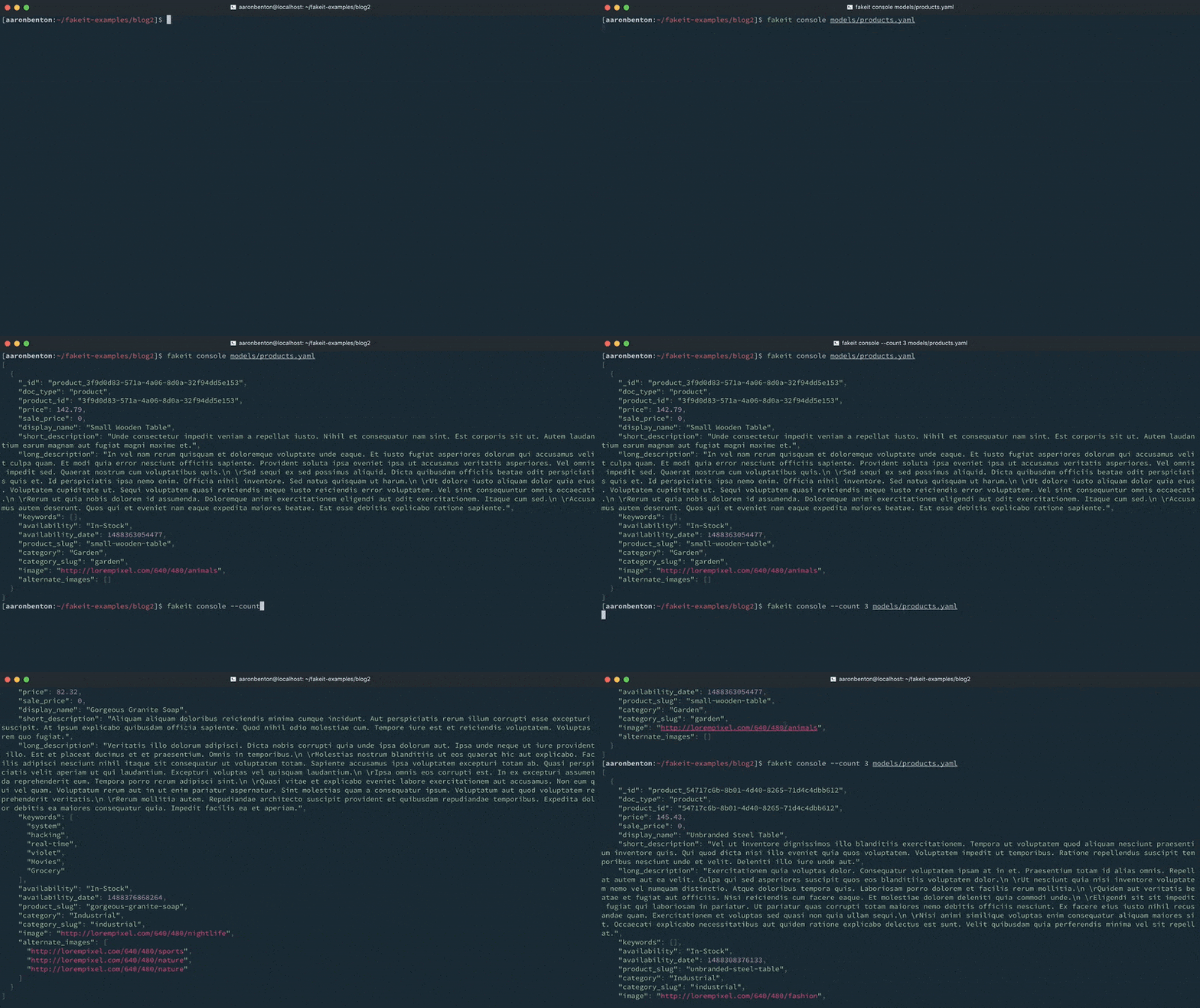
주문 모델
우리 프로젝트의 경우 이미 다음 모델을 정의했습니다:
- users.yaml
- products.yaml
속성이 없는 또는 주문 모델을 정의하고 종속성을 지정하는 것으로 시작하겠습니다:
|
1 2 3 4 5 6 7 8 |
name: Orders type: object key: _id data: dependencies: - products.yaml - users.yaml properties: |
주문 모델에 대해 두 개의 종속성을 정의하고 파일 이름으로 참조했습니다. 모든 모델이 동일한 디렉터리에 저장되므로 전체 경로를 지정할 이유가 없습니다. 런타임에 FakeIt은 문서 생성을 시도하기 전에 먼저 모든 모델을 구문 분석하고 각 모델 종속성(있는 경우)에 따라 실행 순서를 결정합니다.
FakeIt 모델의 각 빌드 함수는 함수 본문으로, 다음과 같은 인수가 전달됩니다.
|
1 2 3 |
function (documents, globals, inputs, faker, chance, document_index, require) { return faker.internet.userName(); } |
실행 순서가 설정되면 각 종속성은 메모리에 저장되고 문서 인수를 통해 종속 모델에서 사용할 수 있습니다. 이 인수는 각 모델에 대한 키를 포함하는 객체이며, 그 값은 생성된 각 문서의 배열입니다. 문서 속성의 예시에서는 이와 비슷하게 보입니다:
|
1 2 3 4 5 6 7 8 |
{ "Users": [ ... ], "Products": [ ... ] } |
이를 활용하여 임의의 제품 및 사용자 문서를 검색하여 해당 속성을 주문 모델 내의 속성에 할당할 수 있습니다. 예를 들어, 사용자 모델에서 생성된 문서에서 임의의 user_id를 검색하고 빌드 함수를 통해 이를 주문 모델의 user_id에 할당할 수 있습니다.
|
1 2 3 4 5 |
user_id: type: integer description: The user_id that placed the order data: build: faker.random.arrayElement(documents.Users).user_id; |
나머지 주문 모델이 어떤 모습일지 정의해 보겠습니다:
|
1 2 3 4 5 6 7 8 9 10 11 12 13 14 15 16 17 18 19 20 21 22 23 24 25 26 27 28 29 30 31 32 33 34 35 36 37 38 39 40 41 42 43 44 45 46 47 48 49 50 51 52 53 54 55 56 57 58 59 60 61 62 63 64 65 66 67 68 69 70 71 72 73 74 75 76 77 78 79 80 81 82 83 84 85 86 87 88 89 90 91 92 93 94 95 96 97 98 99 100 101 102 103 104 105 106 107 108 109 110 111 112 113 114 115 116 117 118 119 120 121 122 123 124 125 126 127 128 129 130 131 132 133 134 135 136 137 138 139 140 141 142 143 144 145 146 147 148 149 150 151 152 153 154 155 156 157 158 159 160 161 162 163 |
name: Orders type: object key: _id data: dependencies: - products.yaml - users.yaml properties: _id: type: string description: The document id data: post_build: `order_${this.order_id}` doc_type: type: string description: The document type data: value: "order" order_id: type: integer description: The order_id data: build: document_index + 1 user_id: type: integer description: The user_id that placed the order data: build: faker.random.arrayElement(documents.Users).user_id; order_date: type: integer description: An epoch time of when the order was placed data: build: new Date(faker.date.past()).getTime() order_status: type: string description: The status of the order data: build: faker.random.arrayElement([ 'Pending', 'Processing', 'Cancelled', 'Shipped' ]) billing_name: type: string description: The name of the person the order is to be billed to data: build: `${faker.name.firstName()} ${faker.name.lastName()}` billing_phone: type: string description: The billing phone data: build: faker.phone.phoneNumber().replace(/x[0-9]+$/, '') billing_email: type: string description: The billing email data: build: faker.internet.email() billing_address_1: type: string description: The billing address 1 data: build: `${faker.address.streetAddress()} ${faker.address.streetSuffix()}` billing_address_2: type: string description: The billing address 2 data: build: chance.bool({ likelihood: 50 }) ? faker.address.secondaryAddress() : null billing_locality: type: string description: The billing city data: build: faker.address.city() billing_region: type: string description: The billing region, city, province data: build: faker.address.stateAbbr() billing_postal_code: type: string description: The billing zip code / postal code data: build: faker.address.zipCode() billing_country: type: string description: The billing region, city, province data: value: US shipping_name: type: string description: The name of the person the order is to be billed to data: build: `${faker.name.firstName()} ${faker.name.lastName()}` shipping_address_1: type: string description: The shipping address 1 data: build: `${faker.address.streetAddress()} ${faker.address.streetSuffix()}` shipping_address_2: type: string description: The shipping address 2 data: build: chance.bool({ likelihood: 50 }) ? faker.address.secondaryAddress() : null shipping_locality: type: string description: The shipping city data: build: faker.address.city() shipping_region: type: string description: The shipping region, city, province data: build: faker.address.stateAbbr() shipping_postal_code: type: string description: The shipping zip code / postal code data: build: faker.address.zipCode() shipping_country: type: string description: The shipping region, city, province data: value: US shipping_method: type: string description: The shipping method data: build: faker.random.arrayElement([ 'USPS', 'UPS Standard', 'UPS Ground', 'UPS 2nd Day Air', 'UPS Next Day Air', 'FedEx Ground', 'FedEx 2Day Air', 'FedEx Standard Overnight' ]); shipping_total: type: double description: The shipping total data: build: chance.dollar({ min: 10, max: 50 }).slice(1) tax: type: double description: The tax total data: build: chance.dollar({ min: 2, max: 10 }).slice(1) line_items: type: array description: The products that were ordered items: type: string data: min: 1 max: 5 build: | const random = faker.random.arrayElement(documents.Products); const product = { product_id: random.product_id, display_name: random.display_name, short_description: random.short_description, image: random.image, price: random.sale_price || random.price, qty: faker.random.number({ min: 1, max: 5 }), }; product.sub_total = product.qty * product.price; return product; grand_total: type: double description: The grand total of the order data: post_build: | let total = this.tax + this.shipping_total; for (let i = 0; i < this.line_items.length; i++) { total += this.line_items[i].sub_total; } return chance.dollar({ min: total, max: total }).slice(1); |
그리고 명령을 사용하여 콘솔에 출력합니다:
|
1 |
fakeit console models/orders.yaml |
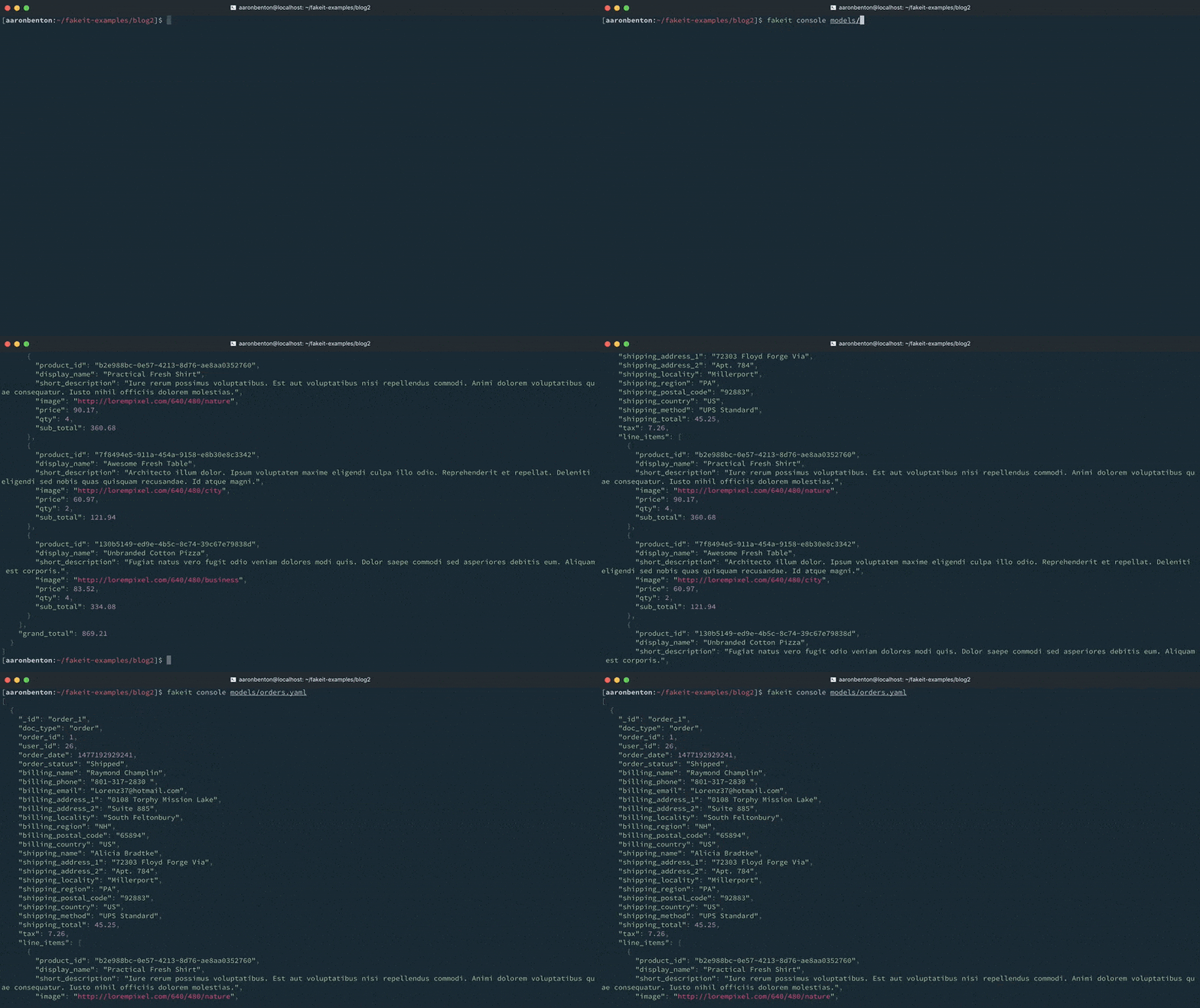
콘솔 출력에서 볼 수 있듯이 사용자 및 제품 모델에 대한 문서가 생성되었으며 이러한 문서는 주문 모델에서 사용할 수 있게 되었습니다. 그러나 출력이 요청된 것은 주문 모델뿐이었기 때문에 출력에서 제외되었습니다.
이제 종속성이 있는 3개의 모델(사용자, 제품 및 주문)을 정의했으므로 각 모델에 대해 여러 개의 문서를 생성하여 Couchbase Server로 출력할 수 있어야 합니다. 지금까지는 -count 명령줄 인수를 통해 생성할 문서의 수를 지정해 왔습니다. 모델의 루트에 있는 데이터: 속성을 사용하여 문서 수 또는 문서 범위를 지정할 수 있습니다.
|
1 2 3 4 5 6 7 8 |
users.yaml name: Users type: object key: _id data: min: 1000 max: 2000 |
|
1 2 3 4 5 6 7 8 |
products.yaml name: Products type: object key: _id data: min: 4000 max: 5000 |
|
1 2 3 4 5 6 7 8 9 10 11 |
orders.yaml name: Orders type: object key: _id data: dependencies: - products.yaml - users.yaml min: 5000 max: 6000 |
이제 명령을 사용하여 관련 문서 모델의 임의의 집합을 생성하고 해당 문서를 Couchbase Server로 직접 출력할 수 있습니다:
|
1 |
fakeit couchbase --server 127.0.0.1 --bucket ecommerce --verbose models/ |
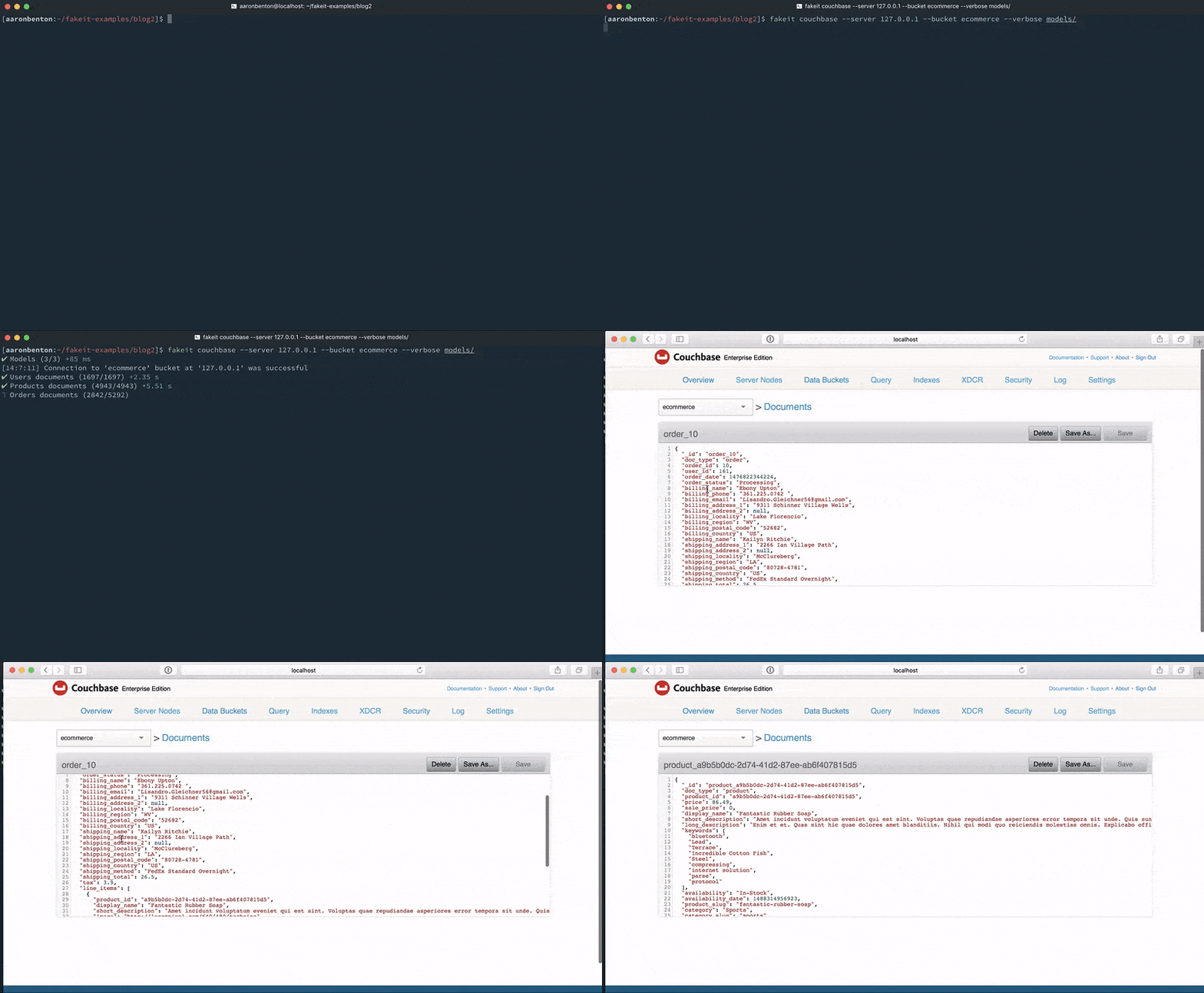
결론
세 가지 간단한 FakeIt YAML 모델을 통해 모델 종속성을 생성하여 무작위로 생성된 데이터를 모델 간에 연관시키고 Couchbase Server로 스트리밍할 수 있는 방법을 살펴보았습니다. 또한 모델 루트의 속성 데이터를 사용하여 모델별로 생성할 문서 수를 지정하는 방법도 살펴봤습니다.
이러한 모델은 프로젝트 저장소에 저장할 수 있어 공간을 거의 차지하지 않으며 개발자가 완전히 다른 데이터로 동일한 데이터 구조를 생성할 수 있습니다. 다중 모델 관계를 통해 문서를 생성할 수 있는 또 다른 장점은 다양한 문서 모델을 탐색하고 다양한 N1QL 쿼리에서 어떻게 수행되는지 확인할 수 있다는 것입니다.
다음 단계
이전 게시물
- FakeIt 시리즈 1/5: 가짜 데이터 생성
 이 게시물은 카우치베이스 커뮤니티 글쓰기 프로그램의 일부입니다.


[...] 이전 포스트 FakeIt 시리즈 2/5: 공유 데이터 및 종속성에서는 FakeIt으로 다중 모델 종속성을 만드는 방법을 살펴봤습니다. 오늘 우리는 [...]
[...] 지금까지 FakeIt 시리즈에서 가짜 데이터를 생성하고, 데이터와 종속성을 공유하고, 소규모 모델에 정의를 사용하는 방법을 살펴봤습니다. 오늘은 [...]의 마지막 주요 기능에 대해 살펴보겠습니다.