

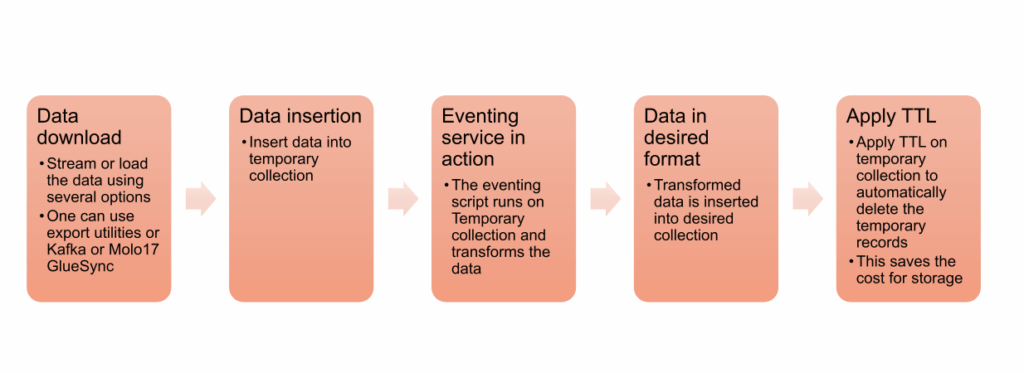
Modern data migrations rarely involve a simple lift-and-shift; they require transformation, cleansing, and enrichment so applications can immediately leverage the destination platform’s strengths. Couchbase Capella’s Eventing service enables event-driven, inline transformations as data arrives, allowing teams to reshape schemas, normalize values, enrich with metadata, and prepare documents for SQL++, Search, Analytics, and mobile sync from the outset.
Objectives
- Deliver a repeatable, event-driven migration pattern from any relational or non-relational database to Couchbase Capella that transforms data in-flight for immediate usability in applications and analytics
In this example, we will use MongoDB Atlas as a source database. - Provide a minimal, production-ready reference implementation using cbimport and Capella Eventing to convert source schemas (e.g., decimals, nested structures, identifiers) into query-optimized models
- Outline operational guardrails, prerequisites, and validation steps so teams can execute confidently with predictable outcomes and rollback options if needed
Why event‑driven migration
- Inline transformation reduces post-migration rework by applying schema normalization and enrichment as documents arrive, thereby accelerating cutover and lowering risk
- Eventing functions keep transformations source-controlled and auditable, so changes are consistent, testable, and repeatable across environments
- The result is Capella-ready data that supports SQL++, Full‑Text Search, Vector Search, Analytics, and App Services without interim refactoring phases
Prerequisites
- Install MongoDB Database Tools (includes mongoexport, mongoimport, etc.)
- Download Couchbase CLI
- Capella paid account and cluster access, with allowed IP addresses configured and the Capella root certificate downloaded and saved as ca.pem
- Create following artifacts in Couchbase Capella:
-
- A bucket with name: Test
- Scope under bucket: Test with name: sample_airbnb
- Two collections with names listingAndReviewsTemp and listingAndReviews
- A Javascript function with name dataTransformation
Click to watch videos below see the Capella setup and creating cluster access steps.
-
- Credentials with read/write access to target bucket/scope/collections and CLI tools installed for cbimport and MongoDB export utilities.
- Connection strings for MongoDB Atlas (source) and Couchbase Capella (target), plus a temporary collection for initial ingestion before transformation.
Source example using MongoDB Atlas
A representative Airbnb listing document illustrates common transformation needs: decimal normalization, identifier handling, nested fields, and flattening for query performance.
Example fields include listing_url, host metadata, address with coordinates, and decimal wrappers for fields like bathrooms and price using the MongoDB extended JSON format.
Eventing transformation pattern
- Use a temporary collection as the Eventing source (listingAndReviewsTemp) and a destination collection (listingAndReviews) for the transformed documents to keep migration idempotent and testable.
- Convert MongoDB extended JSON decimals to native numbers, rename fields for domain readability, derive a Couchbase key from the original _id, and stamp documents with migrated_at.
Step 1: Export from MongoDB
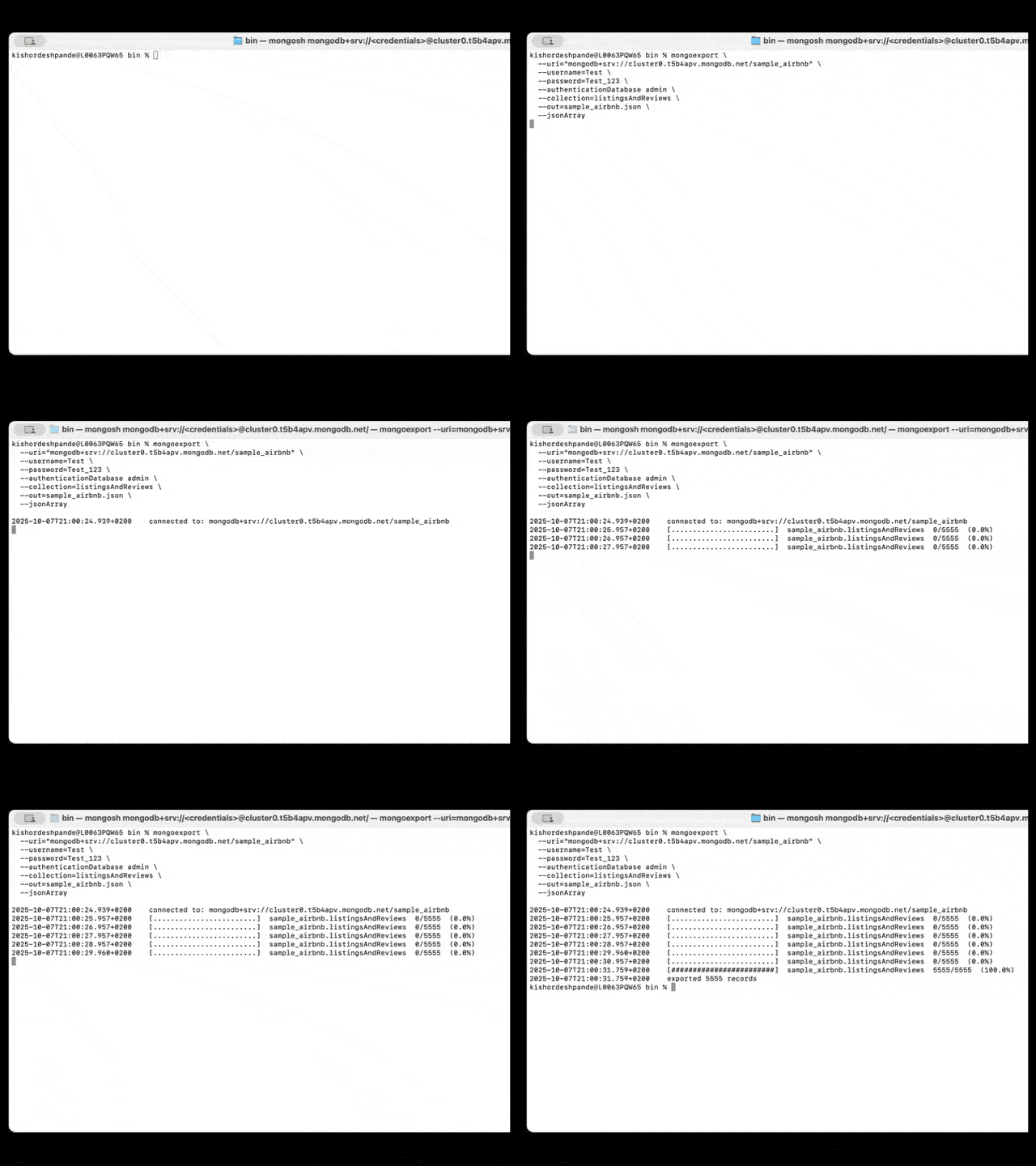
Export documents to JSON using mongoexport with –jsonArray to produce a clean list for batch import into Couchbase.
Follow along with this video of the Mongo export command execution:
Syntax example:
|
1 2 3 4 5 6 7 8 |
mongoexport —uri=“mongodb+srv://cluster0.xxxx.mongodb.net/test” —username=Test —password=Test_123 —authenticationDatabase admin —collection=listingAndReviews —out=listingAndReviews.json —jsonArray |
Step 2: Deploy Eventing
- Configure the Eventing function with the temp collection as source (listingAndReviewsTemp) and the target collection (listingAndReviews) as the destination, then deploy to transform and write documents automatically.
- Monitor success metrics and logs in Eventing; verify counts and random samples in Data Tools to confirm fidelity and schema conformance.
- Watch the video for setup and deployment
Code: Eventing function (OnUpdate)
|
1 2 3 4 5 6 7 8 9 10 11 12 13 14 15 16 17 18 19 20 21 22 23 24 25 26 27 28 29 30 31 32 33 34 35 36 37 38 |
function OnUpdate(doc, meta) { try { // Directly process every document mutation in the source bucket var newId = doc._id ? doc._id.toString() : meta.id; <strong> </strong>var transformedDoc = { listingId: newId, url: doc.listing_url, title: doc.name, summary: doc.summary, type: doc.property_type, room: doc.room_type, accommodates: doc.accommodates, bedrooms: doc.bedrooms, beds: doc.beds, bathrooms: parseFloat(doc.bathrooms?.$numberDecimal || doc.bathrooms) || null, price: parseFloat(doc.price?.$numberDecimal || doc.price) || null, picture: doc.images?.picture_url, host: { id: doc.host?.host_id, name: doc.host?.host_name, location: doc.host?.host_location }, address: { street: doc.address?.street, country: doc.address?.country, coordinates: doc.address?.location?.coordinates }, migrated_at: new Date().toISOString() }; // Use a new prefixed key in the destination bucket dst_bucket[newId] = transformedDoc; } catch (e) { log(“Error during transformation:”, e); } } |
Step 3: Import to temporary collection
Ingest exported JSON into a temporary collection (listingAndReviewsTemp) using cbimport with list format and Capella’s TLS certificate.
Syntax example:
|
1 2 3 4 5 6 7 8 9 10 |
cbimport json –c couchbases://cb.xxxx.cloud.couchbase.com –u MyUser –p MyPassword —bucket Test —scope sample_airbnb —collection listingAndReviewsTemp —format list —file listingAndReviews.json —cacert MyCert.pem |
Watch the Couchbase data import steps:
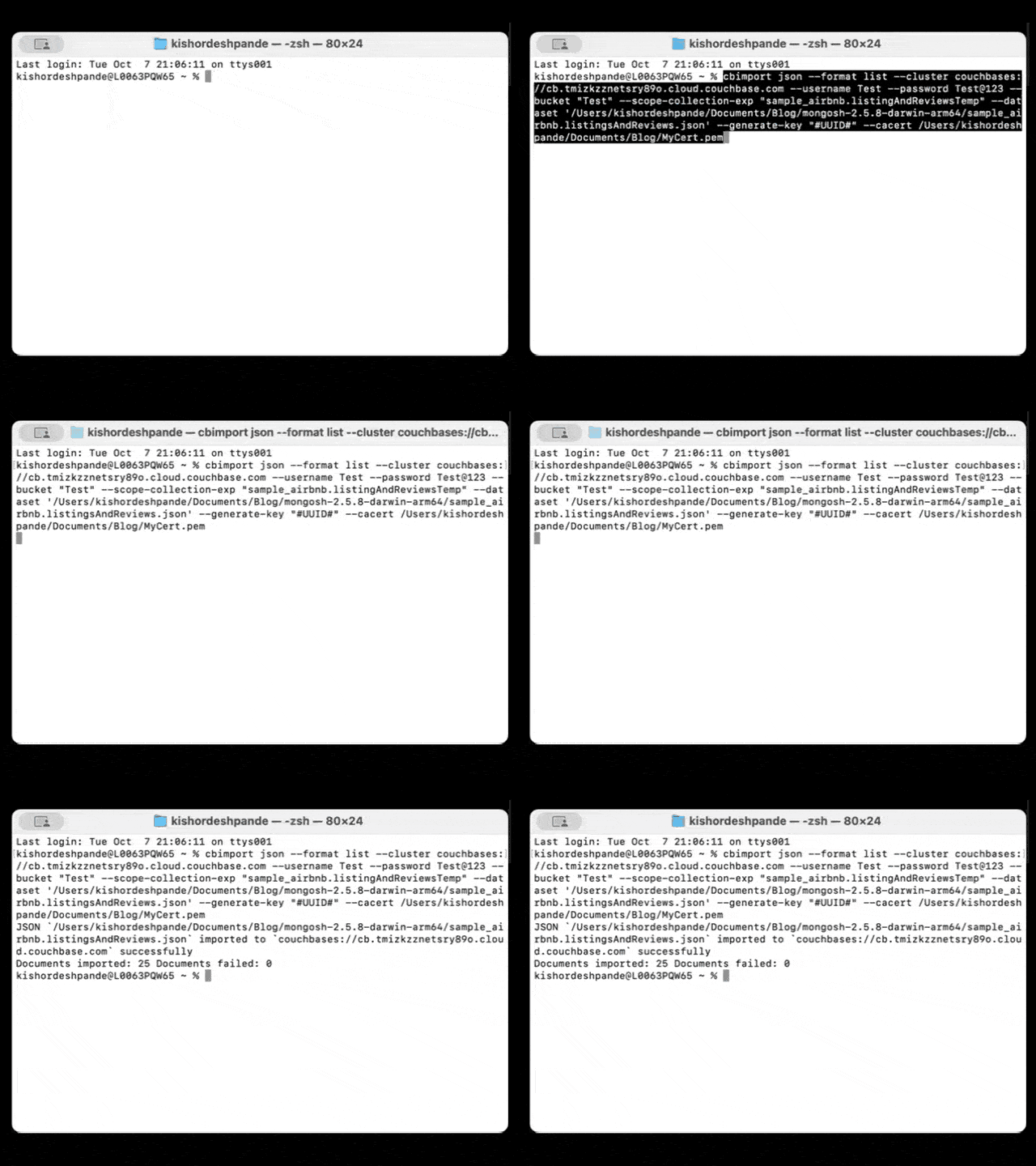
Keep the destination collection empty during this phase—Eventing will populate it post-transformation.
Validation checklist
- Document counts between the source and the transformed destination align within expected variances for filtered fields and transformations
- Numeric fields parsed from extended JSON (e.g., price, bathrooms) match expected numeric ranges, and keys map one-to-one with original IDs
- Representative queries in SQL++ (lookup by host, geospatial proximity by coordinates, price range filters) return expected results on transformed data
- While importing documents into Couchbase, the new ID will be UUID in listingAndReviewsTemp collection
- The given eventing script will remove _id field of MongoDB unique Identifier, change the document ID field from UUID to value of _id as it was in MongoDB
- Watch the import validation video
Operational tips
- Run in small batches first to validate performance of Eventing and backfill posture; scale up once transformation throughput is stable
- Keep the Eventing function versioned; test changes in non-prod with identical collections and a snapshot of export data before promoting
- Apply TTL on temporary collection listingAndReviewsTemp to save the storage cost. Read more information on TTL in the Couchbase docs
Expanded use cases
- E-commerce: Normalize prices and currencies, enrich with inventory status, and denormalize SKU attributes for fast product detail queries
- IoT pipelines: Aggregate sensor readings by device/time window and flag anomalies on ingest to reduce downstream processing latency
- User profiles: Standardize emails/phone numbers, derive geo fields, and attach consent/audit metadata for compliance-ready datasets
- Multi-database consolidation: Harmonize heterogeneous schemas into a unified model that fits Capella’s SQL++, FTS, and Vector Search features
- Content catalogs: Flatten nested media metadata, extract searchable keywords, and precompute facets for low-latency discovery experiences
- Financial records: Convert decimal and date types, attach lineage and reconciliation tags, and route exceptions for manual review on ingest
What’s next
- Add incremental sync by reusing the temp collection as a landing zone for deltas and letting Eventing upsert into the destination for continuous migration
- Layer FTS and vector indexes over transformed documents to enable semantic and hybrid search patterns post-cutover without reindexing cycles
- Continuously stream the data from various relational and non-relation sources to Couchbase for live data migration scenarios using data streaming or ETL technologies, some examples are:
Conclusion
Event-driven migration turns a one-time port into a durable transformation pipeline that produces clean, query-ready data in Capella with minimal post-processing work. By exporting from MongoDB, importing into a temp collection, and applying a controlled Eventing transform, the destination model is ready for SQL++, Search, Analytics, and App Services on day one.
Start for free
Spin up a Capella environment and test this pattern end-to-end with a small sample to validate mappings, performance, and query behavior before scaling.
Start your free tier cluster Sign up for free tier to run your experiment today!

Leave a comment
You must be logged in to post a comment.