

Modern data migrations rarely involve a simple lift-and-shift; they require transformation, cleansing, and enrichment so applications can immediately leverage the destination platform’s strengths. Couchbase Capella’s Eventing service enables event-driven, inline transformations as data arrives, allowing teams to reshape schemas, normalize values, enrich with metadata, and prepare documents for SQL++, Search, Analytics, and mobile sync from the outset.
Objectives
- Deliver a repeatable, event-driven migration pattern from any relational or non-relational database to Couchbase Capella that transforms data in-flight for immediate usability in applications and analytics
In this example, we will use MongoDB Atlas as a source database. - Provide a minimal, production-ready reference implementation using cbimport and Capella Eventing to convert source schemas (e.g., decimals, nested structures, identifiers) into query-optimized models
- Outline operational guardrails, prerequisites, and validation steps so teams can execute confidently with predictable outcomes and rollback options if needed
Why event‑driven migration
- Inline transformation reduces post-migration rework by applying schema normalization and enrichment as documents arrive, thereby accelerating cutover and lowering risk
- Eventing functions keep transformations source-controlled and auditable, so changes are consistent, testable, and repeatable across environments
- The result is Capella-ready data that supports SQL++, Full‑Text Search, Vector Search, Analytics, and App Services without interim refactoring phases
전제 조건
- 설치 MongoDB Database Tools (includes mongoexport, mongoimport, etc.)
- Download Couchbase CLI
- Capella paid account and cluster access, with allowed IP addresses configured and the Capella root certificate downloaded and saved as ca.pem
- Create following artifacts in Couchbase Capella:
-
- A bucket with name: Test
- Scope under bucket: Test with name: sample_airbnb
- Two collections with names listingAndReviewsTemp 그리고 listingAndReviews
- A Javascript function with name dataTransformation
Click to watch videos below see the Capella setup 그리고 creating cluster access steps.
-
- Credentials with read/write access to target bucket/scope/collections and CLI tools installed for cbimport and MongoDB export utilities.
- Connection strings for MongoDB Atlas (source) and Couchbase Capella (target), plus a temporary collection for initial ingestion before transformation.
Source example using MongoDB Atlas
A representative Airbnb listing document illustrates common transformation needs: decimal normalization, identifier handling, nested fields, and flattening for query performance.
Example fields include listing_url, host metadata, address with coordinates, and decimal wrappers for fields like bathrooms and price using the MongoDB extended JSON format.
Eventing transformation pattern
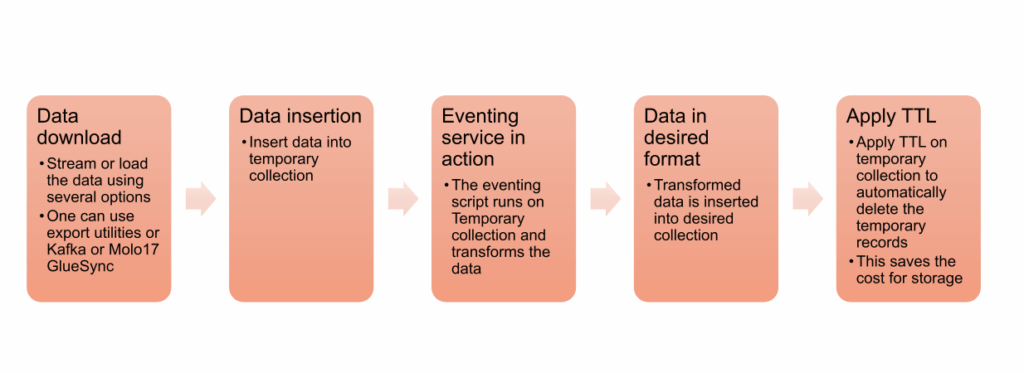
- Use a temporary collection as the Eventing source (listingAndReviewsTemp) and a destination collection (listingAndReviews) for the transformed documents to keep migration idempotent 그리고 testable.
- Convert MongoDB extended JSON decimals to native numbers, rename fields for domain readability, derive a Couchbase key from the original _id, and stamp documents with migrated_at.
Step 1: Export from MongoDB
Export documents to JSON using mongoexport ~와 함께 –jsonArray to produce a clean list for batch import into Couchbase.
Follow along with this video of the Mongo export command execution:
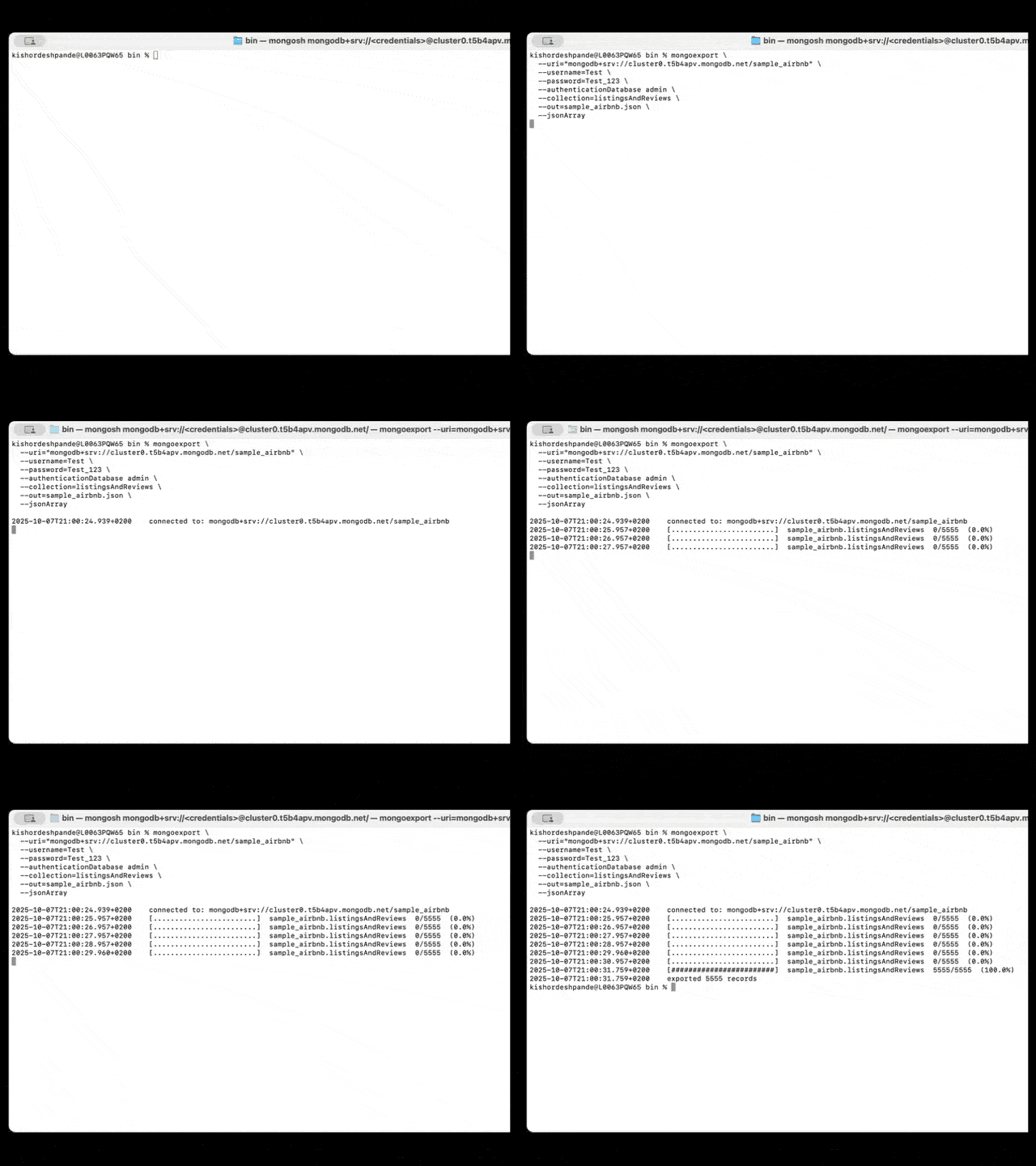
Syntax example:
|
1 2 3 4 5 6 7 8 |
mongoexport —uri=“mongodb+srv://cluster0.xxxx.mongodb.net/test” —사용자 이름=Test —비밀번호=Test_123 —authenticationDatabase admin —컬렉션=listingAndReviews —밖으로=listingAndReviews.JSON —jsonArray |
Step 2: Deploy Eventing
- Configure the Eventing function with the temp collection as source (listingAndReviewsTemp) and the target collection (listingAndReviews) as the destination, then deploy to transform and write documents automatically.
- Monitor success metrics and logs in Eventing; verify counts and random samples in Data Tools to confirm fidelity and schema conformance.
- Watch the video for setup and deployment
Code: Eventing function (OnUpdate)
|
1 2 3 4 5 6 7 8 9 10 11 12 13 14 15 16 17 18 19 20 21 22 23 24 25 26 27 28 29 30 31 32 33 34 35 36 37 38 |
함수 OnUpdate(의사, meta) { 시도하다 { // Directly process every document mutation in the source bucket 변수 newId = 의사._id ? 의사._id.문자열로변환() : meta.아이디; <strong< </strong<변수 transformedDoc = { listingId: newId, URL: 의사.listing_url, title: 의사.이름, summary: 의사.summary, 유형: 의사.property_type, room: 의사.room_type, accommodates: 의사.accommodates, bedrooms: 의사.bedrooms, beds: 의사.beds, bathrooms: parseFloat(의사.bathrooms?.$numberDecimal || 의사.bathrooms) || null, 가격: parseFloat(의사.가격?.$numberDecimal || 의사.가격) || null, picture: 의사.images?.picture_url, host: { 아이디: 의사.host?.host_id, 이름: 의사.host?.host_name, 위치: 의사.host?.host_위치 }, address: { street: 의사.address?.street, country: 의사.address?.country, coordinates: 의사.address?.위치?.coordinates }, migrated_at: 새로운 날짜().toISOString() }; // Use a new prefixed key in the destination bucket dst_bucket[newId] = transformedDoc; } catch (e) { 로그(“Error during transformation:”, e); } } |
Step 3: Import to temporary collection
Ingest exported JSON into a temporary collection (listingAndReviewsTemp) using cbimport with list format and Capella’s TLS certificate.
Syntax example:
|
1 2 3 4 5 6 7 8 9 10 |
cbimport JSON –c couchbases://cb.xxxx.cloud.couchbase.com –u MyUser –p MyPassword —양동이 Test —범위 sample_airbnb —컬렉션 listingAndReviewsTemp —format list —파일 listingAndReviews.JSON —cacert MyCert.pem |
Watch the Couchbase data import steps:
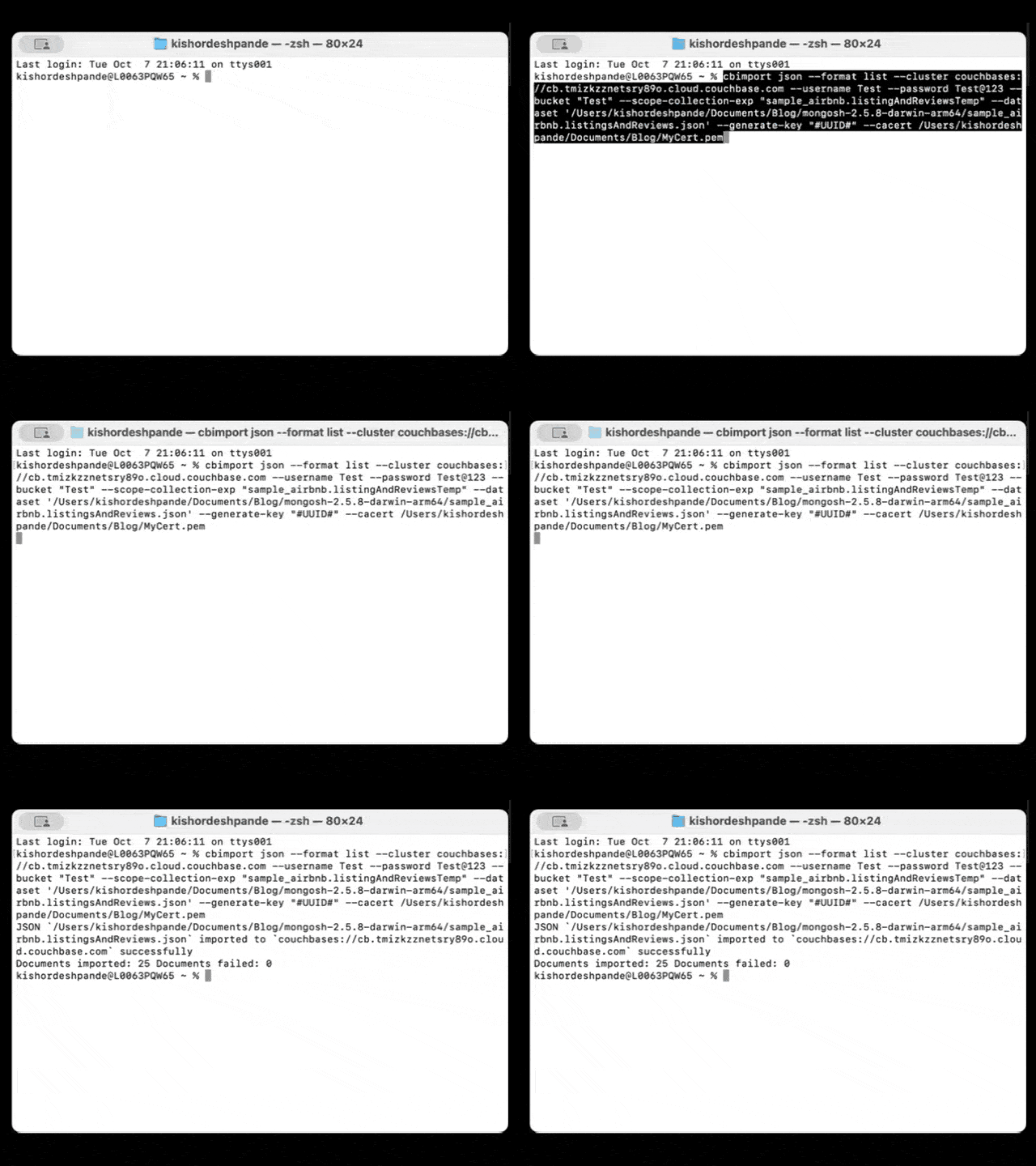
Keep the destination collection empty during this phase—Eventing will populate it post-transformation.
Validation checklist
- Document counts between the source and the transformed destination align within expected variances for filtered fields and transformations
- Numeric fields parsed from extended JSON (e.g., price, bathrooms) match expected numeric ranges, and keys map one-to-one with original IDs
- Representative queries in SQL++ (lookup by host, geospatial proximity by coordinates, price range filters) return expected results on transformed data
- While importing documents into Couchbase, the new ID will be UUID in listingAndReviewsTemp collection
- The given eventing script will remove _id field of MongoDB unique Identifier, change the document ID field from UUID to value of _id as it was in MongoDB
- Watch the import validation 비디오
Operational tips
- Run in small batches first to validate performance of Eventing and backfill posture; scale up once transformation throughput is stable
- Keep the Eventing function versioned; test changes in non-prod with identical collections and a snapshot of export data before promoting
- Apply TTL on temporary collection listingAndReviewsTemp to save the storage cost. Read more information on TTL in the Couchbase docs
Expanded use cases
- E-commerce: Normalize prices and currencies, enrich with inventory status, and denormalize SKU attributes for fast product detail queries
- IoT pipelines: Aggregate sensor readings by device/time window and flag anomalies on ingest to reduce downstream processing latency
- User profiles: Standardize emails/phone numbers, derive geo fields, and attach consent/audit metadata for compliance-ready datasets
- Multi-database consolidation: Harmonize heterogeneous schemas into a unified model that fits Capella’s SQL++, FTS, and Vector Search features
- Content catalogs: Flatten nested media metadata, extract searchable keywords, and precompute facets for low-latency discovery experiences
- Financial records: Convert decimal and date types, attach lineage and reconciliation tags, and route exceptions for manual review on ingest
What’s next
- Add incremental sync by reusing the temp collection as a landing zone for deltas and letting Eventing upsert into the destination for continuous migration
- Layer FTS and vector indexes over transformed documents to enable semantic and hybrid search patterns post-cutover without reindexing cycles
- Continuously stream the data from various relational and non-relation sources to Couchbase for live data migration scenarios using data streaming or ETL technologies, some examples are:
결론
Event-driven migration turns a one-time port into a durable transformation pipeline that produces clean, query-ready data in Capella with minimal post-processing work. By exporting from MongoDB, importing into a temp collection, and applying a controlled Eventing transform, the destination model is ready for SQL++, Search, Analytics, and App Services on day one.
Start for free
Spin up a Capella environment and test this pattern end-to-end with a small sample to validate mappings, performance, and query behavior before scaling.
Start your free tier cluster Sign up for free tier to run your experiment today!

댓글 남기기
댓글을 달기 위해서는 로그인해야합니다.