
Introduction
Couchbase Autonomous Operator (CAO) is a Kubernetes operator that automates the deployment, management, and lifecycle of Couchbase Server clusters on Kubernetes. The team already had a powerful testing framework called CAO-Testrunner – a Go-based framework that uses YAML scenario files to define test actions and validations, executes them as a directed graph, and maintains shared state through a thread-safe in-memory store called TestAssets.
The project was to design and build a Test Matrix Pipeline – a CI/CD pipeline that continuously validates the compatibility of CAO, Couchbase Server, and Kubernetes across multiple versions and cloud providers, catching regressions early before they reach customers.
The Problem
Couchbase Server weekly builds and CAO releases evolve in parallel, often on unsynchronized timelines. At the time, there was no automated way to continuously validate whether the latest unreleased Server builds worked correctly against:
- Multiple released and unreleased CAO versions
- Multiple Kubernetes and OpenShift versions
- Multiple cloud providers (EKS, GKE, AKS)
This meant incompatibilities could go undetected until late in the release cycle, turning what should be a quick fix into a costly scramble. A system was needed that would automatically test every meaningful combination of these four dimensions – K8S/OpenShift version, CAO version, Couchbase Server version, and cloud provider – whenever a new build of any component appeared.
Designing the Solution
The Test Matrix
The core idea is a four-dimensional version matrix:
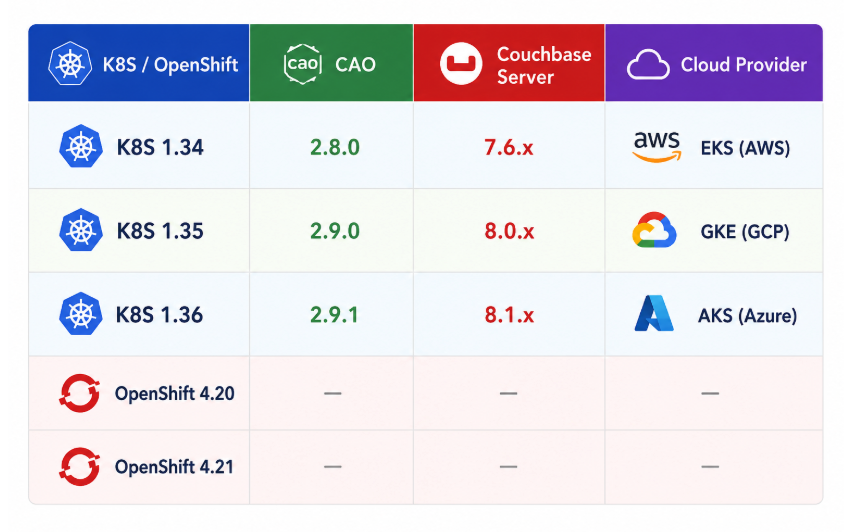
The first dimension is the platform – this includes both vanilla Kubernetes versions and OpenShift versions, tested at the same level. The fourth dimension is the cloud provider, which determines the infrastructure where the cluster is provisioned (EKS, GKE, AKS, or an OpenShift-compatible environment).
When a new build of any component arrives, it becomes the trigger. The trigger version is fixed, and the pipeline generates all combinations from the other three dimensions.
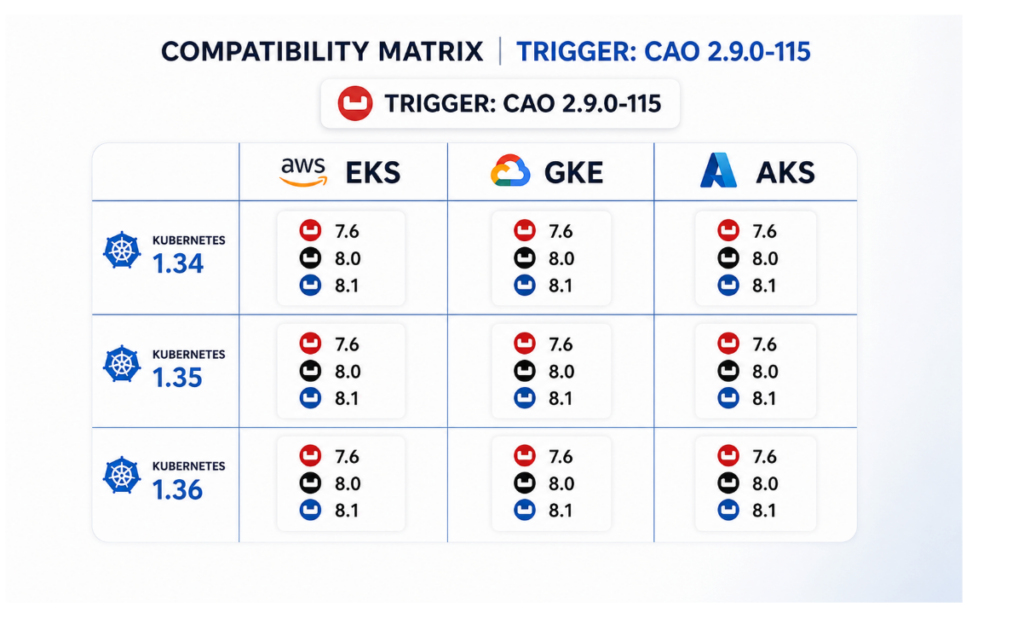
For example, if a new CAO build 2.9.0-115 arrives, every generated combination uses CAO 2.9.0-115, while the pipeline varies the platform, Couchbase Server version, and cloud provider. With three platform versions, three Couchbase Server versions, and three cloud providers, that produces up to 27 independent executions.
The same idea applies when the trigger comes from another dimension:
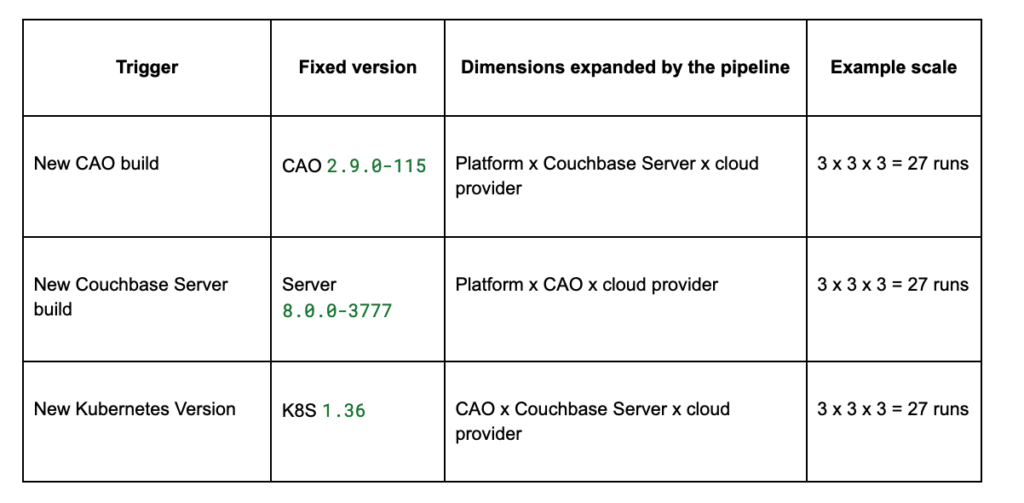
Visually, each trigger slices the matrix from one direction. The new build pins one axis, and the remaining axes expand around it. In the sketch below, 7.6, 8.0, and 8.1 represent Couchbase Server version families:
Test Tagging
Generating the matrix is only half of the problem. The next question is which tests should run for each trigger. Running every scenario for every trigger sounds simple, but it wastes time and cloud resources, and it can make results harder to interpret.
For example, RBAC-related tests are important when a new Couchbase Server build arrives because changes in authentication or authorization logic can affect role behavior. They are also important when a new Couchbase Autonomous Operator (CAO) build arrives, since the operator is responsible for configuring users, roles, and security settings on the cluster. However, if the only change is a new Kubernetes patch version, RBAC tests are usually not the best signal because these behaviors are largely independent of platform-level changes. A Kubernetes-triggered run should instead focus on tests that prove the operator can install cleanly, create and reconcile clusters, manage storage, expose services, and survive platform-level changes.
Similarly, a new Couchbase Server build should definitely include tests that exercise Server-facing behavior such as bucket management, rebalance, upgrades, backup, restore, query, indexing, and XDCR. A new CAO build should include operator lifecycle tests, admission controller tests, cluster create and update flows, upgrade flows, and tests that validate how CAO configures Couchbase Server features. A new Kubernetes or OpenShift build should include platform compatibility tests, networking tests, storage tests, service exposure tests, and basic end-to-end cluster health checks.
This is why the pipeline needed something more intelligent than a static list of scenario files. A tagging system was designed embedded directly into scenario YAML files so each test could describe when it is relevant and what part of the product it validates:
tags:
  trigger:
    - cao
    - cbServer
  minVersion:
    k8s: 1.33
    cbServer: 8.0.0
  maxVersion:
    k8s: null
    cbServer: 7.6.11
  subComponents:
    cbServer:
      - xdcr
Each test declares:
Trigger tags capture the first design question: “Which type of change can this test actually give signal for?” Not every test is relevant for every change, so each test declares which component changes it is sensitive to: k8s, cao, or cbServer. This avoids running tests blindly and instead aligns execution with the source of risk. For example, admission webhook behavior is owned by the operator, so those tests run only on CAO-triggered pipelines. In contrast, XDCR correctness is driven by Couchbase Server behavior, so those tests are primarily tied to Server-triggered runs – while still running on CAO changes when operator-level interactions could affect replication. The result is a pipeline that prioritizes signal over coverage noise, ensuring that each test run answers a meaningful question about the change being introduced.
Version requirements capture the second design question: “Is this test even valid for this matrix combination?” Some features only exist after a specific Kubernetes or Couchbase Server version. Instead of letting those tests fail for the wrong reason on older versions, the scenario declares the minimum supported version. This makes skipped tests intentional rather than noisy.
Subcomponent tags capture the reporting question: “Which area of the product did this test cover?” Tags such as KV, XDCR, indexing, backup, and query make it possible to build coverage views later. They also help explain a run’s results at a higher level than individual YAML file names.
A test is included in a matrix combination only when the trigger matches and all version constraints are satisfied.
Pipeline Architecture
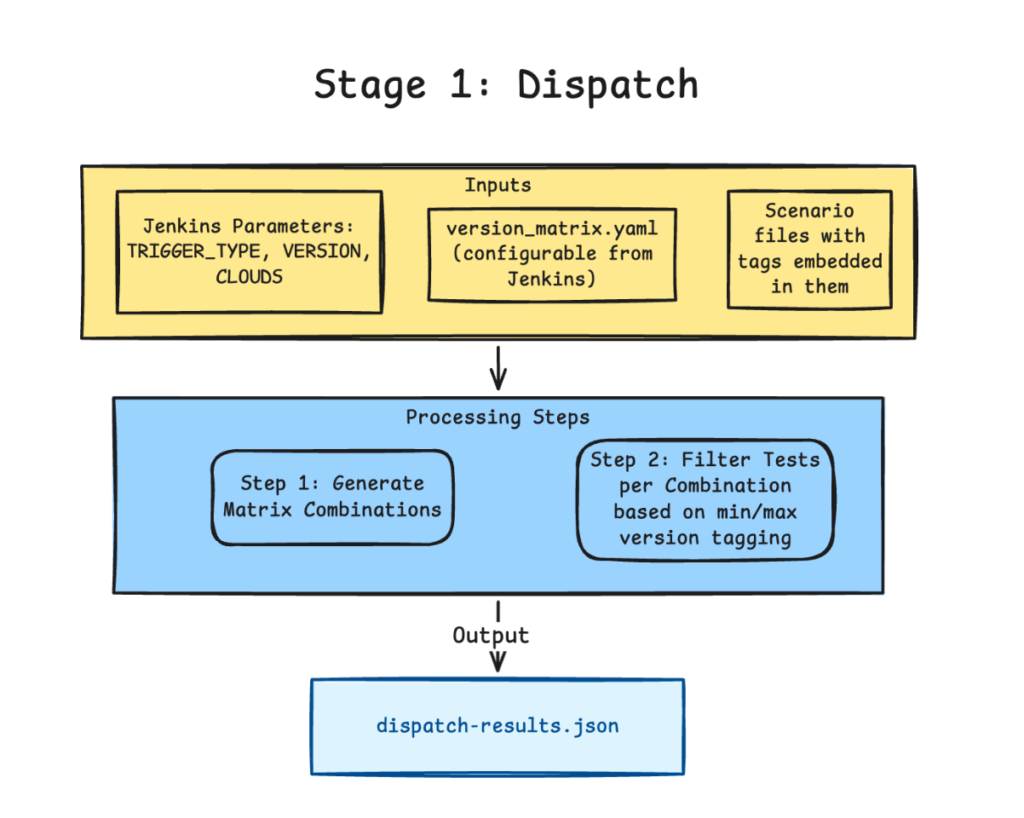
The pipeline is implemented in Jenkins and orchestrated by three Go programs: dispatch, execute, and rerun.
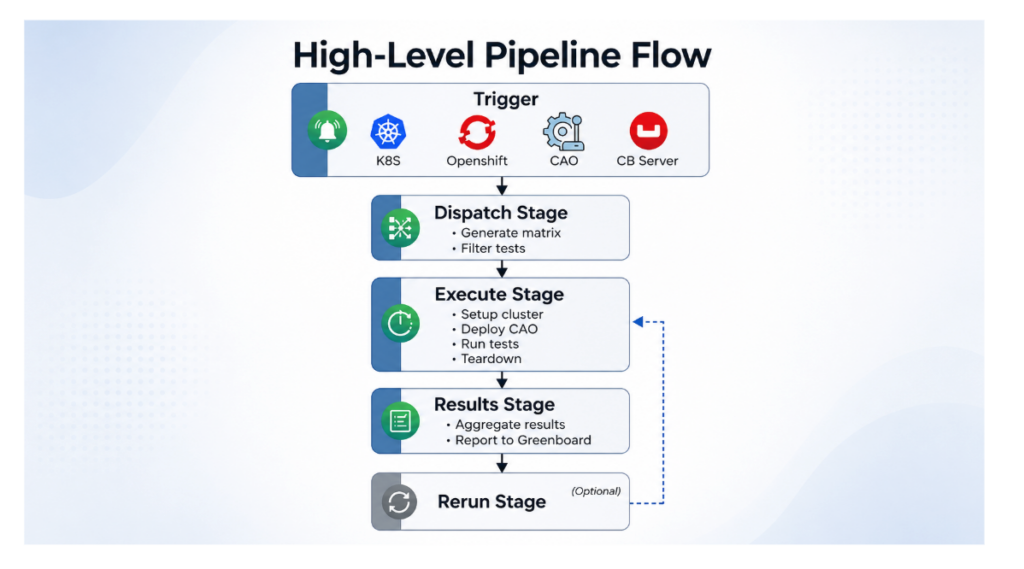
Stage 1: Dispatch
The Dispatch stage is responsible for generating the test plan.
It loads the version matrix and tag definitions, generates all matrix combinations for the given trigger, and filters the test suite for each combination based on trigger tags and minimum version constraints. The output is a dispatch-results.json file where each combination has its own pre-filtered list of scenario files to run.
{
  "triggerType": "cbServer",
  "triggerVersion": "8.0.0-3777",
  "matrixExecutions": [
    {
      "matrixCombo": {
        "k8sVersion": "1.34",
        "caoVersion": "2.9.0-314",
        "cbServerVersion": "8.0.0-3777",
        "cloudProvider": "aws"
      },
      "scenarioFiles": [
        "./scenarios/query/basic-queries.yaml",
        "./scenarios/xdcr/network-chaos.yaml",
        "./scenarios/xdcr/cng-test.yaml",
        "./scenarios/upgrades/cbserver810_upgrade.yaml",
      ]
    }
  ]
}
Stage 2: Execute
The Execute stage iterates through each matrix combination and runs the full lifecycle:
- Provision a Kubernetes or OpenShift cluster – Runs a provider-specific setup scenario (e.g., aws.yaml for EKS, gcp.yaml for GKE, or an OpenShift setup) with version placeholders substituted with real values.
- Deploy CAO – sets up the Admission Controller and Operator using the target CAO version.
- Run tests – Executes each filtered scenario file, recording results after every single test so progress is never lost.
- Tear down the cluster – Destroys the cluster regardless of test outcomes to control cloud costs.
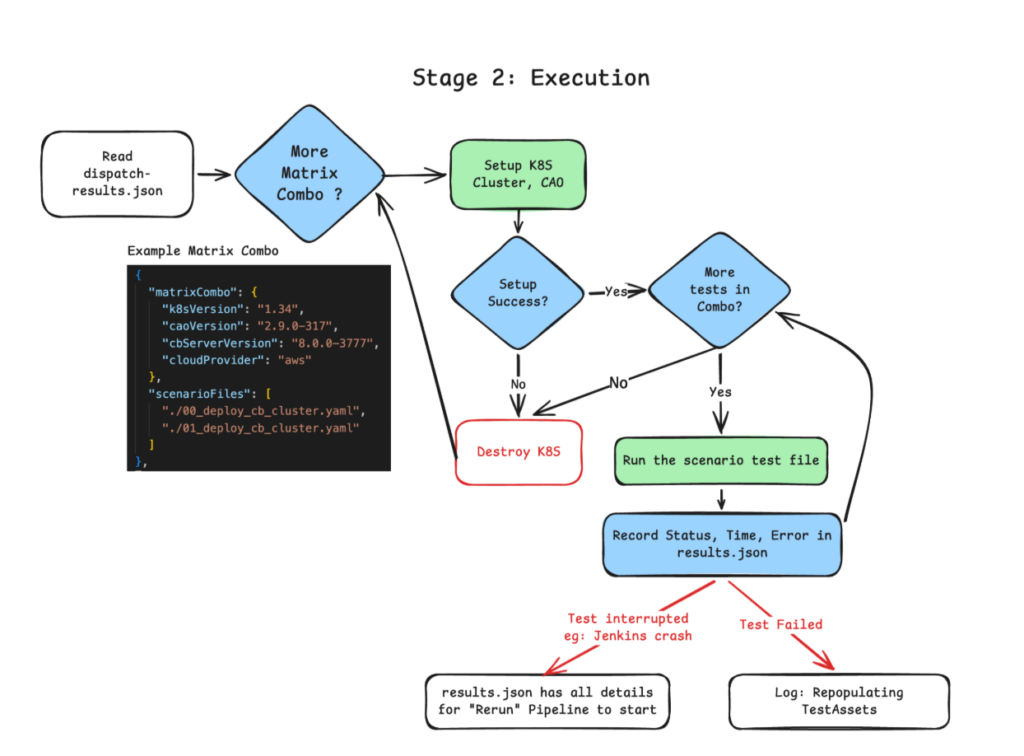
Key design decisions in this stage:
- Failure isolation – A failing test triggers a fresh repopulation of TestAssets to avoid a corrupted state, but execution continues to the next test. No single failure aborts the run.
- Setup failure handling – If cluster provisioning fails, all tests for that combination are skipped and execution moves to teardown, but remaining matrix combinations still proceed.
- Incremental result persistence – Results are written to results.json after every test, so even if Jenkins crashes mid-run, we know exactly what completed.
Stage 3: Rerun
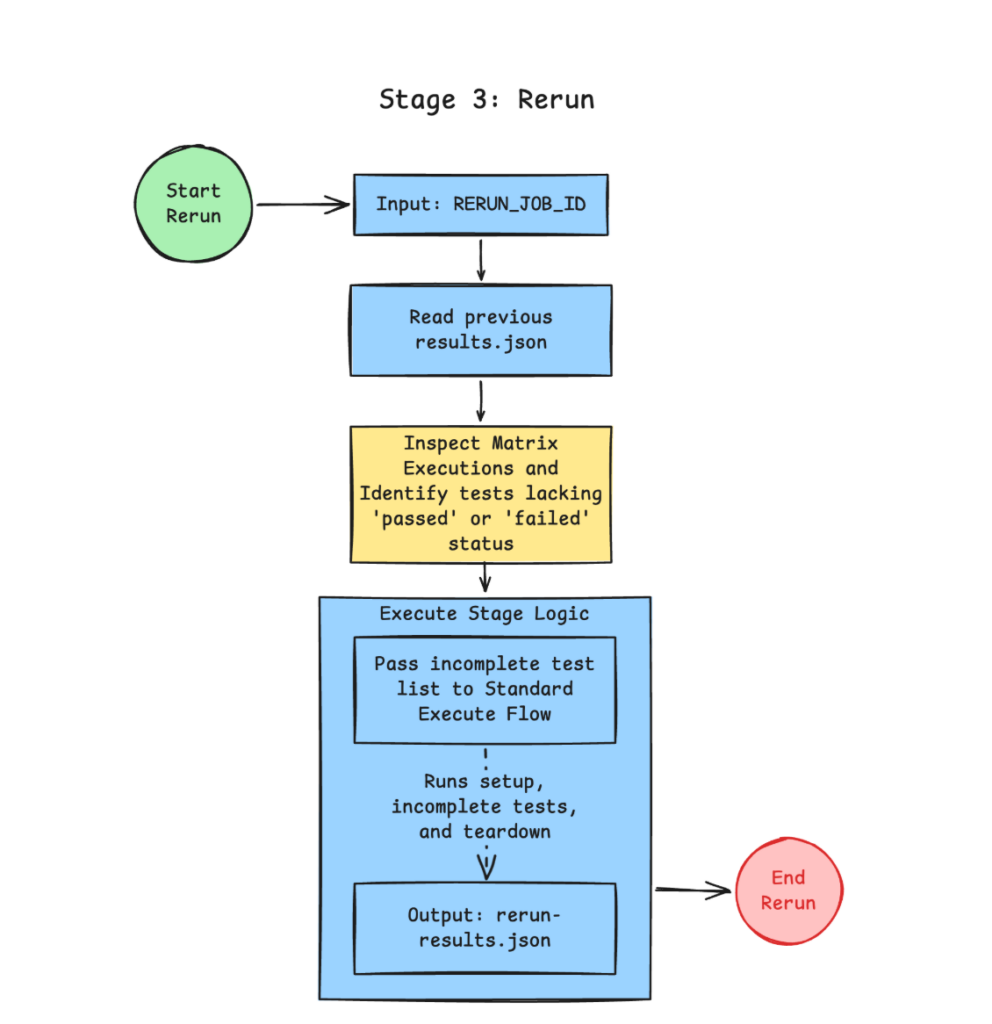
Infrastructure is inherently unreliable. Jenkins agents can terminate unexpectedly, cloud API calls may time out, and cluster provisioning can fail midway. The Rerun stage is designed to recover from these interruptions without discarding progress.
When triggered with a previous build’s job ID, the pipeline reads the earlier results.json, identifies tests that were never reached (i.e., no passed or failed status), and resumes execution from that point using the same Setup → Test → Teardown flow.
Only the incomplete portions of the matrix are executed again – completed tests are left untouched. To preserve traceability, rerun writes to a separate rerun-results.json, keeping the original run intact as a source of truth.
The outcome is a pipeline that can resume execution deterministically, even after partial failure, without duplicating work or losing prior results.
Stage 4: Results
The pipeline publishes results to Greenboard, Couchbase’s internal dashboard for tracking and analyzing test results.
The Parallel Execution Challenge
The sequential pipeline works, but testing 27+ matrix combinations with multiple tests each takes a long time when executed one after another. Naturally, the next step was to explore parallelization. This turned out to be significantly harder than expected.
Why Parallel Is Hard
Resource contention on shared clusters: If multiple tests run on the same Couchbase cluster, they can conflict – two tests creating a bucket with the same name, two subgraphs updating the same resource, or one test changing an eviction policy that another test depends on.
Isolation requirements vary by test: Some tests can safely share a Couchbase cluster (e.g., read-only queries), while others need complete isolation (e.g., XDCR setup, destructive operations). This led to a proposed tagging extension:
cb_cluster_isolation: shared | isolated
k8s_cluster_isolation: shared | isolated
requires_new_cb_cluster: true | false
Resource limits: Combining multiple scenario files could spawn many Couchbase clusters in a single Kubernetes cluster, potentially exhausting node resources.
Result tracking complexity: When tests are combined into a single parent scenario graph, attributing pass/fail to individual test files becomes significantly harder.
The Approach Taken
The idea was to build a Scenario Aggregator that would:
- Read isolation tags from each scenario file.
- Group shared tests together under a single Couchbase deployment.
- Keep isolated tests separate with their own clusters.
- Generate a parent YAML that orchestrates everything using the existing graph execution engine.
# AUTO-GENERATED by pipeline
edges:
  nodes:
    # Based on "cb_cluster_isolation" tag:
    # CASE1: tests that can share a CB cluster (shared)
    - action: "Deploy Couchbase"
      config:
        overrideSpec:
          image: "server:8.1.0-1658" #version injected
        namespace: "group-1"
      edges:
        nodes:
          # Scenario files that can share CB Cluster are appended here
          - scenario: "scenarios/query/basic_query_test.yaml"
          - scenario: "scenarios/bucket/bucket_policy_test.yaml"

    # CASE2: tests that NEED their own CB cluster (isolated)
    - scenario: "scenarios/xdcr/basic-xdcr.yaml"
      #(assuming the file has "Deploy CB" action. If there is flag requires_new_cb_cluster=true, we wrap this scenario with "Deploy CB" action.)
This became one of the most interesting systems design problems in the project: balancing test throughput against isolation guarantees.
Conclusion
The Test Matrix Pipeline provides the CAO team with:
- Automated compatibility validation across the full K8S/OpenShift x CAO x CB Server x Cloud Provider matrix whenever a new build of any component is available
- Early regression detection that catches incompatibilities before they compound into release blockers
- Selective test execution through test tagging, avoiding wasted compute on irrelevant tests
- Resilient execution with built-in recovery from infrastructure failures
- Clear visibility into test results across all version combinations
This pipeline dramatically increases testing efficiency and confidence in the Couchbase Autonomous Operator’s compatibility.

Leave a comment
You must be logged in to post a comment.