

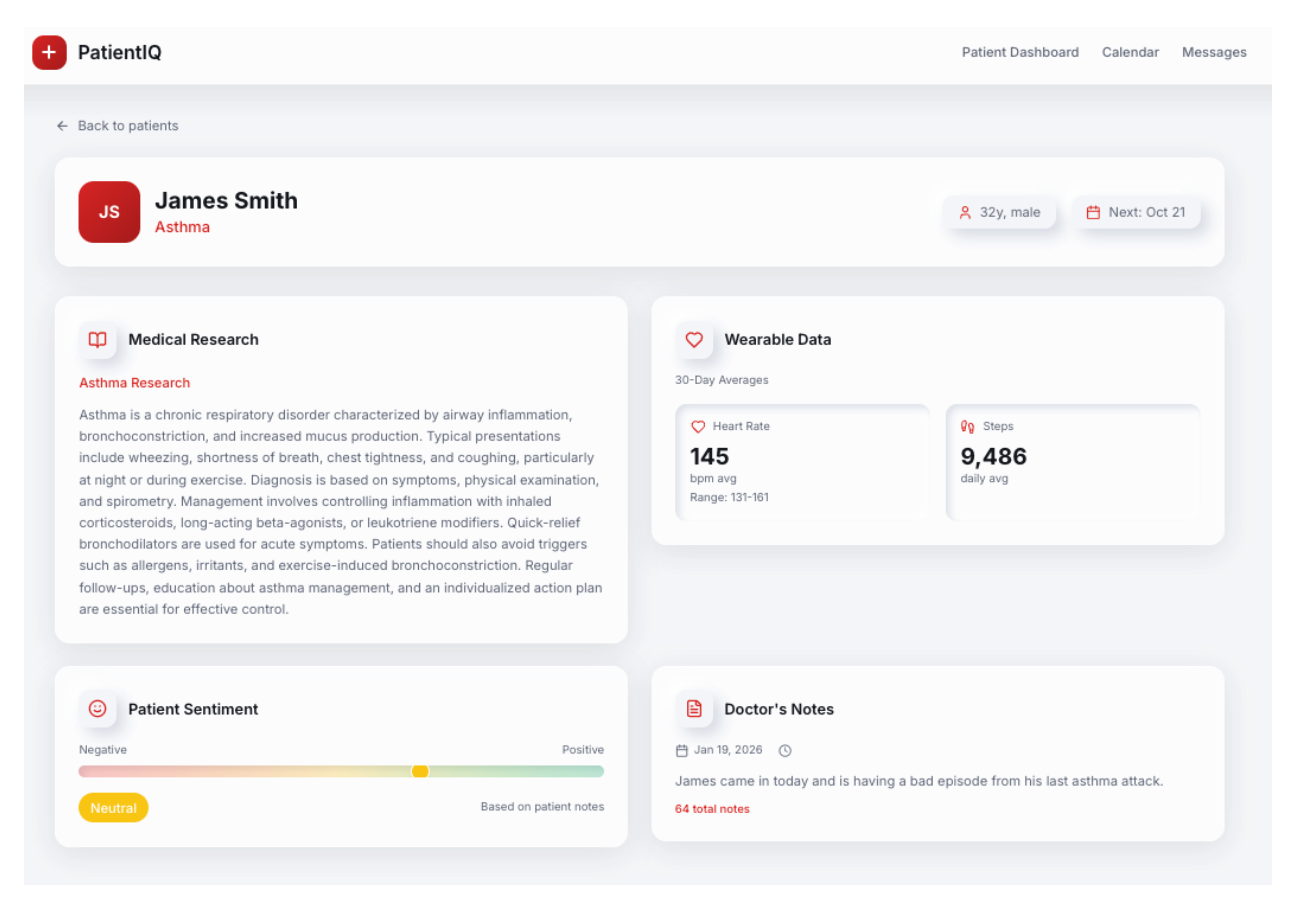
What Is PatientIQ and Why Build it?
PatientIQ is an agentic patient 360 built using Couchbase Capella AI Services. It is one example of a solution to a problem that we are trying to solve. For PatientIQ, it began with a single question. How many of us have had a loved one have a bad healthcare experience?
The response to this when asked in a room full of people was frightening. Most hands went up. Conversations afterward confirmed that for those that didn’t raise their hands, they were usually one close friend away from a relatable bad experience. Yet, doctors in the United States are exceptional with many of the best in the world practicing here. This helped us to reframe the question. If there is not an issue of professional quality, why are bad experiences so common?
Patient Care Is a Data Management Problem
Our personal experiences and research led us to believe that doctors today are overwhelmed. When they are on their third coffee and fifth patient before lunch, it can be hard to consistently deliver excellent tailored care. As we dug into the problem more, our research revealed that doctors today spend twice as much time on Electronic Health Records (EHRs) than patient care. It is also estimated that between 30-40% of EHRs are missing half of their expected data values.
Doctors spend too much time trawling through data that is often incomplete. That is not a doctor quality problem. It is a data management problem. Doctors are smart but can’t be expected to remember every detail about all of their patients. However, for truly personalized medicine, all of this data is essential. The data deserves as much care as patients and like an excellent doctor, Couchbase is uniquely suited to solve this specific data management problem.
The state of AI today requires a robust data layer. General purpose models are not trained on healthcare data and that increases the likelihood of hallucinations that are unacceptable in a healthcare setting. Fine-tuning a model can help train a model on relevant data for specific tasks but the training process can take time and the results can vary. Providing the right context from our operational data store to our models and agents is critically important to reduce the risk of hallucinations and develop an effective intelligence layer. We’ll now look at our considerations on building the right data foundation to enable this.
Working Backward From the Data. Building the Right Data Foundation
Data on doctors and patients for this demo is artificial. It is as realistic as possible while avoiding issues with using sensitive information. The medical research is real and used papers from PubMed. Healthcare data in practice is primarily in FHIR format, similar to the JSON data models we built, and does not require special processing to ingest and serve to our agents.
The full dataset and schema with separation into scopes and collections for data organization can be viewed on GitHub. Although this was a demo application, with an independent review, Capella can be run in a HIPAA-compliant way and we’d aim to do that in production.
For PatientIQ, our simple data structure uses three buckets:
- Scripps: Name of our hospital, including all doctor and patient data.
- Research: Contains all medical research data.
- Agent catalog: All data on our agents, tools, prompts, and traces.
For our operational data, Couchbase’s unique memory-first architecture and built-in cache enabled us to achieve submillisecond response times when carrying out Create, Read, Update and Delete operations handled by our chosen Couchbase Python SDK. We also used indexes at the collection level, for example Scripps.People.Patients`, to avoid full bucket scans and take advantage of fast query response times. It was important for PatientIQ to return operational data on a patient both to the dashboard and to our agents. This enabled a doctor with a short amount of time to prepare for a visit to receive timely information with imperceptible latency.
To keep our demo focused, the dataset is limited to one hospital, doctor (Dr. Mitchell) and five patients. Here is an example of a doctor JSON document:
|
1 2 3 4 5 6 7 8 9 10 11 12 |
{ “doctor_name”: “Tiffany Mitchell”, “doctor_id”: 1, “doctor_licence_number”: “123456”, “patients”: [ “James Smith”, “Maria Garcia”, “Robert Chen”, “Aisha Khan”, “Emily Johnson” ] } |
Each patient has a specific pulmonary condition to ensure a targeted medical research base: Asthma, COPD, Pulmonary Fibrosis, Cystic Fibrosis and Bronchiectasis. Here’s an example of a patient JSON document:
|
1 2 3 4 5 6 7 8 9 10 11 12 13 14 15 16 17 18 19 |
{ “patient_name”: “James Smith”, “patient_id”: “1”, “patient_email”: “james.smith@mail.com”, “patient_cell”: “8583401257”, “weight”: “82”, “height”: “178”, “medical_conditions”: “Asthma”, “gender”: “male”, “age”: “32”, “smoker”: “no”, “alcohol_consumption”: “moderate”, “blood_type”: “A-“, “admission_date”: “2022-09-22”, “doctor_name”: “Tiffany Mitchell”, “registered_hospital”: “Scripps”, “insurance_provider”: “Aetna”, “insurance_number”: “32431432412” } |
We now have our hospital (Scripps), doctor (Dr. Mitchell), and patients (e.g., James Smith). Here are other valuable sources of patient data:
- Wearables
- Visit notes taken by a doctor
- Private notes taken by a patient about their visit
- Previsit questionnaires filled out by patients
- Appointment details and upcoming patient visits
This data today is trapped in a single device or system and is in different formats. As a result of this, it can be very hard to move or draw insights from. Yet, when it is brought together, it can create a unique data profile of a patient that a doctor can use to understand their health and hospital experience.
With Couchbase, we are able to optimally store and retrieve our operational data without introducing a separate caching layer or additional system complexity. This allows our team to focus on feature development, which relies on receiving this operational data quickly.
Adding Intelligence to a Strong Data Foundation With Capella AI Services
Adding intelligence to an application today requires a separate vector database and sending data outside of trusted boundaries to language and embedding models over external APIs. This acts as a barrier to both the data that can be used and a risk to the performance and security of the existing application.
Couchbase Capella and AI Services provide the ability for a developer to overcome those barriers, with optimized vector database support built into the platform and the ability to deploy and run NVIDIA optimized models within a private network boundary shared with your data, without traffic traversing the public internet. For PatientIQ, we were able to use two secure models deployed in the Capella Model Service.

We decided on the following operational data to send to our text embedding model nvidia/llama-3.2-nv-embedqa-1b-v2:
- Visit notes: Taken by a doctor about a patient’s visit.
- Medical research: Papers focused on pulmonary health conditions.
Traditionally, turning this data into text embeddings that are usable for semantic similarity search would require building a custom data pipeline. A cleaning process to normalize the text into a consistent format. A chunking strategy to handle long form content like research papers. Code to call an embedding model and store the resulting vectors. This can add several weeks to the development cycle before any meaningful AI functionality is delivered.
With AI Services, the Data Processing service was used to simplify the process. There are data preprocessing options that can be used to control how the data is vectorized. We vectorized specific JSON fields and returned a new field inside of our JSON document containing our text embeddings. As one example, medical research was extracted from PubMed using BigQuery with the following SQL query:
|
1 2 3 4 5 6 |
SELECT author, title, article_text, article_citation, pmc_link FROM `bigquery–public–data.pmc_open_access_commercial.articles` WHERE REGEXP_CONTAINS(LOWER(IFNULL(title, ”)), r‘asthma|copd|chronic obstructive pulmonary|emphysema|pneumonia|influenza|pulmonary fibrosis|sarcoidosis|pulmonary hypertension|respiratory|pulmonary’) LIMIT 50; |
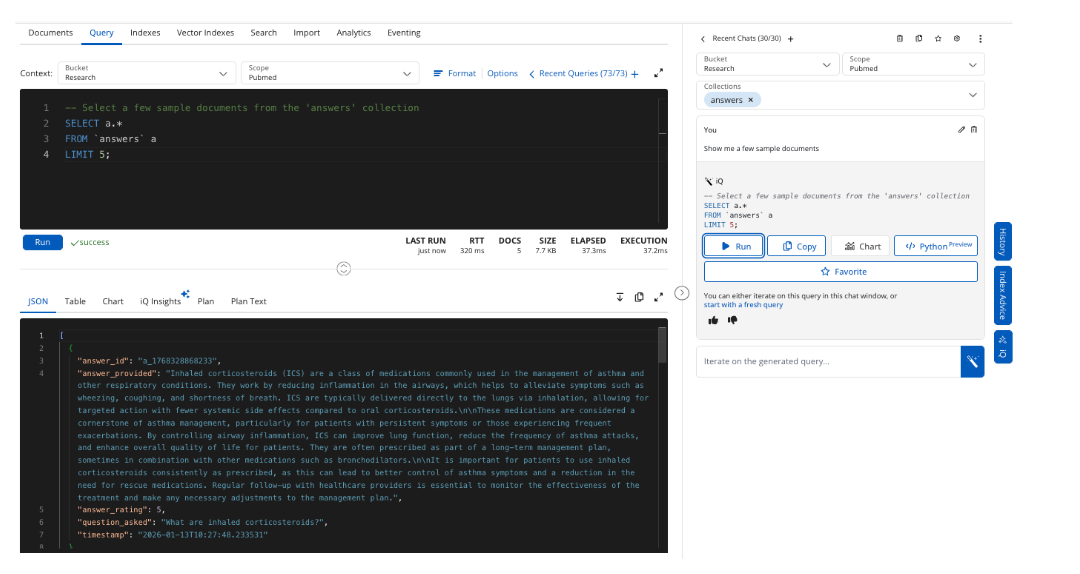
The query returned 50 pulmonary research papers that were then exported to JSON. The text in the article_text field for 50 documents was vectorized and stored in a new field article_text_vectorized. We can retrieve five example papers using Capella iQ to write our SQL++ query.

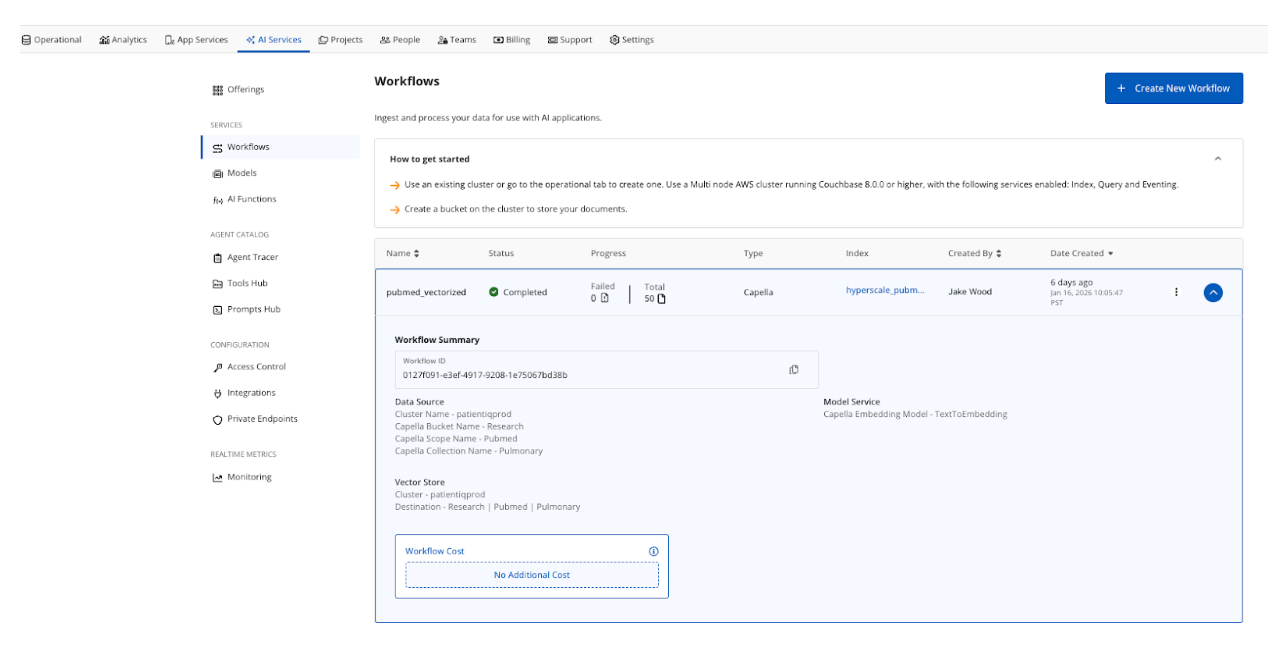
The workflow automates the embedding pipeline process and stores the results in the Research.Pubmed.Pulmonary collection. Optionally, a hyperscale index is created when setting up a workflow. Hyperscale indexes are set up for PatientIQ because the application performs pure vector searches and benefits from optimizations for indexing a single vector column.
Healthcare data is often not archived quickly because medical history can date back several years and there is a high possibility that the index will grow to hundreds or even billions of documents for large healthcare systems. The hyperscale index is a great choice to future-proof a large-scale retrieval system.
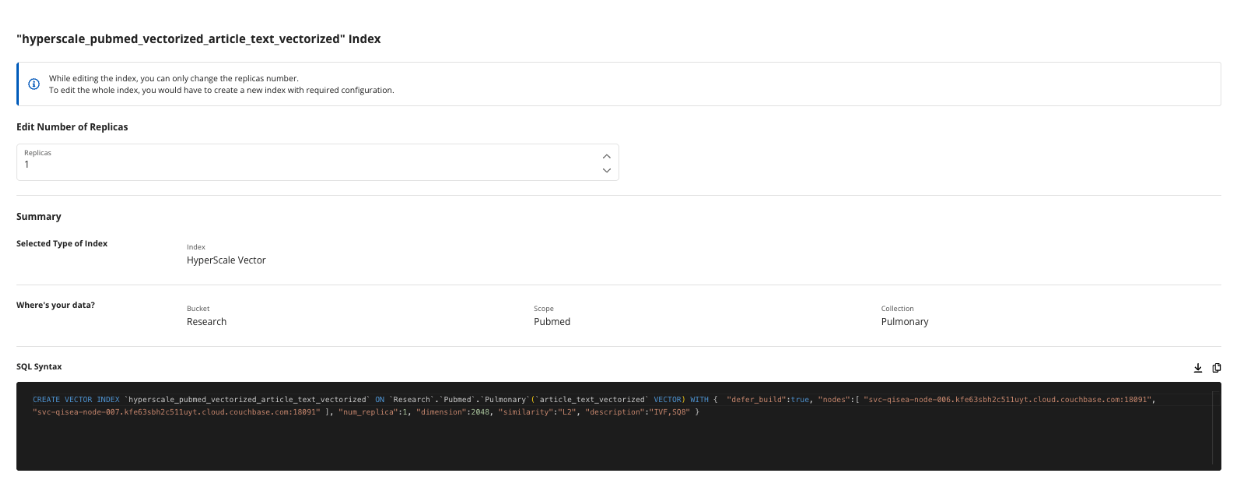
The hyperscale index has a single replica, handles 2048 dimensions output by the NVIDIA llama-3.2-nv-embedqa-1b-v2 text embedding model and uses L2, Euclidean-squared similarity search algorithm. There are four similarity algorithms depending on your use case and we’d consider changing from L2 to Cosine in production because we care primarily about semantic meaning, as magnitude is not as important.
You can see reference to Inverted File Index (IVF) and SQ8 Quantization. These are important configuration knobs you can turn to deliver optimal vector search performance. IVF for making vector searches faster by limiting the number of comparisons to vectors close to the relevant centroids. Scalar Quantization (SQ) lowers the dimensions to 8 bit integers, reducing the memory needed for search and improving the speed because those integer operations are computationally less expensive than floating point operations.
Importantly for PatientIQ, vector data is created, stored, and queried optimally alongside our operational data, without complex pipelines, configuration, or a separate vector database.
In addition to an embedding model, we deployed a large language model mistralai/mistral-7b-instruct-v0.3. The model is run in a NVIDIA-optimized environment with additional configuration options for caching, guardrails, and jailbreak protection. In production, we’d enable all and use caching to reduce our number of LLM calls, tokens used, and costs.
In a healthcare setting, sending data over the internet to public model endpoints increases the risk of data privacy breaches. Being able to use the Model Service where data and inference are colocated provides greater confidence to build intelligent features whilst protecting the underlying data.
The LLM was used in two ways by PatientIQ:
- Summarize patient information across the dashboard.
Using the Model Service API and our endpoint for /v1/chat/completions, a summary of a patient’s general details and their answers provided in a pre-visit questionnaire are turned into succinct digestible paragraphs that a doctor can quickly understand before a patient comes in to see them.
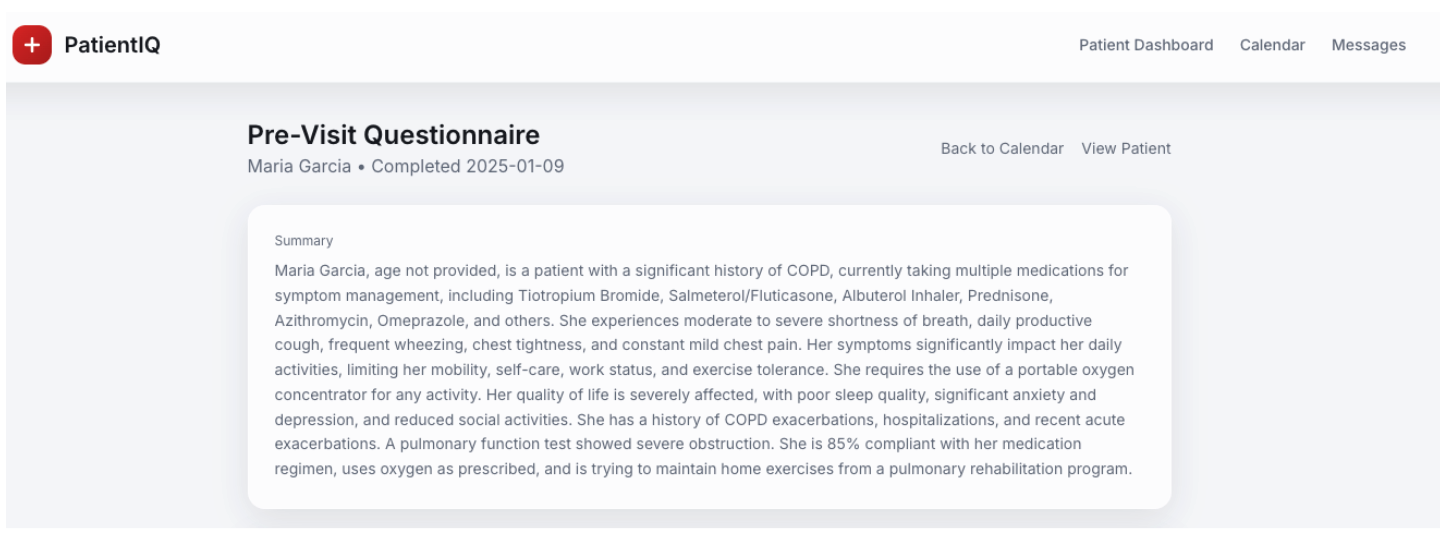
This is an example of retrieval-augmented generation (RAG) and benefits from our operational data stored in the Capella platform used as a knowledge base to provide context to a prompt. This type of RAG was used to power intelligent summarization across the PatientIQ platform and the LLM interacting with the operational data is able to do so in the same US East AWS region, delivering fast responses to the dashboard.
2. Link to an AI Function to perform sentiment analysis on confidential patient visit notes.
Patient feedback notes are about the visits after seeing their doctor. The contents of the notes are intended to be private and not shared directly with the doctor. Instead, a Capella AI Function that is linked to the Mistral LLM is used with the following SQL++ query to perform sentiment analysis over the contents of the notes.
There is also the option here to use a specialized model in AWS Bedrock that is trained on healthcare data. This can be an important way to ensure higher accuracy with a tailored model association when executing AI Functions.
AI Functions allow you to perform prebuilt AI operations like sentiment analysis directly with a SQL++ query and less manual code. Here is our SQL++ query:
|
1 2 3 4 5 6 7 8 9 10 11 12 13 |
SELECT p.doctor_id, p.doctor_name, p.patient_id, p.visit_date, p.visit_notes, default:ai_sentiment({ “text”: p.visit_notes, “temperature”: 0, #The temperature hyperparameter is set to 0 for max. determinism. “max_tokens”: 500 }) AS visit_sentiment FROM `Patient` AS p LIMIT 100; |
See this negative sentiment result for example:
|
1 2 3 4 5 |
“visit_notes”: “Energy is low today. Unhappy with my Doctor’s response. Seemed distracted and disinterested.”, “visit_sentiment”: [ { “response”: “negative” } |
The general sentiment of how a patient is feeling about their doctor is then populated on the PatientIQ frontend.
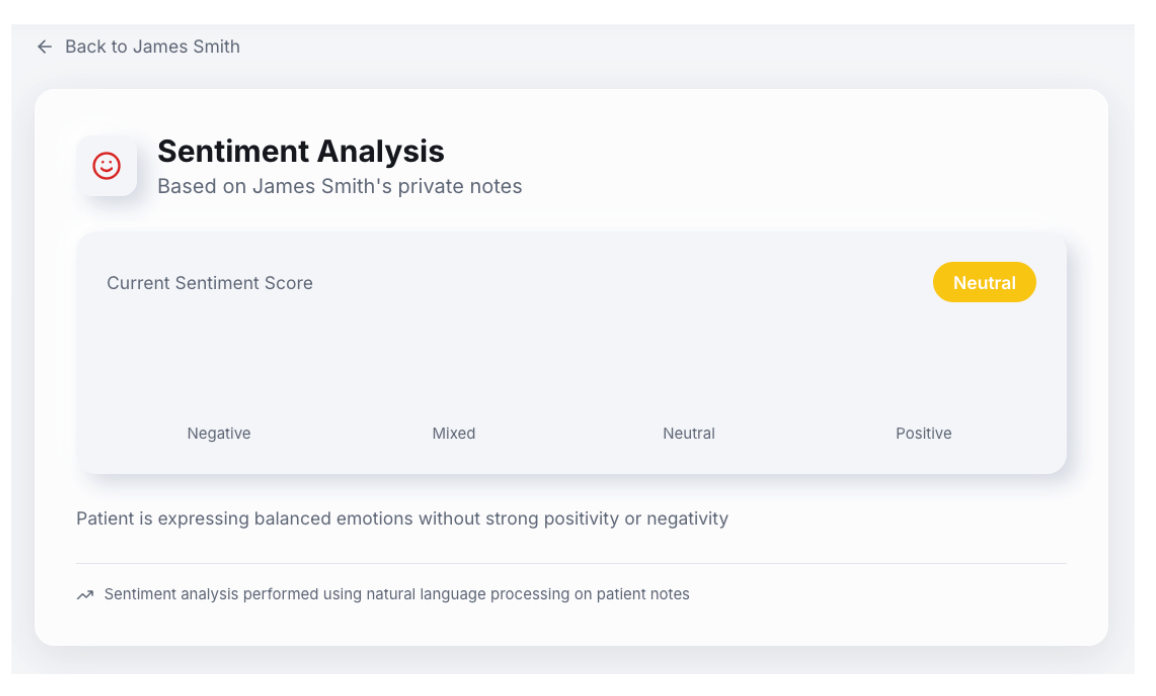
This implementation provided a patient’s last visit feedback to give their doctor an idea of how they might be feeling heading into their next appointment. Doctors can treat patients exhibiting negative sentiments with extra care and adapt to an upcoming visit accordingly.
Taking Action on Intelligence. Building an Agentic Patient 360
The next era of software will be agentic. Software will be capable of taking actions on data before results are delivered to us as users. That means that our software can take smart actions on data, resulting in more useful outputs that we can use to take our own actions in the physical world.
An important caveat to note for our demonstration is that we used an external LLM, but this would be switched out for an LLM with support for tool calling in Capella’s Model Service in production. We did not want to send patient data outside of our trusted environment and we observed latency issues when interacting with an external API.
If we can remove small administrative tasks for doctors through agentic actions, the result is an increased amount of time to spend on taking action with their patients. We chose four agents to demonstrate examples of useful actions:
1. Pulmonary Researcher
This agent fetches a patient’s condition, e.g., asthma, and performs semantic similarity search to return relevant research papers related to that condition. The prompt uses our LLM in the Model Service to summarize the research and display it on the dashboard. A doctor can then ask a more specific question. The question is vectorized, enabling semantic similarity search to return the most relevant answers to the doctor’s clinical question. Answers are returned with the sources used to generate the answer.

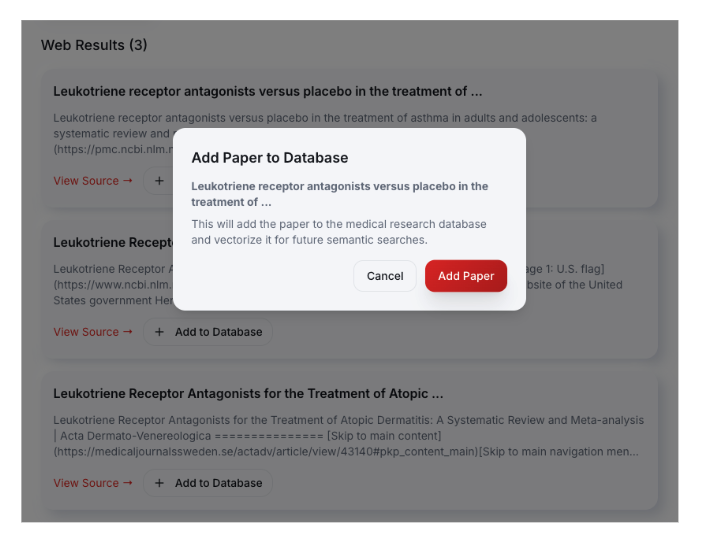
We used a web search tool to find new medical research and return relevant papers from the top three web results. A doctor can verify the source and then choose to add it to their trusted medical research base. When a paper is added, it is vectorized. The new paper is persisted to Capella and is made available to help answer future inquiries.
Questions, answers, and a rating score are stored in Capella to use for assessing and improving future performance of this functionality.
The agent saves the doctor time from searching for relevant literature for a patient’s condition by providing a quick summary and answers to questions from their trusted research base.
2. DocNotes Searcher
This agent searches through notes taken by a doctor during and after visits with patients. A doctor can ask questions in the search to retrieve information from previous visits to help make more informed decisions. Notes are written in PatientIQ, vectorized, and saved to Capella. When a doctor asks a question, semantically similar results are returned as context to the LLM in the Model Service that then delivered as an answer.
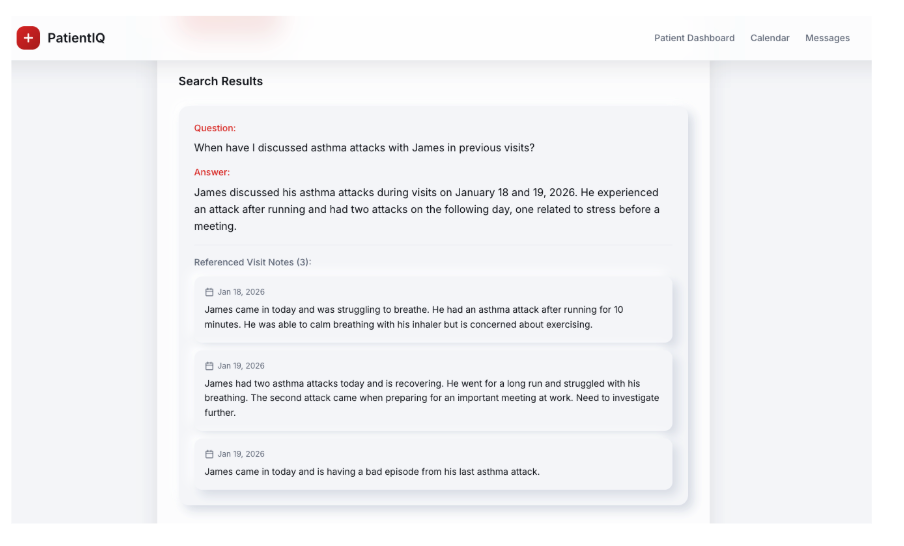
This agent saves doctor’s time from searching for notes and reading irrelevant content by asking an important question and returning a specific answer directly before a patient visit.
3. Previsit Summarizer
This agent reviews a patient’s previsit questionnaire and allows doctors to see a summary before an upcoming appointment with a patient.

The rich detail in the questionnaire is used as context supplied by Capella to the LLM in Model Service and the essential details are provided to the doctor for simple consumption. For example, the top five patient questions for an upcoming appointment is provided along with and the current medications the patient is prescribed. Reading through an entire questionnaire before every patient visit would be very time-consuming, especially as the number of patient visits per day increases.
4. Wearable Alerter
This agent reviews a patient’s 30-day wearable data from a device like an Apple Watch and alerts the doctor if there are any concerning trends. It uses the patient’s identified condition and gives guidance on things to look out for when performing analysis, for example, an asthmatic patient.

Above is an illustration of a critical alert for a patient’s oxygen saturation dropping below 90%. The doctor can set the thresholds to look out for, and the agent can perform the consistent monitoring of the data. Wearable data provides a recent snapshot of patient health that doctors can use to deliver tailored treatment.
LangGraph ReAct Agents. Prompts, Tools and Traces in Couchbase’s Agent Catalog
All agents use LangGraph as an orchestration framework and are simple ReAct agents that behave in this way.

A key difference is that the tools, prompts, and traces are handled by Couchbase’s Agent Catalog. Prompts and tools can be created using agentc add from the CLI. Agent Catalog converts the SQL++ queries, semantic searches, and HTTP requests into Python functions that can be retrieved by our agents.
For PatientIQ, we created 28 tools and five prompts that are stored locally and in Capella. Sentence transformers were used as well as the ll-MiniLM-L12-v2 local embedding model to convert the prompts and tools into text embeddings.
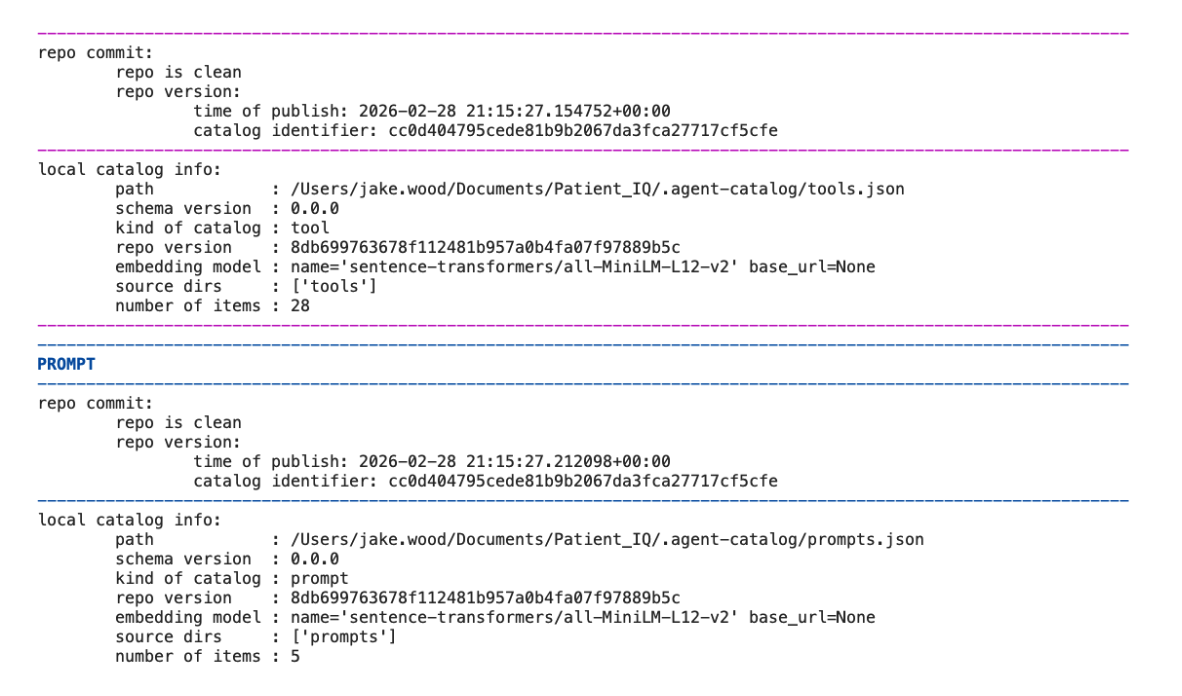
With Agent Catalog, our agents can find relevant tools and prompts using semantic similarity. This can reduce an agent’s confusion when dealing with lots of prompts and tools and failing to find them from a keyword alone.
Administrative staff have oversight over the prompts and tools that our agents use, which reduces the risk of unauthorized tool use and ensures no actions are taken that are not visible. There is also an option to add human approval.
With tools and prompts created and integrated with our agents, the catalog can be indexed and published to Capella. We are able to view, check Git, and review version history.
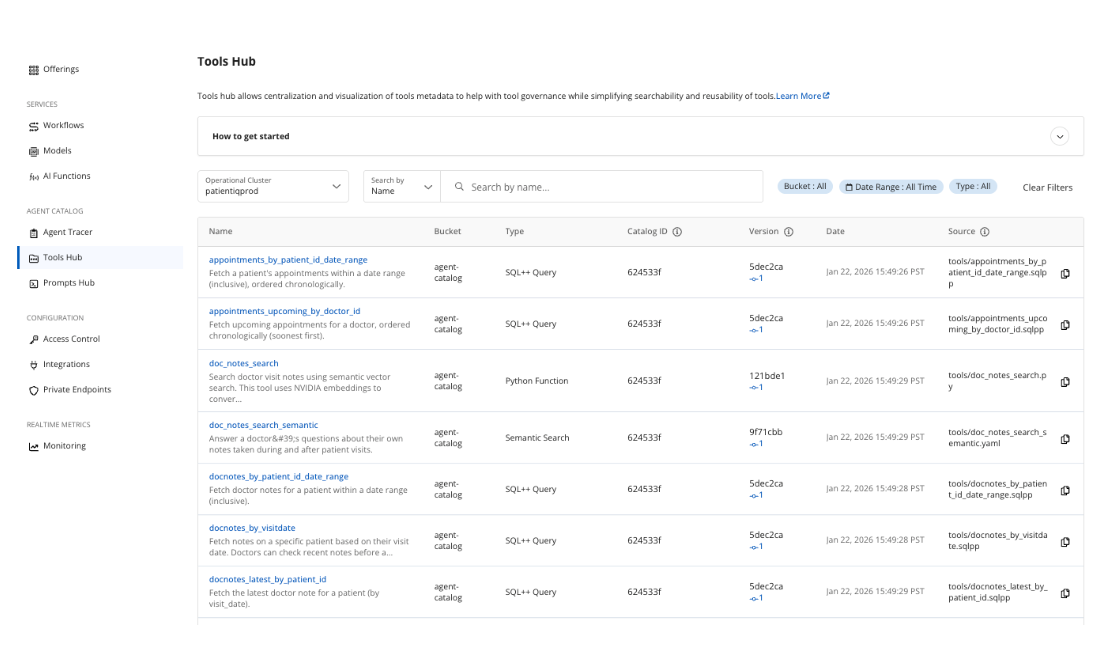
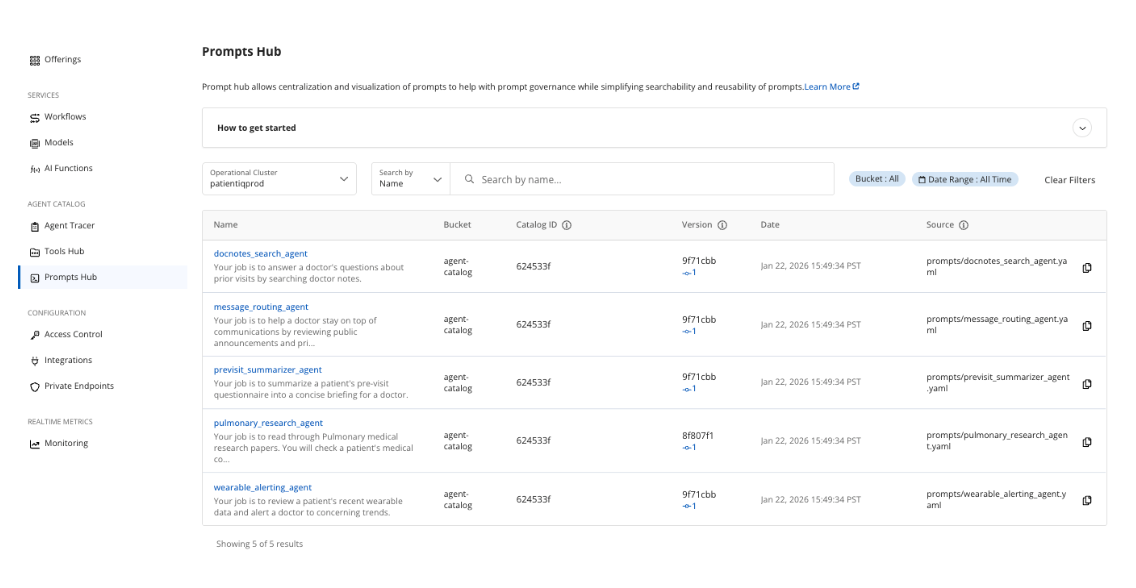
Storing, versioning, and retrieving prompts and tools from Capella makes the development process simpler to operate across projects, teams, and agents.
Although agents will never replace a doctor’s actions, they do allow PatientIQ to act upon our data foundation. The result gives doctors more time to focus on the actions that truly matter for patients.
Working With Non Determinism. Troubleshooting and Evaluating Agents
One challenge with agentic functionality is introducing non determinism, where the same input can produce different outputs or take different paths to get there. This can be beneficial to a user’s experience by making software more human-like, but it can also result in unexpected outcomes. Aside from using retrieval-augmented generation (RAG) to provide context to our prompts, we tried to tackle the downsides of non deterministic agents in two additional ways.
- Using the Agent Tracer and SQL++ queries to troubleshoot unexpected agent behavior.
One example that our team experienced was the Pulmonary Researcher returning research papers as references that did not exist. At first, we did not understand why this was happening from our application code. We were then able to check the Agent Tracer on this specific agent and narrow it down to the tool calls.
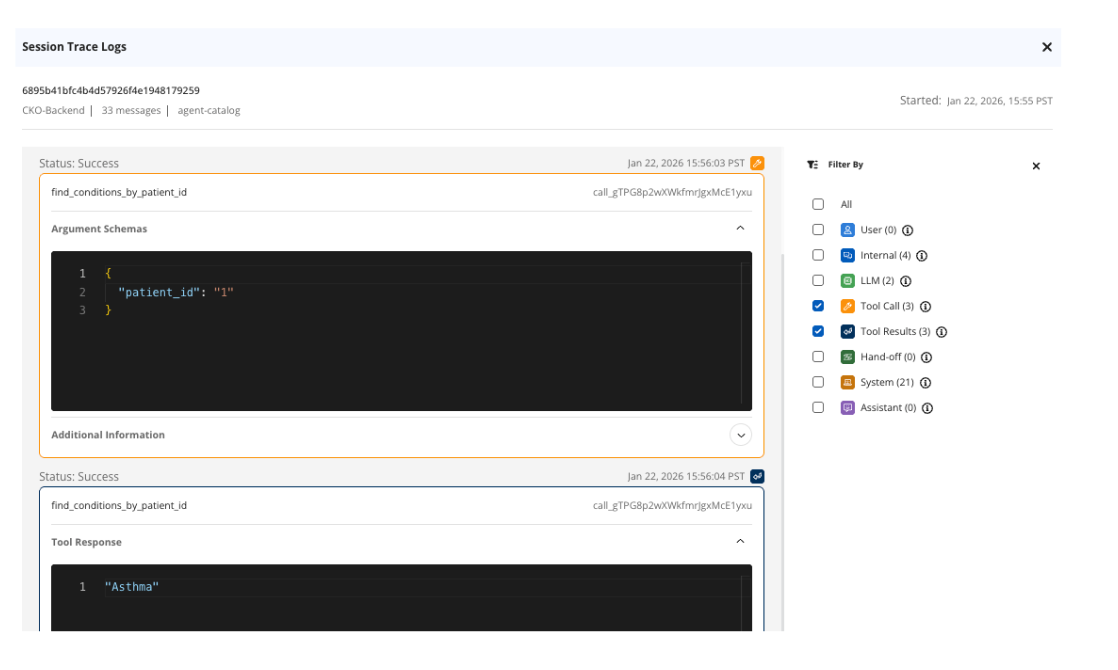
We noticed that our paper search tool was not returning any tool results. We went back to the application code and could see that when using a keyword search, we used the wrong keyword to identify it. Our agent wasn’t using the tool we had created and was hallucinating non existing research papers.

We performed further investigation with SQL++ queries by checking our logs and agent sessions when this occurred. We were then able to troubleshoot and resolve the agent that was misbehaving quickly.
2. Building our own agent evals using ragas to come up with a scoring system.
In PatientIQ, we ran evaluations for each agent using example prompts through the same agent flows, and then used ragas and LLM-graded metrics to score the results against expectations. We came up with our own score dimensions like answer quality, groundedness, and relevance to compare changes over time as prompts, tools, and our retrieval logic evolved. This is an example of metrics for our Pulmonary Researcher:
- Clinical relevance: How clinically relevant and responsive the answer is to the question and patient context.
- Actionability: How actionable the next steps and clinical reasoning are for a clinician.
- Evidence grounding: How well the answer is grounded in evidence and avoids unsupported claims. Penalty for hallucinated citations.
Clinical relevance was introduced after a problem was identified with the agent returning a made-up research paper as evidence for an answer to a clinical question. After it was fixed, we saw an improvement in the evidence grounding score.
Toward PatientIQ in Production and at Scale. Why to Build It on Couchbase?
PatientIQ demonstrates what is possible when operational data, vector search, models, and agent tooling live on a single platform. There is no need to stitch together multiple databases, external vector stores, and public API calls that send private data outside of secure boundaries. Models and data can operate within the same private network. Queries run at memory-first speed. Prompts and tools are versioned centrally. The system can scale horizontally to billions of documents and vectors while maintaining low-latency access and operating at a reduced total cost of ownership (TCO).
The business implications are significant. Doctors save time that was previously lost navigating fragmented EHR systems. Patients receive more attentive, context-aware care. Hospitals reduce administrative overhead and potential negligence risk. Satisfaction improves on both sides of the interaction. Most importantly, doctors spend more time doing what only humans can do: delivering diagnoses, providing empathy, and offering treatment.
Healthcare today does not suffer from a shortage of capable professionals. It suffers from fragmented data. AI does not fix broken infrastructure when simply bolted on top. When it is built on a strong data foundation, it can amplify human expertise in powerful ways. The future of software is agentic. The future of healthcare is data-driven. PatientIQ is what happens when those two ideas meet Couchbase, the operational data platform for AI.
While new market entrants are still experimenting with data persistence, Couchbase is already the battle-tested data foundation for high stakes healthcare AI. Trusted by industry leaders like Arthrex, BD, and Maccabi Healthcare Services, our platform handles everything from sub-1 ms response times to offline capable patient apps and live surgical data. By bridging the gap between fragmented data and life saving care, Couchbase offers the proven reliability and performance required for the next generation of medical innovation.
References
Couchbase
- AI Services
- Python SDK
- Agent Catalog
- Model Service API
- Cloud Trust Center – HIPAA
- Unique Architectural Advantages
- AWS PrivateLink Connection
- NVIDIA AI Enterprise
- Inverted File Index
- SQ8 Quantization
- Process Data for Capella
- Choosing the Right Vector Index
- Get Started With Capella iQ
- Calling Tools and Prompts
- Choosing Search Algorithm
- Integrate LangGraph Agent
- Use Capella AI Functions
LangGraph
PatientIQ
- PatientIQ GitHub
- PatientIQ DeepWiki
- PubMed Research Papers
- Incompleteness of Electronic Health Records
- YouTube Demo
Author

2 Comments
-
Thanks Jake. This is an excellent blog/example/demo.
-
Thank you very much Michael!
-


Leave a comment
You must be logged in to post a comment.