

Couchbase is great as a source for Apache Kafka using the DCP connector.
However it is also great as an endpoint for digesting data, as it is fast, memory first and reliable storage.
In this blog post I will show you how to build simple Java application for a producer and a consumer which save the published messages from Kafka into Couchbase.
I assume here, that you already have a Kafka cluster (even if it’s single node cluster). If not, try to follow that installation guide.
This blog environment have 4 parts:
- Kafka producer
- Apache Kafka queue
- Kafka consumer
- Couchbase server
Producer
We need the producer in order to submit messages to our queue.
In the queue, those messages are being digested and every application which subscribed to the topic – can read those messages.
The source of our messages will be a dummy JSON file I’ve created using Mockaroo, which we will split and sent to the queue.
Our sample JSON data looks something similar to:
{
   "id":1,
   "gender":"Female",
   "first_name":"Jane",
   "last_name":"Holmes",
   "email":"jholmes0@myspace.com",
   "ip_address":"230.49.112.20",
   "city":"Houston"
 }
The producer code:
import com.fasterxml.jackson.databind.JsonNode;
 import com.fasterxml.jackson.databind.ObjectMapper;
 import com.fasterxml.jackson.databind.node.ArrayNode;
 import org.apache.kafka.clients.producer.KafkaProducer;
 import org.apache.kafka.clients.producer.ProducerConfig;
 import org.apache.kafka.clients.producer.ProducerRecord;
 import org.apache.kafka.clients.producer.RecordMetadata;

 import java.io.File;
 import java.nio.charset.Charset;
 import java.nio.file.Files;
 import java.nio.file.Paths;
 import java.util.ArrayList;
 import java.util.HashMap;
 import java.util.List;
 import java.util.Map;
 import java.util.concurrent.Future;


 public class KafkaSimpleProducer {
   public static void main(String[] args) throws Exception {
     Map<String, Object> config = new HashMap<>();
     config.put(ProducerConfig.BOOTSTRAP_SERVERS_CONFIG, "localhost:9092");
     config.put("value.serializer", "org.apache.kafka.common.serialization.StringSerializer");
     config.put("key.serializer", "org.apache.kafka.common.serialization.StringSerializer");
     KafkaProducer<String, String> producer = new KafkaProducer<String, String>(config);

     File input = new File("sampleJsonData.json");
     byte[] encoded = Files.readAllBytes(Paths.get(input.getPath()  ));

     String jsons = new String(encoded, Charset.defaultCharset());
     System.out.println("Splitting file to jsons....");

     List splittedJsons = split(jsons);

     System.out.println("Converting to JsonDocuments....");

     int docCount = splittedJsons.size();

     System.out.println("Number of documents is: " + docCount );

     System.out.println("Starting sending msg to kafka....");
     int count = 0;
     for ( String doc : splittedJsons) {
       System.out.println("sending msg...." + count);
       ProducerRecord<String,String> record = new ProducerRecord<>( "couchbaseTopic", doc );
       Future meta = producer.send(record);
       System.out.println("msg sent...." + count);

       count++;
     }

     System.out.println("Total of " + count + " messages sent");

     producer.close();
   }

   public static List split(String jsonArray) throws Exception {
     List splittedJsonElements = new ArrayList();
     ObjectMapper jsonMapper = new ObjectMapper();
     JsonNode jsonNode = jsonMapper.readTree(jsonArray);

     if (jsonNode.isArray()) {
       ArrayNode arrayNode = (ArrayNode) jsonNode;
       for (int i = 0; i < arrayNode.size(); i++) {
         JsonNode individualElement = arrayNode.get(i);
         splittedJsonElements.add(individualElement.toString());
       }
     }
     return splittedJsonElements;
   }
 }
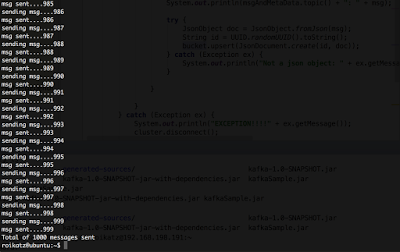
Consumer
This is a simple one, very straight forward, just get the messages from the queue, and use the Couchbase Java SDK in order to insert documents into Couchbase. For simplicity, I’ll be using the sync java SDK, but using the async is totally possible and even recommended.
import com.couchbase.client.java.Bucket;
 import com.couchbase.client.java.Cluster;
 import com.couchbase.client.java.CouchbaseCluster;
 import com.couchbase.client.java.document.JsonDocument;
 import com.couchbase.client.java.document.json.JsonObject;
 import kafka.consumer.Consumer;
 import kafka.consumer.ConsumerConfig;
 import kafka.consumer.KafkaStream;
 import kafka.javaapi.consumer.ConsumerConnector;
 import kafka.message.MessageAndMetadata;

 import java.util.*;

 public class KafkaSimpleConsumer {
   public static void main(String[] args) {

     Properties config = new Properties();
     config.put("zookeeper.connect", "localhost:2181");
     config.put("zookeeper.connectiontimeout.ms", "10000");
     config.put("group.id", "default");

     ConsumerConfig consumerConfig = new kafka.consumer.ConsumerConfig(config);

     ConsumerConnector consumerConnector = Consumer.createJavaConsumerConnector(consumerConfig);

     Map<String, Integer> topicCountMap = new HashMap<>();
     topicCountMap.put("couchbaseTopic", 1);

     Map<String, List<KafkaStream<byte[], byte[]>>> consumerMap = consumerConnector.createMessageStreams(topicCountMap);

     List<KafkaStream<byte[], byte[]>> streams = consumerMap.get("couchbaseTopic");

     List nodes = new ArrayList<>();
     nodes.add("localhost");

     Cluster cluster = CouchbaseCluster.create(nodes);
     final Bucket bucket = cluster.openBucket("kafkaExample");

     try {
       for (final KafkaStream<byte[], byte[]> stream : streams) {
         for (MessageAndMetadata<byte[], byte[]> msgAndMetaData : stream) {
           String msg = convertPayloadToString(msgAndMetaData.message());
           System.out.println(msgAndMetaData.topic() + ": " + msg);

           try {
             JsonObject doc = JsonObject.fromJson(msg);
             String id = UUID.randomUUID().toString();
             bucket.upsert(JsonDocument.create(id, doc));
           } catch (Exception ex) {
             System.out.println("Not a json object: " + ex.getMessage());
           }
         }
       }
     } catch (Exception ex) {
       System.out.println("EXCEPTION!!!!" + ex.getMessage());
       cluster.disconnect();
     }

     cluster.disconnect();
   }

   private static String convertPayloadToString(final byte[] message) {
     String string = new String(message);
     return string;
   }
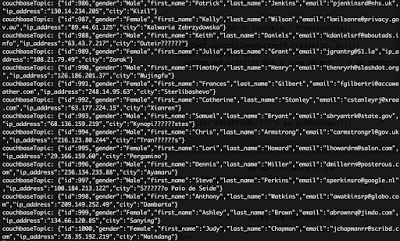
} 
Couchbase Server
Now we can look on the result in Couchbase server.
Look at kafkaExample bucket – Filled with 1000 documents.

Each document looks something like that:
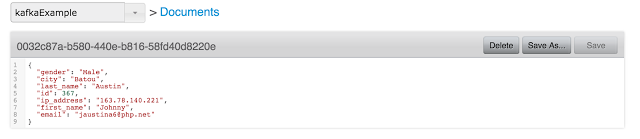
Simple 3 part solution.
Note, that on a Production environment, Producer, Consumer, Kafka or Couchbase will be on or more machines each.
Full (including Maven dependencies) code in GitHub.
Roi.

Leave a comment
You must be logged in to post a comment.