
Porque ¿quién tiene tiempo ? (también la parte 1 porque me llevó más lejos de lo que esperaba 😬)
Couchbase ha introducido recientemente compatibilidad con la búsqueda vectorial. Y he estado buscando una excusa para jugar con él. Resulta que hace poco hubo un gran hilo en Twitter sobre el marketing para desarrolladores. Me identifico con la mayor parte de lo que hay allí. Es un hilo fantástico. Podría resumirlo para asegurarme de que mis compañeros de equipo puedan sacarle el máximo partido en poco tiempo. Podría escribir ese resumen manualmente. O esa podría ser la excusa que estaba buscando.
Pidamos a un LLM, Large Language Model, que resuma este brillante hilo para mí, y en beneficio de los demás. En teoría, las cosas deberían ir como sigue:
-
- Obtener los tweets
- Transformarlos en vectores gracias a un LLM
- Almacenamiento de tuits y vectores en Couchbase
- Crear un índice para consultarlas
- Pregunta algo al LLM
- Transfórmalo en un vector
- Realiza una búsqueda vectorial para contextualizar el LLM
- Crear la pregunta LLM a partir de la pregunta y el contexto
- Obtenga una respuesta fantástica
Se trata básicamente de un flujo de trabajo RAG. RAG son las siglas en inglés de Generación Aumentada de Recuperación. Permite a los desarrolladores crear aplicaciones basadas en LLM más precisas y robustas proporcionando contexto.
Extracción de datos de Twitter
Lo primero es lo primero, obtener datos de Twitter. Esta es la parte más difícil si no estás suscrito a su API. Pero con un poco de buen desguace de edad, todavía se puede hacer algo decente. Probablemente no 100% exacto, pero decente. Así que vamos a ello.
Conseguir mi IDE favorito, con el Plugin Couchbase instalado, creo un nuevo script de Python y empiezo a jugar con twikituna biblioteca de Twitter scraper. Todo funciona muy bien hasta que rápidamente recibo un error HTTP 429. Demasiadas peticiones. He desguazado demasiado. Me han pillado. Un par de cosas para mitigar eso.
-
- En primer lugar, asegúrate de almacenar tu cookie de autenticación en un archivo y reutilizarla, en lugar de volver a iniciar sesión frenéticamente como hice yo.
- Segundo, cámbiate a un IDE online, podrás cambiar de IP más fácilmente.
- Tercero, introduce el tiempo de espera y hazlo aleatorio. No sé si la parte aleatoria ayuda, pero por qué no, es fácil.
El guión final tiene este aspecto:
|
1 2 3 4 5 6 7 8 9 10 11 12 13 14 15 16 17 18 19 20 21 22 23 24 25 26 27 28 29 30 31 32 33 34 35 36 37 38 39 40 41 42 43 44 45 46 47 48 49 50 51 52 53 54 55 56 57 58 59 60 61 62 63 64 65 66 67 68 69 70 71 72 73 74 |
from twikit import Client from random import randint import json import time def get_json_tweet(t, parentid): return { 'created_at': t.created_at, 'id': t.id, 'parent' : parentid, 'full_text': t.full_text, 'created_at': t.created_at, 'text': t.text, 'lang': t.lang, 'in_reply_to': t.in_reply_to, 'quote_count': t.quote_count, 'reply_count': t.reply_count, 'favorite_count': t.favorite_count, 'view_count': t.view_count, 'hashtags': t.hashtags, 'user' : { 'id' : t.user.id, 'name' : t.user.name, 'screen_name ' : t.user.screen_name , 'url ' : t.user.url , }, } def get_replies(id, total_replies, recordTweetid): tweet = client.get_tweet_by_id(id) if( tweet.reply_count == 0): return # Get all replies all_replies = [] tweets = tweet.replies all_replies += tweets while len(tweets) != 0: try: time.sleep(randint(10,20)) tweets = tweets.next() all_replies += tweets except IndexError: print("Array Index error") break print(len(all_replies)) print(all_replies) for t in all_replies: jsonTweet = get_json_tweet(t, id) if (not t.id in recordTweetid) and ( t.in_reply_to == id): time.sleep(randint(10,20)) get_replies(t.id, total_replies, recordTweetid) f.write(',\n') json.dump(jsonTweet, f, ensure_ascii=False, indent=4) client = Client('en-US') ## You can comment this `login`` part out after the first time you run the script (and you have the `cookies.json`` file) client.login( auth_info_1='username', password='secret', ) client.save_cookies('cookies.json'); # client.load_cookies(path='cookies.json'); replies = [] recordTweetid = [] with open('data2.json', 'a', encoding='utf-8') as f: get_replies('1775913633064894669', replies, recordTweetid) |
Fue un poco doloroso evitar el 429, pasé por varias iteraciones pero al final conseguí algo que en su mayor parte funciona. Sólo necesitaba añadir el corchete de inicio y final para convertirlo en un array JSON válido:
|
1 2 3 4 5 6 7 8 9 10 11 12 13 14 15 16 17 18 19 20 21 22 |
[ { "created_at": "Thu Apr 04 16:15:02 +0000 2024", "id": "1775920020377502191", "full_text": null, "text": "@kelseyhightower SOCKS! I will throw millions of dollars at the first company to offer me socks!\n\nImportant to note here: I don’t have millions of dollars! \n\nI think I might have a problem.", "lang": "en", "in_reply_to": "1775913633064894669", "quote_count": 1, "reply_count": 3, "favorite_count": 23, "view_count": "4658", "hashtags": [], "user": { "id": "4324751", "name": "Josh Long", "screen_name ": "starbuxman", "url ": "https://t.co/PrSomoWx53" } }, ... ] |
Es evidente que Josh tiene razón, los calcetines están en el centro de lo que hacemos en marketing para desarrolladores, junto con la ironía.
Ahora tengo un archivo que contiene una serie de documentos JSON, todos con dev marketing hot takes. ¿Y ahora qué?
Convertir tuits en vectores
Para que pueda ser utilizado por un LLM como contexto adicional, es necesario transformarlo en un vector, o incrustación. Básicamente es una matriz de valores decimales entre 0 y 1. Todo esto permitirá RAG, Retrieval Augmented Generation. No es universal, cada LLM tiene su propia representación de un objeto (como datos de texto, audio o vídeo). Siendo extremadamente perezoso e ignorante de lo que ocurre en ese espacio, elegí OpenAI/ChatGPT. Es como si cada semana salieran más modelos de los que teníamos frameworks de JavaScript en 2017.
De todos modos, creé mi cuenta OpenAI, creé una clave API, añadí un par de dólares porque aparentemente no puedes usar su API si no lo haces, incluso las cosas gratis. Entonces estaba listo para transformar los tweets en vectores. El camino más corto para obtener la incrustación a través de la API es usar curl. Se verá así:
|
1 2 3 4 5 6 7 8 9 10 11 12 13 14 15 16 17 18 19 20 21 22 23 24 25 |
curl https://api.openai.com/v1/embeddings -H "Authorization: Bearer $OPENAI_API_KEY" \ -H "Content-Type: application/json" \ -d '{"input": " SOCKS! I will throw millions of dollars at the first company to offer me socks!\n\nImportant to note here: I don’t have millions of dollars! \n\nI think I might have a problem.", "model": "text-embedding-ada-002"}' { "object": "list", "data": [ { "object": "embedding", "index": 0, "embedding": [ -0.008340064, -0.03142008, 0.01558878, ... 0.0007338819, -0.01672055 ] } ], "model": "text-embedding-ada-002", "usage": { "prompt_tokens": 40, "total_tokens": 40 } } |
Aquí se puede ver que la entrada JSON tiene un campo de entrada que se transformará en un vector, y el campo de modelo que hace referencia al modelo que se utilizará para transformar el texto en un vector. La salida devuelve el vector, el modelo utilizado y las estadísticas de uso de la API.
Fantástico, ¿y ahora qué? Convertirlos en vectores no es barato. Es mejor almacenarlos en una base de datos para reutilizarlos más tarde. Además, puedes conseguir fácilmente algunas bonitas funciones añadidas, como la búsqueda híbrida.
Hay un par de maneras de verlo. Hay una manera manual tediosa que es genial para aprender cosas. Y luego está el uso de bibliotecas y herramientas que hacen la vida más fácil. Yo en realidad fui directamente usando Langchain pensando que me haría la vida más fácil, y así fue, hasta que me perdí un "poco". Así que, para nuestro beneficio colectivo de aprendizaje, vamos a empezar con la forma manual. Tengo un array de documentos JSON, necesito vectorizar su contenido, almacenarlo en Couchbase, y luego podré consultarlos con otro vector.
Cargar los tweets en un almacén vectorial como Couchbase
Voy a usar Python porque siento que tengo que mejorar en ello, aunque podemos ver implementaciones de Langchain en Java o JavaScript. Y lo primero que quiero abordar es cómo conectarse a Couchbase:
|
1 2 3 4 5 6 7 8 9 10 11 12 13 14 15 16 17 18 19 20 21 22 23 24 25 26 27 28 |
def connect_to_couchbase(connection_string, db_username, db_password): """Connect to couchbase""" from couchbase.cluster import Cluster from couchbase.auth import PasswordAuthenticator from couchbase.options import ClusterOptions from datetime import timedelta auth = PasswordAuthenticator(db_username, db_password) options = ClusterOptions(auth) connect_string = connection_string cluster = Cluster(connect_string, options) # Wait until the cluster is ready for use. cluster.wait_until_ready(timedelta(seconds=5)) return cluster if name == "__main__": # Load environment variables DB_CONN_STR = os.getenv("DB_CONN_STR") DB_USERNAME = os.getenv("DB_USERNAME") DB_PASSWORD = os.getenv("DB_PASSWORD") DB_BUCKET = os.getenv("DB_BUCKET") DB_SCOPE = os.getenv("DB_SCOPE") DB_COLLECTION = os.getenv("DB_COLLECTION") # Connect to Couchbase Vector Store cluster = connect_to_couchbase(DB_CONN_STR, DB_USERNAME, DB_PASSWORD) bucket = cluster.bucket(DB_BUCKET) scope = bucket.scope(DB_SCOPE) collection = scope.collection(DB_COLLECTION) |
En este código se puede ver el connect_to_couchbase que acepta un método cadena de conexión, nombre de usuario y contraseña. Todos ellos son proporcionados por las variables de entorno cargadas al principio. Una vez que tenemos el objeto cluster podemos obtener el bucket, scope y collection asociados. Si no estás familiarizado con Couchbase, las colecciones son similares a una tabla RDBMS. Los ámbitos pueden tener tantas colecciones y cubos como ámbitos. Esta granularidad es útil por varias razones (multi-tenancy, sincronización más rápida, backup, etc.).
Una cosa más antes de obtener la colección. Necesitamos código para transformar el texto en vectores. Usando el cliente OpenAI se ve así:
|
1 2 3 4 5 6 7 |
from openai import OpenAI def get_embedding(text, model="text-embedding-ada-002"): text = text.replace("\n", " ") return client.embeddings.create(input = [text], model=model).data[0].embedding client = OpenAI() |
Esto hará un trabajo similar a la llamada anterior rizo. Sólo asegúrese de que tiene el OPENAI_API_KEY para que el cliente funcione.
Ahora vamos a ver cómo crear un documento Couchbase a partir de un tweet JSON, con la incrustación generada.
|
1 2 3 4 5 6 7 8 9 10 11 12 13 14 15 16 17 18 19 20 21 |
# Open the JSON file and load the tweets as a JSON array in data with open('data.json') as f: data = json.load(f) # Loop to create the object from JSON for tweet in data: text = tweet['text'] full_text = tweet['full_text'] id = tweet['id'] if full_text is not None: embedding = get_embedding(full_text) textToEmbed = full_text else: embedding = get_embedding(text) textToEmbed = text document = { "metadata": tweet, "text": textToEmbed, "embedding": embedding } collection.upsert(key = id, value = document) |
El documento tiene tres campos, metadatos contiene el tuit completo, texto es el texto transformado en cadena y incrustación es la incrustación generada con OpenAI. La clave será el id del tweet. Y upsert se utiliza para actualizar o insertar el documento si no existe.
Si ejecuto esto y me conecto a mi servidor Couchbase, veré que se crean documentos.
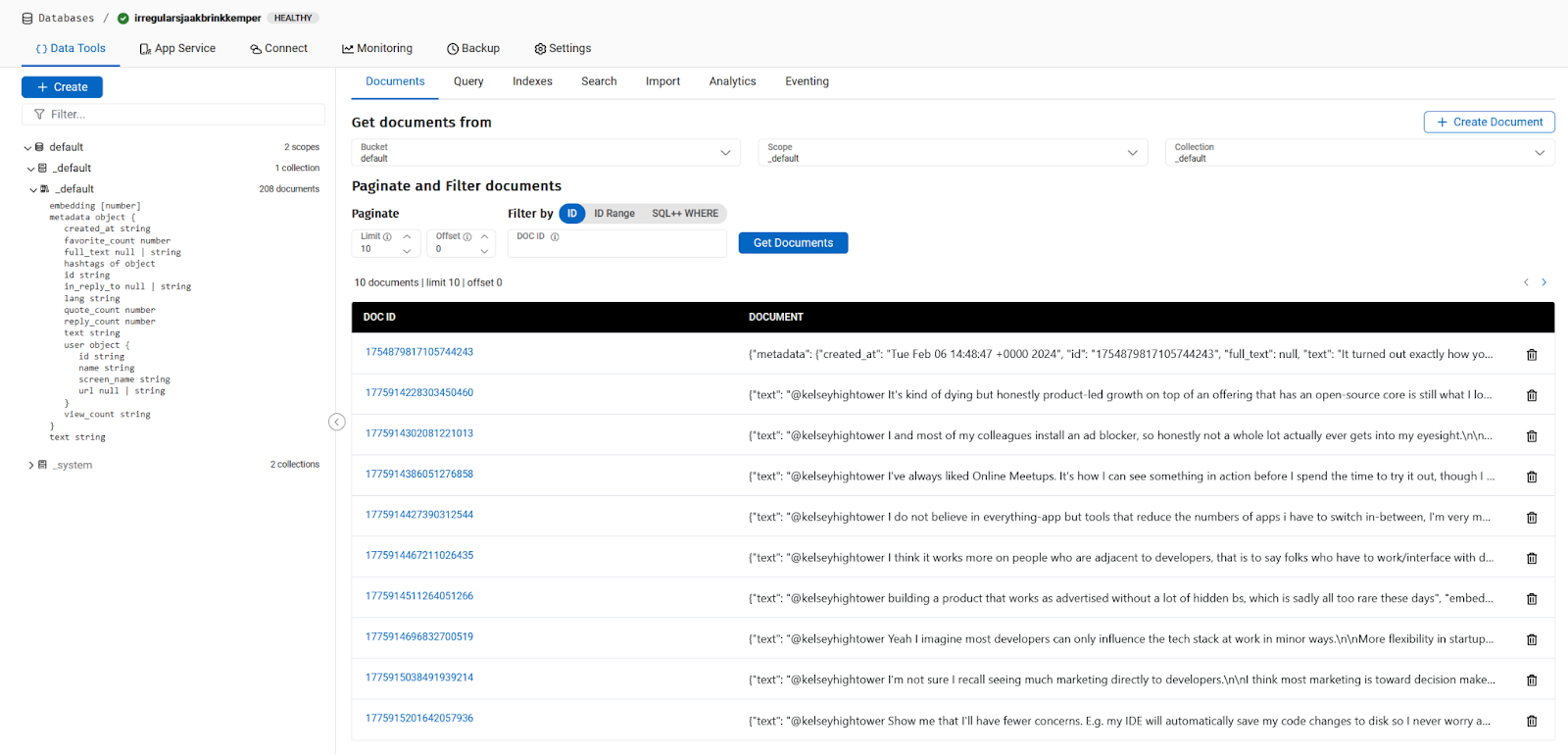
En este punto he extraído datos de Twitter, los he subido a Couchbase como un tweet por documento, con la incrustación OpenAI generada e insertada para cada tweet. Estoy listo para hacer preguntas para consultar documentos similares.
Ejecutar una búsqueda vectorial en Tweets
Y ahora es el momento de hablar de la búsqueda vectorial. ¿Cómo buscar tweets similares a un texto dado? Lo primero que hay que hacer es transformar el texto en un vector o embedding. Así que vamos a hacer la pregunta:
|
1 2 |
query = "Should we throw millions of dollars to buy SOCKs for developer marketing ?" queryEmbedding = get_embedding(query) |
Ya está. El queryEmbedding contiene un vector que representa la consulta. A la consulta:
|
1 2 3 4 5 6 7 8 9 10 11 12 13 14 15 16 17 18 19 20 21 22 23 |
INDEX_NAME = os.getenv("INDEX_NAME") # Fulltext Index Name # This is the Vector Search Query search_req = search.SearchRequest.create( VectorSearch.from_vector_query( VectorQuery( "Embedding", # JSON property name containing the embedding to compare to queryEmbedding, # our query embedding 5, # maximum number of results ) ) ) # Execute the Vector Search Query against the selected scope result = scope.search( INDEX_NAME, # Fulltext Index Name search_req, SearchOptions( show_request=True, log_request=True ), ).rows() for row in result: print("Found tweet \"{}\" ".format(row)) |
Como quiero ver lo que estoy haciendo, estoy activando los logs del SDK de Couchbase configurando esta variable de entorno:
|
1 |
export PYCBC_LOG_LEVEL=info |
Si has seguido el proceso y todo va bien, deberías recibir un mensaje de error.
|
1 2 3 4 5 6 7 8 9 10 11 12 |
@ldoguin ➜ /workspaces/rag-demo-x (main) $ python read_vectorize_store_query_json.py Traceback (most recent call last): File "/workspaces/rag-demo-x/read_vectorize_store_query_json.py", line 167, in <module> for row in result: File "/home/vscode/.local/lib/python3.11/site-packages/couchbase/search.py", line 136, in __next__ raise ex File "/home/vscode/.local/lib/python3.11/site-packages/couchbase/search.py", line 130, in __next__ return self._get_next_row() ^^^^^^^^^^^^^^^^^^^^ File "/home/vscode/.local/lib/python3.11/site-packages/couchbase/search.py", line 121, in _get_next_row raise ErrorMapper.build_exception(row) couchbase.exceptions.QueryIndexNotFoundException: QueryIndexNotFoundException(<ec=17, category=couchbase.common, message=index_not_found (17), context=SearchErrorContext({'last_dispatched_to': '3.87.133.123:18094', 'last_dispatched_from': '172.16.5.4:38384', 'retry_attempts': 0, 'client_context_id': 'ebcca5-1b2f-c142-ccad-821b0f27e2ce0d', 'method': 'POST', 'path': '/api/bucket/default/scope/_default/index/b/query', 'http_status': 400, 'http_body': '{"error":"rest_auth: preparePerms, err: index not found","request":{"ctl":{"timeout":75000},"explain":false,"knn":[{"field":"embedding","k":5,"vector":[0.022349120871154076,..,0.006140850435491819]}],"query":{"match_none":null},"showrequest":true}', 'context_type': 'SearchErrorContext'}), C Source=/couchbase-python-client/src/search.cxx:552>) |
Y esto está bien porque obtenemos un QueryIndexNotFoundException. Está buscando un índice que aún no existe. Así que tenemos que crearlo. Puede iniciar sesión en su clúster en Capella y seguir adelante:
Una vez que tengas el índice, puedes ejecutarlo de nuevo y deberías obtener esto:
|
1 2 3 4 5 6 |
@ldoguin ➜ /workspaces/rag-demo-x (main) $ python read_vectorize_store_query_json.py Found tweet "SearchRow(index='default._default.my_index_6933ea565b622355_4c1c5584', id='1775920020377502191', score=0.6803812980651855, fields=None, sort=[], locations=None, fragments={}, explanation={})" Found tweet "SearchRow(index='default._default.my_index_6933ea565b622355_4c1c5584', id='1775925931791745392', score=0.4303199052810669, fields=None, sort=[], locations=None, fragments={}, explanation={})" Found tweet "SearchRow(index='default._default.my_index_6933ea565b622355_4c1c5584', id='1775921934645006471', score=0.3621498942375183, fields=None, sort=[], locations=None, fragments={}, explanation={})" Found tweet "SearchRow(index='default._default.my_index_6933ea565b622355_4c1c5584', id='1776058836278727024', score=0.3274463415145874, fields=None, sort=[], locations=None, fragments={}, explanation={})" Found tweet "SearchRow(index='default._default.my_index_6933ea565b622355_4c1c5584', id='1775979601862307872', score=0.32539570331573486, fields=None, sort=[], locations=None, fragments={}, explanation={}" |
Obtenemos Fila de búsqueda que contienen el índice utilizado, la clave del documento, la puntuación relacionada y un montón de campos vacíos. Puede ver que esto también está ordenado por puntuacióny da el tweet más cercano a la consulta que ha encontrado.
¿Cómo sabemos si ha funcionado? Lo más rápido es buscar el documento con nuestro plugin IDE. Si utiliza VSCode o cualquier JetBrains IDE, debería ser bastante fácil. También puedes iniciar sesión en Couchbase Capella y encontrarlo allí.
O podemos modificar el índice de búsqueda para almacenar el campo de texto y los metadatos asociados, y volver a ejecutar la consulta:
|
1 2 3 4 5 6 7 8 9 |
result = scope.search( INDEX_NAME, search_req, SearchOptions( fields=["metadata.text"], show_request=True, log_request=True ), ).rows() |
|
1 2 3 4 5 6 |
@ldoguin ➜ /workspaces/rag-demo-x (main) $ python read_vectorize_store_query_json.py Found tweet "SearchRow(index='default._default.my_index_6933ea565b622355_4c1c5584', id='1775920020377502191', score=0.6803812980651855, fields={'metadata.text': '@kelseyhightower SOCKS! I will throw millions of dollars at the first company to offer me socks!\n\nImportant to note here: I don’t have millions of dollars! \n\nI think I might have a problem.'}, sort=[], locations=None, fragments={}, explanation={})" Found tweet "SearchRow(index='default._default.my_index_6933ea565b622355_4c1c5584', id='1775925931791745392', score=0.4303199052810669, fields={'metadata.text': "@kelseyhightower If your t-shirt has a pleasant abstract design on it where the logo of your company isn't very obvious, I will wear that quite happily (thanks, Twilio)\n\nI also really like free socks"}, sort=[], locations=None, fragments={}, explanation={})" Found tweet "SearchRow(index='default._default.my_index_6933ea565b622355_4c1c5584', id='1775921934645006471', score=0.3621498942375183, fields={'metadata.text': "@kelseyhightower For some reason, devs think they aren't influenced by marketing even if they are😅\n\nI'm influenced by social media & fomo. If a lot of developers start talking about some framework or tool, I look into it\n\nI also look into things that may benefit my career in the future"}, sort=[], locations=None, fragments={}, explanation={})" Found tweet "SearchRow(index='default._default.my_index_6933ea565b622355_4c1c5584', id='1776058836278727024', score=0.3274463415145874, fields={'metadata.text': "@kelseyhightower Have a good product. That's the best marketing there is!"}, sort=[], locations=None, fragments={}, explanation={})" Found tweet "SearchRow(index='default._default.my_index_6933ea565b622355_4c1c5584', id='1775979601862307872', score=0.32539570331573486, fields={'metadata.text': '@kelseyhightower From a security standpoint, marketing that works on me:\n\nShowing strong technical expertise. If you’re of the few shops that consistently puts out good research and quality writeups? When I’m looking at vendors, I’m looking at you. When I’m not looking, I’m noting it for later'}, sort=[], locations=None, fragments={}, explanation={})" |
Conclusión
Así que funcionó, el tweet de Josh sobre calcetines aparece en la parte superior de la búsqueda. Ahora ya sabes cómo scrapear twitter, transformar tweets en vectores, almacenarlos, indexarlos y consultarlos en Couchbase. ¿Qué tiene esto que ver con LLM y la IA? Más información en el próximo post.


