
The AI landscape is rapidly transitioning from simple chatbots to AI agents that can plan, reason, and execute tasks autonomously. At the forefront is Docker cagent – a powerful, easy-to-use, multi-agent runtime that’s democratizing AI agent development for developers worldwide.
Unlike traditional AI chatbots that provide simple text based response, agentic AI systems built with cagent can break down complex issues into manageable tasks, delegate work to specialized AI agents, while leveraging external tools and APIs through the Model Context Protocol (MCP).
In this post, we’ll walk through setting up an AI Agent that understands natural language queries, interact with a Couchbase instance to read/write data, how to leverage the Couchbase MCP server and how you can easily ship this agent to production using cagent.
What is cagent?
cagent is an open-source, customizable multi-agent runtime by Docker that makes it simple to orchestrate AI agents with specialized tools and capabilities in order to manage interactions between them.
Key features of cagent
- YAML configuration: Define your entire agent ecosystem using simple, declarative YAML files – no complex coding is required.
- Built-in reasoning capabilities: tools like “think”, “todo”, and “memory” enable sophisticated problem-solving and context retention across sessions.
- Support for multiple AI providers: Support for multiple AI providers like OpenAI, Anthropic, Google Gemini, and Docker Model Runner.
- Rich ecosystem support: Agents can access external tools, APIs, and services through the Model Context Protocol (MCP).
To learn how cagent works, you can refer to the official docs, el readme y el usage file. The concept is really easy to understand and the YAML structure defines everything limited to the required elements.
Creating a Couchbase MCP AI agent with cagent
Installing cagent
First download cagent from the releases page of the project’s repositorio de GitHub.
Once you’ve downloaded the appropriate binary for your platform, you may need to give it executable permissions. On macOS and Linux, this is done with the following command:
|
1 2 |
# linux amd64 build example chmod +x /path/a/downloads/cagent–linux–amd64 |
You can then rename the binary to cagent and configure your PATH to be able to find it.
Based on the models you configure your agents to use, you will need to set the corresponding provider API key accordingly, all theses keys are optional, you will likely need at least one of these:
|
1 2 |
# For OpenAI models exportar OPENAI_API_KEY=your_api_key_here |
Creating a new agent
Using the command: cagent new
You can quickly generate agents or multi-agent teams using a single prompt, using the command: cagent new.
In this example, we will create a simple agent that understands natural language queries, interact with a Couchbase instance to retrieve or manipulate data, and provide meaningful responses using the Couchbase MCP Server. For the Couchbase MCP server we will use the Docker MCP Catalog.
|
1 |
cagent nuevo —modelo OpenAI/gpt–4.1 —máximo–tokens 32000 |
We will add a prompt for our agent to leverage the Couchbase MCP server:
This generates YAML code and is saved in couchbase_agent.yaml. This single agent (root) will serve as the entry point and leverages Couchbase server tools for all database-related tasks and queries.
|
1 2 3 4 5 6 7 8 9 10 11 12 13 14 15 16 17 18 |
versión: “2” agents: root: modelo: openai descripción: Agent for answering questions, executing queries, y exploring datos en your Couchbase base de datos usando el Docker MCP Couchbase server como a tool. instruction: | You are an expert Couchbase base de datos assistant. Your job is a answer usuario questions related a el Couchbase base de datos, execute N1QL queries, summarize datos, help con troubleshooting, o provide documentation-style answers como requested. Usar el Couchbase MCP server a run queries y fetch schema/data para better answers. If a usuario asks para consulta samples, datos exploration, o troubleshooting, make claro a clarify el specific solicitud si no clear, then use el Herramientas como needed, y present resultados clearly y understandably. toolsets: – type: mcp ref: docker:couchbase add_date: true add_environment_info: false models: OpenAI: proveedor: openai modelo: gpt-5-mini max_tokens: 64000 |
Explanation
version: “2”
This specifies the configuration schema version for cagent. Version 2 is the current stable spec.
agents
This block defines the agents currently available. In this example we only define one.
- root – Every cagent config needs a top-level agent. It’s usually the primary agent that coordinates tasks, and here it’s set up as a Couchbase database assistant.
Key properties of the agent:
- model: openai
The name of the model defined later in the models block. Agents must reference a model provider. - descripción
A human-readable explanation of what this agent does. - instruction
Detailed system instructions that define how the agent should behave. Think of this as the “role prompt.”
In this case, the agent is told to:-
- Execute Couchbase SQL++ queries
- Summarize or troubleshoot results
- Proporcionar documentation-style explanations
- Use the Couchbase MCP server as its backend
-
toolsets
This is where cagent connects the agent to external tools via the Model Context Protocol (MCP).
Here we use:
- type: mcp
- ref: docker:couchbase
- Tells cagent to use the Docker MCP Couchbase server image (mcp/couchbase) as a tool. This allows the agent to run real database queries securely inside a container.
- add_environment_info: false
Prevents the agent from automatically adding details about the runtime environment (like OS, working directory, or Git state). This is disabled here since database exploration doesn’t need local environment context.
models
The models block defines what language models the agents can use.
- OpenAI – The model identifier, referenced by the agent’s model field.
- provider: openai – Specifies OpenAI as the LLM provider
- model: gpt-5-mini – The actual model to use.
- max_tokens: 64000 – Configures the maximum output length, useful when working with long query results.
Running the agent
You can run the agent now using the cagent run command:
|
1 |
cagent run couchbase_agent.yaml |
This opens up the cagent shell where you can interact with the agent:

In this example we are using the Couchbase MCP server, so let’s say we ask a question: “Tell me more about the database”.
The agent will use the provided Couchbase MCP server tools and then select the appropriate tool for the user’s given input and execute it.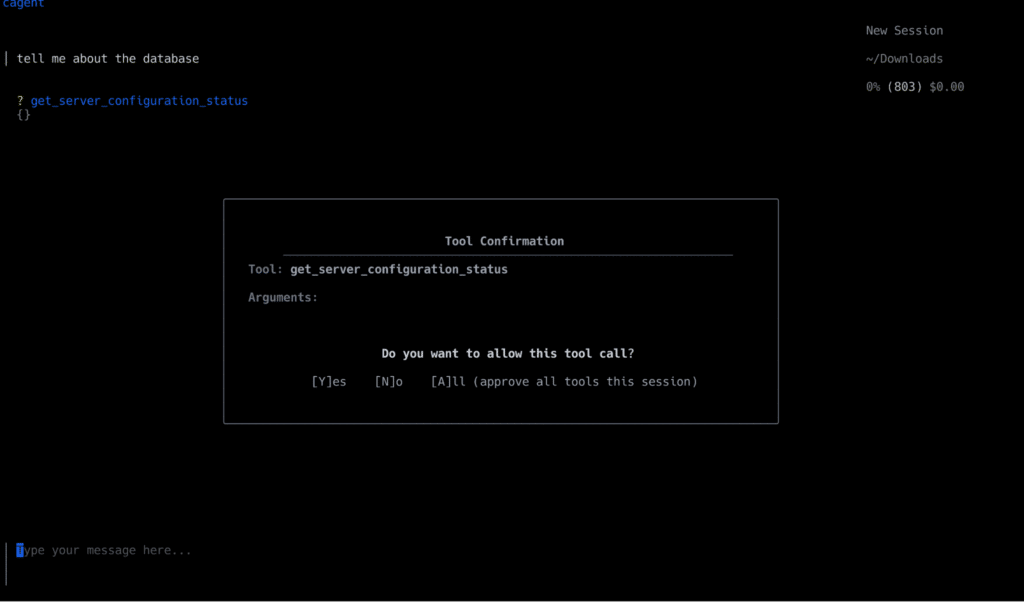
Deploying the agent
cagent includes built-in capabilities for sharing and publishing your agents as OCI artifacts via Docker Hub:
|
1 2 3 4 5 6 |
# Push your agent to Docker Hub cagent empujar ./my_agent.yaml namespace/agente–nombre # Pull and run someone else’s agent cagent pull creek/pirate cagent run creek/pirate |
For example, we will push the Couchbase AI Agent to Docker Hub:
|
1 |
cagent empujar couchbase_agent.yaml shivaylamba/Couchbase–cagent |

You can also find the Couchbase MCP agent example in the cagent repository on GitHub.
An agent-driven future
Docker cagent provides a fundamental shift in how we think and build about AI applications. By making AI Agent development as simple as writing a YAML file, cagent makes it intuitive to build AI applications.
By using the scalability and security of Couchbase along with cagent’s capability to build production ready AI Agents, one can build scalable intelligent systems.
Whether you’re creating a chatbot, analyzing data or running AI-powered workflows, this setup ensures that anything you build will be efficient, scalable, and fully under your control.
The only question is: What will you build?
Connect with our developer community and show us what you are building!

Deja un comentario
Lo siento, debes estar conectado para publicar un comentario.