
I have recently been working on an exciting project, a wasmCloud capability provider for Couchbase. We are building this in the open with the fine folks at Cosmonic. You can checkout the code in our repository.
And early in every project comes the topic of development life cycle and its infrastructure. How do we automatically run tests of our project involving a Couchbase Server? GitHub provides Acciones that allows us to execute code in various moments.
To create an action, you can either click on the Action tab of your repository or add a file under .github/workflows. There are a lot of different ways to trigger the execution of the action. Like on every git push. I just want something simple that makes sure my Couchbase Cluster is still here and accessible through specific secrets or environment variables. So here I will just choose a basic cron expression. The action will be executed every Monday at midnight.
|
1 2 3 4 |
nombre: test Couchbase Credential en: schedule: – cron: ‘0 0 * * 1’ |
Now, about secrets and environment variables. Of course, some of them are, well, secrets. And must be managed as such. Thankfully GitHub thought of everything and gives us a way to set up secrets or environment variables per repository or organization. If you go under Settings/Secrets and variables/actions, you should see the following page:
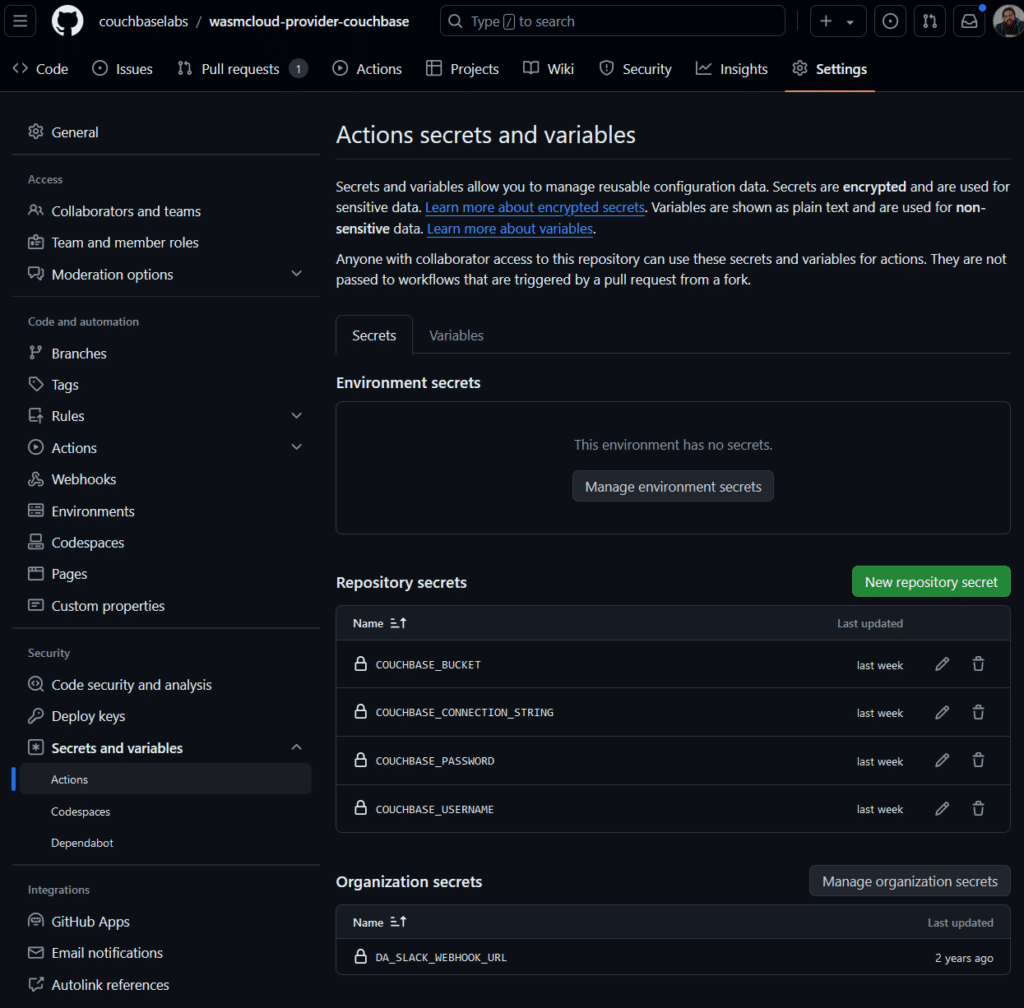
This allows you to define any secret or environment variable you may need for your actions, and more. Here you can see I have set up:
- COUCHBASE_BUCKET – The name of the Bucket I want to use
- COUCHBASE_CONNECTION_STRING – The full Couchbase connection String, as given in the conectar Capella tab for instance
- COUCHBASE_USERNAME – The username used to connect to the cluster
- COUCHBASE_PASSWORD – The password used to connect to the cluster
Now comes the time to write the test. All I want to do is make sure I have a working connection to a cluster, in order to show my collaborators how the secrets/env variables can be used. A simple way to test a connection is to use the Couchbase Shell aka cbsh. It can be installed easily on Ubuntu. All you need is to download and untar it. This can be done in a couple steps:
|
1 2 3 4 5 6 7 8 9 10 11 12 |
jobs: test_credential: runs–en: ubuntu–latest nombre: Prueba that given env variable works steps: shell: bash env: COUCHBASE_CONNECTION_STRING: ${{ secrets.COUCHBASE_CONNECTION_STRING }} COUCHBASE_USERNAME: ${{ secrets.COUCHBASE_USERNAME }} COUCHBASE_PASSWORD: ${{ secrets.COUCHBASE_PASSWORD }} – run: wget https://github.com/couchbaselabs/couchbase-shell/releases/download/v0.75.1/cbsh-x86_64-unknown-linux-gnu.tar.gz – run: tar –xvzf cbsh–x86_64–unknown–linux–gnu.tar.gz |
From there the shell is available simply by running ./cbsh. Notice here that the runs-on option gives us which container to use to run the action, shell is set to bash and env makes the secrets available as environment variables.
Because this shell is based on nushell and a password will be prompted, I could not pipe it straight up after the invocation like this:
|
1 |
echo $COUCHBASE_PASSWORD | ./cbsh —nombre de usuario $COUCHBASE_USERNAME—connstr $COUCHASE_CONNECTION_STRING |
Because this does not work, I had to use a cbsh configuration file instead. And sadly the syntax is a bit tricky for multi-line text formatting and piping. Here, I am creating a new variable called CONFIG, that contains the environment variable values, putting the result in $GITHUB_ENV, which allows me to pass it to the next step, which echos it in the config file:
|
1 2 3 4 5 6 7 8 9 10 11 12 13 14 15 |
– run: | CONFIG=$(gato << EOF versión = 1 [[clúster]] identifier = “local” connstr = “$COUCHBASE_CONNECTION_STRING” nombre de usuario = “$COUCHBASE_USERNAME” contraseña = “$COUCHBASE_PASSWORD” EOF ) echo “CONFIG<<EOF” >> $GITHUB_ENV echo “$CONFIG” >> $GITHUB_ENV echo “EOF” >> $GITHUB_ENV – run: echo “$CONFIG” >> configuración |
Once the config file is all set, cbsh can be invoked like so:
|
1 |
– run: ./cbsh —configuración–dir . –c cb–env |
The complete example is available in our repository as a YML file. And this is what a successful run looks like:

So there you go, you now know how to connect to Couchbase in a GitHub Action. And you also got acquainted with Couchbase Shell – give it a try to do more fun things like migrating all collections, except the _default collection:
|
1 |
colecciones —clusters “On-Prem-Cluster” —cubeta “travel-sample” | seleccionar alcance colección | ¿Dónde? $it.alcance != “_default” | ¿Dónde? $it.colección != “_default” | each { |it| colecciones crear $it.colección —clusters “Capella-Cluster” —cubeta “travel-sample-import” —alcance $it.alcance |
And we have more AI-friendly features coming to Couchbase Shell, stay tuned!

Deja un comentario
Lo siento, debes estar conectado para publicar un comentario.