
In this blog post, we’ll discover how to cache data easily using Spring Cache and Couchbase as a backing store manager.
Table of Contents
- A Word Of Introduction
- The
CacheAbstraction - The Couchbase Implementation
- Getting
couchbase-spring-cacheand Putting it to Work - Conclusion
A Word Of Introduction
There was a lot of work related to Spring lately! We’ve been busy working on the Spring Data Couchbase connector to upgrade it to the 2.x generation of the Java SDK, bringing along a host of new features and improvements (but more on that in a later blog post)…
Along the way, it came to our attention that there are a few classes in the project that are not really related directly to Spring Data and as such didn’t need to adhere to its formal “Release Train” release cycle: the cache package.
So we started a new simple Spring Boot Cache example project to host the 2.x generation of the Couchbase Spring Cache implementation on github (couchbaselabs/couchbase-spring-cache).
Let’s have a look at how it can be leveraged to easily introduce Couchbase-backed caching into a Spring project!
The Cache Abstraction
Spring Framework comes with a lightweight abstraction of a Cache that developers can automatically use by annotating methods in their classes (eg. in a @Repository stereotype).
In order to make use of Spring’s boot caching mechanisms, you simply annotate your methods with a handful of cache-related annotations:
@Cacheablewill let the first invocation of the annotated method with a particular set of input parameters execute, but the result will be cached and subsequent invocations (with the same set) will be served transparently from the cache.@CachePutwill always invoke the method and cache its result (unlike@Cacheableit doesn’t optimize the invocation flow).@CacheEvictwill compute a cache key from the annotated method’s parameters and remove it from the cache when the method is executed (eg. because invoking this method makes an entry stale).@Cachingallows to regroup behavior from the previous annotation into a single one.@CacheConfigallows us to have common cache parameters set on a whole class.
The Couchbase Implementation
The abstract mechanism is put in place by the framework, but an actual backing implementation must be chosen. Spring comes with a few of them (in memory Map, EhCache, Gemfire…), but it is absolutely possible to define custom ones, simply by implementing a Cache and a CacheManager and making it visible in the Spring context.
That’s the focus of couchbase-spring-cache.
Each cache has a name, and each value in the cache has a cache key. The Couchbase implementation will translate that into a document key that reflects that…
- this is a
Cacherelated document (by default using the prefix “cache:“) - it relates to a particular
Cache(by adding theCACHE_NAMEto the prefix above) - it stores a particular cache value under
CACHE_KEY(so all in all “cache:CACHE_NAME:CACHE_KEY“).
For now the values must be Serializable and are stored as a SerializableDocument from the 2.x Java SDK, but alternative transcoding could be offered in the future, eg. JSON/JsonDocument…
Getting couchbase-spring-cache and Putting it to Work
Note:
As of this writing the project is currently in
1.0-SNAPSHOTversion so it is not available onMaven Centralyet. You’ll have to manually build the jar and add it to your local Maven repository.
Downloading and building the couchbase-spring-cache project
Start by cloning the project from github:
git clone https://github.com/couchbaselabs/couchbase-spring-cache.git
cd couchbase-spring-cache
Then build and install it locally using Maven:
mvn clean installYou should see a success message indicating the version built and where it was installed:
[INFO] Installing /path/to/couchbase-spring-cache/target/couchbase-spring-cache-1.0-SNAPSHOT.jar

to /path/to/.m2/repository/com/couchbase/client/couchbase-spring-cache/1.0-SNAPSHOT/couchbase-spring-cache-1.0-SNAPSHOT.jar

[INFO] Installing /path/to/couchbase-spring-cache/pom.xml

to /path/to/.m2/repository/com/couchbase/client/couchbase-spring-cache/1.0-SNAPSHOT/couchbase-spring-cache-1.0-SNAPSHOT.pom

[INFO] ------------------------------------------------------------------------

[INFO] BUILD SUCCESS

[INFO] ------------------------------------------------------------------------
Starting a Tutorial Project
We’ll build a Spring Cache example project using Maven and Spring Boot as a base.
Start by creating the following directory structure for the project in a root directory of your choosing (we’ll use cbcache here):
 cbcache
    └── src
        └── main
            └── java
                └── com
                    └── couchbase
                        └── demo
For instance, use the following command:
mkdir -p cbcache/src/main/java/com/couchbase/demo/
cd cbcache
Then initiate the POM at the cbcache root in pom.xml with the following content:
    4.0.0

    com.couchbase.demo
    cbcache
    0.1.0


        org.springframework.boot
        spring-boot-starter-parent
        1.3.0.RELEASE


        1.8


            org.springframework.boot
            spring-boot-starter


            org.springframework
            spring-context


            com.couchbase.client
            couchbase-spring-cache
            1.0-SNAPSHOT


                org.springframework.boot
                spring-boot-maven-plugin
Add Book Management Entity and Repository
We’ll use the example of a Book repository (as found in the “GETTING STARTED – Caching Data with Spring” official guide from Spring.io).
Create the Book entity class in src/main/java/com/couchbase/demo/Book.java:
import java.io.Serializable;

public class Book implements Serializable {

    private static final long serialVersionUID = -7674163614777124381L;

    private String isbn;
    private String title;

    public Book(String isbn, String title) {
        this.isbn = isbn;
        this.title = title;
    }

    public String getIsbn() {
        return isbn;
    }

    public void setIsbn(String isbn) {
        this.isbn = isbn;
    }

    public String getTitle() {
        return title;
    }

    public void setTitle(String title) {
        this.title = title;
    }

    @Override
    public String toString() {
        return "Book{" + "isbn='" + isbn + ''' + ", title='" + title + ''' + '}';
    }
}
Note the
Bookclass isSerializable, this is important for now for Couchbase storage.
Create a simple repository interface and a naive implementation that simulates a delay:
in src/main/java/com/couchbase/demo/BookRepository.java:
package com.couchbase.demo;

public interface BookRepository {

    Book getByIsbn(String isbn);

}
in src/main/java/com/couchbase/demo/SimpleBookRepository.java:
package com.couchbase.demo;

import org.slf4j.Logger;
import org.slf4j.LoggerFactory;

import org.springframework.stereotype.Component;

@Component
public class SimpleBookRepository implements BookRepository {

    private static final Logger log = LoggerFactory.getLogger(SimpleBookRepository.class);

    @Override
    public Book getByIsbn(String isbn) {
        simulateSlowService();
        Book result = new Book(isbn, "Some book");
        log.info("Actual fetch of " + isbn);
        return result;
    }

    // Don't do this at home
    private void simulateSlowService() {
        try {
            long time = 5000L;
            Thread.sleep(time);
        } catch (InterruptedException e) {
            throw new IllegalStateException(e);
        }
    }

}
The Main Spring Boot Application
Finally, create an Application that uses the repository in src/main/java/com/couchbase/demo/Application.java:
package com.couchbase.demo;

import org.slf4j.Logger;
import org.slf4j.LoggerFactory;

import org.springframework.beans.factory.annotation.Autowired;
import org.springframework.boot.CommandLineRunner;
import org.springframework.boot.SpringApplication;
import org.springframework.boot.autoconfigure.SpringBootApplication;
import org.springframework.stereotype.Component;

@SpringBootApplication
public class Application {

    private static final Logger log = LoggerFactory.getLogger(Application.class);

    @Component
    static class Runner implements CommandLineRunner {
        @Autowired
        private BookRepository bookRepository;

        @Override
        public void run(String... args) throws Exception {
            long start;
            log.info(".... Fetching books");
            fetchAndLog("isbn-1234");
            fetchAndLog("isbn-1234");
            fetchAndLog("isbn-1234");
            fetchAndLog("isbn-8888");
            fetchAndLog("isbn-8888");
        }

        private void fetchAndLog(String isbn) {
            long start = System.currentTimeMillis();
            Book book = bookRepository.getByIsbn(isbn);
            long time = System.currentTimeMillis() - start;
            log.info(isbn + " --> " + book + " in " + time + "ms");
        }
    }

    public static void main(String[] args) {
        SpringApplication.run(Application.class, args);
    }
}
If you run the Application‘s main method in your IDE (or if you invoke “mvn spring-boot:run” from the command line), you’ll notice that all the calls are indeed quite slow:
[...] .... Fetching books
[...] Actual fetch of isbn-1234
[...] isbn-1234 --> Book{isbn='isbn-1234', title='Some book'} in 5001ms
[...] Actual fetch of isbn-1234
[...] isbn-1234 --> Book{isbn='isbn-1234', title='Some book'} in 5004ms
[...] Actual fetch of isbn-1234
[...] isbn-1234 --> Book{isbn='isbn-1234', title='Some book'} in 5004ms
[...] Actual fetch of isbn-8888
[...] isbn-8888 --> Book{isbn='isbn-8888', title='Some book'} in 5003ms
[...] Actual fetch of isbn-8888
[...] isbn-8888 --> Book{isbn='isbn-8888', title='Some book'} in 5003ms
Adding Spring Boot Caching Capabilities
In order to enable caching, you must take a few steps: first you must offer Spring a CacheManager @Bean…
Since we’ll be using the CouchbaseCacheManager (of course), we’ll need to connect to a Cluster and use a Bucket reference (the storage unit where couchbase will store cache documents).
So the CouchbaseCacheManager needs a mapping between Cache names and the corresponding Bucket to use, passed as a Map<String, Bucket>.
In src/main/java/com/couchbase/demo/Application.java, add the following bean declarations:
  public static final String BOOK_CACHE = "books";

  @Bean(destroyMethod = "disconnect")
  public Cluster cluster() {
      //this connects to a Couchbase instance running on localhost
      return CouchbaseCluster.create();
  }

  @Bean(destroyMethod = "close")
  public Bucket bucket() {
      //this will be the bucket where every cache-related data will be stored
      //note that the bucket "default" must exist
      return cluster().openBucket("default", "");
  }

  @Bean
  public CacheManager cacheManager() {
      Map<String, Bucket> mapping = new HashMap<String, Bucket>();
      //we'll make this cache manager recognize a single cache named "books"
      mapping.put(BOOK_CACHE, bucket());
      return new CouchbaseCacheManager(mapping);
  }
You then want to activate the scanning of cache-related annotations and associated proxying by putting the @EnableCaching annotation on the Application class.
Activate Caching in SimpleBookRepository
Let’s see how to activate actual caching on our SimpleBookRepository and verify how the application behaves after that.
To make getByIsbn automatically cache on first invocation and serve subsequent invocations with data from the cache, simply annotate it like so:
    @Override
    @Cacheable(Application.BOOK_CACHE) //using the name of the cache we declared earlier
    public Book getByIsbn(String isbn) {
        simulateSlowService();
        Book result = new Book(isbn, "Some book");
        log.info("Actual fetch of " + isbn);
        return result;
    }
Let’s run the application again and see how it behaves now:
[...] .... Fetching books
[...] Actual fetch of isbn-1234
[...] isbn-1234 --> Book{isbn='isbn-1234', title='Some book'} in 5022ms
[...] isbn-1234 --> Book{isbn='isbn-1234', title='Some book'} in 3ms
[...] isbn-1234 --> Book{isbn='isbn-1234', title='Some book'} in 1ms
[...] Actual fetch of isbn-8888
[...] isbn-8888 --> Book{isbn='isbn-8888', title='Some book'} in 5007ms
[...] isbn-8888 --> Book{isbn='isbn-8888', title='Some book'} in 1ms
Wow! This is much better for invocations past the first one, looks like it is indeed cached :-)
Seeing the Data in Couchbase
Let’s have a quick look at the webconsole to verify that these great timings can be attributed to Couchbase:
- open a new tab in your browser and navigate to
https://localhost:8091. - connect to the web console.
- go to the
Data Bucketstab and click on theDocumentsbutton for the bucket you elected to use (“default”).
What you see in this screen (quick link for the lazies) should be similar to this:
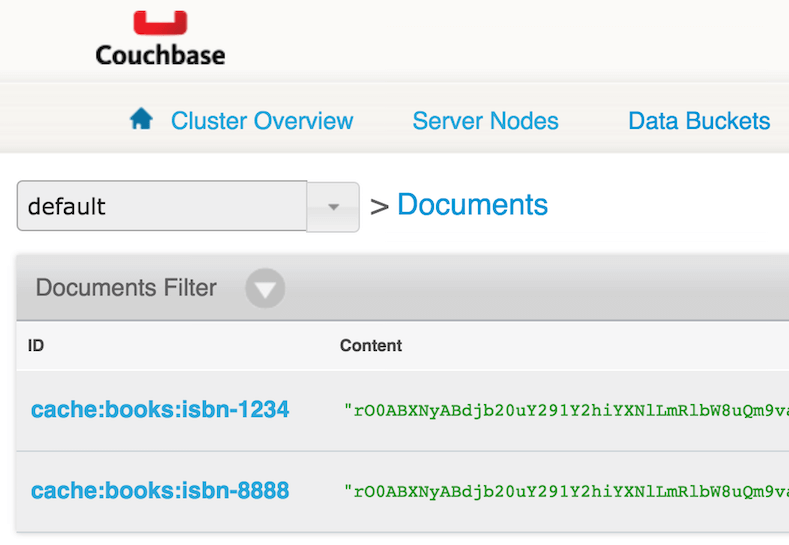
We can see that both books were cached in couchbase, using the cache:CACHE_NAME:CACHE_KEY pattern for the document IDs.
Conclusion
Easy caching using Couchbase is now at your fingertips!
There is much more that Spring Cache can do for you (for instance, choosing how to create the cache key, conditional caching, cache eviction, etc…), and there are specificities to couchbase-spring-cache (eg. for cache clearing you can choose between using a view that will only remove relevant document or, if your bucket is dedicated to a single cache, use the flush mechanism…).
I hope this introductory tutorial whetted your appetite for easy caching using Spring Cache and Couchbase!
The next steps will probably be to introduce alternative storage formats (like JSON) and to offer the artifact on Maven Central or a similar publicly accessible Maven repository (Bintray anyone?)…
Watch out for Spring-related news in the near future!
In the meantime, happy coding :)

Leave a comment
You must be logged in to post a comment.