Most AI demos feel impressive for 30 seconds and then leave one question unanswered: How would you actually build this?
This one is different.
In this post, we’ll build a simple but compelling multimodal AI app to upload a face photo and return the top celebrity matches in milliseconds. Under the hood, the app uses local face embeddings, Couchbase Capella Vector Search, and a lightweight FastAPI backend to turn an image into a searchable vector and retrieve the nearest matches in real time.
It is a fun demo on the surface. But for developers, it demonstrates a important pattern:
unstructured input → embedding generation → vector retrieval → filtered results
That same pattern shows up in identity verification, fraud detection, visual search, personalization, and media asset matching.
Why this demo is important to developers
This app is not just “AI for fun.” It is a practical example of how to build multimodal search without stitching together a separate vector database, metadata store, and sync pipeline.
With one uploaded image, the app:
- Detects a face locally
- Generates a 512-dimensional embedding
- Sends that vector to Couchbase
- Runs a similarity search over 12,000+ celebrity face embeddings
- Returns the top 3 nearest matches with scores
The result is straightforward for users: Upload photo → get top celebrity matches.
The result for developers is more useful: A clean reference architecture for real-time image similarity search.
What the app does
The app takes a face image and matches it against a dataset of celebrity embeddings.
Current capabilities
- Face detection and embedding generation using InsightFace
- Real-time nearest-neighbor retrieval with Couchbase Vector Search
- Gender-based filtering
- Top-k result ranking
- Support for 12,094 images across 100 celebrities
This makes the user experience simple, but the underlying design is production-relevant.
How it works
1. Convert an image into a vector
This demo uses InsightFace’s buffalo_l model to extract a face embedding from the uploaded image. That embedding is a dense numeric representation of the face.
In practical terms, the vector captures features such as facial geometry, spacing, proportions, and structural patterns. Similar-looking faces produce vectors that are close together in vector space.
|
1 2 3 4 5 |
from insightface.app import FaceAnalysis model = FaceAnalysis(name="buffalo_l") faces = model.get(image) embedding = faces[0].embedding |
That delivers a 512-dimensional vector for the detected face.
2. Store embeddings with metadata
Each celebrity face is stored as a document in Couchbase, with both metadata and embedding in the same record.
|
1 2 3 4 5 6 7 |
{ "type": "celebrity_face", "celebrity_id": 4, "celebrity_name": "Shah Rukh Khan", "gender": "male", "embedding": [0.023, -0.045, 0.089, ...] } |
This matters because it lets developers keep structured fields and vector data together, instead of splitting them across multiple systems.
3. Run vector similarity search
Once the query embedding is generated, the app performs a nearest-neighbor search against the vector index in Couchbase.
|
1 2 3 4 5 6 7 8 9 |
{ "knn": [ { "field": "embedding", "vector": [...512 floats...], "k": 3 } ] } |
The database returns the closest matches ranked by similarity. Because the vector index and metadata live together, you can also combine similarity with filters like gender, region, or category.
Architecture overview
The system is intentionally simple:
Browser → FastAPI → InsightFace (local inference) → Couchbase Capella Vector Search → Results
Stack
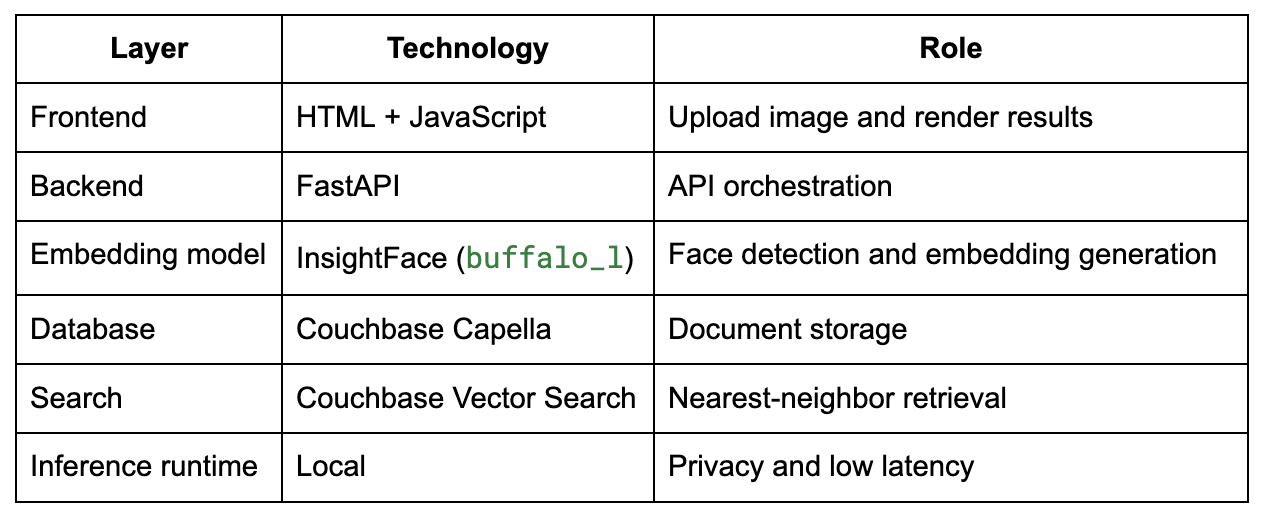
Why local inference helps
For this demo, face embedding generation runs locally instead of calling a remote model endpoint.
That gives two immediate benefits:
- Lower latency because the image does not need to round-trip to a hosted inference service
- Better privacy posture because the raw image can stay local during embedding generation
For developers, this is an important design pattern. Not every multimodal AI workflow needs to push raw user content into a remote service before retrieval begins.
Why Couchbase is a good fit
This app becomes much cleaner because Couchbase can handle both document data and vector search in one place.
1. Vector and metadata live together
Instead of managing one system for embeddings and another for application data, the embedding is stored directly inside the document.
That removes a common source of architectural drag:
- No extra vector store
- No data duplication
- No sync jobs between metadata and embeddings
- No separate retrieval layer to maintain
2. Hybrid retrieval is built in
Real applications rarely do “pure similarity search” alone. They usually need a combination of semantic similarity and structured filtering.
For example:
- Find the top 3 matches among female celebrities
- Search within a specific category or region
- Return similar faces only from a given subset of documents
This hybrid pattern is what turns a demo into an actual application primitive.
3. Managed infrastructure reduces friction
With Capella, developers do not need to spend time standing up and tuning another specialized service just to test or ship vector search.
That means more time spent on:
- User experience
- Ranking logic
- Application workflows
- Production integration
- Less time spent on infrastructure plumbing
Index configuration
For this project, the vector index is configured with:
- Index name: celebrity_face_index
- Dimensions: 512
- Similarity metric: Dot product
- Dataset size: 12,094 documents
- Retrieval approach: Approximate Nearest Neighbor (ANN)
Because the embeddings are normalized, dot product serves as an effective similarity measure for nearest-match retrieval.
More than just a fun app: real business patterns
The “celebrity twin” concept is just a consumer-friendly wrapper around a serious architecture pattern.
At its core, this is a multimodal retrieval workflow:
image → embedding → similarity search → ranked result
That same workflow can support a range of enterprise use cases.
Identity verification and fraud detection
Financial services and digital onboarding systems can compare a selfie against an ID image, detect duplicates, and flag likely impersonation attempts.
Pattern: Face similarity search across large identity datasets.
Retail and personalization
Retail and beauty platforms can use visual similarity to recommend products, styles, or curated experiences based on appearance-related features.
Pattern: Image-based personalization and discovery.
Media and entertainment
Studios and content teams can search talent databases, detect duplicate assets, organize archives, or find visual matches for casting and production workflows.
Pattern: Face-aware asset retrieval.
Safety and compliance use cases
In regulated environments, image similarity can be used in tightly governed workflows where matching, verification, and auditability matter.
Pattern: High-volume retrieval with policy controls.
Takeaway for developers
This project shows that vector search is no longer just an experimental capability bolted onto an AI demo. It is becoming a core application primitive.
With a relatively small stack, you can:
- Generate embeddings locally
- Store vectors alongside metadata
- Perform ANN search in real time
- Combine similarity with structured filters
- Ship a multimodal experience without adding unnecessary infrastructure
The takeaway: The celebrity match experience is the hook. The real value is the architecture.
Final thoughts
If you’re building AI applications that need to search across images, text, or other unstructured inputs, the hard part is usually not generating the embedding. The hard part is operationalizing retrieval cleanly inside the application stack.
This is where Couchbase helps.
By combining document storage and vector search in one platform, developers have a simpler path from prototype to production.
And that’s what this demo is really about: not just finding your celebrity twin, but showing how multimodal vector search can be built in a way that is fast, practical, and ready for real applications.
To explore the code, check out the Guess Your Celebrity Twin application.