
Elaborazione in batch
L'elaborazione per lotti raccoglie ed elabora i dati in lotti a intervalli programmati.

Che cos'è l'elaborazione batch?
L'elaborazione in batch è un metodo di elaborazione dei dati in cui un gruppo di transazioni viene raccolto per un certo periodo ed elaborato come un unico lotto. Questo approccio si contrappone all'elaborazione in tempo reale, in cui ogni transazione viene elaborata singolarmente e immediatamente. L'elaborazione batch è particolarmente adatta per le operazioni che non richiedono risultati immediati, perché può essere programmata per essere eseguita in orari non di punta per ridurre il carico sulle risorse di calcolo.
Nell'elaborazione batch, le transazioni o i punti di dati vengono accumulati fino a quando non viene raggiunta una determinata soglia, che può essere una quantità specifica di dati o un tempo programmato. Una volta raggiunta la soglia, l'intero batch viene elaborato insieme. Questo metodo è molto efficiente per le attività che richiedono un lavoro pesante, come ad esempio analisi dei dati, aggiornamento dei database, elaborazione delle transazioni dei clienti, e la generazione di report. Poiché il processo è automatizzato e può essere eseguito senza una continua supervisione, consente un migliore utilizzo delle risorse del sistema e può portare a un significativo risparmio di tempo e di costi.
Questa pagina copre:
Elaborazione batch vs. elaborazione a flusso
L'elaborazione in batch e l'elaborazione in flusso sono due approcci fondamentali all'elaborazione dei dati. L'elaborazione batch prevede l'elaborazione dei dati in grandi blocchi o “batch”. Questo metodo è ideale quando si tratta di grandi volumi di dati che non richiedono un'azione immediata. È un metodo di elaborazione dei dati tradizionale, in cui i dati vengono raccolti per un certo periodo e poi elaborati tutti in una volta. È come fare il bucato: si aspetta di avere abbastanza panni sporchi per fare un carico completo prima di avviare la lavatrice (o si aspetta fino a un determinato momento ogni settimana per avviare la lavatrice).
D'altra parte, l'elaborazione a flusso è progettata per elaborare i dati in tempo reale, non appena arrivano. Questo approccio è ideale per le applicazioni che hanno bisogno di agire sui dati immediatamente, come ad esempio rilevamento delle frodi sistemi di analisi in tempo reale. L'elaborazione a flusso può essere paragonata al lavaggio di un piatto non appena viene utilizzato: si tratta di un elemento immediatamente, invece di aspettare.
| Attributo | Elaborazione in batch | Elaborazione in streaming |
|---|---|---|
| Metodo di elaborazione dei dati | Accumula e poi elabora | Elabora man mano che arriva |
| Tempo di elaborazione dei dati | Intervalli programmati | Tempo reale |
| Volume dei dati | Elevato – lavorato in lotti | Continuo – elaborato un record alla volta |
| Casi d'uso tipici | Magazzino dei dati Operazioni ETL in batch Generazione di report | Analisi in tempo reale Rilevamento delle frodi Monitoraggio e invio di avvisi |
La differenza fondamentale tra questi due approcci risiede nella gestione della velocità e del volume dei dati. L'elaborazione batch è efficiente per le attività di elaborazione ad alto volume che sono meno sensibili al tempo e può consentire analisi e reportistica più complesse su grandi insiemi di dati. L'elaborazione a flusso è più adatta a scenari che richiedono un'elaborazione rapida e incrementale dei dati e approfondimenti immediati.
Esempi di elaborazione batch
L'elaborazione batch è un metodo potente per gestire grandi volumi di dati, in cui le transazioni vengono raccolte per un certo periodo ed elaborate tutte in una volta. Questo approccio è molto efficiente per le operazioni che non richiedono un feedback immediato.
Ecco tre esempi:
Elaborazione di transazioni finanziarie: Banche e istituzioni finanziarie spesso utilizzano l'elaborazione batch per le transazioni di fine giornata, come l'elaborazione di assegni, bonifici bancari e transazioni con carta di credito. Le transazioni vengono accumulate nel corso della giornata ed elaborate in un unico batch nelle ore non di punta per aggiornare i saldi dei conti e generare report.
Backup e sincronizzazione dei dati: Molte organizzazioni eseguono backup di routine dei dati utilizzando l'elaborazione batch. Questo processo potrebbe comportare la copia dei file dai server attivi alle posizioni di backup durante la notte. Allo stesso modo, sincronizzazione dei dati tra i sistemi, L'aggiornamento di un magazzino centrale con dati provenienti da postazioni satellitari viene spesso eseguito come processo batch per ridurre al minimo l'impatto sulle risorse di rete durante i picchi di utilizzo.
Analisi e reporting dei dati batch: Le aziende utilizzano spesso l'elaborazione batch per analisi e reportistica complesse. Vengono elaborati grandi insiemi di dati per generare report, eseguire analisi di business intelligence o alimentare modelli di apprendimento automatico per l'addestramento. Questi processi sono programmati in orari di basso utilizzo per evitare di interrompere altre operazioni e garantire un uso efficiente delle risorse di calcolo.
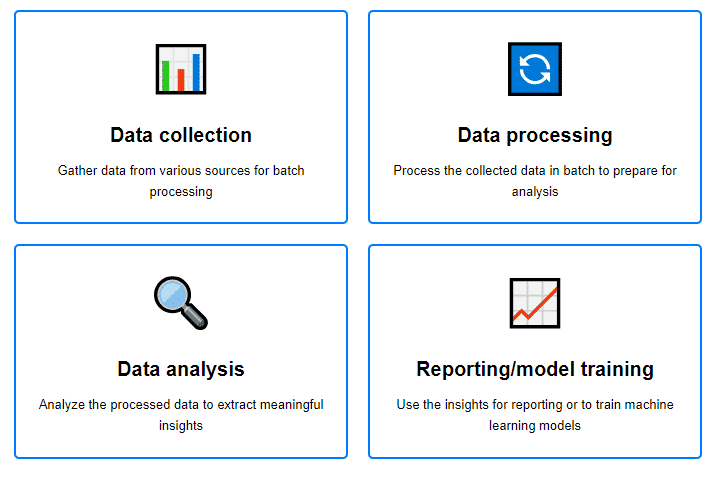
Flusso di lavoro per l'analisi dei dati e la reportistica in batch (leggere in alto a sinistra, in alto a destra, in basso a sinistra, in basso a destra)
Come monitorare l'elaborazione batch
Il monitoraggio dell'elaborazione batch è fondamentale per garantire l'affidabilità dei lavori batch. Si tratta di monitorare le prestazioni dei processi batch, compresi i tempi di esecuzione, l'utilizzo delle risorse e i tassi di errore. Un monitoraggio efficace può aiutare a identificare i colli di bottiglia, ottimizzare l'allocazione delle risorse, individuare i dati problematici e migliorare le prestazioni complessive del sistema.
Per monitorare l'elaborazione batch, concentratevi su queste metriche chiave:
1. Tempo di esecuzione: Misurare il tempo di completamento di ogni lavoro batch. Questo aiuta a identificare i lavori che richiedono più tempo del previsto, il che potrebbe indicare problemi con i dati, il codice o l'infrastruttura sottostante.
2. Utilizzo delle risorse: Monitorare la CPU, la memoria e l'I/O del disco consumati dai lavori batch. Un utilizzo elevato delle risorse potrebbe segnalare inefficienze nel codice, la necessità di aggiornamenti hardware o dati danneggiati.
3. Tassi e tipi di errore: Tracciare il numero e i tipi di errori riscontrati durante l'elaborazione batch. L'analisi degli errori può aiutare a individuare i problemi sistemici, a migliorare la qualità dei dati e a risolvere i bug.
4. Velocità di trasmissione: Misurare la quantità di dati elaborati in un determinato lasso di tempo. Questo può aiutare a valutare l'impatto sulle prestazioni delle modifiche al processo batch.
Per visualizzare e gestire queste metriche, si possono utilizzare dashboard che aggregano i dati da varie fonti, fornendo una panoramica in tempo reale della salute e delle prestazioni dei processi batch. Strumenti come Grafana, Prometeo, Datadog, e Splunk sono comunemente utilizzati per monitorare i processi batch. Inoltre, l'impostazione di avvisi per anomalie o soglie può aiutare a risolvere i problemi in modo proattivo.
Vantaggi e svantaggi dell'elaborazione in batch
L'elaborazione in batch offre diversi vantaggi e svantaggi che i team dovrebbero prendere in considerazione quando determinano le loro strategie di elaborazione dei dati.
Vantaggi
- Efficienza su scala: L'elaborazione batch è molto efficiente per grandi volumi di dati. Raggruppando attività simili, si riduce l'overhead dell'avvio e dell'esecuzione di ogni singola attività, con un notevole risparmio di tempo e di risorse.
- Ottimizzazione delle risorse: L'elaborazione in batch consente un uso ottimale delle risorse, in quanto può essere programmata nelle ore non di punta per ridurre l'impatto sui sistemi operativi e garantire la disponibilità di risorse per le attività critiche nelle ore di punta.
- Coerenza e affidabilità: L'elaborazione di grandi insiemi di dati in batch garantisce coerenza e affidabilità nella gestione dei dati. Ciò è particolarmente importante in situazioni in cui l'integrità dei dati è fondamentale, come le transazioni finanziarie o la gestione dell'inventario.
Svantaggi
- Latenza: Uno dei principali svantaggi dell'elaborazione batch è il ritardo intrinseco tra la raccolta e l'elaborazione dei dati. Questa latenza può essere un problema significativo per le applicazioni che richiedono un'analisi dei dati in tempo reale o un'azione immediata basata sulle informazioni raccolte.
- Complessità nella gestione degli errori: Gli errori nei lavori batch possono essere più complessi da identificare e risolvere a causa della natura massiva dell'elaborazione. Se un lavoro batch fallisce, la diagnosi del problema può richiedere il vaglio di grandi volumi di dati per trovare la causa.
- Inflessibilità: I sistemi di elaborazione batch possono essere meno flessibili nell'accogliere le modifiche o nell'integrare nuove fonti di dati, perché le modifiche possono richiedere cambiamenti significativi ai lavori batch o alle pianificazioni.
Alternative all'elaborazione batch
Le alternative all'elaborazione batch richiedono meno spese generali e si concentrano sull'elaborazione in tempo reale, sull'analisi on-demand e sull'analisi dei dati. scalabilità. La comprensione di queste alternative può aiutare a decidere quale sia la soluzione migliore per casi d'uso specifici, soprattutto quando le informazioni in tempo reale e l'efficienza sono fondamentali.
Elaborazione in tempo reale: A differenza dell'elaborazione batch, L'elaborazione in tempo reale analizza i dati man mano che arrivano. Questo approccio è vantaggioso per le applicazioni che richiedono un processo decisionale istantaneo, come ad esempio rilevamento delle frodi o l'analisi dell'interazione con l'utente dal vivo.
Architettura guidata dagli eventi: Questo modello attende che si verifichino eventi specifici, quindi risponde e comunica tra servizi disaccoppiati in tempo reale. È altamente scalabile e flessibile, il che lo rende adatto a sistemi complessi e distribuiti in cui la reattività immediata è fondamentale. Strumenti come Kafka consentono lo streaming scalabile dei dati tra i componenti.
Servizi colonnari Couchbase Capella™: Per chi sta esplorando alternative all'elaborazione batch tradizionale, soprattutto per i carichi di lavoro analitici, Servizi colonnari Capella rappresenta un'opzione interessante. Le sue funzionalità in tempo reale eliminano la necessità di estese pipeline ETL e semplificano l'architettura dei dati. Il Linguaggio di interrogazione SQL++ migliora l'accessibilità e la manipolazione dei dati, offrendo una transizione senza soluzione di continuità per chi ha familiarità con SQL. L'assenza di manutenzione ETL e le capacità di analisi dei dati in tempo reale ne fanno una scelta interessante per gli ambienti dinamici e guidati dai dati.
Conclusione
L'elaborazione in batch è un approccio potente per gestire grandi volumi di dati in cui l'immediatezza non è fondamentale. È particolarmente utile per le attività che possono essere eseguite senza un'interazione immediata da parte dell'utente, il che la rende utile per alcune situazioni di analisi dei dati, per i rapporti non sensibili al tempo e per gli aggiornamenti del sistema.
Per decidere tra l'elaborazione batch e l'elaborazione in flusso, occorre considerare la natura dei dati, la necessità di un'elaborazione in tempo reale e la complessità delle attività di elaborazione. Alternative come l'elaborazione in flusso sono migliori per scenari che richiedono una gestione immediata dei dati. Scegliete sempre il metodo più adatto ai requisiti del vostro progetto, tenendo conto dei compromessi in termini di prestazioni, complessità e scalabilità.
Per saperne di più sui concetti relativi all'elaborazione batch, esplorare il nostro hub.