FULLY MANAGED DATA SYNC FOR MOBILE AND EDGE APPS
Couchbase Capella App Services
Your apps keep working offline, and your team stops babysitting homegrown sync code. Capella App Services syncs data between devices and the cloud. Couchbase runs it.
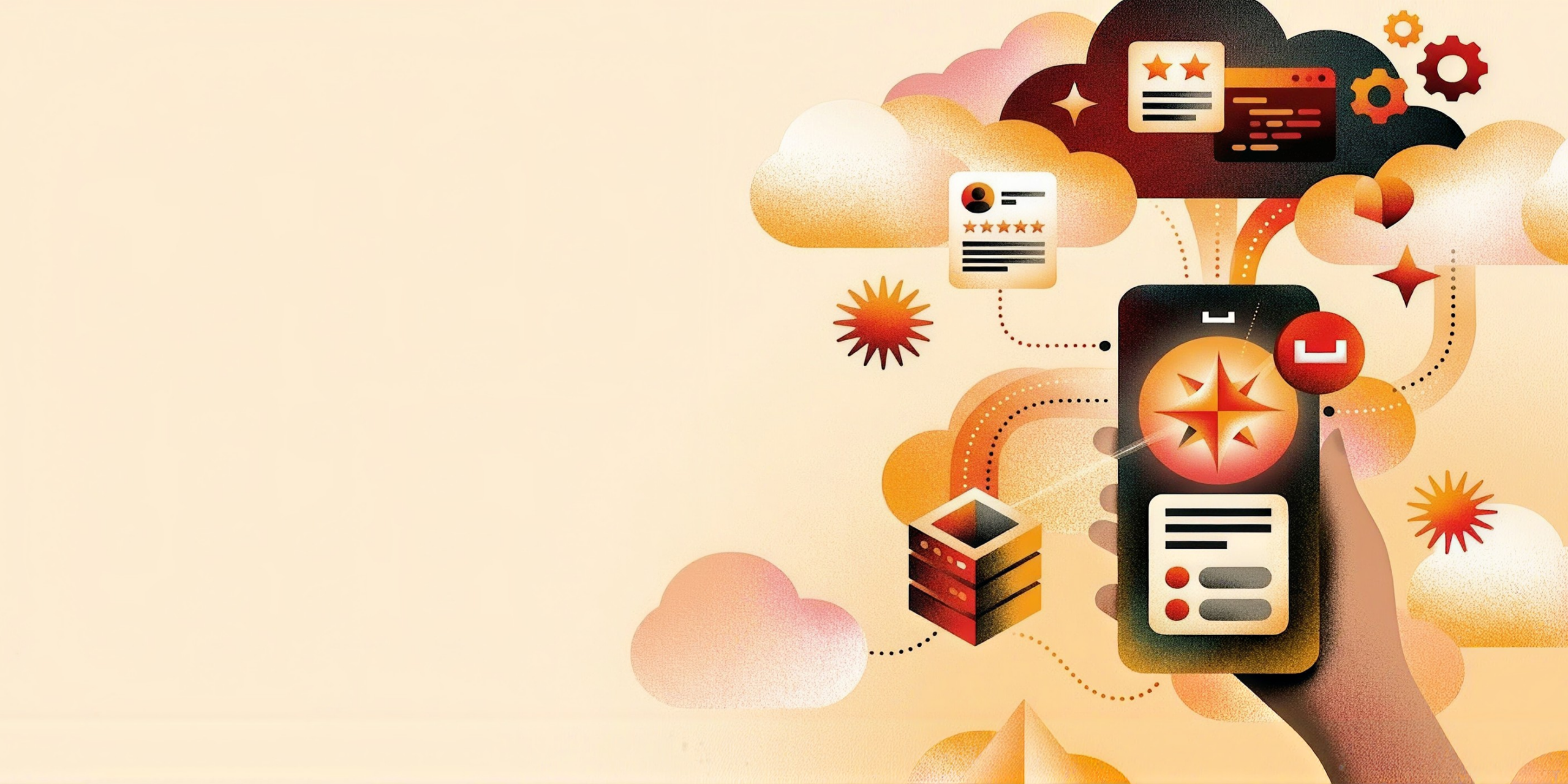
Sync shouldn’t be your side project
Homegrown sync breaks offline, eats into sprints, and sends data to the wrong phones. App Services runs sync for you, from Capella to every device.
Keep the line moving when the Wi-Fi drops
A lost signal shouldn’t stop a sale or an inspection. Apps read and write on the device, then sync when the signal comes back.
Send each device only what it’s allowed to see
Oversharing to devices is a breach in waiting. Channels and your access function decide who syncs each document and who can write.
Spend sprints on features, not sync plumbing
Custom sync code breaks on edge cases nobody tested. App Endpoints give you sync, users and access rules with no server to write.

Run cloud to edge on one platform and one bill
A separate sync vendor adds a contract and another copy of your data. App Services runs inside Capella, billed by the hour.
What is Capella App Services?
App Services is the fully managed Sync Gateway inside Capella. It syncs Couchbase Lite apps on phones, kiosks, and edge devices with your Capella data.
Couchbase Lite is the embedded database inside your app. It stores JSON on the device and runs SQL++, full-text, and vector search locally, so screens load with no network at all. It runs on iOS, Android, desktop, embedded devices through C, and in the browser with JavaScript. Nearby devices can even sync peer to peer, no internet needed.
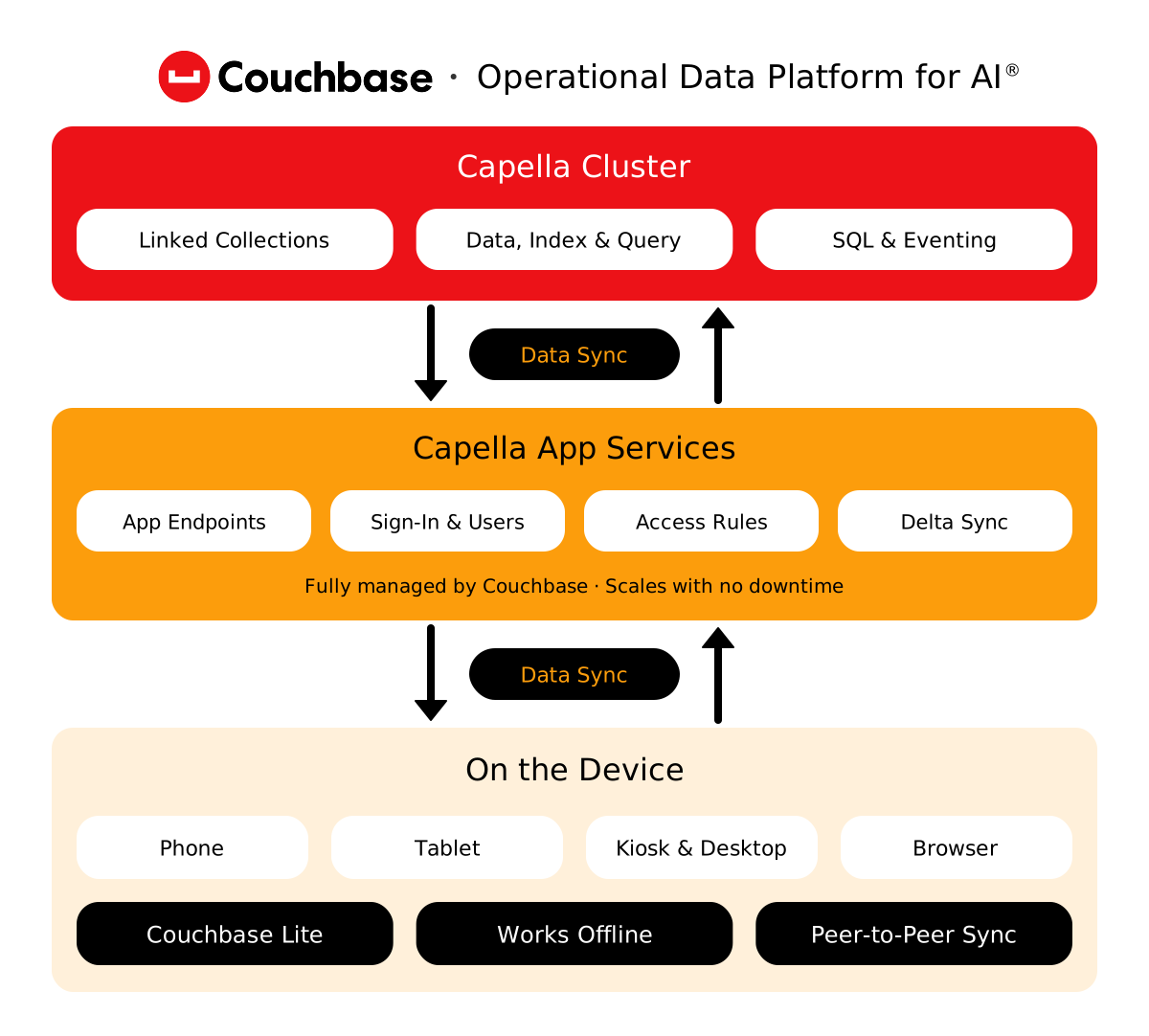
Each App Endpoint links one bucket, one scope, and the collections your app needs. It’s where you set sign-in (basic auth or OpenID Connect), access rules, import filters, and delta sync. One App Service hosts many endpoints, so every app gets its own rules without its own servers.
Apps write to the device first and sync both ways whenever they can. Couchbase Lite resolves conflicts on the device, automatically or with logic you write. Deleted documents stay on the server for 60 days, so a tablet that sat in a drawer for weeks still catches every delete when it comes back.
App Services syncs straight into collections in your Capella cluster. Backend services, Eventing functions, and SQL queries work on the same JSON your devices see, with no ETL in between. Rather run sync yourself? Sync Gateway is the same technology, self-managed, and the move between the two is documented.
Built for devices that go quiet for weeks
60
days a device can stay offline and still sync every delete
5min
typical time to deploy App Services on AWS or Google Cloud
CAPELLA CUSTOMER RESULTS
Apps that stay up when networks don’t



UNDER THE HOOD
Everything sync needs, run by Couchbase
How App Services syncs, secures, runs, scales, and connects your data.
- Sync
- Sicuro
- Operate
- Scala
- Connect
Move only what changed, keep devices talking without the internet, and decide what reaches mobile at all.
Key capabilities of Capella App Services
Import filters
Decide which server documents become mobile documents at all. Everything else stays in the cluster and off every device.
Delta sync
Send only the parts of a document that changed. Big documents on slow networks stop eating bandwidth, battery, and patience.
Web apps sync too
Couchbase Lite for JavaScript syncs browser apps through the same App Endpoint. Turn on CORS for the endpoint.
Per-document access rules, your identity provider, private networking on AWS, and HIPAA-ready audit logs.
Key capabilities of Capella App Services
OpenID Connect sign-in
Use one identity provider or several, with a default. Map a token claim to App Services roles. Basic auth works too.
Private endpoints on AWS
Keep sync, admin, and metrics traffic on AWS PrivateLink instead of the public internet. Set it up in the UI.
Channels and access rules
Your access function runs on every write. It routes documents to channels, checks roles, and rejects bad data before it lands.
Couchbase patches App Services. You pick the timing, test changes first, and get alerts and logs in your tools.
Key capabilities of Capella App Services
Upgrades on your schedule
Couchbase patches App Services for you. Set a preferred day and time, upgrade early if you like, and get email a week ahead.
Alerts where your team works
Send metric alerts to Slack, Microsoft Teams, or any webhook, like ServiceNow. On Developer Pro and Enterprise plans.
Test before you ship
Dry-run your access function with a mock user, an old document, and XATTRs. See the result. Touch no production data.
Resize with no downtime, switch off when idle, and fail over between regions.
Key capabilities of Capella App Services
Resize with no downtime
Run 1 to 12 nodes and change node count or size while apps stay connected. Endpoint URLs stay the same through it all.
Fail over between regions
App Services 4.0 links two clusters with XDCR in both directions. Couchbase Lite 4.0 apps switch to the standby if one fails.
Single node for dev
Build and test on one small node with 2 or 4 vCPUs. It skips high availability, so keep it for dev and test.
REST APIs for web and back office, automation with the API or Terraform, and server logic that reaches devices.
Key capabilities of Capella App Services
Public and admin REST APIs
Read and write documents over HTTPS from web and server apps, and manage app users and roles from your own back office.
Terraform and infrastructure as code
Define App Services in Terraform, or script endpoints, OIDC providers and private endpoints with the Capella Management API.
Eventing that reaches devices
Eventing functions can read and write the collections your devices sync, so server-side logic shows up on phones too.
- Field apps
- Stores
- Failover
- Migrate
ARCHITETTURA
Field apps that work with no signal
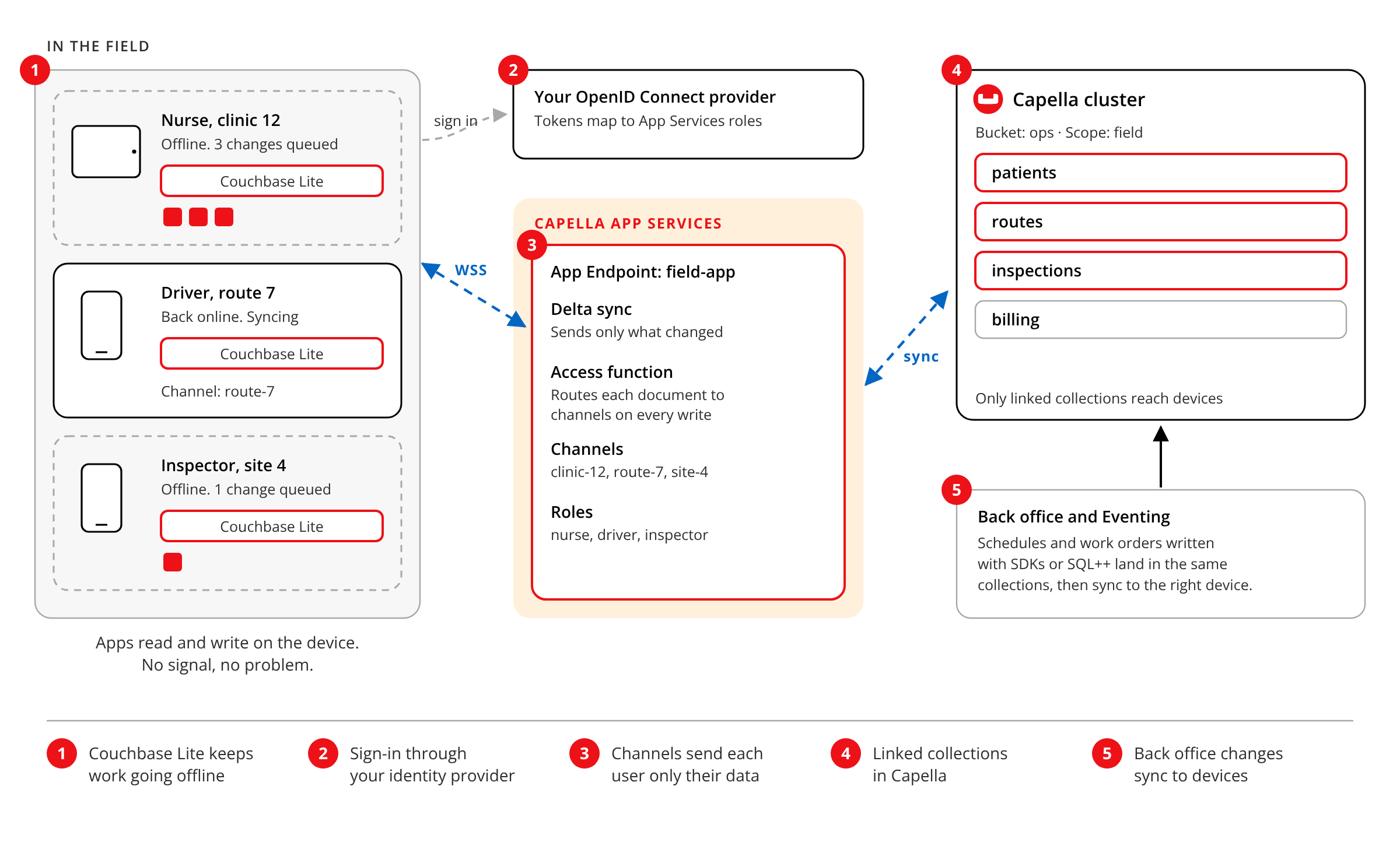
Nurses, drivers, and inspectors can’t wait for a signal. Couchbase Lite keeps their data on the device. When they reconnect, Capella App Services moves only what changed, through channels that match each user’s role. Sign-in goes through your OpenID Connect provider.
ARCHITETTURA
Stores that keep selling offline

Checkout and scanner devices sync with each other over the store network, peer to peer. If the internet link drops, the store keeps selling. When it’s back, devices sync with Capella App Services, and headquarters sees every sale. Separate App Endpoints keep each app’s rules apart.
ARCHITETTURA
Keep syncing when a region fails
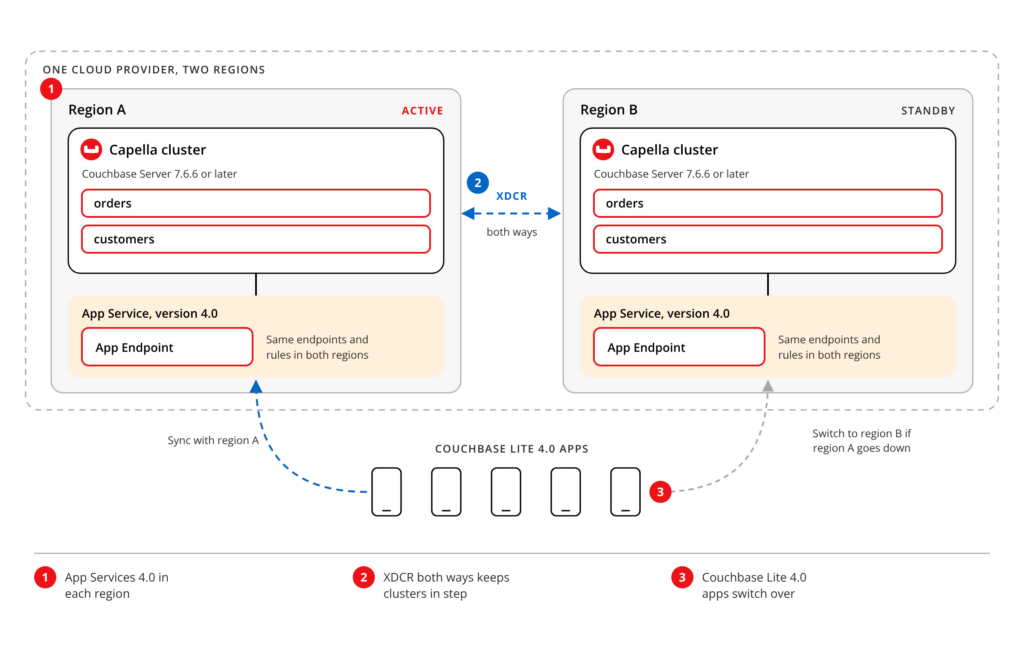
Run App Services on two Capella clusters in two regions of the same cloud, linked by XDCR in both directions. If one region goes down, Couchbase Lite 4.0 apps switch to the standby and keep syncing. It needs Capella App Services 4.0 and Couchbase Server 7.6.6 or later.
ARCHITETTURA
Move Sync Gateway to App Services

XDCR copies your bucket from self-managed Couchbase Server into Capella while apps keep syncing. When it catches up, stop Sync Gateway, create an App Endpoint, bring your sync and import functions, and point apps at the new URL. Basic auth carries over. OIDC needs setting up again.
SWITCHING SYNC PROVIDERS
Sync service retired? Your app wasn’t.
If your mobile sync platform reached end of life, you need a new home without rewriting every screen. Couchbase Lite gives your app an embedded JSON database with SQL, and App Services handles sync, users, and access rules in Capella. Start on the free tier, which includes App Services, and move to a paid plan when the app is ready. Our migration guide walks through each step.
One sync technology, run the way you want
SELF-MANAGED
Gateway di sincronizzazione
Run the same sync technology on your own servers or Kubernetes, next to self-managed Couchbase Server. It’s the right call when sync has to live in your data center, or your team wants full control of every node.
MOBILE AND EDGE
Couchbase Mobile
The whole platform: Couchbase Lite on devices, peer-to-peer sync, Edge Server for small sites, and sync to Capella or Sync Gateway. Start here if you’re choosing an architecture for many apps at once.
MANAGED CLOUD
Couchbase Capella
App Services runs on Capella, the fully managed Couchbase database on AWS, Google Cloud, and Azure. The same cluster that feeds your devices can serve your web backend, search, and AI agents.
Capella App Services FAQ
Answers about offline sync, pricing, platforms, and how App Services compares to self-managed Sync Gateway.
Capella App Services is the fully managed Sync Gateway in Couchbase Capella. It syncs data between Couchbase Lite apps on devices and your Capella cluster, with users and access control.
Yes. Couchbase Lite stores data on the device, so apps read and write with no connection. App Services syncs changes in both directions when the device reconnects.
You pay by the hour for each App Service, based on cloud, region, node count, and size, plus data processed above 1 GiB an hour. You aren’t billed while it’s turned off.
Yes. The Capella free tier includes App Services, linked to your free cluster. Both turn off after 72 hours idle and are deleted after 30 days. Turn the cluster back on and App Services returns too.
Couchbase Lite runs on iOS, Android, desktop with .NET or Java, embedded devices through C, and browsers with JavaScript. App Services runs on AWS, Google Cloud, and Azure.
App Services is Sync Gateway, run by Couchbase inside Capella. With self-managed Sync Gateway, your team runs it. The docs show how to move from one to the other.
Keep exploring
-
Move your app off a discontinued sync service
A technical walkthrough of data, sync rules, and app code, step by step.
-

Why offline-first apps protect revenue
What a network outage costs, from retail floors to hospital wards.
-

Intrigued? Start today.
Let’s talk about how you can build smarter for an AI future, today.