
SUMMARY
Cloud containers package applications and their dependencies into portable, self-contained units that run consistently across any environment. By isolating applications from underlying infrastructure, they solve compatibility issues and streamline development and deployment. Containers come in two main types: application containers for microservices and system containers for legacy workloads, each serving distinct needs. Their lightweight, scalable design enables them to be faster and more efficient than traditional virtual machines (VMs). With the support of orchestration tools like Kubernetes, containers have become a foundation for modern, cloud-native development.
What are containers in cloud computing?
In cloud computing, a container is a portable package that bundles an application with its dependencies (code, runtime, libraries, settings), allowing it to run across different environments. This isolates applications from their environment, ensuring consistent operation across any deployment, from local machines to public clouds. By bundling dependencies, containers solve the “it works on my machine” problem, streamlining development and deployment.
Continue reading this resource to learn the basics of cloud containers, including their types, technical functions, and common use cases. You’ll also learn about their benefits, how they differ from virtual machines, and the tools available for container management and orchestration.
- Types of cloud containers
- How do cloud containers work?
- What are containers used for?
- What benefits do cloud containers provide?
- Containers vs. virtual machines
- Container management tools
- Key takeaways and related resources
- FAQs
Types of cloud containers
All containers use OS-level virtualization, but they primarily fall into two types: application containers and system containers. Each serves a distinct purpose, making understanding their differences critical for selecting the right tool.
Application containers
Application containers, popularized by Docker, are the most common type of container. Their main goal is to package and run a single application or process. They’re lightweight, stateless, and immutable, bundling an application’s code and all its dependencies into one executable package. This functionality ensures consistent performance across environments. They also allow independent deployment and scaling of services, making them ideal for microservices architectures.
Key characteristics
- Single-process focus: Runs one application or service.
- Lightweight and fast: Starts quickly without booting a full OS.
- Immutable: Unchanged after creation; updates involve replacing the container.
- Stateless: Data is managed externally (e.g., volumes, databases).
- Popular technologies: Docker, containerd, CRI-O.
System containers
System containers emulate a full VM with the efficiency of a container. Unlike application containers, they run a complete operating system with multiple services and processes, including an init system like systemd. This makes them suitable for legacy or monolithic applications that expect a traditional OS environment, allowing “lift and shift” to containerized infrastructure without major refactoring. Although heavier than application containers, they’re more resource efficient than VMs because they share the host OS kernel.
Key characteristics
- Multi-process environment: Runs a full boot process and multiple services.
- Behaves like a VM: Offers a persistent, mutable environment for installations and configurations.
- Legacy application support: Ideal for monolithic applications requiring a traditional OS.
- Stateful: Can manage internal state, similar to a standard server.
- Popular technologies: LXD (Linux Container Daemon), OpenVZ.
Choosing between application and system containers depends on the workload. Application containers are standard for modern, microservices-based applications. In contrast, system containers offer a bridge for migrating legacy monolithic systems to containerized infrastructure.
How do cloud containers work?
Cloud containers use OS-level virtualization. Unlike traditional virtual machines that require a full guest operating system for each instance, containers share the host OS kernel, making them lightweight, fast, and efficient. This is achieved using two key Linux kernel features: namespaces and control groups (cgroups).
Core components of containerization
Namespaces: Namespaces partition kernel resources, creating isolated workspaces for containers. Each container has its own network stack, process ID space, mount points, and user ID space. From inside, it appears as a standalone OS, though it shares the host kernel with other containers. This isolation ensures containers don’t interfere with each other.
Control groups (cgroups): Cgroups manage and limit container resource usage, such as CPU, memory, and bandwidth. They prevent any single container from overloading the host system, ensuring stable and predictable performance for all containers.
Container workflow
Container creation and operation rely on two main elements: images and runtimes.
Container images: These immutable files serve as blueprints that contain the code, libraries, dependencies, and configurations needed to run the application. Built in layers (e.g., starting with a minimal Linux distribution), images are efficient to update and share.
Container runtime: The runtime pulls container images and runs them on the host system. It unpacks the image and uses namespaces and cgroups to create isolated processes. The runtime handles the full container life cycle, from creation to termination.
When you run a command like docker run, the runtime retrieves the image (if needed), creates the container, allocates resources, and isolates it. The application then runs in a sandboxed environment as a process on the host OS.
What are containers used for?
Containers are essential for modern software development due to their flexibility, portability, and efficiency. Here are the most common use cases:
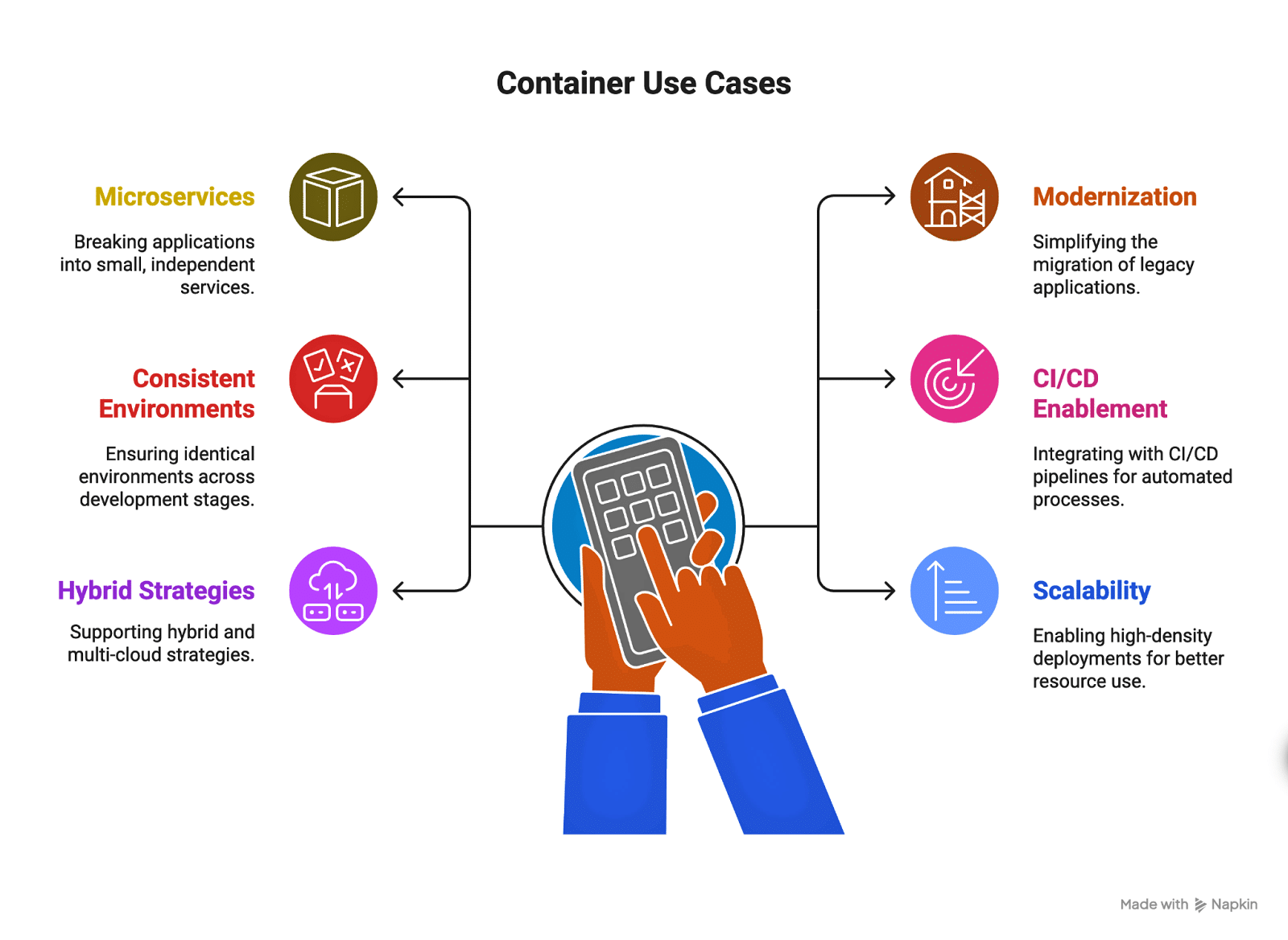
Use cases for containers
- Microservices architectures: Containers are ideal for breaking applications into small, independent services. Each service runs in its own container, simplifying updates, improving fault isolation, and allowing teams to use different technology stacks.
- Application modernization and migration: Containers simplify the “lift and shift” of legacy applications to modern infrastructure, eliminating the need for major code changes and enabling a gradual transition from monolithic to microservices-based architecture.
- Consistent development and testing environments: By packaging applications with all their dependencies into a single image, containers ensure identical environments across development, testing, and production, which reduces bugs and deployment failures.
- CI/CD and DevOps enablement: Containers integrate seamlessly with CI/CD pipelines, allowing for automated builds, tests, and deployments. This speeds up delivery cycles and improves reliability.
- Hybrid and multicloud strategies: Containers can run on any infrastructure, supporting hybrid and multicloud deployments that reduce vendor lock-in and enable easy workload migration.
- Scalability and high-density deployments: The lightweight nature of containers enables high-density deployments for better resource utilization. When combined with orchestration tools like Kubernetes, containers can scale automatically to handle spikes in demand, supporting cost-efficient, high availability applications.
What benefits do cloud containers provide?
Cloud containers change how applications are built, deployed, and managed. By separating applications from the underlying infrastructure, they offer flexibility and efficiency, addressing common development challenges for faster delivery, more reliable systems, and better resource utilization.
- Unmatched portability and flexibility: Containers bundle applications and dependencies into self-contained units that run consistently across any environment, whether in the cloud or on premises. This simplifies migration and avoids vendor lock-in.
- Enhanced scalability and performance: Because containers are lightweight and share the host operating system, they can start in just a few seconds. This speed enables quick, automated scaling with tools like Kubernetes, helping manage sudden traffic increases and keeping applications available.
- Greater resource efficiency and cost savings: Containers allow more applications to run on less hardware by sharing the host OS, leading to higher density than with VMs. This reduces infrastructure costs and lowers cloud bills.
- Faster deployment and development cycles: Containers help maintain consistent environments, eliminating the “it works on my machine” problem. This streamlines CI/CD pipelines for more frequent and predictable deployments, boosting developer productivity.
- Improved consistency and reliability: Immutability prevents configuration drift, ensuring stable and predictable systems. Updating means replacing containers with new images, simplifying rollbacks, and troubleshooting.
Containers vs. virtual machines
While both containers and virtual machines allow applications to run in isolated environments, they do so in very different ways. VMs emulate entire operating systems, providing strong isolation but requiring more resources, while containers share the host OS kernel, making them lightweight, faster to start, and easier to scale. Here’s how the two compare:
| Feature | Containers | Virtual machines |
|---|---|---|
| Architecture | Share the host OS kernel; package only the app and dependencies | Run a full guest OS on top of a hypervisor |
| Resource usage | Lightweight, minimal overhead | Heavier, more resource intensive |
| Startup time | Near instant | Minutes, depending on the OS |
| Scalability | Easily scaled up or down | Scaling requires more time and resources |
| Portability | Highly portable across environments | Portable but requires compatible hypervisors |
| Isolation | Process-level isolation | Strong OS-level isolation |
| Use cases | Microservices, CI/CD, cloud-native apps | Legacy apps, full OS environments, stronger isolation needs |
In practice, many organizations use both containers and VMs depending on their workload needs. Containers are ideal for speed and scalability, while VMs remain a strong choice for running legacy applications or workloads that demand higher isolation. When combined, they contribute to a flexible and efficient infrastructure strategy.
Container management tools
As organizations scale their use of containers, managing them manually becomes impractical. Container management tools help automate deployment, orchestration, scaling, and monitoring, ensuring that applications remain reliable and efficient across complex environments. These platforms also add features for security, networking, and integration with cloud services.
- Docker: A widely used platform that simplifies building, packaging, and running containers across environments.
- Kubernetes: An open-source orchestration system that automates the deployment, scaling, and management of containerized applications.
- Red Hat OpenShift: A Kubernetes-based platform that adds developer-friendly features, enterprise-grade security, and multicloud support.
- Amazon Elastic Kubernetes Service (EKS): A managed Kubernetes service from AWS that reduces the overhead of running Kubernetes clusters.
- Google Kubernetes Engine (GKE): Google’s managed Kubernetes offering, designed for scalability and integration with Google Cloud services.
- Azure Kubernetes Service (AKS): Microsoft’s managed Kubernetes platform, offering deep integration with Azure services.
Choosing the right container management tool often depends on your existing infrastructure, level of expertise, and whether you prefer a fully managed service or more control over configurations.
Key takeaways and additional resources
Cloud containers have become fundamental to modern application development because they bring consistency, portability, and efficiency to every stage of the software life cycle. By isolating applications from their environments, they solve deployment challenges while supporting scalability, automation, and innovation. Whether used for microservices, application modernization, or hybrid cloud strategies, containers continue to help organizations build and deliver software at scale.
Here are the most important takeaways from this resource:
Key takeaways
- Containers package applications with all dependencies, ensuring consistent operation across environments.
- They come in two types, with application containers used for microservices and system containers used for legacy or monolithic apps.
- Containers rely on Linux features, such as namespaces and cgroups, for isolation and resource management.
- Images and runtimes form the foundation of container workflows, powering the creation, scaling, and updates of applications.
- Compared to VMs, containers are lighter, start faster, and are more efficient, making them ideal for cloud-native use cases.
- Container management tools such as Docker, Kubernetes, and OpenShift streamline orchestration, scaling, and monitoring.
- Adoption of containers supports DevOps practices, accelerates CI/CD pipelines, and reduces infrastructure costs.
To learn more about containers, you can visit our concepts hub and review the resources listed below:
Additional resources
- Container Security – Concepts
- Container Orchestration – Concepts
- Pod vs. Container: What Are the Key Differences? – Blog
- Cloud-Native vs. Cloud-Agnostic: Which Approach Is the Best Fit? – Blog
FAQs
What is the difference between cloud containers and Kubernetes? Cloud containers are lightweight packages that bundle an application with its dependencies, while Kubernetes is an orchestration platform that automates the deployment, scaling, and management of containers.
Can containers be used in hybrid or multicloud environments? Yes, containers are highly portable and can run across on-premises, hybrid, and multi-cloud environments without requiring changes to the application.
What are the challenges of managing containers at scale? At scale, challenges include orchestrating thousands of containers, ensuring security, managing networking, and maintaining visibility into performance and resource usage.
How do cloud containers support DevOps practices? Containers provide consistent environments, enable rapid deployments, and integrate seamlessly with CI/CD pipelines, making them ideal for supporting DevOps workflows.
Are cloud containers secure for sensitive workloads? Containers can be secure when paired with best practices such as image scanning, access controls, and runtime monitoring, although they rely on the shared host OS, which requires additional hardening.
What is the difference between containerization and serverless computing? Containerization packages applications and dependencies into portable units, while serverless computing abstracts away infrastructure entirely, letting developers run functions on demand without managing servers.

Start building
Check out our developer portal to explore NoSQL, browse resources, and get started with tutorials.

Use Capella free
Get hands-on with Couchbase in just a few clicks. Capella DBaaS is the easiest and fastest way to get started.

Get in touch
Want to learn more about Couchbase offerings? Let us help.