

Couchbase 6.6 introduced the ability to back up the document database directly to AWS S3 cloud computing storage or any other S3-compatible Object Store. Using the cbbackupmgr backup utility you can now specify an S3 bucket as a destination for backing up your data.
Cloud Storage Overview: Object Stores (AWS S3)
Object Stores com AWS S3-compatible interfaces are becoming the defacto standard for backing up large volumes of data to cloud-based data centers. It is often adopted for varied deployment types including cloud-native deployments, hybrid cloud deployments, and private cloud deployments.
Object Storage is a flat storage system designed to support cloud services. Data is stored as self-contained objects instead of a hierarchy in a file system or as blocks in a block storage system.
Objects consist of three components: data itself, a variable amount of customizable metadata, and a unique identifier. The unique identifier is used by the applications to access the object instead of a file name and a file path as used in traditional file storage. These unique identifiers are arranged in a flat address space, avoiding the complexity and limited scalability of hierarchical file systems using paths for files and folders.
In practice, applications directly manage all of the objects, eliminating the need for a traditional file system to store data. File access is through RESTful APIs, which query the object’s metadata.
The biggest advantage of using object stores from cloud storage services is RESTful web service access. By providing a simplified HTTP interface method remote accessibility and scalability are enhanced.
Other key benefits include custom metadata to query, filter, run analytics, etc. Online storage costs are also reasonable and have no limit to storage capacity.
It also removes the complexity of having to mount the filesystem for containerized workloads to access your files. The real-time performance of the object store can vary widely depending on the underlying cloud storage solution.
Cloud Storage Alternatives
There are cheap and deep object storages like AWS Glacier, high-performance object stores like Nutanix Objects, and something in between like AWS S3.
AWS S3 protocol has become the industry standard for object stores. Apart from S3 itself, plenty of other players like Scality, Dell ECS, NetApps Storage Grid, Nutanix Objects, and more, provide object storage flexibility.
AWS S3 object store is often used for disaster recovery and file sharing of big data analytics datasets (especially images and media files). Since S3 and Glacier are inexpensive, customers also prefer to use them as a cheap cloud storage solution for archiving.
As more workloads become containerized (e.g. using Kubernetes) new ways of addressing file storage, sharing, and access are becoming available. This is helping to alleviate the pain point of mounting and sharing of raw files or obsessing over storage space constraints.
Backing up Couchbase NoSQL to AWS S3
Now let’s look at how quickly you can backup your data to AWS S3 using the Couchbase command-line tool cbbackupmgr (Couchbase 6.6+ is required).
1 – Create an AWS S3 bucket where you want to store the backup files
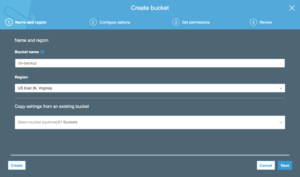
The below prompt appears once the bucket is created.

2 – Configure an archive for the Couchbase bucket
To create this, provide the AWS S3 credentials, like region e access keys which you can obtain from the AWS S3 permissions tab.


3 – Start backing up the files
Use the cbbackupmgr backup command as shown below.
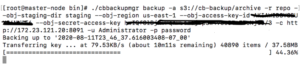
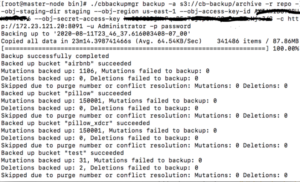
See, below, how all the files from the source cluster are now backed up to the AWS S3 object store.
Contents in the source cluster
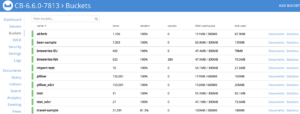
Data backed up to the S3 object store

Following the above steps, you can backup your files directly to AWS or any other S3-compatible stores seamlessly.
For a completely cloud-based solution see Couchbase Cloud NoSQL Database-as-a-Service offering or read how one customer cut NoSQL database costs by 50% using it.

Deixe um comentário
Você precisa fazer o login para publicar um comentário.