

Evaluating a NoSQL database isn’t about checking off a list of features. Instead, you should be asking yourself how each database will hold up under your real-world access patterns, scale requirements, and operational constraints 12 months into production. Many engineers begin with vendor comparisons or articles about SQL versus NoSQL, but those resources rarely answer the questions that matter most.
This guide is different. It gives you a weighted evaluation framework with eight critical criteria you can apply to any candidate, including Couchbase. We’ll also explain where Couchbase fits the rubric and where it doesn’t. If you want more background on NoSQL fundamentals before diving in, start with this NoSQL explainer. If you’re ready to evaluate, keep reading.
What is a NoSQL database, and when does it fit?
A NoSQL database is a non-relational data store built for flexible schemas and horizontal scale. Unlike relational databases that organize data into fixed tables with predefined columns, NoSQL databases let schema evolve with the application. This difference is crucial when your data model is still being discovered or when different records in the same collection legitimately have different shapes.
There are four established families of NoSQL databases, plus an emerging fifth:
- Document databases store data as JSON or similar self-describing documents. Couchbase and MongoDB are the most common examples and are best for hierarchical, object-like data where the document maps cleanly to application objects.
- Key-value databases retrieve data by a single lookup key with no query capability beyond that key. Redis and DynamoDB operate in this model and are best for caching, session storage, and access patterns where the key is always known.
- Wide-column databases organize data into rows and dynamic column families. Cassandra and HBase are the primary examples and are best for time-series, event logging, and write-heavy workloads at extreme scale.
- Graph databases model data as nodes and edges and are optimized for traversing relationships. Neo4j is the most common example and is best for social networks, fraud detection, and recommendation engines where relationships are the primary query target.
- Vector databases (emerging) store high-dimensional numeric embeddings and retrieve by similarity. They are increasingly integrated into multi-model platforms like Couchbase rather than being deployed as standalone systems.
Some platforms collapse multiple NoSQL database types into a single engine. Couchbase, for example, handles document, key-value, and vector in one platform. Consolidation itself is an evaluation variable, with the trade-off of fewer systems to operate, but more functionality to learn and manage.
NoSQL vs. SQL: When to choose a non-relational database
The NoSQL versus SQL decision comes down to a few specific variables. Neither is universally better, so the deciding question is which model best fits the workload.
Choose NoSQL when:
- Your schema evolves frequently, and you can’t predict its final shape at design time
- You need horizontal scale across commodity hardware or cloud instances
- Your access patterns are known and can be denormalized into the data model
- You’re building for high write throughput or global distribution
Stick with SQL when:
- Your workload is defined by complex multi-row transactions with strict ÁCIDO requirements
- You need ad hoc analytical queries across arbitrary dimensions without predefined access patterns
- Your data is highly relational, and joins are fundamental to the domain model
| Dimension | Relacional (SQL) | Non-relational (NoSQL) |
| Esquema | Fixed, predefined | Flexible, per-document |
| Scaling axis | Vertical (primarily) | Horizontal (primarily) |
| Consistency default | Strong (ACID) | Varies (eventual to tunable) |
| Join model | Native, optimizer-managed | Application-side or denormalized |
| Query flexibility | High (ad hoc) | Varies by family |
| Sweet spot | Transactions, analytics | Scale, flexibility, speed |
One thing worth noting is that the line between SQL and NoSQL is blurring. SQL for JSON query languages like SQL++ and PostgreSQL’s JSONB bring relational query expressiveness to document databases. If SQL familiarity is a team concern, it no longer has to be a dealbreaker when evaluating NoSQL options.
→ Ver também: Relational vs. Non-Relational Database
Types of NoSQL databases and their trade-offs
Before evaluating specific databases, take a step back and consider the different NoSQL database families. Each excels at certain access patterns and workloads, and no amount of optimization can fully compensate for choosing the wrong fit.
| Access pattern | Sweet spot | Weakness | |
| Document database | Fetch or update a rich, hierarchical object by ID or secondary index | User profiles, product catalogs, content management, mobile app backends | Complex cross-document joins require application-side logic or denormalization. |
| Key-value database | Single-key get/set at very high throughput | Caching, session state, rate limiting, leaderboards | No query capability beyond the key. If access patterns change, the data model may need restructuring. |
| Wide-column database | Append-heavy writes, time-ordered reads at massive scale | IoT telemetry, event logs, audit trails, time-series | Schema design is rigid relative to documents. Queries outside the defined partition/sort key are expensive. |
| Graph database | Multi-hop relationship traversal | Fraud detection, network analysis, recommendation engines, identity graphs | Poor fit for workloads that are primarily document retrieval with incidental relationship queries. The overhead isn’t justified. |
| Vector database | Similarity search over high-dimensional embeddings | Semantic search, RAG pipelines, recommendation systems | As a standalone system, adds synchronization complexity with operational data. Better served by multi-model platforms with native vector support. |
The advantages of NoSQL (i.e., schema flexibility, horizontal scale, performance at read/write throughput) apply most cleanly when you match the right family to the right workload. Most NoSQL regrets originate from a mismatch.
The eight-criteria evaluation framework
To use this framework, start by weighting each criterion based on your specific workload. For instance, to evaluate databases for a write-heavy IoT application, you should weight scalability and performance heavily, but for a field service app, you would weight edge deployment more heavily. Next, score each of your NoSQL database candidates 1-5 on each criterion and calculate the total score.
Here are the eight criteria:
1. Data model
Start by asking whether the database’s native data model matches the way your application represents data. Every mismatch creates mapping logic between your application objects and the database. That extra translation layer may seem manageable early on, but it adds complexity as the application grows, and it makes schema changes harder over time. The best fit is a database that stores your data in a format that closely matches your application with minimal transformation.
2. Consistency model
The database’s consistency model should match your application’s correctness requirements. Some workloads require strong consistency because stale reads can lead to incorrect business decisions, such as inaccurate account balances or inventory counts. Others can tolerate eventual consistency if availability is the higher priority. Some databases let you choose the consistency level for each operation, which offers flexibility but also shifts more responsibility to the application.
3. Query language
Consider how much your applications can accomplish with the database’s query language. Can it efficiently support secondary indexes, aggregations, range queries, and full-text search, or is it limited to simple key lookups? The more work the database can perform, the less filtering and processing your application has to do. Moving query logic into application code often creates performance bottlenecks and makes systems harder to maintain. Look for a query language that supports your access patterns without requiring extensive post-processing.
4. Horizontal scalability
As your workloads grow, adding capacity should be straightforward. Look at how the database partitions data, how it handles rebalancing when new nodes are added, and whether those operations affect application performance. Also consider whether storage, queries, and indexing can scale independently or whether everything must scale together. The strongest platforms expand without downtime, manual resharding, or noticeable disruption to running applications.
5. Performance under load
Don’t rely on vendor benchmarks built around synthetic workloads. Measure performance using your own access patterns, document sizes, indexes, and query mix. Average latency rarely tells the whole story because users experience the slowest requests, not the average ones. Pay close attention to p99 latency under realistic concurrent load and make sure it consistently meets your service level objectives with room to spare.
6. Multicloud and edge deployment
A database should run wherever your applications need to run. If your infrastructure spans multiple cloud providers, portability becomes important. If your applications operate in retail stores, hospitals, manufacturing facilities, or the field, edge deployment and offline synchronization may be essential. A database that only supports one deployment model can become an architectural limitation. Favor platforms that provide consistent capabilities, governance, and operations across cloud, edge, and on-premises environments.
7. Operational burden
Running a database involves much more than licensing costs or benchmark results. Day-to-day operations include upgrades, backups, monitoring, alerting, capacity planning, and responding to production issues. A managed DBaaS reduces much of that operational work but offers less control. Self-managed deployments provide maximum flexibility at the cost of greater operational responsibility. Choose the model that fits your team’s expertise and the amount of operational effort you can realistically support.
8. Migration path
Finally, consider both how easy it is to migrate into the database and how easy it would be to move away from it in the future. Evaluate the available migration tools, the data synchronization required during cutover, and the rollback plan if something goes wrong. Also look for sources of vendor lock-in, including proprietary query languages, binary storage formats, and tightly coupled managed services. A strong migration path is well documented, reversible, and minimizes the amount of application code that must be rewritten.
Scoring real candidates: The evaluation scorecard
Here’s an example scorecard for three hypothetical candidates evaluated against a write-heavy, globally distributed application with edge deployment requirements. You can copy the structure and adjust the weights for your workload.
To calculate your weighted totals, score each candidate on a scale of 1-5 for each criterion, then multiply each score by the assigned weight. The highest possible weighted total is 5.
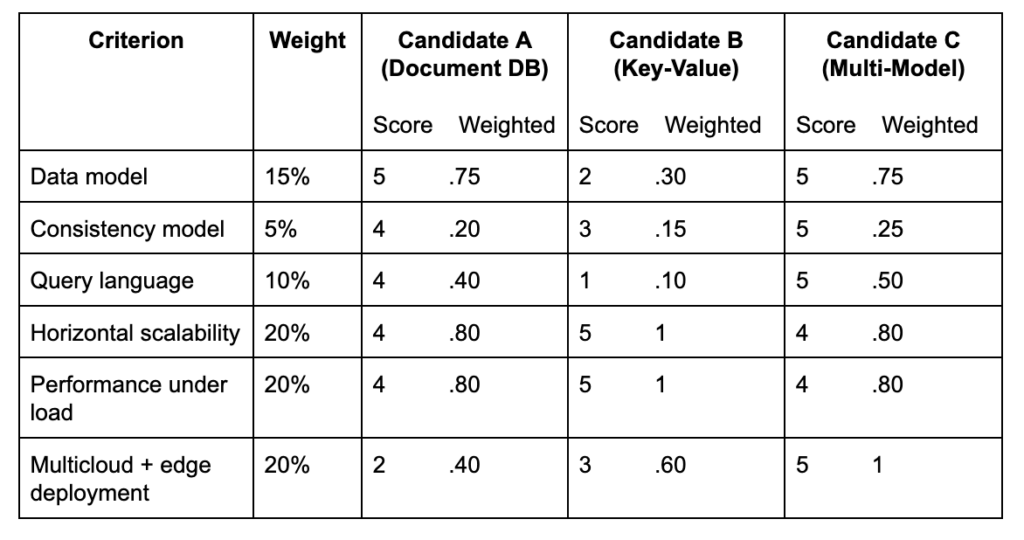
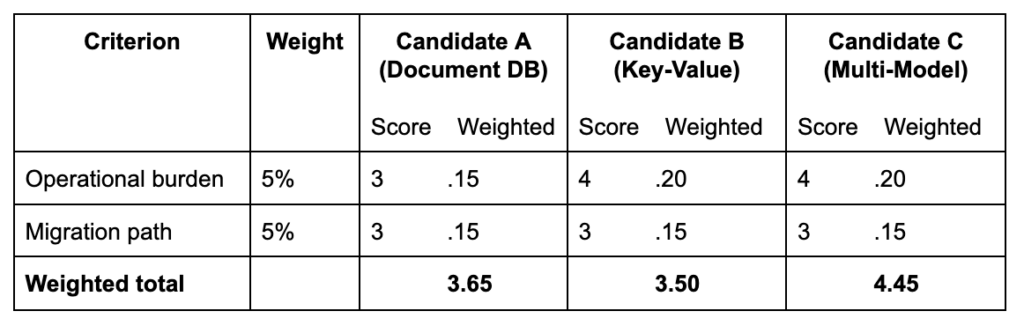
Notice how the edge deployment criterion significantly shifted the outcome in this example. If you remove the edge requirement and reweight deployment to 5%, Candidate B’s raw performance advantage makes it much more competitive. The rubric surfaces the right winner for the right workload, not just the most popular database.
Applying the framework: Where Couchbase lands
If we run Couchbase through the eight criteria, here’s an objective look at how it stacks up:
Data model (Strong): Couchbase’s native JSON document model maps cleanly to application objects without object-relational mapping (ORM) overhead. The multi-model architecture also handles key-value and vector natively in the same platform, which reduces the number of systems required for mixed workloads.
Consistency model (Strong): Couchbase offers tunable consistency from strong to eventual at the operation level, which gives teams flexibility to match consistency to correctness requirements per query rather than accepting a platform-wide default.
Query language (Strong): SQL++ is a superset of SQL that operates natively on JSON. Joins, aggregations, secondary indexes, full-text search, and vector search all work through a single query interface. For teams with SQL experience, the learning curve is significantly lower than proprietary query languages.
Horizontal scalability (Strong): Couchbase scales data, query, index, and search services independently, so you can add capacity to the layer under pressure without over-provisioning everything else. Rebalance is online and transparent.
Performance under load (Strong): Memory-first architecture keeps hot data in RAM and serves reads and writes at sub-millisecond latency at scale. Benchmark this against your actual access pattern – p99 under concurrent load is where the architecture’s memory-first design shows its advantage.
Multicloud and edge deployment (Strong): This is one of Couchbase’s clearest differentiators. Banco de Dados como Serviço (DBaaS) Capella runs across AWS, Google Cloud, and Azure. Couchbase Lite extends the same data model and sync to iOS, Android, and JavaScript for offline-capable edge deployments, with automatic bi-directional sync to the cloud when connectivity returns.
Operational burden (Strong for DBaaS, moderate for self-managed): Capella significantly reduces operational overhead with managed upgrades, automated backups, and built-in observability. Self-managed Couchbase Server requires greater operational expertise. It’s a powerful platform but requires a team that’s committed to learning it.
Migration path (Moderate): SQL++ lowers the query migration barrier for teams coming from relational databases. JSON document migration from MongoDB or similar document databases is straightforward. Migration from highly relational schemas requires deliberate data modeling work for denormalization decisions that don’t have a clean automated path.
Where Couchbase isn’t the answer: Pure graph traversal workloads (e.g., multi-hop relationship queries at depth) are better served by a dedicated graph database. Couchbase can store and query relationships, but it’s not optimized for deep graph traversal the way Neo4j is. If graph traversal is the primary access pattern, evaluate a graph-native database instead.
Ready to move from evaluation to comparison? → MongoDB vs. DynamoDB vs. Couchbase: Full Comparison → Start building on Couchbase Capella for free
NoSQL database FAQs
What is a NoSQL database?
A NoSQL database is a non-relational data store designed for flexible schemas and horizontal scalability. Unlike relational databases that store data in fixed tables with predefined columns, NoSQL databases adapt to evolving data models and scale across commodity hardware or cloud instances. The four main families are document, key-value, wide-column, and graph, with each optimized for a different access pattern. Vector is an emerging fifth category increasingly integrated into multi-model platforms. NoSQL is the right fit when schema evolves fast, scale is horizontal, or access patterns are well-defined and can be denormalized into the data model.
Should I use NoSQL or SQL?
Choose NoSQL when your schema evolves frequently, your scale is horizontal, or your access patterns are known and can be denormalized. Choose SQL when your workload centers on complex multi-row transactions with strict ACID requirements, or when you need ad hoc analytical queries across arbitrary dimensions. The decision isn’t binary. Many production architectures use both NoSQL and SQL, and the line is blurring as SQL for JSON query languages like SQL++ bring relational expressiveness to document databases.
What are the types of NoSQL databases?
The four established types are document (flexible JSON objects, best for hierarchical application data), key-value (single-key lookups at high throughput, best for caching and session state), wide-column (append-heavy writes and time-ordered reads, best for IoT and event logs), and graph (multi-hop relationship traversal, best for fraud detection and social networks). Vector databases are an emerging fifth type, which are optimized for similarity search and increasingly built into multi-model platforms rather than deployed as standalone systems.
How do I evaluate a NoSQL database?
Score candidates 1-5 across eight criteria: data model fit, consistency model, query language, horizontal scalability, performance under load, multicloud and edge deployment, operational burden, and migration path, then weight each criterion to your specific workload. Benchmark on your own access patterns, not vendor Yahoo! Cloud Serving Benchmark (YCSB) numbers. Test migration cost and operational overhead alongside features. A database that performs well in a benchmark but takes three engineers to operate in production may not be the right choice.
What are the advantages of NoSQL databases?
The core advantages of NoSQL databases are schema flexibility (data models evolve without migrations), horizontal scalability (capacity added by adding nodes, not upgrading servers), performance at scale (optimized for specific access patterns rather than general-purpose querying), and developer velocity (JSON documents map directly to application objects, eliminating much of the ORM overhead common in relational databases). These advantages are most pronounced when the NoSQL family matches the workload.
Questions about whether Couchbase fits your specific workload? Talk to a solutions engineer →

Deixe um comentário
Você precisa fazer o login para publicar um comentário.