
The modern data dilemma
Every enterprise data architecture eventually hits the same wall. Operational systems generate fresh, high-velocity data, while the historical record that gives it meaning lives somewhere else – usually in cloud storage.
Bridging the gap between operational systems and historical records has traditionally been done through the data integration process of extract, transform, load (ETL). Data is extracted from the operational store, transformed into an analytical schema, and loaded into a warehouse. This process is repeated on a schedule, with each hop adding latency, cost, and a new point of failure.
Each duplicated copy adds a place where governance and freshness can drift out of sync, and AI-driven applications exacerbate the problem. A RAG pipeline or agent needs more than the current operational state. It needs that state stitched together with months or years of historical context, in real time, without standing up a parallel analytical copy of everything that’s ever happened.
Introducing Couchbase Analytics support for Apache Iceberg
Apache Iceberg has emerged as the de facto standard for the open data lakehouse, providing the structure and reliability needed to treat massive cloud storage as a high-performance analytical database. We’re thrilled to introduce Apache Iceberg support for Couchbase Analytics. With this capability, Couchbase solidifies its position as a unified data platform, directly aligning with the rapid evolution of the open data lakehouse market.
Key capabilities:
- High-performance federated access – You can now query Iceberg tables that reside in external object storage through linked collections, providing read-only access with no data movement and no data duplication.
- Google Lakehouse runtime catalog as the flagship catalog integration – For organizations standardized on Google Cloud, Lakehouse runtime catalog serves as the primary, first-class catalog integration. It connects Couchbase Analytics directly to Iceberg tables in Google Cloud Storage with no intermediate translation layer. Couchbase also supports AWS Glue, AWS S3 Tables, Nessie, and the Iceberg REST Catalog. (Iceberg REST Catalog is the emerging standard interface for metadata across the lakehouse ecosystem for teams operating across clouds.)
- Snapshot-based time travel – Iceberg’s metadata model lets you query historical snapshots directly, enabling point-in-time analysis and audit workflows without extra infrastructure.
- Seamless integrated query power – Your queries can involve multiple Iceberg tables as well as collections residing in storage managed by Couchbase Analytics. This brings the full power of SQL++ to bear on all your data.
The architecture separates three conventionally bundled concerns:
- Compute stays with Couchbase Analytics, which executes the query.
- A catalog (Lakehouse runtime catalog in Google Cloud) holds table metadata independently of where the data lives.
- Armazenamento (Google Cloud Storage) is queried directly at execution time.
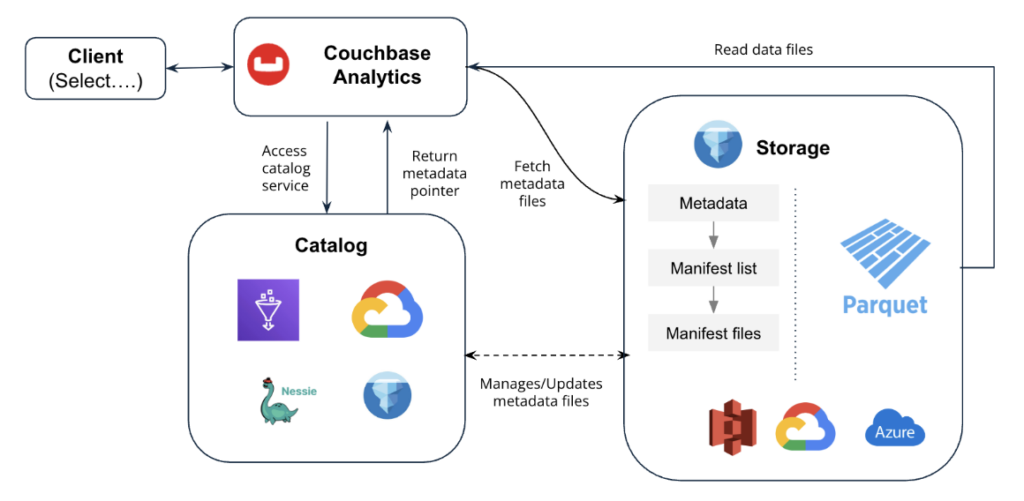
Developer walkthrough: Three steps from catalog to query
Querying an Iceberg table in cloud storage follows a deliberately small, three-step workflow with no pipeline to maintain.
Step 1: Create an authentication link – A link establishes the credentials that Couchbase Analytics uses to authenticate against the catalog and, separately, against the object storage holding the data files.
Step 2: Connect the Iceberg catalog – With a link in place, you register any of the supported catalogs using a CREATE CATALOG SQL++ statement.
Once created, the catalog link appears directly in the Analytics Workbench UI, ready to browse.
|
1 2 3 4 5 6 7 8 9 |
Criar CATALOG myBiglakeMetastoreCatalog TYPE Iceberg SOURCE BIGLAKE_METASTORE AT gcs_link WITH { “warehouse”: “gs://<your-bucket-name>/<path-to-warehouse>/”, “uri”: “https://biglake.googleapis.com/iceberg/v1/restcatalog”, “quotaProjectId”: “<your-gcp-project-id>” }; |
Step 3: Create the linked collection – This is the step that actually makes Iceberg data queryable. CREATE EXTERNAL COLLECTION points at a specific table within the catalog.
|
1 2 3 4 5 6 7 8 9 10 |
Criar EXTERNAL COLLECTION my_external_collection LIGADO myBiglakeMetastoreCatalog AT gcs_link WITH { “table-format”: “iceberg”, “namespace”: “<your_database_namespace>”, “tableName”: “<your_table_name>”, “decimal-to-double”: “true”, “snapshotId”: ‘<optional_snapshot_id>’ }; |
The snapshotId (or snapshotTimestamp) parameter is worth highlighting. While you can define these parameters during collection creation to permanently pin the linked collection to a specific Iceberg snapshot, Couchbase Analytics also lets you pass these identifiers dynamically at query runtime. This unlocks instant time-travel queries against historical table states without requiring extra infrastructure, making Couchbase a natural fit for audit, reconciliation, or point-in-time analytical workloads.
The query requires three statements, no scheduled jobs, and no second copy of the data. From here, my_external_collection behaves like any other collection in Couchbase Analytics. It’s fully joinable against live operational data using standard SQL++.
Better together: Couchbase Enterprise Analytics + Google Cloud
The Iceberg integration is one expression of a broader architectural fit between Couchbase and Google Cloud. Other benefits are:
Infrastructure co-location and workload isolation – Deploying Couchbase on Google Compute Engine lets organizations take full advantage of Couchbase’s Multi-Dimensional Scaling. Analytical workloads run on dedicated, compute-optimized Compute Engine instances, isolated from the transactional nodes serving live application traffic. This ensures that heavy analytical queries never compete for the CPU or memory that your operational workloads depend on.
A shared open format, governed centrally – Lakehouse runtime catalog gives Google Cloud customers a single governance layer over Iceberg tables in Google Cloud Storage. Access policies, lineage, and security are defined once and enforced consistently across every engine that reads them. Couchbase Analytics queries through this same governance layer rather than around it.
Proximity to the rest of the Google Cloud analytics stack – Because Couchbase reads Iceberg tables in place from Google Cloud Storage, the same data is simultaneously available to BigQuery, Dataproc, and other Google Cloud engines without export or replication. Teams can run low-latency operational analytical workloads from Couchbase Analytics and large-scale batch or ML workloads from the rest of the Google Cloud stack against one physical copy of the data.
Getting started
Apache Iceberg support for Couchbase Analytics is available now, with Lakehouse runtime catalog as the flagship integration for teams standardized on Google Cloud. Ready to try it yourself? Head over to the Couchbase Analytics documentation for full implementation details, and deploy a Couchbase Analytics cluster on Google Cloud to get started.
Related Resources
- Enterprise Analytics
- About Enterprise Analytics
- Your AI Agents Are Stuck in Pilot. It’s a Data Problem, Not a Model Problem
Perguntas Frequentes
Does Couchbase Analytics copy Iceberg data into its own storage? No. Couchbase Analytics queries Iceberg tables directly in Google Cloud Storage at execution time. No data is moved or duplicated.
What catalogs does Couchbase Analytics support for Iceberg? Couchbase Analytics supports Google Cloud Lakehouse runtime catalog (the flagship Google Cloud integration), AWS Glue, AWS S3 Tables, Nessie, and the Iceberg REST Catalog.
Can you join Iceberg data with live Couchbase operational data? Yes. Linked Iceberg collections behave like any other collection in Couchbase Analytics and are fully joinable against live operational
data using SQL++.
What is snapshot-based time travel in Couchbase Analytics? You can query Iceberg tables as they existed at any prior snapshot by passing a snapshotId (or snapshotTimestamp) at collection creation or dynamically at query runtime with no extra infrastructure required.

Deixe um comentário
Você precisa fazer o login para publicar um comentário.