ONE DATABASE FOR YOUR APPS AND AI AGENTS
Couchbase Server
Couchbase Server is one fast database for your apps and AI agents, on premises or in any cloud. Your customers stop waiting on slow data, and your team stops juggling four systems.
Stop paying for systems that slow you down
Every extra database adds a bill, a sync job, and an on-call rotation. Couchbase Server does the work of four systems, so your team moves faster.

Fast when traffic spikes
A memory-first design and built-in cache keep apps fast at peak traffic, so your busiest day doesn’t become your worst outage.

One database instead of four
Your document store, cache, search engine, and vector database become one. One bill, one on-call rotation, nothing to sync.

AI without another vector database
Vector and hybrid search run on your live app data, so AI answers come from what’s true right now, not last night’s copy.

Scales out and stays up
Add nodes while your app keeps running. If one fails, replicas take over in seconds. Your customers never even notice.
What is Couchbase Server?
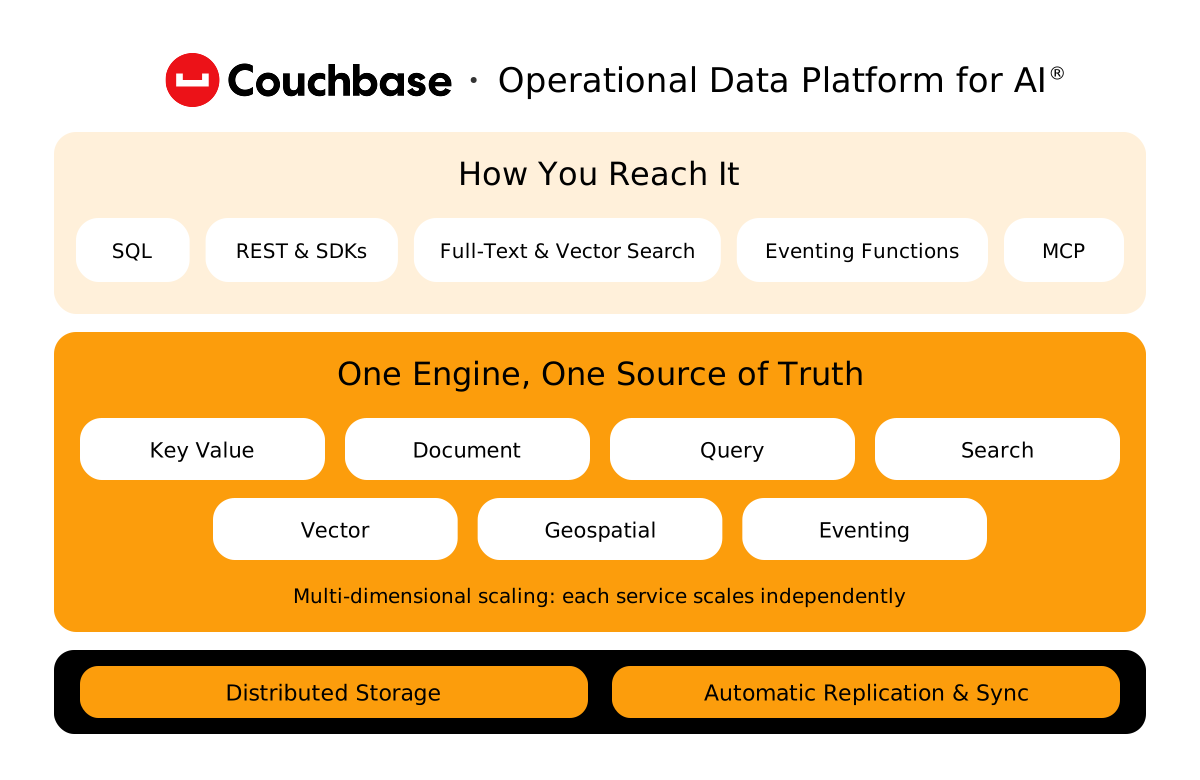
Couchbase Server is a distributed NoSQL database that stores JSON and serves key-value, SQL, search, and vector workloads from one engine.
Key-value lookups, SQL queries, full-text search, vector search, and eventing all run in Couchbase Server against the same data, with a built-in cache in front. Indexes update automatically as documents change, so your apps and AI agents work from one source of truth. There are no ETL jobs between databases waiting to break at 2 a.m.
SQL++ is SQL for JSON. Anyone who knows SQL can write joins, subqueries, aggregates, and multi-document ACID transactions against flexible JSON documents on day one. You get the flexibility of a document database without retraining your team or hiring for a proprietary query language. Developers can also ask in plain English and get SQL back.
Multi-dimensional scaling lets you run data, query, index, and search on their own nodes. When search traffic spikes, you add search nodes, not a bigger copy of everything. Rebalancing runs while your app stays online, so scaling doesn’t need a maintenance window. In Server 8.5 it copies whole data files, about 4x faster on average in internal tests.
Cross data center replication (XDCR) lets clusters in any region or cloud take writes and replicate both ways, resolving conflicts automatically. For data sovereignty, filters decide which documents leave a region, so regulated data stays in-country while the rest replicates. If a region fails, move traffic to one that’s already live.
Stats and benchmarks
<1ms
low-latency reads from built-in cache, even at peak demand
3.9x
higher throughput than a leading document database, same BenchANT setup
CUSTOMER RESULTS
Trusted by apps that can’t go down



WHAT’S NEW IN 8.5
Everything your apps need from one database
Proven capabilities, plus new features in the Server 8.5 private preview.
- Scale
- Protect
- Search
- Manage
- Connect
Add capacity in minutes and fit more tenants on every cluster.
Key capabilities
Faster rebalance
Rebalance now copies whole data files between nodes instead of one document at a time. In internal tests, it ran 4x faster on average.In internal tests, it ran 4x faster on average.
Multi-dimensional scaling
Run data, query, index, and search on their own nodes. Add capacity only where a workload needs it.
Bucket rate limits
Guarantee throughput for critical workloads like checkout and cap noisy ones like batch jobs, so one tenant can’t starve another.
Encrypt everything on disk and recover to the second, not to last night.
Key capabilities
Point-in-time recovery
Continuous backup sends every change to storage as often as every two minutes. Restore to the second before a mistake, down to a single collection.
Native encryption at rest
Built-in encryption covers every service, plus logs and audit trails. Keys stay in your key manager and rotate on schedule.
Modern identity and secrets
Use JWT tokens and single sign-on instead of stored passwords. A credential store keeps keys for cloud storage and AI models.
Vector, text, and hybrid search run on your live data, so AI apps get accurate context without a separate vector database.
Key capabilities
Vector and text search
Run similarity and full-text search on live operational data, with no separate vector database to keep in sync.
Hybrid search in SQL
Combine keyword and vector search, or sparse and dense vectors, and fuse the scores into one ranked list, all in SQL.
Ask in plain English
Ask in plain English and keep context across a chat. Add your business terms, like what net revenue means, for better answers.
Upgrade without surprises and query your data lake without ETL.
Key capabilities
Autonomous Operator
Automate deployment, scaling, upgrades, and backups on Kubernetes, including OpenShift and managed clouds.
Query Apache Iceberg tables
Join live data with Iceberg tables in S3, Google Cloud Storage, or Microsoft Azure from one SQL query. No ETL pipeline, no copies.
Eventing
Run JavaScript functions the moment data changes, for alerts, enrichment, and follow-on updates.
Replicate across regions, clouds, and devices, and keep apps always-on.
Key capabilities
Active-active replication
XDCR replicates data across regions and clouds in both directions, so apps keep running when a region fails.
Send local changes only
In a global mesh, each cluster can send only its own changes, once, to lower cross-region transfer costs.
Sync to mobile and edge
Sync Gateway keeps Couchbase Lite apps and agents on devices in sync with the cloud, so they stay always-on.
- One engine
- Fraud
ARCHITECTURE
One engine, not four databases
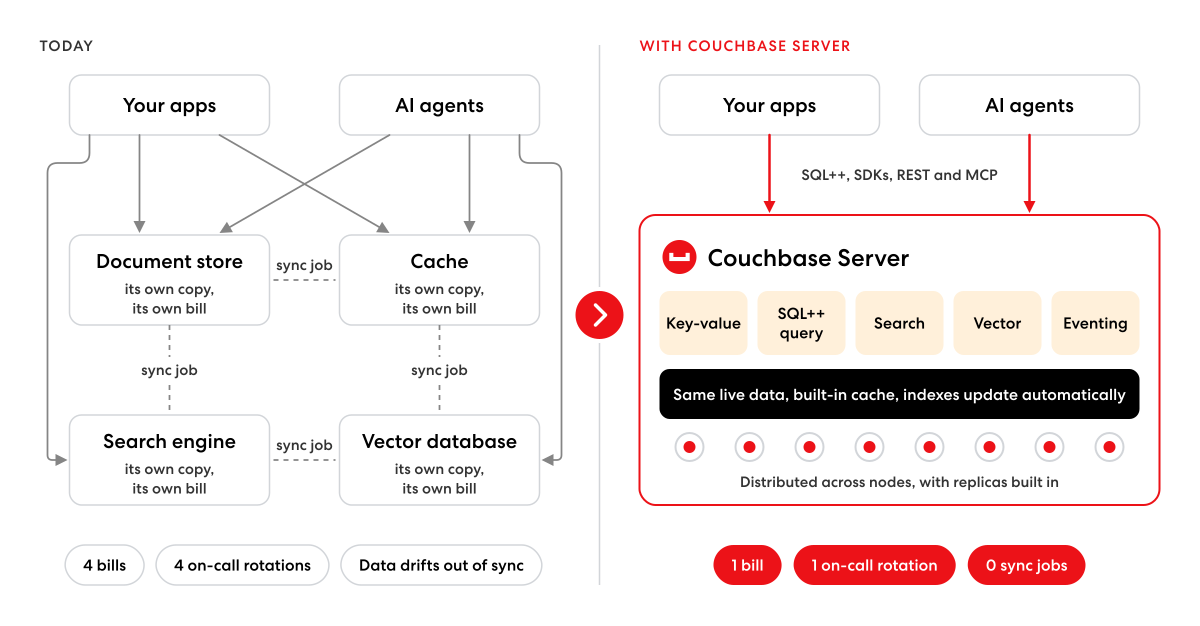
Most teams run a document store, a cache, a search engine, and a vector database, plus the sync jobs between them. Couchbase Server runs all four workloads on the same live data. You get fewer systems to patch, fewer on-call rotations, and no pipelines to keep in step.
ARCHITECTURE
Score every transaction in time
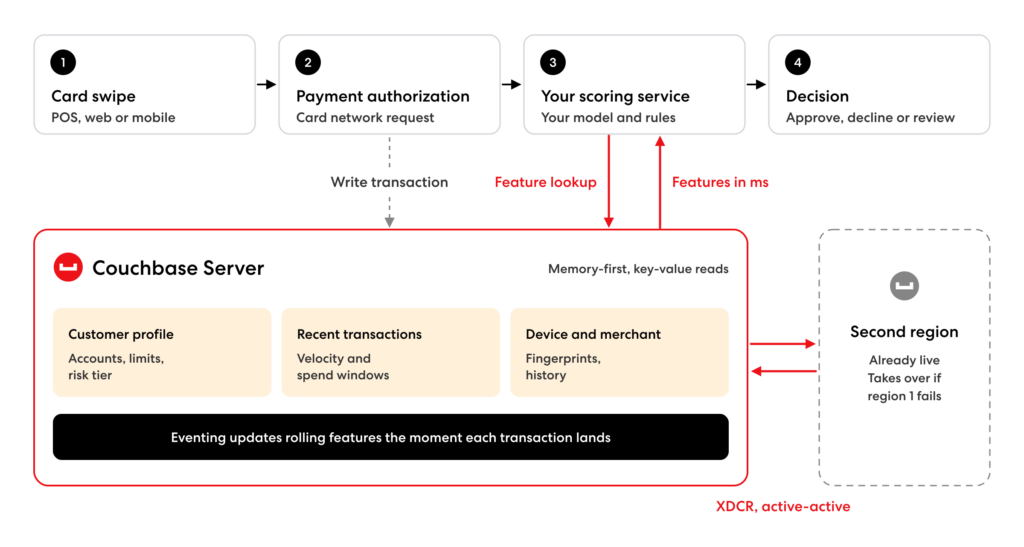
Fraud models need fresh features in milliseconds, before the card leaves the counter. Couchbase Server serves them from memory while your scoring service makes the call. Wells Fargo checks 100% of its 50M+ daily transactions this way, at under 10 ms per operation.
CLOUD MARKETPLACES
Skip the procurement marathon
Couchbase Server Enterprise Edition is on the AWS, Google Cloud, and Microsoft Azure marketplaces, so you can buy it through a cloud account your company already approved. There’s no new vendor to onboard and no separate invoice. Pay by the hour or bring your own license, and eligible purchases can count toward your committed spend with that provider.
Same engine, three ways to run it
SELF-MANAGED
Server
Start free with Community Edition, which runs up to five nodes with four cores each and community support. Move to Enterprise Edition for production: no node limits, active-active XDCR, vector search, 24/7 support and, in 8.5, point-in-time recovery and immutable backups.
MANAGED CLOUD
Capella
Capella is the fully managed version of Couchbase Server, with the same engine running your apps, caching, search, and AI workloads. Couchbase handles setup, backups, scaling, and upgrades on AWS, Google Cloud, and Azure, so your team ships features instead of patching clusters.
PRIVATE CLOUD
Kubernetes
The Couchbase Autonomous Operator automates deployment, scaling, upgrades, and backups on Kubernetes, including OpenShift, EKS, AKS, and GKE. Your platform team runs the database the same way it runs everything else.
Couchbase Server FAQs
Answers to common questions about Couchbase Server, Server 8.5, and how it compares to Capella.
Teams use Couchbase Server for user profiles, catalogs, session stores, caching, real-time fraud checks, and AI apps that need vector search on live data. It replaces several databases with one.
Yes. Couchbase Server is a distributed NoSQL database that stores JSON documents. It also supports SQL for JSON (SQL++), so you can query that JSON with joins, aggregates, and ACID transactions.
Server 8.5 adds point-in-time recovery, immutable backups, encryption across every service, faster rebalance, hybrid search, and chat-style queries. It’s in private preview, with GA in January 2027.
No, but they run the same engine. You operate Couchbase Server yourself, on premises or in any cloud. Couchbase operates Capella for you as a fully managed service on AWS, Azure, and Google Cloud.
Yes. Couchbase Server runs vector search on the same live data as your apps. In 8.5, you can also combine keyword and vector search in one SQL query.
Yes. The Couchbase Autonomous Operator deploys, scales, upgrades, and backs up Couchbase Server on Kubernetes, including OpenShift and managed services like EKS, AKS, and GKE.
Keep exploring
-

Couchbase architecture under the hood
How the engine, services, and storage fit together, and why it matters.
-
What’s new in Couchbase Server 8.5
Faster scaling, recovery to the second, and hybrid search in SQL++.
-

Intrigued? Start today.
Let’s talk about how you can build smarter for an AI future, today.