

We’re excited to announce that Couchbase is now officially supported as a vector store in Flowise, providing users with a powerful, high-performance solution for managing and retrieving vector data. This new integration combines Flowise’s intuitive, no-code AI workflow capabilities with Couchbase’s scalable, flexible vector storage, making it easier than ever to build and deploy AI-driven applications.
Flowise is an open-source tool that allows users to create and manage AI workflows with a visual, no-code interface. It’s designed to simplify the integration of machine learning models and data pipelines, offering users an accessible and efficient way to incorporate AI into their applications without the need for complex coding.
In the following sections, we’ll explore some details of this integration.
Setting up Flowise with Couchbase
To get started with the Flowise and Couchbase, you’ll need to follow a few simple steps.
Installing Flowise
There are multiple ways to install Flowise:
Method 1: Install Flowise locally using NPM
- Install Flowise globally:
- Start Flowise:
Method 2: Install Flowise using Docker
There are two ways to deploy Flowise with Docker: Docker Compose ou Docker Image.
Using a Docker image
- Clone the Flowise Repository locally:
- Navigate to docker folder at the root of the project:
- Build the Docker image with the following command:
- Once the image is built, run the container:
- To stop the running container:
Using Docker Compose
- Clone the Flowise Repository locally:
- Navigate to docker folder at the root of the project:
- Copy the .env.example file and rename it as .env
- To start the containers, use Docker Compose:
0
- To bring the containers down, use the following command:
1
Now you have Flowise installed, you can access it by navigating to https://localhost:3000.
Alternatively, you can also use the Flowise Cloud Version.
Upserting to Couchbase and running a query
Now that Flowise and Couchbase are integrated, you can upsert data into Couchbase and perform vector searches. In this blog, we will show you how to upsert a PDF file into Couchbase using Flowise.
1. Upsert data into Couchbase
To upsert data into Couchbase, drag and connect the following nodes on the Flowise canvas:
- PDF File: Upload your document (e.g., Couchbase-docs.pdf)
- Recursive Character Text Splitter: Splits text into chunks (e.g., size: 1000, overlap: 200)
- OpenAI Embeddings: Converts text into vector embeddings (e.g.,text-embedding-3-large)
- Couchbase: Stores documents and embeddings into the specified bucket, scope, and collection. Don’t forget to add the vector index!
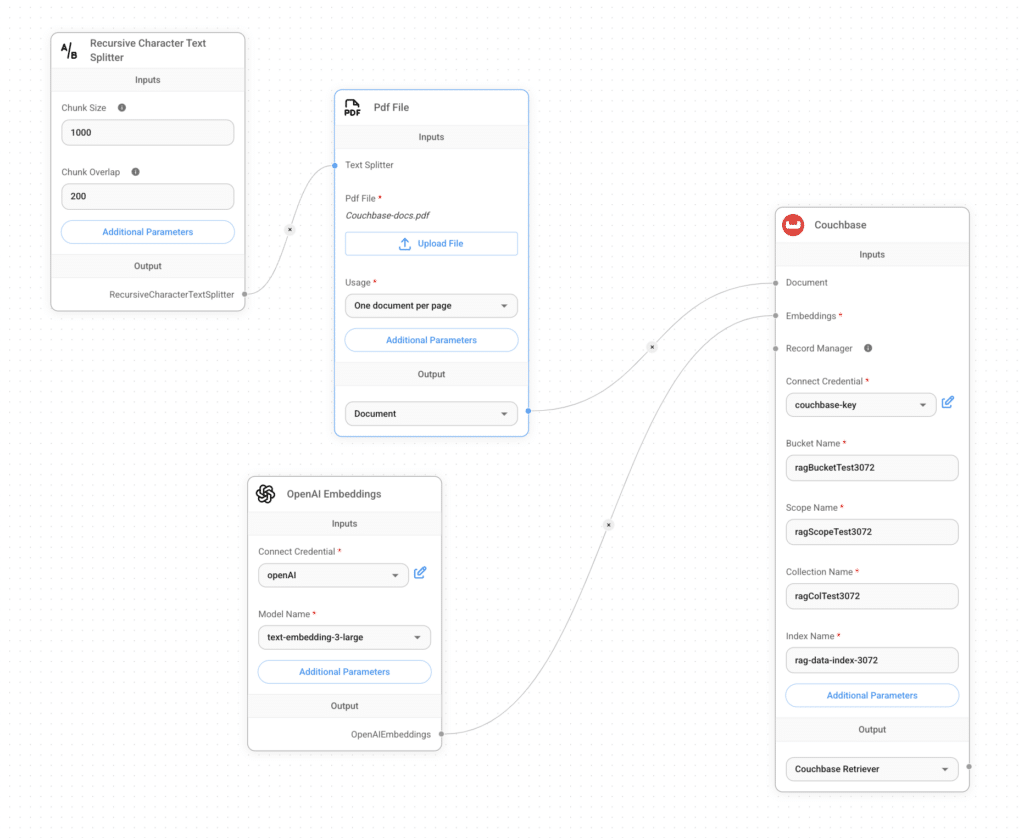
Now that the data is stored, we can query it using the following Flowise setup!
2. Start Querying!
To query data from Couchbase, drag and connect the following nodes on the Flowise canvas:
- Couchbase Retriever: Fetches relevant document chunks using vector search.
- ChatOpenAI: Processes the retrieved context and generates responses (e.g., GPT-4o).
- Conversational Retrieval QA Chain: Handles multi-turn interactions, ensuring accurate and contextual responses.
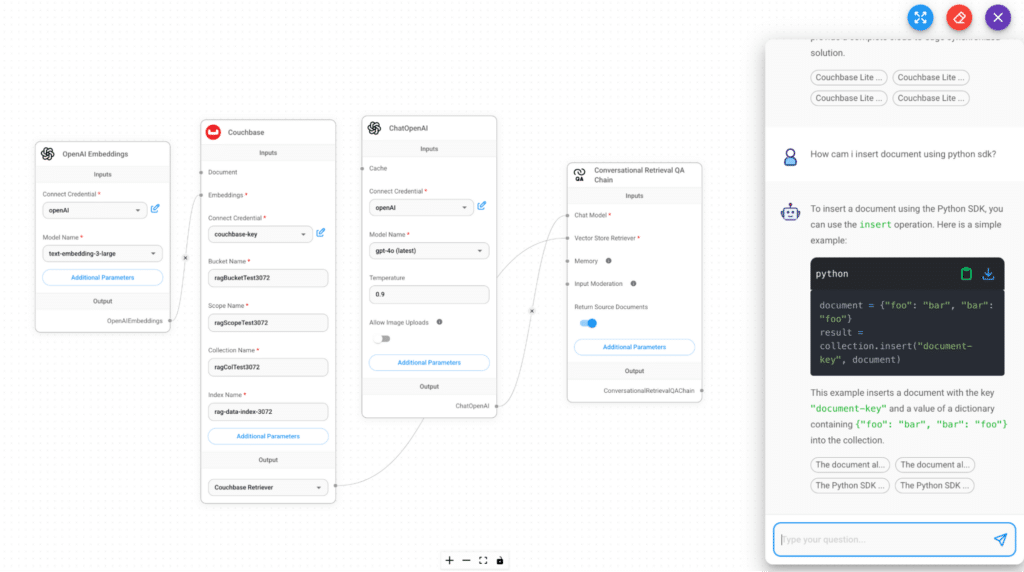
Now, the RAG pipeline is ready to answer queries using stored knowledge!
Conclusão
This integration enables seamless querying of stored knowledge using Couchbase’s high-performance vector storage and Flowise’s low code tool capabilities. By leveraging embeddings, retrieval, and AI-powered responses, you can build scalable, intelligent applications with ease. Whether you’re working on semantic search, rag applications, or other AI-driven use cases, this setup ensures efficiency and accuracy.
Próximos passos
Mais informações estão disponíveis no Flowise AI Documentation, incluindo um guia de integração para Couchbase.
Bom divertimento na programação!

Deixe um comentário
Você precisa fazer o login para publicar um comentário.