
Aaron Benton is an experienced architect who specializes in creative solutions to develop innovative mobile applications. He has over 10 years experience in full stack development, including ColdFusion, SQL, NoSQL, JavaScript, HTML, and CSS. Aaron is currently an Applications Architect for Shop.com in Greensboro, North Carolina and is a Couchbase Community Champion.

FakeIt Série 4 de 5: Trabalhando com Dados Existentes
So far in our FakeIt series we’ve seen how we can Generate Fake Data, Share Data and Dependencies, and use Definitions for smaller models. Today we are going to look at the last major feature of FakeIt, which is working with existing data through inputs.
Rarely as developers do we get the advantage of working on greenfield applications, our domains are more often than not a comprised of different legacy databases and applications. As we are modeling and building new applications, we need to reference and use this existing data. FakeIt allows you to provide existing data to your models through JSON, CSV or CSON files. This data is exposed as an inputs variable in each of a models *run and *build functions.
Users Model
We will start with our users.yaml model that we updated to in our most recent post to use Address e Phone definitions.
|
1 2 3 4 5 6 7 8 9 10 11 12 13 14 15 16 17 18 19 20 21 22 23 24 25 26 27 28 29 30 31 32 33 34 35 36 37 38 39 40 41 42 43 44 45 46 47 48 49 50 51 52 53 54 55 56 57 58 59 60 61 62 63 64 65 66 67 68 69 70 71 72 73 74 75 76 77 78 79 80 81 82 83 84 85 86 87 88 89 90 91 92 93 94 95 96 97 98 99 100 101 102 103 104 105 106 107 108 109 110 111 112 113 114 115 116 117 118 119 120 121 122 123 124 125 126 127 128 129 130 131 132 |
nome: Users tipo: object chave: _id dados: min: 1000 max: 2000 properties: _id: tipo: string descrição: A documento identidade built by o prefixo “user_” e o users identidade dados: post_build: “`user_${this.user_id}`” doc_type: tipo: string descrição: A documento tipo dados: value: “usuário” ID do usuário: tipo: integer descrição: Um auto–incrementing number dados: build: documento_index first_name: tipo: string descrição: A users first nome dados: build: faker.nome.firstName() last_name: tipo: string descrição: A users last nome dados: build: faker.nome.lastName() nome de usuário: tipo: string descrição: A nome de usuário dados: build: faker.internet.userName() senha: tipo: string descrição: A users senha dados: build: faker.internet.senha() email_address: tipo: string descrição: A users e-mail endereço dados: build: faker.internet.e-mail() created_on: tipo: integer descrição: Um epoch tempo de when o usuário was created dados: build: novo Data(faker.data.past()).getTime() addresses: tipo: object descrição: Um object containing o home e work addresses para o usuário properties: home: descrição: A users home endereço schema: $ref: ‘#/definitions/Address’ work: descrição: A users work endereço schema: $ref: ‘#/definitions/Address’ main_phone: descrição: A users main phone number schema: $ref: ‘#/definitions/Phone’ dados: post_build: | delete this.main_phone.tipo retornar this.main_phone additional_phones: tipo: vetor descrição: A users additional phone numbers items: $ref: ‘#/definitions/Phone’ dados: min: 1 max: 4 definitions: Phone: tipo: object properties: tipo: tipo: string descrição: A phone tipo dados: build: faker.random.arrayElement([ ‘Home’, ‘Work’, ‘Mobile’, ‘Other’ ]) phone_number: tipo: string descrição: A phone number dados: build: faker.phone.phoneNumber().substituir(/[^0–9]+/g, ”) extension: tipo: string descrição: A phone extension dados: build: chance.bool({ likelihood: 30 }) ? chance.integer({ min: 1000, max: 9999 }) : nulo Address: tipo: object properties: address_1: tipo: string descrição: A endereço 1 dados: build: `${faker.endereço.streetAddress()} ${faker.endereço.streetSuffix()}` address_2: tipo: string descrição: A endereço 2 dados: build: chance.bool({ likelihood: 35 }) ? faker.endereço.secondaryAddress() : nulo locality: tipo: string descrição: A cidade / locality dados: build: faker.endereço.cidade() region: tipo: string descrição: A region / state / province dados: build: faker.endereço.stateAbbr() postal_code: tipo: string descrição: A compactar code / postal code dados: build: faker.endereço.zipCode() country: tipo: string descrição: A country code dados: build: faker.endereço.countryCode() |
Currently, our Address definition is generating a random country. What if our ecommerce site only supports a small subset of the 195 countries? Let’s say we support six countries to start with: US, CA, MX, UK, ES, DE. We could update the definitions country property to grab a random array element:
(For brevity the other properties have been left off of the model definition)
|
1 2 3 4 5 6 |
... country: tipo: string descrição: A country code dados: build: faker.random.arrayElement([‘US’, ‘CA’, ‘MX’, ‘UK’, ‘ES’, ‘DE’]); |
While this would work, what if we have other models that rely on this same country info, we would have to duplicate this logic. We can achieve this same thing by creating a countries.json file, and adding an inputs property to the data property that can be an absolute or relative path to our input. When are model is generated, our countries.json file will be exposed to each of the models build functions via the inputs argument as inputs.countries
(For brevity the other properties have been left off of the model definition)
|
1 2 3 4 5 6 7 8 9 10 11 12 13 14 15 16 17 18 19 20 21 22 23 24 25 26 27 |
nome: Users tipo: object chave: _id dados: min: 1000 max: 2000 inputs: ./countries.json properties: ... definitions: ... country: tipo: string descrição: A country code dados: build: faker.random.arrayElement(inputs.countries); countries.json [ “US”, “CA”, “MX”, “UK”, “ES”, “DE” ] |
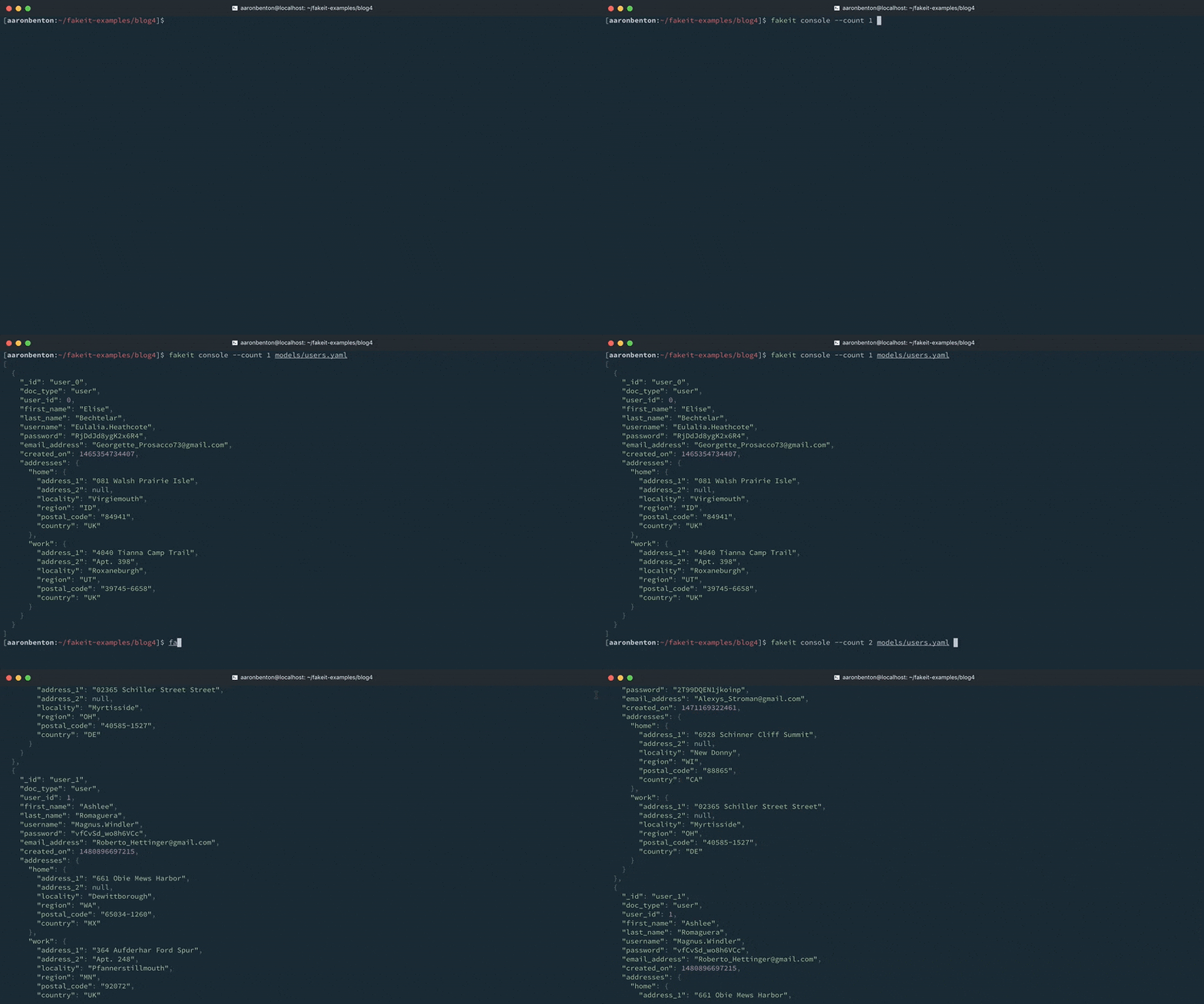
By changing one existing line and adding another line in model we have provided existing data to our Users model. We can still generate a random country, based on the countries our application supports. Lets test our changes by using the following command:
|
1 |
fingir console —count 1 models/users.yaml |
Products Model
Our ecommerce application is using a separate system for categorization, we need to expose that data to our randomly generated products so that we are using valid category information. We will start with the products.yaml that we defined in the FakeIt Series 2 of 5: Shared Data and Dependencies post.
|
1 2 3 4 5 6 7 8 9 10 11 12 13 14 15 16 17 18 19 20 21 22 23 24 25 26 27 28 29 30 31 32 33 34 35 36 37 38 39 40 41 42 43 44 45 46 47 48 49 50 51 52 53 54 55 56 57 58 59 60 61 62 63 64 65 66 67 68 69 70 71 72 73 74 75 76 77 78 79 80 81 82 83 84 85 86 87 88 89 90 91 92 93 94 95 96 97 98 99 100 101 102 103 104 105 106 107 108 |
produtos.yaml nome: Produtos tipo: object chave: _id dados: min: 4000 max: 5000 properties: _id: tipo: string descrição: A documento identidade dados: post_build: `product_${this.product_id}` doc_type: tipo: string descrição: A documento tipo dados: value: product product_id: tipo: string descrição: Unique identificador representing a specific product dados: build: faker.random.uuid() preço: tipo: double descrição: A product preço dados: build: chance.floating({ min: 0, max: 150, fixed: 2 }) sale_price: tipo: double descrição: A product preço dados: post_build: | deixar sale_price = 0; se (chance.bool({ likelihood: 30 })) { sale_price = chance.floating({ min: 0, max: this.price * chance.floating({ min: 0, max: 0.99, fixed: 2 }), fixed: 2 }); } retornar sale_price; display_name: tipo: string descrição: Display nome de product. dados: build: faker.commerce.productName() short_description: tipo: string descrição: Descrição de product. dados: build: faker.lorem.paragraphs(1) long_description: tipo: string descrição: Descrição de product. dados: build: faker.lorem.paragraphs(5) keywords: tipo: vetor descrição: Um vetor de keywords items: tipo: string dados: min: 0 max: 10 build: faker.random.word() availability: tipo: string descrição: A availability status de o product dados: build: | deixar availability = ‘In-Stock’; se (chance.bool({ likelihood: 40 })) { availability = faker.random.arrayElement([ ‘Preorder’, ‘Out of Stock’, ‘Discontinued’ ]); } retornar availability; availability_date: tipo: integer descrição: Um epoch tempo de when o product é available dados: build: faker.data.recent() post_build: novo Data(this.availability_date).getTime() product_slug: tipo: string descrição: A URL friendly versão de o product nome dados: post_build: faker.helpers.slugify(this.display_name).toLowerCase() categoria: tipo: string descrição: Category para o Product dados: build: faker.commerce.department() category_slug: tipo: string descrição: A URL friendly versão de o categoria nome dados: post_build: faker.helpers.slugify(this.categoria).toLowerCase() image: tipo: string descrição: Image URL representing o product. dados: build: faker.image.image() alternate_images: tipo: vetor descrição: Um vetor de alternate imagens para o product items: tipo: string dados: min: 0 max: 4 build: faker.image.image() |
Our existing categories data has been provided in CSV format.
|
1 2 3 4 5 6 7 8 9 10 11 12 13 14 15 |
categories.csv “category_id”,“category_name”,“category_slug” 23,“Electronics”,“electronics” 1032,“Office Supplies”,“office-supplies” 983,“Clothing & Apparel”,“clothing-and-apparel” 483,“Movies, Music & Books”,“movies-music-and-books” 3023,“Sports & Fitness”,“sports-and-fitness” 4935,“Automotive”,“automotive” 923,“Tools”,“tools” 5782,“Home Furniture”,“home-furniture” 9783,“Health & Beauty”,“health-and-beauty” 2537,“Toys”,“toys” 10,“Video Games”,“video-games” 736,“Pet Supplies”,“pet-supplies” |
Now we need to update our products.yaml model to use this existing data.
(For brevity the other properties have been left off of the model definition)
|
1 2 3 4 5 6 7 8 9 10 11 12 13 14 15 16 17 18 19 20 21 22 23 24 25 26 27 |
nome: Produtos tipo: object chave: _id dados: min: 4000 max: 5000 inputs: – ./categories.csv pre_build: globals.current_category = faker.random.arrayElement(inputs.categories); properties: ... category_id: tipo: integer descrição: A Category ID para o Product dados: build: globals.current_category.categoria_identidade categoria: tipo: string descrição: Category para o Product dados: build: globals.current_category.categoria_nome category_slug: tipo: string descrição: A URL friendly versão de o categoria nome dados: post_build: globals.current_category.categoria_slug ... |
There are a few things to notice about how we’ve updated our products.yaml model.
- inputs: is defined as an array not a string. While we are only using a single input, you can provide as many input files to your model as necessary.
- A pre_build function is defined at the root of the model. This is because we cannot grab a random array element for each of our three category properties as the values would not match. Each time an individual document is generated for our model, this pre_build function will run first.
- Each of our category properties build functions reference the global variable set by the pre_build function on our model.
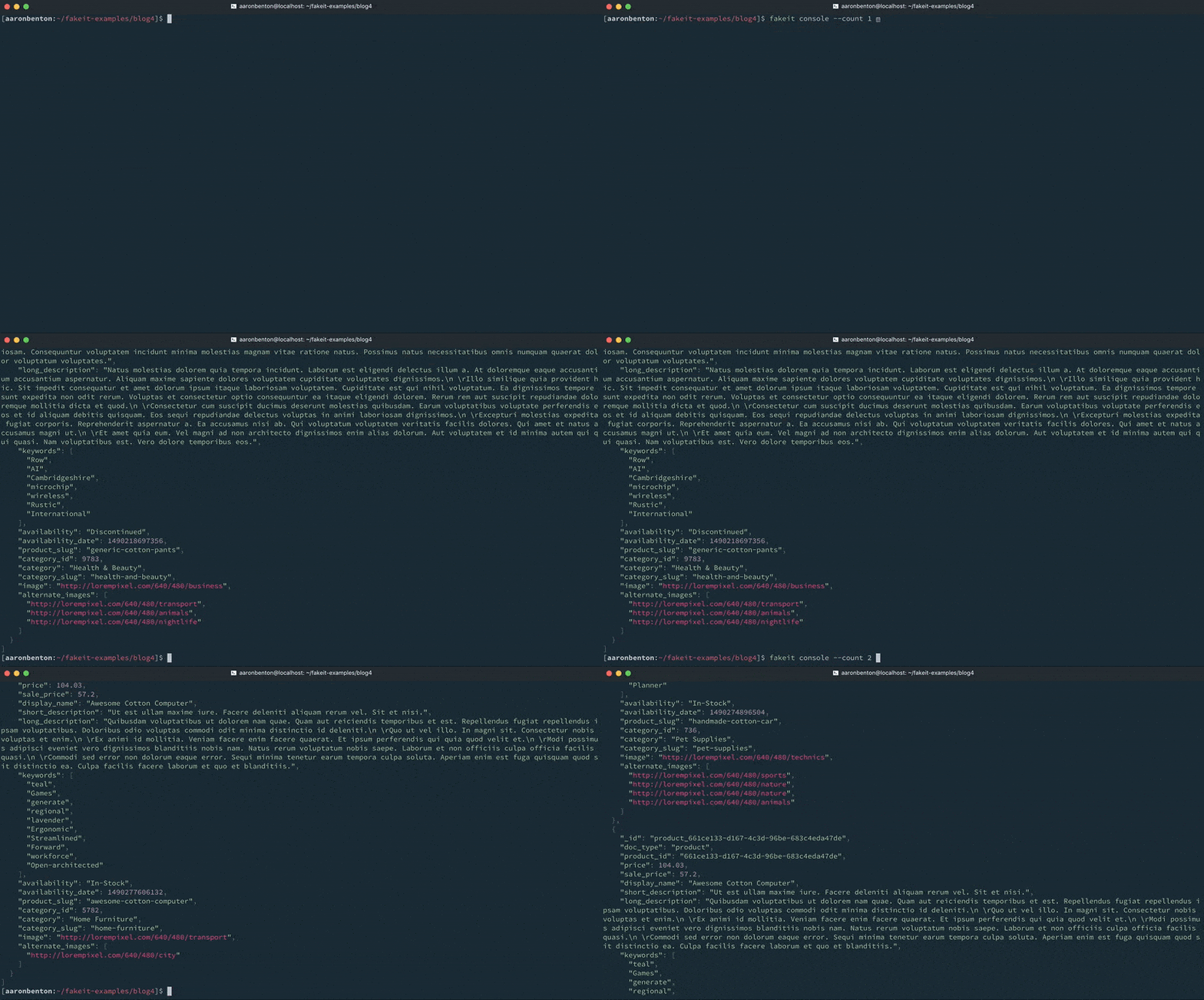
We can test our changes by using the following command:
|
1 |
fingir console —count 1 models/produtos.yaml |
Conclusão
Being able to work with existing data is an extremely powerful feature of FakeIt. It can be used to maintain the integrity of randomly generated documents to work with existing system, and can even be used to transform existing data and import it into Couchbase Server.
Up Next
Previous
- FakeIt Series 1 of 5: Generating Fake Data
- FakeIt Series 2 of 5: Shared Data and Dependencies
- FakeIt Series 3 of 5: Lean Models through Definitions

This post is part of the Couchbase Community Writing Program

Deixe um comentário
Você precisa fazer o login para publicar um comentário.