real-time analytics for apps and ai agents
Couchbase Operational Insights
Couchbase Analytics is now Couchbase Operational Insights: real-time analytics on live operational data, with results written straight back to the apps and AI agents that act on them.

Where traditional analytics falls short
Most analytics runs on a copy of yesterday’s data. Hand that answer to an AI agent and it takes the wrong action, confidently and at scale.

Stale on arrival
Every pipeline hop adds delay, so real time turns into hours and decisions run on last night’s copy.

Brittle by design
ETL pipelines break when an app adds a field or changes a document, and someone has to fix them by hand.

One-way by default
Insights stay in the warehouse. Getting them back to apps and agents takes a reverse ETL job or a script.

Heavy queries slow production
Run analysis on the operational database instead, and the customers using your apps feel the slowdown.
What is Couchbase Operational Insights?
Real-time analytics built into the Operational Data Platform for AI®. It analyzes live operational data and puts the answer where apps and agents act.
Operational Insights mirrors operational data as it changes. Data streams in from Couchbase Capella and Couchbase Server, from MongoDB, DynamoDB, PostgreSQL, MySQL, Oracle, and SQL Server through Kafka, and from JSON, Parquet, Avro, CSV, and Delta Lake files in cloud storage. No nightly copy, and no pipeline to rebuild when a document changes shape.
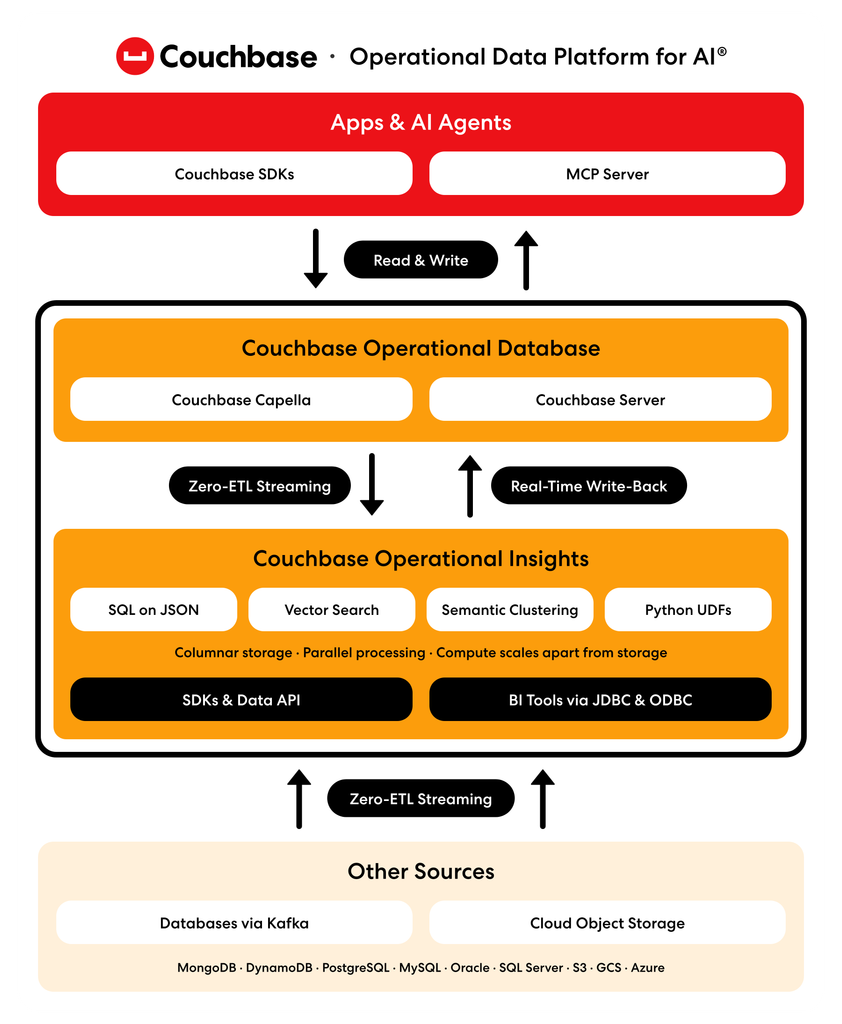
Analysis runs on its own cluster, so heavy queries never slow the apps your customers use. Compute scales apart from storage, which sits in object storage, so you add capacity without moving data. Underneath, JSON is stored column by column and queries run in parallel across nodes, planned by a cost-based optimizer.
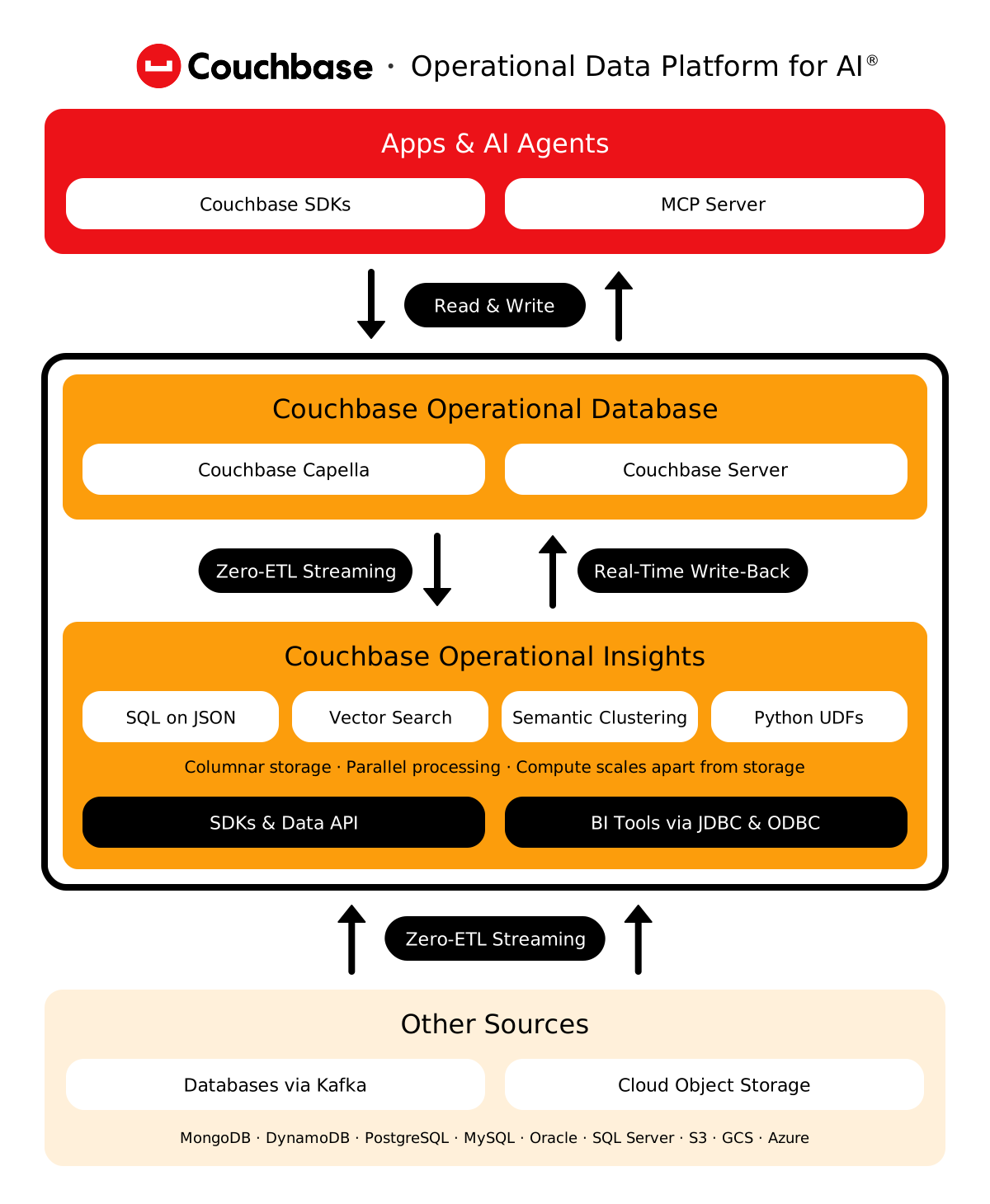
An insight pays off when something acts on it. Write the results of any SQL++ query straight back into the operational database your apps and agents already read: churn and fraud scores, customer segments, cluster labels, KPIs, and next-best offers. There’s no reverse ETL and no hand-off, so the answer is ready on the next read.
For self-managed deployments, group records by exact value or by meaning with semantic clustering, built on native vector search. Cluster reviews, tickets, or claims into themes, and aggregate them in the same SQL query. Vector support and SQL enables exact search for precision and approximate search for speed.
Stats and benchmarks
~100×
lower analytical query latency vs. MongoDB Atlas (CH2++ 2025)
22/22
CH2++ queries completed. MongoDB Atlas timed out on 8 of 22.



HOW IT WORKS
One closed loop, from data to decision
Operational Insights covers every step between a change in your data and the action an app or agent takes on it.
- Ingest
- Analyze
- Cluster
- Act
Stream changes in from Couchbase, other databases, and cloud storage as they happen, with no ETL pipeline to build or babysit.
Operational Insights capabilities
Zero ETL ingestion
Stream data from Couchbase, MongoDB, DynamoDB, PostgreSQL, MySQL, Oracle, and SQL Server via Kafka, and read files on S3, GCS, and Azure.
Query nested JSON in place with SQL++, joining live operational data with historical and external sources in one query.
Operational Insights capabilities
SQL on JSON
Joins and aggregations on nested JSON with no flattening. In self-managed, add custom logic with Python UDFs and run several steps per request.
Group data by meaning and field with semantic clustering and vector search, then aggregate it in the same query (self-managed).
Operational Insights capabilities
Semantic clustering and vector search
CLUSTER BY groups records by meaning in SQL++. Run exact (KNN) vector search or approximate (ANN) search on a VTREE index (self-managed).
Write results straight back to the operational database, so apps and agents act on them with the very next read.
Operational Insights capabilities
リアルタイム・ライトバック
Write the results of any SQL++ query to Couchbase Capella, Couchbase Server, or cloud file stores. No reverse ETL.
- Data flow
- Vector indexing
建築
How Operational Insights works
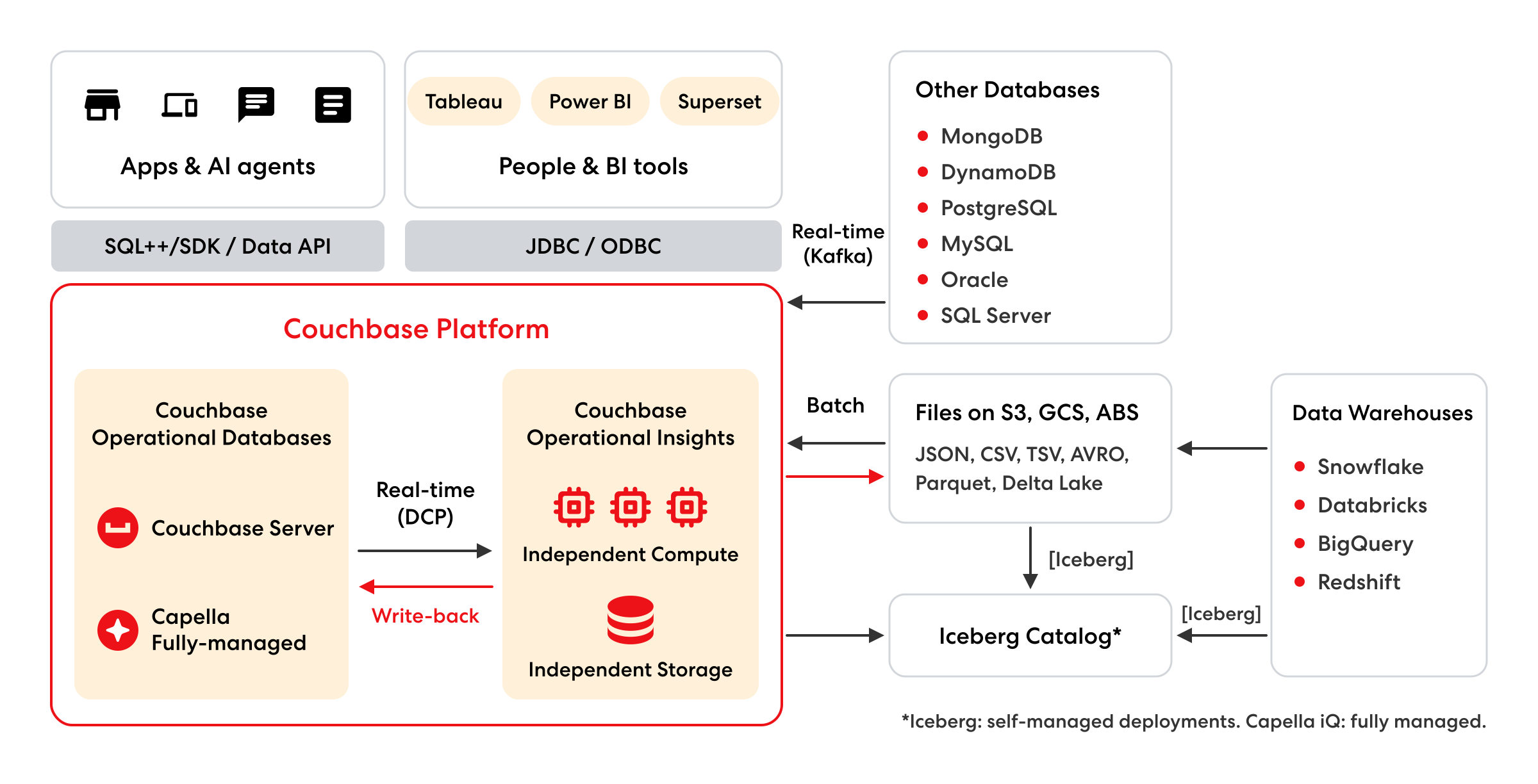
Fast ingestion
Real-time streams from Couchbase Capella and Couchbase Server, Kafka feeds from MongoDB, DynamoDB, PostgreSQL, MySQL, Oracle, and SQL Server, and files in S3, GCS, and Azure.
Speed and scale
Column-wise storage, parallel processing, and compute that scales apart from storage, so analysis never competes with your apps for resources.
Real-time analysis
SQL++, vector search and semantic clustering for apps and agents through SDKs and the Data API, plus Tableau, Power BI, and Superset over JDBC and ODBC.
Write-back
Results go back to Couchbase Capella, Couchbase Server, or cloud file stores, ready for apps and agents on the next read.
VECTOR SEARCH
How vector search queries work
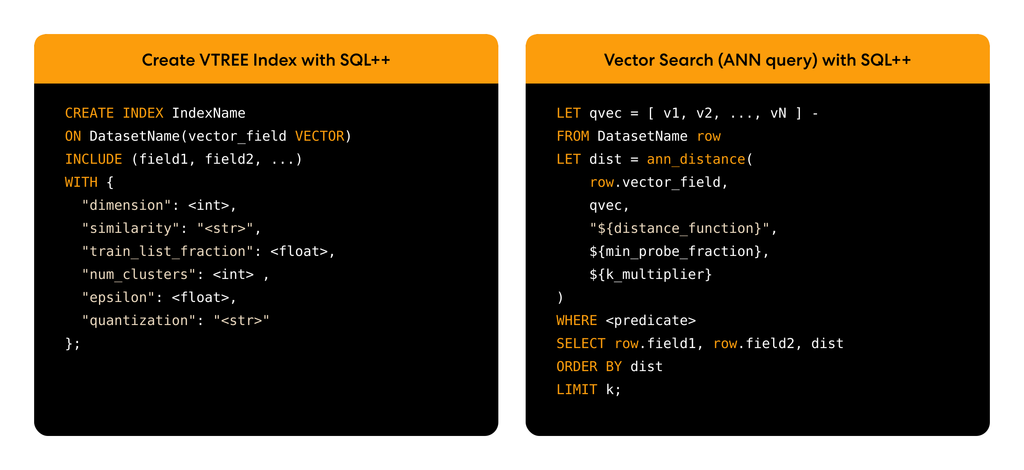
Vector storage
Embeddings live in JSON documents next to the data they describe, so vectors and records stay in one place.
VTREE index
Groups similar vectors into leaf clusters that a search can probe directly. Optional SQ4 or SQ8 quantization compresses stored vectors.
Exact search (KNN)
Compares the query with every stored vector. Precise, but slower as data grows.
Approximate search (ANN)
Uses the index to narrow to likely matches first. Much faster at scale, with settings that trade recall for cost. The same vectors power semantic clustering.
UNDER THE HOOD
Built for constant, concurrent questions
AI agents ask constantly, and often all at once. Hash-based aggregation computes DISTINCT counts in a single pass. Query plan caching reuses the best plan when a question repeats. Sampled optimizer statistics skip full-table scans, so stats collection scales with your data.
One product, two ways to run it
FULLY MANAGED
On Couchbase Capella
Run Operational Insights as a service on AWS, Google Cloud, or Azure (select regions). Ask questions in plain English with Capella iQ, turn clusters off on demand or on a schedule and pay only for storage while off, and let Couchbase handle backup, monitoring, and alerts.
SELF-MANAGED
Wherever you run it
Deploy on premises or in your own AWS, Azure, Google Cloud, or OCI account, on x86 or ARM with S3-compatible object storage. Query Apache Iceberg tables in place through open REST catalogs, and send Prometheus-ready metrics to the monitoring tools you already use.
Operational Insights (formerly Analytics) FAQ
Get quick answers about real-time analytics, zero ETL, write-back, AI agents, and deployment options.
Couchbase Operational Insights is real-time analytics built into the Couchbase platform. It queries live operational JSON data with SQL++ and writes results back for apps and AI agents to use.
Yes. In October 2026, Couchbase Analytics became Couchbase Operational Insights. Capella Analytics and Enterprise Analytics are now Operational Insights, fully managed or self-managed.
No. Data streams in continuously from Couchbase, from other databases through Kafka, and from cloud object storage. It’s ready to query as it changes, with no ETL pipeline or predefined schema.
No. A warehouse reports on what happened across the business. Operational Insights analyzes what’s happening now and writes the answer back to the app. Many teams run both, each for its own job.
Results written back to the operational database become live context that agents reach through the Couchbase MCP Server. Semantic clustering and vector search run in SQL++.
Yes. Run it self-managed on premises or in your own cloud, or fully managed on Couchbase Capella, with the same engine and SQL++. Apache Iceberg is self-managed only; Capella iQ is fully managed only.
Keep exploring
-

See Operational Insights in action
Watch how real-time analytics and write-back give AI agents current context.
-
Why AI agents get stuck in pilot
Learn why agents need fresh, governed context to move from pilot to production.
-

Get started in the docs
Set up Operational Insights, managed or self-managed, and run your first query.