É uma experiência comum se deparar com erros de conexão de rede quando estiver desenvolvendo um aplicativo, principalmente se estiver se conectando do SDK do seu computador local a um cluster remoto.
Seu SDK não está conectado? É provável que você se depare com situações em que seu aplicativo pode se conectar ao servidor, mas você recebe erros relacionados à conexão de rede ou aos endereços IP entre os nós ou seu aplicativo e o SDK do Couchbase.
Este artigo discute como você pode solucionar e corrigir esses erros. O exemplo que apresentaremos a seguir cria um cluster no Azure para demonstrar as condições iniciais, mas também deve ser aplicável a outras instalações.
Examinaremos cada etapa para reproduzir o erro. Primeiro, instalaremos o Couchbase no Azure, execute o SDK Doctor para ver como o erro se manifesta, atualize os endereços alternativos e, por fim, execute o SDK Doctor novamente para ver a resposta bem-sucedida.
Muito bem, vamos nos aprofundar.
Instalar seu cluster do Couchbase no Azure
Aqui estão as etapas para instalar um cluster do Couchbase no Azure.
- Faça login em o Microsoft Azure Marketplace
- Busca por Couchbase
- Escolha o Couchbase Server e o Sync Gateway
- Clique em Get It Now
- Escolha BYOL
- Clique em Continuar
- Clique em Criar
- Preencher o formulário
- Admin:
asdf88495< Atualize isso conforme apropriado - Senha:
Senha1!@#$< Atualize isso conforme apropriado - Preencher os formulários de configuração conforme apropriado
- Clique em Criar
O processo é executado e tem a seguinte aparência após a conclusão de todas as etapas:

Atualizar regras de firewall
É provável que você precise atualizar as regras de firewall para permitir que seu computador local se conecte ao cluster remoto do Azure. Aqui estão as etapas:
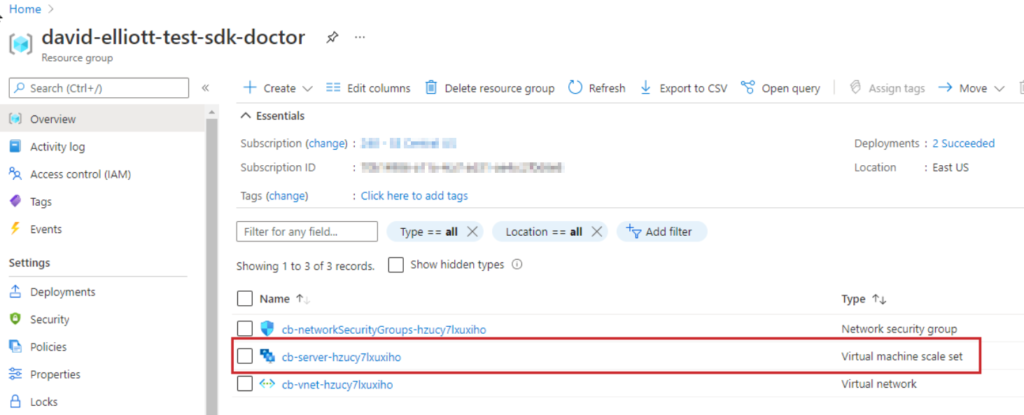
1. Ir para o grupo de recursos
2. Clique em Virtual machine scale set

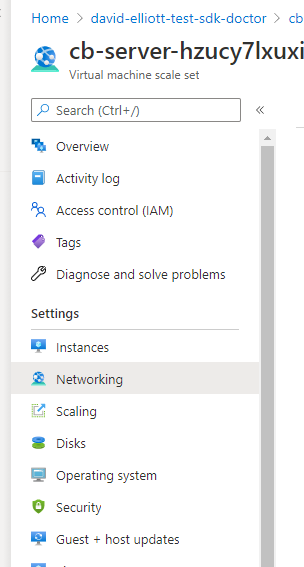
3. Clique em Rede

4. Clique em Add inbound port rule (Adicionar regra de porta de entrada)

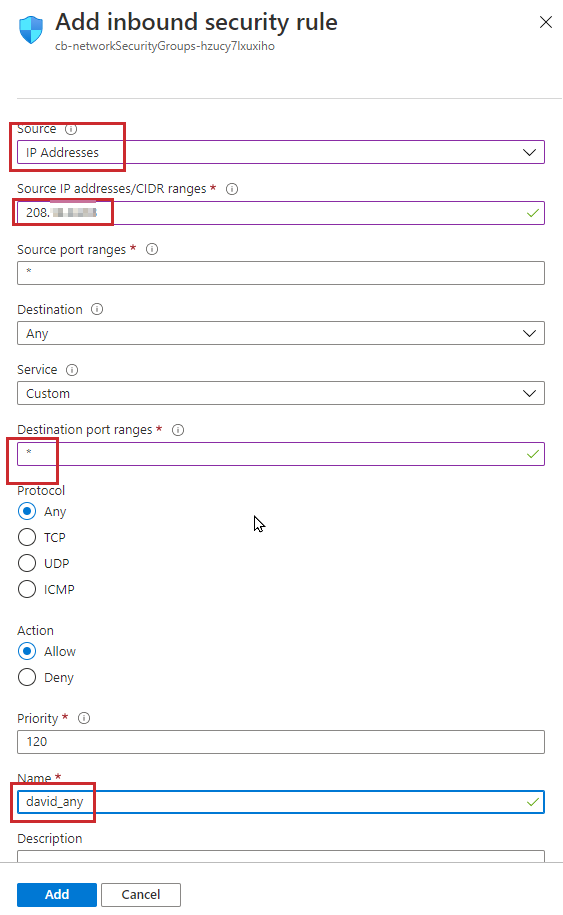
5. Atualize a configuração para usar as informações de sua rede local. Aviso: Isso é muito aberto para os fins desta demonstração; você deve seguir suas diretrizes de segurança ao configurar o firewall.
Confirme se o Couchbase está funcionando
Sua próxima etapa importante é confirmar que o Couchbase está funcionando. Veja como fazer isso:
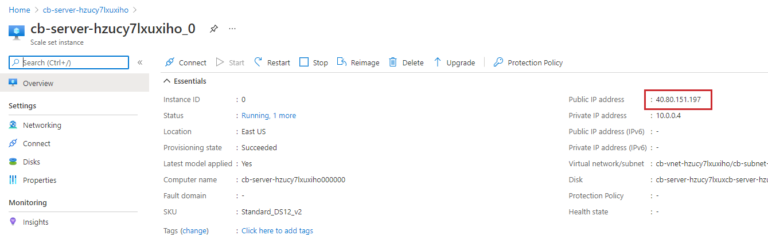
1. Vá para instâncias para obter um endereço IP e conecte-se ao painel de controle do Couchbase.
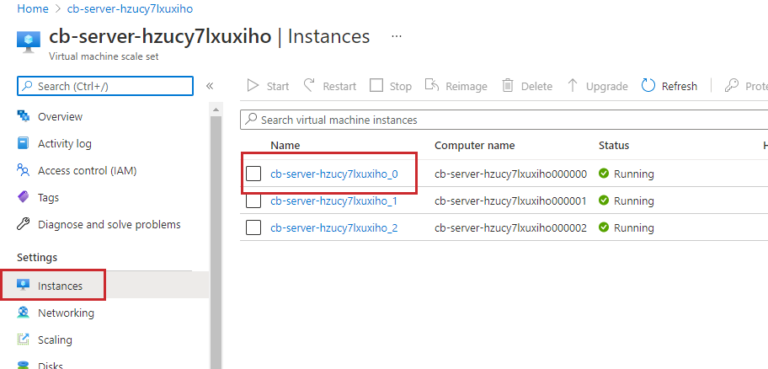
2. Obtenha o endereço IP de um de seus servidores.

3. Neste exemplo, o login é https://40.80.151.197:8091/ui/index.html.
4. Faça login com as informações usadas para criar a conta de administrador na seção "Instalar o cluster do Couchbase no Azure" acima. Foi aqui que você criou o cluster no Azure e preencheu o formulário.
5. No Couchbase, adicione dados de amostra para usar nesta demonstração. Siga a seção instruções na documentação do Couchbase para adicionar dados de buckets de amostra.
Apresentando o SDK Doctor
O Couchbase SDK doctor é uma ferramenta para diagnosticar problemas de conectividade no lado do servidor do aplicativo com o cluster do Couchbase. Ele faz as mesmas conexões com o Servidor Couchbase que os SDKs do Couchbase fazem durante a inicialização e, em seguida, relata o estado das conexões feitas, fornecendo informações de diagnóstico que o ajudam a resolver problemas de rede complexos.
Aqui está o conjunto completo de instruções para usar o SDK Doctor com o Couchbase Server.
1. Executando o SDK Doctor para detectar erros
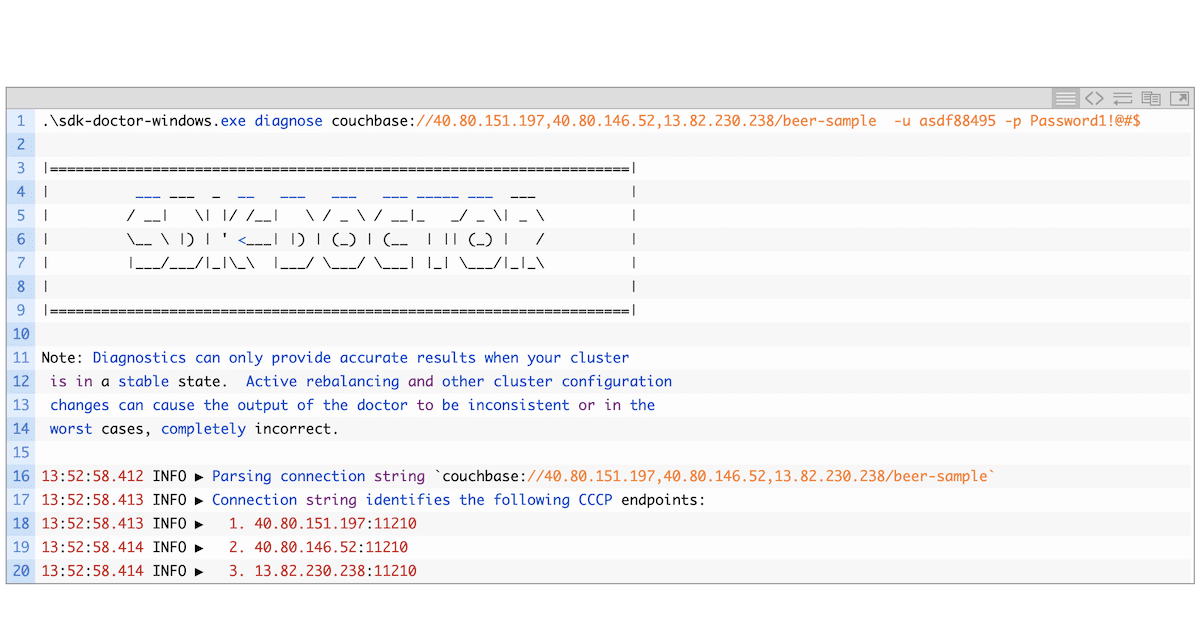
Seguindo as instruções acima, onde você coletou o endereço IP do seu cluster do Couchbase, obtenha também os endereços IP de cada um dos outros nós do seu cluster. Você usará os endereços IP na string de conexão para o SDK Doctor.
O comando abaixo usa os endereços IP dos nós em seu cluster, além do nome do bucket de dados de amostra. Você precisará atualizar essas informações com base nos IPs do seu próprio cluster e no bucket de amostra específico que instalou.
Agora, execute o SDK Doctor.
Você provavelmente receberá várias mensagens de erro, como pode ver abaixo, especialmente se estiver executando o SDK Doctor em um computador local e não na mesma rede que os nós/cluster/VMs. Você verá a mensagem ERRO e Falha na conexão mensagens. Observe que os endereços IP são os 10 endereços internos, não os 40 ou 13.
Talvez seja necessário clicar duas vezes no exemplo de código abaixo para ver a saída completa (dependendo do seu dispositivo).
|
1 2 3 4 5 6 7 8 9 10 11 12 13 14 15 16 17 18 19 20 21 22 23 24 25 26 27 28 29 30 31 32 33 34 35 36 37 38 39 40 41 42 43 44 45 46 47 48 49 50 51 52 53 54 55 56 57 58 59 60 61 62 63 64 65 66 67 68 69 70 71 72 73 74 75 76 77 78 79 80 81 82 83 84 85 86 87 88 89 90 91 92 93 94 95 96 97 98 99 100 101 102 103 104 105 106 107 108 109 110 111 112 113 114 115 116 117 118 119 |
.\sdk-doctor-windows.exe diagnose couchbase://40.80.151.197,40.80.146.52,13.82.230.238/beer-sample -u asdf88495 -p Password1!@#$ |====================================================================| | ___ ___ _ __ ___ ___ ___ _____ ___ ___ | | / __| \| |/ /__| \ / _ \ / __|_ _/ _ \| _ \ | | \__ \ |) | ' <___| |) | (_) | (__ | || (_) | / | | |___/___/|_|\_\ |___/ \___/ \___| |_| \___/|_|_\ | | | |====================================================================| Note: Diagnostics can only provide accurate results when your cluster is in a stable state. Active rebalancing and other cluster configuration changes can cause the output of the doctor to be inconsistent or in the worst cases, completely incorrect. 13:52:58.412 INFO ▶ Parsing connection string `couchbase://40.80.151.197,40.80.146.52,13.82.230.238/beer-sample` 13:52:58.413 INFO ▶ Connection string identifies the following CCCP endpoints: 13:52:58.413 INFO ▶ 1. 40.80.151.197:11210 13:52:58.414 INFO ▶ 2. 40.80.146.52:11210 13:52:58.414 INFO ▶ 3. 13.82.230.238:11210 13:52:58.414 INFO ▶ Connection string identifies the following HTTP endpoints: 13:52:58.414 INFO ▶ 1. 40.80.151.197:8091 13:52:58.414 INFO ▶ 2. 40.80.146.52:8091 13:52:58.414 INFO ▶ 3. 13.82.230.238:8091 13:52:58.415 INFO ▶ Connection string specifies bucket `beer-sample` 13:52:58.415 INFO ▶ Performing DNS lookup for host `40.80.151.197` 13:52:58.415 INFO ▶ Performing DNS lookup for host `40.80.146.52` 13:52:58.415 INFO ▶ Performing DNS lookup for host `13.82.230.238` 13:52:58.415 INFO ▶ Attempting to connect to cluster via CCCP 13:52:58.416 INFO ▶ Attempting to fetch config via cccp from `40.80.151.197:11210` 13:52:58.631 INFO ▶ Attempting to fetch config via cccp from `40.80.146.52:11210` 13:52:58.846 INFO ▶ Attempting to fetch config via cccp from `13.82.230.238:11210` 13:52:59.076 WARN ▶ Bootstrap host `40.80.151.197` is not using the canonical node hostname of `10.0.0.4`. This is not necessarily an error, but has been known to result in strange and challenging to diagnose errors when DNS entries are reconfigured. 13:52:59.077 WARN ▶ Bootstrap host `40.80.146.52` is not using the canonical node hostname of `10.0.0.5`. This is not neccessarily an error, but has been known to result in strange and challenging to diagnose errors when DNS entries are reconfigured. 13:52:59.079 WARN ▶ Bootstrap host `13.82.230.238` is not using the canonical node hostname of `10.0.0.6`. This is not neccessarily an error, but has been known to result in strange and challenging to diagnose errors when DNS entries are reconfigured. 13:52:59.080 INFO ▶ Selected the following network type: default 13:52:59.080 INFO ▶ Identified the following nodes: 13:52:59.081 INFO ▶ [0] 10.0.0.4 13:52:59.081 INFO ▶ indexScan: 9101, indexStreamInit: 9103, indexStreamCatchup: 9104 13:52:59.081 INFO ▶ kvSSL: 11207, projector: 9999, mgmt: 8091 13:52:59.082 INFO ▶ mgmtSSL: 18091, indexAdmin: 9100, n1ql: 8093 13:52:59.082 INFO ▶ indexHttp: 9102, indexHttps: 19102, kv: 11210 13:52:59.083 INFO ▶ cbas: 8095, eventingSSL: 18096, ftsGRPCSSL: 19130 13:52:59.083 INFO ▶ ftsSSL: 18094, ftsGRPC: 9130, indexStreamMaint: 9105 13:52:59.084 INFO ▶ capi: 8092, n1qlSSL: 18093, cbasSSL: 18095 13:52:59.084 INFO ▶ eventingDebug: 9140, fts: 8094, eventingAdminPort: 8096 13:52:59.085 INFO ▶ capiSSL: 18092 13:52:59.085 INFO ▶ [1] 10.0.0.5 13:52:59.086 INFO ▶ ftsGRPCSSL: 19130, indexHttps: 19102, cbas: 8095 13:52:59.086 INFO ▶ eventingAdminPort: 8096, eventingDebug: 9140, indexAdmin: 9100 13:52:59.087 INFO ▶ indexStreamInit: 9103, indexStreamMaint: 9105, mgmtSSL: 18091 13:52:59.087 INFO ▶ cbasSSL: 18095, ftsSSL: 18094, n1ql: 8093 13:52:59.088 INFO ▶ kv: 11210, capi: 8092, capiSSL: 18092 13:52:59.088 INFO ▶ ftsGRPC: 9130, indexScan: 9101, indexHttp: 9102 13:52:59.089 INFO ▶ indexStreamCatchup: 9104, kvSSL: 11207, mgmt: 8091 13:52:59.089 INFO ▶ eventingSSL: 18096, fts: 8094, projector: 9999 13:52:59.089 INFO ▶ n1qlSSL: 18093 13:52:59.090 INFO ▶ [2] 10.0.0.6 13:52:59.090 INFO ▶ mgmtSSL: 18091, cbas: 8095, cbasSSL: 18095 13:52:59.091 INFO ▶ eventingAdminPort: 8096, ftsSSL: 18094, indexAdmin: 9100 13:52:59.091 INFO ▶ indexStreamCatchup: 9104, capi: 8092, ftsGRPC: 9130 13:52:59.092 INFO ▶ indexHttp: 9102, indexStreamMaint: 9105, kvSSL: 11207 13:52:59.092 INFO ▶ projector: 9999, eventingDebug: 9140, fts: 8094 13:52:59.093 INFO ▶ ftsGRPCSSL: 19130, indexStreamInit: 9103, mgmt: 8091 13:52:59.093 INFO ▶ eventingSSL: 18096, indexScan: 9101, indexHttps: 19102 13:52:59.093 INFO ▶ kv: 11210, capiSSL: 18092, n1ql: 8093 13:52:59.094 INFO ▶ n1qlSSL: 18093 13:52:59.095 INFO ▶ Fetching config from `https://10.0.0.4:8091` 13:53:01.096 INFO ▶ Failed to retreive cluster information (error: Get "https://10.0.0.4:8091/pools/default": context deadline exceeded (Client.Timeout exceeded while awaiting headers)) 13:53:03.097 ERRO ▶ Failed to connect to Key Value service at `10.0.0.4:11210` (error: dial tcp 10.0.0.4:11210: i/o timeout) 13:53:05.098 ERRO ▶ Failed to connect to Management service at `10.0.0.4:8091` (error: Get "https://10.0.0.4:8091/": context deadline exceeded (Client.Timeout exceeded while awaiting headers)) 13:53:07.099 ERRO ▶ Failed to connect to Views service at `10.0.0.4:8092` (error: Get "https://10.0.0.4:8092/": context deadline exceeded (Client.Timeout exceeded while awaiting headers)) 13:53:09.101 ERRO ▶ Failed to connect to Query service at `10.0.0.4:8093` (error: Get "https://10.0.0.4:8093/": context deadline exceeded (Client.Timeout exceeded while awaiting headers)) 13:53:11.109 ERRO ▶ Failed to connect to Search service at `10.0.0.4:8094` (error: Get "https://10.0.0.4:8094/": context deadline exceeded (Client.Timeout exceeded while awaiting headers)) 13:53:13.110 ERRO ▶ Failed to connect to Analytics service at `10.0.0.4:8095` (error: Get "https://10.0.0.4:8095/": context deadline exceeded (Client.Timeout exceeded while awaiting headers)) 13:53:15.110 ERRO ▶ Failed to connect to Key Value service at `10.0.0.5:11210` (error: dial tcp 10.0.0.5:11210: i/o timeout) 13:53:17.119 ERRO ▶ Failed to connect to Management service at `10.0.0.5:8091` (error: Get "https://10.0.0.5:8091/": context deadline exceeded (Client.Timeout exceeded while awaiting headers)) 13:53:19.119 ERRO ▶ Failed to connect to Views service at `10.0.0.5:8092` (error: Get "https://10.0.0.5:8092/": context deadline exceeded (Client.Timeout exceeded while awaiting headers)) 13:53:21.120 ERRO ▶ Failed to connect to Query service at `10.0.0.5:8093` (error: Get "https://10.0.0.5:8093/": context deadline exceeded (Client.Timeout exceeded while awaiting headers)) 13:53:23.120 ERRO ▶ Failed to connect to Search service at `10.0.0.5:8094` (error: Get "https://10.0.0.5:8094/": context deadline exceeded (Client.Timeout exceeded while awaiting headers)) 13:53:25.121 ERRO ▶ Failed to connect to Analytics service at `10.0.0.5:8095` (error: Get "https://10.0.0.5:8095/": dial tcp 10.0.0.5:8095: i/o timeout (Client.Timeout exceeded while awaiting headers)) 13:53:27.121 ERRO ▶ Failed to connect to Key Value service at `10.0.0.6:11210` (error: dial tcp 10.0.0.6:11210: i/o timeout) 13:53:29.122 ERRO ▶ Failed to connect to Management service at `10.0.0.6:8091` (error: Get "https://10.0.0.6:8091/": context deadline exceeded (Client.Timeout exceeded while awaiting headers)) 13:53:31.123 ERRO ▶ Failed to connect to Views service at `10.0.0.6:8092` (error: Get "https://10.0.0.6:8092/": context deadline exceeded (Client.Timeout exceeded while awaiting headers)) 13:53:33.124 ERRO ▶ Failed to connect to Query service at `10.0.0.6:8093` (error: Get "https://10.0.0.6:8093/": context deadline exceeded (Client.Timeout exceeded while awaiting headers)) 13:53:35.124 ERRO ▶ Failed to connect to Search service at `10.0.0.6:8094` (error: Get "https://10.0.0.6:8094/": context deadline exceeded (Client.Timeout exceeded while awaiting headers)) 13:53:37.125 ERRO ▶ Failed to connect to Analytics service at `10.0.0.6:8095` (error: Get "https://10.0.0.6:8095/": context deadline exceeded (Client.Timeout exceeded while awaiting headers)) 13:53:39.126 WARN ▶ Failed to perform KV connection performance analysis on `10.0.0.4:11210` (error: %!d(string=dial tcp 10.0.0.4:11210: i/o timeout)) 13:53:41.127 WARN ▶ Failed to perform KV connection performance analysis on `10.0.0.5:11210` (error: %!d(string=dial tcp 10.0.0.5:11210: i/o timeout)) 13:53:43.128 WARN ▶ Failed to perform KV connection performance analysis on `10.0.0.6:11210` (error: %!d(string=dial tcp 10.0.0.6:11210: i/o timeout)) 13:53:43.128 INFO ▶ Diagnostics completed Summary: [WARN] Bootstrap host `40.80.151.197` is not using the canonical node hostname of `10.0.0.4`. This is not neccessarily an error, but has been known to result in strange and challenging to diagnose errors when DNS entries are reconfigured. [WARN] Bootstrap host `40.80.146.52` is not using the canonical node hostname of `10.0.0.5`. This is not neccessarily an error, but has been known to result in strange and challenging to diagnose errors when DNS entries are reconfigured. [WARN] Bootstrap host `13.82.230.238` is not using the canonical node hostname of `10.0.0.6`. This is not neccessarily an error, but has been known to result in strange and challenging to diagnose errors when DNS entries are reconfigured. [WARN] Failed to perform KV connection performance analysis on `10.0.0.4:11210` (error: %!d(string=dial tcp 10.0.0.4:11210: i/o timeout)) [WARN] Failed to perform KV connection performance analysis on `10.0.0.5:11210` (error: %!d(string=dial tcp 10.0.0.5:11210: i/o timeout)) [WARN] Failed to perform KV connection performance analysis on `10.0.0.6:11210` (error: %!d(string=dial tcp 10.0.0.6:11210: i/o timeout)) [ERRO] Failed to connect to Key Value service at `10.0.0.4:11210` (error: dial tcp 10.0.0.4:11210: i/o timeout) [ERRO] Failed to connect to Management service at `10.0.0.4:8091` (error: Get "https://10.0.0.4:8091/": context deadline exceeded (Client.Timeout exceeded while awaiting headers)) [ERRO] Failed to connect to Views service at `10.0.0.4:8092` (error: Get "https://10.0.0.4:8092/": context deadline exceeded (Client.Timeout exceeded while awaiting headers)) [ERRO] Failed to connect to Query service at `10.0.0.4:8093` (error: Get "https://10.0.0.4:8093/": context deadline exceeded (Client.Timeout exceeded while awaiting headers)) [ERRO] Failed to connect to Search service at `10.0.0.4:8094` (error: Get "https://10.0.0.4:8094/": context deadline exceeded (Client.Timeout exceeded while awaiting headers)) [ERRO] Failed to connect to Analytics service at `10.0.0.4:8095` (error: Get "https://10.0.0.4:8095/": context deadline exceeded (Client.Timeout exceeded while awaiting headers)) [ERRO] Failed to connect to Key Value service at `10.0.0.5:11210` (error: dial tcp 10.0.0.5:11210: i/o timeout) [ERRO] Failed to connect to Management service at `10.0.0.5:8091` (error: Get "https://10.0.0.5:8091/": context deadline exceeded (Client.Timeout exceeded while awaiting headers)) [ERRO] Failed to connect to Views service at `10.0.0.5:8092` (error: Get "https://10.0.0.5:8092/": context deadline exceeded (Client.Timeout exceeded while awaiting headers)) [ERRO] Failed to connect to Query service at `10.0.0.5:8093` (error: Get "https://10.0.0.5:8093/": context deadline exceeded (Client.Timeout exceeded while awaiting headers)) [ERRO] Failed to connect to Search service at `10.0.0.5:8094` (error: Get "https://10.0.0.5:8094/": context deadline exceeded (Client.Timeout exceeded while awaiting headers)) [ERRO] Failed to connect to Analytics service at `10.0.0.5:8095` (error: Get "https://10.0.0.5:8095/": dial tcp 10.0.0.5:8095: i/o timeout (Client.Timeout exceeded while awaiting headers)) [ERRO] Failed to connect to Key Value service at `10.0.0.6:11210` (error: dial tcp 10.0.0.6:11210: i/o timeout) [ERRO] Failed to connect to Management service at `10.0.0.6:8091` (error: Get "https://10.0.0.6:8091/": context deadline exceeded (Client.Timeout exceeded while awaiting headers)) [ERRO] Failed to connect to Views service at `10.0.0.6:8092` (error: Get "https://10.0.0.6:8092/": context deadline exceeded (Client.Timeout exceeded while awaiting headers)) [ERRO] Failed to connect to Query service at `10.0.0.6:8093` (error: Get "https://10.0.0.6:8093/": context deadline exceeded (Client.Timeout exceeded while awaiting headers)) [ERRO] Failed to connect to Search service at `10.0.0.6:8094` (error: Get "https://10.0.0.6:8094/": context deadline exceeded (Client.Timeout exceeded while awaiting headers)) [ERRO] Failed to connect to Analytics service at `10.0.0.6:8095` (error: Get "https://10.0.0.6:8095/": context deadline exceeded (Client.Timeout exceeded while awaiting headers)) Found multiple issues, see listing above. |
Usando o endereço alternativo do Couchbase
O Couchbase Server permite que um endereço alternativo seja atribuído a qualquer nó de cluster individual e que um número de porta alternativo seja atribuído a qualquer serviço executado nesse nó.
A atribuição de endereços e números de porta alternativos, que pode ser realizada por meio da CLI e da API REST, pode facilitar a comunicação com aplicativos externos que não têm permissão para entrar em contato direto com os nós de um cluster. No entanto, eles podem ter acesso a um roteador ou outra entidade em rede que forneça endereços visíveis externamente em nome dos nós.
Mergulhe no a documentação do Couchbase sobre o uso de endereços alternativos para saber mais.
Adicionar o endereço alternativo do Couchbase
Há uma chamada REST para atualizar o endereço alternativo de seu cluster do Couchbase. (Para obter mais informações, confira a documentação do Couchbase sobre o gerenciamento de endereços alternativos com a API REST.)
Em seguida, você deverá atualizar o endereço alternativo para cada endereço IP no cluster. Isso mapeia o endereço interno para o endereço IP que você especificar.
|
1 |
curl -v -X PUT -u asdf88495:Password1!@#$ https://40.80.151.197:8091/node/controller/setupAlternateAddresses/external -d hostname=40.80.151.197 |
Você deve receber uma resposta 200, como pode ver abaixo.
|
1 2 3 4 5 6 7 8 9 10 11 12 13 14 15 16 17 18 19 20 21 22 23 24 |
* Trying 13.82.230.238... * TCP_NODELAY set * Connected to 13.82.230.238 (13.82.230.238) port 8091 (#0) * Server auth using Basic with user 'asdf88495' > PUT /node/controller/setupAlternateAddresses/external HTTP/1.1 > Host: 13.82.230.238:8091 > Authorization: Basic YXNkZjg4NDk1OlBhc3N3b3JkMSFAIyQ= > User-Agent: curl/7.55.1 > Accept: */* > Content-Length: 22 > Content-Type: application/x-www-form-urlencoded > * upload completely sent off: 22 out of 22 bytes < HTTP/1.1 200 OK < X-XSS-Protection: 1; mode=block < X-Permitted-Cross-Domain-Policies: none < X-Frame-Options: DENY < X-Content-Type-Options: nosniff < Server: Couchbase Server < Pragma: no-cache < Expires: Thu, 01 Jan 1970 00:00:00 GMT < Date: Mon, 28 Jun 2021 18:59:31 GMT < Content-Length: 0 < Cache-Control: no-cache,no-store,must-revalidate |
Repita o comando para os outros hosts também, da seguinte forma:
|
1 |
curl -v -X PUT -u asdf88495:Password1!@#$ https://40.80.146.52:8091/node/controller/setupAlternateAddresses/external -d hostname=40.80.146.52 |
|
1 |
curl -v -X PUT -u asdf88495:Password1!@#$ https://13.82.230.238:8091/node/controller/setupAlternateAddresses/external -d hostname=13.82.230.238 |
2. Execução do SDK Doctor para confirmar o sucesso
Agora, execute o SDK Doctor novamente para confirmar o sucesso. Você deverá obter algo parecido com o que está abaixo:
Talvez seja necessário clicar duas vezes no exemplo de código abaixo para ver a saída completa (dependendo do seu dispositivo).
|
1 2 3 4 5 6 7 8 9 10 11 12 13 14 15 16 17 18 19 20 21 22 23 24 25 26 27 28 29 30 31 32 33 34 35 36 37 38 39 40 41 42 43 44 45 46 47 48 49 50 51 52 53 54 55 56 57 58 59 60 61 62 63 64 65 66 67 68 69 70 71 72 73 74 75 76 77 78 79 80 81 82 83 84 85 86 87 88 89 90 91 92 93 94 95 96 97 98 99 100 101 102 103 104 105 106 107 108 109 110 111 112 113 114 115 116 117 118 119 120 121 122 123 124 125 126 127 128 129 130 131 132 133 134 135 136 137 138 139 140 141 142 143 144 145 146 147 148 149 150 151 152 153 154 155 156 157 158 159 160 161 162 163 164 165 166 167 168 169 170 171 172 173 174 175 176 177 178 179 180 181 182 183 184 185 186 187 188 189 190 191 192 193 194 195 196 197 198 199 200 201 202 203 204 205 206 207 208 209 210 211 212 213 214 215 216 217 218 219 220 221 222 223 224 225 226 227 228 229 230 231 232 233 234 235 236 237 238 239 240 241 242 243 244 245 246 247 248 249 250 251 252 253 254 255 256 257 258 259 260 261 262 263 264 265 266 267 268 269 270 271 272 273 274 275 276 277 278 279 280 281 282 283 284 285 286 287 288 289 290 291 292 293 294 295 296 297 298 299 300 301 302 303 304 305 306 307 308 309 310 311 312 313 314 315 316 317 318 319 320 321 322 323 324 325 326 327 328 329 330 331 332 333 334 335 336 337 338 339 340 341 342 343 344 345 346 347 348 349 350 351 352 353 354 355 356 357 358 359 360 361 362 363 364 365 366 367 368 369 370 371 372 373 |
C:\david\bin\Couchbase> .\sdk-doctor-windows.exe diagnose couchbase://40.80.151.197,40.80.146.52,13.82.230.238/beer-sample -u asdf88495 -p Password1!@#$ |====================================================================| | ___ ___ _ __ ___ ___ ___ _____ ___ ___ | | / __| \| |/ /__| \ / _ \ / __|_ _/ _ \| _ \ | | \__ \ |) | ' <___| |) | (_) | (__ | || (_) | / | | |___/___/|_|\_\ |___/ \___/ \___| |_| \___/|_|_\ | | | |====================================================================| Note: Diagnostics can only provide accurate results when your cluster is in a stable state. Active rebalancing and other cluster configuration changes can cause the output of the doctor to be inconsistent or in the worst cases, completely incorrect. 13:59:33.729 INFO ▶ Parsing connection string `couchbase://40.80.151.197,40.80.146.52,13.82.230.238/beer-sample` 13:59:33.730 INFO ▶ Connection string identifies the following CCCP endpoints: 13:59:33.730 INFO ▶ 1. 40.80.151.197:11210 13:59:33.730 INFO ▶ 2. 40.80.146.52:11210 13:59:33.730 INFO ▶ 3. 13.82.230.238:11210 13:59:33.730 INFO ▶ Connection string identifies the following HTTP endpoints: 13:59:33.731 INFO ▶ 1. 40.80.151.197:8091 13:59:33.731 INFO ▶ 2. 40.80.146.52:8091 13:59:33.731 INFO ▶ 3. 13.82.230.238:8091 13:59:33.731 INFO ▶ Connection string specifies bucket `beer-sample` 13:59:33.731 INFO ▶ Performing DNS lookup for host `40.80.151.197` 13:59:33.731 INFO ▶ Performing DNS lookup for host `40.80.146.52` 13:59:33.731 INFO ▶ Performing DNS lookup for host `13.82.230.238` 13:59:33.731 INFO ▶ Attempting to connect to cluster via CCCP 13:59:33.732 INFO ▶ Attempting to fetch config via cccp from `40.80.151.197:11210` 13:59:33.947 INFO ▶ Attempting to fetch config via cccp from `40.80.146.52:11210` 13:59:34.171 INFO ▶ Attempting to fetch config via cccp from `13.82.230.238:11210` 13:59:34.391 WARN ▶ Bootstrap host `40.80.151.197` is not using the canonical node hostname of `10.0.0.4`. This is not neccessarily an error, but has been known to result in strange and challenging to diagnose errors when DNS entries are reconfigured. 13:59:34.392 WARN ▶ Bootstrap host `40.80.146.52` is not using the canonical node hostname of `10.0.0.5`. This is not neccessarily an error, but has been known to result in strange and challenging to diagnose errors when DNS entries are reconfigured. 13:59:34.393 WARN ▶ Bootstrap host `13.82.230.238` is not using the canonical node hostname of `10.0.0.6`. This is not neccessarily an error, but has been known to result in strange and challenging to diagnose errors when DNS entries are reconfigured. 13:59:34.394 INFO ▶ Selected the following network type: external 13:59:34.394 INFO ▶ Identified the following nodes: 13:59:34.394 INFO ▶ [0] 40.80.151.197 13:59:34.395 INFO ▶ projector: 9999, n1ql: 8093, n1qlSSL: 18093 13:59:34.395 INFO ▶ cbasSSL: 18095, indexAdmin: 9100, kvSSL: 11207 13:59:34.396 INFO ▶ capi: 8092, capiSSL: 18092, indexStreamCatchup: 9104 13:59:34.396 INFO ▶ mgmtSSL: 18091, eventingAdminPort: 8096, eventingSSL: 18096 13:59:34.397 INFO ▶ fts: 8094, ftsGRPC: 9130, eventingDebug: 9140 13:59:34.397 INFO ▶ indexHttp: 9102, indexStreamMaint: 9105, indexStreamInit: 9103 13:59:34.398 INFO ▶ indexHttps: 19102, kv: 11210, mgmt: 8091 13:59:34.398 INFO ▶ cbas: 8095, ftsSSL: 18094, ftsGRPCSSL: 19130 13:59:34.399 INFO ▶ indexScan: 9101 13:59:34.399 INFO ▶ [1] 40.80.146.52 13:59:34.400 INFO ▶ capiSSL: 18092, mgmtSSL: 18091, indexStreamInit: 9103 13:59:34.400 INFO ▶ indexStreamCatchup: 9104, indexStreamMaint: 9105, indexHttps: 19102 13:59:34.400 INFO ▶ n1ql: 8093, n1qlSSL: 18093, cbasSSL: 18095 13:59:34.401 INFO ▶ eventingDebug: 9140, eventingSSL: 18096, fts: 8094 13:59:34.401 INFO ▶ ftsGRPC: 9130, mgmt: 8091, cbas: 8095 13:59:34.402 INFO ▶ eventingAdminPort: 8096, indexScan: 9101, kvSSL: 11207 13:59:34.402 INFO ▶ capi: 8092, projector: 9999, ftsSSL: 18094 13:59:34.403 INFO ▶ ftsGRPCSSL: 19130, indexAdmin: 9100, indexHttp: 9102 13:59:34.403 INFO ▶ kv: 11210 13:59:34.403 INFO ▶ [2] 13.82.230.238 13:59:34.404 INFO ▶ kv: 11210, projector: 9999, eventingSSL: 18096 13:59:34.404 INFO ▶ indexStreamInit: 9103, indexHttps: 19102, indexStreamMaint: 9105 13:59:34.405 INFO ▶ kvSSL: 11207, capiSSL: 18092, eventingAdminPort: 8096 13:59:34.406 INFO ▶ ftsGRPC: 9130, indexScan: 9101, ftsGRPCSSL: 19130 13:59:34.406 INFO ▶ indexStreamCatchup: 9104, n1ql: 8093, n1qlSSL: 18093 13:59:34.407 INFO ▶ mgmt: 8091, mgmtSSL: 18091, ftsSSL: 18094 13:59:34.407 INFO ▶ fts: 8094, indexAdmin: 9100, indexHttp: 9102 13:59:34.407 INFO ▶ capi: 8092, cbas: 8095, cbasSSL: 18095 13:59:34.408 INFO ▶ eventingDebug: 9140 13:59:34.408 INFO ▶ Fetching config from `https://40.80.151.197:8091` 13:59:34.511 INFO ▶ Received cluster configuration, nodes list: [ { "addressFamily": "inet", "alternateAddresses": { "external": { "hostname": "40.80.151.197", "ports": { "capi": 8092, "capiSSL": 18092, "kv": 11210, "mgmt": 8091, "mgmtSSL": 18091 } } }, "clusterCompatibility": 393222, "clusterMembership": "active", "configuredHostname": "10.0.0.4:8091", "couchApiBase": "https://10.0.0.4:8092/", "couchApiBaseHTTPS": "https://10.0.0.4:18092/", "cpuCount": 4, "externalListeners": [ { "afamily": "inet", "nodeEncryption": false }, { "afamily": "inet6", "nodeEncryption": false } ], "hostname": "10.0.0.4:8091", "interestingStats": { "cmd_get": 0, "couch_docs_actual_disk_size": 17689291, "couch_docs_data_size": 11756324, "couch_spatial_data_size": 0, "couch_spatial_disk_size": 0, "couch_views_actual_disk_size": 22774, "couch_views_data_size": 11416, "curr_items": 2475, "curr_items_tot": 4897, "ep_bg_fetched": 0, "get_hits": 0, "mem_used": 22484624, "ops": 0, "vb_active_num_non_resident": 0, "vb_replica_curr_items": 2422 }, "mcdMemoryAllocated": 22468, "mcdMemoryReserved": 22468, "memoryFree": 27792080896, "memoryTotal": 29450268672, "nodeEncryption": false, "nodeUUID": "616c0853d0e7cbacab9cbdd6ec7a51f7", "os": "x86_64-unknown-linux-gnu", "otpNode": "ns_1@10.0.0.4", "ports": { "direct": 11210, "distTCP": 21100, "distTLS": 21150, "httpsCAPI": 18092, "httpsMgmt": 18091 }, "recoveryType": "none", "services": [ "cbas", "eventing", "fts", "index", "kv", "n1ql" ], "status": "healthy", "systemStats": { "allocstall": 0, "cpu_cores_available": 4, "cpu_stolen_rate": 0, "cpu_utilization_rate": 3.282828282828283, "mem_free": 27792080896, "mem_limit": 29450268672, "mem_total": 29450268672, "swap_total": 0, "swap_used": 0 }, "thisNode": true, "uptime": "1122", "version": "6.6.2-9588-enterprise" }, { "addressFamily": "inet", "alternateAddresses": { "external": { "hostname": "40.80.146.52", "ports": { "capi": 8092, "capiSSL": 18092, "kv": 11210, "mgmt": 8091, "mgmtSSL": 18091 } } }, "clusterCompatibility": 393222, "clusterMembership": "active", "configuredHostname": "10.0.0.5:8091", "couchApiBase": "https://10.0.0.5:8092/", "couchApiBaseHTTPS": "https://10.0.0.5:18092/", "cpuCount": 4, "externalListeners": [ { "afamily": "inet", "nodeEncryption": false }, { "afamily": "inet6", "nodeEncryption": false } ], "hostname": "10.0.0.5:8091", "interestingStats": { "cmd_get": 0, "couch_docs_actual_disk_size": 17275589, "couch_docs_data_size": 11350638, "couch_spatial_data_size": 0, "couch_spatial_disk_size": 0, "couch_views_actual_disk_size": 22737, "couch_views_data_size": 11408, "curr_items": 2415, "curr_items_tot": 4862, "ep_bg_fetched": 0, "get_hits": 0, "mem_used": 22640944, "ops": 0, "vb_active_num_non_resident": 0, "vb_replica_curr_items": 2447 }, "mcdMemoryAllocated": 22468, "mcdMemoryReserved": 22468, "memoryFree": 28102778880, "memoryTotal": 29450268672, "nodeEncryption": false, "nodeUUID": "94565e32208f2d93915124d49842258c", "os": "x86_64-unknown-linux-gnu", "otpNode": "ns_1@10.0.0.5", "ports": { "direct": 11210, "distTCP": 21100, "distTLS": 21150, "httpsCAPI": 18092, "httpsMgmt": 18091 }, "recoveryType": "none", "services": [ "cbas", "eventing", "fts", "index", "kv", "n1ql" ], "status": "healthy", "systemStats": { "allocstall": 0, "cpu_cores_available": 4, "cpu_stolen_rate": 0, "cpu_utilization_rate": 2.763819095477387, "mem_free": 28102778880, "mem_limit": 29450268672, "mem_total": 29450268672, "swap_total": 0, "swap_used": 0 }, "uptime": "1367", "version": "6.6.2-9588-enterprise" }, { "addressFamily": "inet", "alternateAddresses": { "external": { "hostname": "13.82.230.238", "ports": { "capi": 8092, "capiSSL": 18092, "kv": 11210, "mgmt": 8091, "mgmtSSL": 18091 } } }, "clusterCompatibility": 393222, "clusterMembership": "active", "configuredHostname": "10.0.0.6:8091", "couchApiBase": "https://10.0.0.6:8092/", "couchApiBaseHTTPS": "https://10.0.0.6:18092/", "cpuCount": 4, "externalListeners": [ { "afamily": "inet", "nodeEncryption": false }, { "afamily": "inet6", "nodeEncryption": false } ], "hostname": "10.0.0.6:8091", "interestingStats": { "cmd_get": 0, "couch_docs_actual_disk_size": 17363691, "couch_docs_data_size": 11432558, "couch_spatial_data_size": 0, "couch_spatial_disk_size": 0, "couch_views_actual_disk_size": 22756, "couch_views_data_size": 11415, "curr_items": 2413, "curr_items_tot": 4847, "ep_bg_fetched": 0, "get_hits": 0, "mem_used": 22550192, "ops": 0, "vb_active_num_non_resident": 0, "vb_replica_curr_items": 2434 }, "mcdMemoryAllocated": 22468, "mcdMemoryReserved": 22468, "memoryFree": 28038606848, "memoryTotal": 29450268672, "nodeEncryption": false, "nodeUUID": "d66d1a929cde564fa27cec0d3ef56520", "os": "x86_64-unknown-linux-gnu", "otpNode": "ns_1@10.0.0.6", "ports": { "direct": 11210, "distTCP": 21100, "distTLS": 21150, "httpsCAPI": 18092, "httpsMgmt": 18091 }, "recoveryType": "none", "services": [ "cbas", "eventing", "fts", "index", "kv", "n1ql" ], "status": "healthy", "systemStats": { "allocstall": 0, "cpu_cores_available": 4, "cpu_stolen_rate": 0, "cpu_utilization_rate": 1.754385964912281, "mem_free": 28038606848, "mem_limit": 29450268672, "mem_total": 29450268672, "swap_total": 0, "swap_used": 0 }, "uptime": "1136", "version": "6.6.2-9588-enterprise" } ] 13:59:34.706 INFO ▶ Successfully connected to Key Value service at `40.80.151.197:11210` 13:59:34.845 INFO ▶ Successfully connected to Management service at `40.80.151.197:8091` 13:59:34.933 INFO ▶ Successfully connected to Views service at `40.80.151.197:8092` 13:59:35.020 INFO ▶ Successfully connected to Query service at `40.80.151.197:8093` 13:59:35.108 INFO ▶ Successfully connected to Search service at `40.80.151.197:8094` 13:59:35.200 INFO ▶ Successfully connected to Analytics service at `40.80.151.197:8095` 13:59:35.377 INFO ▶ Successfully connected to Key Value service at `40.80.146.52:11210` 13:59:35.515 INFO ▶ Successfully connected to Management service at `40.80.146.52:8091` 13:59:35.619 INFO ▶ Successfully connected to Views service at `40.80.146.52:8092` 13:59:35.713 INFO ▶ Successfully connected to Query service at `40.80.146.52:8093` 13:59:35.803 INFO ▶ Successfully connected to Search service at `40.80.146.52:8094` 13:59:35.903 INFO ▶ Successfully connected to Analytics service at `40.80.146.52:8095` 13:59:36.074 INFO ▶ Successfully connected to Key Value service at `13.82.230.238:11210` 13:59:36.206 INFO ▶ Successfully connected to Management service at `13.82.230.238:8091` 13:59:36.308 INFO ▶ Successfully connected to Views service at `13.82.230.238:8092` 13:59:36.397 INFO ▶ Successfully connected to Query service at `13.82.230.238:8093` 13:59:36.487 INFO ▶ Successfully connected to Search service at `13.82.230.238:8094` 13:59:36.591 INFO ▶ Successfully connected to Analytics service at `13.82.230.238:8095` 13:59:37.207 INFO ▶ Memd Nop Pinged `40.80.151.197:11210` 10 times, 0 errors, 42ms min, 45ms max, 43ms mean 13:59:37.208 WARN ▶ Memcached service on `40.80.151.197:11210` on average took longer than 10ms (was: 43ms) to reply. This is usually due to network-related issues, and could significantly affect application performance. 13:59:37.209 WARN ▶ Memcached service on `40.80.151.197:11210` maximally took longer than 20ms (was: 45ms) to reply. This is usually due to network-related issues, and could significantly affect application performance. 13:59:37.803 INFO ▶ Memd Nop Pinged `40.80.146.52:11210` 10 times, 0 errors, 42ms min, 42ms max, 42ms mean 13:59:37.804 WARN ▶ Memcached service on `40.80.146.52:11210` on average took longer than 10ms (was: 42ms) to reply. This is usually due to network-related issues, and could significantly affect application performance. 13:59:37.804 WARN ▶ Memcached service on `40.80.146.52:11210` maximally took longer than 20ms (was: 42ms) to reply. This is usually due to network-related issues, and could significantly affect application performance. 13:59:38.423 INFO ▶ Memd Nop Pinged `13.82.230.238:11210` 10 times, 0 errors, 43ms min, 44ms max, 44ms mean 13:59:38.423 WARN ▶ Memcached service on `13.82.230.238:11210` on average took longer than 10ms (was: 44ms) to reply. This is usually due to network-related issues, and could significantly affect application performance. 13:59:38.423 WARN ▶ Memcached service on `13.82.230.238:11210` maximally took longer than 20ms (was: 44ms) to reply. This is usually due to network-related issues, and could significantly affect application performance. 13:59:38.424 INFO ▶ Diagnostics completed Summary: [WARN] Bootstrap host `40.80.151.197` is not using the canonical node hostname of `10.0.0.4`. This is not neccessarily an error, but has been known to result in strange and challenging to diagnose errors when DNS entries are reconfigured. [WARN] Bootstrap host `40.80.146.52` is not using the canonical node hostname of `10.0.0.5`. This is not neccessarily an error, but has been known to result in strange and challenging to diagnose errors when DNS entries are reconfigured. [WARN] Bootstrap host `13.82.230.238` is not using the canonical node hostname of `10.0.0.6`. This is not neccessarily an error, but has been known to result in strange and challenging to diagnose errors when DNS entries are reconfigured. [WARN] Memcached service on `40.80.151.197:11210` on average took longer than 10ms (was: 43ms) to reply. This is usually due to network-related issues, and could significantly affect application performance. [WARN] Memcached service on `40.80.151.197:11210` maximally took longer than 20ms (was: 45ms) to reply. This is usually due to network-related issues, and could significantly affect application performance. [WARN] Memcached service on `40.80.146.52:11210` on average took longer than 10ms (was: 42ms) to reply. This is usually due to network-related issues, and could significantly affect application performance. [WARN] Memcached service on `40.80.146.52:11210` maximally took longer than 20ms (was: 42ms) to reply. This is usually due to network-related issues, and could significantly affect application performance. [WARN] Memcached service on `13.82.230.238:11210` on average took longer than 10ms (was: 44ms) to reply. This is usually due to network-related issues, and could significantly affect application performance. [WARN] Memcached service on `13.82.230.238:11210` maximally took longer than 20ms (was: 44ms) to reply. This is usually due to network-related issues, and could significantly affect application performance. Found multiple issues, see listing above. |
Sucesso!
Conclusão
A conexão com clusters do Couchbase na nuvem oferece muitas vantagens. Mas, às vezes, devido a vários requisitos de rede e segurança, a natureza remota e distribuída dos sistemas pode causar complicações entre o SDK do seu aplicativo e o cluster do Couchbase.
Ao usar o Couchbase SDK Doctor e Alternate Addresses, você pode solucionar facilmente quaisquer complicações que surjam e corrigir problemas de conexão imediatamente.