일반적인 경험은 다음과 같습니다. 애플리케이션을 개발할 때 네트워크 연결 오류가 발생할 수 있습니다. 특히 로컬 컴퓨터 SDK에서 원격 클러스터로 연결하는 경우 더욱 그렇습니다.
SDK가 연결되지 않나요? 애플리케이션이 서버에 연결할 수 있지만 노드 또는 앱과 앱 사이의 네트워크 연결 또는 IP 주소와 관련된 오류가 발생하는 상황이 발생할 수 있습니다. 카우치베이스 SDK.
이 문서에서는 이러한 오류를 해결하고 수정하는 방법에 대해 설명합니다. 아래에서 안내하는 예는 초기 조건을 보여주기 위해 Azure에서 클러스터를 만드는 것이지만 다른 설치에도 적용할 수 있습니다.
오류를 재현하기 위해 각 단계를 진행하겠습니다. 먼저 다음을 설치합니다. 카우치베이스 를 실행하여 오류가 어떻게 나타나는지 확인한 다음, 대체 주소를 업데이트하고 마지막으로 SDK Doctor를 다시 실행하여 성공적인 응답을 확인합니다.
그럼 자세히 알아보겠습니다.
Azure에 Couchbase 클러스터 설치하기
다음은 Azure에 Couchbase 클러스터를 설치하는 단계입니다.
- 로그인 마이크로소프트 애저 마켓플레이스
- 카우치베이스 검색
- 카우치베이스 서버 및 동기화 게이트웨이 선택
- 지금 받기를 클릭하세요.
- BYOL 선택
- 계속을 클릭합니다.
- 만들기를 클릭합니다.
- 양식 작성
- 관리자:
asdf88495< 적절히 업데이트하세요. - 비밀번호:
Password1!@#$< 적절히 업데이트하세요. - 적절하게 구성 양식을 작성하세요.
- 만들기를 클릭합니다.
모든 단계를 완료하면 프로세스가 실행되고 다음과 같이 표시됩니다:

방화벽 규칙 업데이트
로컬 컴퓨터가 원격 Azure 클러스터에 연결할 수 있도록 방화벽 규칙을 업데이트해야 할 수 있습니다. 단계는 다음과 같습니다:
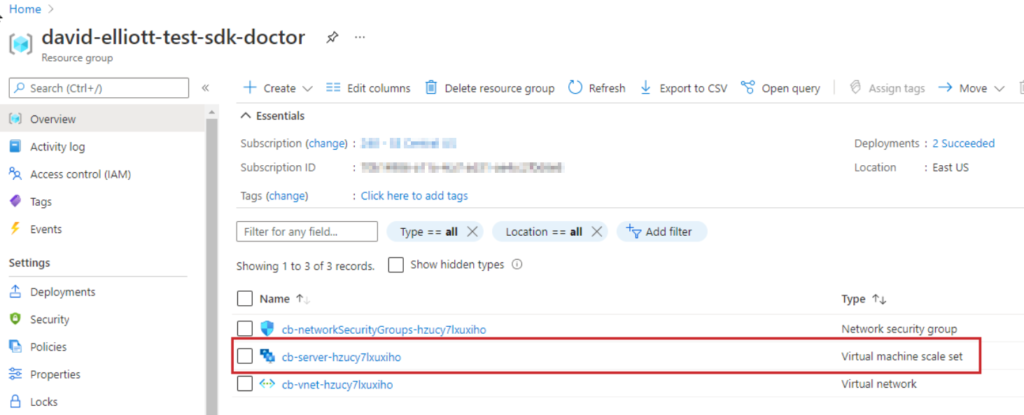
1. 리소스 그룹으로 이동
2. 가상 머신 스케일 세트를 클릭합니다.

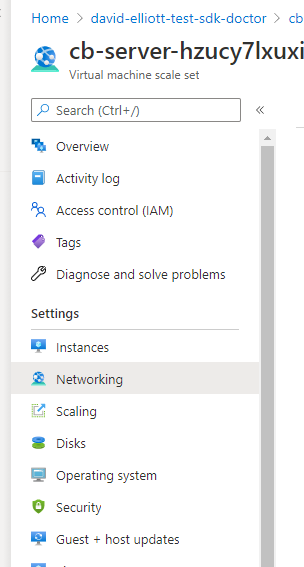
3. 네트워킹을 클릭합니다.

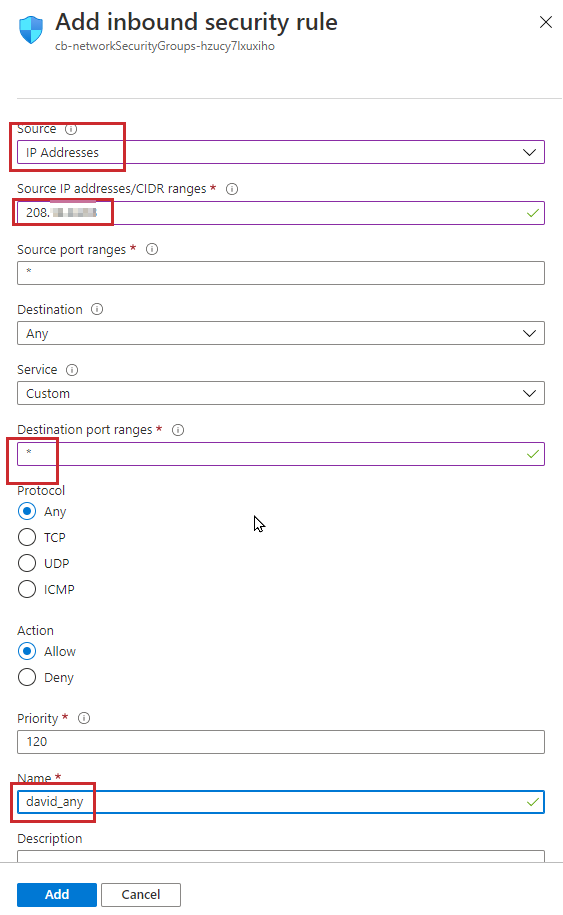
4. 인바운드 포트 규칙 추가를 클릭합니다.

5. 로컬 네트워크 정보를 사용하도록 구성을 업데이트합니다. 경고: 이 데모의 목적은 매우 개방적이므로 방화벽을 구성할 때 보안 지침을 따라야 합니다.

카우치베이스가 실행 중인지 확인
다음 주요 단계는 Couchbase가 제대로 작동하는지 확인하는 것입니다. 방법은 다음과 같습니다:
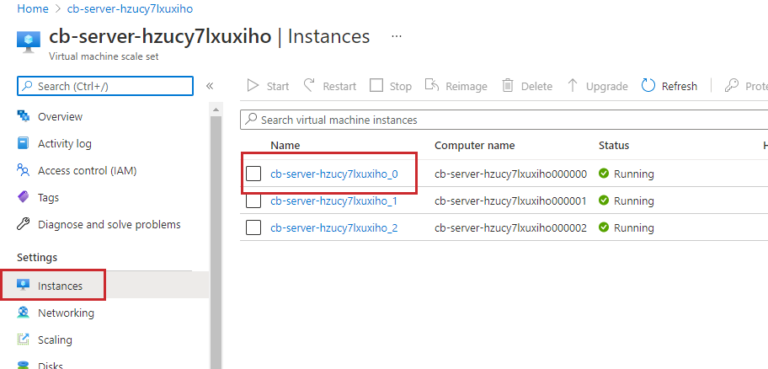
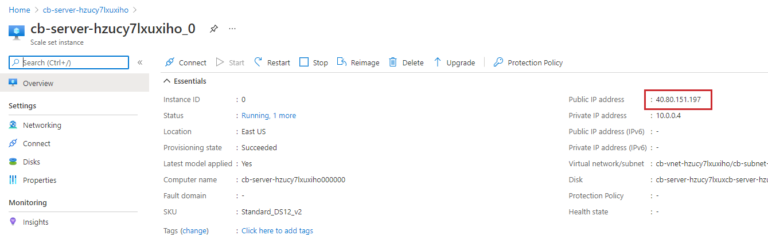
1. 인스턴스로 이동하여 IP 주소를 얻고 Couchbase 제어판에 연결합니다.

2. 서버 중 하나의 IP 주소를 가져옵니다.

3. 이 예제에서 로그인은 다음과 같습니다. https://40.80.151.197:8091/ui/index.html.
4. 위의 "Azure에 Couchbase 클러스터 설치" 섹션에서 관리자 계정을 만드는 데 사용한 정보로 로그인합니다. 여기에서 Azure에서 클러스터를 만들고 양식을 작성했습니다.
5. Couchbase에서 이 데모에 사용할 샘플 데이터를 추가합니다. 카우치베이스의 샘플 버킷에서 데이터를 추가하기 위한 Couchbase 설명서의 지침을 참조하세요..
SDK 닥터 소개
Couchbase SDK 닥터는 Couchbase 클러스터의 애플리케이션 서버 측 연결 문제를 진단하는 도구입니다. 이 도구는 카우치베이스 서버 클러스터를 생성한 다음 연결 상태를 보고하여 난해한 네트워크 문제를 해결하는 데 도움이 되는 진단 정보를 제공합니다.
다음은 다음과 같습니다. 카우치베이스 서버에서 SDK Doctor를 사용하기 위한 전체 지침을 확인하세요..
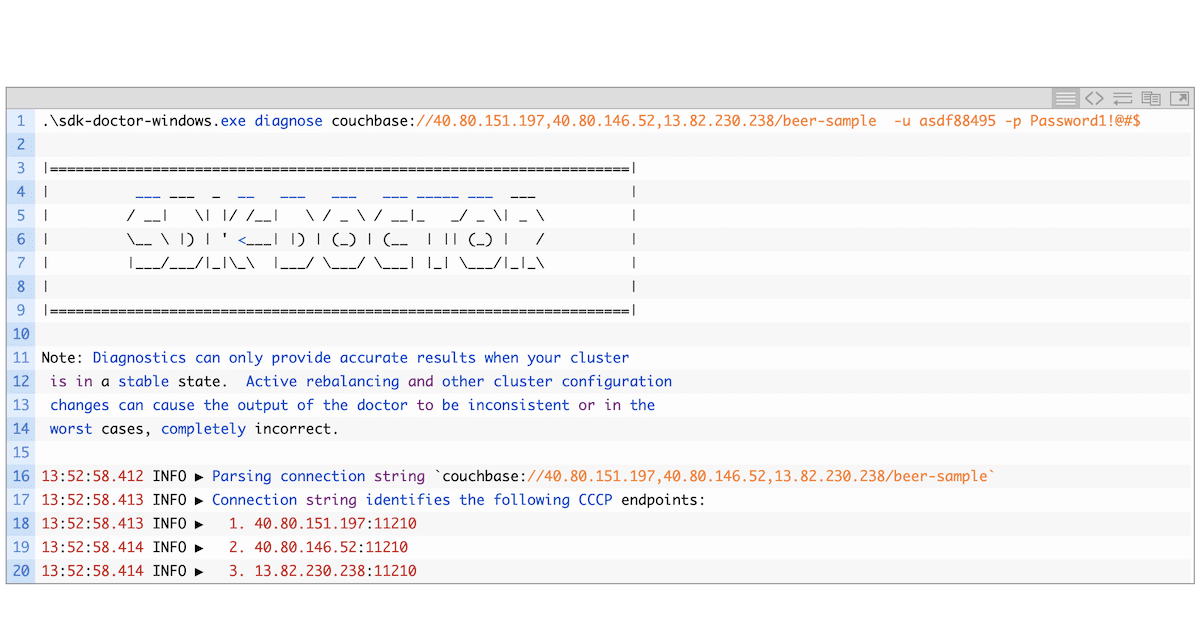
1. SDK Doctor를 실행하여 오류 발견하기
위의 지침(Couchbase 클러스터의 IP 주소를 수집한 곳)에 따라 클러스터의 다른 노드 각각에 대한 IP 주소도 가져옵니다. 이 IP 주소는 SDK Doctor의 연결 문자열에 사용됩니다.
아래 명령은 샘플 데이터 버킷 이름과 함께 클러스터에 있는 노드의 IP 주소를 사용합니다. 자신의 클러스터 IP와 설치한 특정 샘플 버킷에 따라 이 정보를 업데이트해야 합니다.
이제 SDK Doctor를 실행합니다.
특히 노드/클러스터/VM과 동일한 네트워크가 아닌 로컬 컴퓨터에서 SDK Doctor를 실행하는 경우 아래에서 볼 수 있듯이 여러 가지 오류 메시지가 표시될 수 있습니다. 다음과 같은 오류 그리고 연결에 실패했습니다. 메시지를 확인합니다. IP 주소는 40 또는 13이 아닌 내부 10 주소입니다.
아래 코드 샘플을 더블클릭해야 전체 출력을 확인할 수 있습니다(디바이스에 따라 다름).
|
1 2 3 4 5 6 7 8 9 10 11 12 13 14 15 16 17 18 19 20 21 22 23 24 25 26 27 28 29 30 31 32 33 34 35 36 37 38 39 40 41 42 43 44 45 46 47 48 49 50 51 52 53 54 55 56 57 58 59 60 61 62 63 64 65 66 67 68 69 70 71 72 73 74 75 76 77 78 79 80 81 82 83 84 85 86 87 88 89 90 91 92 93 94 95 96 97 98 99 100 101 102 103 104 105 106 107 108 109 110 111 112 113 114 115 116 117 118 119 |
.\sdk-doctor-windows.exe diagnose couchbase://40.80.151.197,40.80.146.52,13.82.230.238/beer-sample -u asdf88495 -p Password1!@#$ |====================================================================| | ___ ___ _ __ ___ ___ ___ _____ ___ ___ | | / __| \| |/ /__| \ / _ \ / __|_ _/ _ \| _ \ | | \__ \ |) | ' <___| |) | (_) | (__ | || (_) | / | | |___/___/|_|\_\ |___/ \___/ \___| |_| \___/|_|_\ | | | |====================================================================| Note: Diagnostics can only provide accurate results when your cluster is in a stable state. Active rebalancing and other cluster configuration changes can cause the output of the doctor to be inconsistent or in the worst cases, completely incorrect. 13:52:58.412 INFO ▶ Parsing connection string `couchbase://40.80.151.197,40.80.146.52,13.82.230.238/beer-sample` 13:52:58.413 INFO ▶ Connection string identifies the following CCCP endpoints: 13:52:58.413 INFO ▶ 1. 40.80.151.197:11210 13:52:58.414 INFO ▶ 2. 40.80.146.52:11210 13:52:58.414 INFO ▶ 3. 13.82.230.238:11210 13:52:58.414 INFO ▶ Connection string identifies the following HTTP endpoints: 13:52:58.414 INFO ▶ 1. 40.80.151.197:8091 13:52:58.414 INFO ▶ 2. 40.80.146.52:8091 13:52:58.414 INFO ▶ 3. 13.82.230.238:8091 13:52:58.415 INFO ▶ Connection string specifies bucket `beer-sample` 13:52:58.415 INFO ▶ Performing DNS lookup for host `40.80.151.197` 13:52:58.415 INFO ▶ Performing DNS lookup for host `40.80.146.52` 13:52:58.415 INFO ▶ Performing DNS lookup for host `13.82.230.238` 13:52:58.415 INFO ▶ Attempting to connect to cluster via CCCP 13:52:58.416 INFO ▶ Attempting to fetch config via cccp from `40.80.151.197:11210` 13:52:58.631 INFO ▶ Attempting to fetch config via cccp from `40.80.146.52:11210` 13:52:58.846 INFO ▶ Attempting to fetch config via cccp from `13.82.230.238:11210` 13:52:59.076 WARN ▶ Bootstrap host `40.80.151.197` is not using the canonical node hostname of `10.0.0.4`. This is not necessarily an error, but has been known to result in strange and challenging to diagnose errors when DNS entries are reconfigured. 13:52:59.077 WARN ▶ Bootstrap host `40.80.146.52` is not using the canonical node hostname of `10.0.0.5`. This is not neccessarily an error, but has been known to result in strange and challenging to diagnose errors when DNS entries are reconfigured. 13:52:59.079 WARN ▶ Bootstrap host `13.82.230.238` is not using the canonical node hostname of `10.0.0.6`. This is not neccessarily an error, but has been known to result in strange and challenging to diagnose errors when DNS entries are reconfigured. 13:52:59.080 INFO ▶ Selected the following network type: default 13:52:59.080 INFO ▶ Identified the following nodes: 13:52:59.081 INFO ▶ [0] 10.0.0.4 13:52:59.081 INFO ▶ indexScan: 9101, indexStreamInit: 9103, indexStreamCatchup: 9104 13:52:59.081 INFO ▶ kvSSL: 11207, projector: 9999, mgmt: 8091 13:52:59.082 INFO ▶ mgmtSSL: 18091, indexAdmin: 9100, n1ql: 8093 13:52:59.082 INFO ▶ indexHttp: 9102, indexHttps: 19102, kv: 11210 13:52:59.083 INFO ▶ cbas: 8095, eventingSSL: 18096, ftsGRPCSSL: 19130 13:52:59.083 INFO ▶ ftsSSL: 18094, ftsGRPC: 9130, indexStreamMaint: 9105 13:52:59.084 INFO ▶ capi: 8092, n1qlSSL: 18093, cbasSSL: 18095 13:52:59.084 INFO ▶ eventingDebug: 9140, fts: 8094, eventingAdminPort: 8096 13:52:59.085 INFO ▶ capiSSL: 18092 13:52:59.085 INFO ▶ [1] 10.0.0.5 13:52:59.086 INFO ▶ ftsGRPCSSL: 19130, indexHttps: 19102, cbas: 8095 13:52:59.086 INFO ▶ eventingAdminPort: 8096, eventingDebug: 9140, indexAdmin: 9100 13:52:59.087 INFO ▶ indexStreamInit: 9103, indexStreamMaint: 9105, mgmtSSL: 18091 13:52:59.087 INFO ▶ cbasSSL: 18095, ftsSSL: 18094, n1ql: 8093 13:52:59.088 INFO ▶ kv: 11210, capi: 8092, capiSSL: 18092 13:52:59.088 INFO ▶ ftsGRPC: 9130, indexScan: 9101, indexHttp: 9102 13:52:59.089 INFO ▶ indexStreamCatchup: 9104, kvSSL: 11207, mgmt: 8091 13:52:59.089 INFO ▶ eventingSSL: 18096, fts: 8094, projector: 9999 13:52:59.089 INFO ▶ n1qlSSL: 18093 13:52:59.090 INFO ▶ [2] 10.0.0.6 13:52:59.090 INFO ▶ mgmtSSL: 18091, cbas: 8095, cbasSSL: 18095 13:52:59.091 INFO ▶ eventingAdminPort: 8096, ftsSSL: 18094, indexAdmin: 9100 13:52:59.091 INFO ▶ indexStreamCatchup: 9104, capi: 8092, ftsGRPC: 9130 13:52:59.092 INFO ▶ indexHttp: 9102, indexStreamMaint: 9105, kvSSL: 11207 13:52:59.092 INFO ▶ projector: 9999, eventingDebug: 9140, fts: 8094 13:52:59.093 INFO ▶ ftsGRPCSSL: 19130, indexStreamInit: 9103, mgmt: 8091 13:52:59.093 INFO ▶ eventingSSL: 18096, indexScan: 9101, indexHttps: 19102 13:52:59.093 INFO ▶ kv: 11210, capiSSL: 18092, n1ql: 8093 13:52:59.094 INFO ▶ n1qlSSL: 18093 13:52:59.095 INFO ▶ Fetching config from `https://10.0.0.4:8091` 13:53:01.096 INFO ▶ Failed to retreive cluster information (error: Get "https://10.0.0.4:8091/pools/default": context deadline exceeded (Client.Timeout exceeded while awaiting headers)) 13:53:03.097 ERRO ▶ Failed to connect to Key Value service at `10.0.0.4:11210` (error: dial tcp 10.0.0.4:11210: i/o timeout) 13:53:05.098 ERRO ▶ Failed to connect to Management service at `10.0.0.4:8091` (error: Get "https://10.0.0.4:8091/": context deadline exceeded (Client.Timeout exceeded while awaiting headers)) 13:53:07.099 ERRO ▶ Failed to connect to Views service at `10.0.0.4:8092` (error: Get "https://10.0.0.4:8092/": context deadline exceeded (Client.Timeout exceeded while awaiting headers)) 13:53:09.101 ERRO ▶ Failed to connect to Query service at `10.0.0.4:8093` (error: Get "https://10.0.0.4:8093/": context deadline exceeded (Client.Timeout exceeded while awaiting headers)) 13:53:11.109 ERRO ▶ Failed to connect to Search service at `10.0.0.4:8094` (error: Get "https://10.0.0.4:8094/": context deadline exceeded (Client.Timeout exceeded while awaiting headers)) 13:53:13.110 ERRO ▶ Failed to connect to Analytics service at `10.0.0.4:8095` (error: Get "https://10.0.0.4:8095/": context deadline exceeded (Client.Timeout exceeded while awaiting headers)) 13:53:15.110 ERRO ▶ Failed to connect to Key Value service at `10.0.0.5:11210` (error: dial tcp 10.0.0.5:11210: i/o timeout) 13:53:17.119 ERRO ▶ Failed to connect to Management service at `10.0.0.5:8091` (error: Get "https://10.0.0.5:8091/": context deadline exceeded (Client.Timeout exceeded while awaiting headers)) 13:53:19.119 ERRO ▶ Failed to connect to Views service at `10.0.0.5:8092` (error: Get "https://10.0.0.5:8092/": context deadline exceeded (Client.Timeout exceeded while awaiting headers)) 13:53:21.120 ERRO ▶ Failed to connect to Query service at `10.0.0.5:8093` (error: Get "https://10.0.0.5:8093/": context deadline exceeded (Client.Timeout exceeded while awaiting headers)) 13:53:23.120 ERRO ▶ Failed to connect to Search service at `10.0.0.5:8094` (error: Get "https://10.0.0.5:8094/": context deadline exceeded (Client.Timeout exceeded while awaiting headers)) 13:53:25.121 ERRO ▶ Failed to connect to Analytics service at `10.0.0.5:8095` (error: Get "https://10.0.0.5:8095/": dial tcp 10.0.0.5:8095: i/o timeout (Client.Timeout exceeded while awaiting headers)) 13:53:27.121 ERRO ▶ Failed to connect to Key Value service at `10.0.0.6:11210` (error: dial tcp 10.0.0.6:11210: i/o timeout) 13:53:29.122 ERRO ▶ Failed to connect to Management service at `10.0.0.6:8091` (error: Get "https://10.0.0.6:8091/": context deadline exceeded (Client.Timeout exceeded while awaiting headers)) 13:53:31.123 ERRO ▶ Failed to connect to Views service at `10.0.0.6:8092` (error: Get "https://10.0.0.6:8092/": context deadline exceeded (Client.Timeout exceeded while awaiting headers)) 13:53:33.124 ERRO ▶ Failed to connect to Query service at `10.0.0.6:8093` (error: Get "https://10.0.0.6:8093/": context deadline exceeded (Client.Timeout exceeded while awaiting headers)) 13:53:35.124 ERRO ▶ Failed to connect to Search service at `10.0.0.6:8094` (error: Get "https://10.0.0.6:8094/": context deadline exceeded (Client.Timeout exceeded while awaiting headers)) 13:53:37.125 ERRO ▶ Failed to connect to Analytics service at `10.0.0.6:8095` (error: Get "https://10.0.0.6:8095/": context deadline exceeded (Client.Timeout exceeded while awaiting headers)) 13:53:39.126 WARN ▶ Failed to perform KV connection performance analysis on `10.0.0.4:11210` (error: %!d(string=dial tcp 10.0.0.4:11210: i/o timeout)) 13:53:41.127 WARN ▶ Failed to perform KV connection performance analysis on `10.0.0.5:11210` (error: %!d(string=dial tcp 10.0.0.5:11210: i/o timeout)) 13:53:43.128 WARN ▶ Failed to perform KV connection performance analysis on `10.0.0.6:11210` (error: %!d(string=dial tcp 10.0.0.6:11210: i/o timeout)) 13:53:43.128 INFO ▶ Diagnostics completed Summary: [WARN] Bootstrap host `40.80.151.197` is not using the canonical node hostname of `10.0.0.4`. This is not neccessarily an error, but has been known to result in strange and challenging to diagnose errors when DNS entries are reconfigured. [WARN] Bootstrap host `40.80.146.52` is not using the canonical node hostname of `10.0.0.5`. This is not neccessarily an error, but has been known to result in strange and challenging to diagnose errors when DNS entries are reconfigured. [WARN] Bootstrap host `13.82.230.238` is not using the canonical node hostname of `10.0.0.6`. This is not neccessarily an error, but has been known to result in strange and challenging to diagnose errors when DNS entries are reconfigured. [WARN] Failed to perform KV connection performance analysis on `10.0.0.4:11210` (error: %!d(string=dial tcp 10.0.0.4:11210: i/o timeout)) [WARN] Failed to perform KV connection performance analysis on `10.0.0.5:11210` (error: %!d(string=dial tcp 10.0.0.5:11210: i/o timeout)) [WARN] Failed to perform KV connection performance analysis on `10.0.0.6:11210` (error: %!d(string=dial tcp 10.0.0.6:11210: i/o timeout)) [ERRO] Failed to connect to Key Value service at `10.0.0.4:11210` (error: dial tcp 10.0.0.4:11210: i/o timeout) [ERRO] Failed to connect to Management service at `10.0.0.4:8091` (error: Get "https://10.0.0.4:8091/": context deadline exceeded (Client.Timeout exceeded while awaiting headers)) [ERRO] Failed to connect to Views service at `10.0.0.4:8092` (error: Get "https://10.0.0.4:8092/": context deadline exceeded (Client.Timeout exceeded while awaiting headers)) [ERRO] Failed to connect to Query service at `10.0.0.4:8093` (error: Get "https://10.0.0.4:8093/": context deadline exceeded (Client.Timeout exceeded while awaiting headers)) [ERRO] Failed to connect to Search service at `10.0.0.4:8094` (error: Get "https://10.0.0.4:8094/": context deadline exceeded (Client.Timeout exceeded while awaiting headers)) [ERRO] Failed to connect to Analytics service at `10.0.0.4:8095` (error: Get "https://10.0.0.4:8095/": context deadline exceeded (Client.Timeout exceeded while awaiting headers)) [ERRO] Failed to connect to Key Value service at `10.0.0.5:11210` (error: dial tcp 10.0.0.5:11210: i/o timeout) [ERRO] Failed to connect to Management service at `10.0.0.5:8091` (error: Get "https://10.0.0.5:8091/": context deadline exceeded (Client.Timeout exceeded while awaiting headers)) [ERRO] Failed to connect to Views service at `10.0.0.5:8092` (error: Get "https://10.0.0.5:8092/": context deadline exceeded (Client.Timeout exceeded while awaiting headers)) [ERRO] Failed to connect to Query service at `10.0.0.5:8093` (error: Get "https://10.0.0.5:8093/": context deadline exceeded (Client.Timeout exceeded while awaiting headers)) [ERRO] Failed to connect to Search service at `10.0.0.5:8094` (error: Get "https://10.0.0.5:8094/": context deadline exceeded (Client.Timeout exceeded while awaiting headers)) [ERRO] Failed to connect to Analytics service at `10.0.0.5:8095` (error: Get "https://10.0.0.5:8095/": dial tcp 10.0.0.5:8095: i/o timeout (Client.Timeout exceeded while awaiting headers)) [ERRO] Failed to connect to Key Value service at `10.0.0.6:11210` (error: dial tcp 10.0.0.6:11210: i/o timeout) [ERRO] Failed to connect to Management service at `10.0.0.6:8091` (error: Get "https://10.0.0.6:8091/": context deadline exceeded (Client.Timeout exceeded while awaiting headers)) [ERRO] Failed to connect to Views service at `10.0.0.6:8092` (error: Get "https://10.0.0.6:8092/": context deadline exceeded (Client.Timeout exceeded while awaiting headers)) [ERRO] Failed to connect to Query service at `10.0.0.6:8093` (error: Get "https://10.0.0.6:8093/": context deadline exceeded (Client.Timeout exceeded while awaiting headers)) [ERRO] Failed to connect to Search service at `10.0.0.6:8094` (error: Get "https://10.0.0.6:8094/": context deadline exceeded (Client.Timeout exceeded while awaiting headers)) [ERRO] Failed to connect to Analytics service at `10.0.0.6:8095` (error: Get "https://10.0.0.6:8095/": context deadline exceeded (Client.Timeout exceeded while awaiting headers)) Found multiple issues, see listing above. |
카우치베이스 대체 주소 사용
카우치베이스 서버를 사용하면 개별 클러스터 노드에 대체 주소를 할당하고 해당 노드에서 실행 중인 모든 서비스에 대체 포트 번호를 할당할 수 있습니다.
대체 주소와 포트 번호를 할당하면 CLI와 REST API를 통해 클러스터의 노드에 직접 연결할 수 없는 외부 애플리케이션과의 통신을 용이하게 할 수 있습니다. 그러나 노드를 대신하여 외부에 표시되는 주소를 제공하는 라우터 또는 기타 네트워크 엔터티에 액세스할 수 있습니다.
자세히 알아보기 대체 주소 사용에 대한 자세한 내용은 카우치베이스 문서를 참조하세요..
카우치베이스 대체 주소 추가
Couchbase 클러스터의 대체 주소를 업데이트하기 위한 REST 호출이 있습니다. (자세한 내용은 여기를 참조하세요, REST API로 대체 주소를 관리하는 방법에 대한 Couchbase 문서를 확인하세요..)
다음으로 클러스터의 각 IP 주소에 대한 대체 주소를 업데이트해야 합니다. 이렇게 하면 내부를 지정한 IP 주소에 매핑합니다.
|
1 |
curl -v -X PUT -u asdf88495:Password1!@#$ https://40.80.151.197:8091/node/controller/setupAlternateAddresses/external -d hostname=40.80.151.197 |
아래에서 볼 수 있듯이 200개의 응답을 받아야 합니다.
|
1 2 3 4 5 6 7 8 9 10 11 12 13 14 15 16 17 18 19 20 21 22 23 24 |
* Trying 13.82.230.238... * TCP_NODELAY set * Connected to 13.82.230.238 (13.82.230.238) port 8091 (#0) * Server auth using Basic with user 'asdf88495' > PUT /node/controller/setupAlternateAddresses/external HTTP/1.1 > Host: 13.82.230.238:8091 > Authorization: Basic YXNkZjg4NDk1OlBhc3N3b3JkMSFAIyQ= > User-Agent: curl/7.55.1 > Accept: */* > Content-Length: 22 > Content-Type: application/x-www-form-urlencoded > * upload completely sent off: 22 out of 22 bytes < HTTP/1.1 200 OK < X-XSS-Protection: 1; mode=block < X-Permitted-Cross-Domain-Policies: none < X-Frame-Options: DENY < X-Content-Type-Options: nosniff < Server: Couchbase Server < Pragma: no-cache < Expires: Thu, 01 Jan 1970 00:00:00 GMT < Date: Mon, 28 Jun 2021 18:59:31 GMT < Content-Length: 0 < Cache-Control: no-cache,no-store,must-revalidate |
다른 호스트에 대해서도 이와 같이 명령을 반복합니다:
|
1 |
curl -v -X PUT -u asdf88495:Password1!@#$ https://40.80.146.52:8091/node/controller/setupAlternateAddresses/external -d hostname=40.80.146.52 |
|
1 |
curl -v -X PUT -u asdf88495:Password1!@#$ https://13.82.230.238:8091/node/controller/setupAlternateAddresses/external -d hostname=13.82.230.238 |
2. SDK Doctor를 실행하여 성공 확인
이제 SDK Doctor를 다시 실행하여 성공 여부를 확인합니다. 아래와 같은 화면이 표시됩니다:
아래 코드 샘플을 더블클릭해야 전체 출력을 확인할 수 있습니다(디바이스에 따라 다름).
|
1 2 3 4 5 6 7 8 9 10 11 12 13 14 15 16 17 18 19 20 21 22 23 24 25 26 27 28 29 30 31 32 33 34 35 36 37 38 39 40 41 42 43 44 45 46 47 48 49 50 51 52 53 54 55 56 57 58 59 60 61 62 63 64 65 66 67 68 69 70 71 72 73 74 75 76 77 78 79 80 81 82 83 84 85 86 87 88 89 90 91 92 93 94 95 96 97 98 99 100 101 102 103 104 105 106 107 108 109 110 111 112 113 114 115 116 117 118 119 120 121 122 123 124 125 126 127 128 129 130 131 132 133 134 135 136 137 138 139 140 141 142 143 144 145 146 147 148 149 150 151 152 153 154 155 156 157 158 159 160 161 162 163 164 165 166 167 168 169 170 171 172 173 174 175 176 177 178 179 180 181 182 183 184 185 186 187 188 189 190 191 192 193 194 195 196 197 198 199 200 201 202 203 204 205 206 207 208 209 210 211 212 213 214 215 216 217 218 219 220 221 222 223 224 225 226 227 228 229 230 231 232 233 234 235 236 237 238 239 240 241 242 243 244 245 246 247 248 249 250 251 252 253 254 255 256 257 258 259 260 261 262 263 264 265 266 267 268 269 270 271 272 273 274 275 276 277 278 279 280 281 282 283 284 285 286 287 288 289 290 291 292 293 294 295 296 297 298 299 300 301 302 303 304 305 306 307 308 309 310 311 312 313 314 315 316 317 318 319 320 321 322 323 324 325 326 327 328 329 330 331 332 333 334 335 336 337 338 339 340 341 342 343 344 345 346 347 348 349 350 351 352 353 354 355 356 357 358 359 360 361 362 363 364 365 366 367 368 369 370 371 372 373 |
C:\david\bin\Couchbase> .\sdk-doctor-windows.exe diagnose couchbase://40.80.151.197,40.80.146.52,13.82.230.238/beer-sample -u asdf88495 -p Password1!@#$ |====================================================================| | ___ ___ _ __ ___ ___ ___ _____ ___ ___ | | / __| \| |/ /__| \ / _ \ / __|_ _/ _ \| _ \ | | \__ \ |) | ' <___| |) | (_) | (__ | || (_) | / | | |___/___/|_|\_\ |___/ \___/ \___| |_| \___/|_|_\ | | | |====================================================================| Note: Diagnostics can only provide accurate results when your cluster is in a stable state. Active rebalancing and other cluster configuration changes can cause the output of the doctor to be inconsistent or in the worst cases, completely incorrect. 13:59:33.729 INFO ▶ Parsing connection string `couchbase://40.80.151.197,40.80.146.52,13.82.230.238/beer-sample` 13:59:33.730 INFO ▶ Connection string identifies the following CCCP endpoints: 13:59:33.730 INFO ▶ 1. 40.80.151.197:11210 13:59:33.730 INFO ▶ 2. 40.80.146.52:11210 13:59:33.730 INFO ▶ 3. 13.82.230.238:11210 13:59:33.730 INFO ▶ Connection string identifies the following HTTP endpoints: 13:59:33.731 INFO ▶ 1. 40.80.151.197:8091 13:59:33.731 INFO ▶ 2. 40.80.146.52:8091 13:59:33.731 INFO ▶ 3. 13.82.230.238:8091 13:59:33.731 INFO ▶ Connection string specifies bucket `beer-sample` 13:59:33.731 INFO ▶ Performing DNS lookup for host `40.80.151.197` 13:59:33.731 INFO ▶ Performing DNS lookup for host `40.80.146.52` 13:59:33.731 INFO ▶ Performing DNS lookup for host `13.82.230.238` 13:59:33.731 INFO ▶ Attempting to connect to cluster via CCCP 13:59:33.732 INFO ▶ Attempting to fetch config via cccp from `40.80.151.197:11210` 13:59:33.947 INFO ▶ Attempting to fetch config via cccp from `40.80.146.52:11210` 13:59:34.171 INFO ▶ Attempting to fetch config via cccp from `13.82.230.238:11210` 13:59:34.391 WARN ▶ Bootstrap host `40.80.151.197` is not using the canonical node hostname of `10.0.0.4`. This is not neccessarily an error, but has been known to result in strange and challenging to diagnose errors when DNS entries are reconfigured. 13:59:34.392 WARN ▶ Bootstrap host `40.80.146.52` is not using the canonical node hostname of `10.0.0.5`. This is not neccessarily an error, but has been known to result in strange and challenging to diagnose errors when DNS entries are reconfigured. 13:59:34.393 WARN ▶ Bootstrap host `13.82.230.238` is not using the canonical node hostname of `10.0.0.6`. This is not neccessarily an error, but has been known to result in strange and challenging to diagnose errors when DNS entries are reconfigured. 13:59:34.394 INFO ▶ Selected the following network type: external 13:59:34.394 INFO ▶ Identified the following nodes: 13:59:34.394 INFO ▶ [0] 40.80.151.197 13:59:34.395 INFO ▶ projector: 9999, n1ql: 8093, n1qlSSL: 18093 13:59:34.395 INFO ▶ cbasSSL: 18095, indexAdmin: 9100, kvSSL: 11207 13:59:34.396 INFO ▶ capi: 8092, capiSSL: 18092, indexStreamCatchup: 9104 13:59:34.396 INFO ▶ mgmtSSL: 18091, eventingAdminPort: 8096, eventingSSL: 18096 13:59:34.397 INFO ▶ fts: 8094, ftsGRPC: 9130, eventingDebug: 9140 13:59:34.397 INFO ▶ indexHttp: 9102, indexStreamMaint: 9105, indexStreamInit: 9103 13:59:34.398 INFO ▶ indexHttps: 19102, kv: 11210, mgmt: 8091 13:59:34.398 INFO ▶ cbas: 8095, ftsSSL: 18094, ftsGRPCSSL: 19130 13:59:34.399 INFO ▶ indexScan: 9101 13:59:34.399 INFO ▶ [1] 40.80.146.52 13:59:34.400 INFO ▶ capiSSL: 18092, mgmtSSL: 18091, indexStreamInit: 9103 13:59:34.400 INFO ▶ indexStreamCatchup: 9104, indexStreamMaint: 9105, indexHttps: 19102 13:59:34.400 INFO ▶ n1ql: 8093, n1qlSSL: 18093, cbasSSL: 18095 13:59:34.401 INFO ▶ eventingDebug: 9140, eventingSSL: 18096, fts: 8094 13:59:34.401 INFO ▶ ftsGRPC: 9130, mgmt: 8091, cbas: 8095 13:59:34.402 INFO ▶ eventingAdminPort: 8096, indexScan: 9101, kvSSL: 11207 13:59:34.402 INFO ▶ capi: 8092, projector: 9999, ftsSSL: 18094 13:59:34.403 INFO ▶ ftsGRPCSSL: 19130, indexAdmin: 9100, indexHttp: 9102 13:59:34.403 INFO ▶ kv: 11210 13:59:34.403 INFO ▶ [2] 13.82.230.238 13:59:34.404 INFO ▶ kv: 11210, projector: 9999, eventingSSL: 18096 13:59:34.404 INFO ▶ indexStreamInit: 9103, indexHttps: 19102, indexStreamMaint: 9105 13:59:34.405 INFO ▶ kvSSL: 11207, capiSSL: 18092, eventingAdminPort: 8096 13:59:34.406 INFO ▶ ftsGRPC: 9130, indexScan: 9101, ftsGRPCSSL: 19130 13:59:34.406 INFO ▶ indexStreamCatchup: 9104, n1ql: 8093, n1qlSSL: 18093 13:59:34.407 INFO ▶ mgmt: 8091, mgmtSSL: 18091, ftsSSL: 18094 13:59:34.407 INFO ▶ fts: 8094, indexAdmin: 9100, indexHttp: 9102 13:59:34.407 INFO ▶ capi: 8092, cbas: 8095, cbasSSL: 18095 13:59:34.408 INFO ▶ eventingDebug: 9140 13:59:34.408 INFO ▶ Fetching config from `https://40.80.151.197:8091` 13:59:34.511 INFO ▶ Received cluster configuration, nodes list: [ { "addressFamily": "inet", "alternateAddresses": { "external": { "hostname": "40.80.151.197", "ports": { "capi": 8092, "capiSSL": 18092, "kv": 11210, "mgmt": 8091, "mgmtSSL": 18091 } } }, "clusterCompatibility": 393222, "clusterMembership": "active", "configuredHostname": "10.0.0.4:8091", "couchApiBase": "https://10.0.0.4:8092/", "couchApiBaseHTTPS": "https://10.0.0.4:18092/", "cpuCount": 4, "externalListeners": [ { "afamily": "inet", "nodeEncryption": false }, { "afamily": "inet6", "nodeEncryption": false } ], "hostname": "10.0.0.4:8091", "interestingStats": { "cmd_get": 0, "couch_docs_actual_disk_size": 17689291, "couch_docs_data_size": 11756324, "couch_spatial_data_size": 0, "couch_spatial_disk_size": 0, "couch_views_actual_disk_size": 22774, "couch_views_data_size": 11416, "curr_items": 2475, "curr_items_tot": 4897, "ep_bg_fetched": 0, "get_hits": 0, "mem_used": 22484624, "ops": 0, "vb_active_num_non_resident": 0, "vb_replica_curr_items": 2422 }, "mcdMemoryAllocated": 22468, "mcdMemoryReserved": 22468, "memoryFree": 27792080896, "memoryTotal": 29450268672, "nodeEncryption": false, "nodeUUID": "616c0853d0e7cbacab9cbdd6ec7a51f7", "os": "x86_64-unknown-linux-gnu", "otpNode": "ns_1@10.0.0.4", "ports": { "direct": 11210, "distTCP": 21100, "distTLS": 21150, "httpsCAPI": 18092, "httpsMgmt": 18091 }, "recoveryType": "none", "services": [ "cbas", "eventing", "fts", "index", "kv", "n1ql" ], "status": "healthy", "systemStats": { "allocstall": 0, "cpu_cores_available": 4, "cpu_stolen_rate": 0, "cpu_utilization_rate": 3.282828282828283, "mem_free": 27792080896, "mem_limit": 29450268672, "mem_total": 29450268672, "swap_total": 0, "swap_used": 0 }, "thisNode": true, "uptime": "1122", "version": "6.6.2-9588-enterprise" }, { "addressFamily": "inet", "alternateAddresses": { "external": { "hostname": "40.80.146.52", "ports": { "capi": 8092, "capiSSL": 18092, "kv": 11210, "mgmt": 8091, "mgmtSSL": 18091 } } }, "clusterCompatibility": 393222, "clusterMembership": "active", "configuredHostname": "10.0.0.5:8091", "couchApiBase": "https://10.0.0.5:8092/", "couchApiBaseHTTPS": "https://10.0.0.5:18092/", "cpuCount": 4, "externalListeners": [ { "afamily": "inet", "nodeEncryption": false }, { "afamily": "inet6", "nodeEncryption": false } ], "hostname": "10.0.0.5:8091", "interestingStats": { "cmd_get": 0, "couch_docs_actual_disk_size": 17275589, "couch_docs_data_size": 11350638, "couch_spatial_data_size": 0, "couch_spatial_disk_size": 0, "couch_views_actual_disk_size": 22737, "couch_views_data_size": 11408, "curr_items": 2415, "curr_items_tot": 4862, "ep_bg_fetched": 0, "get_hits": 0, "mem_used": 22640944, "ops": 0, "vb_active_num_non_resident": 0, "vb_replica_curr_items": 2447 }, "mcdMemoryAllocated": 22468, "mcdMemoryReserved": 22468, "memoryFree": 28102778880, "memoryTotal": 29450268672, "nodeEncryption": false, "nodeUUID": "94565e32208f2d93915124d49842258c", "os": "x86_64-unknown-linux-gnu", "otpNode": "ns_1@10.0.0.5", "ports": { "direct": 11210, "distTCP": 21100, "distTLS": 21150, "httpsCAPI": 18092, "httpsMgmt": 18091 }, "recoveryType": "none", "services": [ "cbas", "eventing", "fts", "index", "kv", "n1ql" ], "status": "healthy", "systemStats": { "allocstall": 0, "cpu_cores_available": 4, "cpu_stolen_rate": 0, "cpu_utilization_rate": 2.763819095477387, "mem_free": 28102778880, "mem_limit": 29450268672, "mem_total": 29450268672, "swap_total": 0, "swap_used": 0 }, "uptime": "1367", "version": "6.6.2-9588-enterprise" }, { "addressFamily": "inet", "alternateAddresses": { "external": { "hostname": "13.82.230.238", "ports": { "capi": 8092, "capiSSL": 18092, "kv": 11210, "mgmt": 8091, "mgmtSSL": 18091 } } }, "clusterCompatibility": 393222, "clusterMembership": "active", "configuredHostname": "10.0.0.6:8091", "couchApiBase": "https://10.0.0.6:8092/", "couchApiBaseHTTPS": "https://10.0.0.6:18092/", "cpuCount": 4, "externalListeners": [ { "afamily": "inet", "nodeEncryption": false }, { "afamily": "inet6", "nodeEncryption": false } ], "hostname": "10.0.0.6:8091", "interestingStats": { "cmd_get": 0, "couch_docs_actual_disk_size": 17363691, "couch_docs_data_size": 11432558, "couch_spatial_data_size": 0, "couch_spatial_disk_size": 0, "couch_views_actual_disk_size": 22756, "couch_views_data_size": 11415, "curr_items": 2413, "curr_items_tot": 4847, "ep_bg_fetched": 0, "get_hits": 0, "mem_used": 22550192, "ops": 0, "vb_active_num_non_resident": 0, "vb_replica_curr_items": 2434 }, "mcdMemoryAllocated": 22468, "mcdMemoryReserved": 22468, "memoryFree": 28038606848, "memoryTotal": 29450268672, "nodeEncryption": false, "nodeUUID": "d66d1a929cde564fa27cec0d3ef56520", "os": "x86_64-unknown-linux-gnu", "otpNode": "ns_1@10.0.0.6", "ports": { "direct": 11210, "distTCP": 21100, "distTLS": 21150, "httpsCAPI": 18092, "httpsMgmt": 18091 }, "recoveryType": "none", "services": [ "cbas", "eventing", "fts", "index", "kv", "n1ql" ], "status": "healthy", "systemStats": { "allocstall": 0, "cpu_cores_available": 4, "cpu_stolen_rate": 0, "cpu_utilization_rate": 1.754385964912281, "mem_free": 28038606848, "mem_limit": 29450268672, "mem_total": 29450268672, "swap_total": 0, "swap_used": 0 }, "uptime": "1136", "version": "6.6.2-9588-enterprise" } ] 13:59:34.706 INFO ▶ Successfully connected to Key Value service at `40.80.151.197:11210` 13:59:34.845 INFO ▶ Successfully connected to Management service at `40.80.151.197:8091` 13:59:34.933 INFO ▶ Successfully connected to Views service at `40.80.151.197:8092` 13:59:35.020 INFO ▶ Successfully connected to Query service at `40.80.151.197:8093` 13:59:35.108 INFO ▶ Successfully connected to Search service at `40.80.151.197:8094` 13:59:35.200 INFO ▶ Successfully connected to Analytics service at `40.80.151.197:8095` 13:59:35.377 INFO ▶ Successfully connected to Key Value service at `40.80.146.52:11210` 13:59:35.515 INFO ▶ Successfully connected to Management service at `40.80.146.52:8091` 13:59:35.619 INFO ▶ Successfully connected to Views service at `40.80.146.52:8092` 13:59:35.713 INFO ▶ Successfully connected to Query service at `40.80.146.52:8093` 13:59:35.803 INFO ▶ Successfully connected to Search service at `40.80.146.52:8094` 13:59:35.903 INFO ▶ Successfully connected to Analytics service at `40.80.146.52:8095` 13:59:36.074 INFO ▶ Successfully connected to Key Value service at `13.82.230.238:11210` 13:59:36.206 INFO ▶ Successfully connected to Management service at `13.82.230.238:8091` 13:59:36.308 INFO ▶ Successfully connected to Views service at `13.82.230.238:8092` 13:59:36.397 INFO ▶ Successfully connected to Query service at `13.82.230.238:8093` 13:59:36.487 INFO ▶ Successfully connected to Search service at `13.82.230.238:8094` 13:59:36.591 INFO ▶ Successfully connected to Analytics service at `13.82.230.238:8095` 13:59:37.207 INFO ▶ Memd Nop Pinged `40.80.151.197:11210` 10 times, 0 errors, 42ms min, 45ms max, 43ms mean 13:59:37.208 WARN ▶ Memcached service on `40.80.151.197:11210` on average took longer than 10ms (was: 43ms) to reply. This is usually due to network-related issues, and could significantly affect application performance. 13:59:37.209 WARN ▶ Memcached service on `40.80.151.197:11210` maximally took longer than 20ms (was: 45ms) to reply. This is usually due to network-related issues, and could significantly affect application performance. 13:59:37.803 INFO ▶ Memd Nop Pinged `40.80.146.52:11210` 10 times, 0 errors, 42ms min, 42ms max, 42ms mean 13:59:37.804 WARN ▶ Memcached service on `40.80.146.52:11210` on average took longer than 10ms (was: 42ms) to reply. This is usually due to network-related issues, and could significantly affect application performance. 13:59:37.804 WARN ▶ Memcached service on `40.80.146.52:11210` maximally took longer than 20ms (was: 42ms) to reply. This is usually due to network-related issues, and could significantly affect application performance. 13:59:38.423 INFO ▶ Memd Nop Pinged `13.82.230.238:11210` 10 times, 0 errors, 43ms min, 44ms max, 44ms mean 13:59:38.423 WARN ▶ Memcached service on `13.82.230.238:11210` on average took longer than 10ms (was: 44ms) to reply. This is usually due to network-related issues, and could significantly affect application performance. 13:59:38.423 WARN ▶ Memcached service on `13.82.230.238:11210` maximally took longer than 20ms (was: 44ms) to reply. This is usually due to network-related issues, and could significantly affect application performance. 13:59:38.424 INFO ▶ Diagnostics completed Summary: [WARN] Bootstrap host `40.80.151.197` is not using the canonical node hostname of `10.0.0.4`. This is not neccessarily an error, but has been known to result in strange and challenging to diagnose errors when DNS entries are reconfigured. [WARN] Bootstrap host `40.80.146.52` is not using the canonical node hostname of `10.0.0.5`. This is not neccessarily an error, but has been known to result in strange and challenging to diagnose errors when DNS entries are reconfigured. [WARN] Bootstrap host `13.82.230.238` is not using the canonical node hostname of `10.0.0.6`. This is not neccessarily an error, but has been known to result in strange and challenging to diagnose errors when DNS entries are reconfigured. [WARN] Memcached service on `40.80.151.197:11210` on average took longer than 10ms (was: 43ms) to reply. This is usually due to network-related issues, and could significantly affect application performance. [WARN] Memcached service on `40.80.151.197:11210` maximally took longer than 20ms (was: 45ms) to reply. This is usually due to network-related issues, and could significantly affect application performance. [WARN] Memcached service on `40.80.146.52:11210` on average took longer than 10ms (was: 42ms) to reply. This is usually due to network-related issues, and could significantly affect application performance. [WARN] Memcached service on `40.80.146.52:11210` maximally took longer than 20ms (was: 42ms) to reply. This is usually due to network-related issues, and could significantly affect application performance. [WARN] Memcached service on `13.82.230.238:11210` on average took longer than 10ms (was: 44ms) to reply. This is usually due to network-related issues, and could significantly affect application performance. [WARN] Memcached service on `13.82.230.238:11210` maximally took longer than 20ms (was: 44ms) to reply. This is usually due to network-related issues, and could significantly affect application performance. Found multiple issues, see listing above. |
성공!
결론
클라우드에서 Couchbase 클러스터에 연결하면 많은 이점이 있습니다. 하지만 때로는 다양한 네트워크 및 보안 요구 사항으로 인해 시스템의 원격 및 분산 특성으로 인해 앱 SDK와 Couchbase 클러스터 간에 복잡한 문제가 발생할 수 있습니다.
카우치베이스 SDK 닥터 및 대체 주소를 사용하면 발생하는 모든 문제를 쉽게 해결하고 연결 문제를 즉시 해결할 수 있습니다.