
We’re excited to announce the new integration between 카우치베이스 그리고 Dify.ai, bringing Couchbase’s robust vector database capabilities into Dify’s streamlined LLMops ecosystem. Dify empowers teams with a no-code solution to build, manage, and deploy AI-driven workflows efficiently. Now, with Couchbase support, users can leverage Couchbase’s high-performance vector storage for rapid, accurate knowledge retrieval within their LLM-powered applications.
Dify.ai is an innovative platform that simplifies the process of building AI-native applications. It provides developers with a comprehensive suite of tools for prompt engineering, model fine-tuning, and application deployment, making it easier than ever to harness the power of large language models (LLMs) in practical applications.
In the following sections, we’ll explore some details of this integration and show how it can revolutionize building AI-native applications with Couchbase and Dify.ai.
Installing Dify with Couchbase
The following instructions are based on Dify’s self-hosted Docker Compose installation guide. Ensure the prerequisites on that guide are met.
- Clone the Dify repository
- Navigate to the Docker directory and configure the environment
IMPORTANT – in the duplicated
docker/.envfile, set: - Launch Dify
- Access DifyAccess administrator initialization page to set up the admin account:
Dify web interface address:
Instructions for upgrading Dify versions can be found 여기, and more details about Dify docker deployment can be found in the docker README.
Adding knowledge and generating embeddings
An 임베딩 is a vector representation of text, enabling the “Knowledge” feature to understand and process the content.
- Access the Dify web interface
- Add model provider. This is 필수 to generate embeddings:
- Click on the avatar in the top right corner to expand the dropdown
- Select Settings 그렇다면 Model Provider
- Click the Setup button for the model provider you’d like to add. Avoid clicking “Add Model”, as this forces you to add each model one by one
- Enter the required API keys, and click Save
- Default system models can also be set from this window, but are not required
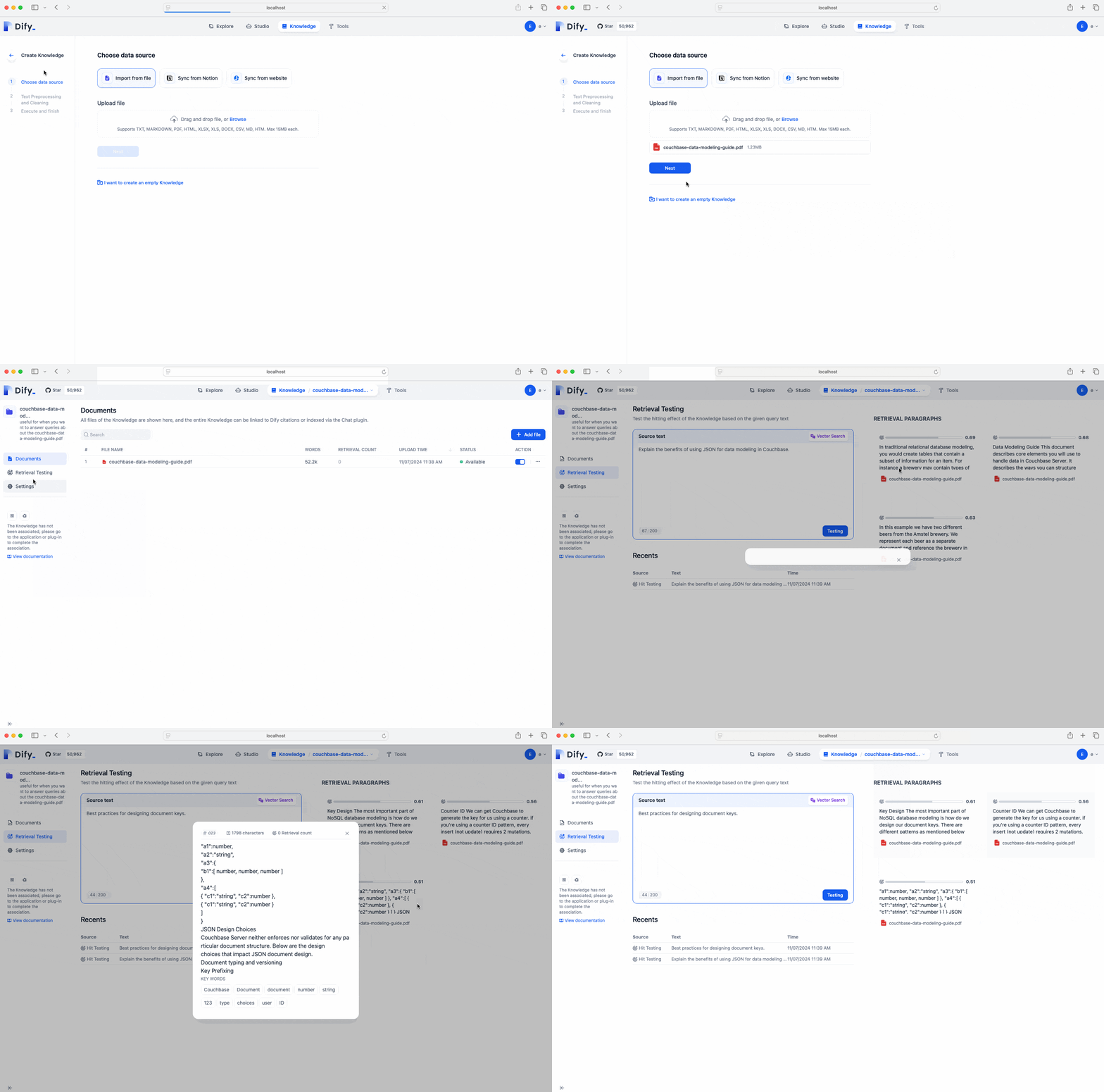
- Add knowledge:
- Click on the Knowledge tab
- Select Create Knowledge
- Follow steps to upload a file
- Select the defaults for Text Preprocessing and Cleaning
- 클릭 Save and Process
- Test Retrieval:
- After the document has completed processing, click Go to document
- Select Retrieval Testing from the sidebar
- Experiment with various text to test the hitting effect of the Knowledge
결론
The Couchbase and Dify integration makes it easier to build AI-native applications that harness high-performance vector retrieval for knowledge-intensive tasks. This powerful combination empowers developers to create sophisticated, responsive AI solutions with minimal setup, paving the way for more accessible and scalable AI applications.
Next steps
- More information is available in the Dify documentation
- See the guide to Creating Applications
Happy coding!

댓글 남기기
댓글을 달기 위해서는 로그인해야합니다.