
Trying Couchbase just got even easier, you can now import your MongoDB data and indexes into Couchbase seamlessly. Whether you prefer working directly from the command line, or within your favorite IDE, our various new offerings—cbmigrate CLI, Couchbase VSCode Extension, e Couchbase JetBrains Plugin—are flexible, efficient, and easy-to-use tools for MongoDB migration.
Introducing Couchbase-to-MongoDB Migration Tools
Our toolkit comprises three core components, each tailored to different development environments and user preferences.
CLI Tool (cbmigrate)
For those who prefer the command line, cbmigrate offers a robust and efficient way to migrate your MongoDB data to Couchbase. It comes packed with features such as custom key generation (exclusive to the CLI plugin), batch processing, and secure SSL connections.
Key Features:
- Custom Key Generation: Generate unique keys for your Couchbase documents using static text, field values, and patterns like UUIDs (CLI-exclusive).
- Secure Migration: Supports SSL encryption and client certificate authentication for secure data transfer.
- Flexibility: Offers detailed command flags to tailor the migration process to your specific needs.
Usage:
To begin with CLI, here’s a basic command template:
|
1 |
cbmigrate mongo —MongoDB–uri MONGODB_URI —MongoDB–coleção MONGODB_COLLECTION —MongoDB–banco de dados MONGODB_DATABASE —cb–aglomerado CB_CLUSTER (—cb–nome de usuário CB_USERNAME —cb–senha CB_PASSWORD | —cb–client–cert CB_CLIENT_CERT [—cb–client–cert–senha CB_CLIENT_CERT_PASSWORD] [—cb–client–chave CB_CLIENT_KEY] [—cb–client–chave–senha CB_CLIENT_KEY_PASSWORD]) [—cb–generate–chave CB_GENERATE_KEY] [—cb–cacert CB_CACERT] [—cb–não–ssl–verificar CB_NO_SSL_VERIFY] [—cb–balde CB_BUCKET] [—cb–escopo CB_SCOPE] [—cb–coleção CB_COLLECTION] [—cb–batch–size CB_BATCH_SIZE] [—verbose] [—copiar–indexes] [—buffer–size BUFFER_SIZE] [—help HELP] |
Basic Migration Command
|
1 |
cbmigrate mongo —MongoDB–uri your_uri —MongoDB–banco de dados your_db —MongoDB–coleção your_collection —cb–aglomerado your_cluster —cb–nome de usuário your_username —cb–senha your_password —cb–balde your_bucket —cb–escopo your_scope —cb–coleção your_collection_name —cb–generate–chave chave::#UUID# |
For more usage examples see the documentation for the utility in GitHub.
Couchbase VSCode Extension
If you’re a fan of coding in VSCode, our Couchbase extension allows you to initiate and manage your database migrations without leaving your IDE.
Key Features:
- Integrated Migration: Perform migrations directly within VSCode, streamlining your development workflow.
- User-Friendly Interface: Utilize the graphical interface to configure and monitor your data migration processes easily.
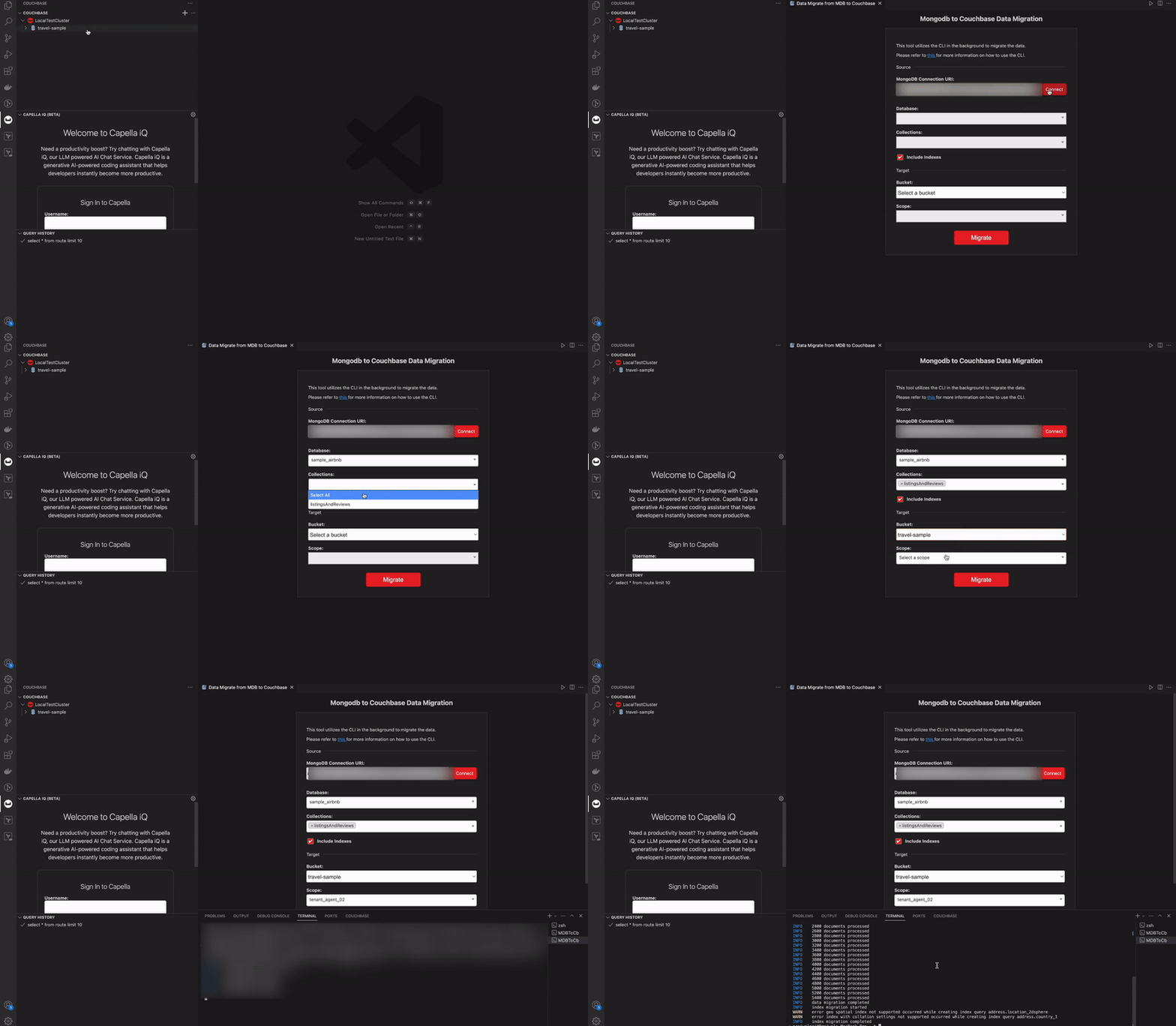
For more information, refer to the VSCode-Couchbase extension documentation on GitHub.
JetBrains IDE Plugin
JetBrains users aren’t left out—the Couchbase plugin for JetBrains IDEs provides a seamless migration experience with the robustness you expect from JetBrains tools.
Key Features:
- Seamless Integration: Migrate your MongoDB data to Couchbase directly within your preferred JetBrains IDE.
- Efficient Workflow: Access all necessary migration functionalities within the familiar JetBrains interface.
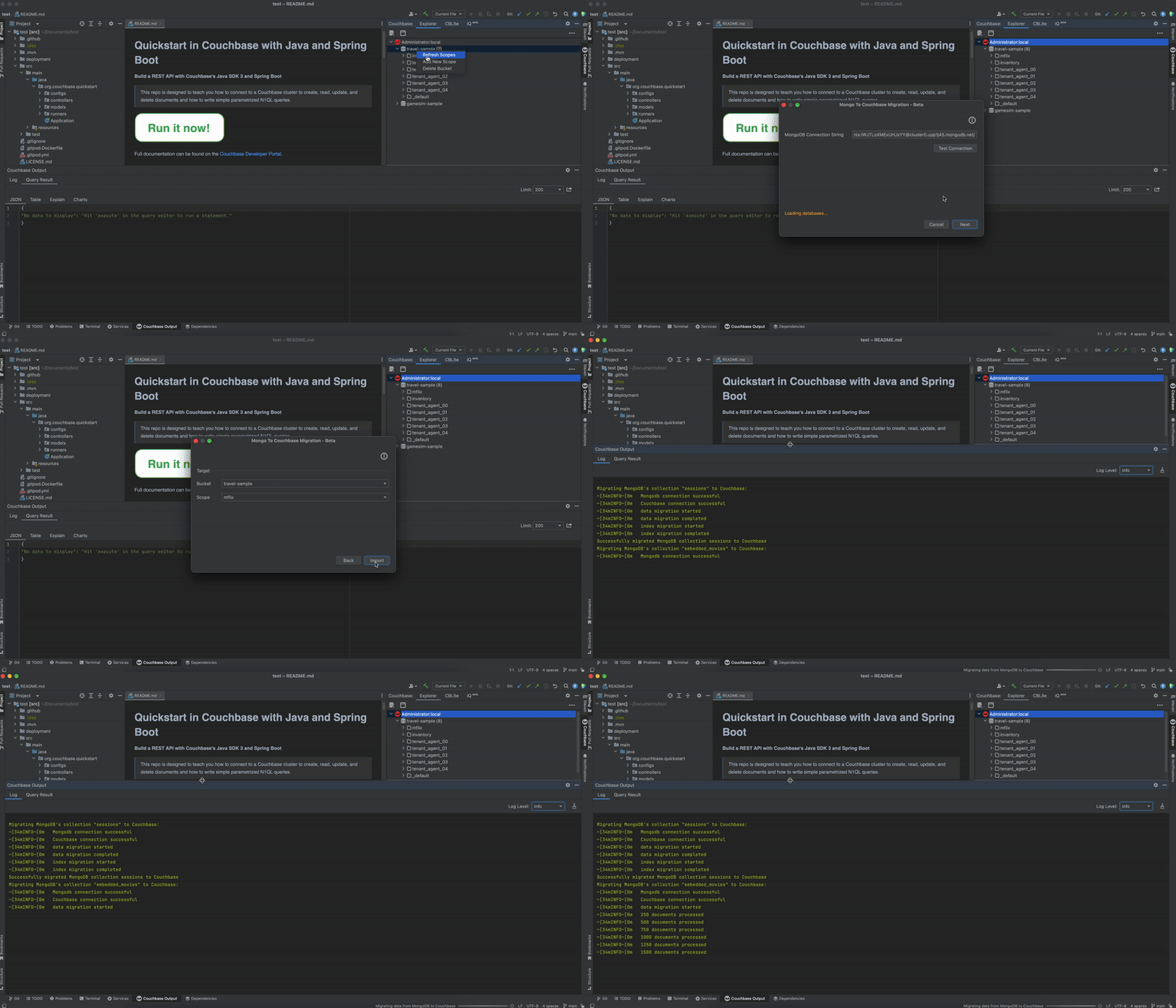
For more information, refer to the Couchbase-JetBrains plugin project in GitHub.

Deixe um comentário
Você precisa fazer o login para publicar um comentário.