
Cross Datacenter Replication (XDCR) in Couchbase provides an easy way to replicate data from one cluster to another. The clusters are typically set in geographically
diverse data centers. This enables for disaster recovery or to bring data closer to users for faster data access. This blog will show:
- Setup two data centers using Docker Swarm
- Run Couchbase containers on each node of Docker Swarm
- Setup a Couchbase cluster on each Docker Swarm cluster
- Configure one-way XDCR between two Couchbase clusters
For the purpose of this blog, the two data centers will be setup on a local machine using Docker Machine.

Complete code used in this blog is available at: github.com/arun-gupta/couchbase-xdcr-docker.
Create Consul Discovery Service
Each node in Docker Swarm needs to be registered with a discovery service. This blog will use Consul for that purpose. And even Consul will be running on a Docker Machine. Typically, you’ll run
a cluster of Consul but for simplicity a single instance is started in our case. Create a Docker Machine and start Consul using this script:
|
1 2 3 4 5 6 7 8 9 10 11 |
# Docker Machine for Consul docker–machine criar –d virtualbox consul–machine # Start Consul docker $(docker–machine configuração consul–machine) correr –d —restart=always –p “8500:8500” –h “consul” progrium/consul –server –bootstrap |
Create Docker Swarm cluster
Docker Swarm allows multiple Docker hosts to be viewed as a single unit. This allows your multi-container applications to easily run on multiple hosts. Docker Swarm serves the same Remote API as served by a single host. This allows your existing tools to target a single host or a cluster of hosts. Both the Docker Swarm clusters will be registered with a single discovery service. This is achieved by using the following value for
--swarm-discovery:
|
1 |
consul://$(docker-machine ip consul-machine):8500/v1/kv/ |
Create a Docker Swarm cluster using Docker Machine using this script:
|
1 2 3 4 5 6 7 8 9 10 11 12 13 14 15 16 17 18 19 20 21 22 23 24 25 26 27 28 29 30 31 32 33 |
# Docker Swarm master docker–machine criar –d virtualbox —swarm —swarm–master —swarm–discovery=“consul://$(docker-machine ip consul-machine):8500/v1/kv/cluster$1” —motor–opt=“cluster-store=consul://$(docker-machine ip consul-machine):8500/v1/kv/cluster$1” —motor–opt=“cluster-advertise=eth1:2376” swarm–master–$1 # Docker Swarm node-01 docker–machine criar –d virtualbox —swarm —swarm–discovery=“consul://$(docker-machine ip consul-machine):8500/v1/kv/cluster$1” —motor–opt=“cluster-store=consul://$(docker-machine ip consul-machine):8500/v1/kv/cluster$1” —motor–opt=“cluster-advertise=eth1:2376” swarm–nó–$1–01 # Docker Swarm node-02 docker–machine criar –d virtualbox —swarm —swarm–discovery=“consul://$(docker-machine ip consul-machine):8500/v1/kv/cluster$1” —motor–opt=“cluster-store=consul://$(docker-machine ip consul-machine):8500/v1/kv/cluster$1” —motor–opt=“cluster-advertise=eth1:2376” swarm–nó–$1–02 # Configure to use Docker Swarm cluster eval “$(docker-machine env –swarm swarm-master-$1)” |
The script needs to be invoked as:
|
1 2 |
./criar–docker–swarm–aglomerado.sh A ./criar–docker–swarm–aglomerado.sh B |
This will create two Docker Swarm clusters with one “master” and two “worker” as shown below:
|
1 2 3 4 5 6 7 8 9 |
NAME ACTIVE DRIVER STATE URL SWARM DOCKER ERRORS consul–machine – virtualbox Running tcp://192.168.99.101:2376 v1.11.1 default * virtualbox Running tcp://192.168.99.100:2376 v1.11.1 swarm–master–A – virtualbox Running tcp://192.168.99.102:2376 swarm-master-A (master) v1.11.1 swarm–master–B – virtualbox Running tcp://192.168.99.105:2376 swarm-master-B (master) v1.11.1 swarm–nó–A–01 – virtualbox Running tcp://192.168.99.103:2376 swarm-master-A v1.11.1 swarm–nó–A–02 – virtualbox Running tcp://192.168.99.104:2376 swarm-master-A v1.11.1 swarm–nó–B–01 – virtualbox Running tcp://192.168.99.106:2376 swarm-master-B v1.11.1 swarm–nó–B–02 – virtualbox Running tcp://192.168.99.107:2376 swarm-master-B v1.11.1 |
Consul is running on Docker Machine with IP address 192.168.99.101. And so Consul UI is accessible at https://192.168.99.101:8500:
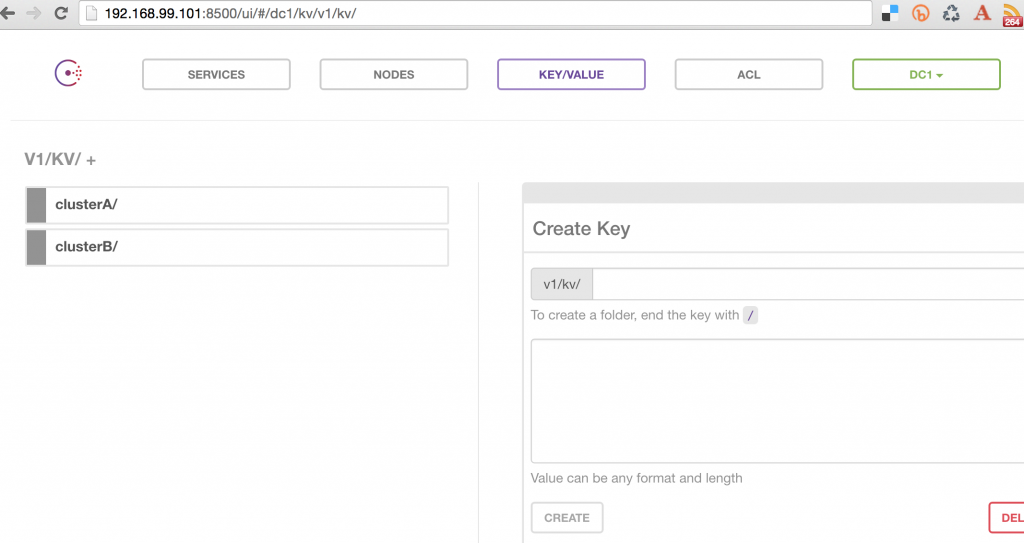
It shows two Docker Swarm clusters that have been registered. Exact list of nodes for each cluster can also be seen. Nodes in clusterA are shown: 
Nodes in clusterB are shown:
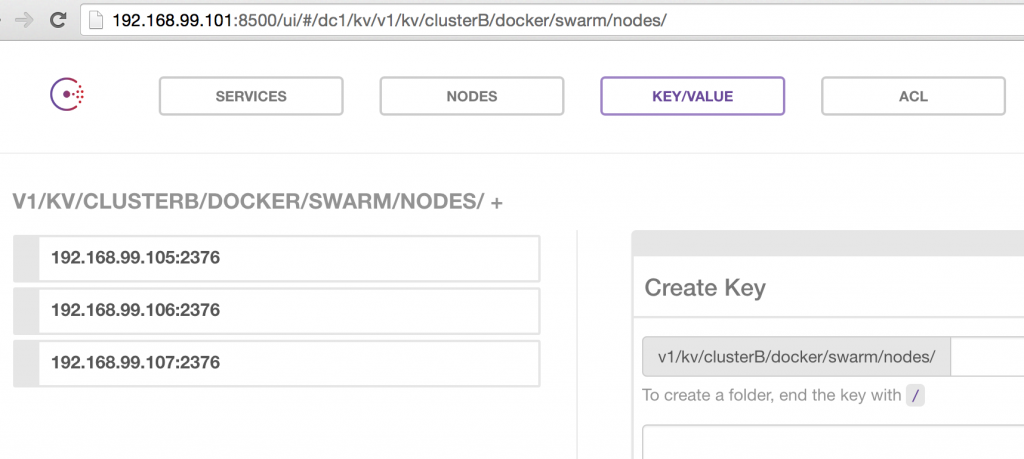
Run Couchbase containers
Run Couchbase container on each node of Docker Swarm cluster using this Compose file.
|
1 2 3 4 5 6 7 8 9 10 |
versão: “2” serviços: db: image: arungupta/Couchbase network_mode: “host” ports: – 8091:8091 – 8092:8092 – 8093:8093 – 11210:11210 |
Configure Docker CLI for the first cluster and run 3 containers:
|
1 2 |
eval “$(docker-machine env –swarm swarm-master-A)” docker–compose scale db=3 |
Check the running containers:
|
1 2 3 4 5 |
> docker ps CONTAINER ID IMAGE COMMAND CREATED STATUS PORTS NAMES 3ec0f15aaee0 arungupta/Couchbase “/entrypoint.sh /opt/” 3 hours ago Up 3 hours swarm–master–A/couchbasexdcrdocker_db_3 07af2ac53539 arungupta/Couchbase “/entrypoint.sh /opt/” 3 hours ago Up 3 hours swarm–nó–A–02/couchbasexdcrdocker_db_2 c94878f543fd arungupta/Couchbase “/entrypoint.sh /opt/” 3 hours ago Up 3 hours swarm–nó–A–01/couchbasexdcrdocker_db_1 |
Configure Docker CLI for the second cluster and run 3 containers:
|
1 2 |
eval “$(docker-machine env –swarm swarm-master-B)” docker–compose scale db=3 |
Check the running containers:
|
1 2 3 4 5 6 |
> eval “$(docker-machine env –swarm swarm-master-B)” > docker ps CONTAINER ID IMAGE COMMAND CREATED STATUS PORTS NAMES 3e3a45480939 arungupta/Couchbase “/entrypoint.sh /opt/” 3 hours ago Up 3 hours swarm–master–B/couchbasexdcrdocker_db_3 1f31f23e337d arungupta/Couchbase “/entrypoint.sh /opt/” 3 hours ago Up 3 hours swarm–nó–B–01/couchbasexdcrdocker_db_1 1feab04c494c arungupta/Couchbase “/entrypoint.sh /opt/” 3 hours ago Up 3 hours swarm–nó–B–02/couchbasexdcrdocker_db_2 |
Create/Rebalance Couchbase cluster
Scaling and Rebalancing Couchbase Cluster using CLI explains how to create a cluster of Couchbase nodes and rebalance an existing cluster using Couchbase CLI.
Create Couchbase cluster on each Swarm cluster using this script.
|
1 |
consul://$(docker-machine ip consul-machine):8500/v1/kv/ |
The script needs to be invoked as:
|
1 |
consul://$(docker-machine ip consul-machine):8500/v1/kv/ |
And now rebalance this cluster using this script:
|
1 |
consul://$(docker-machine ip consul-machine):8500/v1/kv/ |
This script is invoked as:
|
1 |
consul://$(docker-machine ip consul-machine):8500/v1/kv/ |
Console da Web do Couchbase for any node in the cluster will show the output:
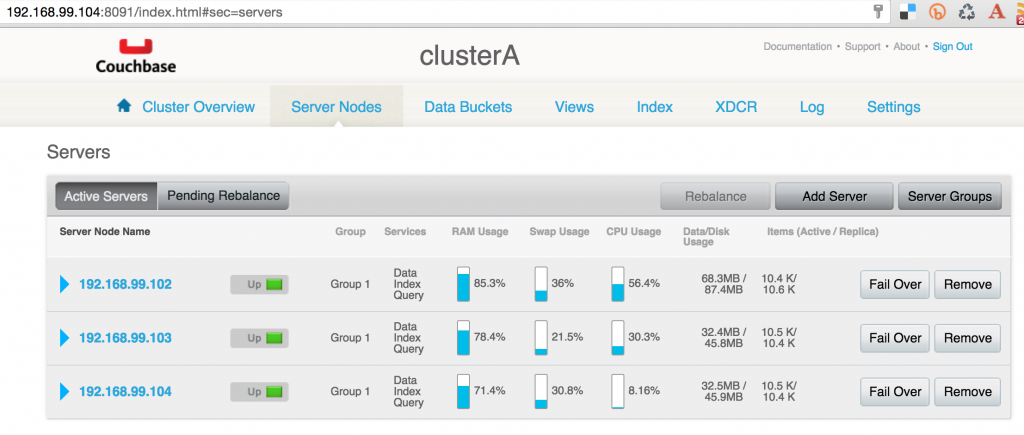
Invoke this script to create the second Couchbase cluster as:
|
1 |
consul://$(docker-machine ip consul-machine):8500/v1/kv/ |
Rebalance this cluster as:
|
1 |
consul://$(docker-machine ip consul-machine):8500/v1/kv/ |
Couchbase Web Console for any node in the second cluster will show the output: 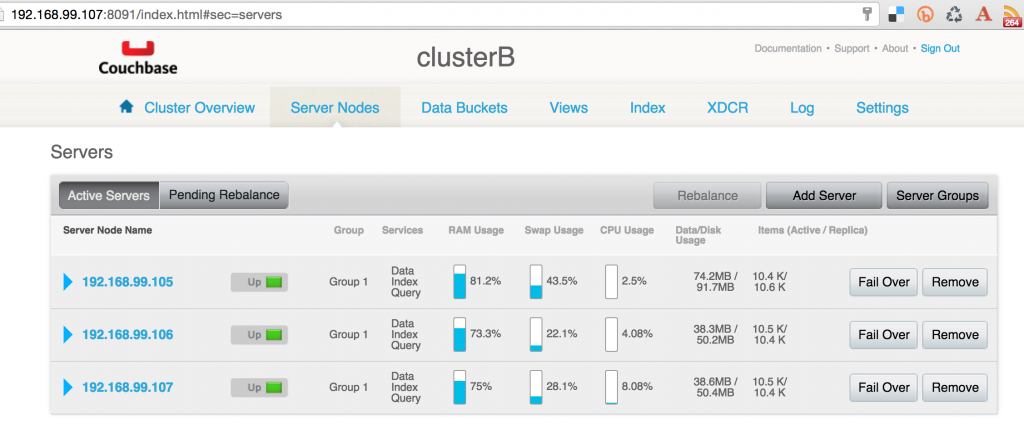
Setup XDCR
Cross datacenter replication can be setup to be uni-directional, bi-directional or multi-directional. Uni-directional allows data to replicated from source cluster to destination cluster, bi-directional allows replication both ways, multi-directional
allows to configure in any direction. We’ll create a simple uni-directional replication using this script:
|
1 |
consul://$(docker-machine ip consul-machine):8500/v1/kv/ |
This script is invoked as:
|
1 |
consul://$(docker-machine ip consul-machine):8500/v1/kv/ |
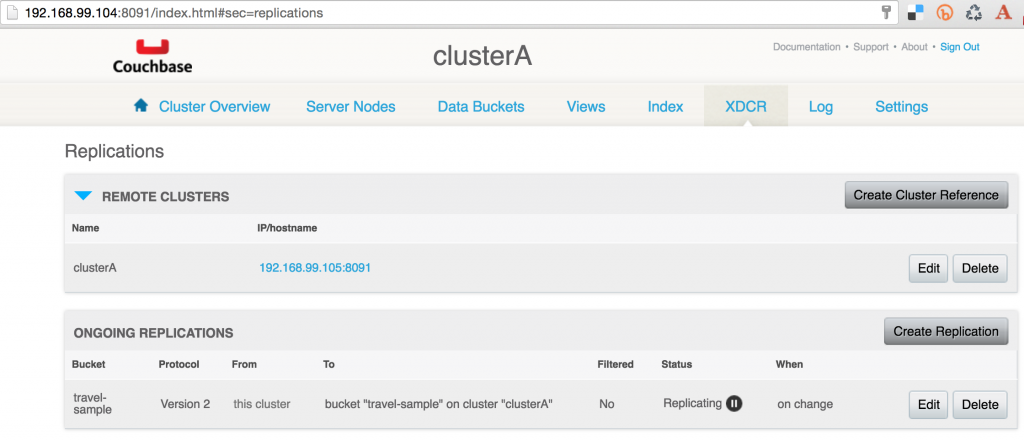
A bi-directional replication can be easily created by executing the commands again but reversing the source and destination cluster. Couchbase Web Console for the source cluster will show:
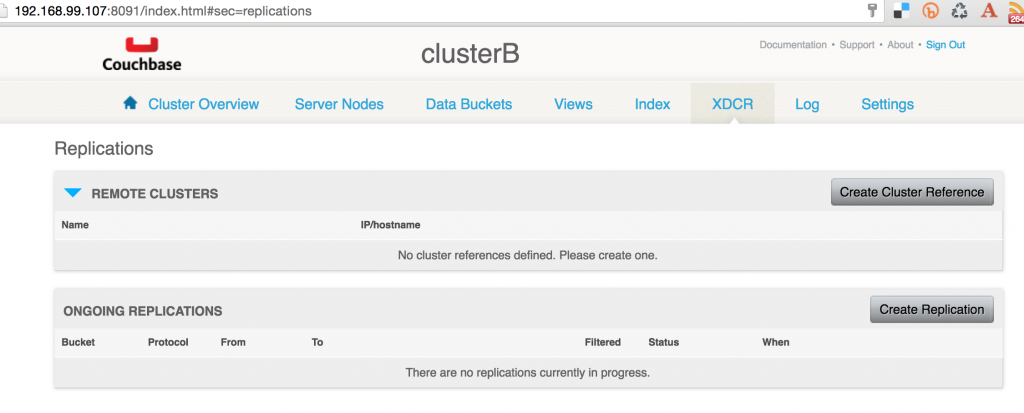
Couchbase Web Console for the destination cluster will show:
Enjoy!
This blog shows how you can simplify your complex deployments using Docker Machine, Docker Swarm, and Docker Compose.
Autor

Uma resposta
-
Hi, I followed your post here to setup 2 couchbase cluster 3 node because I use docker swarm mode :
https://www.couchbase.com/docker-service-swarm-mode-couchbase-cluster/I used vagrant with docker swarm mode. They seemed work well. But when I tried to configure XDCR via WebUI, I got the following error :
Attention – 2017-04-07 15:13:09 10.0.0.6:CheckpointMgr:Failed to get starting seqno for pipeline 690841985e8189a6c431bd9f25faf8a7/test-xdcr/test-xdcr-903583530
Attention – 2017-04-07 15:13:02 10.0.0.3:CheckpointMgr:Failed to get starting seqno for pipeline 690841985e8189a6c431bd9f25faf8a7/test-xdcr/test-xdcr-908871718
Attention – 2017-04-07 15:12:58 10.0.0.5:CheckpointMgr:Failed to get starting seqno for pipeline 690841985e8189a6c431bd9f25faf8a7/test-xdcr/test-xdcr-259497001When I took a look on goxdcr.log, I found something like that :
GenericPipeline 2017-04-07T15:14:07.863Z [DEBUG] 690841985e8189a6c431bd9f25faf8a7/test-xdcr/test-xdcr-413659460 calling update setting constructor on runtime context with settings=map[VBTimestamps:map[300:[vbno=300, uuid=0, seqno=0, sn_start=0, sn_end=0]]]
GenericSupervisor 2017-04-07T15:14:07.863Z [DEBUG] Updating settings on pipelineSupervisor PipelineSupervisor_690841985e8189a6c431bd9f25faf8a7/test-xdcr/test-xdcr. settings=map[pipeline_loglevel:Debug]
CheckpointManager 2017-04-07T15:14:07.864Z [DEBUG] Updating settings on checkpoint manager for pipeline 690841985e8189a6c431bd9f25faf8a7/test-xdcr/test-xdcr. settings=map[checkpoint_interval:1800]
StatisticsManager 2017-04-07T15:14:07.864Z [DEBUG] Updating settings on stats manager. settings=map[publish_interval:1000]
CheckpointManager 2017-04-07T15:14:07.864Z [DEBUG] 690841985e8189a6c431bd9f25faf8a7/test-xdcr/test-xdcr Set VBTimestamp for vb=300 completed
GenericSupervisor 2017-04-07T15:14:07.864Z [ERROR] Received error report : map[CheckpointMgr:Failed to get starting seqno for pipeline 690841985e8189a6c431bd9f25faf8a7/test-xdcr/test-xdcr-413659460]
ReplicationManager 2017-04-07T15:14:07.864Z [INFO] Supervisor PipelineSupervisor_690841985e8189a6c431bd9f25faf8a7/test-xdcr/test-xdcr of type *supervisor.GenericSupervisor reported errors map[CheckpointMgr:Failed to get starting seqno for pipeline 690841985e8189a6c431bd9f25faf8a7/test-xdcr/test-xdcr-413659460]
PipelineManager 2017-04-07T15:14:07.865Z [INFO] Pipeline updater 690841985e8189a6c431bd9f25faf8a7/test-xdcr/test-xdcr is lauched with retry_interval=10
CheckpointManager 2017-04-07T15:14:07.865Z [INFO] Done with SetVBTimestamps
PipelineManager 2017-04-07T15:14:07.865Z [INFO] err_list=[{“time”:”2017-04-07T15:14:07.865641343Z”,”errMsg”:”CheckpointMgr:Failed to get starting seqno for pipeline 690841985e8189a6c431bd9f25faf8a7/test-xdcr/test-xdcr-413659460″}]
PipelineManager 2017-04-07T15:14:07.865Z [INFO] Updater 690841985e8189a6c431bd9f25faf8a7/test-xdcr/test-xdcr moved to 1 from 0
DcpNozzle 2017-04-07T15:14:07.892Z [DEBUG] dcp_690841985e8189a6c431bd9f25faf8a7/test-xdcr/test-xdcr_10.0.0.3:11210_0 starting vb stream for vb=100, opaque=38204
DcpNozzle 2017-04-07T15:14:07.892Z [DEBUG] dcp_690841985e8189a6c431bd9f25faf8a7/test-xdcr/test-xdcr_10.0.0.3:11210_0 starting vb stream for vb=0, opaque=38204
_time=2017-04-07T15:14:07.893+00:00 _level=INFO _msg=UPR_STREAMREQ for vb 100 successful
_time=2017-04-07T15:14:07.893+00:00 _level=INFO _msg=UPR_STREAMREQ for vb 0 successful
DcpNozzle 2017-04-07T15:14:07.908Z [DEBUG] dcp_690841985e8189a6c431bd9f25faf8a7/test-xdcr/test-xdcr_10.0.0.3:11210_1 starting vb stream for vb=300, opaque=38205
DcpNozzle 2017-04-07T15:14:07.908Z [DEBUG] dcp_690841985e8189a6c431bd9f25faf8a7/test-xdcr/test-xdcr_10.0.0.3:11210_1 starting vb stream for vb=200, opaque=38205
_time=2017-04-07T15:14:07.909+00:00 _level=INFO _msg=UPR_STREAMREQ for vb 300 successful
_time=2017-04-07T15:14:07.909+00:00 _level=INFO _msg=UPR_STREAMREQ for vb 200 successful
GenericSupervisor 2017-04-07T15:14:08.074Z [DEBUG] heart beat async called
GenericSupervisor 2017-04-07T15:14:08.074Z [DEBUG] responded to heart beat sent at 2017-04-07 15:14:08.074118904 +0000 UTC
StatisticsManager 2017-04-07T15:14:08.564Z [INFO] Pipeline is no longer running, exit.
StatisticsManager 2017-04-07T15:14:08.564Z [INFO] expvar=Stats for pipeline 690841985e8189a6c431bd9f25faf8a7/test-xdcr/test-xdcr-413659460 {“Errors”: “[{“time”:”2017-04-07T15:14:07.865641343Z”,”errMsg”:”CheckpointMgr:Failed to get starting seqno for pipeline 690841985e8189a6c431bd9f25faf8a7/test-xdcr/test-xdcr-413659460″}]”, “Overview”: {“”: 0, “bandwidth_usage”: 0, “changes_left”: 1, “data_replicated”: 0, “dcp_datach_length”: 0, “dcp_dispatch_time”: 0, “deletion_docs_written”: 0, “deletion_failed_cr_source”: 0, “deletion_filtered”: 0, “deletion_received_from_dcp”: 0, “docs_checked”: 0, “docs_failed_cr_source”: 0, “docs_filtered”: 0, “docs_opt_repd”: 0, “docs_processed”: 0, “docs_received_from_dcp”: 0, “docs_rep_queue”: 0, “docs_written”: 0, “expiry_docs_written”: 0, “expiry_failed_cr_source”: 0, “expiry_filtered”: 0, “expiry_received_from_dcp”: 0, “num_checkpoints”: 0, “num_failedckpts”: 0, “rate_doc_checks”: 0, “rate_doc_opt_repd”: 0, “rate_received_from_dcp”: 0, “rate_replicated”: 0, “resp_wait_time”: 0, “set_docs_written”: 0, “set_failed_cr_source”: 0, “set_filtered”: 0, “set_received_from_dcp”: 0, “size_rep_queue”: 0, “time_committing”: 0, “wtavg_docs_latency”: 0, “wtavg_meta_latency”: 0}, “Progress”: “Received error report : map[CheckpointMgr:Failed to get starting seqno for pipeline 690841985e8189a6c431bd9f25faf8a7/test-xdcr/test-xdcr-413659460]”, “Status”: “Pending”}Can you tell me why these error and how to solve it please ?
Best regards.

Deixe um comentário
Você precisa fazer o login para publicar um comentário.