

This blog is part of a multi-part blog series that shows how to run your applications on Kubernetes. It will use the 카우치베이스, an open source NoSQL distributed document database, as the Docker container.
The first part (Couchbase on Kubernetes) explained how to start the Kubernetes cluster using Vagrant. The second part (Kubernetes on Amazon) explained how run that setup on Amazon Web Services.
This third part will show:
- How to setup and start the Kubernetes cluster on Google Cloud
- Run Docker container in the Kubernetes cluster
- Expose Pod on Kubernetes as Service
- Shutdown the cluster
Here is a quick overview:
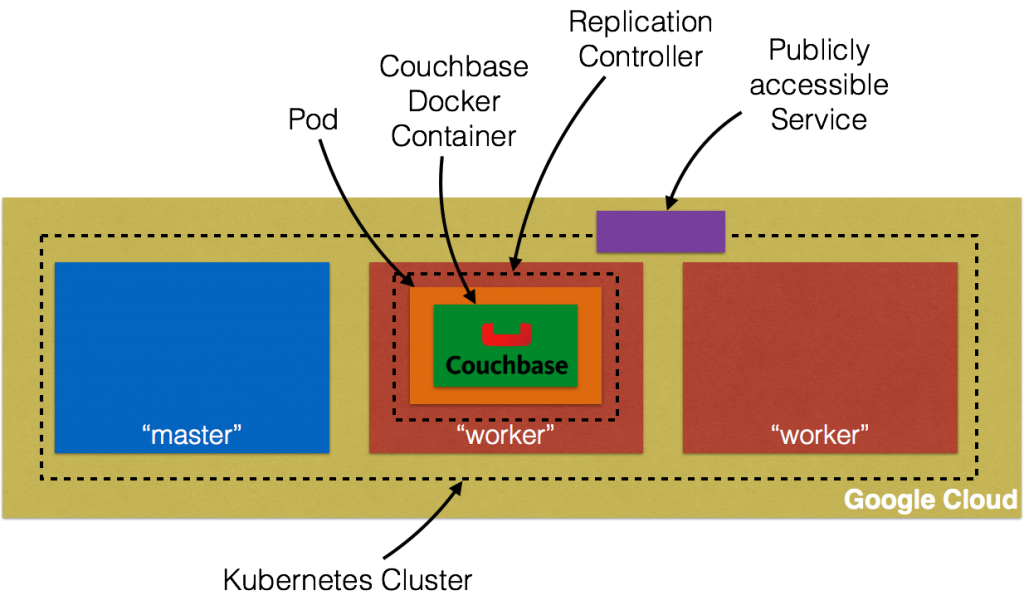
Let’s get into details!
Getting Started with Google Compute Engine provide detailed instructions on how to setup Kubernetes on Google Cloud.
Download and Configure Google Cloud SDK
There is a bit of setup required if you’ve never accessed Google Cloud on your machine. This was a bit overwhelming and wish can be simplified.
- Create a billable account on Google Cloud
- 설치 Google Cloud SDK
- Configure credentials: gcloud auth login
- Create a new Google Cloud project and name it
couchbase-on-kubernetes - Set the project:
gcloud config set project couchbase-on-kubernetes - Set default zone:
gcloud config set compute/zone us-central1-a - Create an instance:
gcloud compute instances create example-instance --machine-type n1-standard-1 --image debian-8 - SSH into the instance:
gcloud compute ssh example-instance - Delete the instance:
gcloud compute instances delete example-instance
Setup Kubernetes Cluster on Google Cloud
Kubernetes cluster can be created on Google Cloud as:
|
1 2 |
설정 KUBERNETES_PROVIDER=gce ./클러스터/kube–up.sh |
Make sure KUBERNETES_PROVIDER is either set to gce or not set at all. By default, this provisions a 4 node Kubernetes cluster with one master. This means 5 Virtual Machines are created.
If you downloaded Kubernetes from github.com/kubernetes/kubernetes/releases, then all the values can be changed in cluster/aws/config-default.sh.
Starting Kubernetes on Google Cloud shows the following log. Google Cloud SDK was behaving little weird but taking the defaults seem to work:
|
1 2 3 4 5 6 7 8 9 10 11 12 13 14 15 16 17 18 19 20 21 22 23 24 25 26 27 28 29 30 31 32 33 34 35 36 37 38 39 40 41 42 43 44 45 46 47 48 49 50 51 52 53 54 55 56 57 58 59 60 61 62 63 64 65 66 67 68 69 70 71 72 73 74 75 76 77 78 79 80 81 82 83 84 85 86 87 88 89 90 91 92 93 94 95 96 97 98 99 100 101 102 103 104 105 106 107 108 109 110 111 112 113 114 115 116 117 118 119 120 121 122 123 124 125 126 127 128 129 130 131 132 133 134 135 136 137 138 139 140 141 142 143 144 145 146 147 148 149 150 151 152 153 154 155 156 157 158 159 160 161 162 163 164 165 166 167 168 169 170 171 172 173 174 175 176 177 178 179 180 181 182 183 |
./쿠버네티스/클러스터/kube–up.sh ... Starting 클러스터 using 제공자: gce ... calling verify–prereqs 당신 가지다 specified 개인 components -로 업데이트. 만약 당신 이다 trying -로 설치 새로운 components, 사용하다: $ gcloud components 설치 alpha Do 당신 want -로 실행 설치 instead (y/N)? Your current Cloud 소프트웨어 개발 키트 버전 이다: 99.0.0 Installing components 에서 버전: 99.0.0 ┌──────────────────────────────────────────────┐ │ These components will 있다 installed. │ ├───────────────────────┬────────────┬─────────┤ │ 이름 │ 버전 │ Size │ ├───────────────────────┼────────────┼─────────┤ │ gcloud Alpha Commands │ 2016.01.12 │ < 1 맨인블랙 │ └───────────────────────┴────────────┴─────────┘ For 그 latest 가득 찬 release notes, please visit: https://cloud.google.com/sdk/release_notes Do 당신 want -로 continue (Y/n)? ╔════════════════════════════════════════════════════════════╗ ╠═ Creating 업데이트 staging area ═╣ ╠════════════════════════════════════════════════════════════╣ ╠═ Installing: gcloud Alpha Commands ═╣ ╠════════════════════════════════════════════════════════════╣ ╠═ Creating 백업 그리고 activating 새로운 설치 ═╣ ╚════════════════════════════════════════════════════════════╝ Performing 게시물 processing 단계...done. Update done! 당신 가지다 specified 개인 components -로 업데이트. 만약 당신 이다 trying -로 설치 새로운 components, 사용하다: $ gcloud components 설치 베타 Do 당신 want -로 실행 설치 instead (y/N)? Your current Cloud 소프트웨어 개발 키트 버전 이다: 99.0.0 Installing components 에서 버전: 99.0.0 ┌─────────────────────────────────────────────┐ │ These components will 있다 installed. │ ├──────────────────────┬────────────┬─────────┤ │ 이름 │ 버전 │ Size │ ├──────────────────────┼────────────┼─────────┤ │ gcloud Beta Commands │ 2016.01.12 │ < 1 맨인블랙 │ └──────────────────────┴────────────┴─────────┘ For 그 latest 가득 찬 release notes, please visit: https://cloud.google.com/sdk/release_notes Do 당신 want -로 continue (Y/n)? ╔════════════════════════════════════════════════════════════╗ ╠═ Creating 업데이트 staging area ═╣ ╠════════════════════════════════════════════════════════════╣ ╠═ Installing: gcloud Beta Commands ═╣ ╠════════════════════════════════════════════════════════════╣ ╠═ Creating 백업 그리고 activating 새로운 설치 ═╣ ╚════════════════════════════════════════════════════════════╝ Performing 게시물 processing 단계...done. Update done! All components 이다 up -로 날짜. ... calling kube–up Your active configuration 이다: [기본값] Project: 카우치베이스–~에–쿠버네티스 Zone: us–central1–b Creating gs://kubernetes-staging-9479406781 Creating gs://kubernetes-staging-9479406781/… +++ Staging 서버 tars -로 Google Storage: gs://kubernetes-staging-9479406781/devel +++ 쿠버네티스–서버–리눅스–amd64.tar.gz uploaded (sha1 = 1ff42f7c31837851d919a66fc07f34b9dbdacf28) +++ 쿠버네티스–salt.tar.gz uploaded (sha1 = f307380ad6af7dabcf881b132146fa775c18dca8) Looking ~를 위해 already existing resources Starting master 그리고 configuring firewalls Created [https://www.googleapis.com/compute/v1/projects/couchbase-on-kubernetes/zones/us-central1-b/disks/kubernetes-master-pd]. NAME ZONE SIZE_GB TYPE STATUS 쿠버네티스–master–pd us–central1–b 20 pd–ssd READY Created [https://www.googleapis.com/compute/v1/projects/couchbase-on-kubernetes/regions/us-central1/addresses/kubernetes-master-ip]. Created [https://www.googleapis.com/compute/v1/projects/couchbase-on-kubernetes/global/firewalls/default-default-ssh]. Created [https://www.googleapis.com/compute/v1/projects/couchbase-on-kubernetes/global/firewalls/kubernetes-master-https]. NAME NETWORK SRC_RANGES RULES SRC_TAGS TARGET_TAGS 기본값–기본값–ssh 기본값 0.0.0.0/0 tcp:22 NAME NETWORK SRC_RANGES RULES SRC_TAGS TARGET_TAGS 쿠버네티스–master–https 기본값 0.0.0.0/0 tcp:443 쿠버네티스–master +++ 로깅 using Fluentd -로 GCP ./쿠버네티스/클러스터/../클러스터/../클러스터/gce/util.sh: 선 434: @: unbound variable ./쿠버네티스/클러스터/../클러스터/../클러스터/gce/util.sh: 선 434: @: unbound variable ./쿠버네티스/클러스터/../클러스터/../클러스터/gce/util.sh: 선 434: @: unbound variable ./쿠버네티스/클러스터/../클러스터/../클러스터/gce/util.sh: 선 434: @: unbound variable Created [https://www.googleapis.com/compute/v1/projects/couchbase-on-kubernetes/global/firewalls/default-default-internal]. NAME NETWORK SRC_RANGES RULES SRC_TAGS TARGET_TAGS 기본값–기본값–internal 기본값 10.0.0.0/8 tcp:1–65535,udp:1–65535,icmp Created [https://www.googleapis.com/compute/v1/projects/couchbase-on-kubernetes/global/firewalls/kubernetes-minion-all]. NAME NETWORK SRC_RANGES RULES SRC_TAGS TARGET_TAGS 쿠버네티스–minion–모두 기본값 10.244.0.0/16 tcp,udp,icmp,esp,ah,sctp 쿠버네티스–minion Created [https://www.googleapis.com/compute/v1/projects/couchbase-on-kubernetes/zones/us-central1-b/instances/kubernetes-master]. NAME ZONE MACHINE_TYPE PREEMPTIBLE INTERNAL_IP EXTERNAL_IP STATUS 쿠버네티스–master us–central1–b n1–standard–1 10.128.0.2 104.197.213.249 RUNNING Creating minions. ./쿠버네티스/클러스터/../클러스터/../클러스터/gce/util.sh: 선 434: @: unbound variable ./쿠버네티스/클러스터/../클러스터/../클러스터/gce/util.sh: 선 434: @: unbound variable Attempt 1 -로 만들다 쿠버네티스–minion–template WARNING: 당신 가지다 selected a disk size 의 under [200GB]. 이것 may 결과 안으로 poor I/O performance. For 더 information, 보다: https://developers.google.com/compute/docs/disks/persistent-disks#pdperformance. Created [https://www.googleapis.com/compute/v1/projects/couchbase-on-kubernetes/global/instanceTemplates/kubernetes-minion-template]. NAME MACHINE_TYPE PREEMPTIBLE CREATION_TIMESTAMP 쿠버네티스–minion–template n1–standard–1 2016–03–03T14:01:14.322–08:00 Created [https://www.googleapis.com/compute/v1/projects/couchbase-on-kubernetes/zones/us-central1-b/instanceGroupManagers/kubernetes-minion-group]. NAME ZONE BASE_INSTANCE_NAME SIZE TARGET_SIZE INSTANCE_TEMPLATE AUTOSCALED 쿠버네티스–minion–group us–central1–b 쿠버네티스–minion 4 쿠버네티스–minion–template Waiting ~를 위해 group -로 되다 stable, current 작업: creating: 4 Waiting ~를 위해 group -로 되다 stable, current 작업: creating: 4 Waiting ~를 위해 group -로 되다 stable, current 작업: creating: 4 Waiting ~를 위해 group -로 되다 stable, current 작업: creating: 4 Waiting ~를 위해 group -로 되다 stable, current 작업: creating: 4 Waiting ~를 위해 group -로 되다 stable, current 작업: creating: 4 Waiting ~를 위해 group -로 되다 stable, current 작업: creating: 3 Group 이다 stable MINION_NAMES=쿠버네티스–minion–1hmm 쿠버네티스–minion–3x1d 쿠버네티스–minion–h1ov 쿠버네티스–minion–nshn 사용하여 master: 쿠버네티스–master (external IP: 104.197.213.249) Waiting ~를 위해 클러스터 initialization. 이것 will continually check -로 보다 만약 그 API ~를 위해 쿠버네티스 이다 reachable. 이것 might loop forever 만약 there was 일부 uncaught 오류 during start up. 쿠버네티스 클러스터 created. 클러스터 “couchbase-on-kubernetes_kubernetes” 설정. 사용자 “couchbase-on-kubernetes_kubernetes” 설정. context “couchbase-on-kubernetes_kubernetes” 설정. switched -로 context “couchbase-on-kubernetes_kubernetes”. 사용자 “couchbase-on-kubernetes_kubernetes-basic-auth” 설정. Wrote 설정 ~를 위해 카우치베이스–~에–kubernetes_kubernetes -로 /Users/arungupta/.kube/설정 쿠버네티스 클러스터 이다 running. 그 master 이다 running at: https://104.197.213.249 그 사용자 이름 그리고 비밀번호 -로 사용하다 이다 located 안으로 /Users/arungupta/.kube/설정. ... calling validate–클러스터 Waiting ~를 위해 4 ready 노드. 0 ready 노드, 0 등록됨. Retrying. Waiting ~를 위해 4 ready 노드. 0 ready 노드, 2 등록됨. Retrying. Waiting ~를 위해 4 ready 노드. 0 ready 노드, 3 등록됨. Retrying. Waiting ~를 위해 4 ready 노드. 0 ready 노드, 4 등록됨. Retrying. Waiting ~를 위해 4 ready 노드. 3 ready 노드, 4 등록됨. Retrying. Waiting ~를 위해 4 ready 노드. 3 ready 노드, 4 등록됨. Retrying. Found 4 node(s). NAME LABELS STATUS AGE 쿠버네티스–minion–1hmm 쿠버네티스.io/hostname=쿠버네티스–minion–1hmm Ready 1m 쿠버네티스–minion–3x1d 쿠버네티스.io/hostname=쿠버네티스–minion–3x1d Ready 52s 쿠버네티스–minion–h1ov 쿠버네티스.io/hostname=쿠버네티스–minion–h1ov Ready 1m 쿠버네티스–minion–nshn 쿠버네티스.io/hostname=쿠버네티스–minion–nshn Ready 1m Validate output: NAME STATUS MESSAGE ERROR 제어기–manager Healthy ok 영점 scheduler Healthy ok 영점 etcd–0 Healthy {“health”: “true”} 영점 etcd–1 Healthy {“health”: “true”} 영점 클러스터 validation succeeded Done, listing 클러스터 services: 쿠버네티스 master 이다 running at https://104.197.213.249 GLBCDefaultBackend 이다 running at https://104.197.213.249/api/v1/proxy/namespaces/kube-system/services/default-http-backend Heapster 이다 running at https://104.197.213.249/api/v1/proxy/namespaces/kube-system/services/heapster KubeDNS 이다 running at https://104.197.213.249/api/v1/proxy/namespaces/kube-system/services/kube-dns KubeUI 이다 running at https://104.197.213.249/api/v1/proxy/namespaces/kube-system/services/kube-ui 그라파나 이다 running at https://104.197.213.249/api/v1/proxy/namespaces/kube-system/services/monitoring-grafana InfluxDB 이다 running at https://104.197.213.249/api/v1/proxy/namespaces/kube-system/services/monitoring-influxdb |
There are a couple of unbound variables and a WARNING message, but that didn’t seem to break the script. Google Cloud Console shows: 
Five instances are created as shown – one for master node and four for worker nodes.
Run Docker Container in Kubernetes Cluster on Google Cloud
Now that the cluster is up and running, get a list of all the nodes:
|
1 2 3 4 5 6 |
./쿠버네티스/클러스터/kubectl.sh 얻다 아니요 NAME LABELS STATUS AGE 쿠버네티스–minion–1hmm 쿠버네티스.io/hostname=쿠버네티스–minion–1hmm Ready 47m 쿠버네티스–minion–3x1d 쿠버네티스.io/hostname=쿠버네티스–minion–3x1d Ready 46m 쿠버네티스–minion–h1ov 쿠버네티스.io/hostname=쿠버네티스–minion–h1ov Ready 47m 쿠버네티스–minion–nshn 쿠버네티스.io/hostname=쿠버네티스–minion–nshn Ready 47m |
It shows four worker nodes. Create a Couchbase pod:
|
1 2 |
./쿠버네티스/클러스터/kubectl.sh 실행 카우치베이스 —image=arungupta/카우치베이스 replicationcontroller “카우치베이스” created |
Notice, how the image name can be specified on the CLI. This command creates a Replication Controller with a single pod. The pod uses arungupta/couchbase Docker image that provides a pre-configured Couchbase server. Any Docker image can be specified here.
Get all the RC resources:
|
1 2 3 |
./쿠버네티스/클러스터/kubectl.sh 얻다 rc CONTROLLER CONTAINER(S) IMAGE(S) SELECTOR REPLICAS AGE 카우치베이스 카우치베이스 arungupta/카우치베이스 실행=카우치베이스 1 48s |
This shows the Replication Controller that is created for you.
Get all the Pods:
|
1 2 3 |
./쿠버네티스/클러스터/kubectl.sh 얻다 po NAME READY STATUS RESTARTS AGE 카우치베이스–s8v9r 1/1 Running 0 1m |
The output shows the Pod that is created as part of the Replication Controller.
Get more details about the Pod:
|
1 2 3 4 5 6 7 8 9 10 11 12 13 14 15 16 17 18 19 20 21 22 23 24 25 26 27 28 29 30 31 32 33 34 35 36 37 38 39 40 41 42 43 44 |
./쿠버네티스/클러스터/kubectl.sh describe po 카우치베이스–s8v9r 이름: 카우치베이스–s8v9r Namespace: 기본값 Image(s): arungupta/카우치베이스 Node: 쿠버네티스–minion–3x1d/10.128.0.3 시작 Time: Thu, 03 Mar 2016 14:53:36 –0800 Labels: 실행=카우치베이스 상태: Running Reason: Message: IP: 10.244.3.3 Replication Controllers: 카우치베이스 (1/1 replicas created) Containers: 카우치베이스: Container 아이디: 도커://601ee2e4c822814c3969a241e37c97bf4d0d209f952f24707ab308192d289098 Image: arungupta/카우치베이스 Image 아이디: 도커://298618e67e495c2535abd17b60241565e456a4c9ee96c923ecf844a9dbcccced QoS Tier: cpu: Burstable Requests: cpu: 100m State: Running Started: Thu, 03 Mar 2016 14:54:46 –0800 Ready: True Restart Count: 0 Environment Variables: Conditions: 입력 상태 Ready True Volumes: 기본값–토큰–frsd7: 입력: Secret (a 비밀 that should populate 이것 volume) SecretName: 기본값–토큰–frsd7 Events: FirstSeen LastSeen Count From SubobjectPath Reason Message ───────── ──────── ───── ──── ───────────── ────── ─────── 1m 1m 1 {kubelet 쿠버네티스–minion–3x1d} implicitly 필수 컨테이너 POD Pulled Container image “gcr.io/google_containers/pause:0.8.0” already present ~에 machine 1m 1m 1 {scheduler } Scheduled Successfully assigned 카우치베이스–s8v9r -로 쿠버네티스–minion–3x1d 1m 1m 1 {kubelet 쿠버네티스–minion–3x1d} implicitly 필수 컨테이너 POD Created Created ~와 함께 도커 아이디 c1de9da87f1e 1m 1m 1 {kubelet 쿠버네티스–minion–3x1d} spec.컨테이너{카우치베이스} Pulling Pulling image “arungupta/couchbase” 1m 1m 1 {kubelet 쿠버네티스–minion–3x1d} implicitly 필수 컨테이너 POD Started Started ~와 함께 도커 아이디 c1de9da87f1e 29s 29s 1 {kubelet 쿠버네티스–minion–3x1d} spec.컨테이너{카우치베이스} Pulled Successfully pulled image “arungupta/couchbase” 29s 29s 1 {kubelet 쿠버네티스–minion–3x1d} spec.컨테이너{카우치베이스} Created Created ~와 함께 도커 아이디 601ee2e4c822 29s 29s 1 {kubelet 쿠버네티스–minion–3x1d} spec.컨테이너{카우치베이스} Started Started ~와 함께 도커 아이디 601ee2e4c822 |
Expose Pod on Kubernetes as Service
Now that our pod is running, how do I access the Couchbase server? You need to expose it outside the Kubernetes cluster. The kubectl expose command takes a pod, service or replication controller and expose it as a Kubernetes Service.
Let’s expose the replication controller previously created and expose it:
|
1 2 |
./쿠버네티스/클러스터/kubectl.sh expose rc 카우치베이스 —목표–port=8091 —port=8091 —유형=LoadBalancer service “카우치베이스” exposed |
Get more details about Service:
|
1 2 3 4 5 6 7 8 9 10 11 12 13 14 15 16 17 |
./쿠버네티스/클러스터/kubectl.sh describe svc 카우치베이스 이름: 카우치베이스 Namespace: 기본값 Labels: 실행=카우치베이스 Selector: 실행=카우치베이스 입력: LoadBalancer IP: 10.0.37.150 LoadBalancer Ingress: 104.197.118.35 Port: 8091/TCP NodePort: 30808/TCP Endpoints: 10.244.3.3:8091 Session Affinity: None Events: FirstSeen LastSeen Count From SubobjectPath Reason Message ───────── ──────── ───── ──── ───────────── ────── ─────── 2m 2m 1 {service–제어기 } CreatingLoadBalancer Creating load balancer 1m 1m 1 {service–제어기 } CreatedLoadBalancer Created load balancer |
그 Loadbalancer Ingress attribute gives you the IP address of the load balancer that is now publicly accessible. Wait for 3 minutes to let the load balancer settle down. Access it using port 8091 and the login page for Couchbase Web Console shows up: 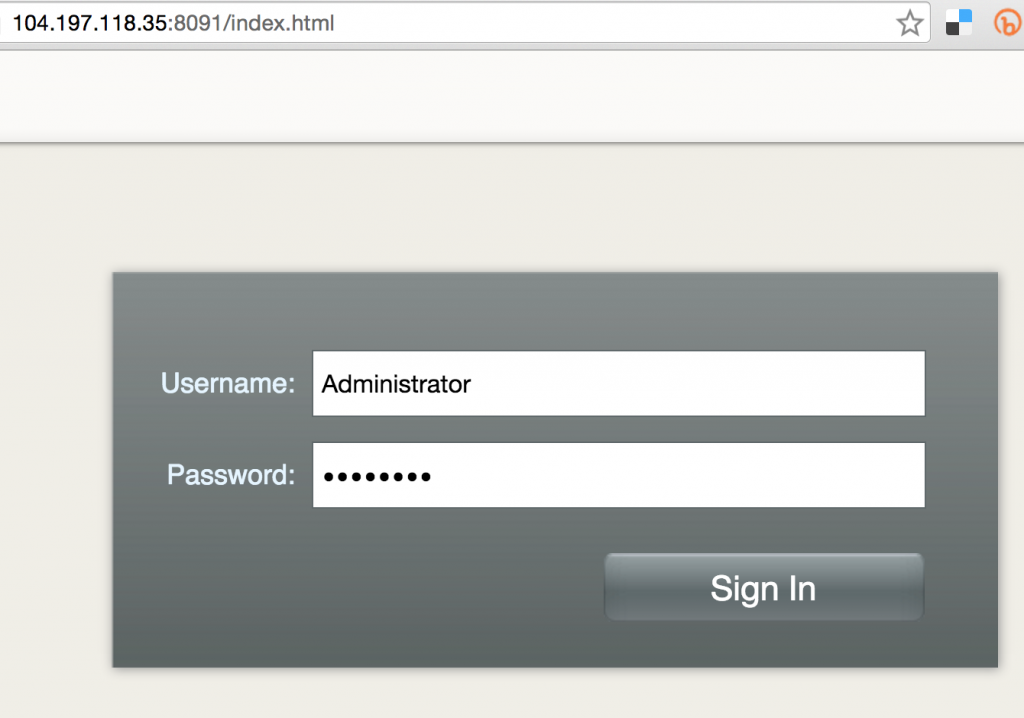
Enter the credentials as “Administrator” and “password” to see the Web Console: 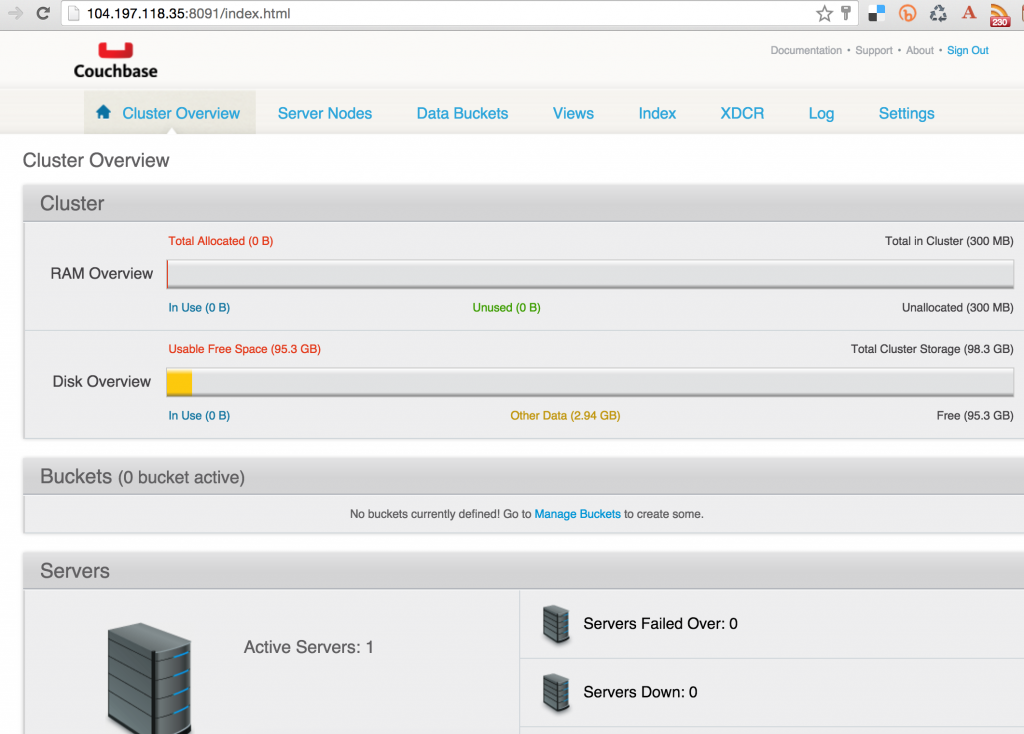
And so you just accessed your pod outside the Kubernetes cluster.
Shutdown Kubernetes Cluster
Finally, shutdown the cluster using cluster/kube-down.sh script.
|
1 2 3 4 5 6 7 8 9 10 11 12 13 14 15 16 17 18 19 20 21 22 23 24 25 26 27 28 29 30 31 32 33 34 35 36 37 38 39 40 41 |
./쿠버네티스/클러스터/kube–down.sh Bringing down 클러스터 using 제공자: gce 당신 가지다 specified 개인 components -로 업데이트. 만약 당신 이다 trying -로 설치 새로운 components, 사용하다: $ gcloud components 설치 alpha Do 당신 want -로 실행 설치 instead (y/N)? All components 이다 up -로 날짜. 당신 가지다 specified 개인 components -로 업데이트. 만약 당신 이다 trying -로 설치 새로운 components, 사용하다: $ gcloud components 설치 베타 Do 당신 want -로 실행 설치 instead (y/N)? All components 이다 up -로 날짜. All components 이다 up -로 날짜. Your active configuration 이다: [기본값] Project: 카우치베이스–~에–쿠버네티스 Zone: us–central1–b Bringing down 클러스터 Deleted [https://www.googleapis.com/compute/v1/projects/couchbase-on-kubernetes/zones/us-central1-b/instanceGroupManagers/kubernetes-minion-group]. Deleted [https://www.googleapis.com/compute/v1/projects/couchbase-on-kubernetes/global/instanceTemplates/kubernetes-minion-template]. Updated [https://www.googleapis.com/compute/v1/projects/couchbase-on-kubernetes/zones/us-central1-b/instances/kubernetes-master]. Deleted [https://www.googleapis.com/compute/v1/projects/couchbase-on-kubernetes/zones/us-central1-b/instances/kubernetes-master]. Deleted [https://www.googleapis.com/compute/v1/projects/couchbase-on-kubernetes/global/firewalls/kubernetes-master-https]. Deleted [https://www.googleapis.com/compute/v1/projects/couchbase-on-kubernetes/global/firewalls/kubernetes-minion-all]. Deleting routes 쿠버네티스–ad3beb92–e18b–11e5–8e71–42010a800002 Deleted [https://www.googleapis.com/compute/v1/projects/couchbase-on-kubernetes/global/routes/kubernetes-ad3beb92-e18b-11e5-8e71-42010a800002]. Deleted [https://www.googleapis.com/compute/v1/projects/couchbase-on-kubernetes/regions/us-central1/addresses/kubernetes-master-ip]. property “clusters.couchbase-on-kubernetes_kubernetes” unset. property “users.couchbase-on-kubernetes_kubernetes” unset. property “users.couchbase-on-kubernetes_kubernetes-basic-auth” unset. property “contexts.couchbase-on-kubernetes_kubernetes” unset. property “current-context” unset. Cleared 설정 ~를 위해 카우치베이스–~에–kubernetes_kubernetes 에서 /Users/arungupta/.kube/설정 Done |
Enjoy!

댓글 남기기
댓글을 달기 위해서는 로그인해야합니다.