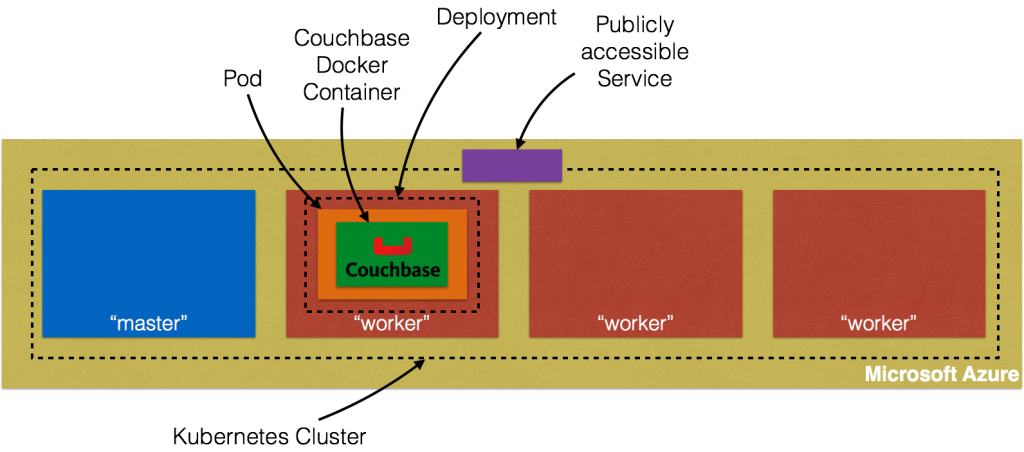
Este blog es parte de una serie de blogs de varias partes que muestra cómo ejecutar sus aplicaciones en Kubernetes. Se utilizará el Couchbaseuna base de datos documental distribuida NoSQL de código abierto, como el Docker
contenedor.
- En la Parte 1 se explica cómo iniciar un clúster Kubernetes utilizando Vagrant -. Kubernetes en Vagrant
- En la segunda parte se hizo lo mismo con Amazon Web Services. Kubernetes en Amazon Web Services
- La Parte 3 hizo lo mismo con Google Cloud - Kubernetes en Google Cloud
Esta cuarta parte lo demostrará:
- Cómo configurar e iniciar el clúster Kubernetes en Azure
- Ejecutar el contenedor Docker en el clúster Kubernetes
- Exponer Pod en Kubernetes como Servicio
- Apagar el clúster
Muchas gracias a @colemickens por ayudarme con esta receta.
Instalar y configurar Azure CLI
Azure CLI es una interfaz de línea de comandos para desarrollar, desplegar y gestionar aplicaciones Azure. Es necesaria para instalar el clúster Kubernetes en Azure.
- Instalar nodo:
123456789101112131415brew install node==> Downloading https://homebrew.bintray.com/bottles/node-6.2.0.yosemite.bottle.tar.gz######################################################################## 100.0%==> Pouring node-6.2.0.yosemite.bottle.tar.gz==> CaveatsPlease note by default only English locale support is provided. If you needfull locale support you should either rebuild with full icu:`brew reinstall node --with-full-icu`or add full icu data at runtime following:https://github.com/nodejs/node/wiki/Intl#using-and-customizing-the-small-icu-buildBash completion has been installed to:/usr/local/etc/bash_completion.d==> Summary? /usr/local/Cellar/node/6.2.0: 3,979 files, 40.4M - Instale Azure CLI:
123456789101112131415161718192021222324252627282930313233343536373839404142434445464748495051525354555657585960616263646566676869707172737475767778798081828384858687888990919293949596979899100101102103104105106107108109110111112113114115116117118119120121122123124125126127128129130131132133134135136137138139140141142143144145146147148149150151152153154155156157158159160161162163164165166167168169170171172173174175176177178179180181182183184185186187188189190191192193194195196197198199200201202203204205206207208209210211212213214215216217218219220221222223224225226227228229230231232233234235236237238239240241242243244245246247248249250251252253254255256257258259260261262263264265266267268269270271272273274275276277278279280281282283284285286npm install -g azure-cli/usr/local/bin/azure -> /usr/local/lib/node_modules/azure-cli/bin/azure> fibers@1.0.13 install /usr/local/lib/node_modules/azure-cli/node_modules/fibers> node build.js || nodejs build.js`darwin-x64-v8-5.0` exists; testingBinary is fine; exiting/usr/local/lib└─┬ azure-cli@0.10.0├─┬ adal-node@0.1.17│ ├── date-utils@1.2.21│ ├─┬ jws@3.1.3│ │ ├─┬ base64url@1.0.6│ │ │ └─┬ meow@2.0.0│ │ │ ├─┬ camelcase-keys@1.0.0│ │ │ │ ├── camelcase@1.2.1│ │ │ │ └── map-obj@1.0.1│ │ │ ├─┬ indent-string@1.2.2│ │ │ │ ├── get-stdin@4.0.1│ │ │ │ └─┬ repeating@1.1.3│ │ │ │ └── is-finite@1.0.1│ │ │ ├── minimist@1.2.0│ │ │ └── object-assign@1.0.0│ │ └─┬ jwa@1.1.3│ │ ├── buffer-equal-constant-time@1.0.1│ │ └─┬ ecdsa-sig-formatter@1.0.5│ │ └── base64-url@1.2.2│ ├── node-uuid@1.4.1│ ├── xmldom@0.1.22│ └── xpath.js@1.0.6├── applicationinsights@0.15.12├── async@1.4.2├── azure-arm-authorization@2.0.0├── azure-arm-batch@0.1.0├── azure-arm-cdn@0.1.0-preview├── azure-arm-commerce@0.1.1├── azure-arm-compute@0.18.0├── azure-arm-datalake-analytics@0.3.2├── azure-arm-datalake-store@0.3.0├── azure-arm-dns@0.10.1├── azure-arm-hdinsight@0.2.0├── azure-arm-hdinsight-jobs@0.1.0├── azure-arm-insights@0.11.1├── azure-arm-network@0.13.1├── azure-arm-rediscache@0.2.1├── azure-arm-resource@1.4.4-preview├── azure-arm-storage@0.13.1-preview├── azure-arm-trafficmanager@0.10.5├─┬ azure-arm-website@0.10.0│ ├─┬ azure-common@0.9.12│ │ ├─┬ request@2.45.0│ │ │ ├── aws-sign2@0.5.0│ │ │ ├── bl@0.9.5│ │ │ ├── caseless@0.6.0│ │ │ ├── forever-agent@0.5.2│ │ │ ├─┬ form-data@0.1.4│ │ │ │ ├── async@0.9.2│ │ │ │ └─┬ combined-stream@0.0.7│ │ │ │ └── delayed-stream@0.0.5│ │ │ ├─┬ hawk@1.1.1│ │ │ │ ├── boom@0.4.2│ │ │ │ ├── cryptiles@0.2.2│ │ │ │ ├── hoek@0.9.1│ │ │ │ └── sntp@0.2.4│ │ │ ├─┬ http-signature@0.10.1│ │ │ │ ├── asn1@0.1.11│ │ │ │ └── assert-plus@0.1.5│ │ │ ├── mime-types@1.0.2│ │ │ ├── node-uuid@1.4.7│ │ │ ├── oauth-sign@0.4.0│ │ │ └── qs@1.2.2│ │ └── xml2js@0.2.7│ └── moment@2.6.0├── azure-asm-compute@0.15.0├── azure-asm-hdinsight@0.10.2├── azure-asm-mgmt@0.10.1├── azure-asm-network@0.11.0├── azure-asm-sb@0.10.1├── azure-asm-sql@0.10.1├── azure-asm-storage@0.10.1├── azure-asm-subscription@0.10.1├── azure-asm-trafficmanager@0.10.3├─┬ azure-asm-website@0.10.1│ └── moment@2.6.0├── azure-batch@0.3.0├─┬ azure-common@0.9.16│ ├── dateformat@1.0.2-1.2.3│ ├── duplexer@0.1.1│ ├── envconf@0.0.4│ ├─┬ request@2.45.0│ │ ├── aws-sign2@0.5.0│ │ ├── bl@0.9.5│ │ ├── caseless@0.6.0│ │ ├── forever-agent@0.5.2│ │ ├─┬ form-data@0.1.4│ │ │ ├── async@0.9.2│ │ │ ├─┬ combined-stream@0.0.7│ │ │ │ └── delayed-stream@0.0.5│ │ │ └── mime@1.2.11│ │ ├─┬ hawk@1.1.1│ │ │ ├── boom@0.4.2│ │ │ ├── cryptiles@0.2.2│ │ │ ├── hoek@0.9.1│ │ │ └── sntp@0.2.4│ │ ├─┬ http-signature@0.10.1│ │ │ ├── asn1@0.1.11│ │ │ ├── assert-plus@0.1.5│ │ │ └── ctype@0.5.3│ │ ├── mime-types@1.0.2│ │ ├── node-uuid@1.4.7│ │ ├── oauth-sign@0.4.0│ │ └── qs@1.2.2│ ├── validator@3.22.2│ └── xml2js@0.2.7├── azure-gallery@2.0.0-pre.18├── azure-graph@0.1.1├─┬ azure-keyvault@0.10.1│ └── node-uuid@1.4.7├─┬ azure-monitoring@0.10.2│ └── moment@2.6.0├─┬ azure-storage@0.7.0│ ├── browserify-mime@1.2.9│ ├── extend@1.2.1│ ├── node-uuid@1.4.7│ ├─┬ readable-stream@2.0.6│ │ ├── isarray@1.0.0│ │ ├── process-nextick-args@1.0.7│ │ └── util-deprecate@1.0.2│ ├─┬ request@2.57.0│ │ ├── aws-sign2@0.5.0│ │ ├─┬ bl@0.9.5│ │ │ └─┬ readable-stream@1.0.34│ │ │ └── isarray@0.0.1│ │ ├── caseless@0.10.0│ │ ├─┬ form-data@0.2.0│ │ │ ├── async@0.9.2│ │ │ └─┬ combined-stream@0.0.7│ │ │ └── delayed-stream@0.0.5│ │ ├─┬ har-validator@1.8.0│ │ │ ├── bluebird@2.10.2│ │ │ └── commander@2.9.0│ │ ├── hawk@2.3.1│ │ ├─┬ http-signature@0.11.0│ │ │ ├── asn1@0.1.11│ │ │ └── assert-plus@0.1.5│ │ ├─┬ mime-types@2.0.14│ │ │ └── mime-db@1.12.0│ │ └── qs@3.1.0│ ├── validator@3.22.2│ └── xml2js@0.2.7├─┬ caller-id@0.1.0│ └── stack-trace@0.0.9├── colors@0.6.2├─┬ commander@1.0.4│ └── keypress@0.1.0├── easy-table@0.0.1├─┬ event-stream@3.1.5│ ├── from@0.1.3│ ├── map-stream@0.1.0│ ├── pause-stream@0.0.11│ ├── split@0.2.10│ └── stream-combiner@0.0.4├── eyes@0.1.8├── fast-json-patch@0.5.6├── github@0.1.6├── js2xmlparser@1.0.0├── jsrsasign@4.8.2├─┬ kuduscript@1.0.6│ ├── commander@1.1.1│ └── streamline@0.4.11├── moment@2.13.0├── ms-rest@1.14.2├─┬ ms-rest-azure@1.14.2│ ├── async@0.2.7│ └── uuid@2.0.1├── node-forge@0.6.23├── node-uuid@1.2.0├── number-is-nan@1.0.0├── omelette@0.1.0├─┬ openssl-wrapper@0.2.1│ ├── debug@0.7.4│ └── q@0.9.7├─┬ read@1.0.7│ └── mute-stream@0.0.6├─┬ readable-stream@1.0.34│ ├── core-util-is@1.0.2│ ├── inherits@2.0.1│ ├── isarray@0.0.1│ └── string_decoder@0.10.31├─┬ request@2.69.0│ ├── aws-sign2@0.6.0│ ├── aws4@1.4.1│ ├─┬ bl@1.0.3│ │ └─┬ readable-stream@2.0.6│ │ └── isarray@1.0.0│ ├── caseless@0.11.0│ ├─┬ combined-stream@1.0.5│ │ └── delayed-stream@1.0.0│ ├── extend@3.0.0│ ├── forever-agent@0.6.1│ ├─┬ form-data@1.0.0-rc4│ │ └── async@1.5.2│ ├─┬ har-validator@2.0.6│ │ ├─┬ chalk@1.1.3│ │ │ ├── ansi-styles@2.2.1│ │ │ ├── escape-string-regexp@1.0.5│ │ │ ├─┬ has-ansi@2.0.0│ │ │ │ └── ansi-regex@2.0.0│ │ │ ├── strip-ansi@3.0.1│ │ │ └── supports-color@2.0.0│ │ ├─┬ commander@2.9.0│ │ │ └── graceful-readlink@1.0.1│ │ ├─┬ is-my-json-valid@2.13.1│ │ │ ├── generate-function@2.0.0│ │ │ ├─┬ generate-object-property@1.2.0│ │ │ │ └── is-property@1.0.2│ │ │ ├── jsonpointer@2.0.0│ │ │ └── xtend@4.0.1│ │ └─┬ pinkie-promise@2.0.1│ │ └── pinkie@2.0.4│ ├─┬ hawk@3.1.3│ │ ├── boom@2.10.1│ │ ├── cryptiles@2.0.5│ │ ├── hoek@2.16.3│ │ └── sntp@1.0.9│ ├─┬ http-signature@1.1.1│ │ ├── assert-plus@0.2.0│ │ ├─┬ jsprim@1.2.2│ │ │ ├── extsprintf@1.0.2│ │ │ ├── json-schema@0.2.2│ │ │ └── verror@1.3.6│ │ └─┬ sshpk@1.8.3│ │ ├── asn1@0.2.3│ │ ├── assert-plus@1.0.0│ │ ├─┬ dashdash@1.13.1│ │ │ └── assert-plus@1.0.0│ │ ├── ecc-jsbn@0.1.1│ │ ├─┬ getpass@0.1.6│ │ │ └── assert-plus@1.0.0│ │ ├── jodid25519@1.0.2│ │ ├── jsbn@0.1.0│ │ └── tweetnacl@0.13.3│ ├── is-typedarray@1.0.0│ ├── isstream@0.1.2│ ├── json-stringify-safe@5.0.1│ ├─┬ mime-types@2.1.11│ │ └── mime-db@1.23.0│ ├── node-uuid@1.4.7│ ├── oauth-sign@0.8.2│ ├── qs@6.0.2│ ├── stringstream@0.0.5│ ├── tough-cookie@2.2.2│ └── tunnel-agent@0.4.3├─┬ ssh-key-to-pem@0.11.0│ ├── asn1@0.1.11│ └── ctype@0.5.2├─┬ streamline@0.10.17│ ├── fibers@1.0.13│ ├── galaxy@0.1.12│ └─┬ source-map@0.1.43│ └── amdefine@1.0.0├── streamline-streams@0.1.5├─┬ sync-request@3.0.0│ ├─┬ concat-stream@1.4.10│ │ ├── readable-stream@1.1.14│ │ └── typedarray@0.0.6│ ├── http-response-object@1.1.0│ └─┬ then-request@2.2.0│ ├── http-basic@2.5.1│ ├─┬ promise@7.1.1│ │ └── asap@2.0.4│ └── qs@6.2.0├── through@2.3.4├── tunnel@0.0.2├── underscore@1.4.4├── validator@3.1.0├─┬ winston@0.6.2│ ├── async@0.1.22│ ├── cycle@1.0.3│ ├── pkginfo@0.2.3│ └── request@2.9.203├── wordwrap@0.0.2├─┬ xml2js@0.1.14│ └── sax@0.5.2└── xmlbuilder@0.4.3 - Regístrese para una prueba gratuita en https://azure.microsoft.com/en-us/free/.
- Inicie sesión en Azure mediante el comando
inicio de sesión en azure:
1234567azure logininfo: Executing command logininfo: To sign in, use a web browser to open the page https://aka.ms/devicelogin. Enter the code BS5P64ANU to authenticate.|info: Added subscription Free Trialinfo: Setting subscription "Free Trial" as default+info: login command OK - Obtener información de la cuenta mediante
mostrar cuenta azuremando:
12345678910111213azure account showinfo: Executing command account showdata: Name : Free Trialdata: ID : XXXdata: State : Enableddata: Tenant ID : YYYdata: Is Default : truedata: Environment : AzureClouddata: Has Certificate : Nodata: Has Access Token : Yesdata: User name : arun.gupta@gmail.comdata:info: account show command OK
Tenga en cuenta el valor que se muestra en lugar de XXX e YYY. Estos se utilizarán para configurar el clúster de Kubernetes.
Iniciar clúster Kubernetes
- Descargar Kubernetes 1.2.4 y extraerlo.
- El clúster Kubernetes en Azure se puede iniciar como:
1234export KUBERNETES_PROVIDER=azureexport AZURE_SUBSCRIPTION_ID=XXXexport AZURE_TENANT_ID=YYY./cluster/kube-up.sh
Asegúrese de especificar los valores adecuados paraXXXyYYYdel comando anterior.AZURE_SUBSCRIPTION_IDyAZURE_TENANT_IDson específicos de Azure. Estos valores son
también puede editarse encluster/azure/config-default.sh. - Inicie el clúster Kubernetes:
123456789101112131415161718192021222324252627282930313233343536373839404142434445464748./kubernetes/cluster/kube-up.sh... Starting cluster using provider: azure... calling verify-prereqs... calling kube-up++> AZURE KUBE-UP STARTED: Tue May 31 16:15:26 PDT 2016This will be interactive. (export AZURE_AUTH_METHOD=client_secret to avoid the prompt)hyperkube-amd64:v1.2.4 was found in the gcr.io/google_containers repositoryFlag --tenant-id has been deprecated, tenant-id is deprecated. it is now determined automatically from the subscription idWARN[0000] --resource-group is unset. Derived one from --deployment-name: "kube-20160531-161525"WARN[0000] --master-fqdn is unset. Derived one from input: "kube-20160531-161525.westus.cloudapp.azure.com".To sign in, use a web browser to open the page https://aka.ms/devicelogin. Enter the code BPRLH2ARJ to authenticate.INFO[0034] Starting ARM Deployment. This will take some time. deployment="kube-20160531-161525-1464736561"INFO[0279] Finished ARM Deployment. deployment="kube-20160531-161525-1464736561"INFO[0279] Validating Kubernetes cluster.WARN[0279] Failed to validate components: Get https://kube-20160531-161525.westus.cloudapp.azure.com:6443/api/v1/componentstatuses: dial tcp 23.99.60.138:6443: getsockopt: connection refusedINFO[0294] Validating Kubernetes cluster.WARN[0294] Failed to validate components: Get https://kube-20160531-161525.westus.cloudapp.azure.com:6443/api/v1/componentstatuses: dial tcp 23.99.60.138:6443: getsockopt: connection refusedINFO[0309] Validating Kubernetes cluster.WARN[0309] Failed to validate components: Get https://kube-20160531-161525.westus.cloudapp.azure.com:6443/api/v1/componentstatuses: dial tcp 23.99.60.138:6443: getsockopt: connection refusedINFO[0324] Validating Kubernetes cluster.WARN[0347] validate: incorrect healthy count. expected=3 actual=4INFO[0347] Deployment Complete!INFO[0347] master: "https://kube-20160531-161525.westus.cloudapp.azure.com:6443"INFO[0347] output: "/opt/azkube/_deployments/kube-20160531-161525"cluster "kube-20160531-161525" set.user "kube-20160531-161525_user" set.context "kube-20160531-161525" set.switched to context "kube-20160531-161525".++> AZURE KUBE-UP FINISHED: Tue May 31 16:21:15 PDT 2016 (duration: -349 seconds)... calling validate-clusterDetected 4 ready nodes, found 4 nodes out of expected 3. Found more nodes than expected, your cluster may not behave correctly.Found 4 node(s).NAME STATUS AGEkube-20160531-161525-vm-master Ready,SchedulingDisabled 21skube-20160531-161525-vm-node-0 Ready 18skube-20160531-161525-vm-node-1 Ready 19skube-20160531-161525-vm-node-2 Ready 19sFlag --api-version has been deprecated, flag is no longer respected and will be deleted in the next releaseValidate output:NAME STATUS MESSAGE ERRORscheduler Healthy okcontroller-manager Healthy oketcd-1 Healthy {"health": "true"}etcd-0 Healthy {"health": "true"}Cluster validation succeededDone, listing cluster services:Kubernetes master is running at https://kube-20160531-161525.westus.cloudapp.azure.com:6443
Inicia cuatro nodos deEstándar_A1talla. Cada
te proporciona 1 núcleo, 1,75 GB de RAM y 40 GB de disco duro.
Ejecutar un contenedor Docker en un clúster Kubernetes en Azure
Ahora que el clúster está en marcha, obtenga una lista de todos los nodos:
|
1 2 3 4 5 6 |
./kubernetes/cluster/kubectl.sh get no NAME STATUS AGE kube-20160531-161525-vm-master Ready,SchedulingDisabled 3m kube-20160531-161525-vm-node-0 Ready 3m kube-20160531-161525-vm-node-1 Ready 3m kube-20160531-161525-vm-node-2 Ready 3m |
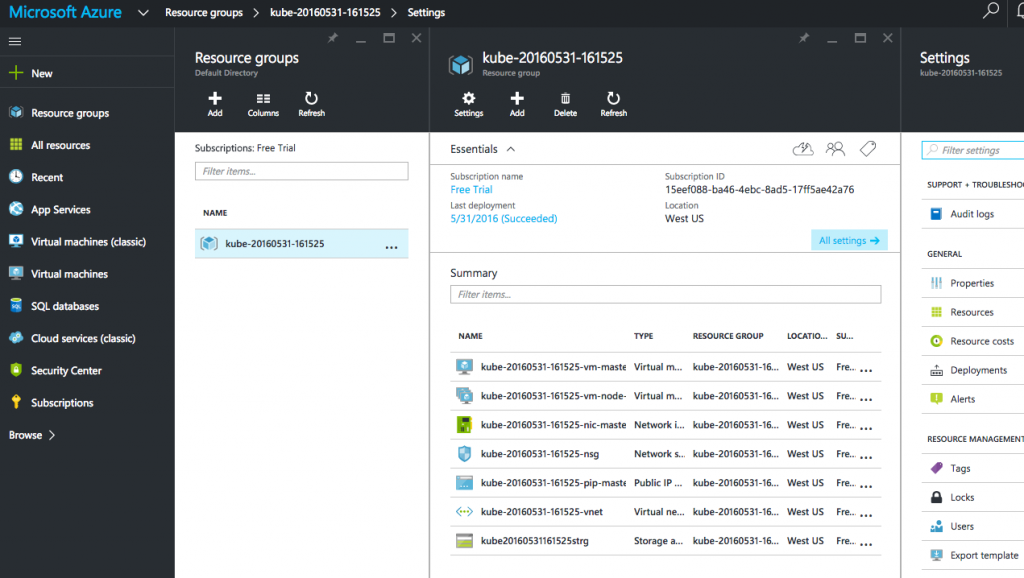
Se crean cuatro instancias como se muestra - una para el nodo maestro y tres para los nodos trabajadores. Portal Azure muestra todos los artefactos creados en el Grupo de Recursos:

Puede obtener más información sobre los nodos creados:

Cree un pod de Couchbase:
|
1 2 |
./kubernetes/cluster/kubectl.sh run couchbase --image=arungupta/couchbase deployment "couchbase" created |
Observe, cómo el nombre de la imagen se puede especificar en la CLI. Las versiones de Kubernetes anteriores a la 1.2 creaban un controlador de replicación con este comando. Esto se explica en Kubernetes en Amazon Web Services o Kubernetes en Google Cloud. Despliegues introducidos de Kubernetes 1.2 y
por lo que se crea un despliegue en su lugar. Esto permite simplificar el despliegue y la gestión de la aplicación, incluyendo el control de versiones, múltiples despliegues simultáneos, agregando el estado de todos los pods, manteniendo la disponibilidad de la aplicación y la reversión.
El módulo utiliza arungupta/couchbase Imagen Docker que proporciona un servidor Couchbase preconfigurado. Aquí se puede especificar cualquier imagen Docker. Se puede ver el estado del pod:
|
1 2 3 4 5 |
./kubernetes/cluster/kubectl.sh get -w po NAME READY STATUS RESTARTS AGE couchbase-2830197765-f0s9c 0/1 ContainerCreating 0 5s NAME READY STATUS RESTARTS AGE couchbase-2830197765-f0s9c 1/1 Running 0 1m |
Obtenga más detalles sobre la vaina:
|
1 2 3 4 5 6 7 8 9 10 11 12 13 14 15 16 17 18 19 20 21 22 23 24 25 26 27 28 29 30 31 32 33 34 35 36 37 38 |
./kubernetes/cluster/kubectl.sh describe po couchbase-2830197765-f0s9c Name: couchbase-2830197765-f0s9c Namespace: default Node: kube-20160531-161525-vm-node-2/10.0.0.6 Start Time: Tue, 31 May 2016 16:28:02 -0700 Labels: pod-template-hash=2830197765,run=couchbase Status: Running IP: 10.2.74.2 Controllers: ReplicaSet/couchbase-2830197765 Containers: couchbase: Container ID: docker://eba043085c95645cf650206469be5c7e2d6c7395883a053d197446a14e757440 Image: arungupta/couchbase Image ID: docker://sha256:f6b013d9694354148ace6804127dadee01c733151b5ff5e169f7c3b0e4faf321 Port: QoS Tier: cpu: BestEffort memory: BestEffort State: Running Started: Tue, 31 May 2016 16:29:04 -0700 Ready: True Restart Count: 0 Environment Variables: Conditions: Type Status Ready True Volumes: default-token-ylszs: Type: Secret (a volume populated by a Secret) SecretName: default-token-ylszs Events: FirstSeen LastSeen Count From SubobjectPath Type Reason Message --------- -------- ----- ---- ------------- -------- ------ ------- 7m 7m 1 {default-scheduler } Normal Scheduled Successfully assigned couchbase-2830197765-f0s9c to kube-20160531-161525-vm-node-2 7m 7m 1 {kubelet kube-20160531-161525-vm-node-2} spec.containers{couchbase} Normal Pulling pulling image "arungupta/couchbase" 6m 6m 1 {kubelet kube-20160531-161525-vm-node-2} spec.containers{couchbase} Normal Pulled Successfully pulled image "arungupta/couchbase" 6m 6m 1 {kubelet kube-20160531-161525-vm-node-2} spec.containers{couchbase} Normal Created Created container with docker id eba043085c95 6m 6m 1 {kubelet kube-20160531-161525-vm-node-2} spec.containers{couchbase} Normal Started Started container with docker id eba043085c95 |
Exponer Pod en Kubernetes como Servicio
Ahora que nuestro pod está funcionando, ¿cómo accedo al servidor Couchbase? Necesitas exponer el Deployment as a Service fuera del cluster Kubernetes. Típicamente, esto será expuesto usando el comando:
|
1 |
./kubernetes/cluster/kubectl.sh expose deployment couchbase --target-port=8091 --port=8091 --type=LoadBalancer |
Pero Azure no admite --type=Balanceador de carga por el momento. Se está trabajando en esta función y esperamos que esté disponible en un futuro próximo. Así que mientras tanto, expondremos el Servicio como:
|
1 2 |
./kubernetes/cluster/kubectl.sh expose deployment couchbase --target-port=8091 --port=8091 service "couchbase" exposed |
Ahora proxy a este servicio utilizando kubectl proxy mando:
|
1 2 |
./kubernetes/cluster/kubectl.sh proxy --address='0.0.0.0' --port=9999 --accept-hosts='.*' Starting to serve on [::]:9999 |
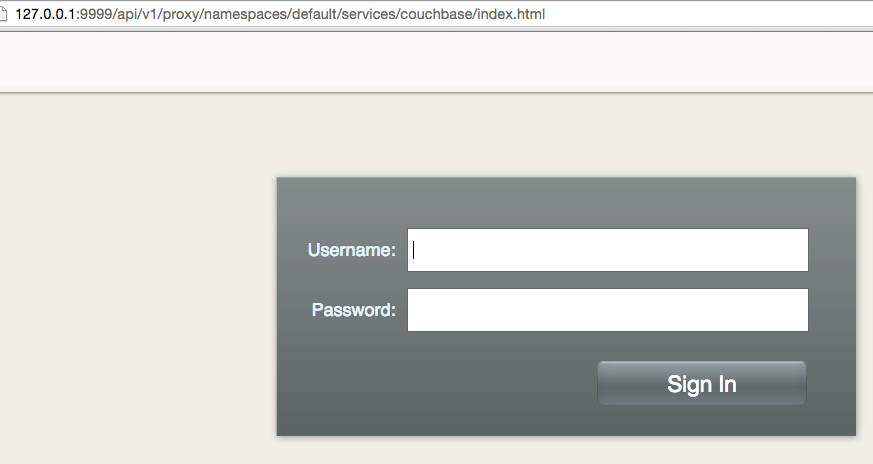
Y ahora este Servicio expuesto es accesible en https://127.0.0.1:9999/api/v1/proxy/namespaces/default/services/couchbase/index.html. Esto muestra el login
pantalla de Consola web de Couchbase:

Apagar el clúster Kubernetes
Por último, apague el clúster mediante cluster/kube-down.sh guión.
|
1 2 3 4 5 6 7 |
./kubernetes/cluster/kube-down.sh Bringing down cluster using provider: azure Bringing down cluster You must do this manually (for now)! This can be done with: ./kubernetes/cluster/../cluster/../cluster/azure/util.sh: line 246: AZ_RESOURCE_GROUP: unbound variable |
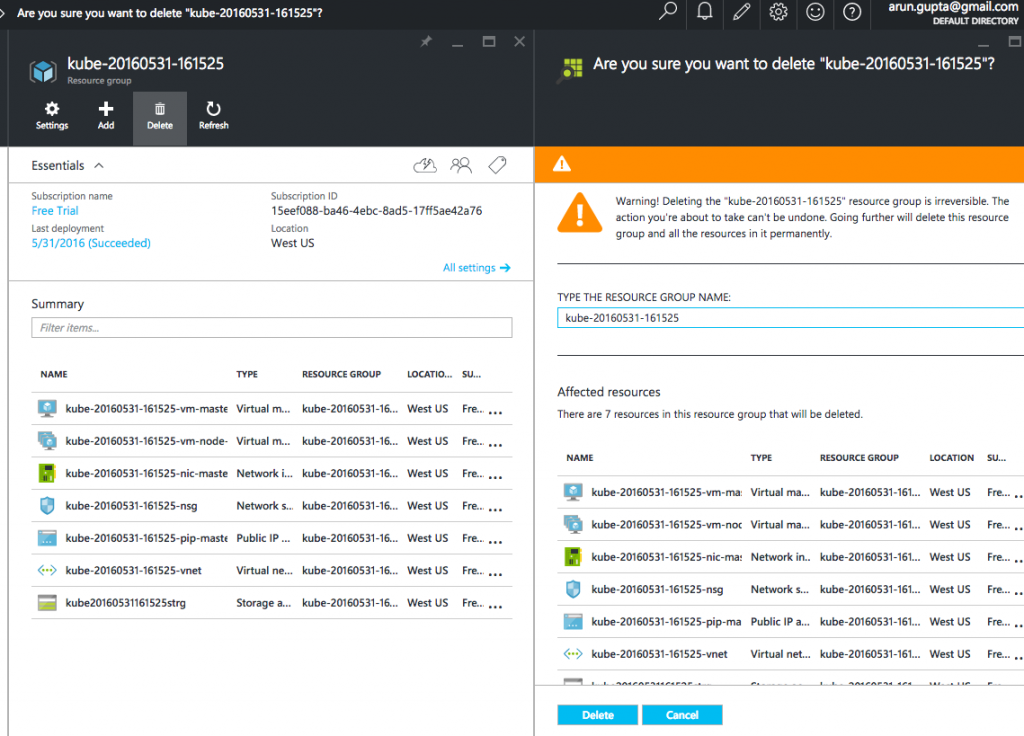
Este script apaga el cluster pero el grupo de recursos Azure necesita ser explícitamente eliminado. Esto se puede hacer seleccionando el grupo de recursos de portal.azure.es:

Esto se archiva como #26601.
Otras referencias ...
- Portal para desarrolladores de Couchbase Server
- Couchbase en contenedores
- Preguntas sobre StackOverflow, Foros o Canal Slack
- Síguenos en @couchbasedev
- Couchbase 4.5
¡Que aproveche!

Hice un buen progreso al intentar esto, pero me encontré con un problema al final. Puedo golpear manualmente el punto final piscinas en la conexión proxy y autenticar, pero la interfaz de usuario web no está tratando de utilizar la URL proxy y en su lugar sólo está tratando 127.0.0.1:9999/pools (en lugar de la url proxy completo). ¿Me he perdido algún paso? Por otro lado, he podido usar el -type=LoadBalancer que ahora parece estar disponible.