

Data security is an important aspect of every modern data platform. With micro-service based architectures becoming more of a common pattern across every high-scale app, existing password based authentication mechanisms for user authentication is hard to manage at scale, let alone the fact that passwords are hard to remember or could be cracked. As a remedy, Couchbase Server 5.0 introduced X.509 certificate authentication.
Couchbase Server 5.5 adds further enhancements to support all services and interfaces including N1QL, Indexing, XDCR, Search, and even the Couchbase Web UI and REST endpoints.
What is certificate based authentication?
In a nutshell, “authentication” is the process of verifying that a user is who they say they are. In the world of technology this can be achieved in a variety of ways. Certificate based authentication allows users to securely access a server by exchanging a digital certificate instead of a username and password. This means the client is not sending a username or password to the server which helps in preventing phishing, keystroke logging and man-in-the-middle (MITM) attacks among other common problems with password-based authentication.
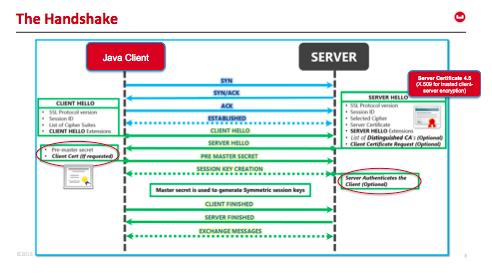
Client-server TLS handshake illustrating mutual authentication
Certificate based authentication is built by leveraging the X.509 public key infrastructure (PKI) standard. Certificate authentication offers stronger security by mutually authenticating both the client, using a trusted party (the Certificate Authority (CA)) and the server during the TLS handshake. Because the certificate is signed, it is only possible to connect to the real server, and centrally manage the certificates using the CA for rotation or revocation.
Identifying the user within a certificate
If you’re wondering how x509 certificate authentication works, it has to have multiple fields such as expiry date, CN name, san name, etc. Depending on your organisation and policies, different fields will be used to encode the user name/id. For example:
|
1 2 3 4 5 6 7 8 9 10 11 12 13 14 15 16 |
Certificate: 데이터: 버전: 3 (0x2) Serial Number: 2 (0x2) Signature Algorithm: sha1WithRSAEncryption Issuer: O=www.freelan.org, OU=freelan Validity Not Before: 4월 27 10:54:40 2012 GMT Not After : 4월 25 10:54:40 2022 GMT Subject: OU=freelan, CN=카우치베이스–bob/emailAddress=bob@freelan.org Subject Public Key 정보: Public Key Algorithm: rsaEncryption Public–Key: (4096 bit) Modulus: … … |
To identify the user, Couchbase is configured to parse one or more fields and extract the user. This is done by using a path, prefix, and delimiter. The 경로 describes where in the certificate to get the user name from, the prefix strips off the beginning of the username and the delimiter terminates the username. In the above example, to extract a user called “bob” you would use:
|
1 2 3 |
“path”: “subject.CN” “prefix”: “couchbase-“ “delimiter”: “/” |
There is a maximum limit of 10 path expressions in Couchbase, with no two expressions having the same path and prefix fields, and it is mandatory to specify all the fields in the expression. Couchbase tries each path expression on the certificate one-by-one in the order specified, and it uses the first one that can successfully extract a non-empty username string. If all the path expressions cannot extract the user string, efforts to authenticate with X.509 certificates will fail too.
Configuring Couchbase Server
In Couchbase Server 5.5, certificate based authentication is disabled by default, relying instead on local user/pass or LDAP/PAM based authentication methods.
When “Require Client Certificate” is set to “Enable”, Couchbase Server will accept the certificate supplied and try to authenticate based it. If that fails, Couchbase Server will fall back to user/pass or LDAP/PAM based authentication methods.
When “Require Client Certificate” is set to “Mandatory”, an X.509 certificate must be provided or else authentication will fail.

These settings can also be supplied via the CLI or REST API.
Authorizing the user
Once a user has “authenticated” (they are who they say they are), they still need to be “authorized” which is the process of determining what they are allowed to do.
In Couchbase Server this is done by assigning one or more roles to each user.
Configuring clients for certificate based authentication
The X.509 certificate based authentication feature is supported by all SDK clients. However, only the very latest versions support it, so check the release notes for your SDK versions.
X.509 is the official standard for public key certificates and SSL/TLS relies on this standard. In your client, you must use a valid x.509 certificate that is generated and signed by the same root certificate authority (CA) as the server.
Most common web browsers have been supporting client-authentication since the early TLS days. You can configure the client certificate in your browser certificate store and should be good to go!
All Couchbase tools such as couchbase-cli, and the N1QL shell are also being updated to support X.509 authentication.
결론
Even though it is a bit of work to get this type of authentication setup, it is very secure and simpler to manage at scale. Please download Couchbase Server 5.5 to give it a try. We look forward to your feedback!
작가

2개의 응답
-
Useful information. Is MA-SSL supported in Couchbase server 4.5 as well?
-
Hi Vidhya, thanks for your comment!
MA-SSL would not be supported before version 5.5 as we did not support _authentication_ via certificates, only encryption.
I hope that helps
Perry
-


댓글 남기기
댓글을 달기 위해서는 로그인해야합니다.