
여러분에게 좋은 소식이 있습니다, 스프링 데이터 카우치베이스 2 지난주에 출시되어 이제 멋진 Spring Initializr에서 사용할 수 있습니다. 이 멋진 웹사이트를 사용하면 Spring/Couchbase 프로젝트를 매우 빠르게 시작할 수 있습니다. 프로젝트에 필요한 종속성을 선택하고 프로젝트 생성(Generate Project) 버튼을 누르기만 하면 가져올 준비가 된 프로젝트가 포함된 아카이브가 생성됩니다. 이 마법사는 다음에서도 사용할 수 있습니다. 스프링 툴 스위트.
1/ 이동하기 https://start.spring.io/
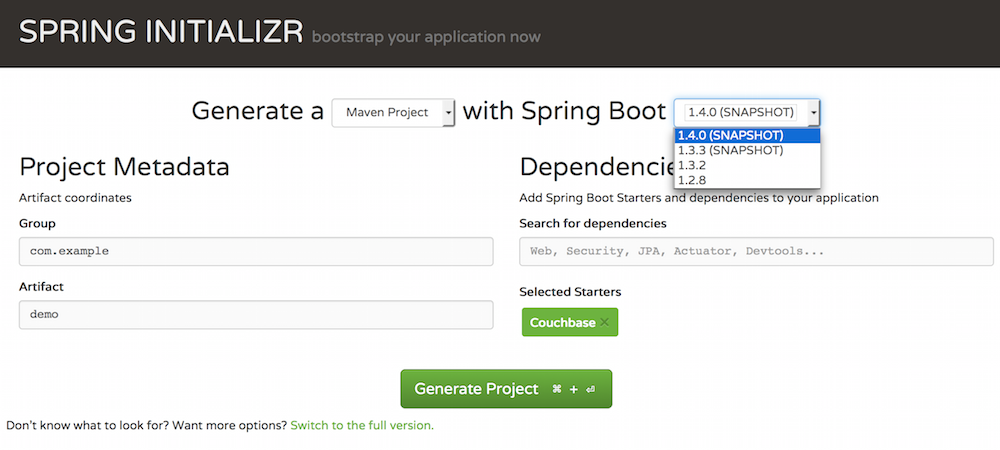
2/ 현재 이 기능은 Spring Boot 1.4.0-SNAPSHOT에서만 사용할 수 있으므로, 먼저 올바른 Spring Boot 버전을 선택해야 합니다.
3/ Couchbase 선택
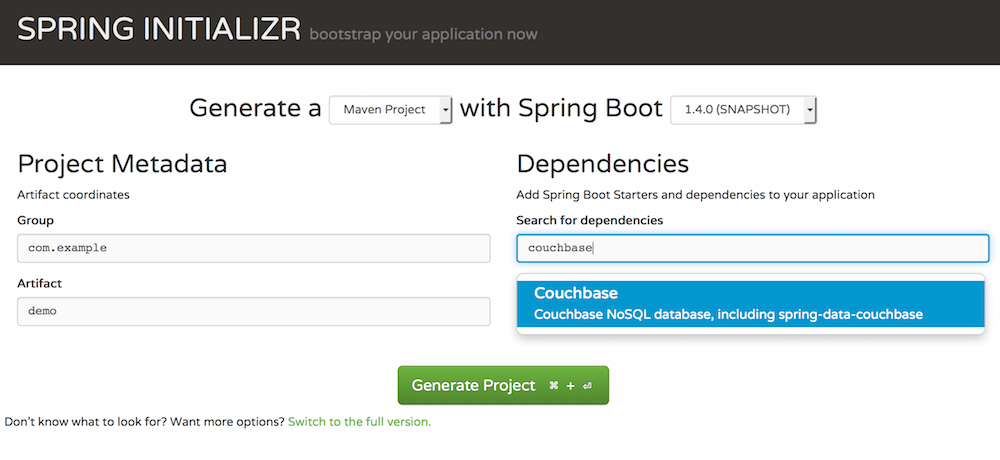
4/ 프로젝트에 필요할 수 있는 기타 종속성을 추가하세요.
프로젝트 생성
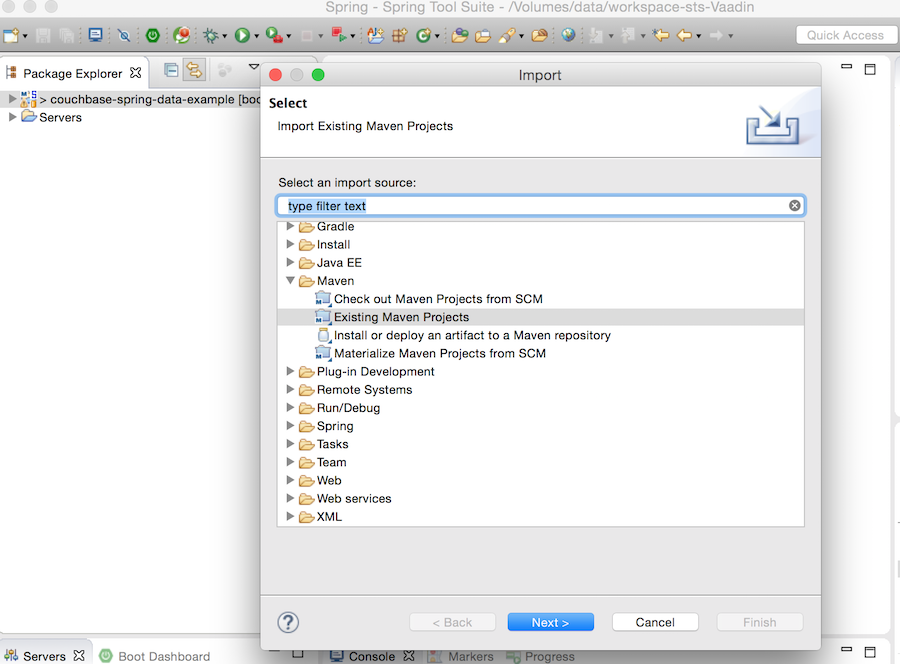
이제 선택하신 편집기로 가져올 준비가 된 아카이브가 생겼습니다. 저는 Spring 작업을 하고 있어서 그들의 기본 도구 모음을 고수하는 편입니다. 이는 기본적으로 올바른 플러그인 세트가 미리 구성된 Eclipse입니다.
6/ 기존 메이븐 프로젝트로 간단히 임포트할 수 있도록 생성 마법사에서 메이븐을 계속 사용했습니다.
기본 설정을 활성화하려면 application.properties 파일에 다음 내용을 추가해야 합니다.
spring.data.couchbase.bucket.name=default
또는 AbstractCouchbaseConfiguration을 확장하는 @Configuration 빈을 생성할 수 있습니다. 이제 시작하겠습니다. 다음은 Spring Boot Couchbase 자동 설정이 제공하는 기능에 대한 간략한 목록입니다.
속성
Couchbase 액세스를 구성하기 위해 몇 가지 속성을 정의할 수 있으며, 기본값은 다음과 같습니다:
# 연결할 버킷의 이름으로, 자동 구성을 활성화하려면 필수입니다.
spring.data.couchbase.bucket.name=default
# 연결할 버킷의 비밀번호입니다.
spring.data.couchbase.bucket.password=
# Couchbase 클러스터 노드의 주소
spring.data.couchbase.bootstrap-hosts=127.0.0.1
# 어노테이션(@ViewIndexed, @N1qlPrimaryIndexed, @N1qlSecondaryIndexed)만을 기반으로 한 자동 인덱스 생성
spring.data.couchbase.auto-index=false
# 기본 일관성 수준 (read-your-own-writes|eventually-consistent|strongly-consistent|update-after)
spring.data.couchbase.consistency=read-your-own-writes
- read-your-own-writes는 stale=false 및 ScanConsistency=statement_plus입니다.
- 강한 일관성(strongly-consistent)은 stale=false 및 ScanConsistency=request_plus입니다.
- update-after는 stale=update-after이고 ScanConsistency=not_bounded입니다
- 최종적 일관성은 stale=true 및 ScanConsistency=not_bounded입니다.
신선도 수준
stale=true이(가) 설정된 경우, Couchbase는 뷰가 오래된(stale) 상태이더라도 뷰를 새로고침하지 않습니다. 이로 인한 이점은 향상된 쿼리 지연 시간입니다. stale=update_after가 설정된 경우, Couchbase는 오래된 결과가 반환된 후에 뷰를 업데이트합니다. stale=false가 설정된 경우, Couchbase는 뷰를 새로고침하여 가장 최신 결과를 반환합니다.
스캔 일관성 수준
유계가 아닌
단일 문장 요청의 경우 기본값입니다. 인덱스 스캔에서는 타임스탬프 벡터가 사용되지 않습니다. 또한 벡터를 얻는 비용이 발생하지 않고 인덱스가 벡터를 따라잡을 때까지 대기하는 시간도 피할 수 있기 때문에 가장 빠른 모드이기도 합니다.
추가 요청
이는 요청에 따라 강력한 일관성을 구현합니다. 요청을 처리하기 전에 현재 벡터가 획득됩니다. 이 벡터는 요청 내 문장의 하한값으로 사용됩니다. 요청에 DML 문장이 있는 경우 요청 내에서도 RYOW가 적용됩니다.
statement_plus
이는 문장별로 강력한 일관성을 구현합니다. 각 문장을 처리하기 전에 현재 벡터가 획득되며 해당 문장의 하한값으로 사용됩니다.
인덱스 주석
여기에 자동화가 포함된 저장소의 예시가 있습니다 색인 생성. 리포지토리 빈이 초기화될 때, 어노테이션으로 정의된 인덱스가 존재하는지 확인하고 존재하지 않으면 생성합니다.
@N1qlPrimaryIndexed
@ViewIndexed(designDoc = "customer")
@N1qlSecondaryIndexed(indexName = "customerSecondaryIndex")
public interface CustomerRepository extends CouchbasePagingAndSortingRepository {}
인덱스는 개발 목적으로만 사용해야 합니다. 운영 환경에서는 자동 인덱스 생성을 끄고 배포 과정에서 올바른 노드에 올바른 인덱스를 생성할 것을 권장합니다.
인덱싱된 뷰
이것 주석 설계 문서의 이름과 뷰 이름뿐만 아니라 사용자 정의 맵 및 리듀스 함수도 정의할 수 있습니다.
N1qlPrimaryIndexed
이것 주석 현재 저장소와 연결된 버킷에 N1QL 기본 인덱스가 생성되도록 합니다.
N1qlSecondaryIndexed
이것 주석 엔티티의 타입에 보조 인덱스가 존재하는지 확인합니다.
사용 가능한 원두
자동 구성을 활성화한 경우 여러 빈을 사용할 수 있습니다. 가장 유용한 빈의 목록은 다음과 같습니다.
- CouchbaseTemplate couchbaseTemplate
- 저수준 Spring Data Couchbase API에 대한 액세스를 제공합니다.
- ValidatingCouchbaseEventListener validationEventListener
- javax.validation dependant entities validator. When it is registered as Spring component its automatically invoked before entities are saved in database.
- CustomConversions customConversions
- Used to capture custom JSON type conversions.
- Bucket couchbaseClient
- Direct access to the configured Bucket
결론
This should have given you a good overview of what is available when starting a new project with spring-boot-starter-data-couchbase. For more details about Spring Data Couchbase 2, please refer to the 문서화 or checkout this blog regularly for more Spring/Couchbase goodness.

댓글 남기기
댓글을 달기 위해서는 로그인해야합니다.