There are use cases that are best served by multiple types of data access, including SQL, vector search, geospatial queries, and key-value access. One approach is to combine/chain together multiple data systems for each access method. However, the Couchbase approach makes it possible to combine these different types of queries to solve real-world problems.
This article walks through aspects of the demo application “What is This Thing?” (aka “WITT”). For more context and background, check out:
This blog post is part of the 2024 C# Advent. However, you don’t need to understand C# to read this post: the concepts are applicable to any of the many SDKs available for Couchbase.
Vector Search: The Basics
Vector search is useful for applications that need to find similar items. For example, embeddings created by AI models can be indexed and searched. Each item in WITT is modeled like this:
|
1 2 3 4 5 6 7 8 |
{ “이름”: “Reticulated Splines”, “desc”: “Specialized grooves used in advanced machinery for precise alignment.”, “price”: 19.99, “image”: “data:image/png;base64,...“, “rating“: 5, “imageVector”: [ -4.5390625, 0.32543945, ... ] } |
Note: The image of the item is stored as a base64-encoded string. In a production project, I’d recommend using file storage, S3, etc, rather than storing it in the database.
imageVector is retrieved by uploading the image to an AI image model, like Azure Computer Vision.
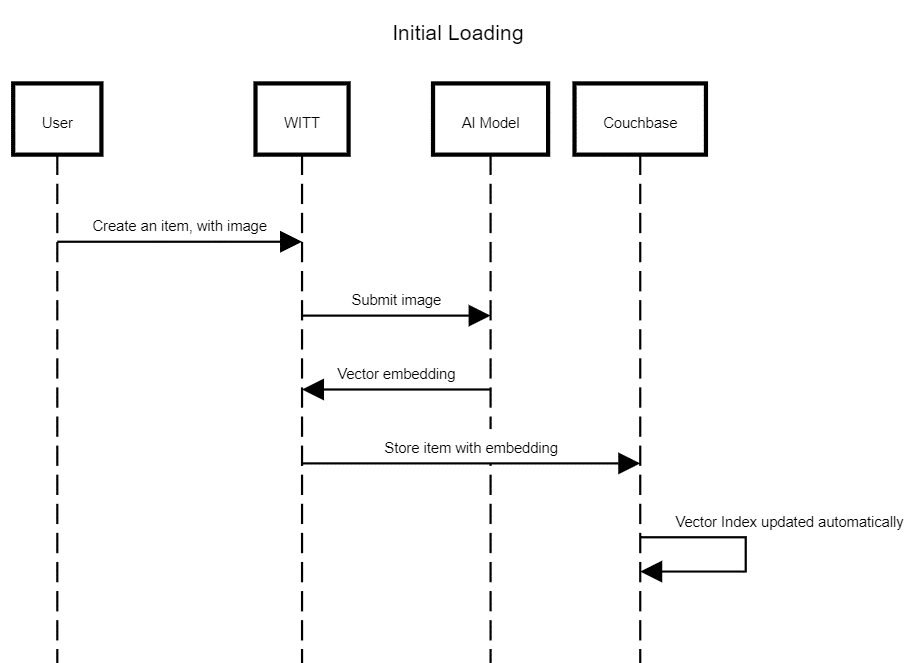
Note: One of the features of the just-announced Capella AI services is model hosting, which will reduce the latency of this step, and also increase privacy and flexibility, and potentially reduce costs.
Image Embeddings and Nearest Neighbor Search
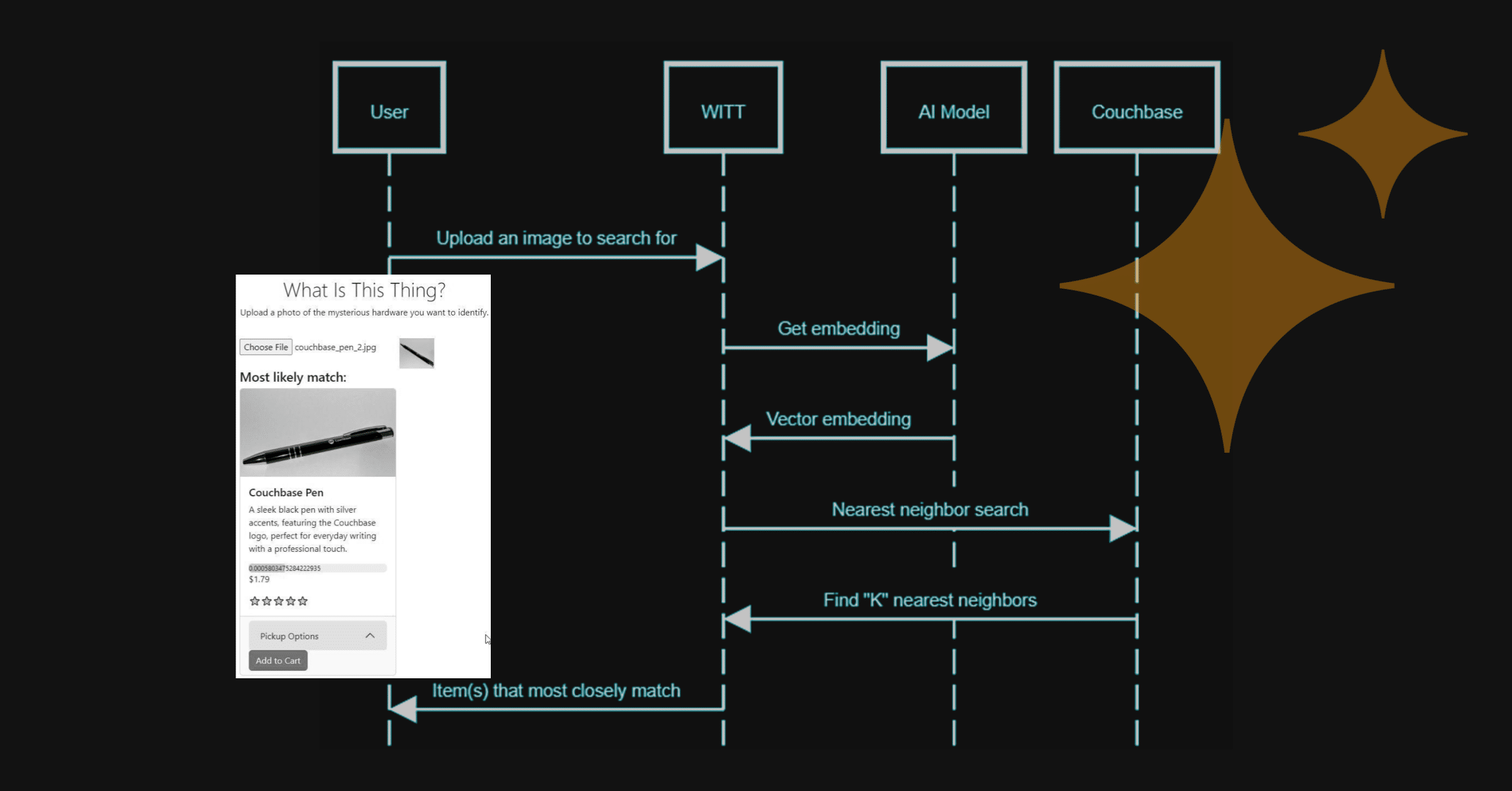
With a vector search index on the imageVector field, Couchbase can perform nearest neighbor searches. In this case, that search would find items that are visually similar (according to the AI model). So, if a user has an image, and they want to find an item in Couchbase that is most similar to that image, a vector search index can do this:
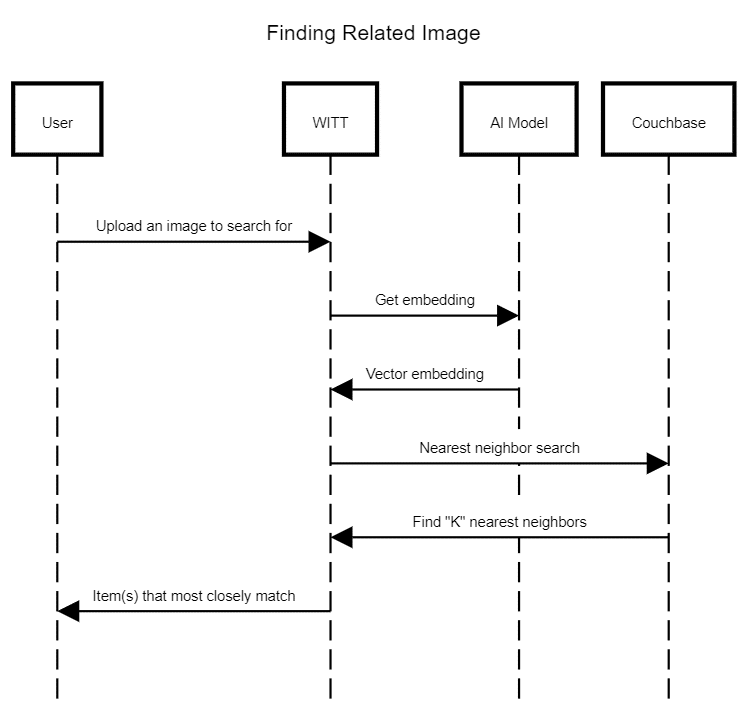
Here’s the code in WITT that, for a given image, requests a vector embedding from Azure Computer Vision:
|
1 2 3 4 5 6 7 8 9 10 11 12 13 14 15 16 17 18 19 20 21 22 23 24 25 26 27 28 29 30 31 32 33 34 35 36 |
// Free tier: 20 Calls per minute, 5K Calls per month // Standard tier: 10 Calls per second, starting $1.00 USD/1000 calls (Estimated) 공공의 비동기 Task<float[]< GetImageEmbedding(문자열 base64Image) { 변수 endpoint = _settings.가치.Endpoint; 변수 subscriptionKey = _settings.가치.SubscriptionKey; using (HttpClient 클라이언트 = 새로운 HttpClient()) { // Set the subscription key and endpoint 클라이언트.DefaultRequestHeaders.Add(“Ocp-Apim-Subscription-Key”, subscriptionKey); // Endpoint URL 문자열 URL = $“{endpoint}/retrieval:vectorizeImage?overload=stream&api-version=2023-04-01-preview”; byte[] imageBytes = Base64PngToByteArray(base64Image); using (ByteArrayContent 콘텐츠 = 새로운 ByteArrayContent(imageBytes)) { 콘텐츠.Headers.ContentType = 새로운 MediaTypeHeaderValue(“application/octet-stream”); HttpResponseMessage 응답 = await 클라이언트.PostAsync(URL, 콘텐츠); 문자열 jsonResponse = await 응답.Content.ReadAsStringAsync(); 만약 (응답.IsSuccessStatusCode) { // Parse the JSON response to extract the vector embeddings JObject JSON = JObject.구문 분석하다(jsonResponse); JToken vectorEmbeddings = JSON[“vector”]; 반환 vectorEmbeddings.객체로변환<float[]<(); } 던지다 새로운 Exception(“Unable to retrieve vector embeddings for image.”); } } } |
There are probably frameworks that can handle this call too, but for this simple demo, that only requires a single REST call, I found this to be sufficient. If you want to use something other than Azure with this demo, you need to implement IEmbeddingService.
Multi-Purpose Queries with SQL++
Many databases with vector search can perform a very similar operation. What Couchbase enables you to do is to perform multiple types of data operations with a single platform, a single pool of data. For instance, given a geospatial location (which can be retrieved through a web browser), you can not only query to find a similar item by image, but also combine that with a geospatial search, all through a single SQL++ query:
|
1 2 3 4 5 6 7 8 9 10 11 12 13 14 15 16 17 18 19 20 21 22 23 24 25 26 27 28 29 30 31 32 33 34 35 36 37 38 39 40 41 |
함께 closestStores AS ( /* CTE to get closest stores based on user’s location */ 선택 x.이름, META(x).아이디 AS 아이디 ~에서 whatisthis._default.Stores x 어디 SEARCH(x, { “fields”: [“*”], “질의” : { “location” : { “lat” : 39.8787, “lon” : –83.0805 }, “distance” : “15mi”, “field” : “geo” } . . . }) 한계 3 ) /* SELECT items with nearby stock */ 선택 allItems.이름, allItems.`desc`, allItems.image, allItems.가격, allItems.rating, SEARCH_SCORE(allItems) AS score, /* subquery to get stock from nearby locations */ (선택 . . . ) AS stock ~에서 whatisthis._default.Items AS allItems /* vector search using image embedding */ 어디 SEARCH(allItems, { “fields”: [“*”], “질의”: { “match_none”: {} }, “knn”: [ { “k”: 4, “field”: “imageVector”, “vector”: [ –0.9135742,1.1552734, ... ] } ] } ) 주문 에 의해 score 설명 |
Note: this query was edited for brevity’s sake. Check out DataLayer.cs for a more complete view of the queries.
The result of this query is a “most likely match” for a given image. For example, here is the top result when uploading a picture of a pen:
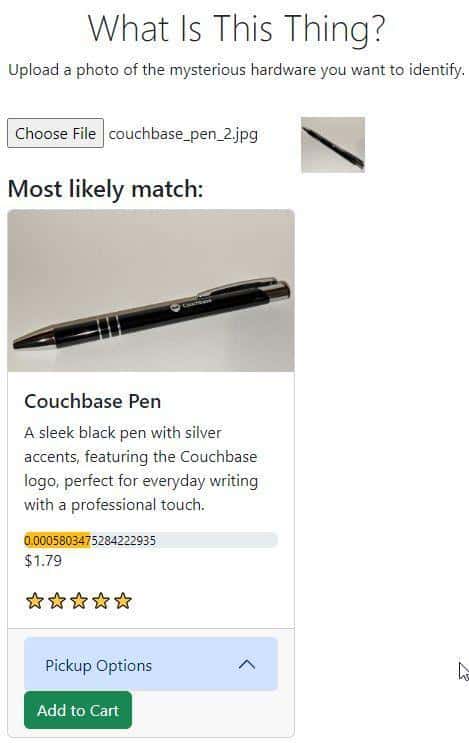
The quality of matches will depend on:
- The quality of the AI model
- The quality/quantity of the images for a given item
In my limited testing, I’ve found the Azure Computer Vision model to be very good for matching relevant images.
The result also will contain nearby stores, where the item is available for purchase.
Beyond Vector Search and Geospatial
This query showed Couchbase’s ability to combine vector search AND geospatial search into a single operation. It also contained a CTE, JOINs, and a subquery.
Within a single query, you can also perform:
- Full Text Search, including scoring, facets, boosting, etc.
- Time series 작업
- User-defined functions (UDFs) for adding custom code (JavaScript or SQL)
- Full SQL capabilities: window functions, CTEs, JOINs, aggregation, and more
- Read from real-time analytics data via write-back
- Query data that’s automatically synced from mobile/edge devices
- Automatic 캐싱 (built-in)
Here’s the marketing section: Some databases may only be able to perform a subset of these operations, and require you to bring in other tools when you need additional functionality. This increases your costs, latency, and complexity. With Couchbase, you can keep your application simpler, faster, and cheaper. Marketing section over.
Technical Highlights
The WITT demo application referenced is built with:
- React UI frontend
- ASP.NET Core backend
- Azure Computer Vision
- Couchbase .NET SDK
You can also check out What is This Thing? as a public demo. (Keep in mind that it is all built with free-tier hosting (Azure and Capella Free Tier), and that it is still actively being developed. If you notice some slowness or downtime, that could be because of too much traffic, sorry!)

댓글 남기기
댓글을 달기 위해서는 로그인해야합니다.