
Trying Couchbase just got even easier, even if you want to migrate from DynamoDB. You can now import your DynamoDB data and indexes into Couchbase seamlessly. Whether you prefer working directly from the command line or within your favorite IDE, our new offerings – cbmigrate CLI, Couchbase VSCode Extension, 그리고 Couchbase JetBrains Plugin – provide flexible, efficient, and easy-to-use solutions for migrating your data.
Tools to help migrate DynamoDB to Couchbase
Our toolkit includes three core components, each tailored to different development environments and user preferences.
CLI Tool (cbmigrate)
For those who prefer the command line, 씨비마이그레이트 offers a robust and efficient way to migrate from DynamoDB to Couchbase. The 씨비마이그레이트 tool comes packed with features such as custom key generation (exclusive to the CLI), batch processing, and secure SSL connections.
Key Features
- Custom key generation: Generate unique keys for your Couchbase documents using static text, field values, and patterns like UUIDs (CLI-exclusive).
- Secure migration: Supports SSL encryption and client certificate authentication for secure data transfer.
- 유연성: Offers detailed command flags to tailor the migration process to your specific needs.
Usage
To begin with the CLI, here’s a basic command template:
|
1 2 |
sh 씨비마이그레이트 다이나모DB —다이나모DB–table–이름 DYNAMODB_TABLE_NAME [—aws–profile AWS_PROFILE] [—aws–지역 AWS_REGION] [—aws–endpoint–URL AWS_ENDPOINT_URL] [—aws–아니요–verify–ssl] [—aws–ca–bundle AWS_CA_BUNDLE] —씨비–클러스터 CB_CLUSTER (—씨비–사용자 이름 CB_USERNAME —씨비–비밀번호 CB_PASSWORD | —씨비–클라이언트–cert CB_CLIENT_CERT [—씨비–클라이언트–cert–비밀번호 CB_CLIENT_CERT_PASSWORD] [—씨비–클라이언트–열쇠 CB_CLIENT_KEY] [—씨비–클라이언트–열쇠–비밀번호 CB_CLIENT_KEY_PASSWORD]) [—씨비–cacert CB_CACERT] [—씨비–아니요–ssl–verify CB_NO_SSL_VERIFY] [—씨비–양동이 CB_BUCKET] [—씨비–범위 CB_SCOPE] [—씨비–컬렉션 CB_COLLECTION] [—씨비–배치–size CB_BATCH_SIZE] [—디버그] [—씨비–generate–열쇠 CB_GENERATE_KEY] [—copy–indexes] [—buffer–size BUFFER_SIZE] [—도와주세요 HELP] |
Basic Migration Command
|
1 2 |
sh 씨비마이그레이트 다이나모DB —다이나모DB–table–이름 your_table —씨비–클러스터 your_cluster —씨비–사용자 이름 your_username —씨비–비밀번호 your_password —씨비–양동이 your_bucket —씨비–범위 your_scope —씨비–컬렉션 your_collection_name —씨비–generate–열쇠 열쇠::#UUID# |
For more information, see the cbmigrate GitHub repository.
Couchbase VSCode Extension
If you’re a fan of coding in VSCode, our Couchbase extension allows you to initiate and manage your database migrations without leaving your IDE.
Key Features
- Integrated migration: Perform migrations directly within VSCode, streamlining your development workflow.
- User-friendly interface: Utilize the graphical interface to configure and monitor your data migration processes easily.
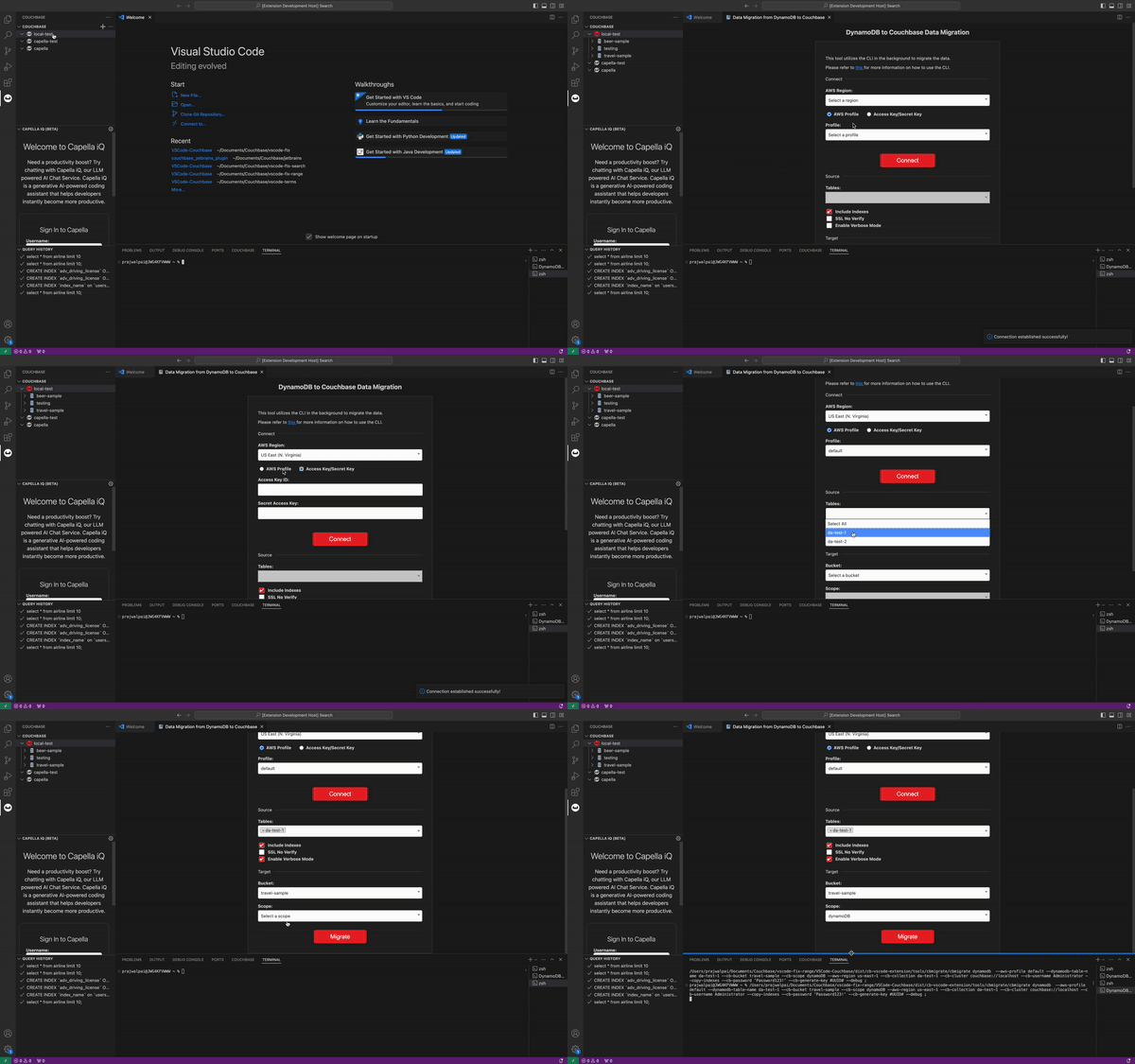
For more information, refer to the Couchbase VSCode plugin repository.
JetBrains IDE Plugin
JetBrains users aren’t left out—our plugin for JetBrains IDEs provides a seamless migration experience with the robustness you expect from JetBrains tools.
Key Features
- Seamless integration: Migrate your DynamoDB data to Couchbase directly within your preferred JetBrains IDE.
- Efficient workflow: Access all necessary migration functionalities within the familiar JetBrains interface.
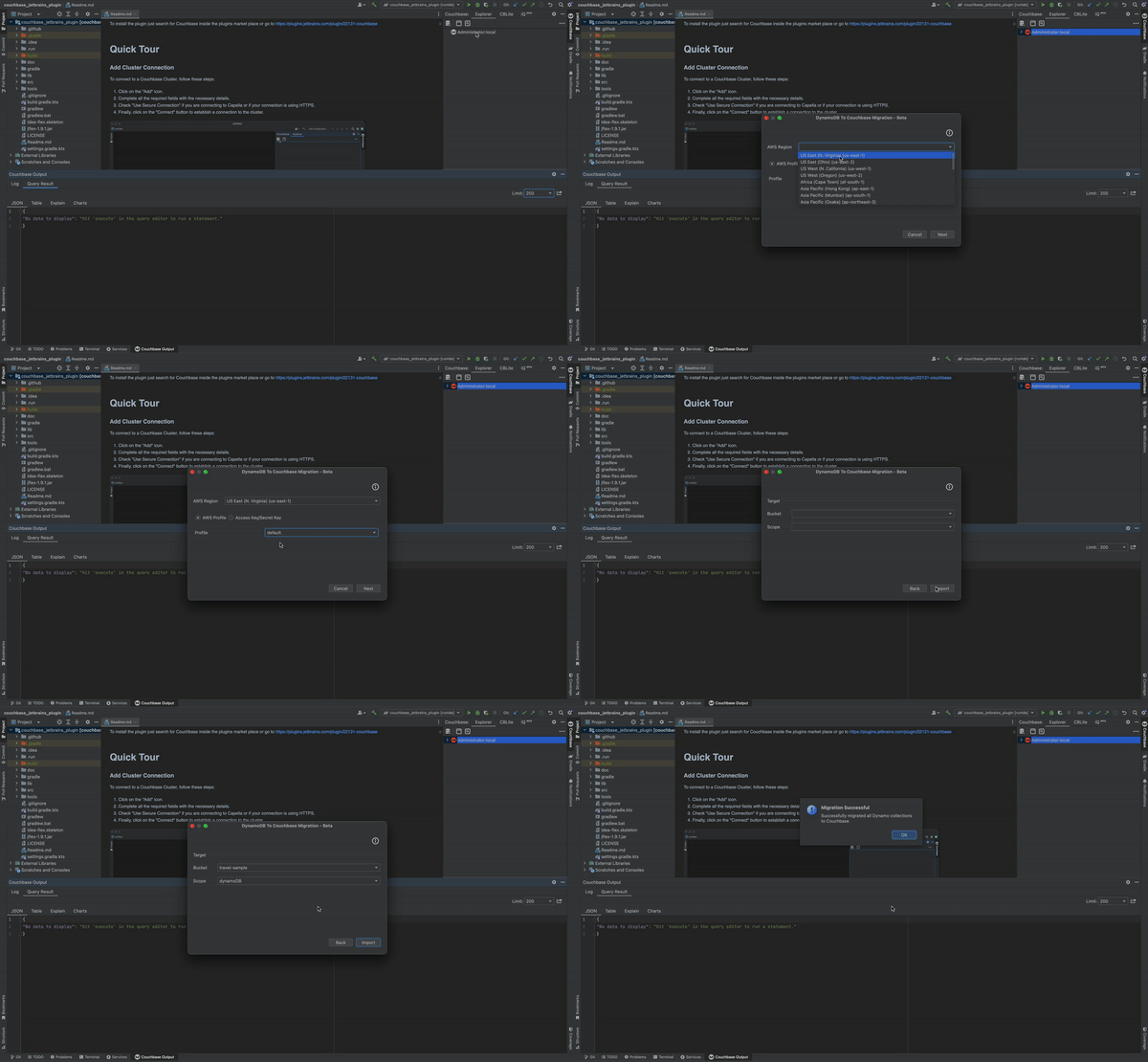
For more information, see the Couchbase JetBrains plugin repository.
By leveraging these tools, you can ensure a smooth and efficient transition from DynamoDB to Couchbase, regardless of your preferred development environment. Start migrating your data today and take advantage of the powerful features offered by Couchbase.

댓글 남기기
댓글을 달기 위해서는 로그인해야합니다.