
What is the Capella free tier?
Couchbase Capella offers a free tier product with a perpetual, no-cost environment for users to explore and experience the capabilities of Couchbase’s NoSQL database platform. This free tier is not constrained by time limits, allowing users to engage with Capella at their own pace without the concern of trial expirations or unexpected charges.
Advantages of Capella’s free tier:
- Perpetual Access: Unlike traditional time-bound trials, Capella’s free tier remains available indefinitely, provided the cluster remains active. This ensures users can thoroughly evaluate and experiment with Capella’s features without the pressure of impending deadlines.
- Comprehensive feature exploration: Users gain access to a suite of functionalities, including SQL-based querying, 전문 검색, and robust Vector Search. Additionally, Capella facilitates seamless synchronization with mobile and IoT devices at the edge, enabling the development of versatile applications.
- Managed backend services: 카펠라 앱 서비스 provides a fully managed application backend tailored for mobile and edge applications. This service supports data synchronization between Capella operational buckets and devices running 코우치베이스 라이트, as well as user authentication and management, streamlining the development process.
By leveraging Capella’s free tier, users can immerse themselves in a robust, flexible, and scalable NoSQL database environment, making it an ideal choice for both learning and developing innovative applications.
Why do customers want to upgrade to a paid tier?
While Couchbase Capella’s free tier offers a valuable opportunity to explore its features without immediate financial commitment, organizations may find that upgrading to a paid tier aligns better with their evolving needs and objectives.
Some of the paid tier features include scalability, enhanced support and service level agreements (SLAs), additional capabilities and features like eventing, analytics, backup & restore, security, enhanced auditing, multi cluster deployment, and cross data center replication (XDCR).
- Warning: When upgrading from a free tier plan to a paid plan, Couchbase deletes your existing free tier operational cluster. Therefore, before adding an activation id, be sure to complete steps 1 and 2, below.
전제 조건
- A free tier account: Steps to create a free tier account are here
- 한 activation id -로 upgrade to paid plan
- Couchbase Command line tools: Download here and follow the CLI intro
- Unzip the folder and we will run commands from that folder
- Create Cluster Access for Free and paid tier cluster:
- Create User with Username FreeUser for free cluster with read-write access to all buckets and scopes
- Create User with Username PaidUser for paid cluster with read-write access to all buckets and scopes
- Configure Allowed IP addresses for both free tier and paid tier clusters
- 다운로드 Capella Root Certificates:
- Save free tier cluster certificate as FreeCert.pem
- Save paid plan cluster certificate as PaidCert.pem
- 카펠라 Connection strings for free tier and paid plan
Step 1: Create an archive repository
Use the following command to create an archive repository where the backup of the cluster will be taken:
Syntax:
|
1 |
cbbackupmgr 설정 –a BackupDirectoryPath –r capella_free —카펠라 |
Command:
|
1 |
cbbackupmgr 설정 –a C:UsersdkskiDownloadsBackup –r 카펠라_free –카펠라 |
Output:
|
1 |
백업 리포지토리 `capella_free` created successfully 안으로 archive `BackupDirectoryPath` |
예시:

Step 2: Backup data into the archive repository
Use the below command to take cluster backup in the created repository:
Syntax:
|
1 |
cbbackupmgr 백업 —archive BackupDirectoryPath —repo repositoryname –c CouchbaseConnectionString –u Username –p ‘Password‘ —cacert CertificatePath —가득 찬–백업 —threads 2 |
Command:
|
1 |
cbbackupmgr 백업 —archive C:UsersdkskiDownloadsBackup —repo capella_free –c couchbases://cb.gq4ceqpayy1yp2pe.cloud.couchbase.com -u FreeUser -p ******** –cacert C:UsersdkskiDownloadsCertificates/FreeCert.pem –full-backup –threads 2 |
예시:

Output:
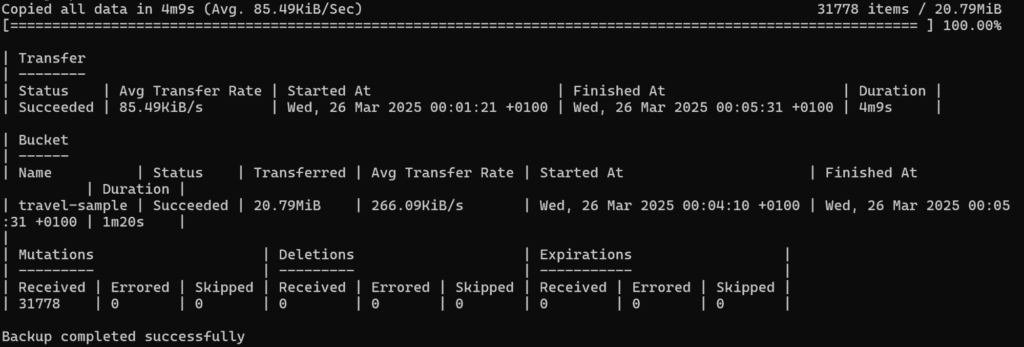
Step 3: Restore backup into paid plan cluster
- Create a cluster using the prepaid credits as part of the activation ID after Step 1 and Step 2 from migration steps are complete
- Create the buckets with the same name as the Free tier cluster
- Use below command to restore cluster backup from repository in paid plan cluster
Syntax:
|
1 |
cbbackupmgr 복원하다 –a BackupDirectoryPath –r capella_free –c CouchbaseConnectionString –u Username –p ‘Password’ —cacert CertificatePath |
Command:
|
1 |
cbbackupmgr 복원하다 –a C:UsersdkskiDownloadsBackup –r capella_free –c couchbases://cb.xxxxpaidplanclusterconnectionstring.cloud.couchbase.com -u PaidUser -p Paid@123 –cacert C:UsersdkskiDownloadsCertificates/PaidCert.pem |
예시:

Output:
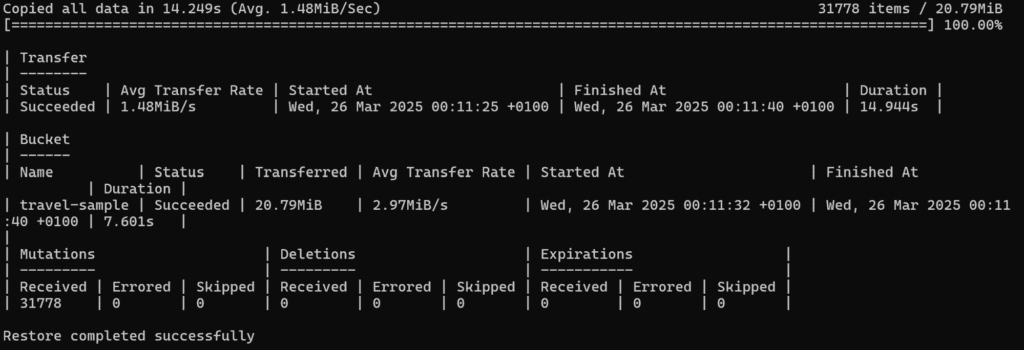
Step 4: Build the indexes
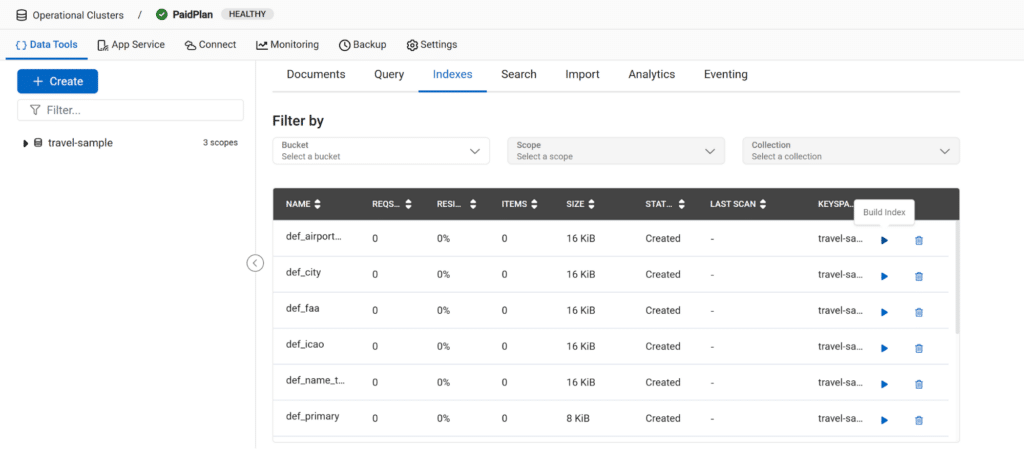
Index definitions are restored but not built. To build the indexes in your cluster:
- Open your cluster in the Capella management UI
- Go to Data Tools > Indexes
- Build the indexes that are in a Created 상태
예시:
결론
In this post, we have gone through basic steps to migrate from Capella free tier to a paid plan.
The migration is super easy and can be done in just 4 steps. The important consideration is after creating a paid plan cluster, the free tier cluster is deleted automatically, therefore, we have to backup the free tier cluster before using activation id.
Start for free
Sign up for your free tier cluster to run your experiment today!

댓글 남기기
댓글을 달기 위해서는 로그인해야합니다.